ignition CITROEN C1 2013 Owner's Manual
[x] Cancel search | Manufacturer: CITROEN, Model Year: 2013, Model line: C1, Model: CITROEN C1 2013Pages: 140, PDF Size: 4.24 MB
Page 80 of 140
78Practical information
Before disconnecting the battery
Wait 2 minutes after switching off the ignition
before disconnecting the battery.
Close the windows and the doors before disconnecting the battery.
Following reconnection of thebattery
Following reconnection of the battery, switch on
the i
gnition and wait 1 minute before star ting to
permit initialisation of the electronic systems.However, if problems remain following this
operation, contact a CITROËN dealer or aqualified workshop.
Referring to the corresponding section, you
must yourself reinitialise:
- the remote control key,
- the audio system.
Page 88 of 140
86Checks
Checking levels
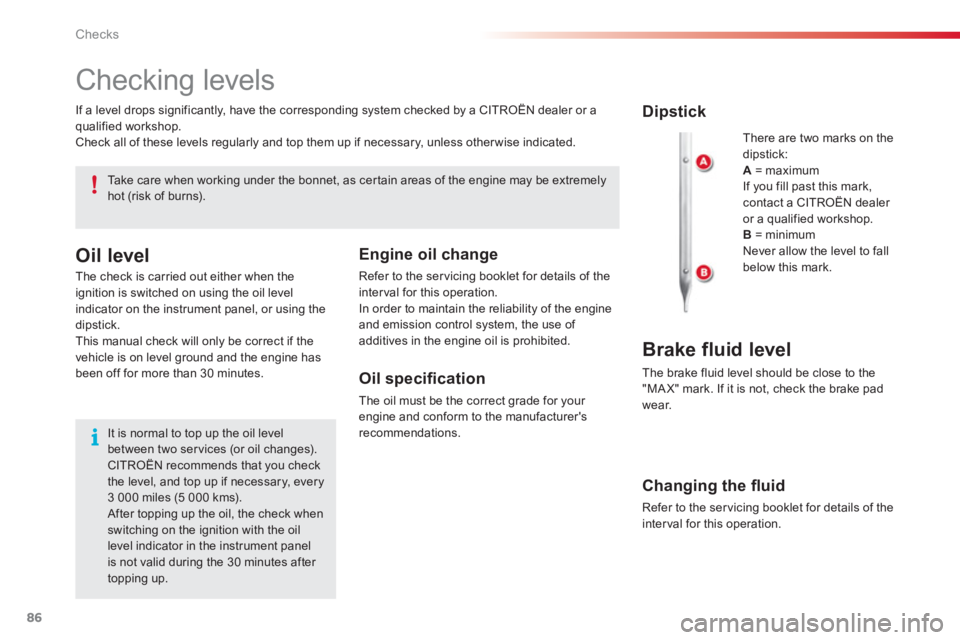
There are two marks on thedipstick:A= maximum
If you fill past this mark, contact a CITROËN dealer or a qualified workshop. B= minimum
Never allow the level to fallbelow this mark.
Dipstick
Brake fluid level
The brake fluid level should be close to the
"MA X" mark. If it is not, check the brake pad
w
ear. If a level drops si
gnificantly, have the corresponding system checked by a CITROËN dealer or a
qualified workshop.
Check all of these levels re
gularly and top them up if necessary, unless other wise indicated.
Take care when working under the bonnet, as certain areas of the engine may be extremely hot (risk of burns).
Oil level
The check is carried out either when the ignition is switched on using the oil level indicator on the instrument panel, or using the
dipstick.
This manual check will only be correct if the
vehicle is on level ground and the engine has
been off for more than 30 minutes.
It is normal to top up the oil level between two ser vices (or oil changes). CITROËN recommends that you checkthe level, and top up if necessary, every 3 000 miles (5 000 kms). After topping up the oil, the check whenswitching on the ignition with the oillevel indicator in the instrument panelis not valid during the 30 minutes after topping up.
Engine oil change
Refer to the servicing booklet for details of the
interval for this operation.
In order to maintain the reliabilit
y of the engine
and emission control system, the use of
additives in the engine oil is prohibited.
Oil specifi cation
The oil must be the correct grade for your engine and conform to the manufacturer'srecommendations.
Changing the fl uid
Refer to the servicing booklet for details of the
interval for this operation.
Page 89 of 140
10
87 Checks
Screenwash fluid level
Top up the level when necessary.
Coolant level
Fluid specifi cation
For optimum cleaning and to avoid freezing,
this fluid must not be topped up or replaced
with plain water.
Fluid specifi cation
The brake fluid must conform to themanufacturer's recommendations and meet the
D
OT4 standard.
The coolant level should be close to the "MAX" mark but should never exceed it.
When the engine is warm, the temperature of
the coolant is regulated by the fan. This can
operate with the ignition off.
In addition, as the cooling system is pressurised, wait at least one hour after switching off the engine before carrying out anywork.
To avoid any risk of scalding, unscrew the cap by two turns to allow the pressure to drop.
When the pressure has dropped, remove thecap and top up the level.
Changing the coolant
The coolant does not have to be changed.
Fluid specifi cation
The coolant must conform to the
manufacturer's recommendations.
Used products
Avoid prolonged contact of used oil or fluids
with the skin.
M
ost of these fluids are harmful to health or indeed very corrosive.
Do not discard used oil or fluids intosewers or onto the ground.Take used oil to a CITROËN dealer or a qualified workshop (France) or to an authorised waste disposal site.
Page 102 of 140
03
VOLMENUSRC/
LISTESCSEEK +
_MP3
100
CD, USB
AUDIO
PLAYING A COMPILATION
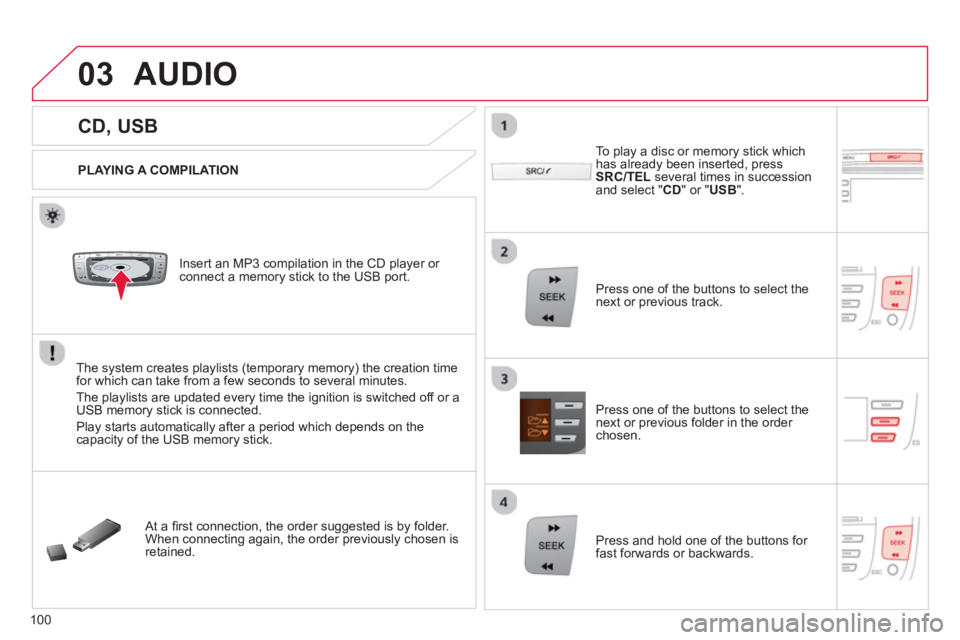
Insert an MP3 compilation in the CD pla
yer or connect a memory stick to the USB port.
The system creates playlists
(temporary memory) the creation timefor which can take from a few seconds to several minutes.
The pla
ylists are updated every time the ignition is switched off or aUSB memory stick is connected.
Pla
y starts automatically after a period which depends on the capacity of the USB memory stick.
At a fi rst connection, the order suggested is by folder.When connecting again, the order previously chosen is retained.
To pla
y a disc or memory stick whichhas already been inserted, press
SRC/TELseveral times in succession and select " CD " or " USB".
Press one of the buttons to select the next or previous track.
Pr
ess one of the buttons to select the next or previous folder in the order chosen.
Pr
ess and hold one of the buttons for
fast forwards or backwards.
Page 106 of 140
04
104
USING THE TELEPHONE
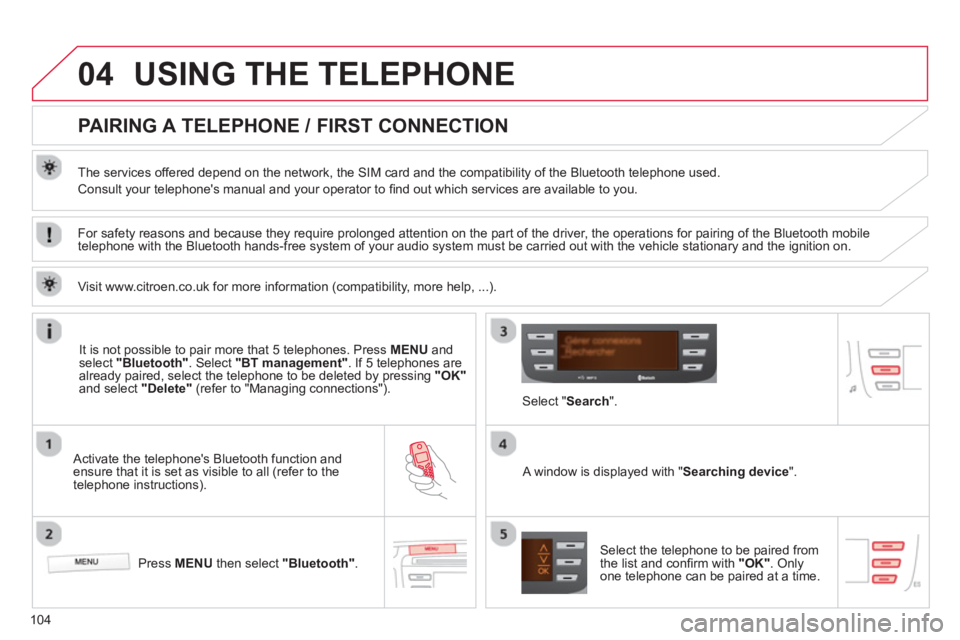
PAIRING A TELEPHONE / FIRST CONNECTION
The services offered depend on the network, the SIM card and the compatibility of the Bluetooth telephone used.
Consult your telephone's manual and your operator to fi nd out which services are available to you.
Activate the telephone's Bluetooth function andensure that it is set as visible to all (refer to the
telephone instructions).
Press MENU
then select "Bluetooth".
A window is displayed with " Searching device".
Select the telephone to be paired from
the list and confi rm with "OK". Onlyone telephone can be paired at a time.
Select " Search".
For safety reasons and because they require prolonged attention on the part of the driver, the operations for pairing of the Bluetooth mobile
telephone with the Bluetooth hands-free system of your audio system must be carried out with the vehicle stationary and the ignition on.
It is not possible to pair more that 5 telephones. Press MENUand select "Bluetooth"
. Select "BT management"
. If 5 telephones are
already paired, select the telephone to be deleted by pressing "OK"and select "Delete"
(refer to "Managing connections").
Visit www.citroen.co.uk
for more information (compatibility, more help, ...).
Page 111 of 140
04
109
USING THE TELEPHONE
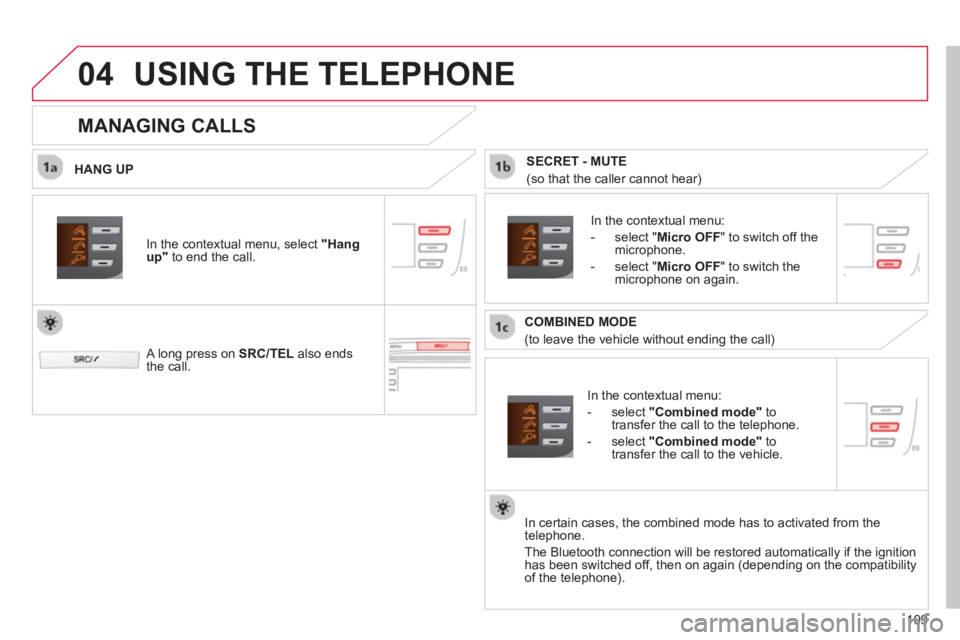
HANG UP
In the contextual menu:
-
select "Combined mode"to
transfer the call to the telephone.
-
select "Combined mode"to
transfer the call to the vehicle.
In the contextual menu:
-
select " Micro OFF
" to switch off themicrophone.
-
select " Micro OFF
" to switch the
microphone on again.
In certain cases, the combined mode has to activated
from the
telephone.
The Bluetooth connection will be restored automaticall
y if the ignition
has been switched off, then on again (depending on the compatibility
of the telephone).
MANAGING CALLS
A long press on SRC/TELalso ends
the call. In the contextual menu, select
"Hang up"
to end the call.
SECRET - MUTE
(so that the caller cannot hear)
COMBINED MODE
(to leave the vehicle without ending the call)
Page 120 of 140
01
118
FIRST STEPS
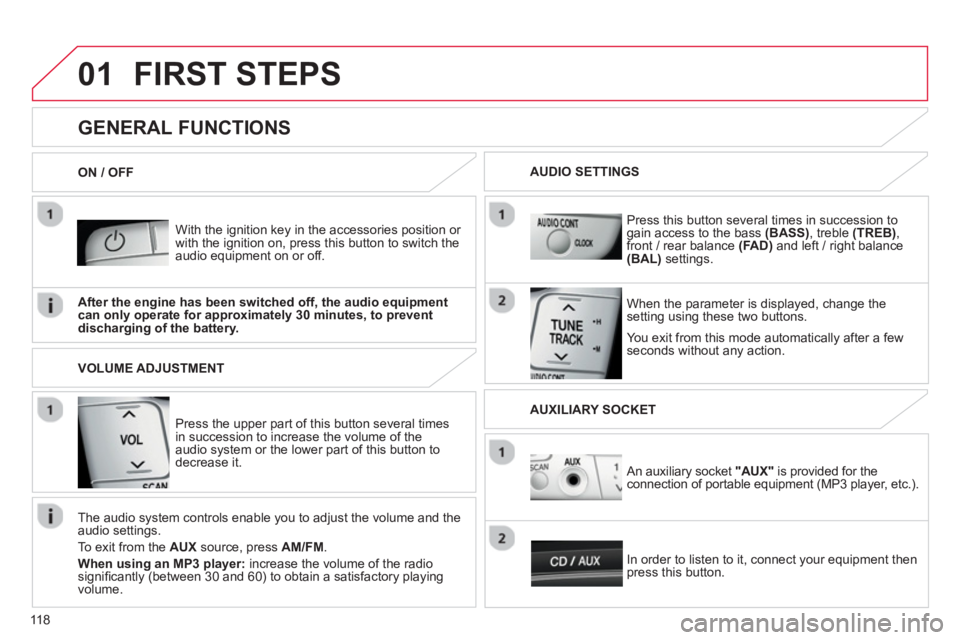
With the ignition key in the accessories position or with the ignition on, press this button to switch the
audio equipment on or off.
You exit
from this mode automatically after a fewseconds without any action.
GENERAL FUNCTIONS
When the parameter is displayed, change thesetting using these two buttons.
Pr
ess this button several times in succession togain access to the bass (BASS)
, treble (TREB)
,
front / rear balance (FA D)and left / right balance(BAL) settings.
After the en
gine has been switched off, the audio equipmentcan only operate for approximately 30 minutes, to preventdischarging of the battery.
AUDIO SETTINGS
ON / OFF
Press the upper part o
f this button several times
in succession to increase the volume of theaudio system or the lower part of this button todecrease it.
VOLUME ADJUSTMENT
The audio s
ystem controls enable you to adjust the volume and the
audio settings.
T
o exit from the AUX
source, press AM/FM.
When using an MP3 player:
increase the volume of the radio signifi cantly (between 30 and 60) to obtain a satisfactory playing
volume.
In order to listen to it, connect
your equipment then press this button.
An auxiliary socket "AUX"
is provided for the connection of portable equipment (MP3 player, etc.).
AUXILIARY SOCKET
Page 133 of 140
.
131 Visual search
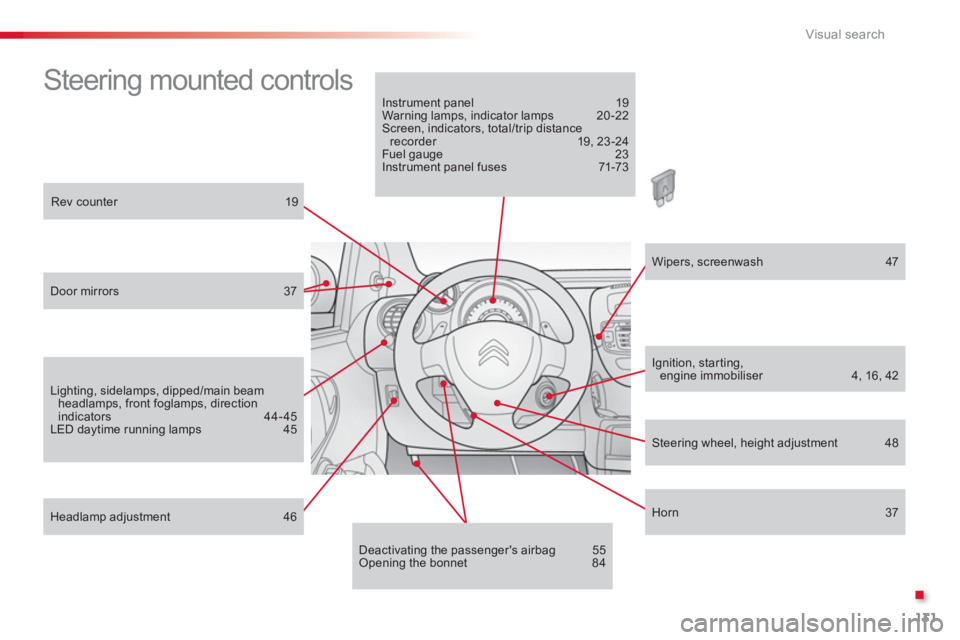
Steering mounted controls
Rev counter 19
Door mirrors 37
Lighting, sidelamps, dipped/main beam headlamps, front foglamps, directionindicators 44-45
LED daytime running lamps 45
Headlamp adjustment 46
Instrument panel 19Warning lamps, indicator lamps 20-22Screen, indicators, total/trip distance recorder 19, 23-24Fuel gauge 23Instrument panel fuses 71-73
Deactivating the passenger's airbag 55 Opening the bonnet 84
Wipers, screenwash 47
Ignition, star ting,engine immobiliser 4, 16, 42
Horn 37
Steering wheel, height adjustment 48