USB Citroen C1 2014 1.G User Guide
[x] Cancel search | Manufacturer: CITROEN, Model Year: 2014, Model line: C1, Model: Citroen C1 2014 1.GPages: 256, PDF Size: 5.63 MB
Page 212 of 256
06
210
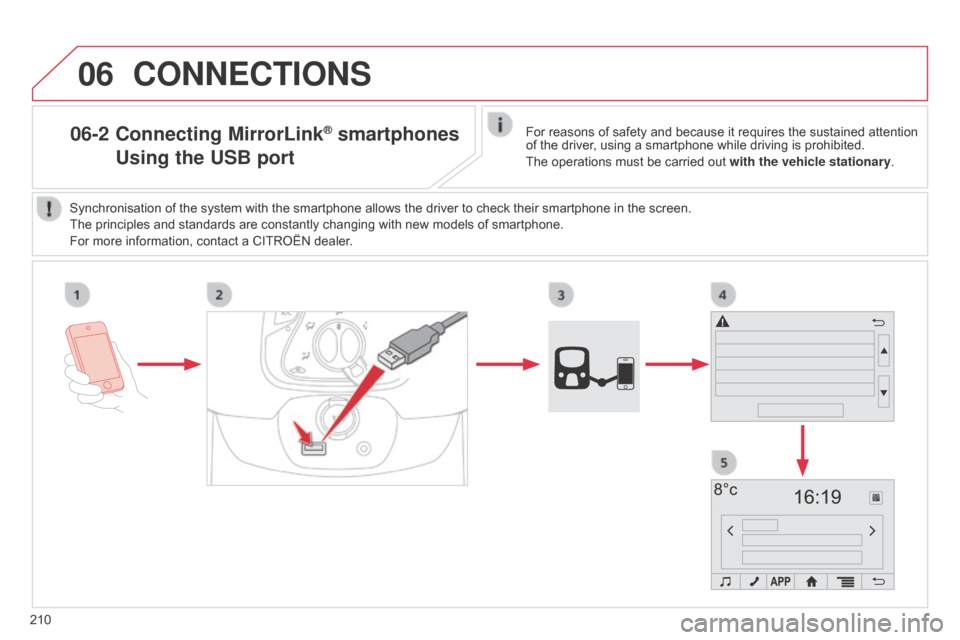
06-2 Connecting MirrorLink® smartphones
Using
the USB portFor reasons of safety and because it requires the sustained attention
of the driver, using a smartphone while driving is prohibited.
The operations must be carried out with the vehicle stationary.
Synchronisation of the system with the smartphone allows the driver to check their smartphone in the screen.
The principles and standards are constantly changing with new models of smartphone.
For more information, contact a CITROËN dealer.
CONNECTIONS
Page 213 of 256
06
2 11
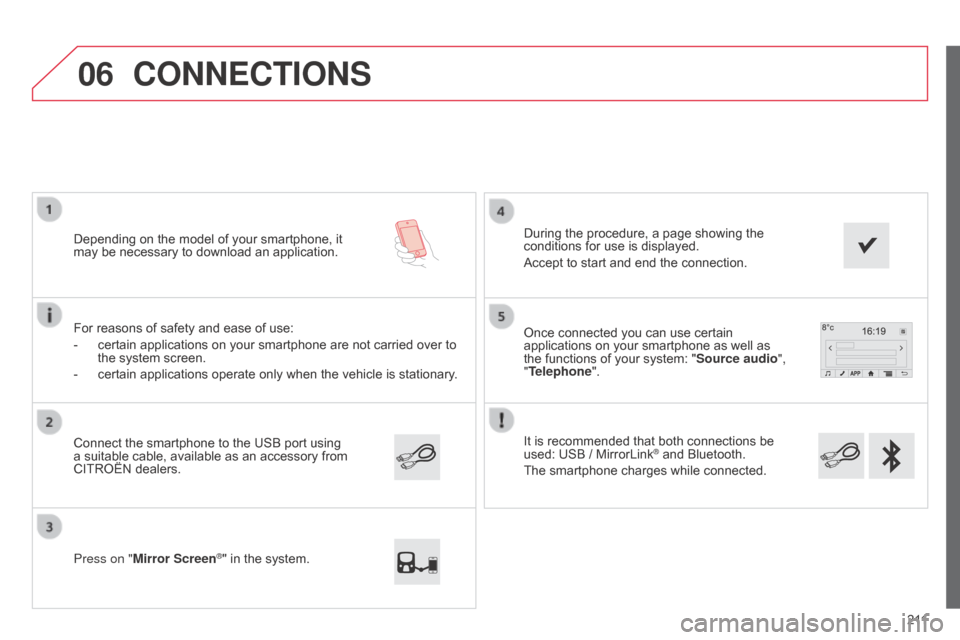
It is recommended that both connections be
used: USB / MirrorLink
® and Bluetooth.
The smartphone charges while connected. Once connected you can use certain
applications on your smartphone as well as
the functions of your system: "Source audio ",
"Telephone".
Connect the smartphone to the USB port using
a suitable cable, available as an accessory from
CITROËN dealers. Depending on the model of your smartphone, it
may be necessary to download an application.
Press on "Mirror Screen
®" in the system. During the procedure, a page showing the
conditions for use is displayed.
Accept to start and end the connection.
For reasons of safety and ease of use:
-
certain applications on your smartphone are not carried over to
the system screen.
-
certain applications operate only when the vehicle is stationary
.
CONNECTIONS
Page 215 of 256
213
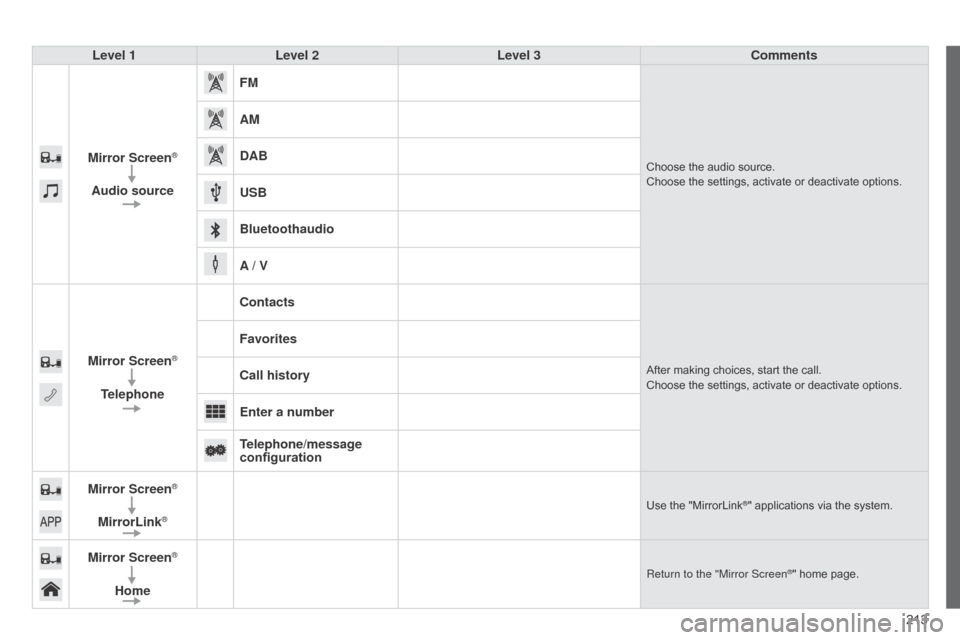
Level 1
Level 2 Level 3 Comments
Mirror Screen
®
Audio source FM
Choose the audio source.
Choose the settings, activate or deactivate options.
AM
DAB
USB
Bluetoothaudio
A / V
Mirror Screen
®
Telephone Contacts
After making choices, start the call.
Choose the settings, activate or deactivate options.
Favorites
Call history
Enter a number
Telephone/message
configuration
Mirror Screen
®
MirrorLink®Use the "MirrorLink®" applications via the system.
Mirror Screen®
Home
Return to the "Mirror Screen®" home page.
Page 221 of 256
FREQUENTLY ASKED QUESTIONS
219
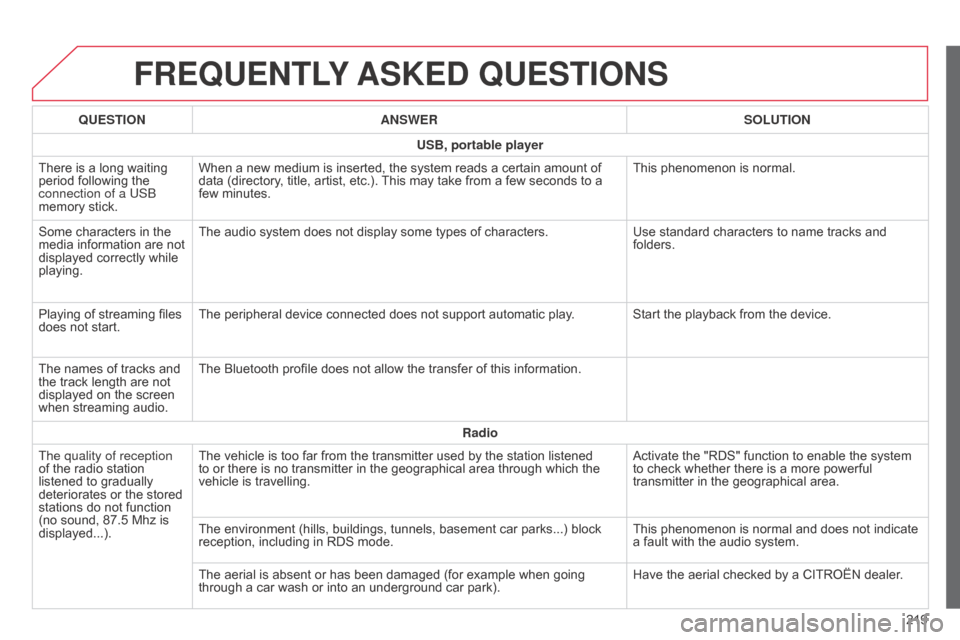
QUESTION
ANSWER SOLUTION
USB, portable player
There is a long waiting
period following the
connection of a US
b
memory stick. When a new medium is inserted, the system reads a certain amount of
data (directory, title, artist, etc.). This may take from a few seconds to a
few minutes.
This phenomenon is normal.
Some characters in the
media information are not
displayed correctly while
playing. The audio system does not display some types of characters.
Use standard characters to name tracks and
folders.
Playing of streaming files
does not start. The peripheral device connected does not support automatic play. Start the playback from the device.
The names of tracks and
the track length are not
displayed on the screen
when streaming audio. The Bluetooth profile does not allow the transfer of this information.
Radio
The quality of reception
of the radio station
listened to gradually
deteriorates or the stored
stations do not function
(no sound, 87.5
Mhz is
displayed...). The vehicle is too far from the transmitter used by the station listened
to or there is no transmitter in the geographical area through which the
vehicle is travelling.
Activate the "RDS" function to enable the system
to check whether there is a more powerful
transmitter in the geographical area.
The environment (hills, buildings, tunnels, basement car parks...) block
reception, including in RDS mode. This phenomenon is normal and does not indicate
a fault with the audio system.
The aerial is absent or has been damaged (for example when going
through a car wash or into an underground car park). Have the aerial checked by a CITROËN dealer.
Page 222 of 256
FREQUENTLY ASKED QUESTIONS
220QUESTION
ANSWER SOLUTION
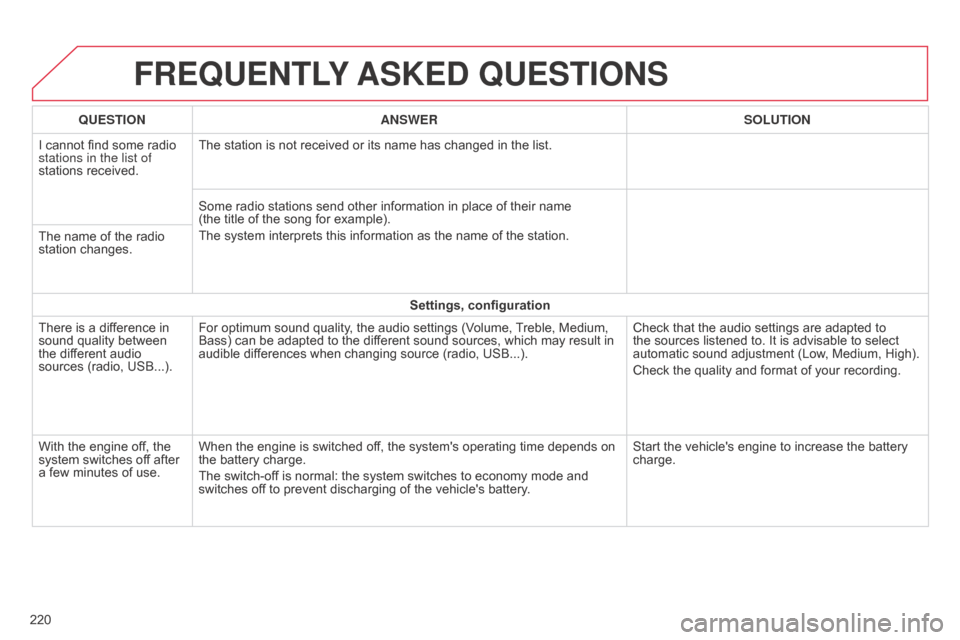
I cannot find some radio
stations in the list of
stations received. The station is not received or its name has changed in the list.
Some radio stations send other information in place of their name
(the title of the song for example).
The system interprets this information as the name of the station.
The name of the radio
station changes.
Settings, configuration
There is a difference in
sound quality between
the different audio
sources (radio, USB...). For optimum sound quality, the audio settings (Volume, Treble, Medium,
Bass) can be adapted to the different sound sources, which may result in
audible differences when changing source (radio, USB...).
Check that the audio settings are adapted to
the sources listened to. It is advisable to select
automatic sound adjustment (Low, Medium, High).
Check the quality and format of your recording.
With the engine off, the
system switches off after
a few minutes of use. When the engine is switched off, the system's operating time depends on
the battery charge.
The switch-off is normal: the system switches to economy mode and
switches off to prevent discharging of the vehicle's battery. Start the vehicle's engine to increase the battery
charge.
Page 230 of 256
04
228
MEDIA
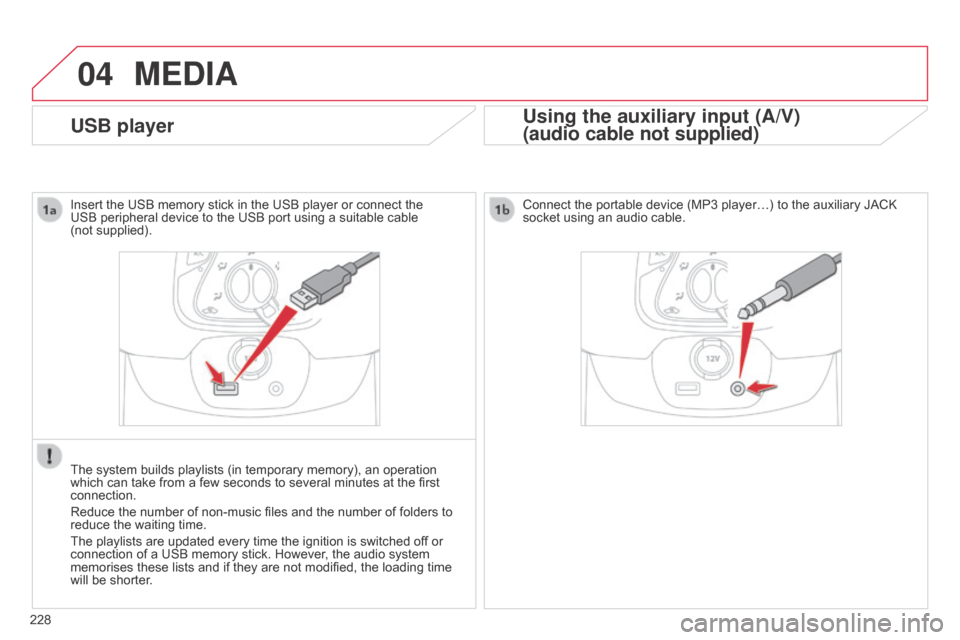
USB playerUsing the auxiliary input (A/V)
(audio cable not supplied)
Connect the portable device (MP3 player…) to the auxiliary JACK
socket using an audio cable.
Insert the USB memory stick in the USB player or connect the
USB peripheral device to the USB port using a suitable cable
(not
supplied).
The system builds playlists (in temporary memory), an operation
which can take from a few seconds to several minutes at the first
connection.
Reduce the number of non-music files and the number of folders to
reduce the waiting time.
The playlists are updated every time the ignition is switched of f or
connection of a USB memory stick. However, the audio system
memorises these lists and if they are not modified, the loading time
will be shorter.
Page 231 of 256
04
229
MEDIA
MP3 / USB player
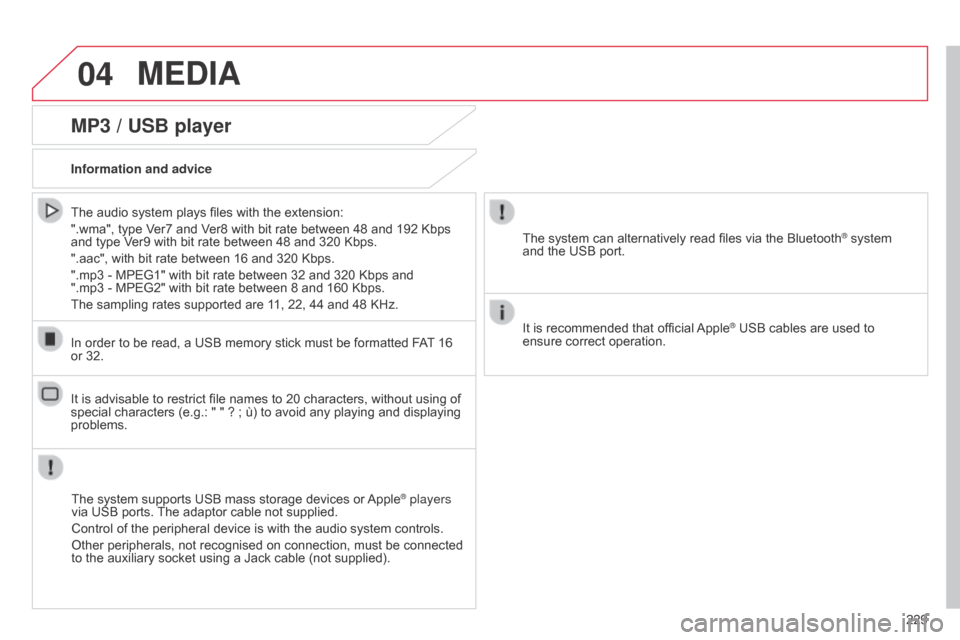
Information and adviceThe system supports USB mass storage devices or Apple
® players
via USB ports. The adaptor cable not supplied.
Control of the peripheral device is with the audio system controls.
Other peripherals, not recognised on connection, must be connected
to the auxiliary socket using a Jack cable (not supplied).
In order to be read, a USB memory stick must be formatted FAT 16
or 32.
The system can alternatively read files via the Bluetooth
® system
and the USB port.
It is recommended that official Apple
® USB cables are used to
ensure correct operation.
The audio system plays files with the extension:
".wma", type Ver7 and Ver8 with bit rate between 48 and 192 Kbps
and type Ver9 with bit rate between 48 and 320 Kbps.
".aac", with bit rate between 16 and 320 Kbps.
".mp3 - MPEG1" with bit rate between 32 and 320 Kbps and
".mp3 - MPEG2" with bit rate between 8 and 160 Kbps.
The sampling rates supported are 11, 22, 44 and 48 KHz.
It is advisable to restrict file names to 20 characters, without using of
special characters (e.g.: " " ? ; ù) to avoid any playing and displaying
problems.
B4_en_Chap12b_Autoradio-Toyota-2_ed01-2014
Page 232 of 256
04
230
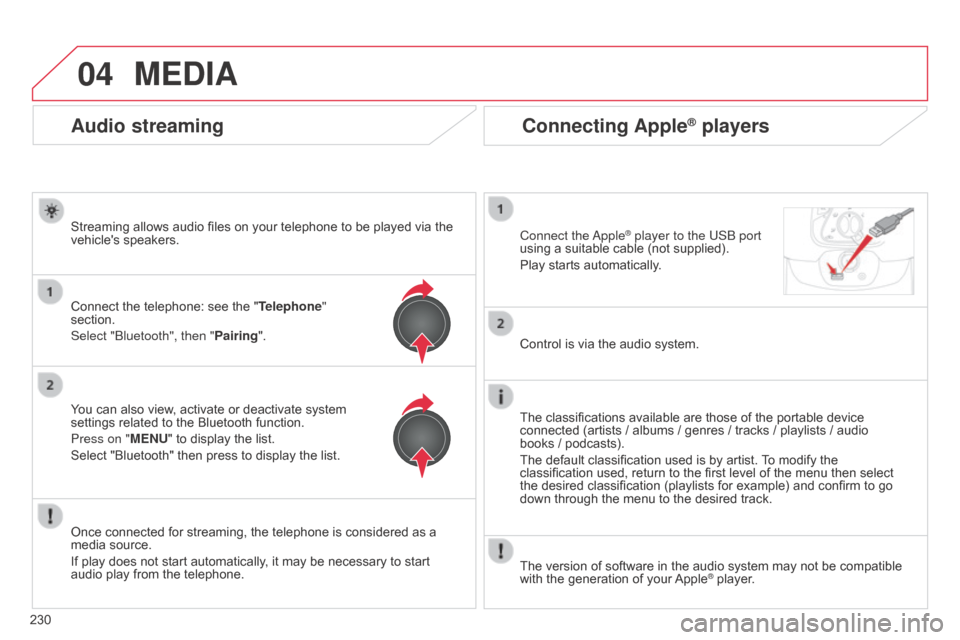
Connecting Apple® players
Connect the apple® player to the USb port
using a suitable cable (not supplied).
Play starts automatically
.
Control is via the audio system.
The classifications available are those of the portable device
connected (artists / albums / genres / tracks / playlists / audio
books
/ podcasts).
The default classification used is by artist. To modify the
classification used, return to the first level of the menu then select
the desired classification (playlists for example) and confirm to go
down through the menu to the desired track.
The version of software in the audio system may not be compatible
with the generation of your Apple
® player.
MEDIA
Audio streaming
Streaming allows audio files on your telephone to be played via the
vehicle's speakers.
Connect the telephone: see the " Telephone"
section.
Select "
b luetooth", then "Pairing".
You can also view, activate or deactivate system
settings related to the Bluetooth function.
Press on "MENU" to display the list.
Select "Bluetooth" then press to display the list.
Once connected for streaming, the telephone is considered as a
media source.
If play does not start automatically, it may be necessary to start
audio play from the telephone.
Page 237 of 256
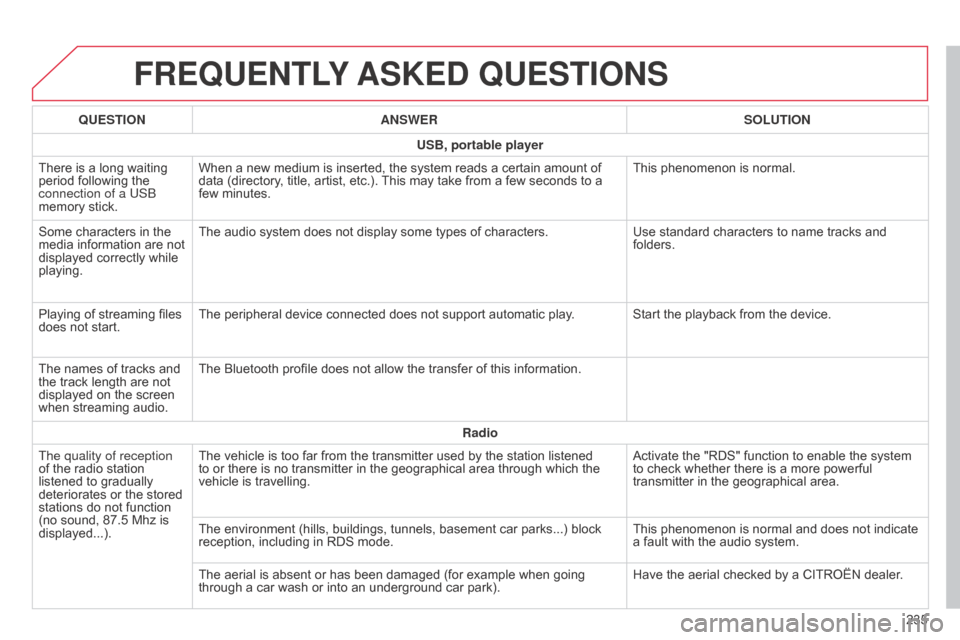
FREQUENTLY ASKED QUESTIONS
235
QUESTION
ANSWER SOLUTION
USB, portable player
There is a long waiting
period following the
connection of a US
b
memory stick. When a new medium is inserted, the system reads a certain amount of
data (directory, title, artist, etc.). This may take from a few seconds to a
few minutes.
This phenomenon is normal.
Some characters in the
media information are not
displayed correctly while
playing. The audio system does not display some types of characters.
Use standard characters to name tracks and
folders.
Playing of streaming files
does not start. The peripheral device connected does not support automatic play. Start the playback from the device.
The names of tracks and
the track length are not
displayed on the screen
when streaming audio. The Bluetooth profile does not allow the transfer of this information.
Radio
The quality of reception
of the radio station
listened to gradually
deteriorates or the stored
stations do not function
(no sound, 87.5
Mhz is
displayed...). The vehicle is too far from the transmitter used by the station listened
to or there is no transmitter in the geographical area through which the
vehicle is travelling.
Activate the "RDS" function to enable the system
to check whether there is a more powerful
transmitter in the geographical area.
The environment (hills, buildings, tunnels, basement car parks...) block
reception, including in RDS mode. This phenomenon is normal and does not indicate
a fault with the audio system.
The aerial is absent or has been damaged (for example when going
through a car wash or into an underground car park). Have the aerial checked by a CITROËN dealer.
B4_en_Chap12b_Autoradio-Toyota-2_ed01-2014
Page 238 of 256
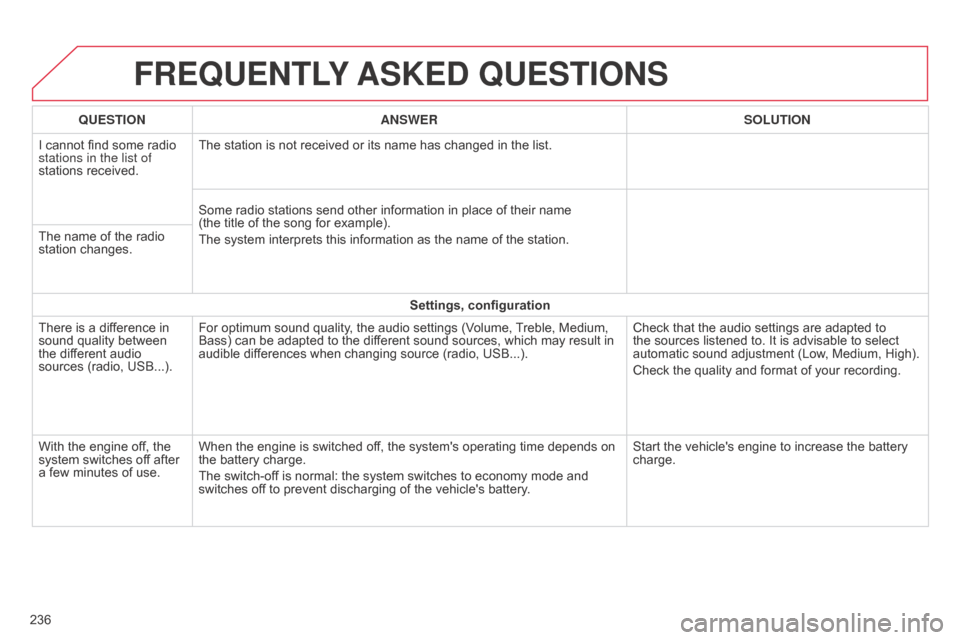
FREQUENTLY ASKED QUESTIONS
236QUESTION
ANSWER SOLUTION
I cannot find some radio
stations in the list of
stations received. The station is not received or its name has changed in the list.
Some radio stations send other information in place of their name
(the title of the song for example).
The system interprets this information as the name of the station.
The name of the radio
station changes.
Settings, configuration
There is a difference in
sound quality between
the different audio
sources (radio, USB...). For optimum sound quality, the audio settings (Volume, Treble, Medium,
Bass) can be adapted to the different sound sources, which may result in
audible differences when changing source (radio, USB...).
Check that the audio settings are adapted to
the sources listened to. It is advisable to select
automatic sound adjustment (Low, Medium, High).
Check the quality and format of your recording.
With the engine off, the
system switches off after
a few minutes of use. When the engine is switched off, the system's operating time depends on
the battery charge.
The switch-off is normal: the system switches to economy mode and
switches off to prevent discharging of the vehicle's battery. Start the vehicle's engine to increase the battery
charge.