brake CITROEN C1 2017 User Guide
[x] Cancel search | Manufacturer: CITROEN, Model Year: 2017, Model line: C1, Model: CITROEN C1 2017Pages: 269, PDF Size: 7.63 MB
Page 73 of 269
71
C1_en_Chap04_conduite_ed01-2016
Starting - switching off the engine with the key
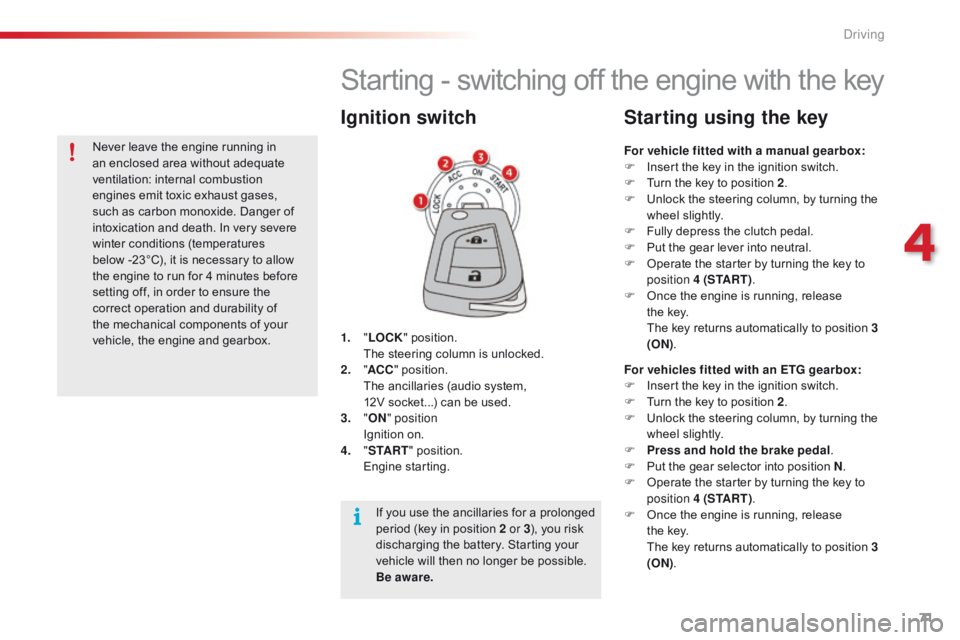
1. "LOCK " position. T
he steering column is unlocked.
2.
" AC
C"
position.
T
he ancillaries (audio system,
1
2V socket...) can be used.
3.
"ON " position
I
gnition on.
4.
" S
TA R T"
position.
E
ngine
s
tarting.
Ignition switch
For vehicle fitted with a manual gearbox:
F I nsert the key in the ignition switch.
F
T
urn the key to position 2.
F
U
nlock the steering column, by turning the
w
heel slightly.
F
F
ully depress the clutch pedal.
F
P
ut the gear lever into neutral.
F
O
perate the starter by turning the key to
p
osition 4 (S TA R T ) .
F
O
nce the engine is running, release
t
he key.
T
he key returns automatically to position 3
(ON) .
Starting using the key
For vehicles fitted with an ETG gearbox:
F
I nsert the key in the ignition switch.
F
T
urn the key to position 2.
F
U
nlock the steering column, by turning the
w
heel slightly.
F
P
ress and hold the brake pedal .
F
P
ut the gear selector into position N.
F
O
perate the starter by turning the key to
p
osition 4 (S TA R T ) .
F
O
nce the engine is running, release
t
he key.
T
he key returns automatically to position 3
(ON) .
If
you
use
the
ancillaries
for
a
prolonged
p
eriod
(key
in
position
2 or 3 ),
you
risk
d
ischarging
the
battery.
Starting
your
v
ehicle
will
then
no
longer
be
possible.
B
e aware.
Never
leave
the
engine
running
in
a
n
enclosed
area
without
adequate
v
entilation:
in
ternal
c
ombustion
e
ngines
emit
toxic
exhaust
gases,
s
uch
as
carbon
monoxide.
Danger
of
i
ntoxication
and
death.
In
very
severe
w
inter
conditions
(temperatures
b
elow -23°C),
it
is
necessary
to
allow
t
he
engine
to
run
for
4
minutes
before
s
etting
off,
in
order
to
ensure
the
c
orrect
operation
and
durability
of
t
he
mechanical
components
of
your
v
ehicle,
the
engine
and
gearbox.
4
Driving
Page 76 of 269
74
C1_en_Chap04_conduite_ed01-2016
There is an audible signal when the driver's door is opened and the vehicle is in "ACC "
mode.
If
the vehicle is not immobilised, the
e
ngine will not stop.
Switching off using the
electronic key
F Immobilise
the vehicle.
F W ith a manual gearbox: put the gear lever
i
nto neutral.
F
W
ith an ETG gearbox: place the gear
s
elector at N .
F
W
ith the electronic key inside
t
he vehicle, press the " S TA R T/
STOP "
button.
The
engine stops.
The
steering locks when a door is opened or on
l
ocking the vehicle.
F
P
ress the "START/STOP " button
again
to change to "OFF "
mode.
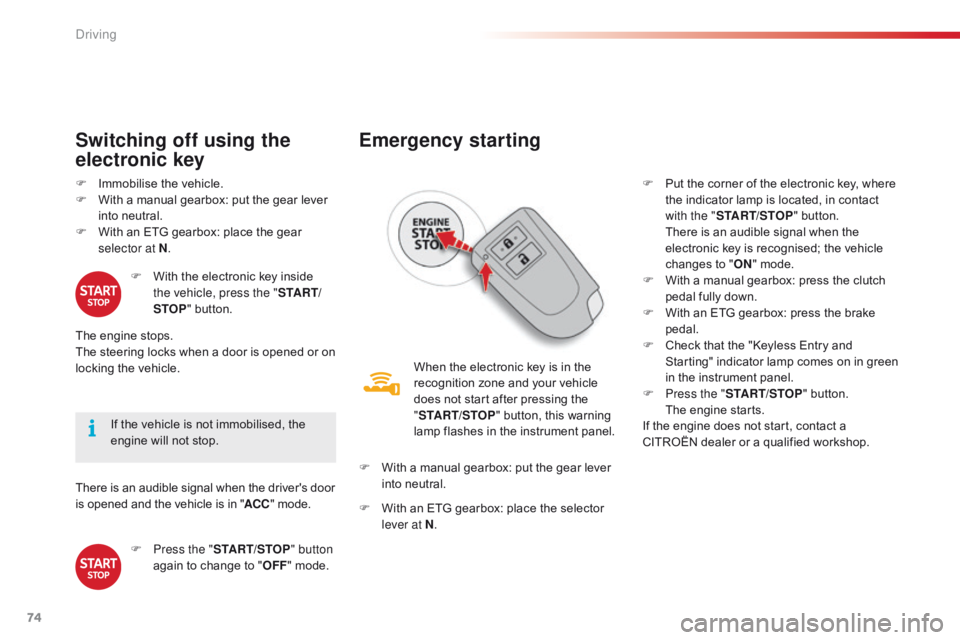
Emergency starting
When the electronic key is in the recognition zone and your vehicle
d
oes not start after pressing the
"ST
ART/STOP "
button, this warning
l
amp flashes in the instrument panel.
F
W
ith
a manual gearbox: put the gear lever
i
nto
neutral.
F
W
ith
an ETG gearbox: place the selector
l
ever at N . F
P
ut the corner of the electronic key, where
t
he indicator lamp is located, in contact
w
ith the "
START/STOP " button.
T
here is an audible signal when the
e
lectronic key is recognised; the vehicle
c
hanges to "
ON " mode.
F
W
ith a manual gearbox: press the clutch
p
edal fully down.
F
W
ith an ETG gearbox: press the brake
ped
al.
F
C
heck that the "Keyless Entry and S
tarting" indicator lamp comes on in green i
n the instrument panel.
F
P
ress the "START/STOP "
button.
T
he engine starts.
If
the engine does not start, contact a
C
ITROËN dealer or a qualified workshop.
Driving
Page 78 of 269
76
C1_en_Chap04_conduite_ed01-2016
Manual parking brake
Applying
F Pull the parking brake lever up to i
mmobilise your vehicle.
When
the vehicle is being driven, if
t
he parking brake is still on or has
n
ot been fully released, this warning
l
amp comes on accompanied by an
a
udible
s
ignal.
Releasing
F Pull the parking brake lever up gently, p
ress the release button then lower the
lever
f
ully.
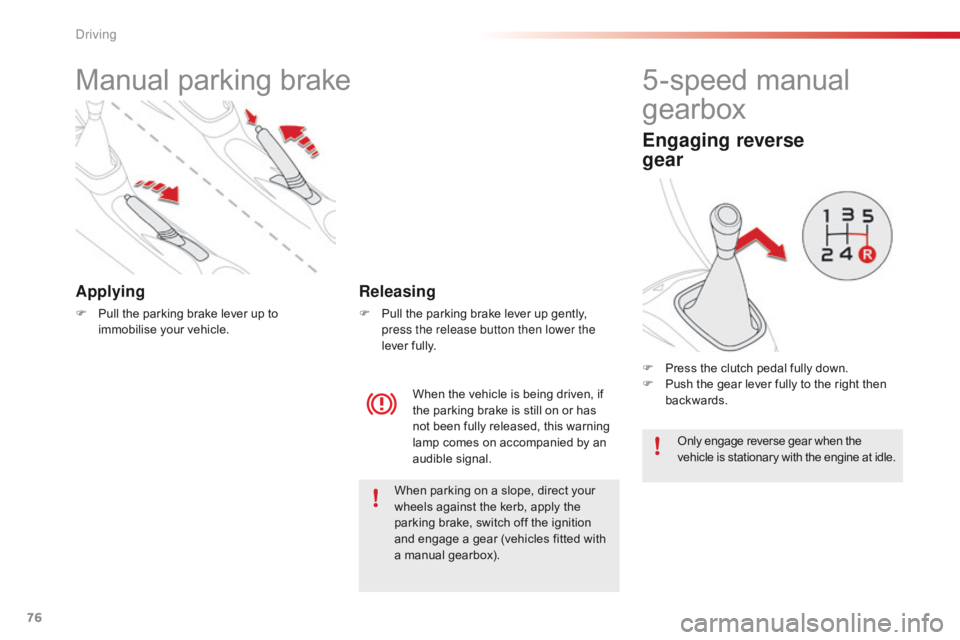
5-speed manual
g
earbox
Engaging reverse
gear
F Press the clutch pedal fully down.
F P ush the gear lever fully to the right then
ba
ckwards.
Only
engage reverse gear when the
v
ehicle is stationary with the engine at idle.
When
parking
on
a
slope,
direct
your
w
heels
against
the
kerb,
apply
the
p
arking
brake,
switch
off
the
ignition
a
nd
engage
a
gear
(vehicles
fitted
with
a
manual
gearbox).
Driving
Page 79 of 269
77
C1_en_Chap04_conduite_ed01-2016
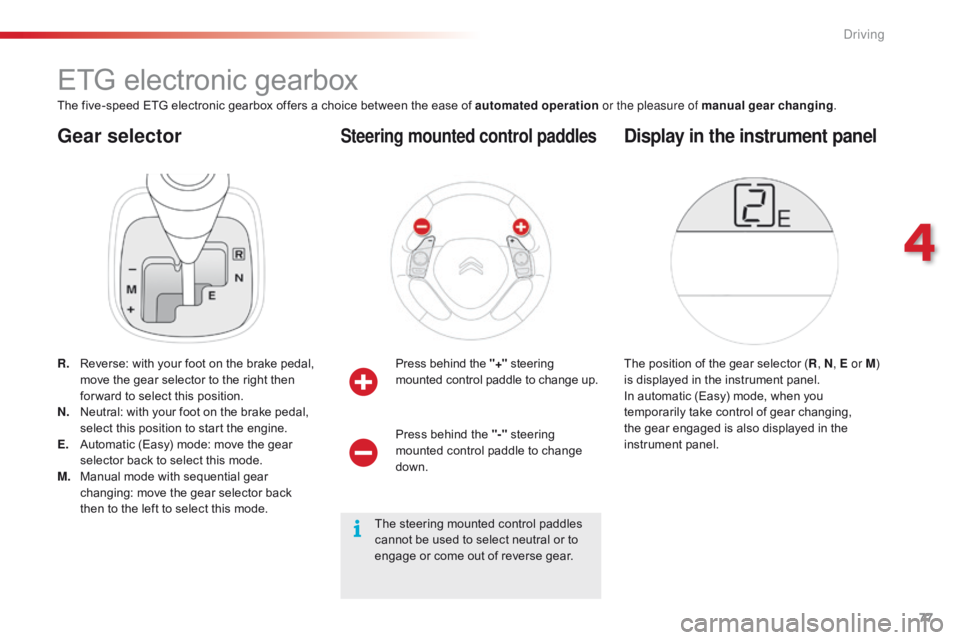
Gear selector
ETG electronic gearbox
The five-speed ETG electronic gearbox offers a choice between the ease of automated operation o r the pleasure of manual gear changing.
R.
R
everse: with your foot on the brake pedal,
m
ove the gear selector to the right then
f
or ward to select this position.
N.
N
eutral: with your foot on the brake pedal,
s
elect this position to start the engine.
E.
A
utomatic (Easy) mode: move the gear
s
elector back to select this mode.
M.
M
anual mode with sequential gear
c
hanging: move the gear selector back
t
hen to the left to select this mode.Press
behind the "+"
s
teering
m
ounted control paddle to change up.
Steering mounted control paddles
The position of the gear selector (R , N, E or M ) i
s displayed in the instrument panel.
In
automatic (Easy) mode, when you
t
emporarily take control of gear changing,
t
he gear engaged is also displayed in the
in
strument
pan
el.
Display in the instrument panel
Press behind the "-" steering m
ounted control paddle to change
d
own.
The
steering mounted control paddles
c
annot be used to select neutral or to
e
ngage or come out of reverse gear.
4
Driving
Page 80 of 269
78
C1_en_Chap04_conduite_ed01-2016
F With the parking brake applied, press the b
rake pedal then select position N.
F
S
tart the engine.
Moving off
if you do not press the brake pedal or if the gear selector is not in position N,
engine
starting is not possible. Never
leave a child unsupervised inside
t
he vehicle with the engine running.F
Sel
ect position E using the gear selector.
The gearbox then operates in auto-active
m
ode, without any intervention required by
t
he driver.
It continuously selects the most suitable g
ear for:
- o ptimised fuel consumption,
-
t
he driving style,
-
t
he profile of the road,
-
t
he load in the vehicle.
To
obtain optimum acceleration, when
ov
ertaking another vehicle for example, press
f
irmly on the accelerator pedal going beyond
t
he point of resistance.
Automatic (EASY) mode
It is possible to change mode at any time, by moving the gear selector from position E to
position M
and the other way round.
F
W
ith
your
foot
on
the
brake
pedal,
select
p
osition R
, E or M.
F
R
elease
the
parking
brake.
F
P
rogressively
release
the
brake
pedal.
A
ccelerate
away.
The
creep
function
may
be
temporarily
u
navailable
if
the
clutch
temperature
is
t
oo
high
or
the
gradient
too
steep.
An
a
udible
signal
gives
a
warning
if
the
c
lutch
temperature
is
too
high.
Never select neutral N when the vehicle
is
moving.
This
function
makes
manoeuvring
the
vehicle
a
t
low
speed
easier
(parking,
traffic
jams…).
After
first
placing
the
gear
selector
in
p
osition
E
, M or R , the vehicle moves off as
soon as you take your foot off the brake
pedal ,
at
low
speed,
with
the
engine
at
idle.
Creep function
Driving
Page 81 of 269
79
C1_en_Chap04_conduite_ed01-2016
Temporarily taking control of
gear changes
You can temporarily take control of gear changes using the "+" and "-" steering
m
ounted control paddles.
Gear
change commands are only acted on if
t
he engine speed allows. There is an audible
s
ignal if a command is not accepted.
The
gear engaged is displayed in the
in
strument
pan
el.
This function allows you to anticipate certain
situations
such as overtaking a vehicle or
a
pproaching a corner.
After
a few moments with no action on the
c
ontrols, the gearbox returns to automatic
c
ontrol of the gears. It
is possible to change mode at any time, by
m
oving the gear selector from position E to
position M
and the other way round.
Never select neutral N when the vehicle
is
moving.
F
P
lace the gear selector in position M
.
F
C
hange up or down using:
- t he gear selector, pushing:
- b ack, "+" to change up,
-
f
or ward, "-"
to change down.
-
o
r the "+" or "-"
steering mounted
c
ontrol paddle.
The
gear engaged is displayed.
Gear
change commands are only acted on if
t
he engine speed allows.
It is not necessary to release the accelerator
peal
during gear changes. There is an audible
s
ignal if a command is not accepted.
When
braking or slowing down, the gearbox
a
utomatically changes down so that pick-up is
i
n the right gear.
Manual mode
Under sharp acceleration, the gearbox will not change up without action by the driver on
t
he gear selector or steering mounted control
p
addles (unless the engine speed is close to
m
aximum).
To
engage reverse, the vehicle must be
s
tationary with your foot on the brake pedal.
F
Sel
ect position R .
Reverse
There is an audible signal on engaging reverse.
4
Driving
Page 82 of 269
80
C1_en_Chap04_conduite_ed01-2016
The vehicle can be stopped whatever the position of the gear selector (N , E or R ).
However,
there is an audible signal on opening
t
he driver's door if the gear selector is not at
p
osition N .
Switching off
When the vehicle is stopped with the e
ngine running, always put the gear
s
elector to neutral N .
There
is a continuous audible signal
i
f you turn the ignition switch to "OFF "
with
the vehicle in 2
nd, 3rd, 4th or 5th ge a r.
In
this
case
return
the
ignition
switch
t
o " ON ",
move
the
gear
selector
to
p
osition
N , then to position E , M or R,
then
turn
the
ignition
switch
to
" OFF ".
On
a
slope,
use
the
brakes
to
i
mmobilise
the
vehicle
and
place
the
g
ear
selector
in
position
N , E or R . With
the ignition on, illumination
o
f this warning lamp indicates a
g
earbox fault.
Contact a CITROËN dealer or a
q
ualified
w
orkshop.
Operating faults
In all cases, it is essential
that you
apply the parking brake to immobilise
t
he vehicle.
Before
doing anything under the
b
onnet, check that the gear selector is
i
n neutral N and the parking brake is
a
pplied.
Limits of operation
On a gradient, or when hill start assist is activated, n ever hold the vehicle using the
accelerator :
you could damage the clutch.
In
these situations there is an audible signal.
F
M
ove the gear selector to position N.
F
W
ait 15 minutes to allow the clutch to cool
d
own before setting off. -
c
heck that the ignition switch is at the
"
O
N
"
position,
-
p
lace the gear selector at N
, then move it
t
o E
, M or R .
If 1 is flashing in the instrument panel:
- p lace the gear selector at E or M
, then
move it to N.
If R
is flashing in the instrument panel:
-
p
lace the gear selector at R,
then move it
t
o N.
If
N is flashing in the instrument panel
a
ccompanied by an audible signal for a long time:
Driving
Page 84 of 269
82
C1_en_Chap04_conduite_ed01-2016
Hill start assist
System which keeps your vehicle immobilised temporarily (approximately 2 seconds) when
s
tarting on a gradient, the time it takes to
m
ove your foot from the brake pedal to the
a
ccelerator
ped
al.
This
system only operates when:
-
t
he vehicle is completely stationary, with
y
our foot on the brake pedal,
-
c
ertain conditions of slope are met,
-
w
ith the driver’s door closed.
The
hill start assist system cannot be
d
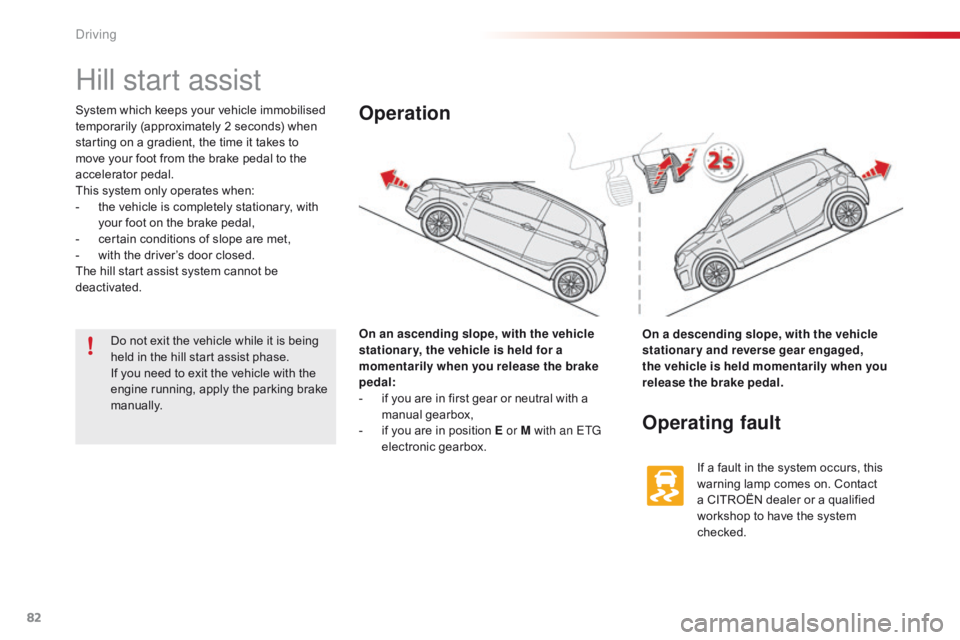
eactivated. On an ascending slope, with the vehicle
stationar y, the vehicle is held for a
momentarily when you release the brake
pedal:
-
i
f you are in first gear or neutral with a
m
anual
g
earbox,
-
i
f you are in position E or M with an ETG
electronic
ge
arbox.Operation
On a descending slope, with the vehicle
stationary and reverse gear engaged,
the vehicle is held momentarily when you
release the brake pedal.
Operating fault
If a fault in the system occurs, this warning lamp comes on. Contact
a
CITROËN dealer or a qualified
w
orkshop to have the system
c
hecked.
Do
not
exit
the
vehicle
while
it
is
being
h
eld
in
the
hill
start
assist
phase.
If
you
need
to
exit
the
vehicle
with
the
e
ngine
running,
apply
the
parking
brake
m
anually.
Driving
Page 109 of 269
107
C1_en_Chap06_securite_ed01-2016
Electronic Stability Control (ESC) incorporating the following systems:
-
a
nti-lock braking system (ABS) and the
e
lectronic brake force distribution (EBFD),
-
em
ergency
b
raking
a
ssistance,
-
t
raction control (TRC),
-
d
ynamic stability control (DSC).
Electronic stability control (ESC)
Definitions
Anti-lock braking system (ABS)
and electronic brake force
distribution (EBFD)
These systems improve the stability and manoeuvrability of your vehicle when braking
a
nd contribute towards better control in
c
orners, in particular on poor or slippery road
su
rfaces.
The
ABS prevents wheel lock in the event of
em
ergency
b
raking.
The
electronic brake force distribution system
m
anages the braking pressure wheel by wheel.
Emergency braking assistance
In an emergency, this system enables you to reach the optimum braking pressure more
q
uickly and therefore reduce the stopping
di
stance.
It
is triggered according to the speed at which
t
he brake pedal is pressed. This is felt by a
r
eduction in the resistance of the pedal and an
i
ncrease in the effectiveness of the braking.
Traction control (TRC)
This system optimises traction in order to limit wheel slip by acting on the brakes of the driving
w
heels and on the engine. It also improves
t
he directional stability of the vehicle on
a
cceleration.
Dynamic stability control (DSC)
If there is a difference between the path followed by the vehicle and that required by the
d
river, this system monitors each wheel and
a
utomatically acts on the brake of one or more
w
heels and on the engine to return the vehicle
t
o the required path, within the limits of the laws
o
f physics.
6
Safety
Page 110 of 269
108
C1_en_Chap06_securite_ed01-2016
Illumination of this warning lamp, accompanied by an audible signal,
i
ndicates that there is a fault with the
e
lectronic brake force distribution
(
EBFD), which could cause loss of
c
ontrol of the vehicle when braking.
Operation
Illumination of this warning lamp, accompanied by an audible signal,
i
ndicates that there is a fault with
t
he ABS system, which could cause
l
oss of control of the vehicle when
braking.
Anti-lock braking system (ABS)
and electronic brake force
distribution (EBFD)When changing w heels ( tyres a nd r ims), m
ake sure that these are approved for
y
our vehicle.
Normal
operation of the ABS may make
i
tself felt by slight vibration of the brake
ped
al.
In emergency braking, press
very firmly without releasing
the
pressure.
Yo u must
stop
as
soon
as
it
is
safe
to
do
so.
Contact
a
CITROËN
dealer
or
a
qualified
w
orkshop
as
soon
as
possible.
Dynamic stability control (DSC)
and traction control (TRC)
Activation
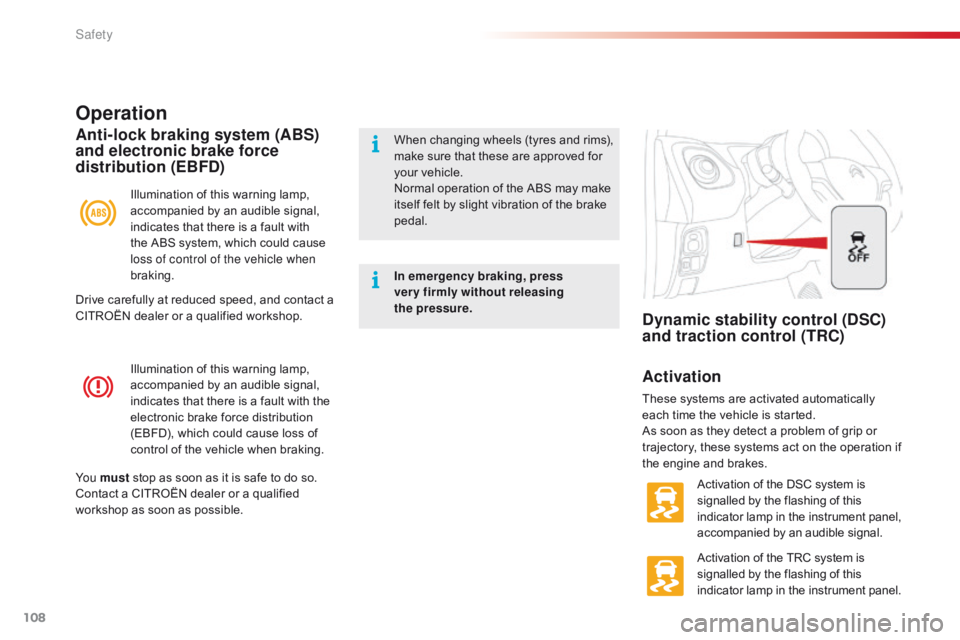
These systems are activated automatically e ach time the vehicle is started.
As
soon as they detect a problem of grip or
t
rajectory, these systems act on the operation if
t
he engine and brakes.
Activation
of the DSC system is
s
ignalled by the flashing of this
i
ndicator lamp in the instrument panel,
a
ccompanied by an audible signal.
Activation
of the TRC system is
s
ignalled by the flashing of this
i
ndicator lamp in the instrument panel.
Drive
carefully
at
reduced
speed,
and
contact
a
C
ITROËN
dealer
or
a
qualified
workshop.
Safety