phone CITROEN C1 2017 User Guide
[x] Cancel search | Manufacturer: CITROEN, Model Year: 2017, Model line: C1, Model: CITROEN C1 2017Pages: 269, PDF Size: 7.63 MB
Page 206 of 269
204
C1_en_Chap10a_ Autoradio-Toyota-tactile-1_ed01-2016
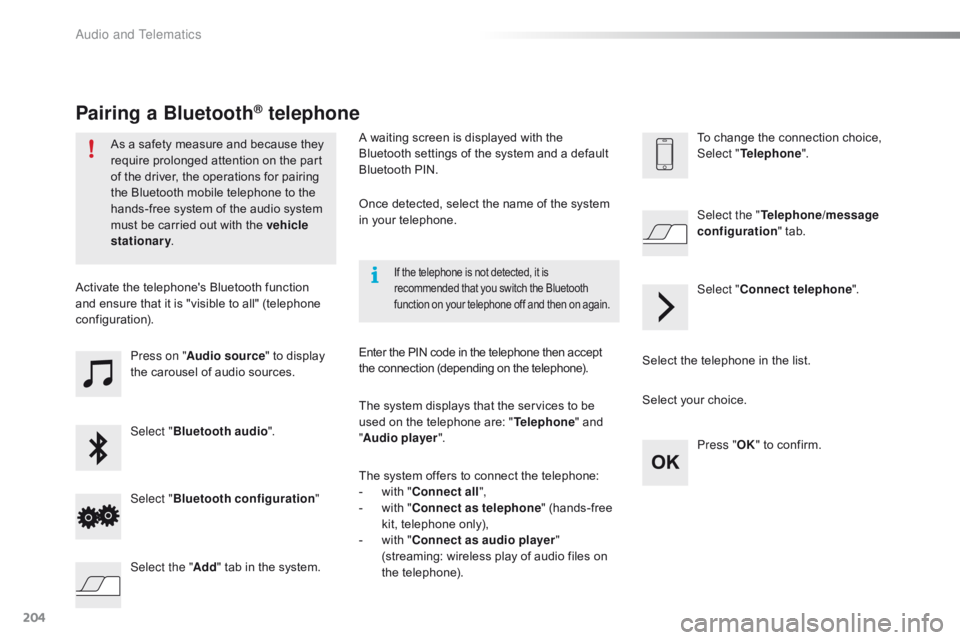
Press on "Audio source " to display t
he carousel of audio sources.
Select " Bluetooth audio ".
Select " Bluetooth configuration "
Activate
the telephone's Bluetooth function
a
nd
ensure that it is "visible to all" (telephone
c
onfiguration).
Select the telephone in the list.
Select "
Connect telephone ".
Select the "
Telephone/message
configuration " tab.
Select your choice.
Select the " Add"
tab in the system. Press "
OK"
to confirm.
If the telephone is not detected, it is recommended that you switch the Bluetooth f
unction on your telephone off and then on again.
As a safety measure and because they require prolonged attention on the part
o
f the driver, the operations for pairing
t
he Bluetooth mobile telephone to the
h
ands-free system of the audio system
m
ust be carried out with the vehicle
stationary .
Pairing a Bluetooth® telephone
A waiting screen is displayed with the B
luetooth settings of the system and a default
B
luetooth PIN.
Once
detected, select the name of the system
i
n your telephone.
The
system displays that the services to be
u
sed on the telephone are: "Telephone "
and
"A
udio player ".
The
system offers to connect the telephone:
-
w
ith "Connect all",
-
w
ith "Connect as telephone "
(hands-free
k
it, telephone only),
-
w
ith "Connect as audio player "
(streaming:
wireless play of audio files on
t
he
t
elephone).
Enter
the PIN code in the telephone then accept
t
he connection (depending on the telephone).To
change the connection choice, Sel
ect "Telephone ".
Audio and Telematics
Page 207 of 269
205
C1_en_Chap10a_ Autoradio-Toyota-tactile-1_ed01-2016
The services available depend on the network, the SIM card and the
c
ompatibility of the Bluetooth telephone
u
sed. Check the telephone manual and
w
ith your network provider for details of
t
he services available to you.
The
profiles compatible with the system
a
re: HFP, OPP, PBAP, A2DP, AVRCP,
M
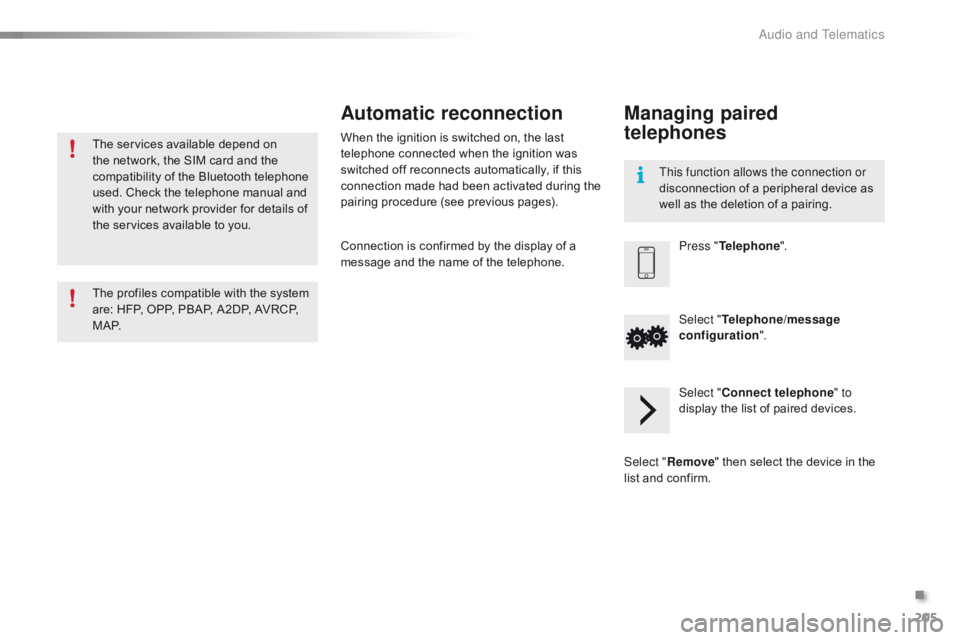
A P. This function allows the connection or
disconnection
of a peripheral device as
w
ell as the deletion of a pairing.
Automatic reconnection
When the ignition is switched on, the last telephone connected when the ignition was
s
witched off reconnects automatically, if this
c
onnection made had been activated during the
p
airing procedure (see previous pages).
Connection
is confirmed by the display of a
m
essage and the name of the telephone.
Managing paired
telephones
Press "Telephone ".
Select " Telephone/message
configuration ".
Select " Connect telephone " to
display
the list of paired devices.
Select " Remove "
then select the device in the
l
ist
and
confirm.
.
Audio and Telematics
Page 208 of 269
206
C1_en_Chap10a_ Autoradio-Toyota-tactile-1_ed01-2016
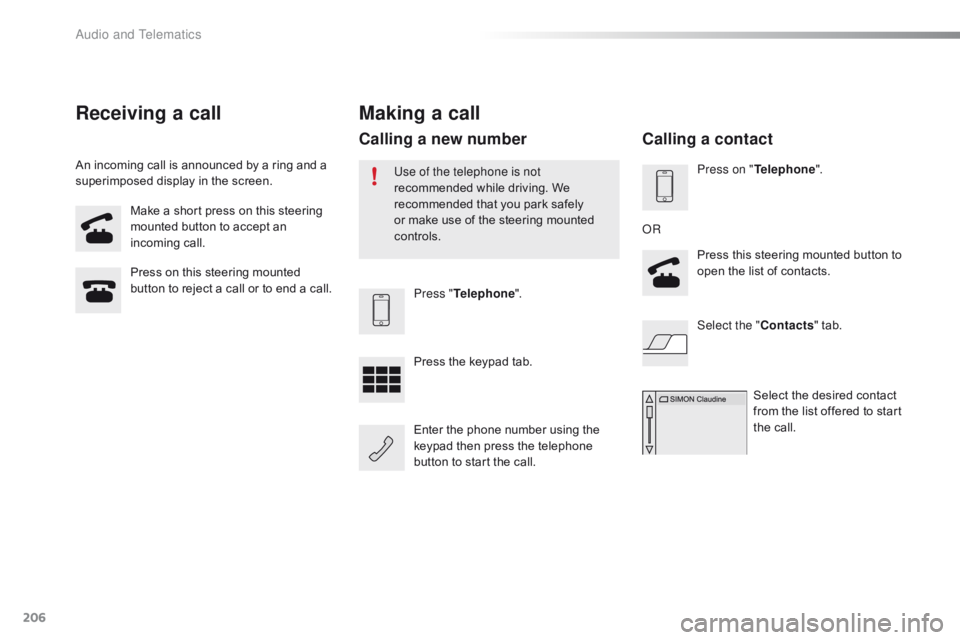
Make a short press on this steering mounted button to accept an
inc
oming
c
all.
Press
on this steering mounted
b
utton to reject a call or to end a call.Press "Telephone ".
Press
the keypad tab.
Enter
the phone number using the
k
eypad then press the telephone
b
utton to start the call.
Receiving a call
An incoming call is announced by a ring and a superimposed display in the screen.
Making a call
Use of the telephone is not
recommended while driving. We
r
ecommended that you park safely
o
r make use of the steering mounted
c
ontrols.
Calling a new number
Press on " Telephone ".
Press this steering mounted button to
o
pen the list of contacts.
OR
Select the " Contacts"
tab.
Select
the desired contact
f
rom the list offered to start
t
he call.
Calling a contact
Audio and Telematics
Page 209 of 269
207
C1_en_Chap10a_ Autoradio-Toyota-tactile-1_ed01-2016
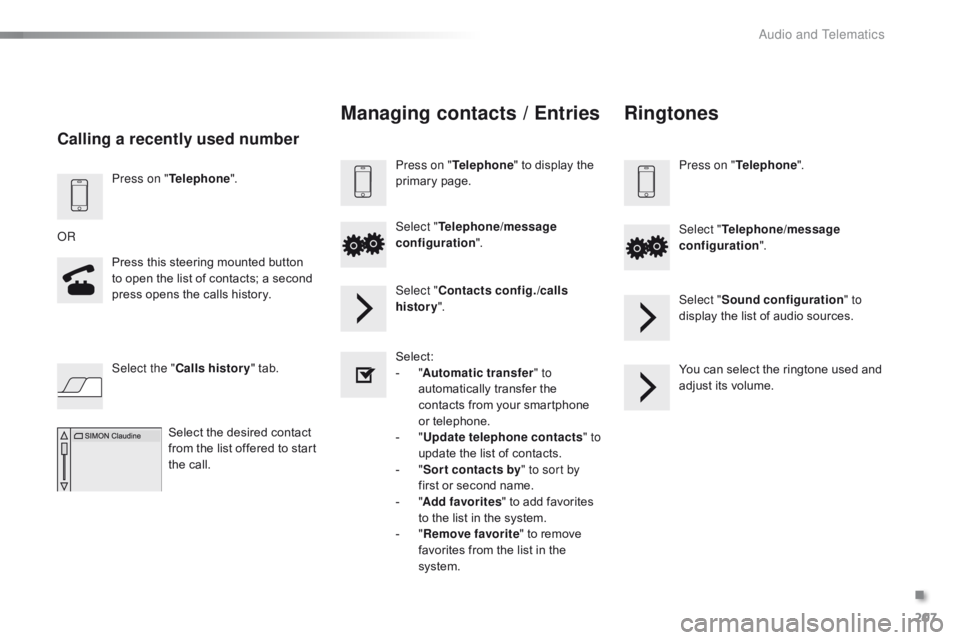
Press on "Telephone ".
Press this steering mounted button
t
o open the list of contacts; a second
p
ress opens the calls history.
OR
Select the " Calls history "
tab.
Select
the desired contact
f
rom the list offered to start
t
he call.
Calling a recently used number
Managing contacts / Entries
Press on "Telephone " to display the p
rimary pag e.
Select " Telephone/message
configuration ".
Select " Contacts config./calls
history ".
Select:
-
"A
utomatic transfer " to
automatically
transfer the
c
ontacts from your smartphone
o
r
t
elephone.
-
" U
pdate telephone contacts " to
update
the list of contacts.
-
" S
or t contacts by " to sort by
first
or second name.
-
"A
dd favorites "
to add favorites
t
o the list in the system.
-
" R
emove favorite "
to remove
f
avorites from the list in the
s
ystem.
Ringtones
Press on " Telephone ".
Select " Telephone/message
configuration ".
Select " Sound configuration " to
display
the list of audio sources.
You
can select the ringtone used and
a
djust its volume.
.
Audio and Telematics
Page 213 of 269
211
C1_en_Chap10a_ Autoradio-Toyota-tactile-1_ed01-2016
Level 1Level 2 Level 3 Comment
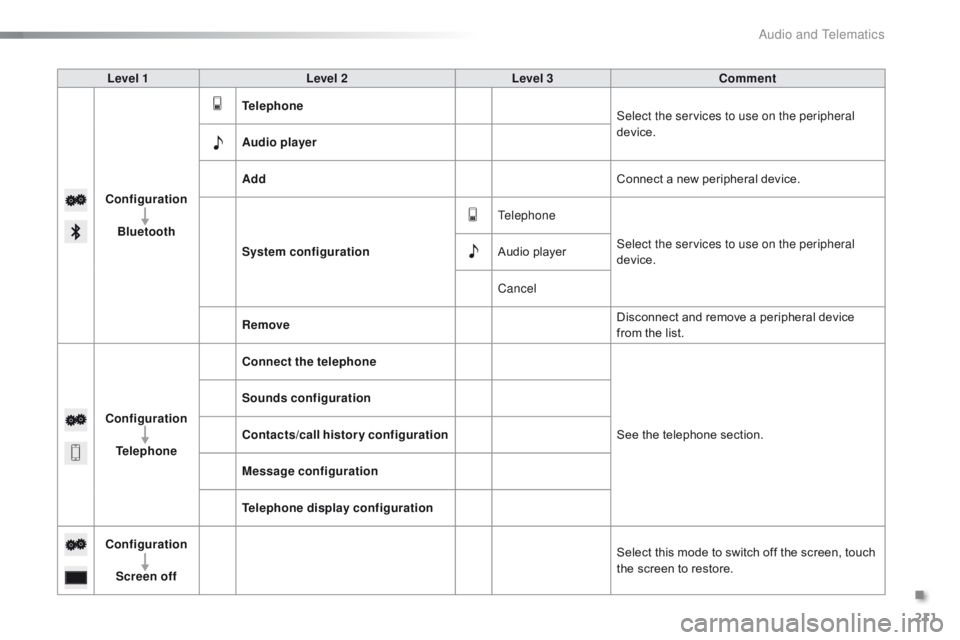
Configuration Bluetooth Telephone
Select the services to use on the peripheral
device.
Audio player
Add Connect
a new peripheral device.
System configuration Telephone
Select the services to use on the peripheral
device.
Audio
player
Cancel
Remove Disconnect
and remove a peripheral device
f
rom the list.
Configuration Telephone Connect the telephone
See
the telephone section.
Sounds configuration
Contacts/call history configuration
Message configuration
Telephone display configuration
Configuration Screen off Select
this mode to switch off the screen, touch
t
he screen to restore.
.
Audio and Telematics
Page 214 of 269
212
C1_en_Chap10a_ Autoradio-Toyota-tactile-1_ed01-2016
Mirror Screen® - iPhone® connections
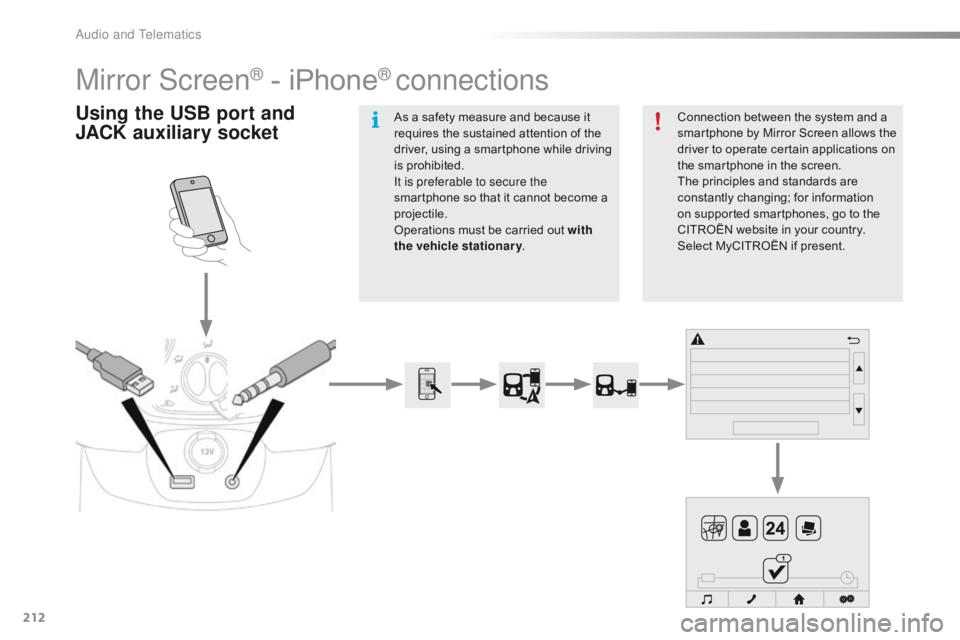
Using the USB port and
J ACK auxiliary socketConnection between the system and a s
martphone by Mirror Screen allows the
d
river to operate certain applications on
t
he smartphone in the screen.
The
principles and standards are
c
onstantly
c
hanging;
fo
r
in
formation
o
n supported smartphones, go to the
C
ITROËN website in your country.
S
elect MyCITROËN if present.
As
a
safety
measure
and
because
it
r
equires
the
sustained
attention
of
the
d
river,
using
a
smartphone
while
driving
i
s
prohibited.
It is preferable to secure the
smartphone
so
that
it
cannot
become
a
pro
jectile.
Operations
must
be
carried
out
with
the vehicle stationary .
Audio and Telematics
Page 215 of 269
213
C1_en_Chap10a_ Autoradio-Toyota-tactile-1_ed01-2016
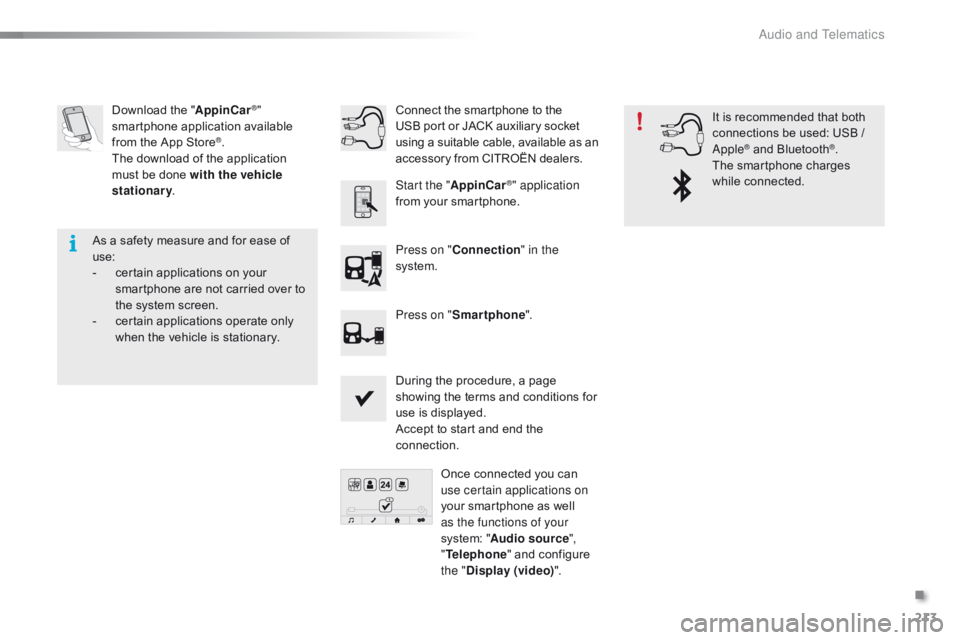
Download the "A ppinCar®"
smartphone a
pplication a
vailable f
rom
the
App
Store
®.
The
download
of
the application
m
ust
be
done
with the vehicle
stationary .
Press on "Connection " in the
system.
During
the procedure, a page
s
howing the terms and conditions for
u
se is displayed.
Accept
to start and end the
c
onnection.
Press on "
Smartphone ".
Once
connected you can
u
se certain applications on
your
smartphone as well
a
s the functions of your
system:
"Audio source ",
" Telephone "
and configure
t
he "Display (video) ".
Connect
the smartphone to the
U
SB port or JACK auxiliary socket
u
sing a suitable cable, available as an a
ccessory from CITROËN dealers.
Start the " AppinCar
®" application
from
your
smartphone. It
is recommended that both
c
onnections be used: USB /
A
pple
® and Bluetooth®.
The
smartphone
charges
w
hile
c
onnected.
As
a
safety
measure
and
for
ease
of
u
se:
-
c
ertain
applications
on
your
s
martphone
are
not
carried
over
to
t
he
system
screen.
-
c
ertain
applications
operate
only
w
hen
the
vehicle
is
stationary.
.
Audio and Telematics
Page 217 of 269
215
C1_en_Chap10a_ Autoradio-Toyota-tactile-1_ed01-2016
Level 1Level 2Level 3Comments
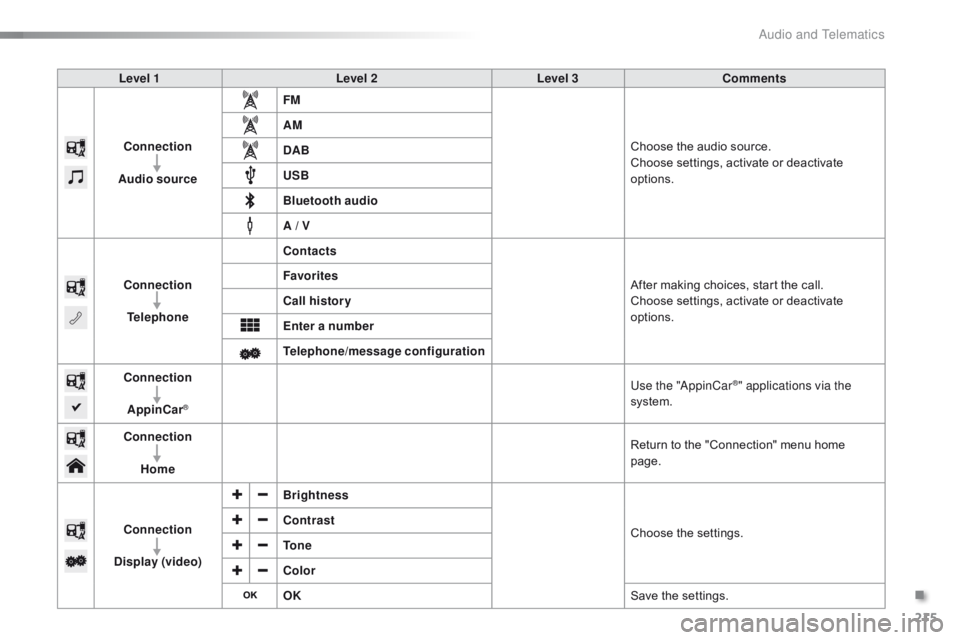
Connection
Audio source FM
Choose
the audio source.
Choose
settings, activate or deactivate
op
tions.
AM
DAB
USB
Bluetooth audio
A / V
Connection Telephone Contacts
After
making choices, start the call.
Choose
settings, activate or deactivate
op
tions.
Favorites
Call history
Enter a number
Telephone/message configuration
Connection
AppinCar
®
Use the "AppinCar®" applications via the
system.
Connection Home Return
to
the
"Connection" menu home
pag
e.
Connection
Display (video) Brightness
Choose
t
he
se
ttings.
Contrast
To n e
Color
OK
Save
the
settings.
.
Audio and Telematics
Page 218 of 269
216
C1_en_Chap10a_ Autoradio-Toyota-tactile-1_ed01-2016
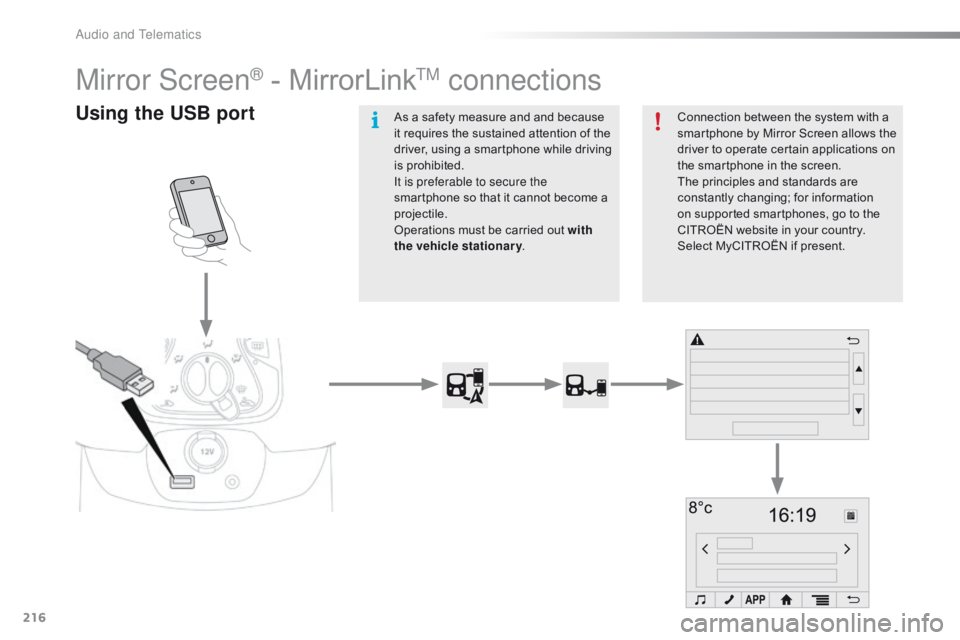
Mirror Screen® - MirrorLinkTM connections
Using the USB portConnection between the system with a smartphone by Mirror Screen allows the
d
river to operate certain applications on
t
he smartphone in the screen.
The
principles and standards are
c
onstantly
c
hanging;
fo
r
in
formation
o
n supported smartphones, go to the
C
ITROËN website in your country.
S
elect MyCITROËN if present.
As
a
safety
measure
and
and
because
i
t
requires
the
sustained
attention
of
the
d
river,
using
a
smartphone
while
driving
i
s
prohibited.
It is preferable to secure the
smartphone
so
that
it
cannot
become
a
pro
jectile.
Operations
must
be
carried
out
with
the vehicle stationary .
Audio and Telematics
Page 219 of 269
217
C1_en_Chap10a_ Autoradio-Toyota-tactile-1_ed01-2016
Depending on the model of your smartphone, the manufacturer
m
ay require you to first download a
d
edicated
a
pplication.
The
download of the application
m
ust be done with the vehicle
stationary .
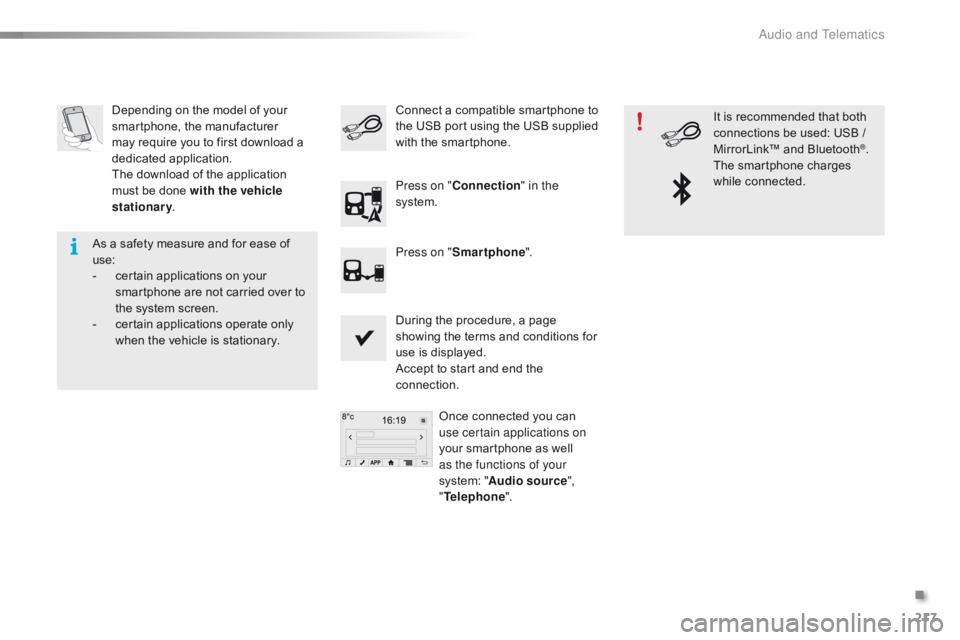
During
the procedure, a page
s
howing the terms and conditions for
u
se is displayed.
Accept
to start and end the
c
onnection.Once
connected you can
u
se certain applications on
your
smartphone as well
a
s the functions of your
system:
"Audio source ",
" Telephone ".
Connect
a compatible smartphone to t
he USB port using the USB supplied
w
ith the smartphone.
Press on " Connection " in the
system.
Press on " Smartphone ". It
is recommended that both
c
onnections be used: USB /
M
irrorLink™ and Bluetooth
®.
The
smartphone
charges
w
hile
c
onnected.
As
a
safety
measure
and
for
ease
of
u
se:
-
c
ertain
applications
on
your
s
martphone
are
not
carried
over
to
t
he
system
screen.
-
c
ertain
applications
operate
only
w
hen
the
vehicle
is
stationary.
.
Audio and Telematics