wheel CITROEN C1 2017 User Guide
[x] Cancel search | Manufacturer: CITROEN, Model Year: 2017, Model line: C1, Model: CITROEN C1 2017Pages: 269, PDF Size: 7.63 MB
Page 72 of 269
70
C1_en_Chap04_conduite_ed01-2016
A few driving recommendations
Observe the driving regulations at all times and remain vigilant whatever the traffic conditions.
Pay
close attention to the traffic and keep your
h
ands on the wheel so that you are ready to
r
eact at any time to any eventuality.
On
a long journey, a break every two hours is
s
trongly
re
commended.
In
difficult weather, drive smoothly, anticipate
t
he need to brake and increase the distance
f
rom other vehicles. Never
drive with the parking brake
a
pplied - Risk of overheating and
d
amage to the braking system!
Do
not park or run the engine when
s
tationary in areas where inflammable
s
ubstances and materials (dry grass,
d
ead leaves...) might come into
c
ontact with the hot exhaust system -
R
isk of fire!
Never
leave a vehicle unsupervised
w
ith the engine running. If you have
t
o leave your vehicle with the engine
r
unning, apply the parking brake
a
nd put the gearbox into neutral or
p
osition
N,
depending on the type of
g
earbox.
Driving on flooded
roads
We strongly advise against driving on flooded roads, as this could cause serious damage
t
o the engine or gearbox, as well as to the
e
lectrical systems of your vehicle.
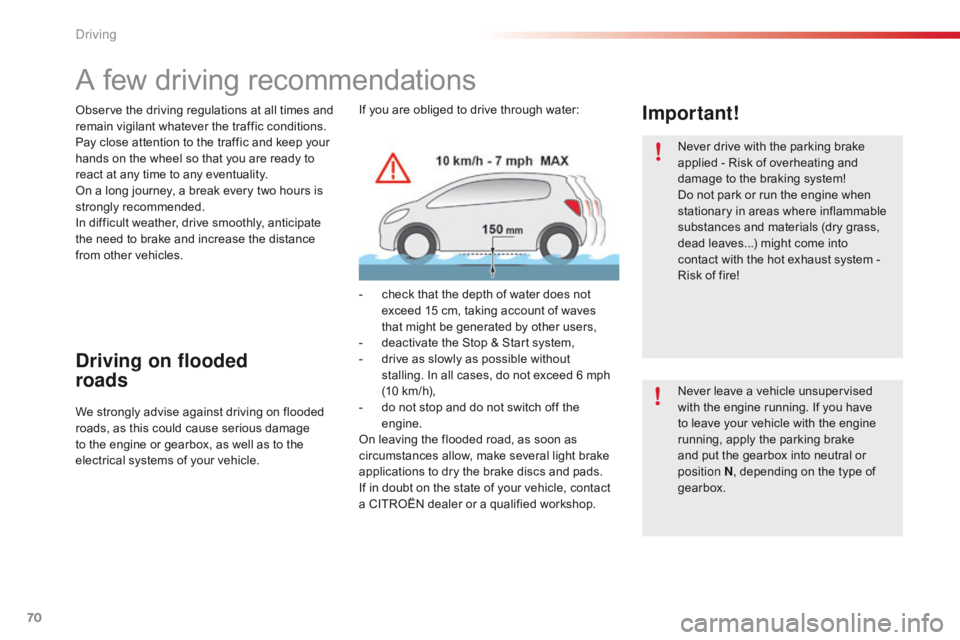
Important!If you are obliged to drive through water:
-
c
heck that the depth of water does not
e
xceed 15 cm, taking account of waves
t
hat might be generated by other users,
-
d
eactivate the Stop & Start system,
-
d
rive as slowly as possible without
s
talling. In all cases, do not exceed 6 mph
(
10 km/h),
-
d
o not stop and do not switch off the
e
ngine.
On
leaving the flooded road, as soon as
c
ircumstances allow, make several light brake
a
pplications to dry the brake discs and pads.
If
in doubt on the state of your vehicle, contact
a
CITROËN dealer or a qualified workshop.
Driving
Page 75 of 269
73
C1_en_Chap04_conduite_ed01-2016
Starting using the
electronic key
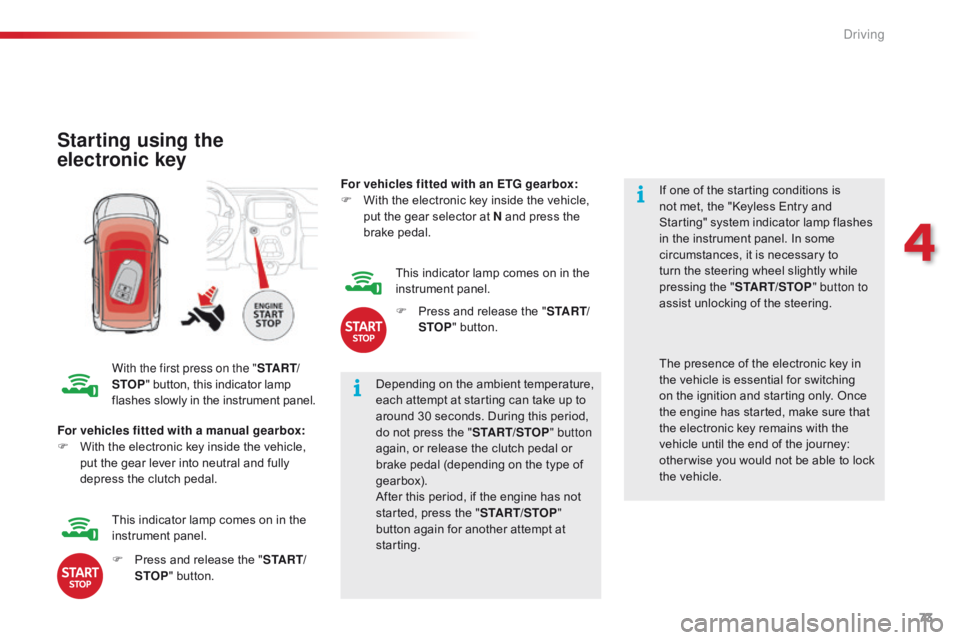
With the first press on the "S TA R T/
STOP "
button, this indicator lamp f
lashes slowly in the instrument panel.Depending
on the ambient temperature,
e
ach attempt at starting can take up to
a
round 30 seconds. During this period,
d
o not press the "START/STOP " button
again,
or release the clutch pedal or
b
rake pedal (depending on the type of
g
earbox).
After
this period, if the engine has not
s
tarted, press the "START/STOP "
button
again for another attempt at
s
tarting. If
one of the starting conditions is
n
ot met, the "Keyless Entry and
S
tarting" system indicator lamp flashes
i
n the instrument panel. In some
c
ircumstances, it is necessary to
t
urn the steering wheel slightly while
p
ressing the "
START/STOP " button to
assist unlocking of the steering.
For vehicles fitted with a manual gearbox:
F
W
ith
the electronic key inside the vehicle,
p
ut
the gear lever into neutral and fully
d
epress the clutch pedal. The
presence of the electronic key in t
he vehicle is essential for switching
o
n the ignition and starting only. Once
t
he engine has started, make sure that
t
he electronic key remains with the
v
ehicle until the end of the journey:
o
ther wise you would not be able to lock
t
he vehicle.
F
P
ress and release the "S TA R T/
STOP "
button.
This
indicator lamp comes on in the
in
strument
pan
el. For vehicles fitted with an ETG gearbox:
F
W
ith the electronic key inside the vehicle,
p
ut the gear selector at N and press the
b
rake
ped
al.
This indicator lamp comes on in the
in
strument
pan
el.
F
P
ress and release the "
S TA R T/
STOP " button.
4
Driving
Page 88 of 269
86
C1_en_Chap04_conduite_ed01-2016
The speed limiter cannot, in any circumstances, replace the need to o
bserve speed limits, nor can it replace the
n
eed for vigilance on the part of the driver.
Speed limiter (PureTech 82 engine)
The speed limiter is switched on manually: t
his can be done whatever the speed of the
v
ehicle. However, if you are driving at less than
2
0 mph (30 km/h), the programmed speed will
b
e fixed at 20 mph (30 km/h).
The
speed limiter is paused by operation of the
control.
The
programmed speed can be exceeded
t
emporarily by pressing the accelerator firmly
b
eyond the point of resistance.
To
return to the programmed speed, simply
r
elease the accelerator pedal until the vehicle
r
eturns to the programmed speed limit.
System
which prevents the vehicle from exceeding the speed programmed by the driver.Steering mounted controls
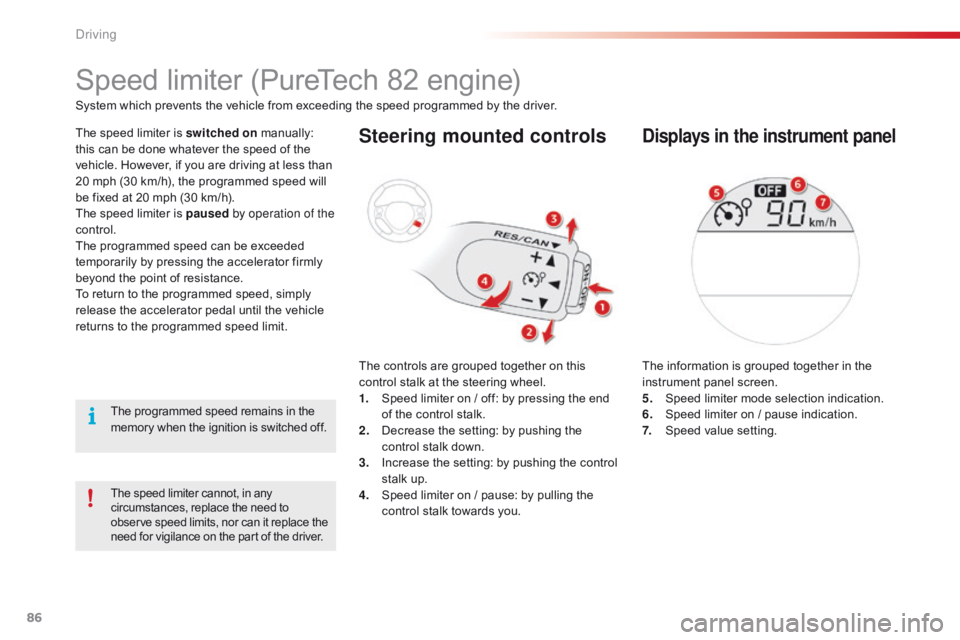
The controls are grouped together on this c
ontrol stalk at the steering wheel.
1.
S
peed limiter on / off: by pressing the end
o
f the control stalk.
2.
D
ecrease the setting: by pushing the
c
ontrol stalk down.
3.
I
ncrease the setting: by pushing the control
s
talk up.
4.
S
peed limiter on / pause: by pulling the
c
ontrol stalk towards you.
Displays in the instrument panel
The information is grouped together in the instrument panel screen.
5.
S
peed limiter mode selection indication.
6.
S
peed limiter on / pause indication.
7.
S
peed value setting.
The
programmed
speed
remains
in
the
m
emory
when
the
ignition
is
switched
off.
Driving
Page 91 of 269
89
C1_en_Chap04_conduite_ed01-2016
Speed limiter (VTi 68 engine)
System which prevents the vehicle from exceeding the speed programmed by the driver.
T he speed limiter is switched on
m
anually:
t
his can be done whatever the speed of the
v
ehicle. However, if you are driving at less than
2
0 mph (30 km/h), the programmed speed will
b
e fixed at 20 mph (30 km/h).
The
speed limiter is paused by operation of the
control.
The
programmed speed can be exceeded
t
emporarily by pressing the accelerator firmly
b
eyond the point of resistance.
To
return to the programmed speed, simply
r
elease the accelerator pedal until the vehicle
r
eturns to the programmed speed limit.
The
programmed limit speed is erased
w
hen switching off the ignition.
Steering mounted controls
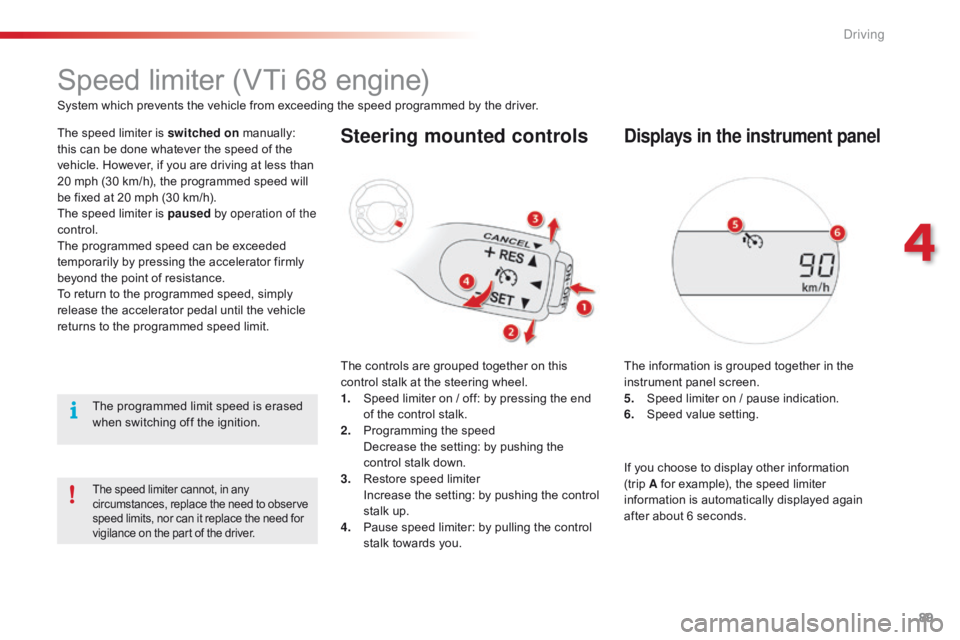
The controls are grouped together on this control stalk at the steering wheel.
1.
S
peed limiter on / off: by pressing the end
o
f the control stalk.
2.
P
rogramming the speed
D
ecrease the setting: by pushing the
c
ontrol stalk down.
3.
R
estore speed limiter
I
ncrease the setting: by pushing the control
s
talk up.
4.
P
ause speed limiter: by pulling the control
s
talk towards you.
Displays in the instrument panel
The information is grouped together in the instrument panel screen.
5.
S
peed limiter on / pause indication.
6.
S
peed value setting.
The speed limiter cannot, in any circumstances, replace the need to observe s
peed limits, nor can it replace the need for
v
igilance on the part of the driver.
If you choose to display other information (trip A
for example), the speed limiter
i
nformation is automatically displayed again
a
fter about 6 seconds.
4
Driving
Page 97 of 269
95
C1_en_Chap04_conduite_ed01-2016
Under-inflation detection
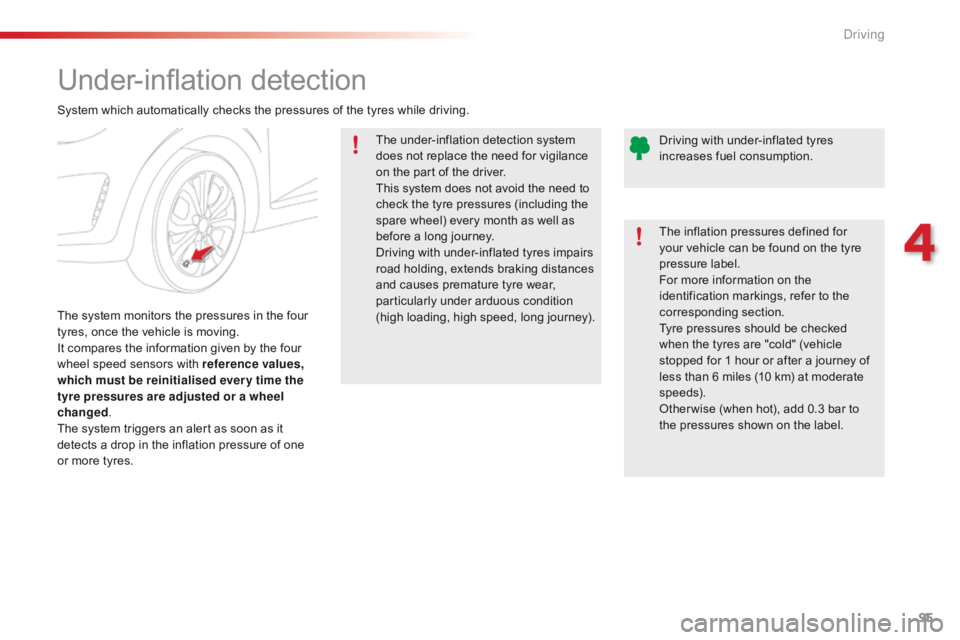
The system monitors the pressures in the four t
yres, once the vehicle is moving.
It
compares the information given by the four
w
heel speed sensors with reference values,
which must be reinitialised ever y time the
tyre pressures are adjusted or a wheel
changed .
The
system triggers an alert as soon as it
d
etects a drop in the inflation pressure of one
o
r more tyres. The
under-inflation detection system
d
oes not replace the need for vigilance
o
n the part of the driver.
This system does not avoid the need to
c
heck the tyre pressures (including the
s
pare wheel) every month as well as
b
efore a long journey.
Driving with under-inflated tyres impairs
r
oad holding, extends braking distances
a
nd causes premature tyre wear, p
articularly under arduous condition (
high loading, high speed, long journey).
System
which automatically checks the pressures of the tyres while driving.
The inflation pressures defined for
y
our vehicle can be found on the tyre
p
ressure label.
For more information on the
i
dentification markings, refer to the c
orresponding s ection.
Tyre pressures should be checked
w
hen the tyres are "cold" (vehicle
s
topped for 1 hour or after a journey of
l
ess than 6 miles (10 km) at moderate
s
peeds).
Other wise
(when hot), add 0.3 bar to
t
he pressures shown on the label.
Driving
with under-inflated tyres
i
ncreases fuel consumption.
4
Driving
Page 98 of 269
96
C1_en_Chap04_conduite_ed01-2016
Under-inflation alert
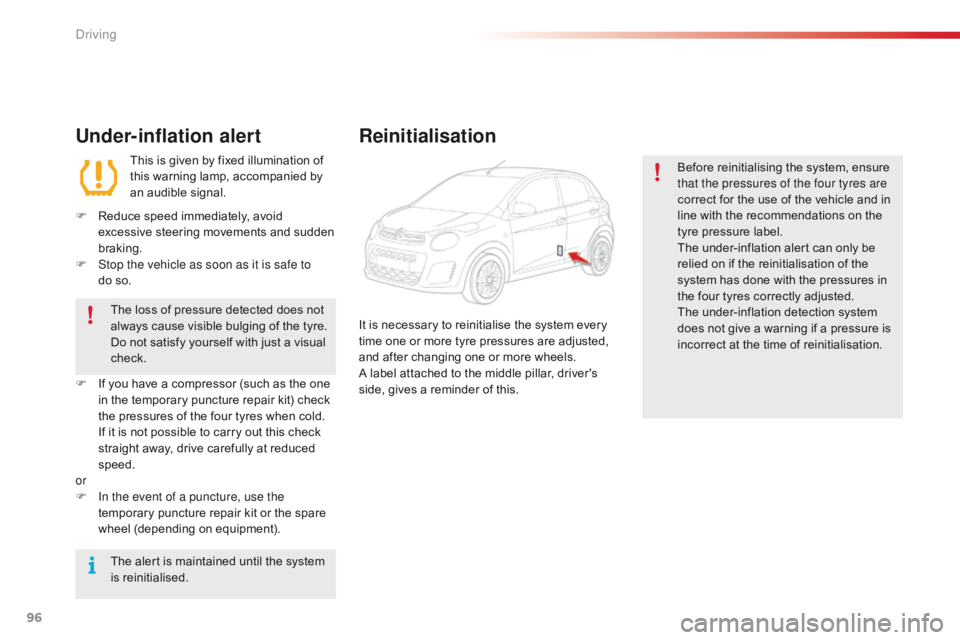
This is given by fixed illumination of this warning lamp, accompanied by
a
n audible signal.
F
R
educe speed immediately, avoid
e
xcessive steering movements and sudden
b
raking.
F
S
top the vehicle as soon as it is safe to
do so.
The
loss of pressure detected does not
a
lways cause visible bulging of the tyre.
D
o
not satisfy yourself with just a visual
c
heck.
F
I
f
you
have a compressor (such as the one
i
n
the
temporary puncture repair kit) check
t
he
pressures of the four tyres when cold.
I
f
it
is
not possible to carry out this check
s
traight away, drive carefully at reduced
s
peed.
or
F
I
n the event of a puncture, use the
temporary
puncture repair kit or the spare
w
heel (depending on equipment).
The
alert is maintained until the system
i
s
r
einitialised.
Reinitialisation
Before reinitialising the system, ensure t hat the pressures of the four tyres are
correct
for the use of the vehicle and in
l
ine with the recommendations on the
t
yre pressure label.
The
under-inflation alert can only be
r
elied on if the reinitialisation of the
s
ystem has done with the pressures in
t
he four tyres correctly adjusted.
The
under-inflation detection system
d
oes not give a warning if a pressure is
i
ncorrect at the time of reinitialisation.
It
is
necessary
to
reinitialise
the
system
every
t
ime
one
or
more
tyre
pressures
are
adjusted,
a
nd
after
changing
one
or
more
wheels.
A
label
attached
to
the
middle
pillar,
driver's
s
ide,
gives
a
reminder
of
this.
Driving
Page 108 of 269
106
C1_en_Chap06_securite_ed01-2016
Horn
Audible warning to alert other road users to an imminent d anger.
When
manoeuvring the vehicle,
t
ake care not to operate the horn
u
nintentionally.
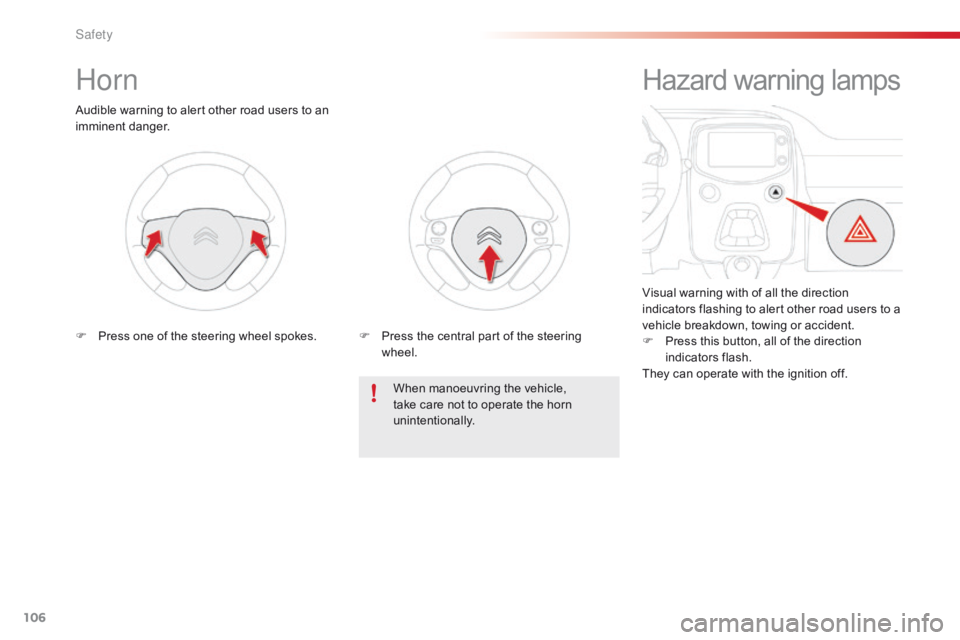
F
P
ress one of the steering wheel spokes.F
P
ress the central part of the steering
w
heel.
Hazard warning lamps
Visual warning with of all the direction i
ndicators flashing to alert other road users to a
v
ehicle breakdown, towing or accident.
F
P
ress this button, all of the direction
in
dicators
f
lash.
They
can operate with the ignition off.
Safety
Page 109 of 269
107
C1_en_Chap06_securite_ed01-2016
Electronic Stability Control (ESC) incorporating the following systems:
-
a
nti-lock braking system (ABS) and the
e
lectronic brake force distribution (EBFD),
-
em
ergency
b
raking
a
ssistance,
-
t
raction control (TRC),
-
d
ynamic stability control (DSC).
Electronic stability control (ESC)
Definitions
Anti-lock braking system (ABS)
and electronic brake force
distribution (EBFD)
These systems improve the stability and manoeuvrability of your vehicle when braking
a
nd contribute towards better control in
c
orners, in particular on poor or slippery road
su
rfaces.
The
ABS prevents wheel lock in the event of
em
ergency
b
raking.
The
electronic brake force distribution system
m
anages the braking pressure wheel by wheel.
Emergency braking assistance
In an emergency, this system enables you to reach the optimum braking pressure more
q
uickly and therefore reduce the stopping
di
stance.
It
is triggered according to the speed at which
t
he brake pedal is pressed. This is felt by a
r
eduction in the resistance of the pedal and an
i
ncrease in the effectiveness of the braking.
Traction control (TRC)
This system optimises traction in order to limit wheel slip by acting on the brakes of the driving
w
heels and on the engine. It also improves
t
he directional stability of the vehicle on
a
cceleration.
Dynamic stability control (DSC)
If there is a difference between the path followed by the vehicle and that required by the
d
river, this system monitors each wheel and
a
utomatically acts on the brake of one or more
w
heels and on the engine to return the vehicle
t
o the required path, within the limits of the laws
o
f physics.
6
Safety
Page 111 of 269
109
C1_en_Chap06_securite_ed01-2016
The TRC and DSC systems offer increased safety in normal driving, but
s
hould not encourage the driver to take
e
xtra risks or drive at high speed.
The correct operation of these
systems
depends on observation of
t
he
ma
nufacturer's
r
ecommendations
r
egarding the wheels (tyres and rims),
t
he braking components, the electronic
c
omponents and the assembly and
r
epair procedures used by CITROËN
d
ealers.
After
an impact, have the system
c
hecked by a CITROËN dealer or a
q
ualified
w
orkshop.
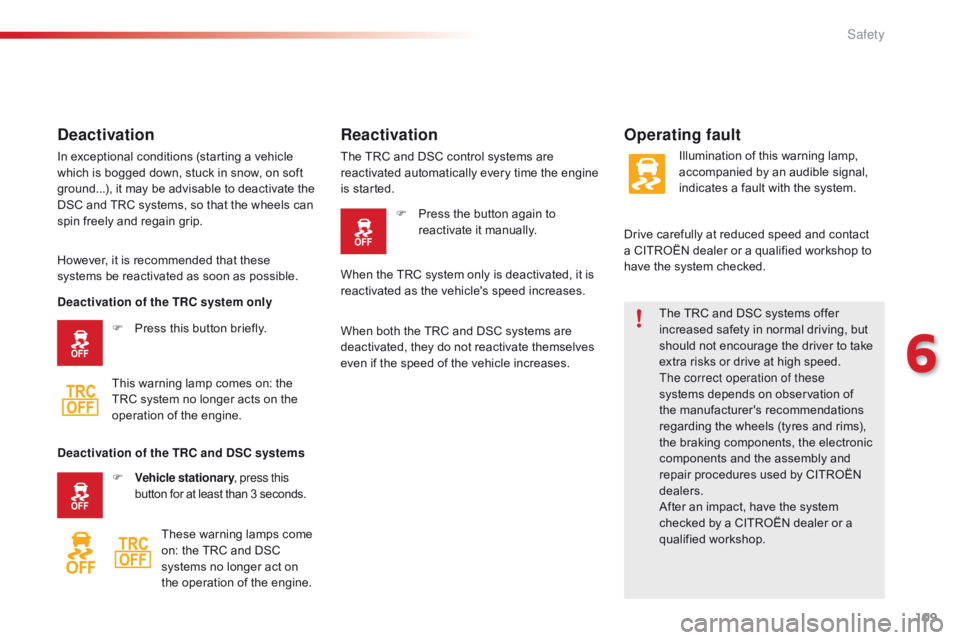
Deactivation
In exceptional conditions (starting a vehicle which is bogged down, stuck in snow, on soft
g
round...), it may be advisable to deactivate the
D
SC and TRC systems, so that the wheels can
s
pin freely and regain grip.
Operating fault
However, it is recommended that these systems be reactivated as soon as possible.
F
P
ress this button briefly.
This
warning lamp comes on: the
T
RC system no longer acts on the
o
peration of the engine.
Reactivation
The TRC and DSC control systems are reactivated automatically every time the engine
i
s started. F
P
ress the button again to
r
eactivate it manually. Illumination
of this warning lamp, a
ccompanied by an audible signal,
i
ndicates a fault with the system.
Drive
carefully at reduced speed and contact
a
CITROËN dealer or a qualified workshop to
h
ave the system checked.
Deactivation of the TRC system only
Deactivation of the TRC and DSC systems F
V
ehicle stationary , press this
button
for
at
least
than
3
seconds.
These
warning
lamps
come
o
n:
the
TRC
and
DSC
s
ystems
no
longer
act
on
t
he
operation
of
the
engine. When
the TRC system only is deactivated, it is
r
eactivated as the vehicle's speed increases.
When
both the TRC and DSC systems are
d
eactivated, they do not reactivate themselves
e
ven if the speed of the vehicle increases.
6
Safety
Page 115 of 269
113
C1_en_Chap06_securite_ed01-2016
Never leave accumulations of snow or any object projecting above the bonnet
o
r in front of the roof: this might fall into
t
he field of vision of the sensor and
g
enerate a detection.
Operating limits
The system o nly d etects v ehicles (cars, lorries) t
hat are stationary or moving in the same
d
irection as your vehicle. In
difficult weather conditions (very
h
eavy rain, snow, fog, hail...), braking
d
istances increase, which can reduce
t
he ability of the system to avoid a
c
ollision.
The
driver must therefore remain
par
ticularly
v
igilant.
The
system is not triggered or is interrupted if
t
he
d
river:
-
a
ccelerates strongly (even if the speed
l
imiter is on),
-
o
r turns the steering wheel suddenly
(
avoiding
m
anoeuvre).
Detection
capability is less effective if:
-
y
ou are driving on roads with pronounced
b
ends and/or on roads in poor condition,
-
y
our vehicle is excessively loaded, as
t
his changes the horizontal attitude of the
v
ehicle.
-
y
our vehicle skids.
It
does not detect small vehicles
(
bicycles, motorcycles), pedestrians or
a
nimals, nor non-reflective stationary
ob
jects.Unwanted triggering of the system
It is possible for the system to detect a risk of imminent collision and start working, in the
fo
llowing
c
onditions
in par
ticular:
-
d
etection of an object located close to the
e
dge of the road entering a corner (safety
b
arrier, lamp post or road sign),
-
d
etection of a structure located at the top
o
r bottom of a steep slope (advertising
h
oarding, steet lighting),
-
d
etection of reflective objects (central
r
eservation...) in the road,
-
d
etection of the upper bar of a bridge or a
t
raffic light gantry,
-
p
assing a vehicle travelling in the other
d
irection in a corner,
-
p
assing a vehicle traveling in the other
d
irection, at a crossroads, when your
v
ehicle is turning left or right,
-
i
f the vehicle ahead of you sends up water
o
r snow,
-
i
f your vehicle stops very close to an
ov
erhanging wall or other vehicles,
-
w
hen your vehicle closes rapidly on the
v
ehicle
a
head,
-
i
f the vehicle is raised or lowered,
-
i
f the vehicle passes through a plastic
c
urtain,
-
i
f driving through mist or smoke,
-
i
f the sensor is misaligned (following
r
eplacement after a collision).
6
Safety