lock CITROEN C1 2018 Owner's Guide
[x] Cancel search | Manufacturer: CITROEN, Model Year: 2018, Model line: C1, Model: CITROEN C1 2018Pages: 269, PDF Size: 7.63 MB
Page 139 of 269
137
C1_en_Chap06_securite_ed01-2016
Child lock
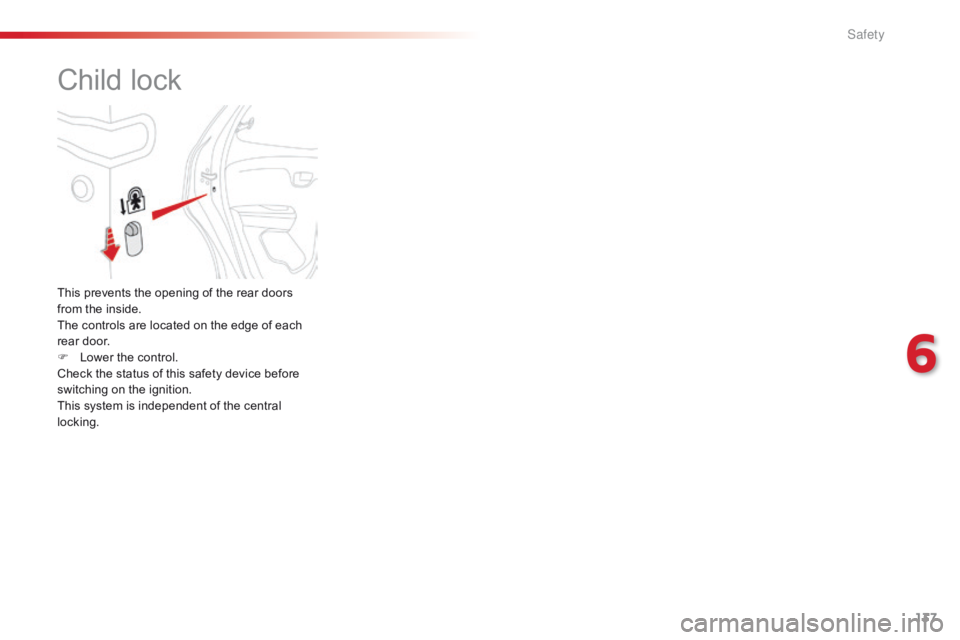
This prevents the opening of the rear doors from the inside.
The
controls are located on the edge of each
r
ear door.
F
L
ower the control.
Check
the status of this safety device before
s
witching on the ignition.
This
system is independent of the central
l
ocking.
6
S
Page 140 of 269
138
C1_en_Chap07_info-pratiques_ed01-2016
Fuel tank
Low fuel levelRefuelling
When the low fuel level is reached, t
his warning lamp comes on,
a
ccompanied by an audible signal.
The
message "LO FUEL" is displayed in place
o
f
the
range.
You have approximately 5 litres remaining.
In
certain
driving conditions and depending on
t
he
engine, the distance which can be travelled
w
ith
the
fuel remaining may be less than
3
0 miles
(50 km). To
refuel in complete safety:
F
Y
ou must stop the engine and switch off
the ignition (ignition in "LOCK" position
or "OFF" mode) .
F
P
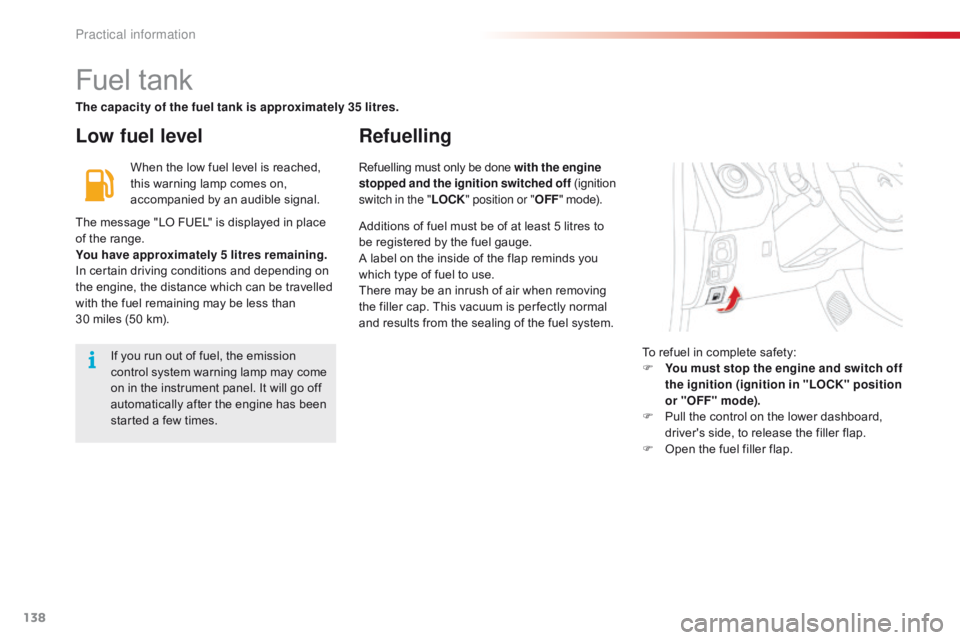
ull the control on the lower dashboard,
d
river's side, to release the filler flap.
F
O
pen the fuel filler flap.
If
you run out of fuel, the emission
c
ontrol system warning lamp may come
o
n
in the instrument panel. It will go off
a
utomatically after the engine has been
s
tarted a few times. Refuelling
must only be done with the engine
stopped and the ignition switched off ( ignition s
witch in the "LOCK" position or " OFF"
mode).
The capacity of the fuel tank is approximately 35 litres.
Additions of fuel must be of at least 5 litres to
b
e registered by the fuel gauge.
A
label on the inside of the flap reminds you
w
hich type of fuel to use.
There
may be an inrush of air when removing
t
he filler cap. This vacuum is per fectly normal
a
nd results from the sealing of the fuel system.
Practical information
Page 173 of 269
171
C1_en_Chap08_en-cas-pannes_ed01-2016
FuseN° Rating
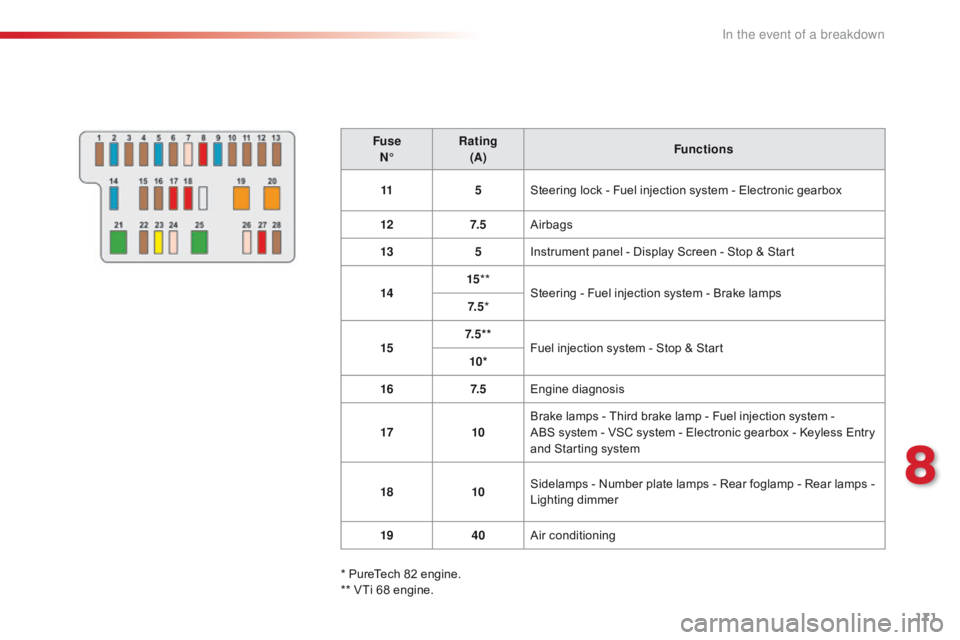
(A) Functions
11 5Steering
lock - Fuel injection system - Electronic gearbox
12 7. 5Airbags
13 5Instrument
panel - Display Screen - Stop & Start
14 15
**
Steering
- Fuel injection system - Brake lamps
7. 5 *
15 7. 5 * *
Fuel
injection system - Stop & Start
10*
16 7. 5Engine
d
iagnosis
17 10Brake
lamps - Third brake lamp - Fuel injection system -
ABS
system - VSC system - Electronic gearbox - Keyless Entry
a
nd Starting system
18 10Sidelamps
- Number plate lamps - Rear foglamp - Rear lamps -
L
ighting dimmer
19 40Air
c
onditioning
*
PureTech 82 engine.
**
VTi 68 engine.
8
In the event of a breakdown
Page 176 of 269
174
C1_en_Chap08_en-cas-pannes_ed01-2016
** VTi 68 engine.F use
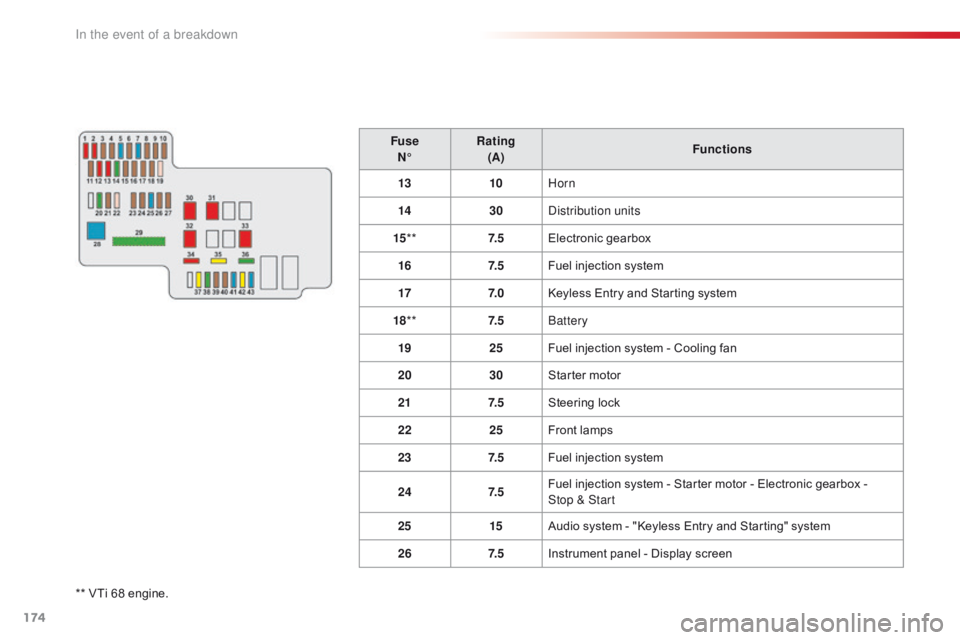
N° Rating
(A) Functions
13 10Horn
14 30Distribution units
15 ** 7. 5Electronic
g
earbox
16 7. 5Fuel injection system
17 7. 0Keyless Entry and Starting system
18 ** 7. 5Battery
19 25Fuel injection system - Cooling fan
20 30Starter motor
21 7. 5Steering lock
22 25Front lamps
23 7. 5Fuel injection system
24 7. 5Fuel injection system - Starter motor - Electronic gearbox -
Stop & Start
25 15Audio system - "Keyless Entry and Starting" system
26 7. 5Instrument panel - Display screen
In the event of a breakdown
Page 182 of 269
180
C1_en_Chap08_en-cas-pannes_ed01-2016
Towing the vehicle
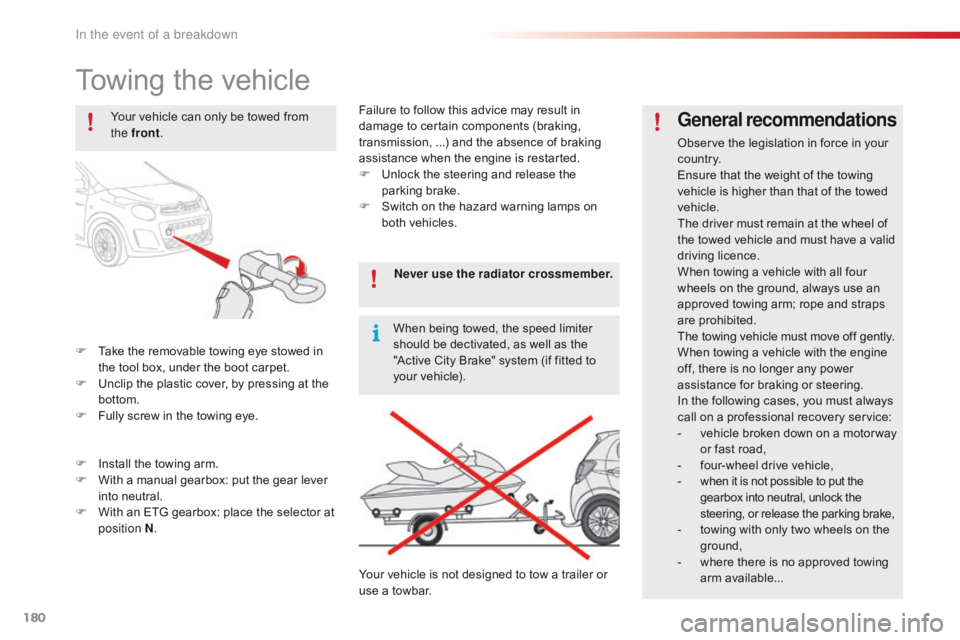
F Take the removable towing eye stowed in t
he tool box, under the boot carpet.
F
U
nclip the plastic cover, by pressing at the
b
ottom.
F
F
ully screw in the towing eye.
General recommendations
Observe the legislation in force in your co unt r y.
Ensure
that the weight of the towing
v
ehicle is higher than that of the towed
v
ehicle.
The
driver must remain at the wheel of
t
he towed vehicle and must have a valid
d
riving
l
icence.
When
towing a vehicle with all four
w
heels on the ground, always use an
a
pproved towing arm; rope and straps
ar
e
p
rohibited.
The
towing vehicle must move off gently.
When
towing a vehicle with the engine
o
ff, there is no longer any power
a
ssistance for braking or steering.
In
the following cases, you must always
c
all on a professional recovery service:
-
v
ehicle broken down on a motor way
o
r fast road,
-
f
our-wheel drive vehicle,
-
w
hen it is not possible to put the
g
earbox into neutral, unlock the
s
teering, or release the parking brake,
-
t
owing with only two wheels on the
g
round,
-
w
here there is no approved towing
ar
m
a
vailable...
Your
vehicle
can
only
be
towed
from
t
he front
.
F
I
nstall
the
towing
arm.
F
W
ith
a
manual
gearbox:
put
the
gear
lever
i
nto
neutral.
F
W
ith
an
ETG
gearbox:
place
the
selector
at
p
osition N . Never use the radiator crossmember.
When
being
towed,
the
speed
limiter
s
hould
be
dectivated,
as
well
as
the
"
Active
City
Brake"
system
(if
fitted
to
y
our
vehicle).
Your
vehicle
is
not
designed
to
tow
a
trailer
or
u
se
a
towbar.
Failure
to
follow
this
advice
may
result
in
d
amage
to
certain
components
(braking,
t
ransmission,
...)
and
the
absence
of
braking
a
ssistance
when
the
engine
is
restarted.
F
U
nlock
the
steering
and
release
the
par
king
b
rake.
F
S
witch
on
the
hazard
warning
lamps
on
b
oth
vehicles.
In the event of a breakdown
Page 190 of 269
188
C1_en_Chap10a_ Autoradio-Toyota-tactile-1_ed01-2016
Steering mounted controls
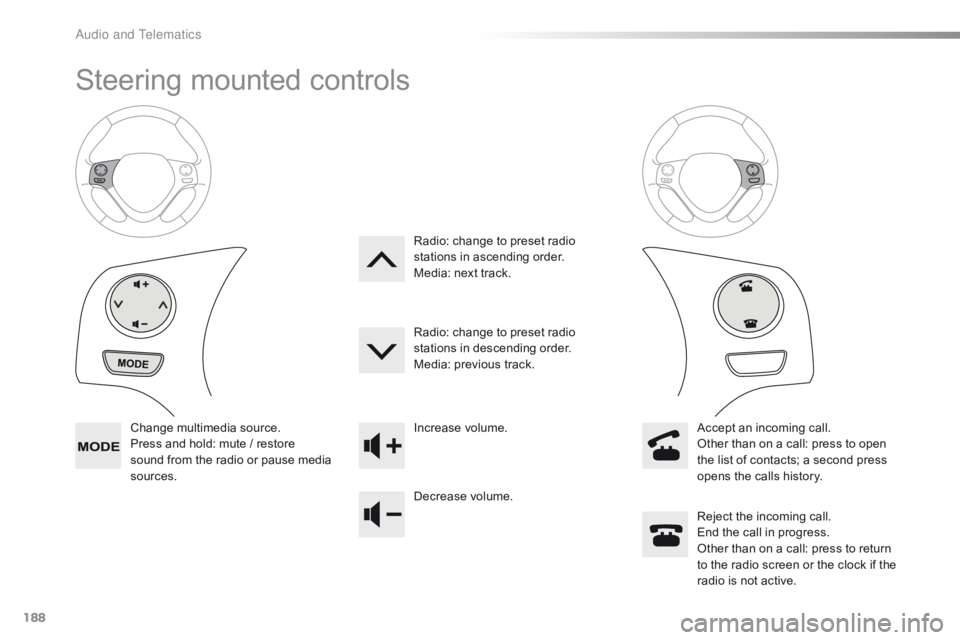
Change multimedia source.
P ress and hold: mute / restore
s
ound from the radio or pause media
s
ources. Increase
volume.
Decrease volume.Reject
the incoming call.
End
the call in progress.
Other
than on a call: press to return
t
o the radio screen or the clock if the
r
adio is not active.
Radio:
change to preset radio
s
tations in ascending order.
Media: next track.
Radio: change to preset radio
s
tations in descending order.
Media: previous track.
Accept an incoming call.
Other than on a call: press to open
t
he list of contacts; a second press
o
pens the calls history.
A
Page 211 of 269
209
C1_en_Chap10a_ Autoradio-Toyota-tactile-1_ed01-2016
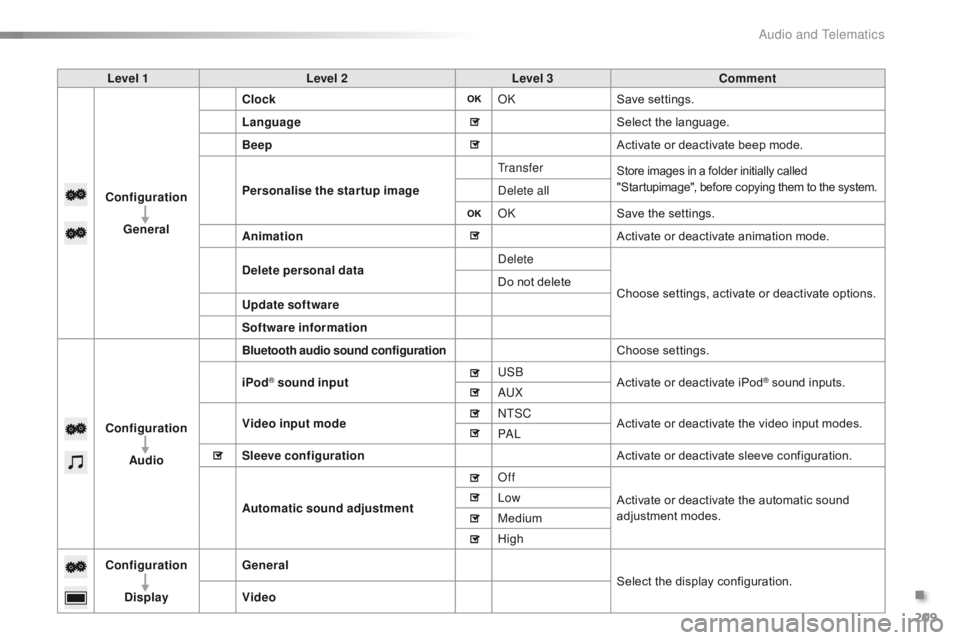
Level 1Level 2 Level 3 Comment
Configuration General Clock
OKSave
se
ttings.
Language Select
the language.
Beep Activate
or deactivate beep mode.
Personalise the star tup image Tr a n s f e r
Store images in a folder initially called "
Startupimage", before copying them to the system.
Delete all
OKSave
the settings.
Animation Activate
or deactivate animation mode.
Delete personal data Delete
Choose
settings, activate or deactivate options.
Do
not delete
Update software
Software information
Configuration Audio
Bluetooth audio sound configurationChoose settings.
iPod
® sound input USB
Activate or deactivate iPod® sound inputs.
AU
X
Video input mode NTSC
Activate
or
deactivate
the
video input modes.
PA L
Sleeve configuration Activate
or
deactivate
sleeve configuration.
Automatic sound adjustment Off
Activate
or
deactivate
the
automatic sound
a
djustment
modes.
Low
Medium
High
Configuration
Display General
Select
the
display
configuration.
Video
.
Audio and Telematics
Page 235 of 269
233
C1_en_Chap10a_ Autoradio-Toyota-tactile-1_ed01-2016
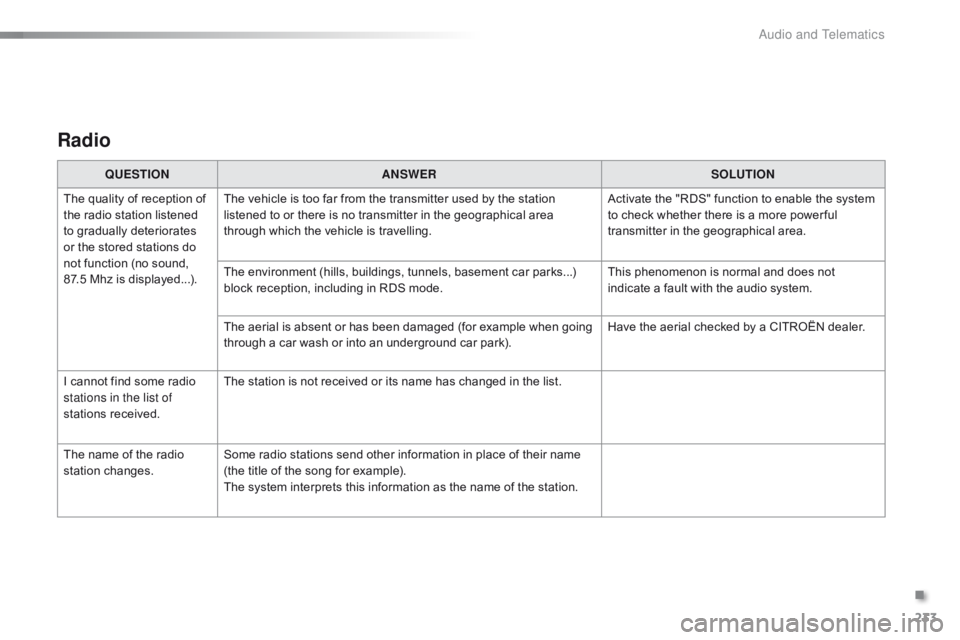
Radio
QUESTIONANSWER SOLUTION
The
quality of reception of
t
he
radio station listened
t
o
gradually deteriorates
o
r
the
stored stations do
n
ot
function (no sound,
87
.5 Mhz is displayed...). The
vehicle is too far from the transmitter used by the station
l
istened to or there is no transmitter in the geographical area
t
hrough which the vehicle is travelling.Activate
the "RDS" function to enable the system
t
o check whether there is a more power ful
t
ransmitter in the geographical area.
The
environment (hills, buildings, tunnels, basement car parks...)
b
lock reception, including in RDS mode.This
phenomenon is normal and does not
i
ndicate a fault with the audio system.
The
aerial is absent or has been damaged (for example when going
t
hrough a car wash or into an underground car park).Have
the aerial checked by a CITROËN dealer.
I
cannot find some radio
s
tations in the list of
stations
r
eceived. The
station is not received or its name has changed in the list.
The
name of the radio
s
tation
c
hanges. Some
radio stations send other information in place of their name
(
the title of the song for example).
The
system interprets this information as the name of the station.
.
Audio and Telematics
Page 238 of 269
236
C1_en_Chap10b_ Autoradio-Toyota-2_ed01-2016
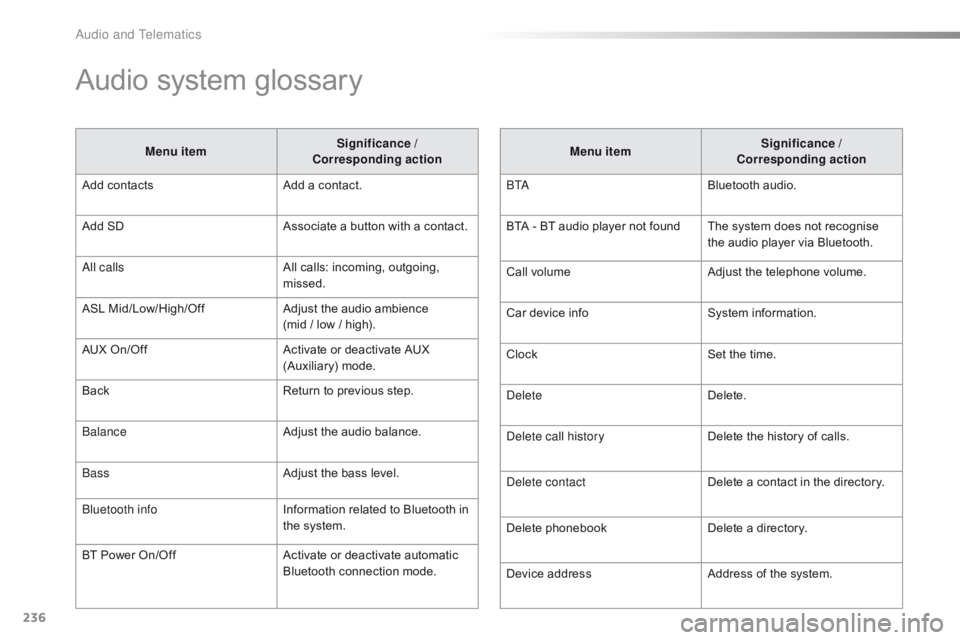
Audio system glossary
Menu itemSignificance /
Corresponding action
Add
contacts Add
a contact.
Add
SD Associate
a button with a contact.
All calls All
calls: incoming, outgoing,
m
issed.
ASL
M
id/Low/High/Off Adjust
the audio ambience
(mid
/ low / high).
AUX
On/Off Activate
or deactivate AUX
(
Auxiliary)
m
ode.
Back Return
to previous step.
Balance Adjust
the audio balance.
Bass Adjust
the bass level.
Bluetooth info Information
related to Bluetooth in
t
he system.
BT
Power
On/Off Activate
or deactivate automatic
B
luetooth connection mode.Menu item
Significance /
Corresponding action
B TA Bluetooth
audio.
BTA
- BT audio player not found The system does not recognise
t
he audio player via Bluetooth.
Call
volumeAdjust
the telephone volume.
Car
device infoSystem
i
nformation.
Clock Set
the time.
Delete Delete.
Delete call history Delete
the history of calls.
Delete contact Delete
a contact in the directory.
Delete
pho
nebookDelete
a directory.
Device
addressAddress
of the system.
Audio and Telematics
Page 255 of 269
253
C1_en_Chap10b_ Autoradio-Toyota-2_ed01-2016
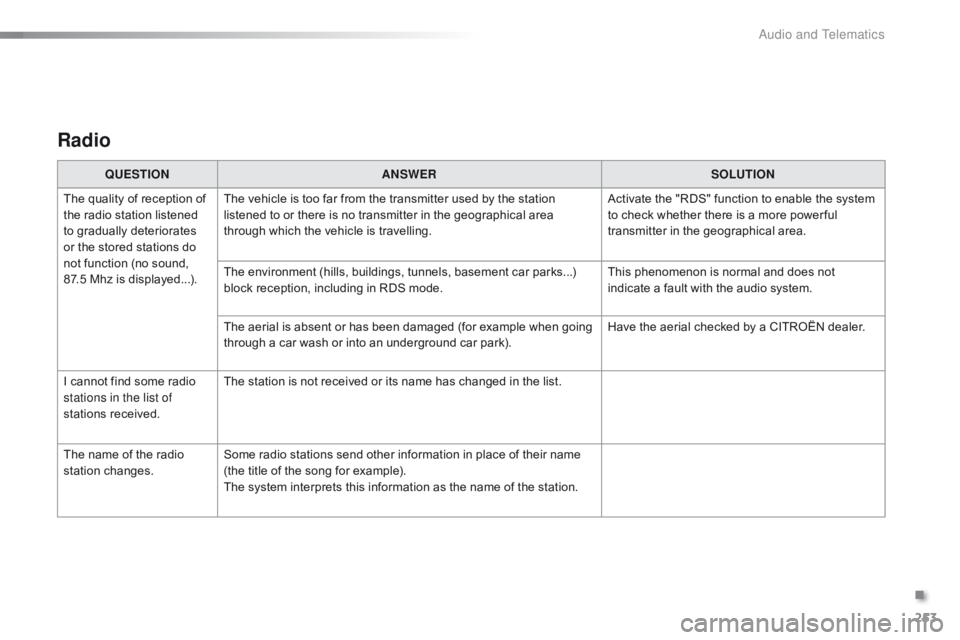
Radio
QUESTIONANSWER SOLUTION
The
quality of reception of
t
he
radio station listened
t
o
gradually deteriorates
o
r
the
stored stations do
n
ot
function (no sound,
87
.5 Mhz is displayed...). The
vehicle is too far from the transmitter used by the station
l
istened to or there is no transmitter in the geographical area
t
hrough which the vehicle is travelling.Activate
the "RDS" function to enable the system
t
o check whether there is a more power ful
t
ransmitter in the geographical area.
The
environment (hills, buildings, tunnels, basement car parks...)
b
lock reception, including in RDS mode.This
phenomenon is normal and does not
i
ndicate a fault with the audio system.
The
aerial is absent or has been damaged (for example when going
t
hrough a car wash or into an underground car park).Have
the aerial checked by a CITROËN dealer.
I
cannot find some radio
s
tations in the list of
stations
r
eceived. The
station is not received or its name has changed in the list.
The
name of the radio
s
tation
c
hanges. Some
radio stations send other information in place of their name
(
the title of the song for example).
The
system interprets this information as the name of the station.
.
Audio and Telematics