audio CITROEN C1 2021 User Guide
[x] Cancel search | Manufacturer: CITROEN, Model Year: 2021, Model line: C1, Model: CITROEN C1 2021Pages: 269, PDF Size: 7.63 MB
Page 176 of 269

174
C1_en_Chap08_en-cas-pannes_ed01-2016
** VTi 68 engine.F use
N° Rating
(A) Functions
13 10Horn
14 30Distribution units
15 ** 7. 5Electronic
g
earbox
16 7. 5Fuel injection system
17 7. 0Keyless Entry and Starting system
18 ** 7. 5Battery
19 25Fuel injection system - Cooling fan
20 30Starter motor
21 7. 5Steering lock
22 25Front lamps
23 7. 5Fuel injection system
24 7. 5Fuel injection system - Starter motor - Electronic gearbox -
Stop & Start
25 15Audio system - "Keyless Entry and Starting" system
26 7. 5Instrument panel - Display screen
In the event of a breakdown
Page 180 of 269
178
C1_en_Chap08_en-cas-pannes_ed01-2016
Starting using another battery
F Start the engine of the vehicle with the g
ood battery and leave it running for a few
m
inutes.
F
O
perate the starter on the broken down
v
ehicle and let the engine run.
If
the engine does not start straight away,
s
witch off the ignition and wait a few moments
b
efore trying again.
Never
try
to
start
the
engine
by
c
onnecting
a
battery
charger.
Never
use
a
24
V
or
higher
battery
b
o o s t e r.
First
check
that
the
slave
battery
has
a
n
ominal
voltage
of
12
V
and
a
capacity
a
t
least
equal
to
that
of
the
discharged
b
attery.
The
two
vehicles
must
not
be
in
contact
w
ith
each
other.
Switch
off
the
electrical
consumers
on
b
oth
vehicles
(audio
system,
wipers,
l
ighting,
...
).
Ensure
that
the
jump
lead
cables
do
n
ot
pass
close
to
moving
parts
of
the
e
ngine
(cooling
fan,
belts,
...).
Do
not
disconnect
the
(+)
terminal
when
t
he
engine
is
running. F
W
ait until the engine returns to idle then
d
isconnect the jump lead cables in the
r
everse
o
rder.
F
R
efit the plastic cover to the (+) terminal, if
y
our vehicle has one.
F
A
llow the engine to run for at least
3
0 minutes, by driving or with the vehicle
s
tationary, so that the battery reaches an
adequate
state of charge.
When
your
vehicle's
battery
is
discharged,
the
e
ngine
can
be
started
using
a
slave
battery
(
external
or
on
another
vehicle)
and
jump
lead
c
ables
or
a
battery
booster.
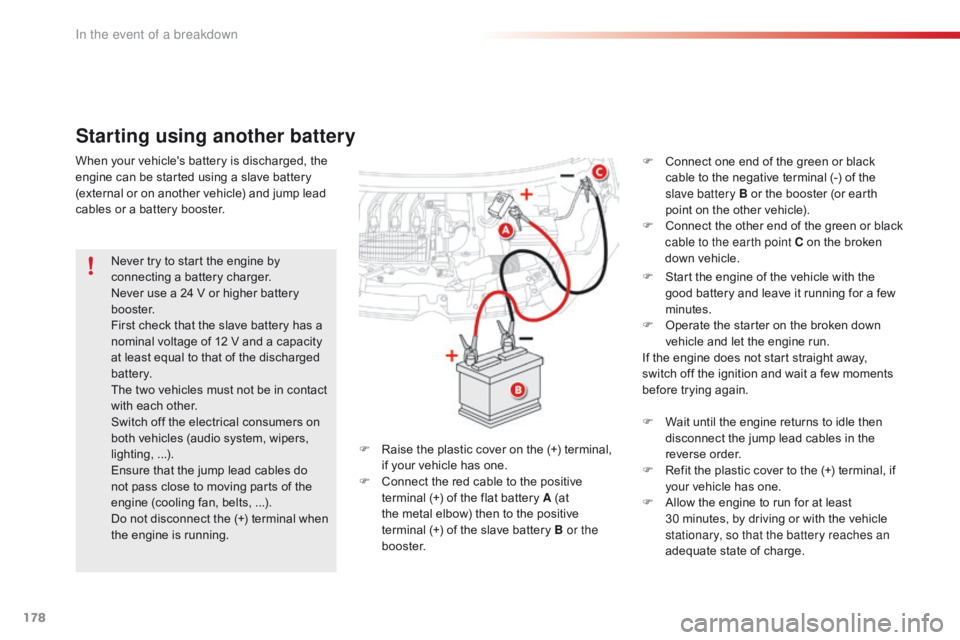
F
R
aise
the
plastic
cover
on
the
(+)
terminal,
i
f
your
vehicle
has
one.
F
C
onnect
the
red
cable
to
the
positive
t
erminal
(+)
of
the
flat
battery
A
(at
t
he
metal
elbow)
then
to
the
positive
t
erminal (+)
of
the
slave
battery
B or the
b o o s t e r. F
C
onnect one end of the green or black
c
able to the negative terminal (-) of the
s
lave battery B or the booster (or earth
p
oint on the other vehicle).
F
C
onnect
t
he
o
ther
e
nd
o
f
t
he
g
reen
o
r
b
lack
c
able to the earth point C on the broken
d
own vehicle.
In the event of a breakdown
Page 187 of 269
185
C1_en_Chap10a_ Autoradio-Toyota-tactile-1_ed01-2016
7-inch touch screen tablet
Multimedia system - Bluetooth® telephone - Mirror Screen® - GPS navigation
First steps 186
Steering mounted controls
1
88
Menus
18
9
Audio
source
1
90
Radio
19
4
DAB
(Digital Audio Broadcasting) radio
1
96
Media
19
8
Telephone
2
02
Configuration
20
8
Mirror Screen
® - iPhone® connections 2 12
Mirror Screen® - MirrorLinkTM connections 2 16
Navigation
2
20
Frequently
asked
questions
2
31
As
a
safety
measure,
the
driver
must
carry
out
operations which
r
equire
prolonged
attention
while
the
vehicle
is
stationary.
To
prevent
discharging
of
the
battery,
the
system cuts off
f
ollowing
activation
of
energy
economy
mode,
20 minutes after
s
witching
off
the
engine
on
vehicles
fitted
with
the Keyless Entry
a
nd
Starting
system. Contents
The
temperature
of
a
telephone
may
increase
when
connected
b
y
MirrorLink
TM. In this case, the telephone battery discharges as a
safety
measure.
.
Audio and Telematics
Page 188 of 269
186
C1_en_Chap10a_ Autoradio-Toyota-tactile-1_ed01-2016
In the event of prolonged exposure to sunlight and very hot conditions, the
s
ystem may go into stand-by (screen
a
nd sound completely off) for at least
5 m
inutes.
Return
to normal operation takes
p
lace when the temperature in the
p
assenger
c
ompartment
d
rops.
First steps
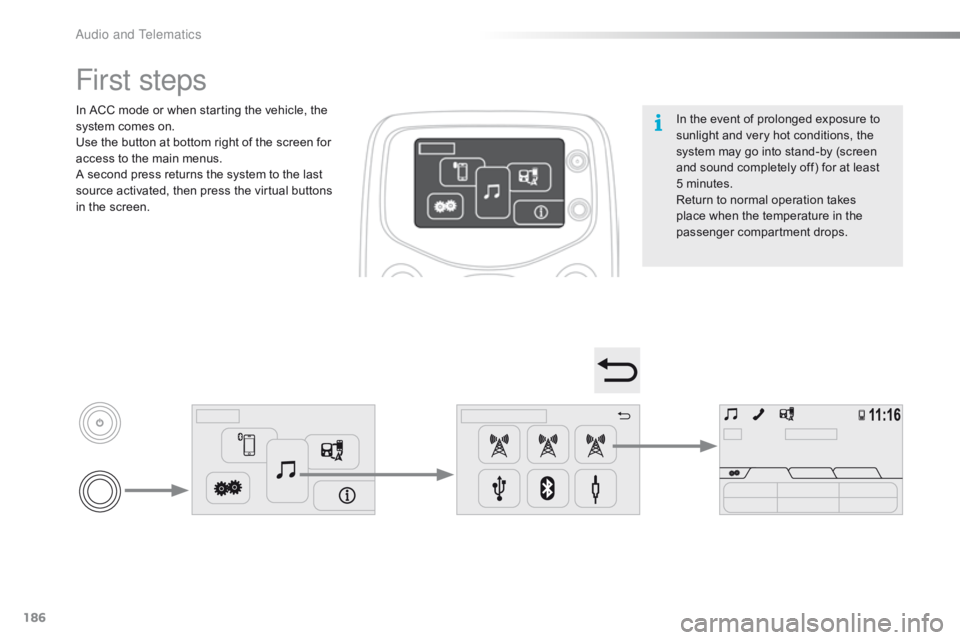
In ACC mode or when starting the vehicle, the system comes on.
Use
the button at bottom right of the screen for
a
ccess to the main menus.
A
second press returns the system to the last
s
ource activated, then press the virtual buttons
i
n the screen.
Audio and Telematics
Page 189 of 269
187
C1_en_Chap10a_ Autoradio-Toyota-tactile-1_ed01-2016
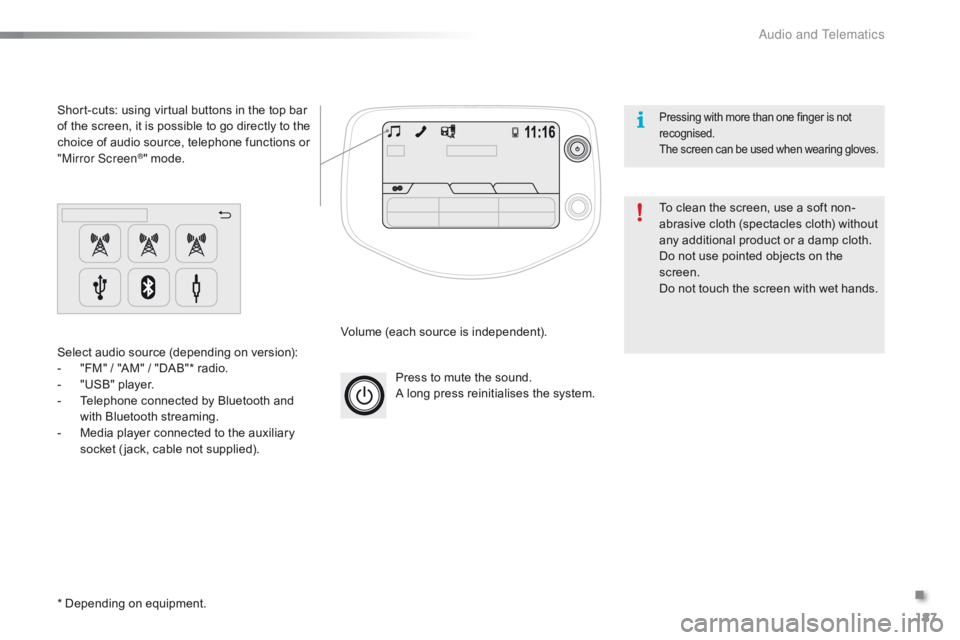
Press to mute the sound.
A long press reinitialises the system.
Volume
(each source is independent).
Select
audio
source
(depending
on
version):
-
"
FM"
/
"AM"
/
"DAB"*
radio.
-
"
USB"
player.
-
T
elephone
connected
by
Bluetooth
and
w
ith
Bluetooth
streaming.
-
M
edia
player
connected
to
the
auxiliary
s
ocket
( jack,
cable
not
supplied).
Short-cuts:
using
virtual
buttons
in
the
top
bar
o
f
the
screen,
it
is
possible
to
go
directly
to
the
c
hoice
of
audio
source,
telephone
functions
or
"
Mirror Screen
®" mode.
*
Depending
on
equipment. To
clean the screen, use a soft non-
abrasive
cloth (spectacles cloth) without
a
ny additional product or a damp cloth.
Do
not use pointed objects on the
sc
reen.
Do
not touch the screen with wet hands.
Pressing with more than one finger is not recognised.
The
s
creen
c
an
b
e
u
sed
w
hen
w
earing
g
loves.
.
Audio and Telematics
Page 191 of 269

189
C1_en_Chap10a_ Autoradio-Toyota-tactile-1_ed01-2016
Menus
Audio sourceConfiguration
Telephone
Connection Vehicle information
Select an audio source, a radio station, view p
hotos or videos. Adjust
settings for sounds or brightness a
nd activate or deactivate certain settings
a
ccording to use.
Connect a telephone by Bluetooth®.
Run
certain
applications
on
a
your
smartphone
i
n
the
touch
screen.
Enter
navigation
settings
and
select
a
d
estination. Access
the
trip
computer.
.
Audio and Telematics
Page 192 of 269

190
C1_en_Chap10a_ Autoradio-Toyota-tactile-1_ed01-2016
Audio source
Level 1Level 2 Level 3
Audio and Telematics
Page 193 of 269
191
C1_en_Chap10a_ Autoradio-Toyota-tactile-1_ed01-2016
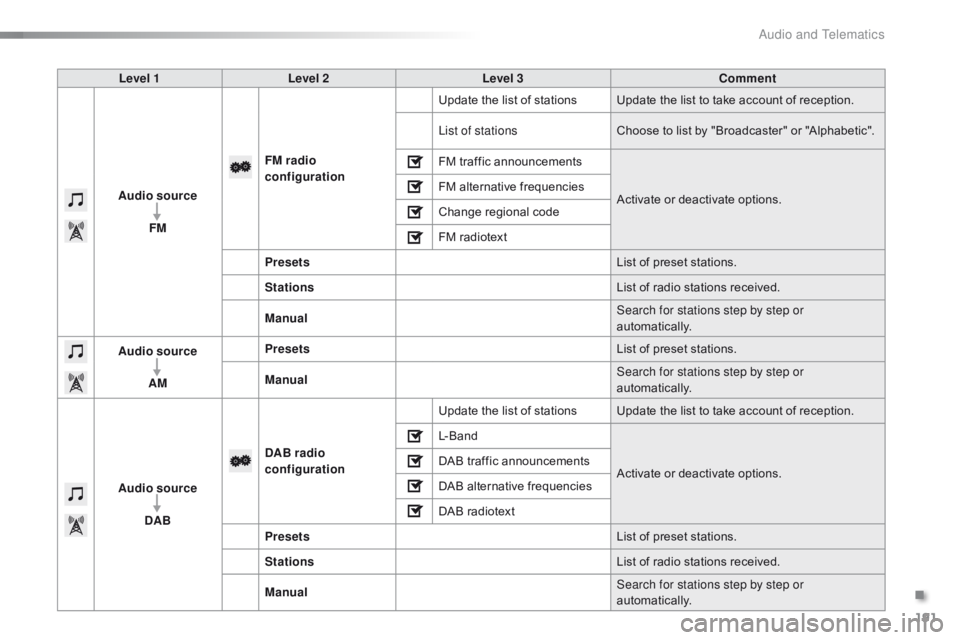
Level 1Level 2 Level 3 Comment
Audio source FM FM
radio
configuration Update
the list of stations Update the list to take account of reception.
List of stations Choose
to list by "Broadcaster" or "Alphabetic".
FM
traffic announcementsActivate
or deactivate options.
FM
alternative frequencies
Change
r
egional
c
ode
FM
radiotext
Presets List
of preset stations.
Stations List
of radio stations received.
Manual Search for stations step by step or
automatically.
Audio source
AM Presets
List
of preset stations.
Manual Search for stations step by step or
automatically.
Audio source DAB DAB radio
configuration
Update
the list of stations Update the list to take account of reception.
L- B a n d
Activate
or deactivate options.
DAB
traffic announcements
DAB
alternative frequencies
DAB
radiotext
Presets List
of preset stations.
Stations List
of radio stations received.
Manual Search for stations step by step or
automatically.
.
Audio and Telematics
Page 194 of 269

192
C1_en_Chap10a_ Autoradio-Toyota-tactile-1_ed01-2016
Level 1Level 2Level 3
Audio and Telematics
Page 195 of 269

193
C1_en_Chap10a_ Autoradio-Toyota-tactile-1_ed01-2016
Level 1Level 2 Level 3 Comment
Audio source USB Scan
Choose
the play setting.
Random play
Repeat play
Previous track
Play
Next track
Audio source
Bluetooth audio Telephone
First
connection, refer to the telephone section.
Audio play System
c
onfigurationActivate
or deactivate options.
Random
p
layChoose
the play setting.
Repeat play
Previous
track
Play
Next
track
Audio source A / V Screen format
Normal
Choose
the most suitable screen format.
Stretched
Zoom
Full screen Display
in full screen mode.
.
Audio and Telematics