Speed limiter CITROEN C1 2021 Owners Manual
[x] Cancel search | Manufacturer: CITROEN, Model Year: 2021, Model line: C1, Model: CITROEN C1 2021Pages: 269, PDF Size: 7.63 MB
Page 4 of 269
.
.
C1_en_Chap00a_sommaire_ed01-2016
Instrument panels 11
Display screens
1
3
Indicator
and warning lamps
1
5
Indicators
2
6
Trip
computer
2
7
Setting
the time
2
9
InstrumentsOver view
Keys 31
K eyless Entry and Starting system
3
4
Doors
3
8
Boot
3
9
Front
electric windows
4
1
Rear
quarter windows
4
1
Electric
fa
bric
ro
of
4
2
Access
Front seats 46
Rear seats
4
8
Mirrors
5
0
Steering
wheel adjustment
5
1
Ventilation
5
2
Heating
5
4
Manual
a
ir
c
onditioning
5
5
Automatic
air conditioning
5
7
Front
demist - defrost
6
0
Rear
screen demist - defrost
6
1
Courtesy
lamp
6
2
Boot
lamp
6
2
Interior
fittings
6
3
Rear
parcel shelf
6
7
Boot
fittings
6
8
Ease of use a nd c omfort
Driving recommendations 7 0
Starting - switching off the engine
with
the key
7
1
Starting
- switching off the engine with
t
he Keyless Entry and Starting system
7
2
Manual
par
king
b
rake
7
6
5 -speed
manual gearbox
7
6
ETG
electronic gearbox
7
7
Gear
shift indicator
8
1
Hill
start assist
8
2
Stop
& Start
8
3
Speed
limiter
8
6
Reversing
camera
9
2
Lane
departure warning system
9
3
Under-inflation
d
etection
9
5
Driving
Eco-driving
Contents
Page 9 of 269
7
C1_en_Chap00b_vue-ensemble_ed01-2016
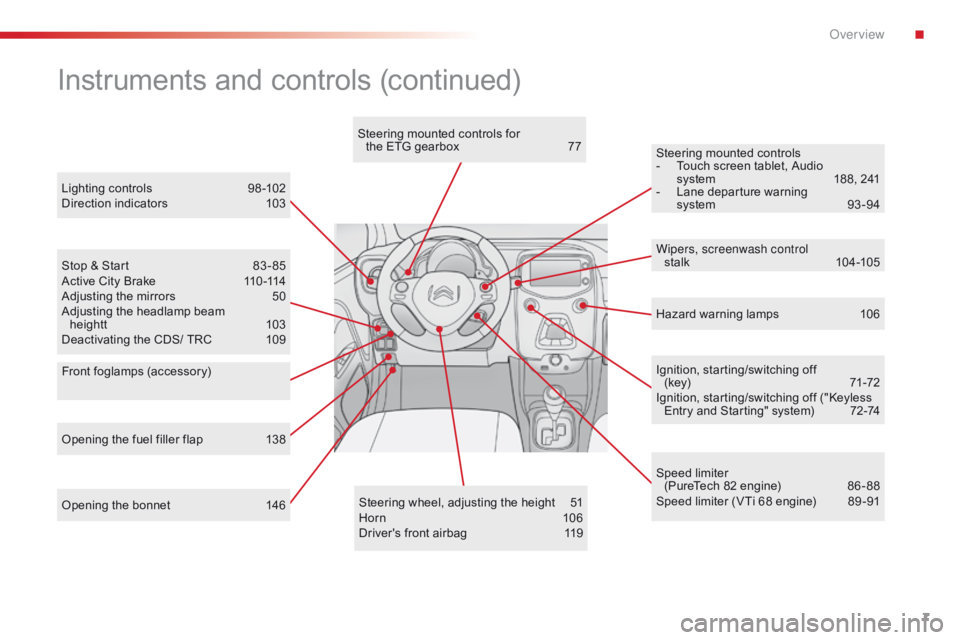
Opening the bonnet 146Steering wheel, adjusting the height 5 1
Horn 10 6
Driver's
front airbag
1
19Ignition,
starting/switching off
(key)
7
1-72
Ignition, starting/switching off ("Keyless
E
ntry and Starting" system)
7
2-74
Steering mounted controls
-
T
ouch screen tablet, Audio
s
ystem
1
88, 241
-
L
ane departure warning
s
ystem
9
3 -94
Instruments and controls (continued)
Lighting controls 9
8 -102
Direction indicators 1 03
Stop
& Start
8
3 - 85
Active
City Brake
1
10 -114
Adjusting
the mirrors
5
0
Adjusting
the headlamp beam
heightt
1
03
Deactivating
the CDS/ TRC
1
09 Wipers, screenwash control
stalk
10
4 -105
Speed
limiter
(PureTech
82 engine)
8
6 - 88
Speed
limiter (VTi 68 engine)
8
9 -91
Opening
the fuel filler flap
1
38 Hazard
warning lamps
1
06
Steering
mounted controls for
the ETG gearbox
7
7
Front foglamps (accessory)
.
Over view
Page 21 of 269
19
C1_en_Chap01_instrument- de-bord_ed01-2016
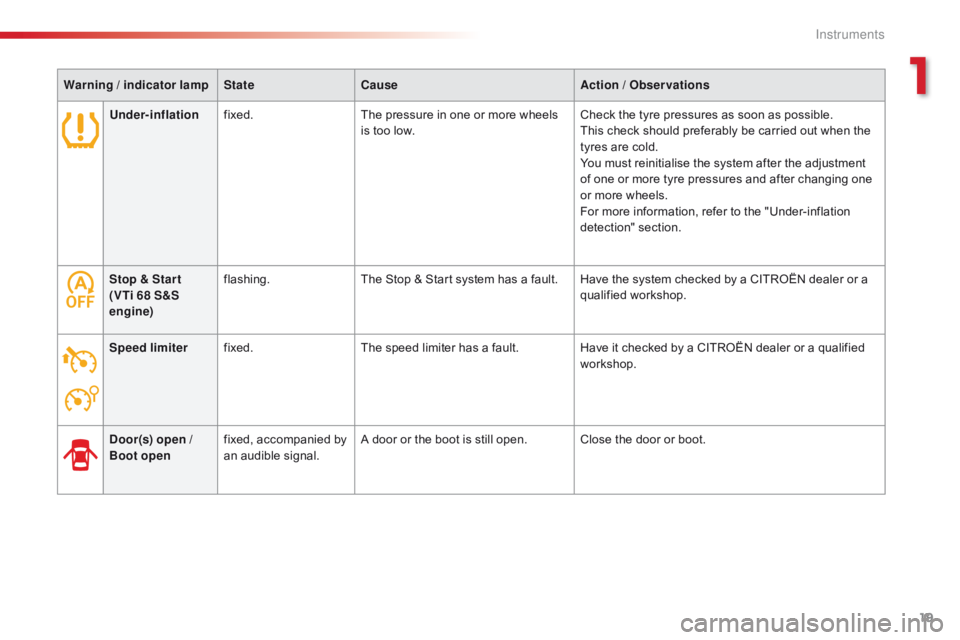
Stop & Star t
(VTi 68 S&S
engine)flashing.
The Stop & Start system has a fault. Have the system checked by a CITROËN dealer or a q
ualified w orkshop.
Speed limiter fixed. The
speed limiter has a fault.Have
it checked by a CITROËN dealer or a qualified
w
orkshop.
Door(s) open
/
Boot open fixed,
accompanied by
a
n audible signal.A
door or the boot is still open. Close the door or boot.
Warning
/ indicator lamp
State Cause Action
/ Observations
Under-inflation fixed. The pressure in one or more wheels
i
s too low.
Check the tyre pressures as soon as possible.
This check should preferably be carried out when the
t
yres are cold.
You must reinitialise the system after the adjustment
o
f one or more tyre pressures and after changing one
o
r more wheels.
For more information, refer to the "Under-inflation
d
etection"
s
ection.
1
Instruments
Page 25 of 269

23
C1_en_Chap01_instrument- de-bord_ed01-2016
Warning / indicator lamp State Cause Action / Observations
Gear shift
indicator fixed.
You
can change up.For
more information, refer to the corresponding
s
ection.
You
can change down (only for the
V
Ti 68 engine).
Speed limiter
(VTi 68 engine) fixed.
The
speed limiter is active.
Lane departure
warning system fixed.
The
button has been pressed. The lane departure warning system has been
a
ctivated.
For
more information, refer to the corresponding
s
ection.
fixed. The
system is operational: it has detected road
m
arkings to the left and /or right.
For
more information, refer to the corresponding
s
ection.
Active City
Brake fixed.
The
button has been pressed.
The
configuration of the system has
be
en
mo
difiied.The
Active City Brake system has been activated.
For
more information, refer to the corresponding
s
ection.
1
Instruments
Page 68 of 269
66
C1_en_Chap03_ergonomie-confort_ed01-2016
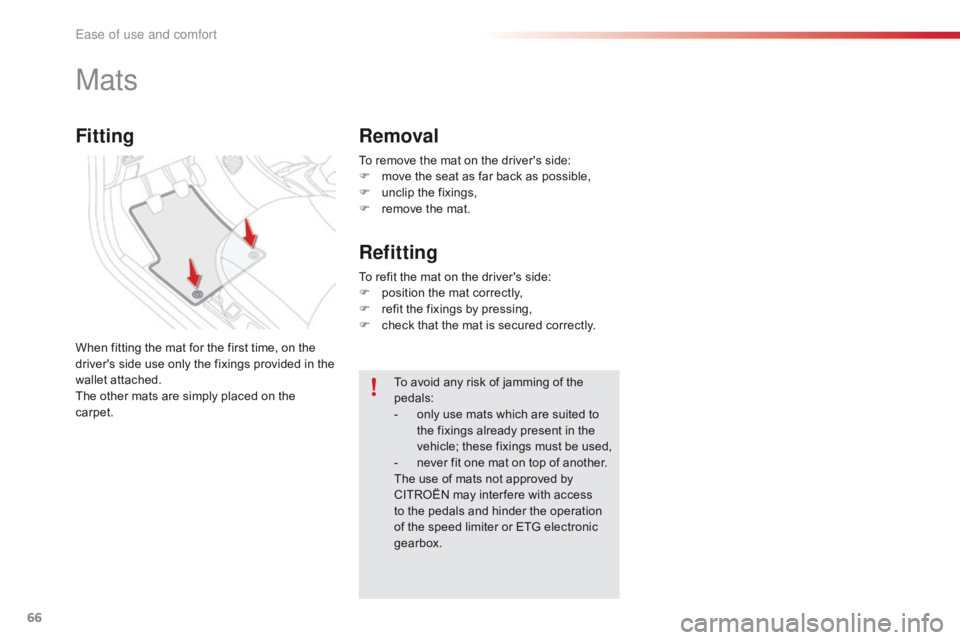
To remove the mat on the driver's side:
F m ove the seat as far back as possible,
F
u
nclip the fixings,
F
r
emove the mat.
Mats
When fitting the mat for the first time, on the driver's side use only the fixings provided in the
w
allet attached.
The
other mats are simply placed on the
c
arpet. To
avoid any risk of jamming of the
ped
als:
-
o
nly use mats which are suited to
t
he fixings already present in the
v
ehicle; these fixings must be used,
-
n
ever fit one mat on top of another.
The
use of mats not approved by
C
ITROËN may inter fere with access
t
o the pedals and hinder the operation
o
f the speed limiter or ETG electronic
g
earbox.
To
refit the mat on the driver's side:
F
p
osition the mat correctly,
F
r
efit the fixings by pressing,
F
c
heck that the mat is secured correctly.
Fitting
Removal
Refitting
Ease of use and comfort
Page 88 of 269
86
C1_en_Chap04_conduite_ed01-2016
The speed limiter cannot, in any circumstances, replace the need to o
bserve speed limits, nor can it replace the
n
eed for vigilance on the part of the driver.
Speed limiter (PureTech 82 engine)
The speed limiter is switched on manually: t
his can be done whatever the speed of the
v
ehicle. However, if you are driving at less than
2
0 mph (30 km/h), the programmed speed will
b
e fixed at 20 mph (30 km/h).
The
speed limiter is paused by operation of the
control.
The
programmed speed can be exceeded
t
emporarily by pressing the accelerator firmly
b
eyond the point of resistance.
To
return to the programmed speed, simply
r
elease the accelerator pedal until the vehicle
r
eturns to the programmed speed limit.
System
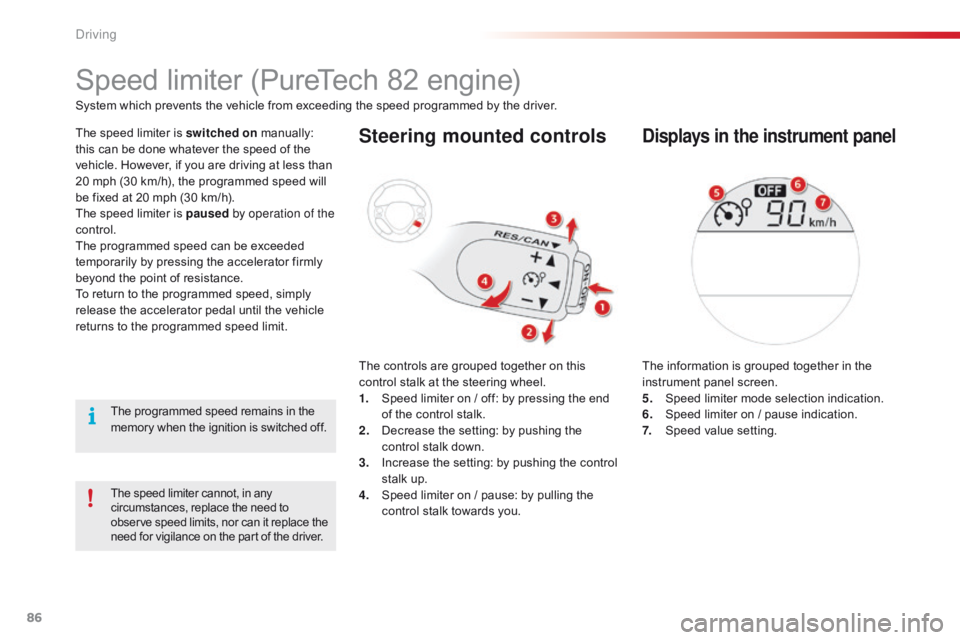
which prevents the vehicle from exceeding the speed programmed by the driver.Steering mounted controls
The controls are grouped together on this c
ontrol stalk at the steering wheel.
1.
S
peed limiter on / off: by pressing the end
o
f the control stalk.
2.
D
ecrease the setting: by pushing the
c
ontrol stalk down.
3.
I
ncrease the setting: by pushing the control
s
talk up.
4.
S
peed limiter on / pause: by pulling the
c
ontrol stalk towards you.
Displays in the instrument panel
The information is grouped together in the instrument panel screen.
5.
S
peed limiter mode selection indication.
6.
S
peed limiter on / pause indication.
7.
S
peed value setting.
The
programmed
speed
remains
in
the
m
emory
when
the
ignition
is
switched
off.
Driving
Page 89 of 269
87
C1_en_Chap04_conduite_ed01-2016
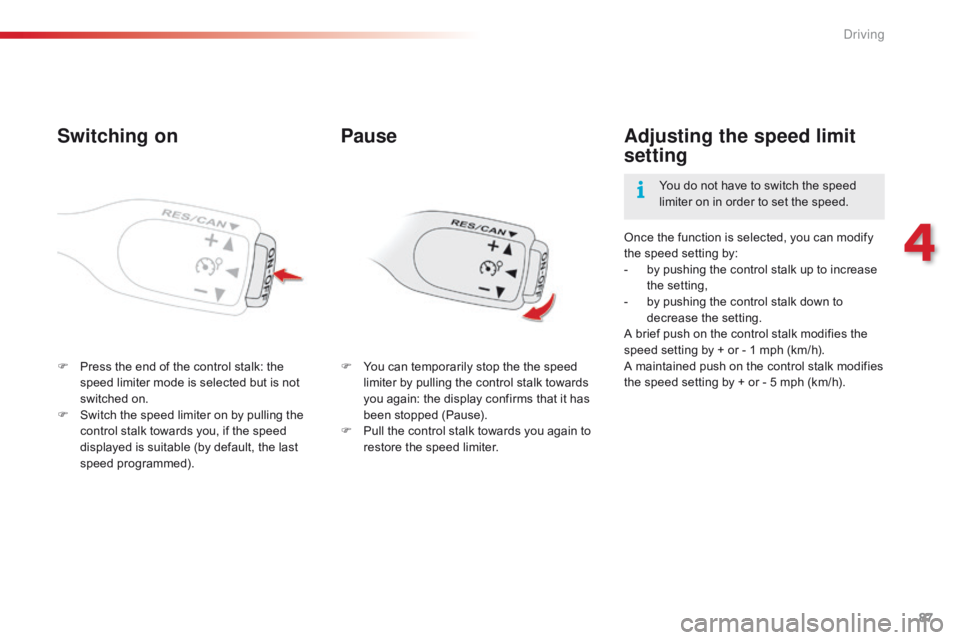
Switching on
F Press the end of the control stalk: the s
peed limiter mode is selected but is not
s
witched on.
F
S
witch the speed limiter on by pulling the
c
ontrol stalk towards you, if the speed
d
isplayed is suitable (by default, the last
s
peed
pro
grammed). Once
the function is selected, you can modify
t
he speed setting by:
-
b
y pushing the control stalk up to increase
t
he
se
tting,
-
b
y pushing the control stalk down to
d
ecrease
t
he
se
tting.
A brief push on the control stalk modifies the
s
peed setting by + or - 1 mph (km/h).
A maintained push on the control stalk modifies t
he speed setting by + or - 5 mph (km/h).
Adjusting the speed limit
setting
You do not have to switch the speed l
imiter on in order to set the speed.
Pause
F You can temporarily stop the the speed l
imiter by pulling the control stalk towards
y
ou again: the display confirms that it has
b
een stopped (Pause).
F
P
ull the control stalk towards you again to
r
estore the speed limiter.
4
Driving
Page 90 of 269
88
C1_en_Chap04_conduite_ed01-2016
Switching off
F Press the end of the control stalk. T
he display of information related to the
sp
eed
l
imiter
d
isappears.
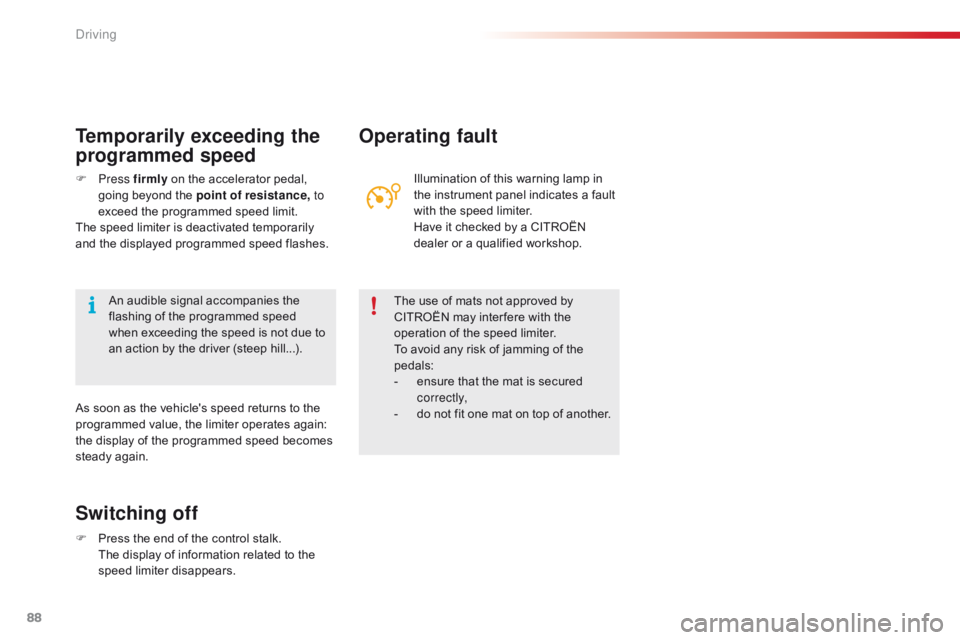
Operating fault
Illumination of this warning lamp in the instrument panel indicates a fault
w
ith the speed limiter.
Have
it checked by a CITROËN
d
ealer or a qualified workshop.
The
use of mats not approved by
C
ITROËN may inter fere with the
o
peration of the speed limiter.
To
avoid any risk of jamming of the
ped
als:
-
e
nsure that the mat is secured
c
o r r e c t l y,
-
d
o not fit one mat on top of another.
Temporarily exceeding the
programmed speed
F Press f irmly on the accelerator pedal, g
oing beyond the point of resistance, to
exceed
the programmed speed limit.
The
speed limiter is deactivated temporarily
a
nd the displayed programmed speed flashes.
As
soon as the vehicle's speed returns to the
p
rogrammed value, the limiter operates again:
t
he display of the programmed speed becomes
s
teady again.
An
audible signal accompanies the
f
lashing of the programmed speed
w
hen exceeding the speed is not due to
a
n action by the driver (steep hill...).
Driving
Page 91 of 269

89
C1_en_Chap04_conduite_ed01-2016
Speed limiter (VTi 68 engine)
System which prevents the vehicle from exceeding the speed programmed by the driver.
T he speed limiter is switched on
m
anually:
t
his can be done whatever the speed of the
v
ehicle. However, if you are driving at less than
2
0 mph (30 km/h), the programmed speed will
b
e fixed at 20 mph (30 km/h).
The
speed limiter is paused by operation of the
control.
The
programmed speed can be exceeded
t
emporarily by pressing the accelerator firmly
b
eyond the point of resistance.
To
return to the programmed speed, simply
r
elease the accelerator pedal until the vehicle
r
eturns to the programmed speed limit.
The
programmed limit speed is erased
w
hen switching off the ignition.
Steering mounted controls
The controls are grouped together on this control stalk at the steering wheel.
1.
S
peed limiter on / off: by pressing the end
o
f the control stalk.
2.
P
rogramming the speed
D
ecrease the setting: by pushing the
c
ontrol stalk down.
3.
R
estore speed limiter
I
ncrease the setting: by pushing the control
s
talk up.
4.
P
ause speed limiter: by pulling the control
s
talk towards you.
Displays in the instrument panel
The information is grouped together in the instrument panel screen.
5.
S
peed limiter on / pause indication.
6.
S
peed value setting.
The speed limiter cannot, in any circumstances, replace the need to observe s
peed limits, nor can it replace the need for
v
igilance on the part of the driver.
If you choose to display other information (trip A
for example), the speed limiter
i
nformation is automatically displayed again
a
fter about 6 seconds.
4
Driving
Page 92 of 269

90
C1_en_Chap04_conduite_ed01-2016
F Press the end of the control stalk: the s
peed limiter is switched on.
F
A
ccelerate or decelerate to attain the
de
sired
s
peed.
F
P
ush the control stalk down and release, to
p
rogramme the speed.
T
he speed at which the vehicle is running
a
t the moment when you release the
c
ontrol stalk becomes the programmed
s
peed.
Adjusting the speed limit
setting
Once a speed is programmed, you can modify it by pushing and releasing the control stalk:
-
u
p to increase the speed setting,
-
d
own to reduce the speed setting.
A
brief push on the control stalk modifies the
s
peed setting by + or - 1 mph (km/h).
A
maintained push on the control stalk modifies
t
he speed setting by + or - 5 mph (km/h).
Switching on
This indicator lamp comes on in the instrument pan el.
Pause
F You can temporarily stop the the speed l
imiter by pulling the control stalk towards
yo
u.
F
P
ush the control stalk up to restore
o
peration of the speed limiter with the
s
ame speed setting.
Driving