service Citroen C1 RHD 2014 1.G User Guide
[x] Cancel search | Manufacturer: CITROEN, Model Year: 2014, Model line: C1 RHD, Model: Citroen C1 RHD 2014 1.GPages: 256, PDF Size: 5.59 MB
Page 203 of 256
05
201
The services available depend on the network, the SIM card and the
compatibility of the Bluetooth telephone used. Check the telephone
manual and with your network provider for details of the services
available to you.
The profiles compatible with the system are: HFP, OPP, PBAP,
A2DP, AVRCP, MAP.
BLUETOOTH
Automatic reconnection
When the ignition is switched on, the last telephone connected
when the ignition was switched off reconnects automatically, if this
connection made had been activated during the pairing procedure
(see previous pages).
Connection is confirmed by the display of a message and the name
of the telephone.
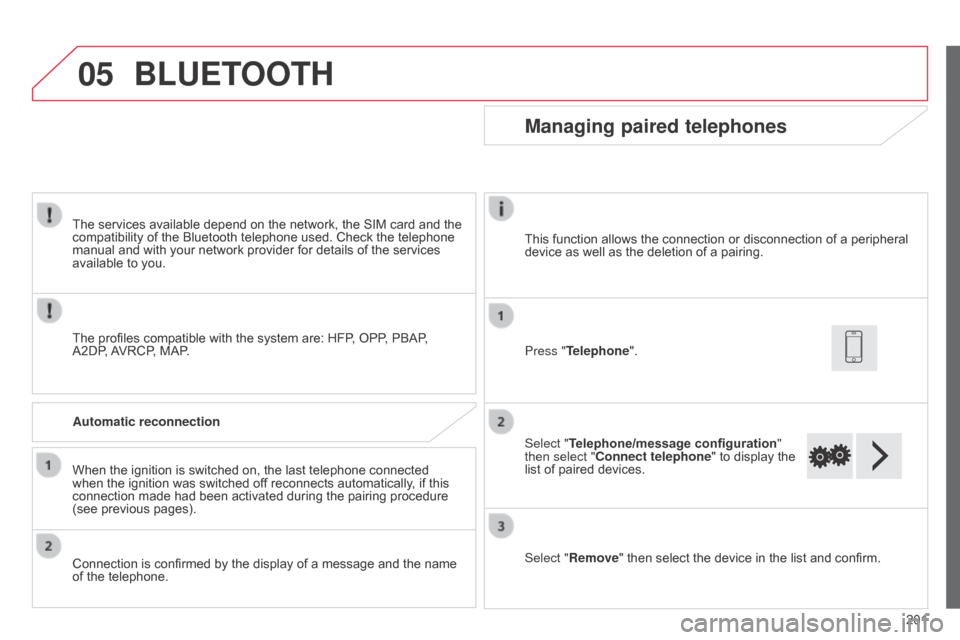
Managing paired telephones
Press "Telephone".
Select "Telephone/message configuration
"
then select "Connect telephone" to display the
list of paired devices.
Select "Remove " then select the device in the list and confirm.
This function allows the connection or disconnection of a peripheral
device as well as the deletion of a pairing.
Page 219 of 256
217
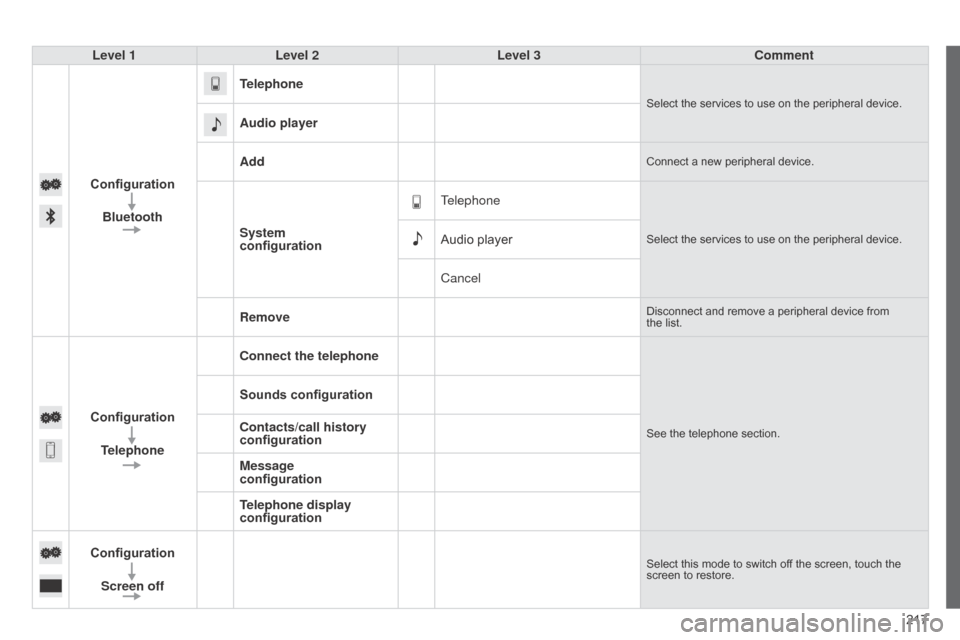
Level 1
Level 2 Level 3 Comment
Configuration Bluetooth Telephone
Select the services to use on the peripheral device.
Audio player
Add
Connect a new peripheral device.
System
configuration
TelephoneSelect the services to use on the peripheral device.Audio player
Cancel
Remove
Disconnect and remove a peripheral device from
the list.
Configuration
Telephone Connect the telephoneSee the telephone section.
Sounds configuration
Contacts/call history
configuration
Message
configuration
Telephone display
configuration
Configuration Screen off
Select this mode to switch off the screen, touch the
screen to restore.
Page 220 of 256
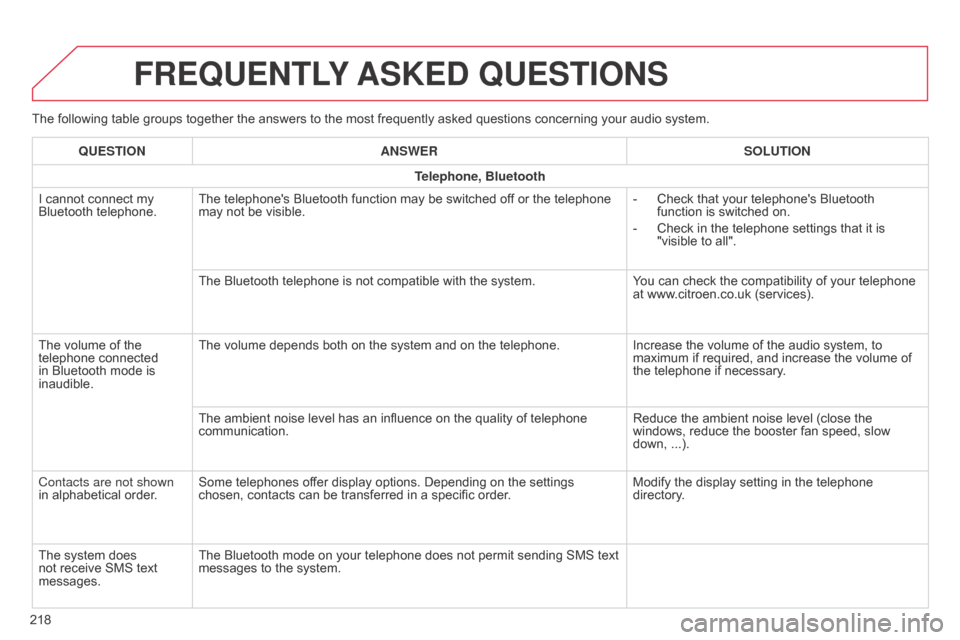
The following table groups together the answers to the most frequently asked questions concerning your audio system.
FREQUENTLY ASKED QUESTIONS
218QUESTION
ANSWER SOLUTION
Telephone, Bluetooth
I cannot connect my
Bluetooth telephone. The telephone's Bluetooth function may be switched off or the telephone
may not be visible. -
Check that your telephone's Bluetooth
function is switched on.
-
Check in the telephone settings that it is
"visible to all".
The Bluetooth telephone is not compatible with the system. Y
ou can check the compatibility of your telephone
at www.citroen.co.uk (services).
The volume of the
telephone connected
in Bluetooth mode is
inaudible. The volume depends both on the system and on the telephone.
Increase the volume of the audio system, to
maximum if required, and increase the volume of
the telephone if necessary.
The ambient noise level has an influence on the quality of telephone
communication. Reduce the ambient noise level (close the
windows, reduce the booster fan speed, slow
down, ...).
Contacts are not shown
in alphabetical order. Some telephones offer display options. Depending on the settings
chosen, contacts can be transferred in a specific order. Modify the display setting in the telephone
directory.
The system does
not receive SMS text
messages. The Bluetooth mode on your telephone does not permit sending SMS text
messages to the system.
Page 236 of 256
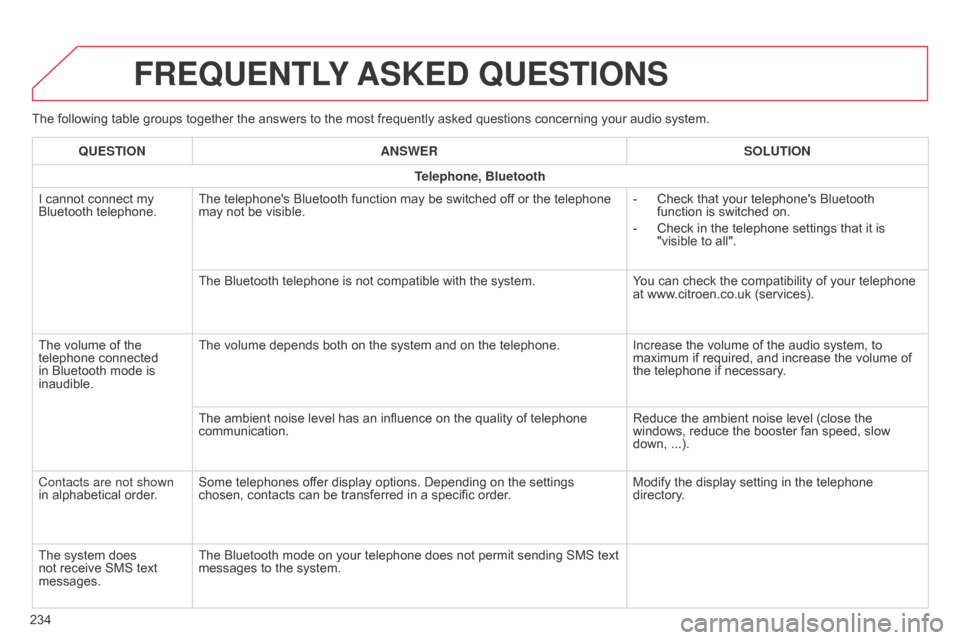
The following table groups together the answers to the most frequently asked questions concerning your audio system.
FREQUENTLY ASKED QUESTIONS
234QUESTION
ANSWER SOLUTION
Telephone, Bluetooth
I cannot connect my
Bluetooth telephone. The telephone's Bluetooth function may be switched off or the telephone
may not be visible. -
Check that your telephone's Bluetooth
function is switched on.
-
Check in the telephone settings that it is
"visible to all".
The Bluetooth telephone is not compatible with the system. Y
ou can check the compatibility of your telephone
at www.citroen.co.uk (services).
The volume of the
telephone connected
in Bluetooth mode is
inaudible. The volume depends both on the system and on the telephone.
Increase the volume of the audio system, to
maximum if required, and increase the volume of
the telephone if necessary.
The ambient noise level has an influence on the quality of telephone
communication. Reduce the ambient noise level (close the
windows, reduce the booster fan speed, slow
down, ...).
Contacts are not shown
in alphabetical order. Some telephones offer display options. Depending on the settings
chosen, contacts can be transferred in a specific order. Modify the display setting in the telephone
directory.
The system does
not receive SMS text
messages. The Bluetooth mode on your telephone does not permit sending SMS text
messages to the system.