radio Citroen C1 RHD 2015 1.G User Guide
[x] Cancel search | Manufacturer: CITROEN, Model Year: 2015, Model line: C1 RHD, Model: Citroen C1 RHD 2015 1.GPages: 260, PDF Size: 6.35 MB
Page 196 of 260
194
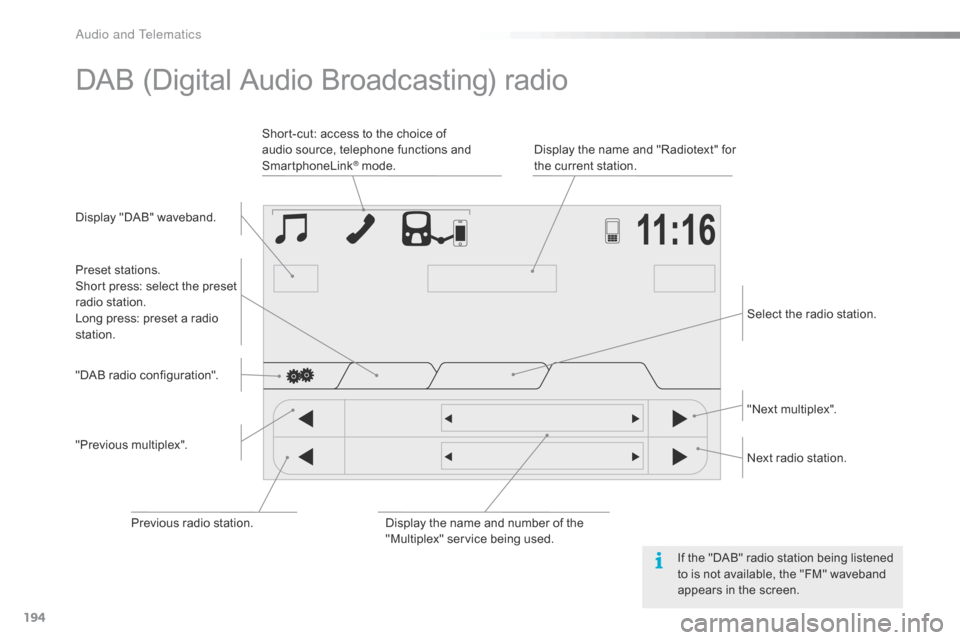
DAB (Digital Audio Broadcasting) radio
Display "DAB" waveband.Display the name and "Radiotext" for
the current station.
Short-cut: access to the choice of
audio source, telephone functions and
SmartphoneLink
® mode.
Select the radio station.
Preset stations.
Short press: select the preset
radio station.
Long press: preset a radio
station.
"Next multiplex".
Next radio station.
Display the name and number of the
"Multiplex" service being used.
"Previous multiplex". "DAB radio configuration".
Previous radio station. If the "DAB" radio station being listened
to is not available, the "FM" waveband
appears in the screen.
Audio and Telematics
Page 197 of 260
195
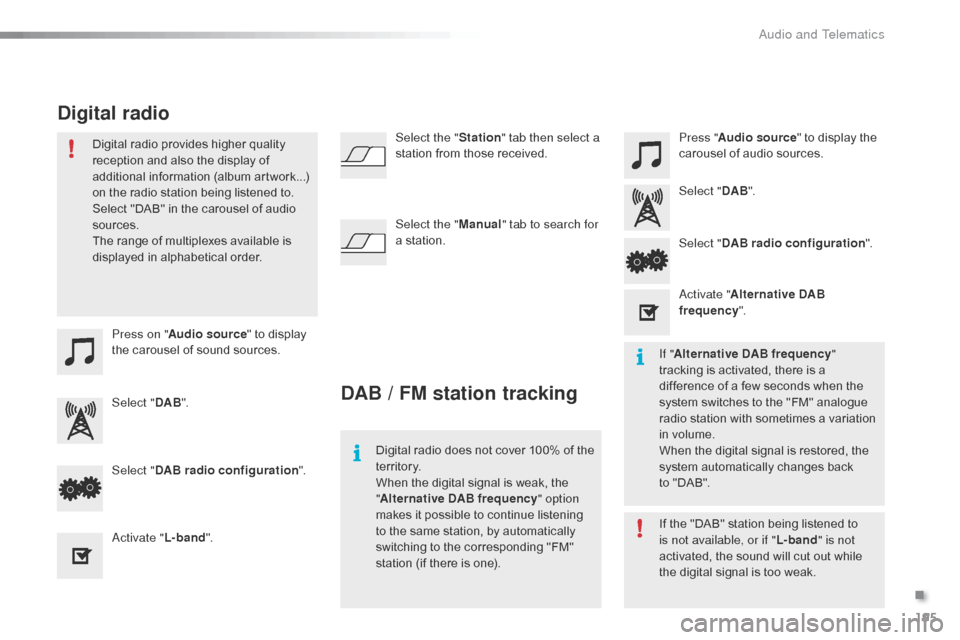
Press on "Audio source " to display
the carousel of sound sources. Press "
Audio source " to display the
carousel of audio sources.
Select " DAB". Select "
DAB".
Select " DAB radio configuration ".
Activate " L-band". Select "
DAB radio configuration ".
Activate " Alternative DAB
frequency ".
Select the "
Station" tab then select a
station from those received.
Select the " Manual" tab to search for
a station.
Digital radio provides higher quality
reception and also the display of
additional information (album artwork...)
on the radio station being listened to.
Select "DAB" in the carousel of audio
sources.
The range of multiplexes available is
displayed in alphabetical order.
Digital radio does not cover 100% of the
te r r i to r y.
When the digital signal is weak, the
"Alternative DAB frequency " option
makes it possible to continue listening
to the same station, by automatically
switching to the corresponding "FM"
station (if there is one). If the "DAB" station being listened to
is not available, or if "
L-band" is not
activated, the sound will cut out while
the digital signal is too weak. If " Alternative DAB frequency "
tracking is activated, there is a
difference of a few seconds when the
system switches to the "FM" analogue
radio station with sometimes a variation
in volume.
When the digital signal is restored, the
system automatically changes back
to
"DAB".
DAB / FM station tracking
Digital radio
.
Audio and Telematics
Page 222 of 260

220
Radio
QUESTIONANSWER SOLUTION
The quality of reception of
the radio station listened
to gradually deteriorates
or the stored stations do
not function (no sound,
87.5
Mhz is displayed...). The vehicle is too far from the transmitter used by the station
listened to or there is no transmitter in the geographical area
through which the vehicle is travelling.
Activate the "RDS" function to enable the system
to check whether there is a more power ful
transmitter in the geographical area.
The environment (hills, buildings, tunnels, basement car parks...)
block reception, including in RDS mode. This phenomenon is normal and does not
indicate a fault with the audio system.
The aerial is absent or has been damaged (for example when going
through a car wash or into an underground car park). Have the aerial checked by a CITROËN dealer.
I cannot find some radio
stations in the list of
stations received. The station is not received or its name has changed in the list.
The name of the radio
station changes. Some radio stations send other information in place of their name
(the title of the song for example).
The system interprets this information as the name of the station.
Audio and Telematics
Page 223 of 260

221
Settings, configuration
QUESTIONANSWER SOLUTION
There is a difference in
sound quality between the
different audio sources
(radio, USB...). For optimum sound quality, the audio settings (Volume, Treble,
Medium, Bass) can be adapted to the different sound sources,
which may result in audible differences when changing source
(radio, USB...). Check that the audio settings are adapted to
the sources listened to. It is advisable to select
automatic sound adjustment (Low, Medium,
High).
Check the quality and format of your recording.
With the engine off, the
system switches off after a
few minutes of use. When the engine is switched off, the system's operating time
depends on the battery charge.
The switch-off is normal: the system changes to economy mode
and switches off to preserve the state of charge of the vehicle's
battery. Start the vehicle's engine to increase the battery
charge.
.
Audio and Telematics
Page 225 of 260
223
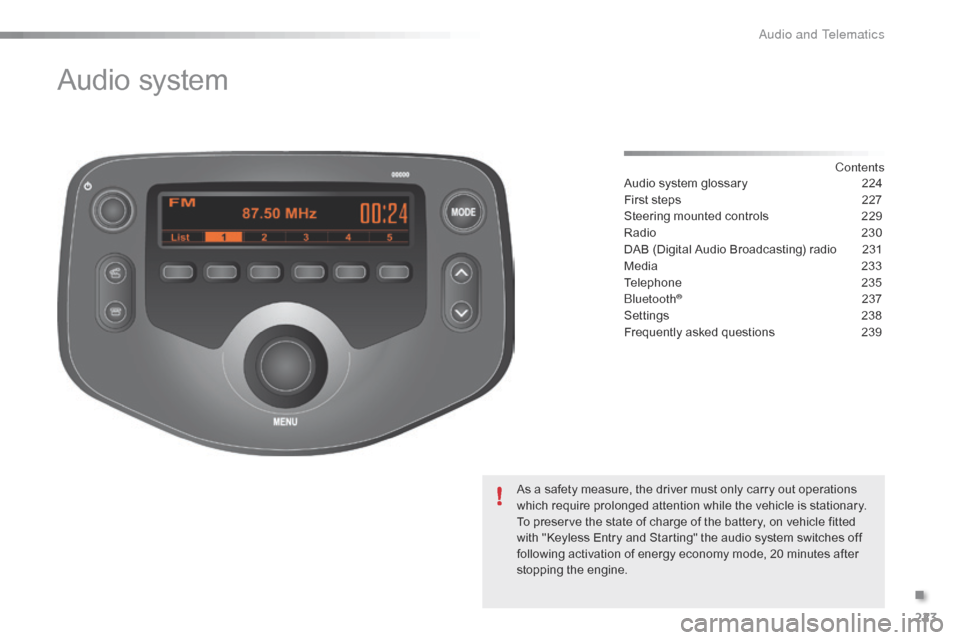
Audio system
Contents
Audio system glossary
2 24
First steps
2
27
Steering mounted controls
2
29
Radio
2
30
DAB (Digital Audio Broadcasting) radio
2
31
Media
23
3
Telephone
2
35
Bluetooth
® 2 37
Settings
2
38
Frequently asked questions
2
39
As a safety measure, the driver must only carry out operations
which require prolonged attention while the vehicle is stationary.
To preserve the state of charge of the battery, on vehicle fitted
with "Keyless Entry and Starting" the audio system switches off
following activation of energy economy mode, 20 minutes after
stopping the engine.
.
Audio and Telematics
Page 227 of 260

225
Menu itemSignificance /
Corresponding action
Incoming calls Incoming calls.
List Audio Display the list of registered audio
devices.
List Phone Display the list of registered
telephones.
Missed calls Missed calls.
No entry No data available.
No history No history available.
No connected Not connected.
Outgoing calls Outgoing calls.
Overwrite all Replace all.
Pairing Connect a device by Bluetooth.
Menu item
Significance /
Corresponding action
Device name Name of the system.
DAB Digital radio.
Dial by number Enter a telephone number.
Disconnect Disconnect your telephone.
Display Setting Activate or deactivate automatic
display of connections.
Enter new passkey Enter a new password.
FM AF On/Off Activate or deactivate FM AF
mode.
FM List Display the list of FM stations.
FM TA On/Off Activate or deactivate FM TA
mode - alert messages.
HF Sound Setting High frequency sound setting.
.
Audio and Telematics
Page 228 of 260

226
Menu itemSignificance /
Corresponding action
Passkey Change the password.
Phonebook Phone directory.
Radio Display radio mode.
Region Code Activate or deactivate RDS mode.
Reset Reset settings.
Reset all Reset all.
Ringtone Choose a ringtone
Ringtone volume Adjust the ringtone volume.
Searching Searching...
Select Select. Menu item
Significance /
Corresponding action
Setup Settings.
Skip Go to the next step.
Sound Setting Display the sound settings.
Speed dials Speed dialling.
TA Traffic announcements.
TEL Display the list of telephone
settings.
Transfer history Transfer the calls history.
Treble Adjust the treble level.
Update Update the list.
Updating Updating...
Audio and Telematics
Page 229 of 260

227
First steps
On/Off.
Volume (each source is
independent).
Accept an incoming call.AM radio buttons 1 to 6: select a
preset radio station.
FM buttons 1 to 5: select a preset
radio station.
FM list: display the radio stations
received.
Press and hold: preset a radio
station.
Back: abandon current operation, up
on level in the menu.Display menu and set options.
Rotate: scroll through a list or change
radio station.
Press: confirm the option displayed in
the screen.
Reject an incoming call.
End call. Select AM, FM and DAB*
wavebands.
Select the BTA (Bluetooth Audio) and
AUX (auxiliary) source.
Select:
-
t
he next radio frequency up
automatically.
-
t
he next line in a list or a menu.
- t he next media folder.
Select:
-
t
he next radio frequency down
automatically.
-
t
he previous line in a list or a
menu.
-
t
he previous media folder.
* Depending on equipment.
Audio system with Bluetooth®
.
Audio and Telematics
Page 230 of 260

228
On/Off.
Volume (each source is
independent).
Select:
-
t
he next radio frequency up/down
automatically.
-
t
he previous/next line in a list or a
menu. AM radio buttons 1 to 6: select a
preset radio station.
FM radio buttons 1 to 5: select a
preset radio station.
FM
list: display the radio stations
received.
Press and hold: preset a radio
station.
Back: abandon the current operation,
go up one level in a menu. Display menu and set options.
Rotate: scroll through a list or change
radio station.
Press: confirm the option displayed in
the screen.
Select AM and FM
wavebands.
Select the BTA (Bluetooth Audio) and
AUX (Auxiliary) source.
Select previous/next media folder.
Audio system
Audio and Telematics
Page 231 of 260
229
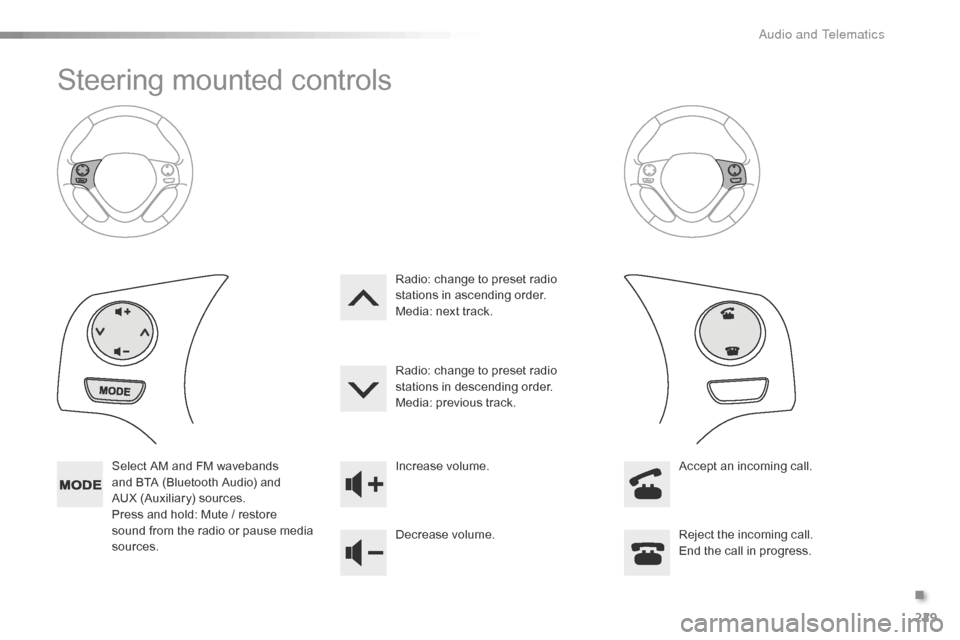
Steering mounted controls
Select AM and FM wavebands
and BTA (Bluetooth Audio) and
AUX (Auxiliary) sources.
Press and hold: Mute / restore
sound from the radio or pause media
sources. Increase volume.
Decrease volume.
Reject the incoming call.
End the call in progress.
Radio: change to preset radio
stations in ascending order.
Media: next track.
Radio: change to preset radio
stations in descending order.
Media: previous track.
Accept an incoming call.
.
A