audio Citroen C1 RHD 2015 1.G Owner's Manual
[x] Cancel search | Manufacturer: CITROEN, Model Year: 2015, Model line: C1 RHD, Model: Citroen C1 RHD 2015 1.GPages: 260, PDF Size: 6.35 MB
Page 5 of 260
.
.
Direction indicators 101
Horn
10
1
Hazard warning lamps
1
02
Under-inflation detection
1
02
ESC system
1
05
Active City Brake
1
08
Seat belts
1
13
Airbags
1
16
Safety
Child seats 121
Deactivating the passenger's front airbag
1
24
ISOFIX child seats
1
30
Child lock
1
35
Child safety Checks
Fuel tank 1
36
Temporary puncture
repair kit
1
38
Changing a wheel
1
43
Snow chains
1
48
Changing a bulb
1
49
Changing a fuse
1
54
12 V battery
1
63
Electrical energy economy mode
1
66
Changing a wiper blade
1
66
Towing the vehicle
1
67
Fitting roof bars
1
68
Accessories
1
69
Practical information Technical data
7-inch touch screen tablet 183
Audio system
2
23
Audio and telematics
Visual search
Alphabetical index
B o n n et 17 2
Petrol engines
1
73
Checking levels
1
74
C h e c ks
17
7Engines
1
79
Weights
18
0
Dimensions
1
81
Identification markings
1
82
Contents
Page 9 of 260

7
Instruments and controls
1. Lighting and direction indicator stalk
2. Steering mounted controls for the audio
system or the touch screen tablet
A
ctivation / Deactivation of the lane
departure warning system
3.
S
teering mounted controls for the ETG
electronic gearbox
4.
S
peed limiter control
5.
S
creen wash/wipe control stalk
6.
B
onnet release
7.
G
love box /
D
eactivation of the passenger's front
airbag/
R
einitialisation of the tyre under-inflation
detection system
8.
S
ide air vents
9.
P
assenger's front airbag 10. A
udio system, touch screen tablet or open
storage
11.
S
TART/STOP button
12 .
H
azard warning lamps
13.
M
anual or automatic air conditioning
controls
14 .
A
uxiliary sockets for portable devices
15.
G
ear lever
16.
C
up holder and storage
17.
P
arking brake
18.
C
an holder
19.
S
teering wheel adjustment control
20.
D
eactivation of VSC / TRC systems
21.
F
uel filler flap release
22.
E
lectric window controls23. D
eactivation of Stop & Start o
r Activation / Deactivation of Active City
Brake
H
eadlamp beam height control
24.
D
oor mirror adjustment controls
25.
D
river's front airbag
Horn
26.
I
nstrument panel
2 7.
C
ourtesy lamp
E
lectric fabric roof control
.
Over view
Page 23 of 260
21
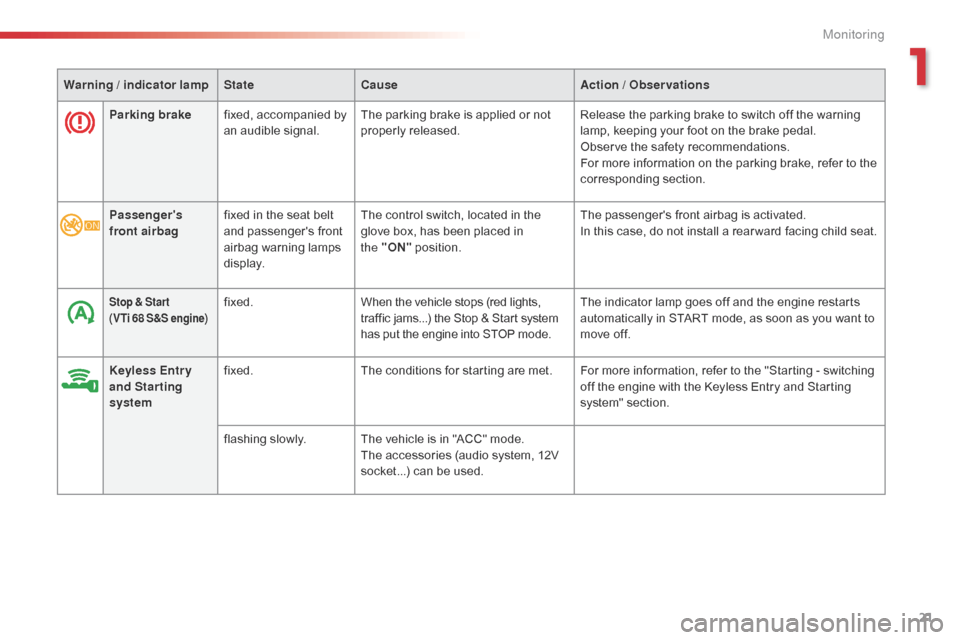
Parking brakefixed, accompanied by
an audible signal. The parking brake is applied or not
properly released. Release the parking brake to switch off the warning
lamp, keeping your foot on the brake pedal.
Observe the safety recommendations.
For more information on the parking brake, refer to the
corresponding section.
Warning
/ indicator lamp
State Cause Action
/ Observations
Passenger's
front airbag fixed in the seat belt
and passenger's front
airbag warning lamps
display. The control switch, located in the
glove box, has been placed in
the
"ON" position. The passenger's front airbag is activated.
In this case, do not install a rear ward facing child seat.
Stop & Star t
(VTi 68 S&S engine)fixed. When the vehicle stops (red lights,
traffic jams...) the Stop & Start system
has put the engine into STOP mode. The indicator lamp goes off and the engine restarts
automatically in START mode, as soon as you want to
move off.
Keyless Entr y
and Starting
system fixed.
The conditions for starting are met. For more information, refer to the "Starting - switching
off the engine with the Keyless Entry and Starting
system" section.
flashing slowly. The vehicle is in "ACC" mode.
The accessories (audio system, 12V
socket...) can be used.
1
Monitoring
Page 30 of 260
28
Audio system
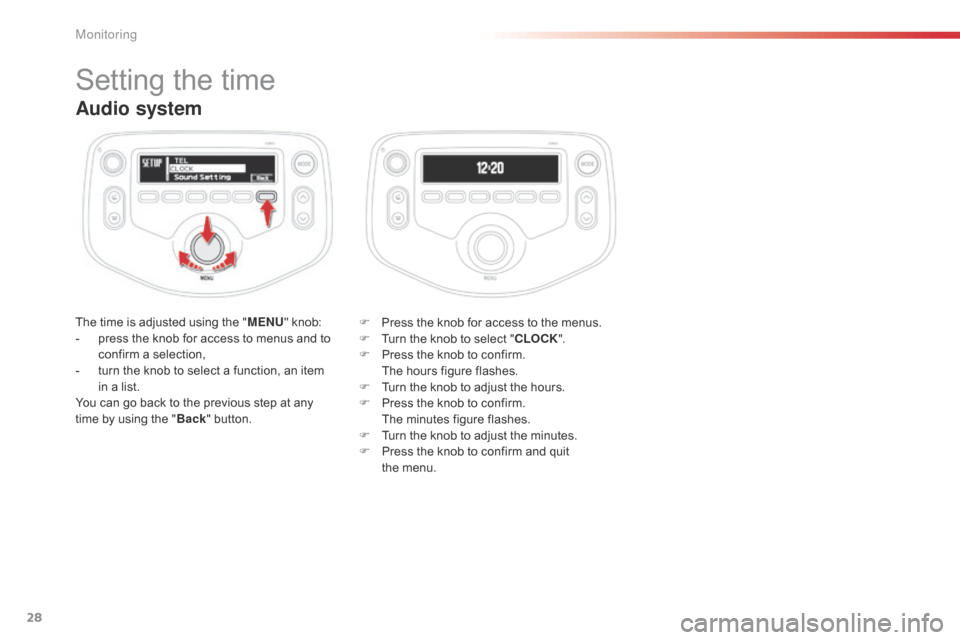
The time is adjusted using the "MENU" knob:
- p ress the knob for access to menus and to
confirm a selection,
-
t
urn the knob to select a function, an item
in a list.
You can go back to the previous step at any
time by using the " Back" button. F
P ress the knob for access to the menus.
F
T
urn the knob to select "CLOCK".
F
P
ress the knob to confirm.
T
he hours figure flashes.
F
T
urn the knob to adjust the hours.
F
P
ress the knob to confirm.
T
he minutes figure flashes.
F
T
urn the knob to adjust the minutes.
F
P
ress the knob to confirm and quit
the
menu.
Setting the time
Monitoring
Page 65 of 260
63
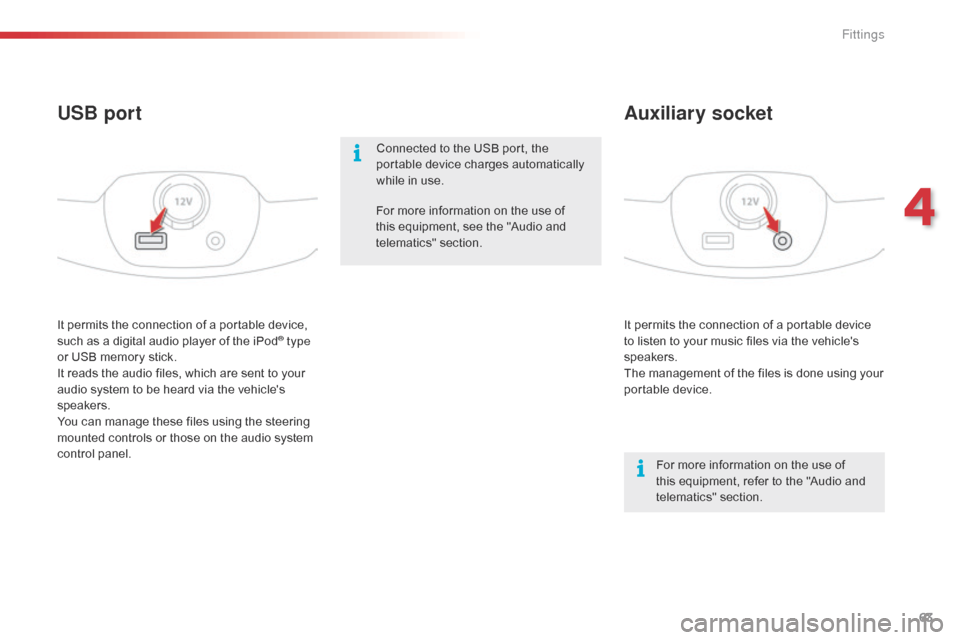
It permits the connection of a portable device
to listen to your music files via the vehicle's
speakers.
The management of the files is done using your
portable device.
It permits the connection of a portable device,
such as a digital audio player of the iPod® type
or USB memory stick.
It reads the audio files, which are sent to your
audio system to be heard via the vehicle's
speakers.
You can manage these files using the steering
mounted controls or those on the audio system
control panel.
Auxiliary socket
USB port
For more information on the use of
this equipment, refer to the "Audio and
telematics" section.
For more information on the use of
this equipment, see the "Audio and
telematics" section.
Connected to the USB port, the
portable device charges automatically
while in use.
4
Fittings
Page 158 of 260

156
Dashboard fuses
The fusebox is located below the dashboard
(driver's side).
F
U
nclip the plastic cover for access to the
fuses.
When you have finished, carefully refit the
c ove r. Fuse
N° Rating
(A) Functions
1 5Fuel injection system - Audio system - VSC system
2 15Front and rear screenwash
3 5Main distribution unit - Instrument panel - Display screen -
Air conditioning - Heated rear screen and door mirror heating -
Electric fabric roof - Audio system
4 5Electric power steering - Stop & Start
5 15Rear wiper
6 5Cooling fan - ABS system - VSC system
7 25Front wiper
8 10Heated door mirrors
9 1512 V socket (120 W max)
10 7. 5Door mirrors - Audio system - Stop & Start - Instrument panel -
Display screen
Practical information
Page 162 of 260
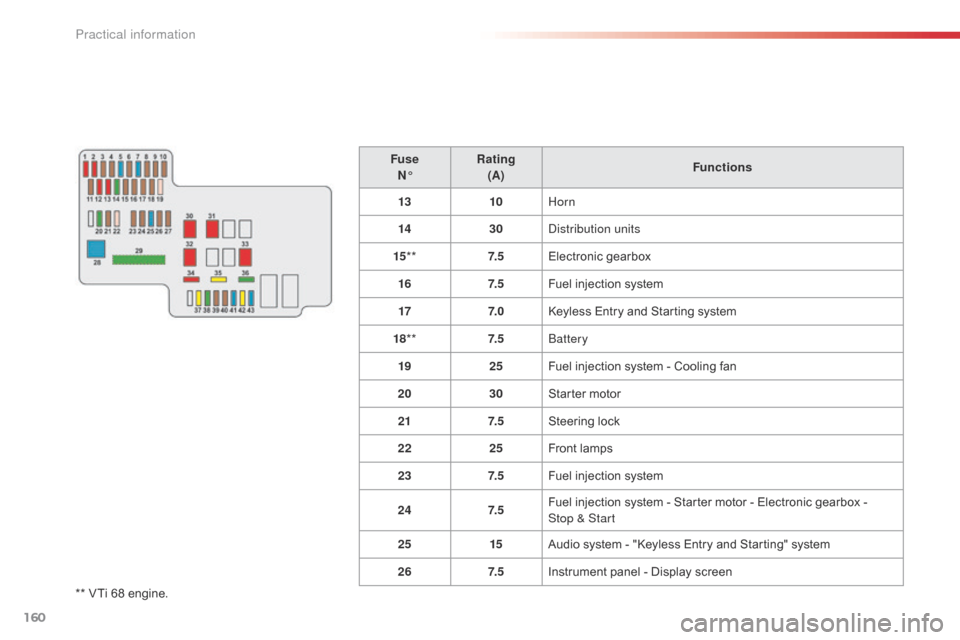
160
** VTi 68 engine.Fuse
N° Rating
(A) Functions
13 10Horn
14 30Distribution units
15 ** 7. 5Electronic gearbox
16 7. 5Fuel injection system
17 7. 0Keyless Entry and Starting system
18 ** 7. 5Battery
19 25Fuel injection system - Cooling fan
20 30Starter motor
21 7. 5Steering lock
22 25Front lamps
23 7. 5Fuel injection system
24 7. 5Fuel injection system - Starter motor - Electronic gearbox -
Stop & Start
25 15Audio system - "Keyless Entry and Starting" system
26 7. 5Instrument panel - Display screen
Practical information
Page 168 of 260

166
Electrical energy economy mode*
System which manages the duration of use of certain functions to conserve a sufficient level of
charge in the battery.
After the engine has stopped, you can still use functions such as the audio system, windscreen
wipers, dipped beam headlamps,
courtesy lamps, etc. for a maximum combined duration of
twenty
m
inutes.
This period may be greatly reduced if the battery is not fully charged.
Let the engine run for the duration
specified to ensure that the battery
charge is sufficient.
Do not repeatedly and continuously
restart the engine in order to charge the
battery.
A flat battery prevents the engine from
starting.
Refer to the "Battery" section.
Switching to economy mode
Once this time has elapsed the active functions
are put on standby.
Exiting economy mode
These functions are reactivated automatically
next time the vehicle is driven.
To restore the use of these functions
immediately, start the engine and let it run for at
least 5 minutes.
Changing a wiper
blade
Removing the front wiper blade
F Raise the wiper arm.
F R emove the wiper blade, sliding it towards
the outside.
Fitting the front wiper blade
F Put the corresponding new wiper blade in place and fix it.
F
F
old down the wiper arm carefully.
To conserve the effectiveness of
the flat-blade type wiper blades, we
recommend that they are:
-
h
andled with care,
-
c
leaned regularly with soapy water,
-
n
ot used to hold a cardboard sheet
against the windscreen,
-
r
eplaced at the first signs of wear.
*
O
nly on vehicles with the "Keyless Entry and
Starting" system.
Practical information
Page 171 of 260
169
Accessories
A wide range of accessories and genuine parts is available from the CITROËN dealer network.
These accessories and parts are all suitable for your vehicle and benefit from CITROËN's recommendation and warranty.
"Transport solutions":
boot carpet, boot liner,
transverse roof bars, bicycle carrier, ski carrier,
roof boxes, boot dividers, ...
"Styling": rear diffuser, aluminium gear knob,
alloy wheels, exterior expressive stickers,
chrome side mouldings, chrome mirror shells,
door sill finishers, ... "Comfort":
air deflectors, insulated module,
sun blinds, scented air freshener, portable
ashtray, coat hanger fitted to head restraint,
reading lamp, front and rear parking sensors,
centre armrest, cigarette lighter... "Security and safety":
anti-theft alarm,
vehicle tracking system, snow chains, wheel
non-slip covers, wheel security bolts, child
seats, first aid kit, warning triangle, high
visibility vest, breathalyzer, fire extinguisher,
pet seat belt, foglamp kit, seat belt cutter/glass
hammer, ...
"Protection": mats, mud flaps, vehicle cover,
seat covers, side protective mouldings, bumper
protectors, ...
To prevent the mat from becoming caught
under the pedals:
-
e
nsure that the mat is secured correctly,
-
n
ever fit one mat on top of another."Multimedia":
audio system, speaker, semi-
integral navigation systems, hands-free kit,
driving assistance systems, 230 V socket,
rear multi-media support, DVD players,
portable satellite navigation system, telephone/
smartphone support, digital radio, ...
9
Practical information
Page 185 of 260
183
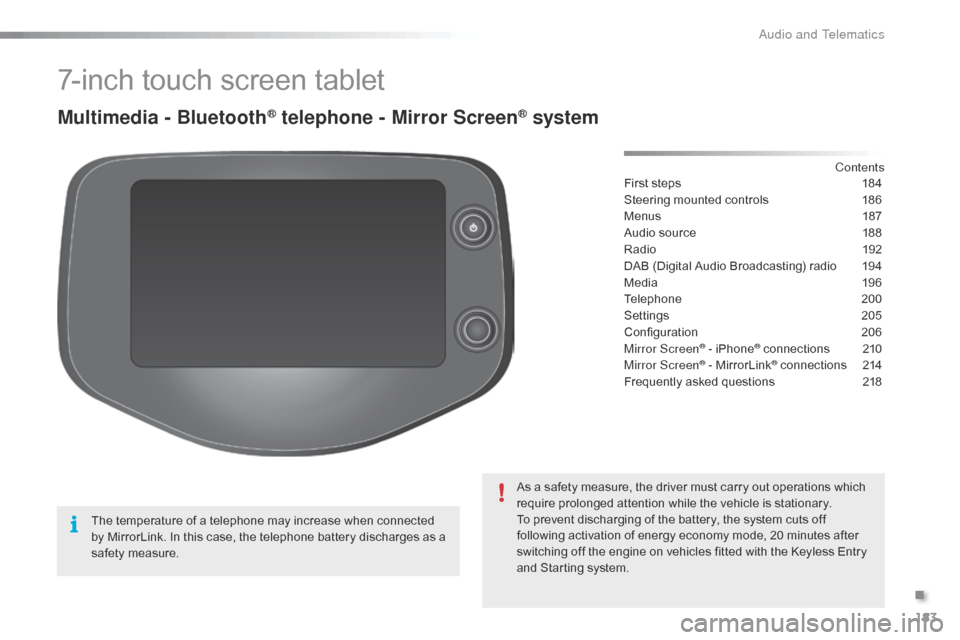
7-inch touch screen tablet
Multimedia - Bluetooth® telephone - Mirror Screen® system
First steps 184
Steering mounted controls
1
86
Menus
1
87
Audio source
1
88
Radio
19
2
DAB (Digital Audio Broadcasting) radio
1
94
Media
19
6
Telephone
2
00
Settings
2
05
Configuration
20
6
Mirror Screen
® - iPhone® connections 2 10
Mirror Screen® - MirrorLink® connections 2 14
Frequently asked questions
2
18
As a safety measure, the driver must carry out operations which
require prolonged attention while the vehicle is stationary.
To prevent discharging of the battery, the system cuts off
following activation of energy economy mode, 20 minutes after
switching off the engine on vehicles fitted with the Keyless Entry
and Starting system. Contents
The temperature of a telephone may increase when connected
by MirrorLink. In this case, the telephone battery discharges as a
safety measure.
.
Audio and Telematics