manual radio set Citroen C1 RHD 2016 1.G Owner's Manual
[x] Cancel search | Manufacturer: CITROEN, Model Year: 2016, Model line: C1 RHD, Model: Citroen C1 RHD 2016 1.GPages: 268, PDF Size: 7.09 MB
Page 193 of 268
191
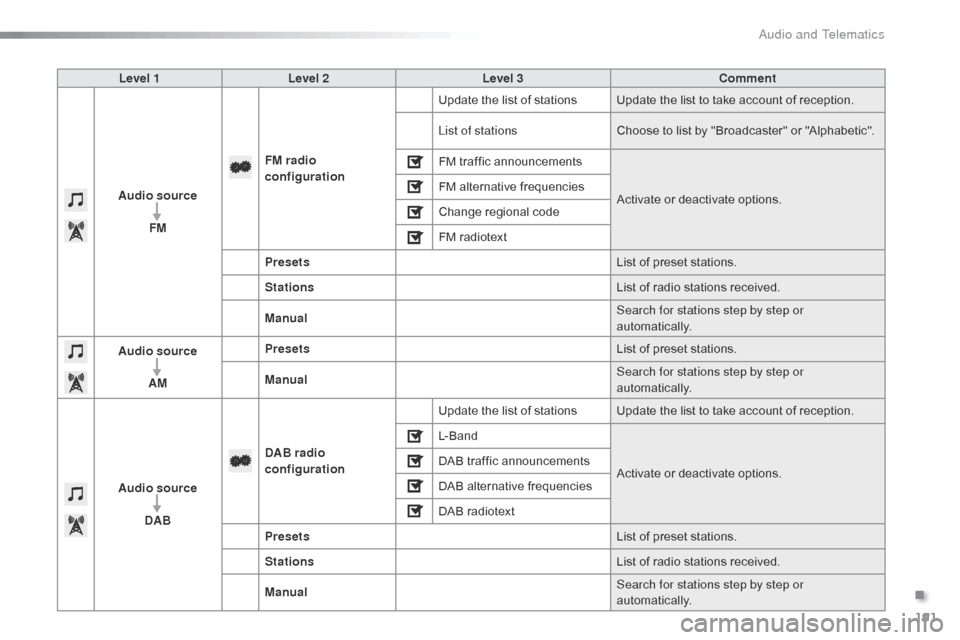
Level 1Level 2 Level 3 Comment
Audio source FM FM
radio
configuration Update
the list of stations Update the list to take account of reception.
List of stations Choose
to list by "Broadcaster" or "Alphabetic".
FM
traffic announcementsActivate
or deactivate options.
FM
alternative frequencies
Change
r
egional
c
ode
FM
radiotext
Presets List
of preset stations.
Stations List
of radio stations received.
Manual Search for stations step by step or
automatically.
Audio source
AM Presets
List
of preset stations.
Manual Search for stations step by step or
automatically.
Audio source DAB DAB radio
configuration
Update
the list of stations Update the list to take account of reception.
L- B a n d
Activate
or deactivate options.
DAB
traffic announcements
DAB
alternative frequencies
DAB
radiotext
Presets List
of preset stations.
Stations List
of radio stations received.
Manual Search for stations step by step or
automatically.
.
Audio and Telematics
Page 244 of 268
242
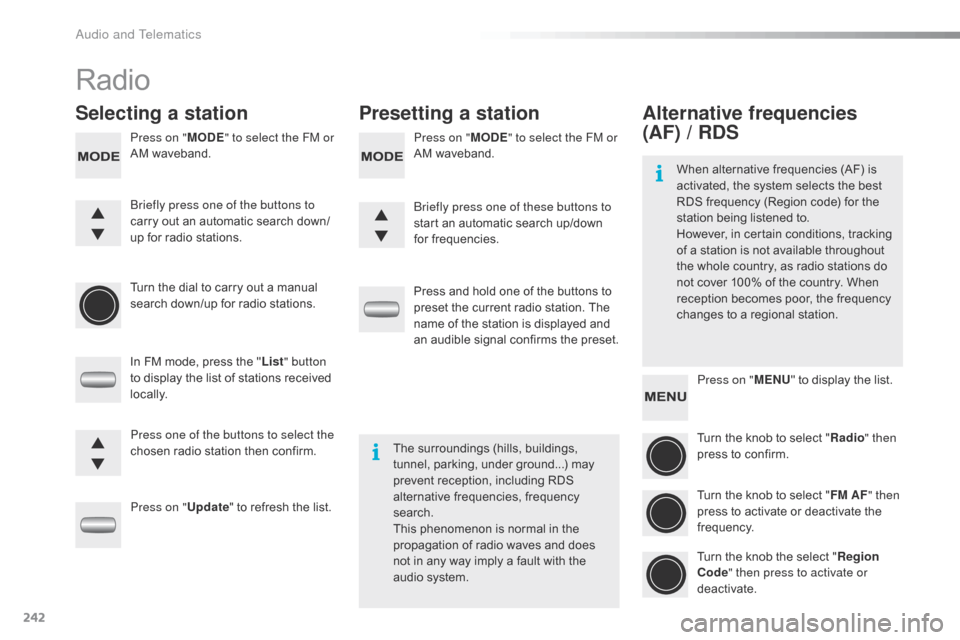
Radio
Selecting a stationPresetting a station
Press on "MODE" to select the FM or
AM waveband. Press on "
MODE" to select the FM or
AM waveband.
Turn
the dial to carry out a manual
s
earch down/up for radio stations.
In
FM mode, press the "List " button
to
display the list of stations received
l
ocally.
Press on " Update"
to refresh the list.Press
and hold one of the buttons to
p
reset the current radio station. The
n
ame of the station is displayed and
a
n audible signal confirms the preset.
Briefly press one of the buttons to
carry
out an automatic search down/
up
for radio stations. Briefly press one of these buttons to
start
an automatic search up/down
f
or frequencies.
Press one of the buttons to select the
chosen
radio station then confirm.The
surroundings (hills, buildings,
t
unnel, parking, under ground...) may
p
revent reception, including RDS
a
lternative frequencies, frequency
sea
rch.
This
phenomenon is normal in the
p
ropagation of radio waves and does
n
ot in any way imply a fault with the
a
udio system.
Alternative frequencies
(AF) / RDS
Press on "MENU" to display the list.
Turn the knob to select "Radio " then
press
to confirm.
Turn
the knob to select "FM AF " then
press
to activate or deactivate the
f
requency.
Turn
the knob the select "Region
Code " then press to activate or
deactivate.
When
alternative frequencies (AF) is
a
ctivated, the system selects the best
R
DS frequency (Region code) for the
s
tation being listened to.
However, in certain conditions, tracking
o
f
a
station is not available throughout
t
he
whole country, as radio stations do
n
ot
cover 100% of the country. When
r
eception becomes poor, the frequency
c
hanges to a regional station.
Audio and Telematics
Page 245 of 268
243
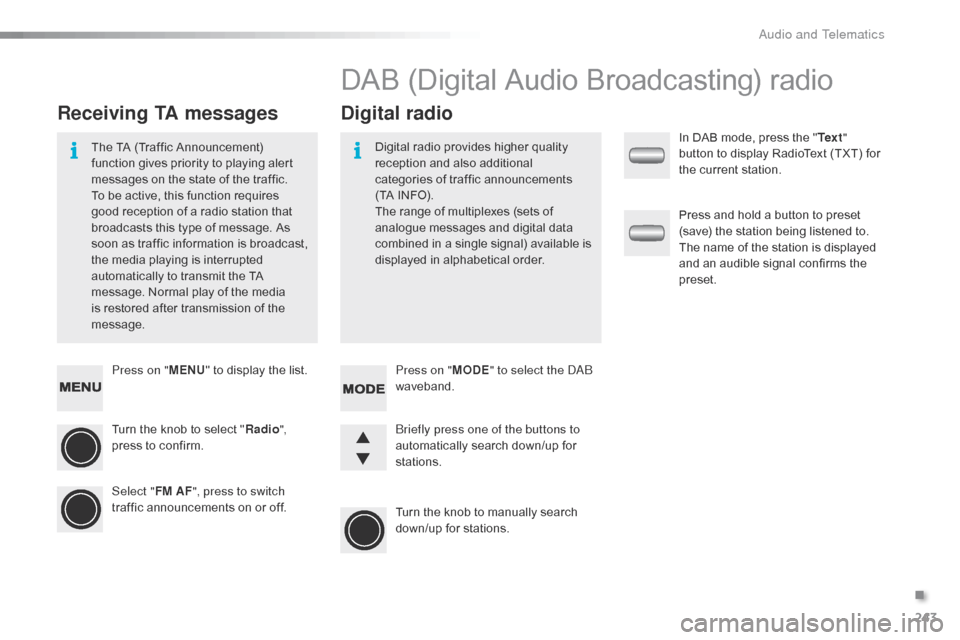
Press on "MENU" to display the list.
Turn the knob to select "Radio ",
press
to confirm.
Select " FM AF", press to switch
traffic
announcements on or off.
Receiving TA messages Digital radio
The TA (Traffic Announcement) f
unction gives priority to playing alert
m
essages on the state of the traffic.
T
o be active, this function requires
g
ood reception of a radio station that
b
roadcasts this type of message. As
s
oon as traffic information is broadcast,
t
he media playing is interrupted
a
utomatically to transmit the TA
m
essage. Normal play of the media
i
s restored after transmission of the
m
essage. Digital
radio provides higher quality r
eception and also additional
c
ategories of traffic announcements
(
TA INFO).
The
range of multiplexes (sets of
a
nalogue messages and digital data
c
ombined in a single signal) available is
d
isplayed in alphabetical order.
DAB (Digital Audio Broadcasting) radio
Press on "MODE" to select the DAB
waveband.
Turn
the knob to manually search
d
own/up for stations.
Briefly press one of the buttons to
automatically
search down/up for
s
tations. In
DAB mode, press the "
Te x t "
button to display RadioText (TXT) for
t
he current station.
Press and hold a button to preset
(
save) the station being listened to.
T
he name of the station is displayed
a
nd an audible signal confirms the
p
reset.
.
Audio and Telematics