display panel Citroen C2 2008 1.G User Guide
[x] Cancel search | Manufacturer: CITROEN, Model Year: 2008, Model line: C2, Model: Citroen C2 2008 1.GPages: 178, PDF Size: 5.55 MB
Page 51 of 178
A
1
4
3
2
B
II
68
S P E E D L I M I T E R
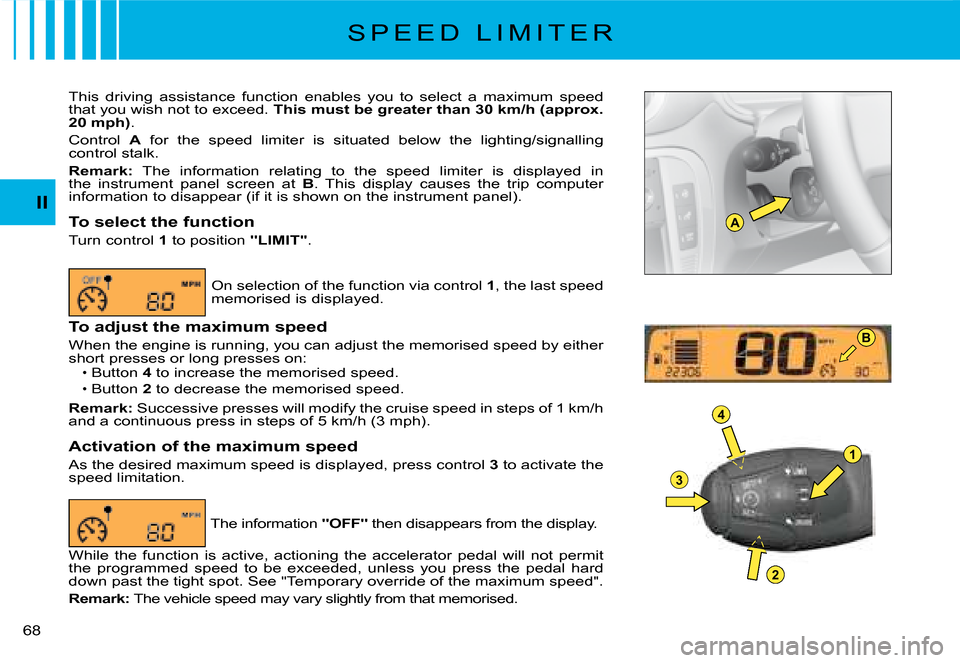
This driving assistance function enables you to select a maximum speed that you wish not to exceed. This must be greater than 30 km/h (approx. 20 mph).
Control A for the speed limiter is situated below the lighting/signalling control stalk.
Remark: The information relating to the speed limiter is displayed in the instrument panel screen at B. This display causes the trip computer information to disappear (if it is shown on the instrument panel).
To select the function
Turn control 1 to position "LIMIT".
On selection of the function via control 1, the last speed memorised is displayed.
To adjust the maximum speed
When the engine is running, you can adjust the memorised spee d by either short presses or long presses on:Button 4 to increase the memorised speed.
Button 2 to decrease the memorised speed.
Remark: Successive presses will modify the cruise speed in steps of 1 km/h and a continuous press in steps of 5 km/h (3 mph).
Activation of the maximum speed
As the desired maximum speed is displayed, press control 3 to activate the speed limitation.
Page 52 of 178

II
69
S P E E D L I M I T E R
Disengagement of the maximum speed
Press button 3 located on the end of control A.
This action causes the information "OFF" to appear in the instrument panel screen.
The memorised speed remains displayed and is not cancelled.
Temporary override of the maximum speed
At any time, it is possible to go above the memorised maximum speed by pressing the accelerator pedal hard down past the tight spot.
While the memorised speed is being exceeded, the displayed speed fl ashes.
You have only to release the accelerator pedal to return below the maximum speed, to restore the function.
Remark: If during speed limitation the system cannot keep to the maxi mum speed (especially on a steep descent or if you accelerate too hard), the speed fl ashes. Adapt your speed as necessary.
The function will re-engage when your speed has returned below the desired maximum.
To cancel the functionBy moving the control from position "LIMIT" to position 0.Or stop the engine.
The speed that you chose is memorised.
If there is a malfunction, the memorised speed will fl ash and the warning lamp "OFF" will come on permanently in the display. Contact a CITROËN dealer.If there is a malfunction, the memorised speed will fl ash and the warning lamp If there is a malfunction, the memorised speed will fl ash and the warning lamp
Page 53 of 178
1
II
70
P A R K I N G A S S I S T A N C E
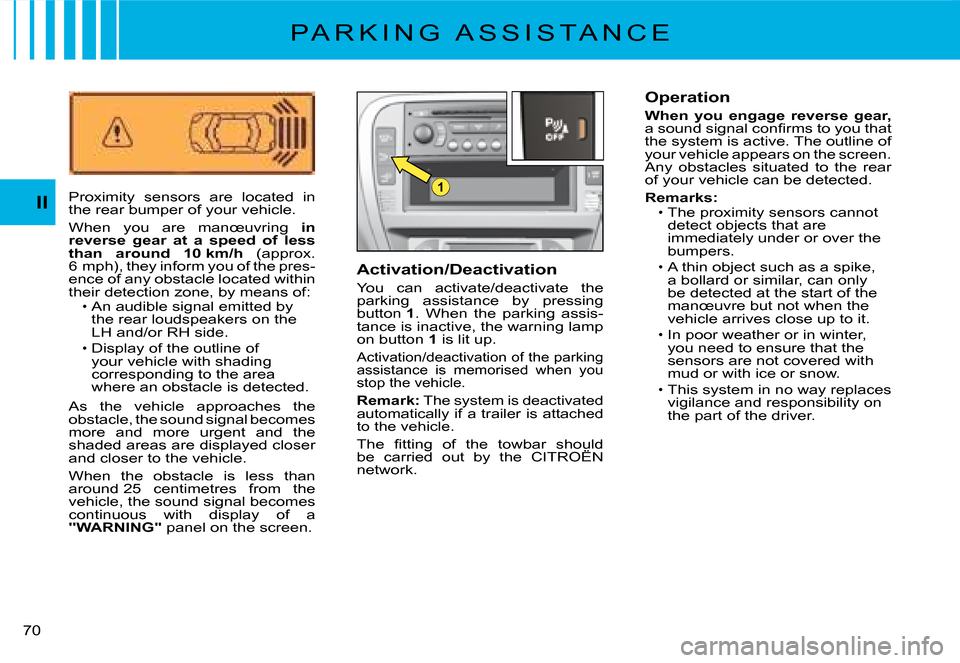
Proximity sensors are located in the rear bumper of your vehicle.
When you are manœuvring in reverse gear at a speed of less than around 10 km/h (approx. 6 mph), they inform you of the pres-ence of any obstacle located within their detection zone, by means of:An audible signal emitted by the rear loudspeakers on the LH and/or RH side.Display of the outline of your vehicle with shading corresponding to the area where an obstacle is detected.
As the vehicle approaches the obstacle, the sound signal becomes more and more urgent and the shaded areas are displayed closer and closer to the vehicle.
When the obstacle is less than around 25 centimetres from the vehicle, the sound signal becomes continuous with display of a "WARNING" panel on the screen.
Page 61 of 178
2
8
5
73
9
6
14
14
5763
III
77
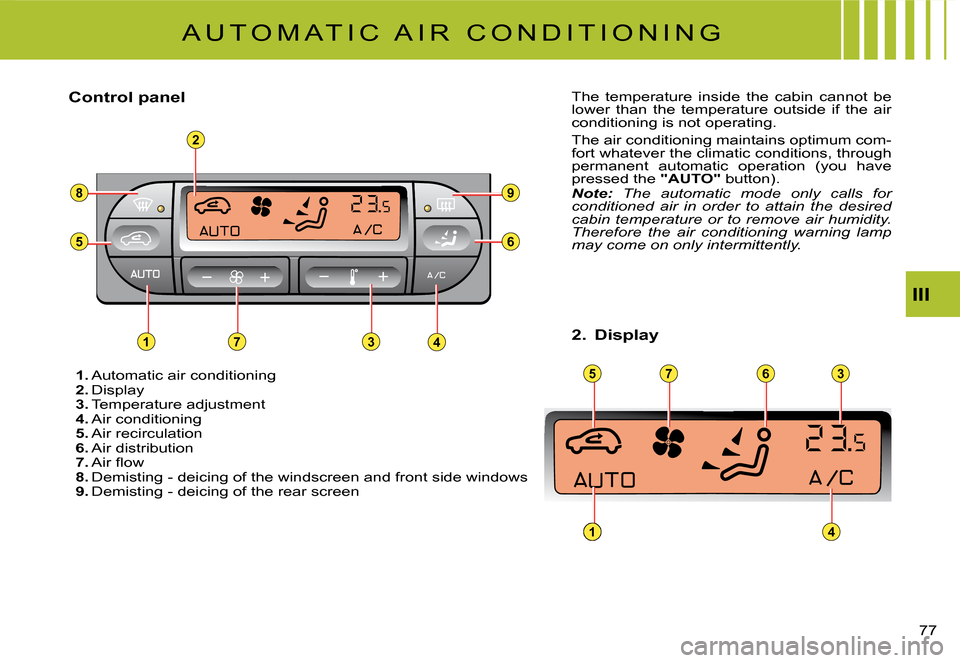
1. Automatic air conditioning2. Display3. Temperature adjustment4. Air conditioning5. Air recirculation6. Air distribution7. Air fl ow8. Demisting - deicing of the windscreen and front side windows9. Demisting - deicing of the rear screen
The temperature inside the cabin cannot be lower than the temperature outside if the air conditioning is not operating.
The air conditioning maintains optimum com-fort whatever the climatic conditions, through permanent automatic operation (you have pressed the "AUTO" button).Note: The automatic mode only calls for conditioned air in order to attain the desired cabin temperature or to remove air humidity. Therefore the air conditioning warning lamp may come on only intermittently.
Control panel
2. Display
A U T O M A T I C A I R C O N D I T I O N I N G
Page 63 of 178
III
79
A U T O M A T I C A I R C O N D I T I O N I N G
Manual recalling of one or more functions
One or more functions can be adjusted manually, while still retaining the other functions in automatic mode.
The function display "AUTO" then goes out.
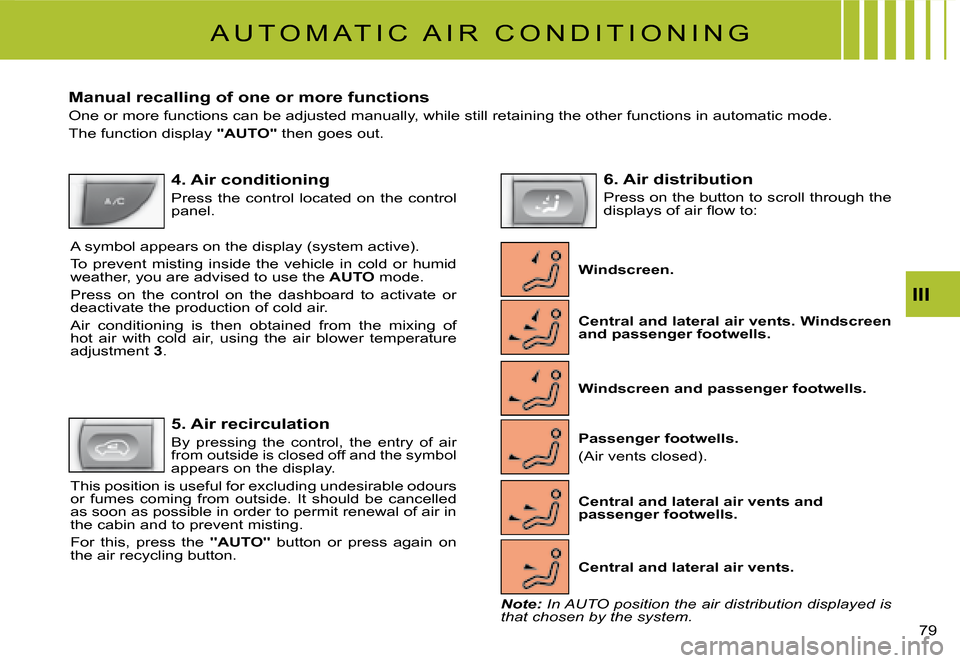
4. Air conditioning
Press the control located on the control panel.
A symbol appears on the display (system active).
To prevent misting inside the vehicle in cold or humid weather, you are advised to use the AUTO mode.
Press on the control on the dashboard to activate or deactivate the production of cold air.
Air conditioning is then obtained from the mixing of hot air with cold air, using the air blower temperature adjustment 3.
5. Air recirculation
By pressing the control, the entry of air from outside is closed off and the symbol appears on the display.
This position is useful for excluding undesirable odours or fumes coming from outside. It should be cancelled as soon as possible in order to permit renewal of air in the cabin and to prevent misting.
For this, press the "AUTO" button or press again on the air recycling button.
6. Air distribution
Press on the button to scroll through the displays of air fl ow to:
Windscreen.
Central and lateral air vents. Windscreen and passenger footwells.
Windscreen and passenger footwells.
Passenger footwells.
(Air vents closed).
Central and lateral air vents.
Central and lateral air vents and passenger footwells.
Note: In AUTO position the air distribution displayed is that chosen by the system.
Page 92 of 178
IV
108
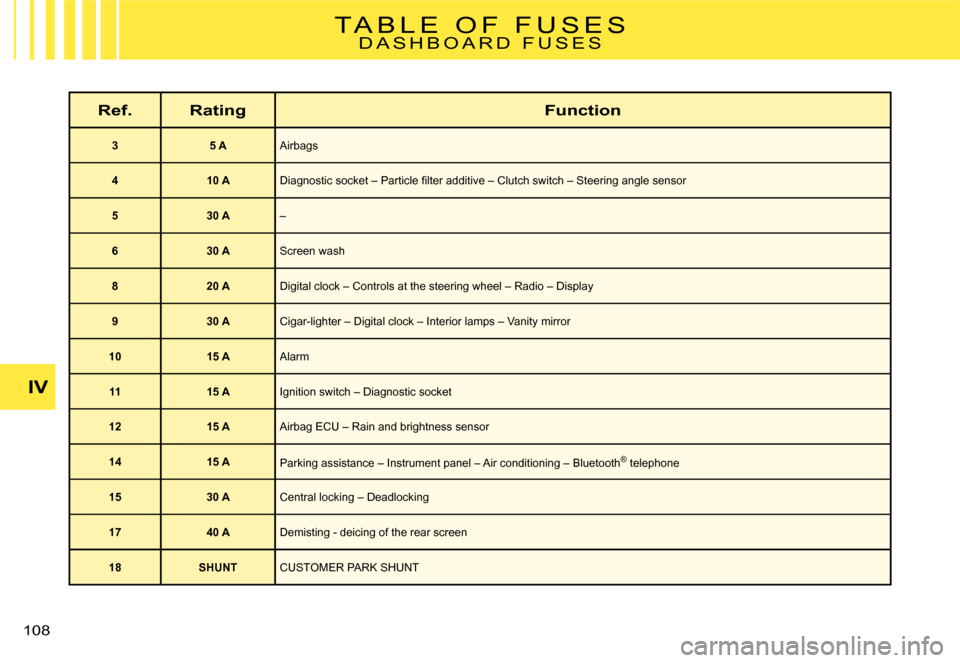
T A B L E O F F U S E SD A S H B O A R D F U S E S
Ref.RatingFunction
35 AAirbags
410 ADiagnostic socket – Particle fi lter additive – Clutch switch – Steering angle sensor
530 A–
630 AScreen wash
820 ADigital clock – Controls at the steering wheel – Radio – Display
930 ACigar-lighter – Digital clock – Interior lamps – Vanity mirror
1015 AAlarm
1115 AIgnition switch – Diagnostic socket
1215 AAirbag ECU – Rain and brightness sensor
1415 AParking assistance – Instrument panel – Air conditioning – Blueto oth® telephone®
1530 A Central locking – Deadlocking
1740 ADemisting - deicing of the rear screen
18SHUNTCUSTOMER PARK SHUNT
Page 152 of 178

AUD
24A U D I O
TEMPORARY SOUND PAUSEPress simultaneously on buttons 4 and 6at the steering wheel to activate this func-tion.The sound will be paused, regardless of the source selected. The permanent audio s o ur c e s (r a di o, C D, C D c han g e r, M P 3) remain cut off, but not the others (guidance instructions for example).To restore sound, press any of the buttons on the control panel.
S OUND ADJUSTMENTSEach press on button U brings up the param-eter to be adjusted : choice of predefi ned sound ambiances, bass, treble, loudness, fade (front/rear sound distribution), balance (lef t /right sound distribution) and volume adjusted to vehicle speed.Control G allows you to modify the value of the parameter displayed.
Note :T h e v a l u e c h o s e n i s a u t o m a t i c a l l y accepted, without any need for valida-tion.The selection of a particular sound ambi-ence automatically adjusts the bass and treble.Adjustment of bass and treble is avail-able only if you have selected the sound ambiance “None”.Adjustments of bass, treble and loud-ness, when available, are specifi c to each sound source.
Page 172 of 178
CAR
44M A P
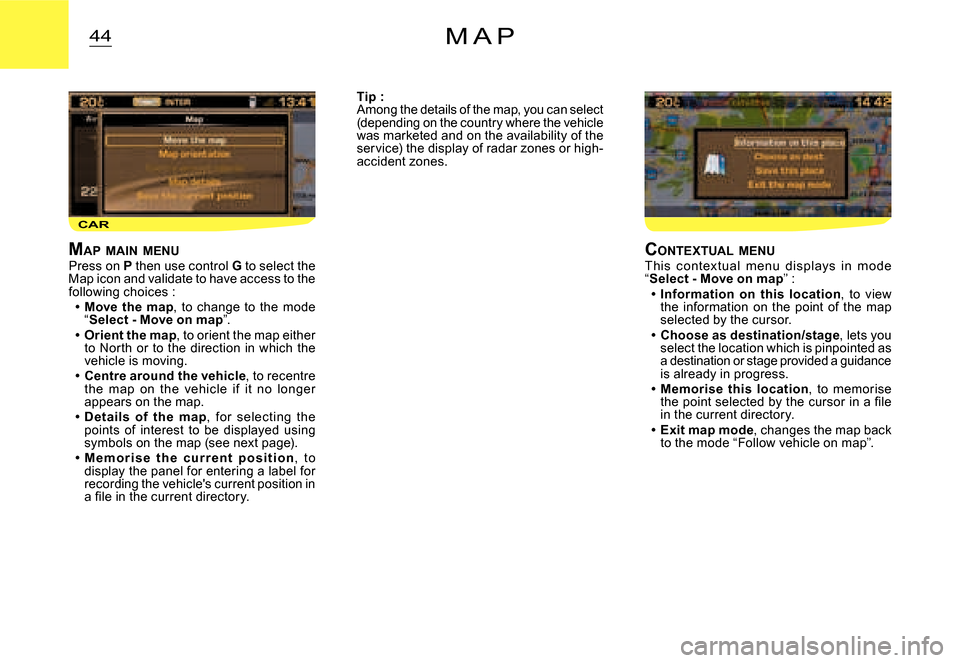
MAP MAIN MENUPress on P then use control G to select the Map icon and validate to have access to the following choices :Move the map, to change to the mode “Select - Move on map”.Orient the map, to orient the map either to North or to the direction in which the vehicle is moving.Centre around the vehicle, to recentre the map on the vehicle if it no longer appears on the map.Details of the map, for selecting the points of interest to be displayed using symbols on the map (see next page).M e m o r i s e t h e c u r r e n t p o s i t i o n, to display the panel for entering a label for recording the vehicle's current position in a fi le in the current directory.
Page 178 of 178
5
11
22
11
22
11
22
33
YES
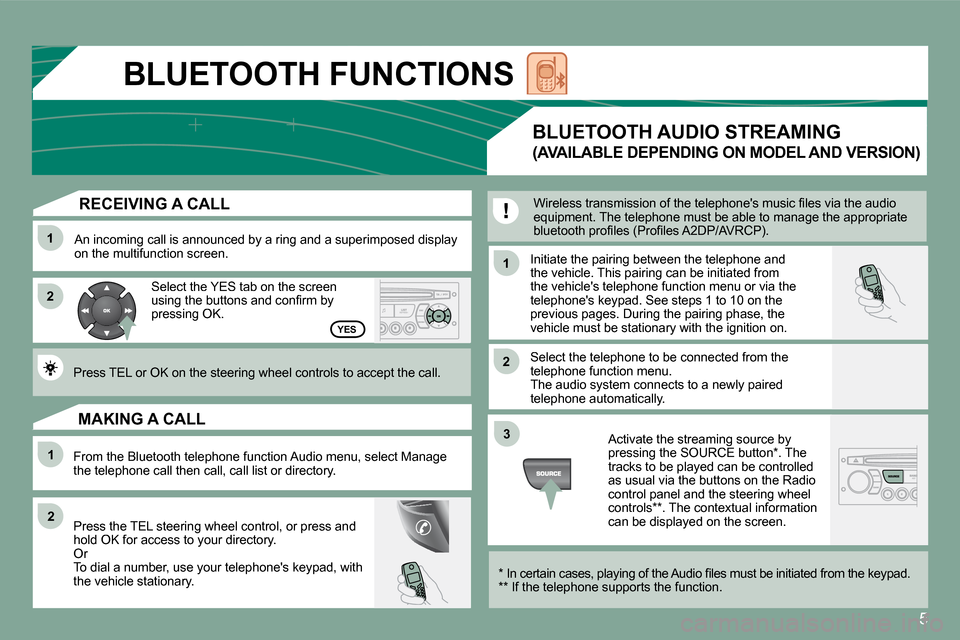
RECEIVING A CALL
An incoming call is announced by a ring and a superimposed display on the multifunction screen.
Select the YES tab on the screen using the buttons and confi rm by pressing OK.
Press TEL or OK on the steering wheel controls to accept the call.
From the Bluetooth telephone function Audio menu, select Manage the telephone call then call, call list or directory.
Press the TEL steering wheel control, or press and hold OK for access to your directory. Or To dial a number, use your telephone's keypad, with the vehicle stationary.
MAKING A CALL
Initiate the pairing between the telephone and the vehicle. This pairing can be initiated from the vehicle's telephone function menu or via the telephone's keypad. See steps 1 to 10 on the previous pages. During the pairing phase, the vehicle must be stationary with the ignition on.
Select the telephone to be connected from the telephone function menu. The audio system connects to a newly paired telephone automatically.
BLUETOOTH AUDIO STREAMING
(AVAILABLE DEPENDING ON MODEL AND VERSION)
Wireless transmission of the telephone's music fi les via the audio equipment. The telephone must be able to manage the appropriate bluetooth profi les (Profi les A2DP/AVRCP).
* In certain cases, playing of the Audio fi les must be initiated from the keypad. ** If the telephone supports the function.
Activate the streaming source by pressing the SOURCE button * . The tracks to be played can be controlled as usual via the buttons on the Radio control panel and the steering wheel controls ** . The contextual information can be displayed on the screen.
BLUETOOTH FUNCTIONS