audio CITROEN C2 2009 User Guide
[x] Cancel search | Manufacturer: CITROEN, Model Year: 2009, Model line: C2, Model: CITROEN C2 2009Pages: 178, PDF Size: 5.55 MB
Page 141 of 178
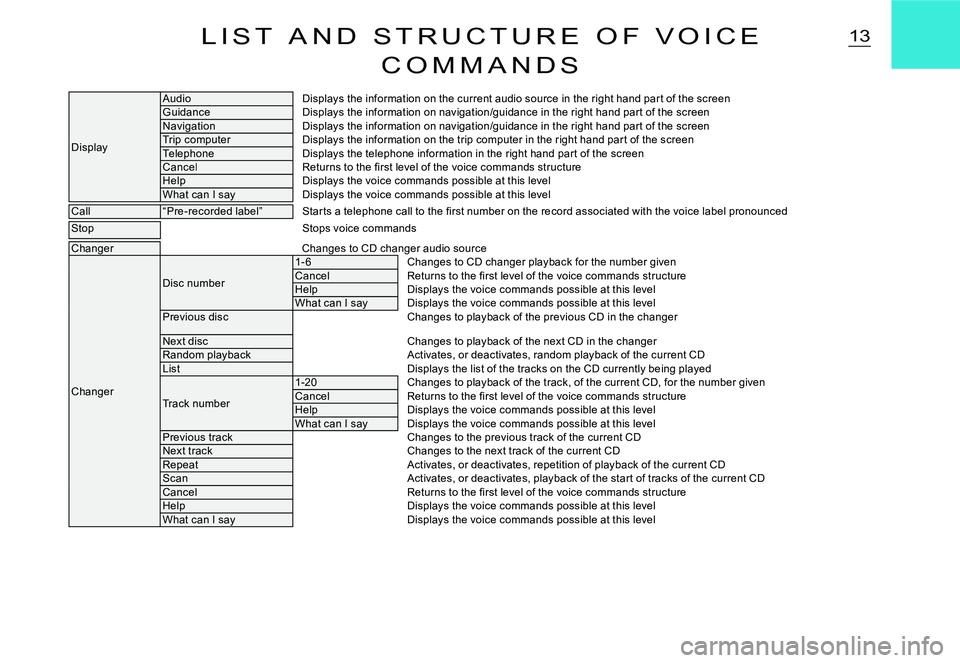
13L I S T A N D S T R U C T U R E O F V O I C E
C O M M A N D S
Display
AudioDisplays the information on the current audio source in the right hand par t of the screenGuidanceDisplays the information on navigation/guidance in the right hand par t of the screenNavigationDisplays the information on navigation/guidance in the right hand par t of the screenTrip computerDisplays the information on the trip computer in the right hand par t of the screenTelephoneDisplays the telephone information in the right hand par t of the screenCancelReturns to the fi rst level of the voice commands stru ctureHelpDisplays the voice commands possible at this levelWhat can I sayDisplays the voice commands possible at this level
Call“Pre-recorded label”Star ts a telephone call to the fi rst number on the record associated with the voice label pronounced
StopStops voice commands
ChangerChanges to CD changer audio source
Changer
Disc number
1- 6Changes to CD changer playback for the number givenCancelReturns to the fi rst level of the voice commands stru ctureHelpDisplays the voice commands possible at this levelWhat can I sayDisplays the voice commands possible at this levelPrevious discChanges to playback of the previous CD in the changer
Next discChanges to playback of the next CD in the changerRandom playbackActivates, or deactivates, random playback of the curr ent CDListDisplays the list of the tracks on the CD currently being played
Track number
1-20Changes to playback of the track, of the current CD, for the number givenCancelReturns to the fi rst level of the voice commands structureHelpDisplays the voice commands possible at this levelWhat can I sayDisplays the voice commands possible at this levelPrevious trackChanges to the previous track of the current CDNext trackChanges to the next track of the current CDRepeatActivates, or deactivates, repetition of playback of the current CDScanActivates, or deactivates, playback of the star t of tracks of the current CDCancelReturns to the fi rst level of the voice commands stru ctureHelpDisplays the voice commands possible at this levelWhat can I sayDisplays the voice commands possible at this level
Page 142 of 178
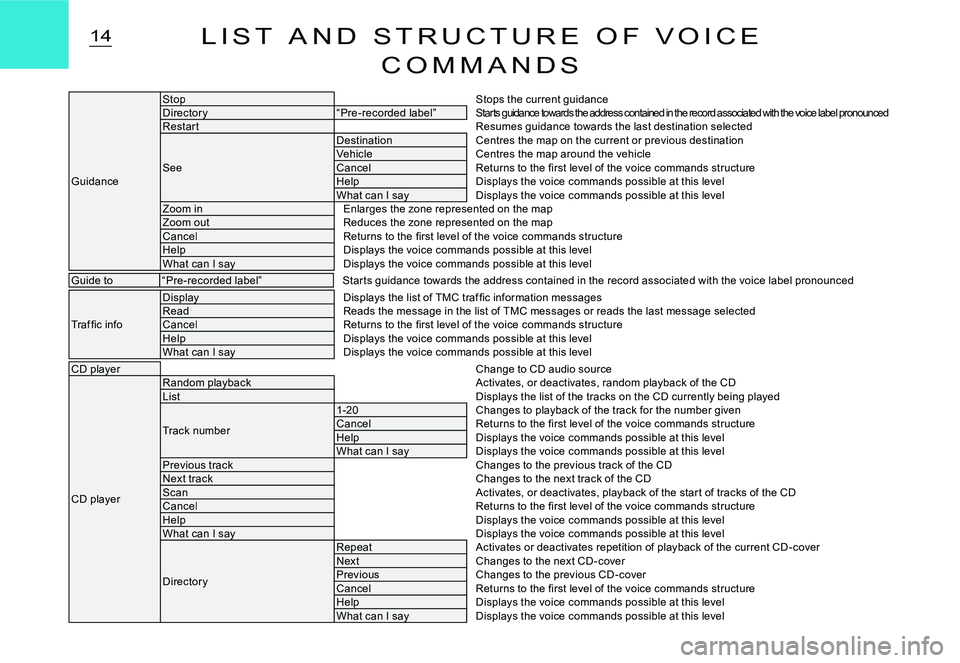
14L I S T A N D S T R U C T U R E O F V O I C E
C O M M A N D S
Guidance
StopStops the current guidanceDirector y“Pre-recorded label”Starts guidance towards the address contained in the record associated with the voice label pronouncedRestar tResumes guidance towards the last destination selecte d
See
DestinationCentres the map on the current or previous destinationVehicleCentres the map around the vehicleCancelReturns to the fi rst level of the voice commands structureHelpDisplays the voice commands possible at this levelWhat can I sayDisplays the voice commands possible at this levelZoom inEnlarges the zone represented on the mapZoom outReduces the zone represented on the mapCancelReturns to the fi rst level of the voice commands structureHelpDisplays the voice commands possible at this levelWhat can I sayDisplays the voice commands possible at this level
Guide to“Pre-recorded label”Star ts guidance towards the address contained in the r ecord associated with the voice label pronounced
Traf fi c info
DisplayDisplays the list of TMC traf fi c information messagesReadReads the message in the list of TMC messages or reads the last message selectedCancelReturns to the fi rst level of the voice commands structureHelpDisplays the voice commands possible at this levelWhat can I sayDisplays the voice commands possible at this level
CD playerChange to CD audio source
CD player
Random playbackActivates, or deactivates, random playback of the CDListDisplays the list of the tracks on the CD currently being played
Track number
1-20Changes to playback of the track for the number givenCancelReturns to the fi rst level of the voice commands stru ctureHelpDisplays the voice commands possible at this levelWhat can I sayDisplays the voice commands possible at this levelPrevious trackChanges to the previous track of the CDNext trackChanges to the next track of the CDScanActivates, or deactivates, playback of the star t of tracks of the CDCancelReturns to the fi rst level of the voice commands stru ctureHelpDisplays the voice commands possible at this levelWhat can I sayDisplays the voice commands possible at this level
Director y
RepeatActivates or deactivates repetition of playback of the current CD -coverNextChanges to the next CD -coverPreviousChanges to the previous CD -coverCancelReturns to the fi rst level of the voice commands structureHelpDisplays the voice commands possible at this levelWhat can I sayDisplays the voice commands possible at this level
Page 143 of 178
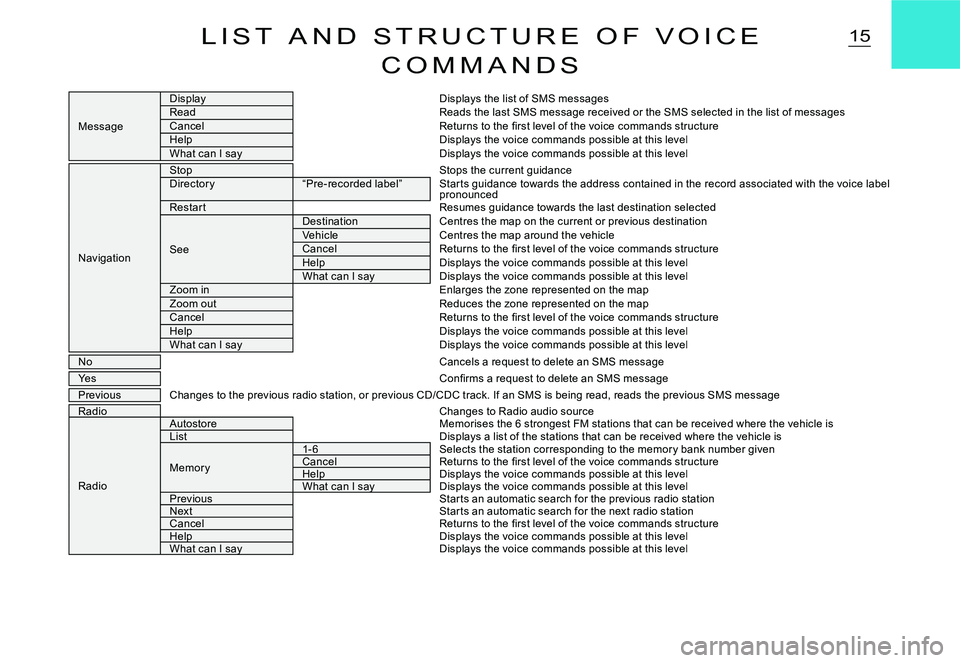
15L I S T A N D S T R U C T U R E O F V O I C E
C O M M A N D S
Message
DisplayDisplays the list of SMS messagesReadReads the last SMS message received or the SMS selected in the list of messagesCancelReturns to the fi rst level of the voice commands structureHelpDisplays the voice commands possible at this levelWhat can I sayDisplays the voice commands possible at this level
Navigation
StopStops the current guidanceDirector y“Pre-recorded label”Star ts guidance towards the address contained in the r ecord associated with the voice label pronouncedRestar tResumes guidance towards the last destination selecte d
See
DestinationCentres the map on the current or previous destinationVehicleCentres the map around the vehicleCancelReturns to the fi rst level of the voice commands structureHelpDisplays the voice commands possible at this levelWhat can I sayDisplays the voice commands possible at this levelZoom inEnlarges the zone represented on the mapZoom outReduces the zone represented on the mapCancelReturns to the fi rst level of the voice commands structureHelpDisplays the voice commands possible at this levelWhat can I sayDisplays the voice commands possible at this level
NoCancels a request to delete an SMS message
YesConfi rms a request to delete an SMS message
PreviousChanges to the previous radio station, or previous CD/C DC track. If an SMS is being read, reads the previous SMS messageRadioChanges to Radio audio source
Radio
AutostoreMemorises the 6 strongest FM stations that can be rece ived where the vehicle isListDisplays a list of the stations that can be received where the vehicle is
Memor y
1- 6Selects the station corresponding to the memor y bank n umber givenCancelReturns to the fi rst level of the voice commands structureHelpHelpDisplays the voice commands possible at this levelWhat can I sayWhat can I sayDisplays the voice commands possible at this levelPreviousStar ts an automatic search for the previous radio stati onNextStar ts an automatic search for the next radio stationCancelReturns to the fi rst level of the voice commands structureHelpHelpDisplays the voice commands possible at this levelWhat can I sayWhat can I sayDisplays the voice commands possible at this level
Page 152 of 178
AUD
24A U D I O
TEMPORARY SOUND PAUSEPress simultaneously on buttons 4 and 6at the steering wheel to activate this func-tion.The sound will be paused, regardless of the source selected. The permanent audio s o ur c e s (r a di o, C D, C D c han g e r, M P 3) remain cut off, but not the others (guidance instructions for example).To restore sound, press any of the buttons on the control panel.
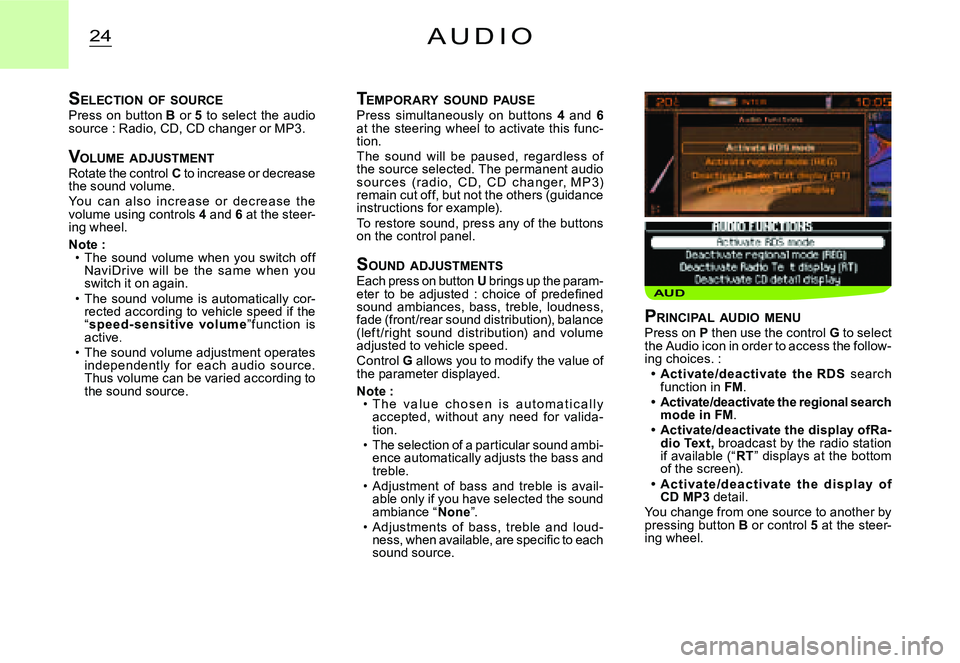
S OUND ADJUSTMENTSEach press on button U brings up the param-eter to be adjusted : choice of predefi ned sound ambiances, bass, treble, loudness, fade (front/rear sound distribution), balance (lef t /right sound distribution) and volume adjusted to vehicle speed.Control G allows you to modify the value of the parameter displayed.
Note :T h e v a l u e c h o s e n i s a u t o m a t i c a l l y accepted, without any need for valida-tion.The selection of a particular sound ambi-ence automatically adjusts the bass and treble.Adjustment of bass and treble is avail-able only if you have selected the sound ambiance “None”.Adjustments of bass, treble and loud-ness, when available, are specifi c to each sound source.
Page 155 of 178
27R A D I O S O U R C E - R D S S Y S T E M
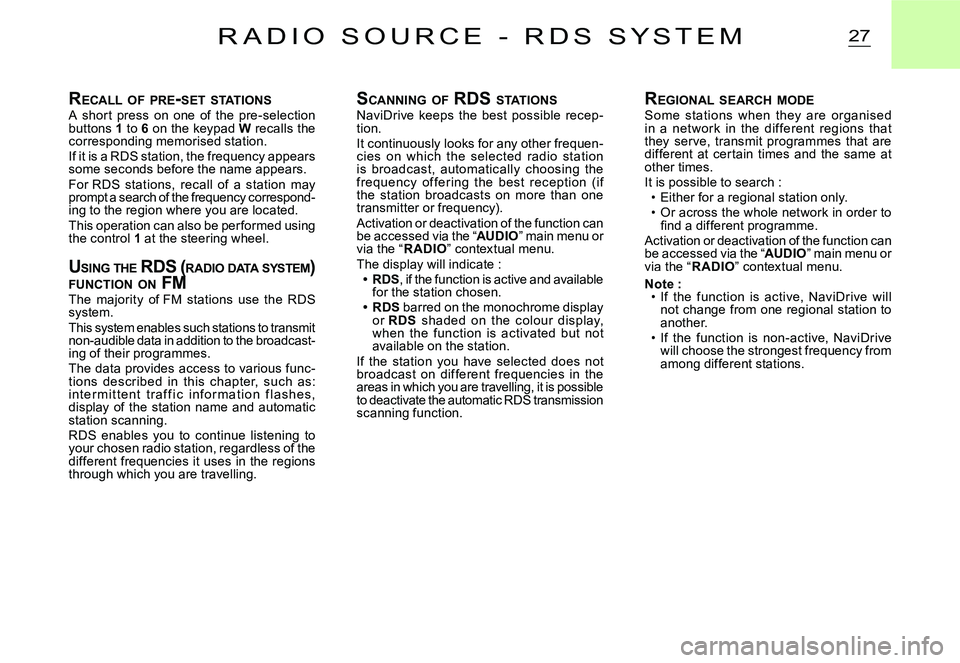
RECALL OF PRE -SET STATIONSA shor t press on one of the pre-selection buttons 1 to 6 on the keypad W recalls the corresponding memorised station.If it is a RDS station, the frequency appears some seconds before the name appears.For RDS stations, recall of a station may prompt a search of the frequency correspond-ing to the region where you are located.This operation can also be performed using the control 1 at the steering wheel.
U SING THE RDS ( RADIO DATA SYSTEM ) FUNCTION ON FMUSING THE RDS ( R RDS (R
The majority of FM stations use the RDS system.This system enables such stations to transmit non-audible data in addition to the broadcast-ing of their programmes.The data provides access to various func-tions described in this chapter, such as: i nte r m i t te nt t r a f f i c i n f o r m at i o n f l a s h e s, display of the station name and automatic station scanning.RDS enables you to continue listening to your chosen radio station, regardless of the different frequencies it uses in the regions through which you are travelling.
SCANNING OF RDS STATIONSNaviDrive keeps the best possible recep-tion.It continuously looks for any other frequen-cies on which the selected radio station is broadcast, automatically choosing the frequency of fering the best reception (if the station broadcasts on more than one transmitter or frequency).Activation or deactivation of the function can be accessed via the “AUDIO” main menu or via the “R ADIO” contextual menu.The display will indicate :RDS, if the function is active and available for the station chosen.RDS barred on the monochrome display or RDS shaded on the colour display, when the function is activated but not available on the station.If the station you have selected does not broadcast on dif ferent frequencies in the areas in which you are travelling, it is possible to deactivate the automatic RDS transmission scanning function.
Page 156 of 178
28R D S S Y S T E M
TA TR AFFIC INFORMATION (TR AFFIC ANNOUNCEMENTS )TA TR AFFIC INFOR INFOR
Some stations allow broadcasting of these messages thanks to the “TA” function.TATAYou can activate this function by pressing button S. Your system allows you to receive traffi c information fl ashes from an FM station which broadcasts them, even though you are listening to another radio programme not itself providing traffi c information, or to another audio source.T h e di s p l ay w i ll in di c ate “TA” p r ov i de d the function is activated and the station is compatible with these messages ; “TA” will TATAbe barred on the monochrome display and shaded on the colour display, when the sta-tion is not compatible.W hile t r af f ic announc em ent s are being broadcast, the original radio programme, or audio source being played, is paused. When the messages are fi nished, your NaviDrive will revert automatically to the musical pro-gramme originally being listened to.
Note :You have to be in FM wave band.During station search phases or auto -matic memorisation phases, if the “TA” TATAfunction is active, the transmitters that are c ompatible with the broadc asting of these messages will be captured or memorised fi rst.The station being listened to should indi-cate via the RDS system that it broadcasts traffi c information.Stations organised in a network (EON) have regional transmitters sending their own programmes. While listening to one of these stations you can switch to any station on the network that is broadcasting traffi c information messages.During the broadcast of a message you can stop listening to it by pressing but-ton S, the “TA” function remains active.TATA
Page 159 of 178
31C D S O U R C E
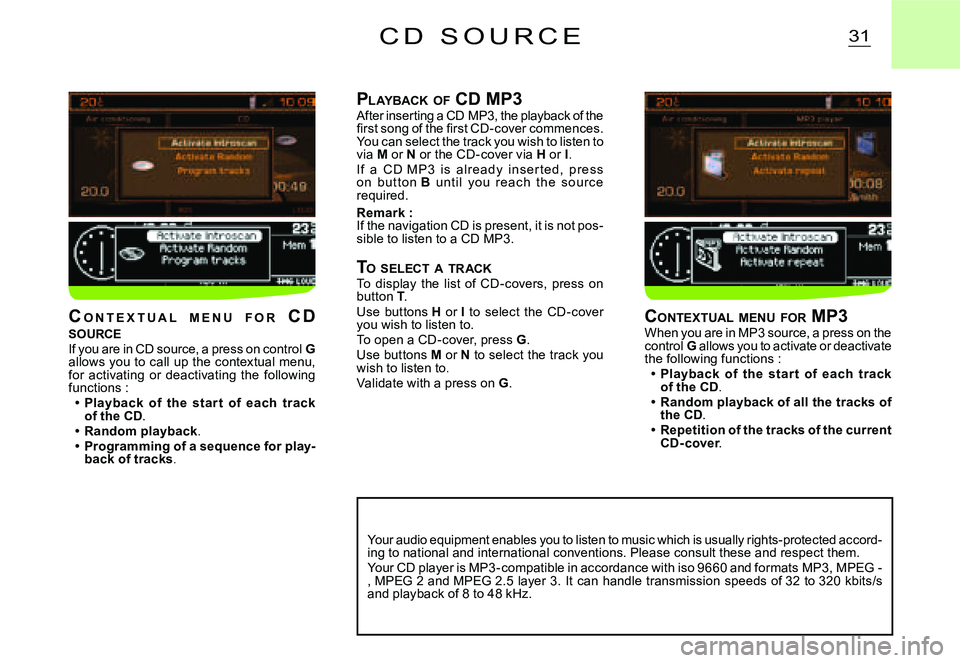
PLAYBACK OF CD MP3After inserting a CD MP3, the playback of the fi rst song of the fi rst CD-cover commences. You can select the track you wish to listen to via M or N or the CD-cover via H or I.I f a C D M P 3 i s alr e ady ins er te d, p r e s s o n but to n B unt il you r e ac h t he s o ur c e required.
Remark :If the navigation CD is present, it is not pos-sible to listen to a CD MP3.
TO SELECT A TRACKTo display the list of CD-covers, press on button T.Use buttons H or I to select the CD-cover you wish to listen to.To open a CD-cover, press G.Use buttons M or N to select the track you wish to listen to.Validate with a press on G.
Your audio equipment enables you to listen to music which is usually rights-protected accord-ing to national and international conventions. Plea se consult these and respect them. Your CD player is MP3-compatible in accordance with iso 9660 and formats MP3, MPEG -, MPEG 2 and MPEG 2.5 layer 3. It can handle transmi ssion speeds of 32 to 320 kbits/s and playback of 8 to 48 kHz.
CONTEXTUAL MENU FOR MP3When you are in MP3 source, a press on the control G allows you to activate or deactivate the following functions :Playback of the star t of each track of the CD.Random playback of all the tracks of the CD.Repetition of the tracks of the current CD- cover.
Page 174 of 178
1
11
11
22
33
USB PLAYER
The system puts together playlists (temporary memory) created over a period which depends on the capacity of the USB e quipment. The other sources are available during this time. The playlists are updated each time the ignition is switched off or each time a USB stick is connected. When connecting for the fi rst time, the tracks are classifi ed by folder. When you reconnect, the classifi cation system selec ted previously is retained.
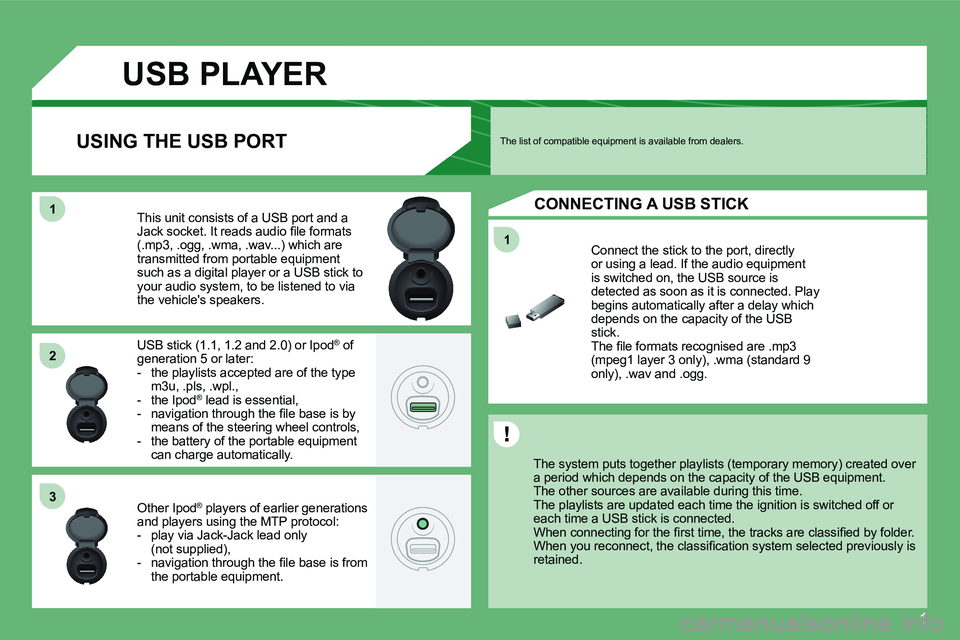
Connect the stick to the port, directly or using a lead. If the audio equipment is switched on, the USB source is detected as soon as it is connected. Play begins automatically after a delay which depends on the capacity of the USB stick. The fi le formats recognised are .mp3 (mpeg1 layer 3 only), .wma (standard 9 only), .wav and .ogg.
This unit consists of a USB port and a Jack socket. It reads audio fi le formats (.mp3, .ogg, .wma, .wav...) which are transmitted from portable equipment such as a digital player or a USB stick to your audio system, to be listened to via the vehicle's speakers.
USB stick (1.1, 1.2 and 2.0) or Ipod ® of ®
generation 5 or later: - the playlists accepted are of the type m3u, .pls, .wpl., - the Ipod ® lead is essential, ®
- navigation through the fi le base is by means of the steering wheel controls, - the battery of the portable equipment can charge automatically.
Other Ipod ® players of earlier generations ®
and players using the MTP protocol: - play via Jack-Jack lead only (not supplied), - navigation through the fi le base is from the portable equipment.
The list of compatible equipment is available from dealers. USING THE USB PORT
CONNECTING A USB STICK
Page 175 of 178
2
33
44
11
55
22
USB PLAYER
USING THE USB PORT
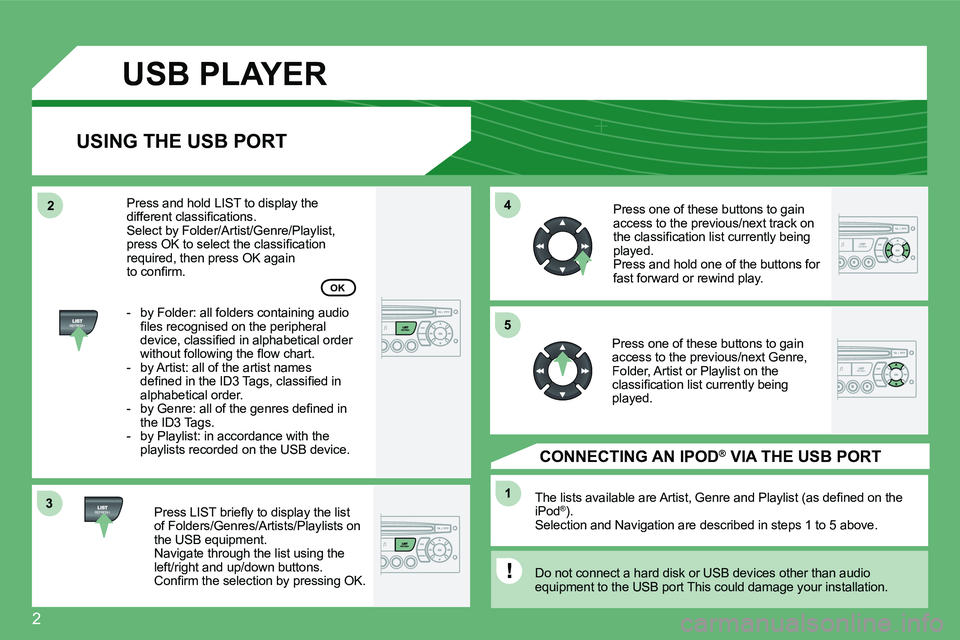
Press LIST briefl y to display the list of Folders/Genres/Artists/Playlists on the USB equipment. Navigate through the list using the left/right and up/down buttons. Confi rm the selection by pressing OK.
The lists available are Artist, Genre and Playlist (as defi ned on the iPod ® ). ®
Selection and Navigation are described in steps 1 to 5 above.
Do not connect a hard disk or USB devices other than audio equipment to the USB port This could damage your in stallation.
CONNECTING AN IPOD ®AN IPOD AN IPOD VIA THE USB PORT ®
Press one of these buttons to gain access to the previous/next track on the classifi cation list currently being played. Press and hold one of the buttons for fast forward or rewind play.
Press one of these buttons to gain access to the previous/next Genre, Folder, Artist or Playlist on the classifi cation list currently being played.
Press and hold LIST to display the different classifi cations. Select by Folder/Artist/Genre/Playlist, press OK to select the classifi cation required, then press OK again to confi rm.
- by Folder: all folders containing audio fi les recognised on the peripheral device, classifi ed in alphabetical order without following the fl ow chart. - by Artist: all of the artist names defi ned in the ID3 Tags, classifi ed in alphabetical order. - by Genre: all of the genres defi ned in the ID3 Tags. - by Playlist: in accordance with the playlists recorded on the USB device.
OK
Page 176 of 178
3
11
22
22
11
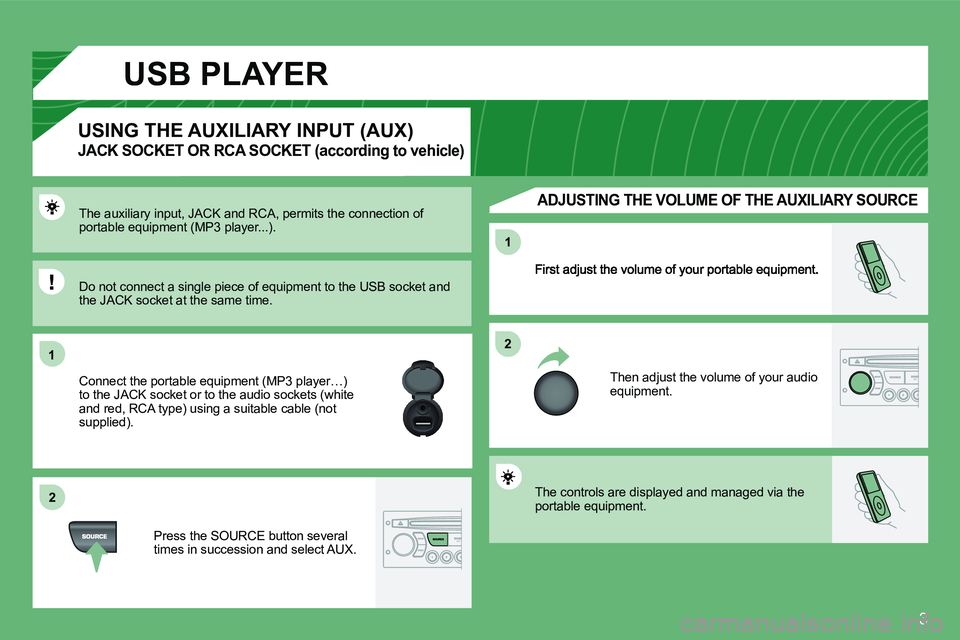
Then adjust the volume of your audio equipment.
The auxiliary input, JACK and RCA, permits the connection of portable equipment (MP3 player...).
Connect the portable equipment (MP3 player…) to the JACK socket or to the audio sockets (white and red, RCA type) using a suitable cable (not supplied).
Press the SOURCE button several times in succession and select AUX.
USING THE AUXILIARY INPUT (AUX)
JACK SOCKET OR RCA SOCKET (according to vehicle)
ADJUSTING THE VOLUME OF THE AUXILIARY SOURCE
Do not connect a single piece of equipment to the USB socket and the JACK socket at the same time.
The controls are displayed and managed via the portable equipment.
USB PLAYER