automatic Citroen C3 2009.5 1.G Owner's Guide
[x] Cancel search | Manufacturer: CITROEN, Model Year: 2009.5, Model line: C3, Model: Citroen C3 2009.5 1.GPages: 209, PDF Size: 7.71 MB
Page 82 of 209
5
VISIBILITY
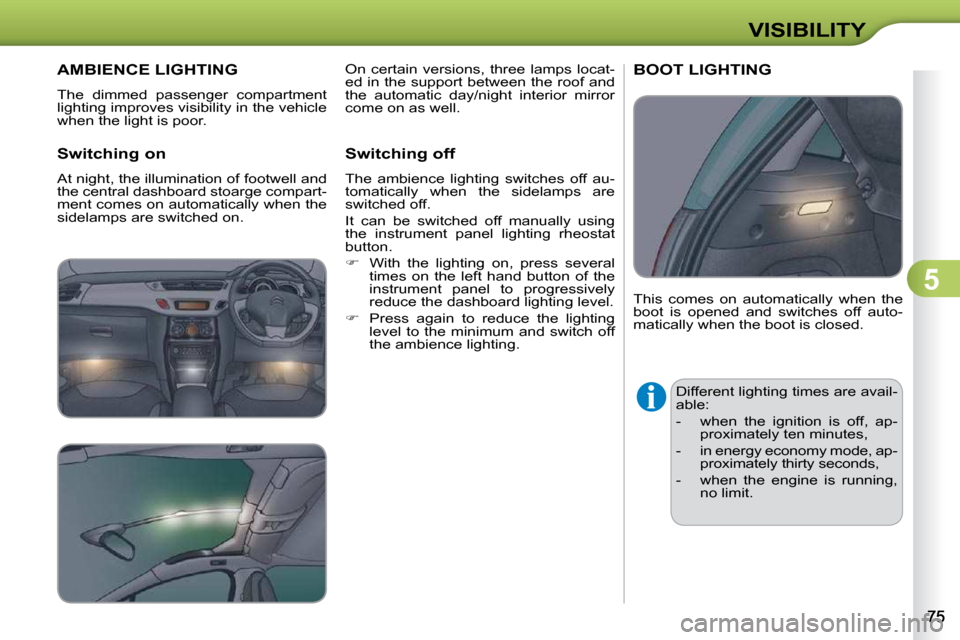
AMBIENCE LIGHTING
The dimmed passenger compartment
lighting improves visibility in the vehicle
when the light is poor.
Switching on
At night, the illumination of footwell and
the central dashboard stoarge compart-
ment comes on automatically when the
sidelamps are switched on. Switching off
The ambience lighting switches off au-
tomatically when the sidelamps are
switched off.
It can be switched off manually using
the instrument panel lighting rheostat
button.
With the lighting on, press several
times on the left hand button of the
instrument panel to progressively
reduce the dashboard lighting level.
Press again to reduce the lighting
level to the minimum and switch off
the ambience lighting. This comes on automatically when the
boot is opened and switches off auto-
matically when the boot is closed.
BOOT LIGHTING
Different lighting times are avail-
able:
- when the ignition is off, ap-
proximately ten minutes,
- in energy economy mode, ap- proximately thirty seconds,
- when the engine is running, no limit.
On certain versions, three lamps locat-
ed in the support between the roof and
the automatic day/night interior mirror
come on as well.
Page 85 of 209
6
FITTINGS
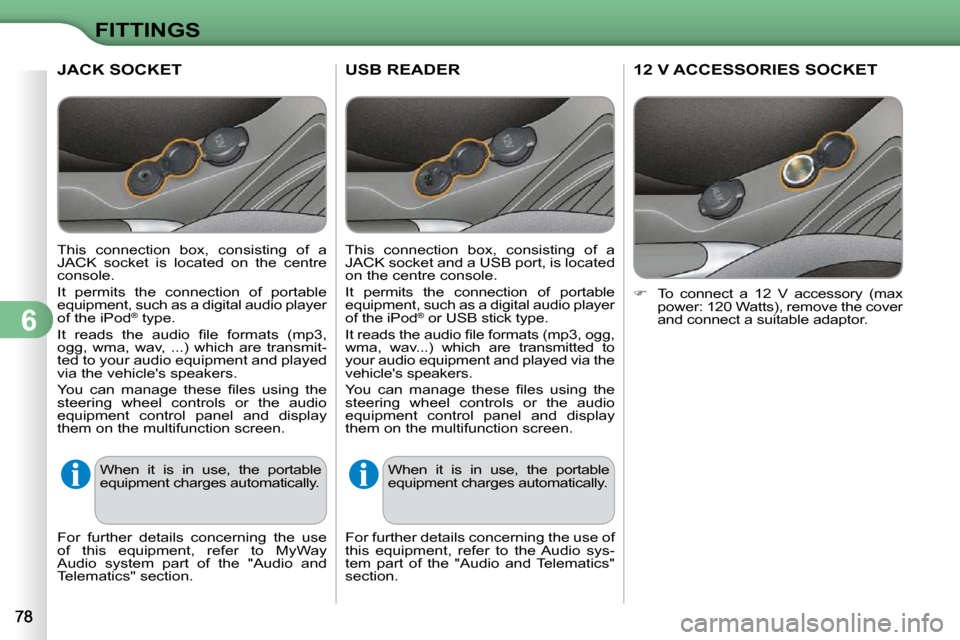
USB READER
This connection box, consisting of a
JACK socket and a USB port, is located
on the centre console.
It permits the connection of portable
equipment, such as a digital audio player
of the iPod ®
or USB stick type.
It reads the audio fi le formats (mp3, ogg,
wma, wav...) which are transmitted to
your audio equipment and played via the
vehicle's speakers.
You can manage these fi les using the
steering wheel controls or the audio
equipment control panel and display
them on the multifunction screen.
When it is in use, the portable
equipment charges automatically.
For further details concerning the use of
this equipment, refer to the Audio sys-
tem part of the "Audio and Telematics"
section.
12 V ACCESSORIES SOCKET
To connect a 12 V accessory (max
power: 120 Watts), remove the cover
and connect a suitable adaptor.
JACK SOCKET
This connection box, consisting of a
JACK socket is located on the centre
console.
It permits the connection of portable
equipment, such as a digital audio player
of the iPod ®
type.
It reads the audio fi le formats (mp3,
ogg, wma, wav, ...) which are transmit-
ted to your audio equipment and played
via the vehicle's speakers.
You can manage these fi les using the
steering wheel controls or the audio
equipment control panel and display
them on the multifunction screen.
When it is in use, the portable
equipment charges automatically.
For further details concerning the use
of this equipment, refer to MyWay
Audio system part of the "Audio and
Telematics" section.
Page 88 of 209
6
FITTINGS
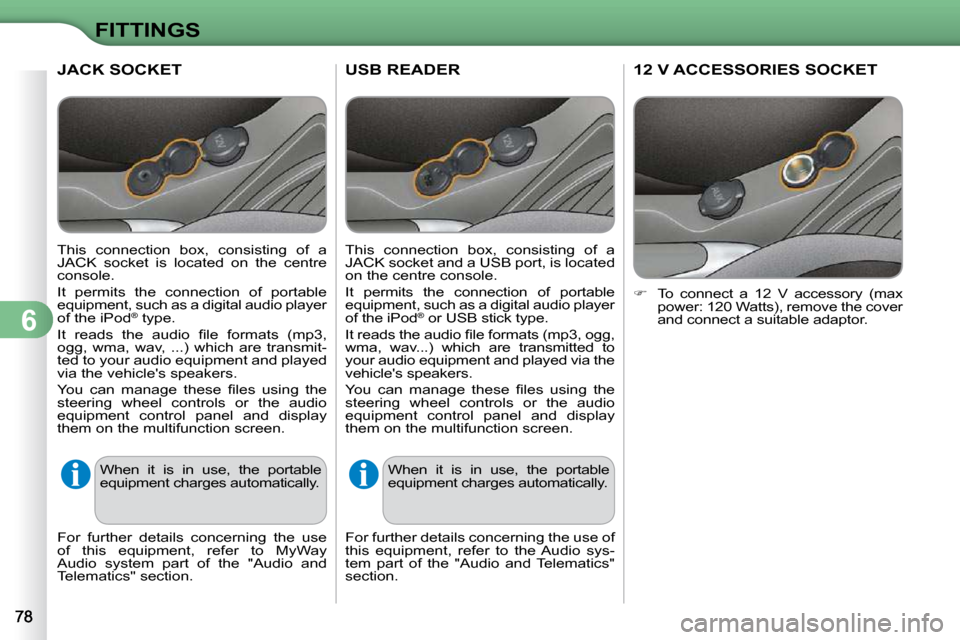
USB READER
This connection box, consisting of a
JACK socket and a USB port, is located
on the centre console.
It permits the connection of portable
equipment, such as a digital audio player
of the iPod ®
or USB stick type.
It reads the audio fi le formats (mp3, ogg,
wma, wav...) which are transmitted to
your audio equipment and played via the
vehicle's speakers.
You can manage these fi les using the
steering wheel controls or the audio
equipment control panel and display
them on the multifunction screen.
When it is in use, the portable
equipment charges automatically.
For further details concerning the use of
this equipment, refer to the Audio sys-
tem part of the "Audio and Telematics"
section.
12 V ACCESSORIES SOCKET
To connect a 12 V accessory (max
power: 120 Watts), remove the cover
and connect a suitable adaptor.
JACK SOCKET
This connection box, consisting of a
JACK socket is located on the centre
console.
It permits the connection of portable
equipment, such as a digital audio player
of the iPod ®
type.
It reads the audio fi le formats (mp3,
ogg, wma, wav, ...) which are transmit-
ted to your audio equipment and played
via the vehicle's speakers.
You can manage these fi les using the
steering wheel controls or the audio
equipment control panel and display
them on the multifunction screen.
When it is in use, the portable
equipment charges automatically.
For further details concerning the use
of this equipment, refer to MyWay
Audio system part of the "Audio and
Telematics" section.
Page 101 of 209
8
SAFETY
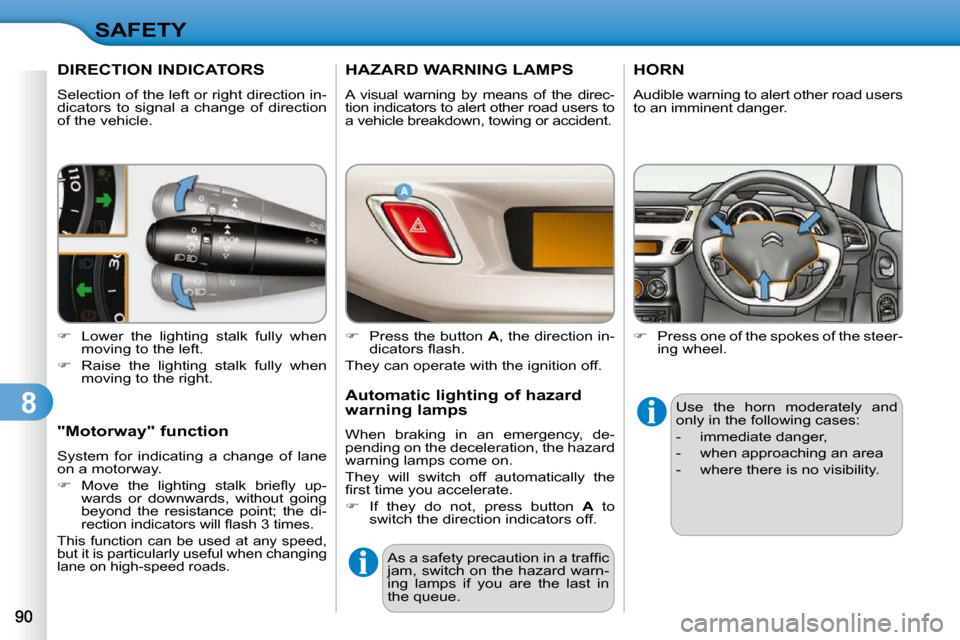
DIRECTION INDICATORS
Selection of the left or right direction in-
dicators to signal a change of direction
of the vehicle.
Lower the lighting stalk fully when
moving to the left.
Raise the lighting stalk fully when
moving to the right.
"Motorway" function
System for indicating a change of lane
on a motorway.
Move the lighting stalk briefl y up-
wards or downwards, without going
beyond the resistance point; the di-
rection indicators will fl ash 3 times.
This function can be used at any speed,
but it is particularly useful when changing
lane on high-speed roads.
HAZARD WARNING LAMPS
A visual warning by means of the direc-
tion indicators to alert other road users to
a vehicle breakdown, towing or accident.
Press the button A , the direction in-
dicators fl ash.
They can operate with the ignition off.
Automatic lighting of hazard
warning lamps
When braking in an emergency, de-
pending on the deceleration, the hazard
warning lamps come on.
They will switch off automatically the
fi rst time you accelerate.
If they do not, press button A to
switch the direction indicators off.
As a safety precaution in a traffi c
jam, switch on the hazard warn-
ing lamps if you are the last in
the queue.
HORN
Audible warning to alert other road users
to an imminent danger.
Press one of the spokes of the steer-
ing wheel.
Use the horn moderately and
only in the following cases:
- immediate danger,
-
when approaching an area
- where there is no visibility.
Page 105 of 209
8
SAFETY
The driver must ensure that passen-
gers use the seat belts correctly and
that they are all restrained securely
before setting off.
Wherever you are seated in the ve-
hicle, always fasten your seat belt,
even for short journeys.
Do not invert the seat belt buckles as
they will not fulfi l their role fully.
The seat belts are fi tted with an inertia
reel permitting automatic adjustment
of the length of the strap to your size.
The seat belt is stored automatically
when not in use.
Before and after use, ensure that the
seat belt is reeled in correctly.
The lower part of the strap must be
positioned as low as possible on the
pelvis.
The upper part must be positioned in
the hollow of the shoulder.
The inertia reels are fi tted with an au-
tomatic locking device which comes
into operation in the event of a colli-
sion, emergency braking or if the ve-
hicle rolls over. You can release the
device by pulling rapidly on the strap
and releasing it. Recommendations for
children
Use a suitable child seat if the pas-
senger is less than 12 years old or
shorter than one and a half metres.
Never use the same seat belt to secure
more than one person.
Never allow a child to travel on your lap.
In order to be effective, a seat belt:
- must be tightened as close to the
body as possible,
- must restrain one person of adult size only,
- must not bear any trace of cuts or fraying,
- must be pulled in front of you with a smooth movement, checking
that it does not twist,
- must not be altered or modifi ed to avoid altering its performance.
In accordance with current safety regu-
lations, all repairs and checks must be
carried out by a CITROËN dealer who
guarantees that the work is carried out
correctly.
Have your seat belts checked regularly
by a CITROËN dealer and particularly
if the straps show signs of damage.
Clean the seat belt straps with soapy
water or a textile cleaning product,
sold by CITROËN dealers.
After folding or moving a seat or rear
bench seat, ensure that the seat belt is
positioned and reeled in correctly.
Depending on the nature and se-
riousness of the impacts , the pre-
tensioning device may be triggered
before and independently of the air-
bags. Triggering of the pre-tensioners
is accompanied by a slight discharge
of harmless smoke and a noise, due
to the activation of the pyrotechnic
cartridge incorporated in the system.
In all cases, the airbag warning lamp
comes on.
Following an impact, have the seat
belts system checked, and if neces-
sary replaced, by a CITROËN dealer.
Page 113 of 209
9
DRIVING
AUTOMATIC GEARBOX
Four-speed automatic gearbox which
offers a choice between the comfort of
fully automatic operation, enhanced by
sport and snow programmes, or manual
gear changing.
Therefore, four driving modes are offered:
- automatic operation for electronic
management of the gears by the
gearbox,
- sport programme for a more dy-
namic style of driving,
- snow programme to improve driving
when traction is poor,
- manual operation for sequential
changing of the gears by the driver.
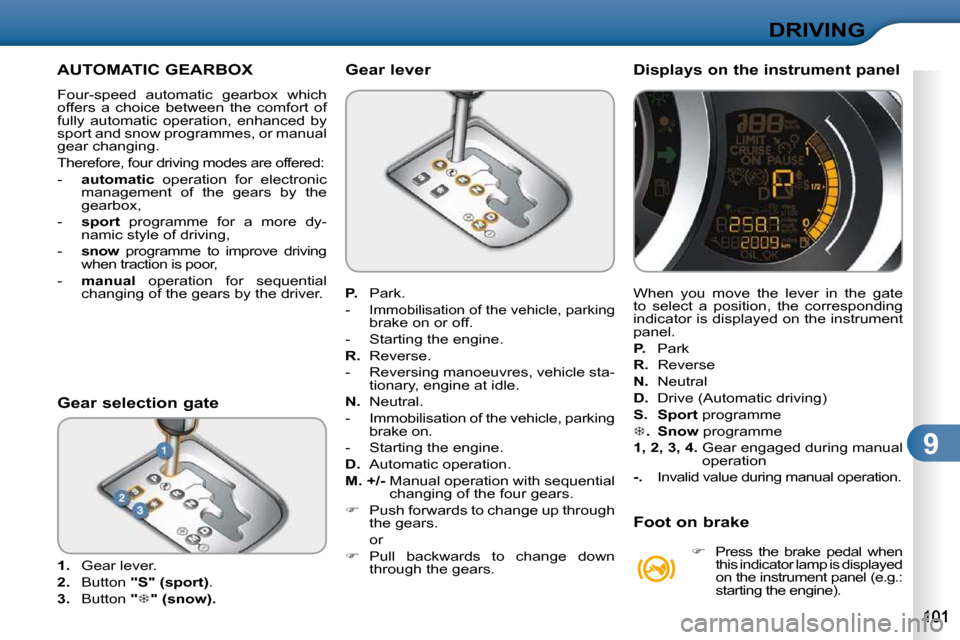
1. Gear lever.
2. Button "S" (sport) .
3. Button "
" (snow).
Gear selection gate
P. Park.
-
Immobilisation of the vehicle, parking
brake on or off.
- Starting the engine.
R. Reverse.
- Reversing manoeuvres, vehicle sta- tionary, engine at idle.
N. Neutral.
- Immobilisation of the vehicle, parking brake on.
- Starting the engine.
D. Automatic operation.
M. +/- Manual operation with sequential
changing of the four gears.
Push forwards to change up through
the gears.
or
Pull backwards to change down
through the gears.
Gear lever
When you move the lever in the gate
to select a position, the corresponding
indicator is displayed on the instrument
panel.
P. Park
R. Reverse
N. Neutral
D. Drive (Automatic driving)
S. Sport programme
. Snow programme
1, 2, 3, 4
. Gear engaged during manual
operation
-. Invalid value during manual operation.
Displays on the instrument panel
Foot on brake
Press the brake pedal when
this indicator lamp is displayed
on the instrument panel (e.g.:
starting the engine).
Page 114 of 209
9
DRIVING
Moving off
Apply the parking brake.
Select position P or N .
Start the engine.
If this procedure is not followed, an au-
dible signal is heard, accompanied by a
message on the multifunction screen.
With the engine running, press the
brake pedal.
Release the parking brake.
Select position R , D or M .
Gradually release the brake pedal.
The vehicle moves off immediately. Automatic operation
Select position D for automatic
changing of the four gears.
The gearbox then operates in auto-
adaptive mode, without any intervention
on the part of the driver. It continuously
selects the most suitable gear accor-
ding to the style of driving, the profi le of
the road and the load in the vehicle.
For maximum acceleration without
touching the lever, press the accelera-
tor pedal down fully (kick down). The
gearbox changes down automatically
or maintains the gear selected until the
maximum engine speed is reached.
On braking, the gearbox changes down
automatically to provide effi cient engine
braking.
If you release the accelerator sharply,
the gearbox will not change to a higher
gear for safety reasons. Sport and snow programmes
These two special programmes supple-
ment the automatic operation in very
specifi c conditions of use.
Sport programme "S"
Press button "S" , after starting the
engine.
The gearbox automatically favours a
dynamic style of driving.
Snow programme " "
Press button " ", after starting the
engine.
The gearbox adapts to driving on slip-
pery roads.
This programme improves starting and
drive when traction is poor.
Return to automatic operation
At any time, press the button selected
again to quit the programme engaged
and return to auto-adaptive mode.
If position
N is engaged inad-
vertently while driving, allow the
engine to return to idle then en-
gage position D to accelerate.
Never select position N while the
vehicle is moving.
Never select positions P or R
unless the vehicle is completely
stationary.
When the engine is running at
idle, with the brakes released,
if position
R , D or M is selected,
the vehicle moves even without
the accelerator being pressed.
When the engine is running, never
leave children in the vehicle with-
out supervision.
When carrying out maintenance
with the engine running, apply
the parking brake and select
position P .
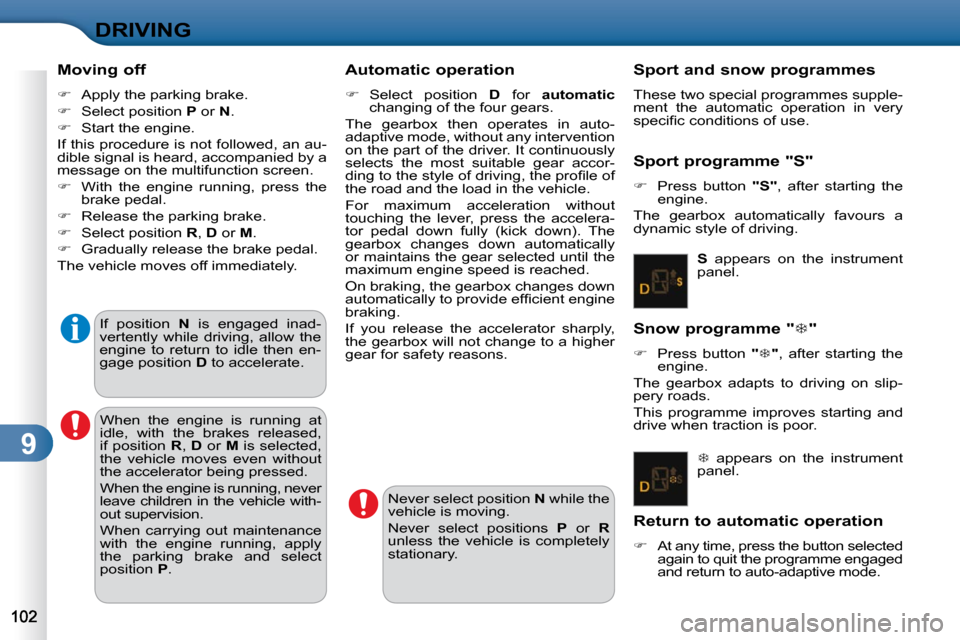
S appears on the instrument
panel.
appears on the instrument
panel.
Page 115 of 209
9
DRIVING
Manual operation
Select position M for sequential
changing of the four gears.
Push the lever towards the + sign to
change up a gear.
Pull the lever towards the - sign to
change down a gear.
It is only possible to change from one
gear to another if the vehicle speed and
engine speed permit; otherwise, the
gearbox will operate temporarily in auto-
matic mode.
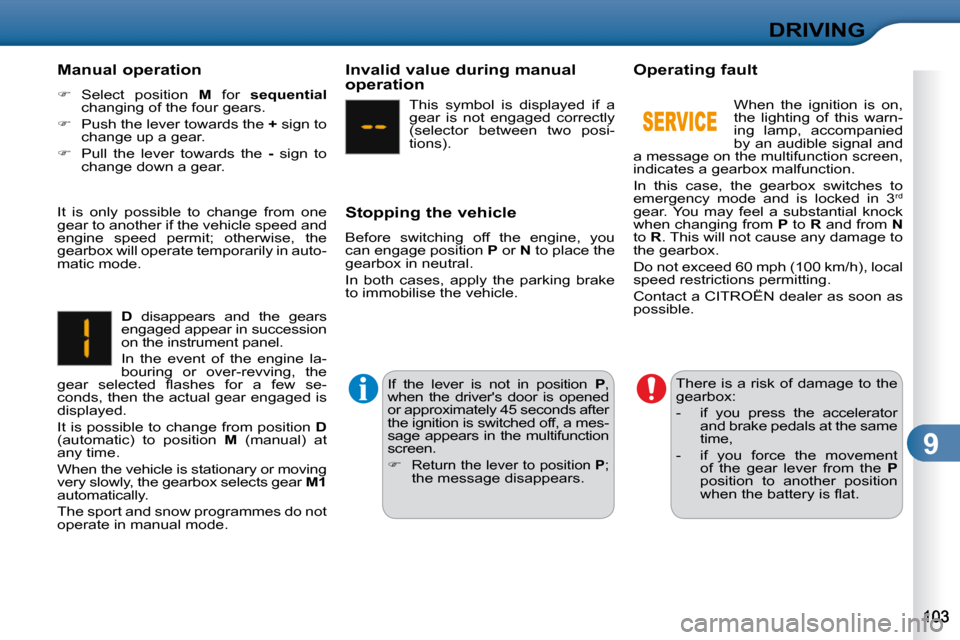
D disappears and the gears
engaged appear in succession
on the instrument panel.
In the event of the engine la-
bouring or over-revving, the
gear selected fl ashes for a few se-
conds, then the actual gear engaged is
displayed.
It is possible to change from position D
(automatic) to position M (manual) at
any time.
When the vehicle is stationary or moving
very slowly, the gearbox selects gear M1
automatically.
The sport and snow programmes do not
operate in manual mode. Invalid value during manual
operation
This symbol is displayed if a
gear is not engaged correctly
(selector between two posi-
tions).
Stopping the vehicle
Before switching off the engine, you
can engage position P or N to place the
gearbox in neutral.
In both cases, apply the parking brake
to immobilise the vehicle.
If the lever is not in position P ,
when the driver's door is opened
or approximately 45 seconds after
the ignition is switched off, a mes-
sage appears in the multifunction
screen.
Return the lever to position P ;
the message disappears. There is a risk of damage to the
gearbox:
- if you press the accelerator
and brake pedals at the same
time,
- if you force the movement of the gear lever from the P
position to another position
when the battery is fl at.
Operating fault
When the ignition is on,
the lighting of this warn-
ing lamp, accompanied
by an audible signal and
a message on the multifunction screen,
indicates a gearbox malfunction.
In this case, the gearbox switches to
emergency mode and is locked in 3 rd
gear. You may feel a substantial knock
when changing from P to R and from N
to R . This will not cause any damage to
the gearbox.
Do not exceed 60 mph (100 km/h), local
speed restrictions permitting.
Contact a CITROËN dealer as soon as
possible.
Page 118 of 209
9
DRIVING
The cruise control cannot, in any
circumstances, replace the need
to respect speed limits, nor can
it replace the need for vigilance
and responsibility on the part of
the driver.
CRUISE CONTROL
System which automatically maintains
the speed of the vehicle at the value
programmed by the driver, without any
action on the accelerator pedal.
The cruise control is switched on
manually: it requires a minimum vehicle
speed of 25 mph (40 km/h), as well as
the engagement of:
- fourth gear on a manual gearbox,
- second gear on an automatic gearbox, in sequential mode,
- position D on an automatic gearbox.
The cruise control is switched off manu-
ally or by pressing the brake or clutch
pedal or on triggering of the ESP sys-
tem for safety reasons.
It is possible to exceed the programmed
speed temporarily by pressing the ac-
celerator pedal.
To return to the programmed speed,
simply release the accelerator pedal.
Switching off the ignition cancels any
programmed speed value. The controls of this system are grouped
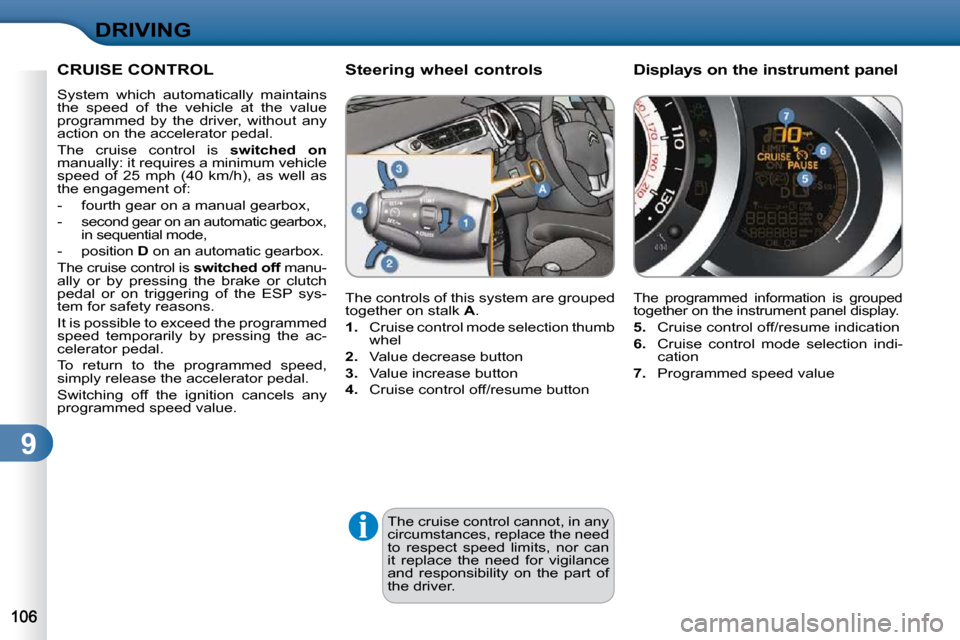
together on stalk
A .
1. Cruise control mode selection thumb
whel
2. Value decrease button
3. Value increase button
4. Cruise control off/resume button
Steering wheel controls Displays on the instrument
panel
The programmed information is grouped together on the instrument panel display.
5. Cruise control off/resume indication
6. Cruise control mode selection indi-
cation
7. Programmed speed value
Page 119 of 209
9
DRIVING
When the cruise control is
switched on, be careful if you
maintain the pressure on one of
the programmed speed chan-
ging buttons: this may result in
a very rapid change in the speed
of your vehicle.
Do not use the cruise control on
slippery roads or in heavy traffi c.
On a steep descent, the cruise
control will not be able to prevent
the vehicle from exceeding the
programmed speed.
To avoid any risk of jamming of
the pedals:
- ensure that the mat is posi-tioned correctly,
- never fi t one mat on top of another.
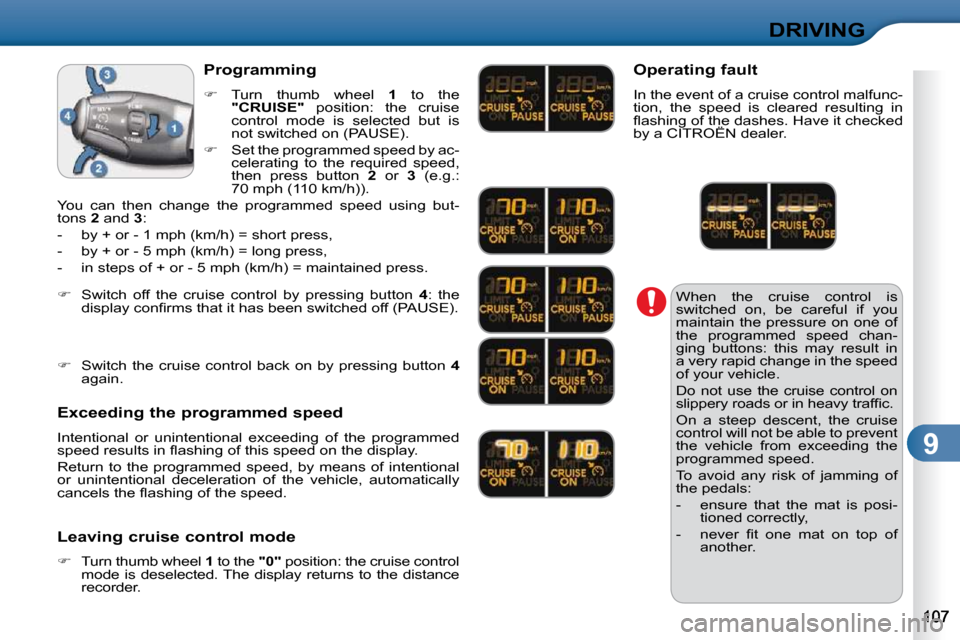
Programming
Turn thumb wheel 1 to the
"CRUISE" position: the cruise
control mode is selected but is
not switched on (PAUSE).
Set the programmed speed by ac-
celerating to the required speed,
then press button 2 or 3 (e.g.:
70 mph (110 km/h)).
You can then change the programmed speed using but-
tons 2 and 3 :
- by + or - 1 mph (km/h) = short press,
- by + or - 5 mph (km/h) = long press,
- in steps of + or - 5 mph (km/h) = maintained press.
Exceeding the programmed speed
Intentional or unintentional exceeding of the programmed
speed results in fl ashing of this speed on the display.
Return to the programmed speed, by means of intentional
or unintentional deceleration of the vehicle, automaticall y
cancels the fl ashing of the speed.
Leaving cruise control mode
Turn thumb wheel 1 to the "0" position: the cruise control
mode is deselected. The display returns to the dist ance
recorder.
Switch off the cruise control by pressing button 4 : the
display confi rms that it has been switched off (PAUSE).
Switch the cruise control back on by pressing button 4
again. Operating fault
In the event of a cruise control malfunc-
tion, the speed is cleared resulting in
fl ashing of the dashes. Have it checked
by a CITROËN dealer.