ECU Citroen C3 2012 2.G User Guide
[x] Cancel search | Manufacturer: CITROEN, Model Year: 2012, Model line: C3, Model: Citroen C3 2012 2.GPages: 252, PDF Size: 8.11 MB
Page 143 of 252
11
141
PRACTICAL INFORMATION
CHANGING A WHEEL
Procedure for changing a faulty wheel
for the spare wheel using the tools pro-
vided with the vehicle.
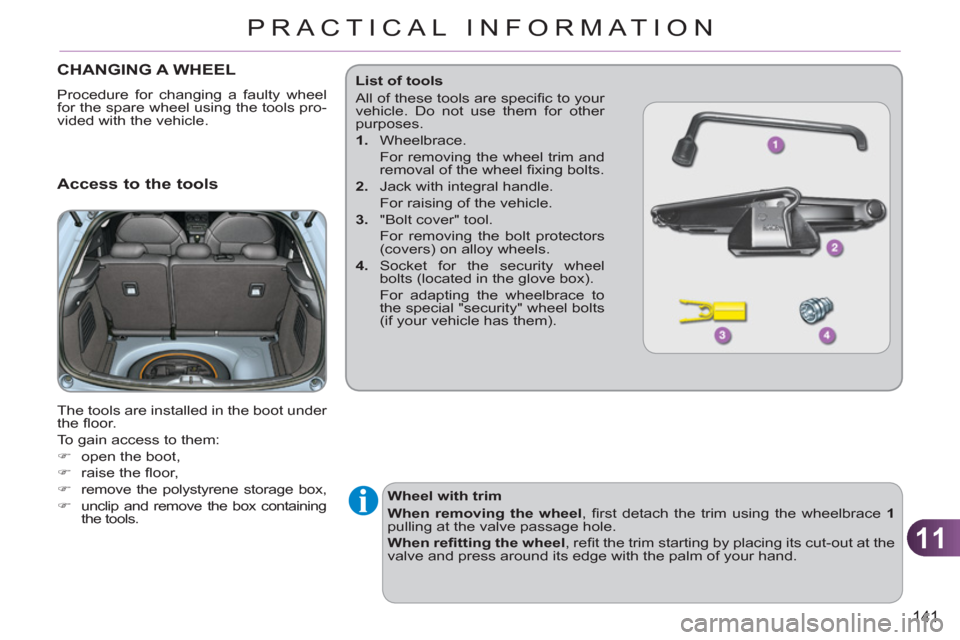
Access to the tools
The tools are installed in the boot under
the fl oor.
To gain access to them:
)
open the boot,
)
raise the fl oor,
)
remove the polystyrene storage box,
)
unclip and remove the box containing
the tools.
Wheel with trim
When removing the wheel
, fi rst detach the trim using the wheelbrace 1
pulling at the valve passage hole.
When refi tting the wheel
, refi t the trim starting by placing its cut-out at the
valve and press around its edge with the palm of your hand.
List of tools
All of these tools are specifi c to your
vehicle. Do not use them for other
purposes.
1.
Wheelbrace.
For removing the wheel trim and
removal of the wheel fi xing bolts.
2.
Jack with integral handle.
For raising of the vehicle.
3.
"Bolt cover" tool.
For removing the bolt protectors
(covers) on alloy wheels.
4.
Socket for the security wheel
bolts (located in the glove box).
For adapting the wheelbrace to
the special "security" wheel bolts
(if your vehicle has them).
Page 144 of 252
11
PRACTICAL INFORMATION
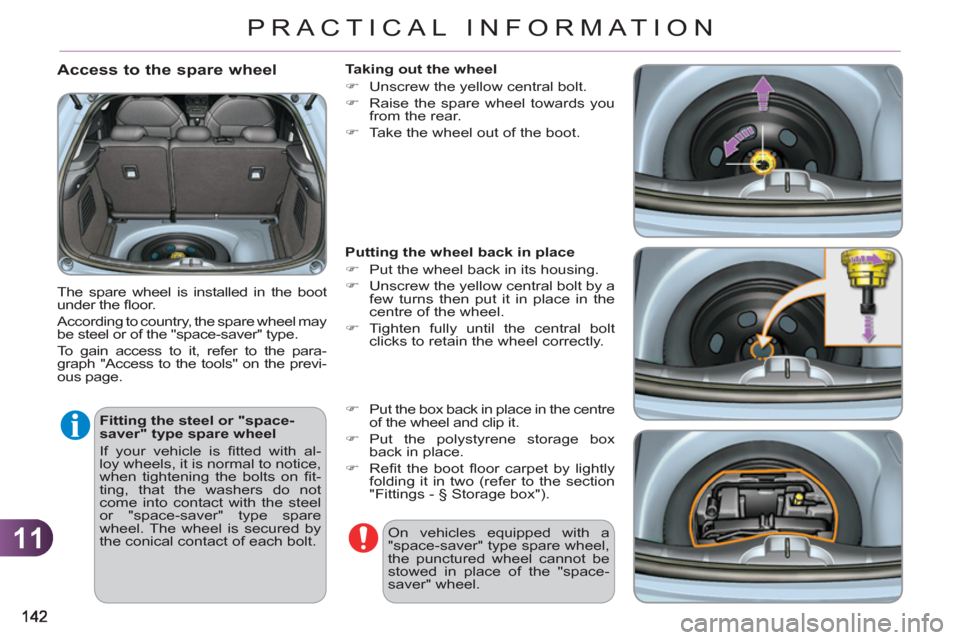
Access to the spare wheel
The spare wheel is installed in the boot
under the fl oor.
According to country, the spare wheel may
be steel or of the "space-saver" type.
To gain access to it, refer to the para-
graph "Access to the tools" on the previ-
ous page.
Fitting the steel or "space-
saver" type spare wheel
If your vehicle is fi tted with al-
loy wheels, it is normal to notice,
when tightening the bolts on fi t-
ting, that the washers do not
come into contact with the steel
or "space-saver" type spare
wheel. The wheel is secured by
the conical contact of each bolt.
Taking out the wheel
)
Unscrew the yellow central bolt.
)
Raise the spare wheel towards you
from the rear.
)
Take the wheel out of the boot.
Putting the wheel back in place
)
Put the wheel back in its housing.
)
Unscrew the yellow central bolt by a
few turns then put it in place in the
centre of the wheel.
)
Tighten fully until the central bolt
clicks to retain the wheel correctly.
)
Put the box back in place in the centre
of the wheel and clip it.
)
Put the polystyrene storage box
back in place.
)
Refi t the boot fl oor carpet by lightly
folding it in two (refer to the section
"Fittings - § Storage box").
On vehicles equipped with a
"space-saver" type spare wheel,
the punctured wheel cannot be
stowed in place of the "space-
saver" wheel.
Page 145 of 252
11
143
PRACTICAL INFORMATION
*
position R
for an electronic gearbox;
position P
for an automatic gearbox.
Removing a wheel
Parking the vehicle
Immobilise the vehicle where it
does not block traffi c: the ground
must be level, stable and not
slippery.
Apply the parking brake, switch
off the ignition and engage fi rst
gear * to lock the wheels.
If necessary, place a chock under
the wheel diagonally opposite the
wheel to be changed.
It is imperative that you ensure
that the occupants get out of the
vehicle and wait where they are
safe.
Never go underneath a vehicle
raised using a jack; use an axle
stand.
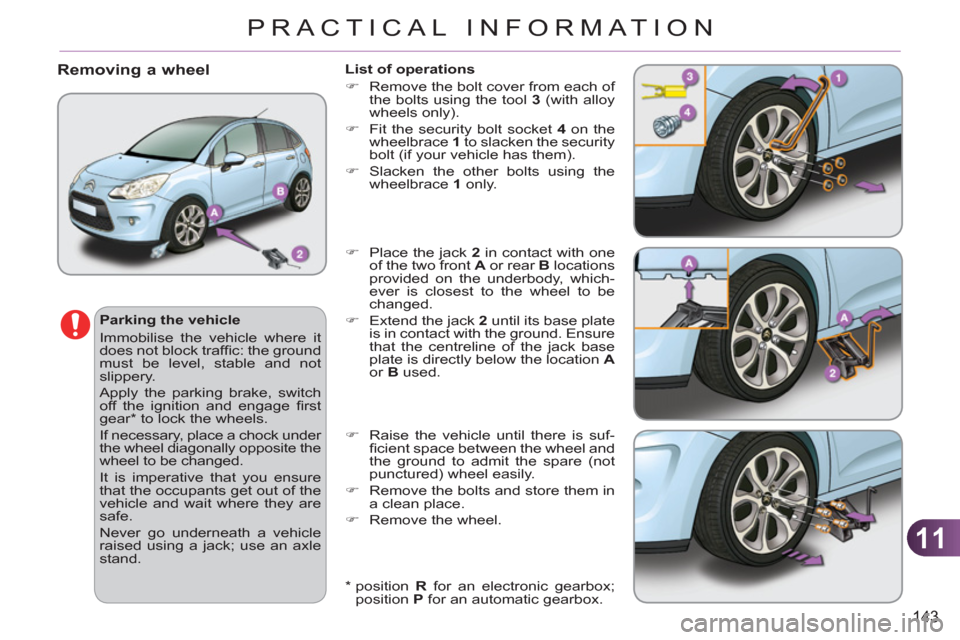
List of operations
)
Remove the bolt cover from each of
the bolts using the tool 3
(with alloy
wheels only).
)
Fit the security bolt socket 4
on the
wheelbrace 1
to slacken the security
bolt (if your vehicle has them).
)
Slacken the other bolts using the
wheelbrace 1
only.
)
Place the jack 2
in contact with one
of the two front A
or rear B
locations
provided on the underbody, which-
ever is closest to the wheel to be
changed.
)
Extend the jack 2
until its base plate
is in contact with the ground. Ensure
that the centreline of the jack base
plate is directly below the location A
or B
used.
)
Raise the vehicle until there is suf-
fi cient space between the wheel and
the ground to admit the spare (not
punctured) wheel easily.
)
Remove the bolts and store them in
a clean place.
)
Remove the wheel.
Page 146 of 252
11
144
PRACTICAL INFORMATION
After changing a wheel
To store the punctured wheel in
the boot correctly, fi rst remove
the central cover.
When using the "space-saver"
type temporary use spare wheel,
do not exceed 50 mph (80 km/h).
Have the tightening of the bolts
and the pressure of the spare
wheel checked by a CITROËN
dealer or a qualifi ed workshop
without delay.
Have the punctured wheel re-
paired and replace it on the ve-
hicle as soon as possible.
Do not drive with more than one
temporary use spare wheel fi tted
to the vehicle at one time.
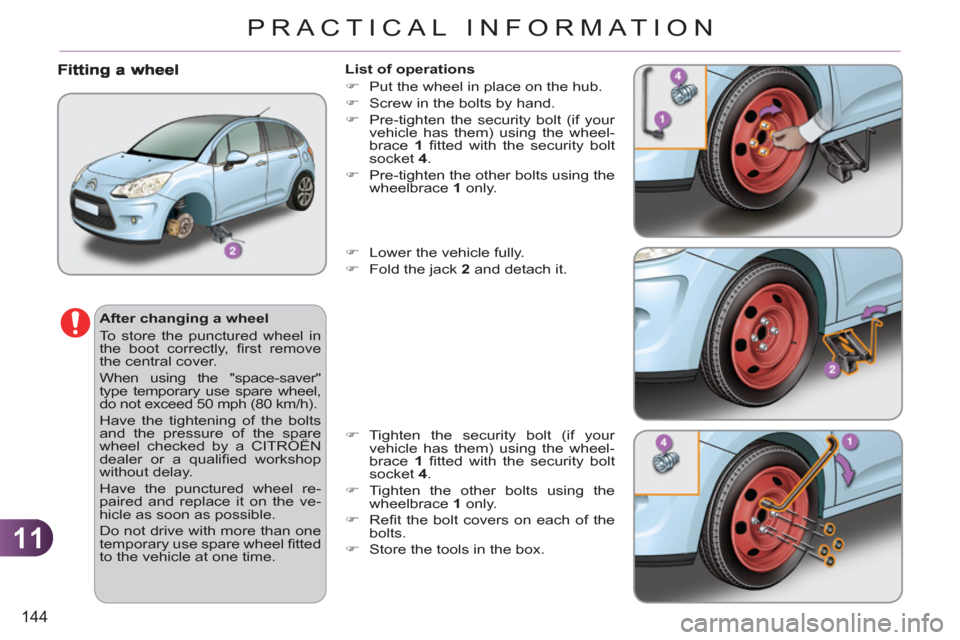
List of operations
)
Put the wheel in place on the hub.
)
Screw in the bolts by hand.
)
Pre-tighten the security bolt (if your
vehicle has them) using the wheel-
brace 1
fi tted with the security bolt
socket 4
.
)
Pre-tighten the other bolts using the
wheelbrace 1
only.
)
Lower the vehicle fully.
)
Fold the jack 2
and detach it.
)
Tighten the security bolt (if your
vehicle has them) using the wheel-
brace 1
fi tted with the security bolt
socket 4
.
)
Tighten the other bolts using the
wheelbrace 1
only.
)
Refi t the bolt covers on each of the
bolts.
)
Store the tools in the box.
Page 150 of 252
11
148
PRACTICAL INFORMATION
Rear lamps
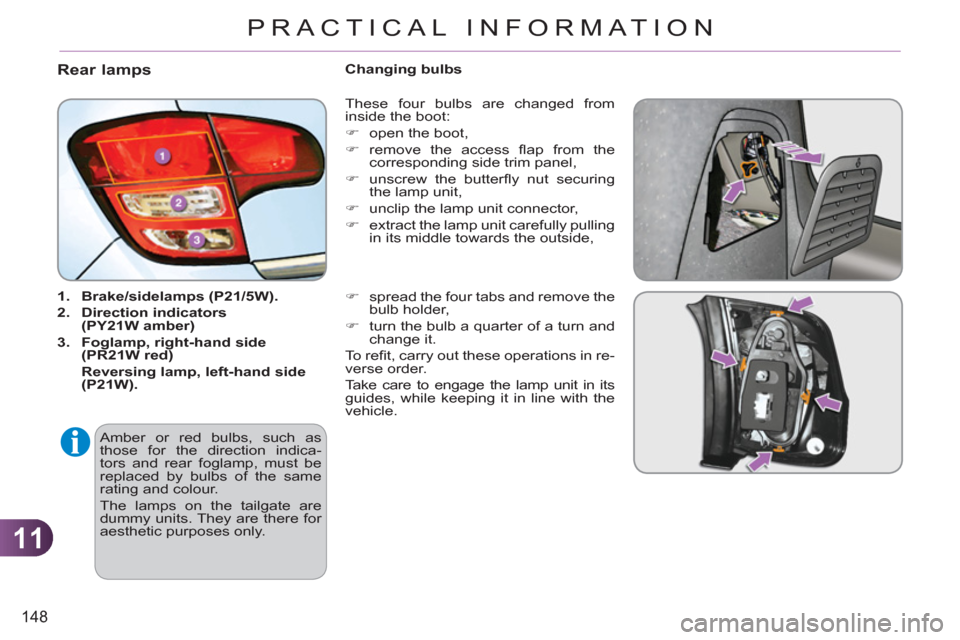
1.
Brake/sidelamps (P21/5W).
2.
Direction indicators
(PY21W amber)
3.
Foglamp,
right-hand side
(
PR21W red)
Reversing lamp
,
left-hand side
(
P21W).
These four bulbs are changed from
inside the boot:
)
open the boot,
)
remove the access fl ap from the
corresponding side trim panel,
)
unscrew the butterfl y nut securing
the lamp unit,
)
unclip the lamp unit connector,
)
extract the lamp unit carefully pulling
in its middle towards the outside,
)
spread the four tabs and remove the
bulb holder,
)
turn the bulb a quarter of a turn and
change it.
To r efi t, carry out these operations in re-
verse order.
Take care to engage the lamp unit in its
guides, while keeping it in line with the
vehicle.
Changing bulbs
Amber or red bulbs, such as
those for the direction indica-
tors and rear foglamp, must be
replaced by bulbs of the same
rating and colour.
The lamps on the tailgate are
dummy units. They are there for
aesthetic purposes only.
Page 160 of 252
11
158
PRACTICAL INFORMATION
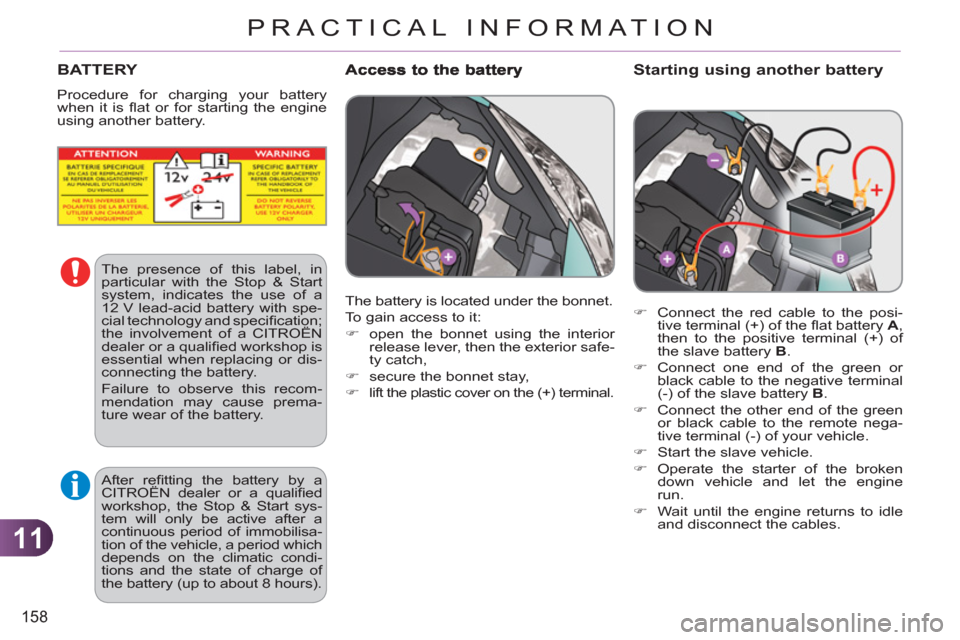
Starting using another battery
)
Connect the red cable to the posi-
tive terminal (+) of the fl at battery A
,
then to the positive terminal (+) of
the slave battery B
.
)
Connect one end of the green or
black cable to the negative terminal
(-) of the slave battery B
.
)
Connect the other end of the green
or black cable to the remote nega-
tive terminal (-) of your vehicle .
)
Start the slave vehicle.
)
Operate the starter of the broken
down vehicle and let the engine
run.
)
Wait until the engine returns to idle
and disconnect the cables.
BATTERY
Procedure for charging your battery
when it is fl at or for starting the engine
using another battery.
The battery is located under the bonnet.
To gain access to it:
)
open the bonnet using the interior
release lever, then the exterior safe-
ty catch,
)
secure the bonnet stay,
)
lift the plastic cover on the (+) terminal.
The presence of this label, in
particular with the Stop & Start
system, indicates the use of a
12 V lead-acid battery with spe-
cial technology and specifi cation;
the involvement of a CITROËN
dealer or a qualifi ed workshop is
essential when replacing or dis-
connecting the battery.
Failure to observe this recom-
mendation may cause prema-
ture wear of the battery.
After refi tting the battery by a
CITROËN dealer or a qualifi ed
workshop, the Stop & Start sys-
tem will only be active after a
continuous period of immobilisa-
tion of the vehicle, a period which
depends on the climatic condi-
tions and the state of charge of
the battery (up to about 8 hours).
Page 167 of 252
11
PRACTICAL INFORMATION
*
To avoid any risk of jamming of the
pedals:
-
ensure that the mat is positioned and
secured correctly,
-
never fi t one mat on top of another.
ACCESSORIES
They are all adapted to your vehicle and
benefi t from CITROËN's recommenda-
tion and warranty.
"Comfort"
sun blinds, door defl ectors, isotherm
module, smoking kit, fragrance cartridg-
es, front centre armrest, moveable mirror,
reading lamp...
"Style":
leather steering wheel, gear lever knobs,
front spoiler, rear diffuser, bumper trims,
front foglamp trims, parking brake lever
trims, aluminium footrest, alloy wheels,
wheel trims, chrome tailgate fi nisher,
chrome tailpipe fi nisher, chrome mirror
shells, chrome door handles... A wide range of accessories and genu-
ine parts is available from the CITROËN
dealer network.
These accessories and parts have been
tested and approved for reliability and
safety.
Conversion kits
You can obtain an "Enterprise" kit to
convert a trade vehicle to a private car
and vice-versa.
"Transport solutions":
child seats and booster cushions, boot
tray, boot carpet, boot net, boot contain-
ers, transverse roof bars, bicycle carrier,
ski carrier, roof boxes, towbars, towbar
wiring harnesses...
"Safety":
anti-theft alarm, wheel security bolts,
stolen vehicle tracking system, breath-
alyser, fi rst aid kit, warning triangle, high
visibility vest, dog guard, snow chains,
non-slip covers, foglamps kit, parking
sensors, bumper protection strips (trans-
lucent, gloss black, chrome fi nish)...
"Protection" :
mats * , mudfl aps, seat covers, door sill
protectors... If a towbar and wiring are fi tted
outside the CITROËN dealer
network, this must be done
making use of the vehicle's
electrical pre-equipment and
following the manufacturer's
recommendations.
Page 182 of 252
180
EMERGENCY OR ASSISTANCE CALL
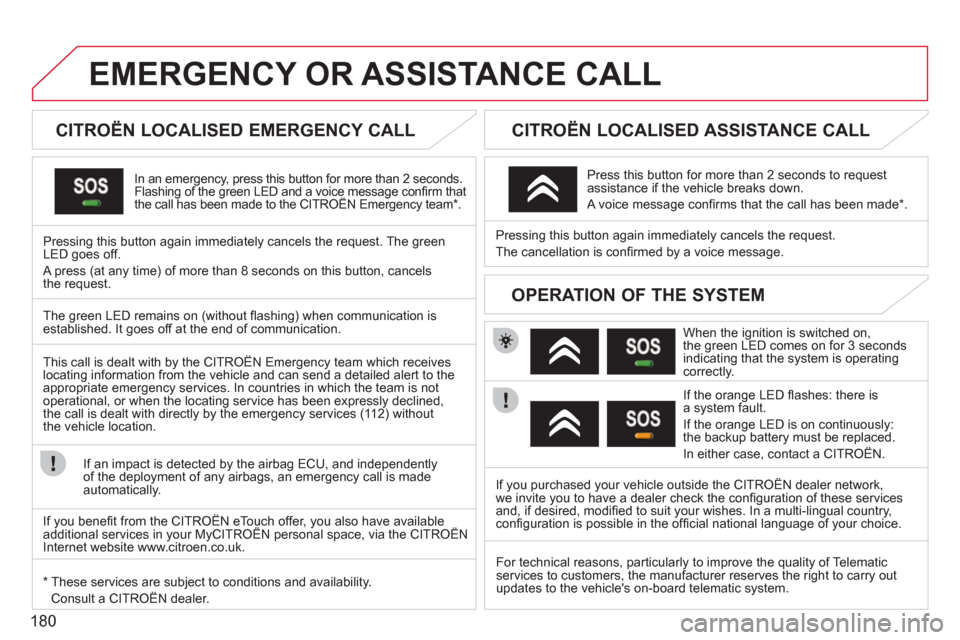
CITROËN LOCALISED EMERGENCY CALL
In an emergency, press this button for more than 2 seconds.Flashing of the green LED and a voice message confi rm thatthe call has been made to the CITROËN Emergency team * . gg g
Pressing this button again immediately cancels the request. The green LED goes off.
A press
(at any time) of more than 8 seconds on this button, cancels
the request.
CITROËN LOCALISED ASSISTANCE CALL
When the ignition is switched on,
the green LED comes on for 3 seconds
indicating that the system is operating correctly.
If the oran
ge LED fl ashes: there is
a system fault.
If the oran
ge LED is on continuously:
the backup battery must be replaced.
In either case, contact a CITRO
ËN. Pressin
g this button again immediately cancels the request.
The cancellation is confi rmed b
y a voice message.
Press this button for more than 2 seconds to request
assistance if the vehicle breaks down.
A voice message confi rms that the call has been made *
.
OPERATION OF THE SYSTEM
The green LED remains on (without fl ashing) when communication is established. It goes off at the end of communication.
This call is dealt with b
y the CITROËN Emergency team which receiveslocating information from the vehicle and can send a detailed alert to theappropriate emergency services. In countries in which the team is not
operational, or when the locating service has been expressly declined,
the call is dealt with directl
y by the emergency services (11 2) without
the vehicle location.
If an impact is detected b
y the airbag ECU, and independentlyof the deployment of any airbags, an emergency call is made
automatically.
*
These services are subject to conditions and availability.
Consult a CITROËN dealer.If you purchased your vehicle outside the CITROËN dealer network,
we invite
you to have a dealer check the confi guration of these servicesand, if desired, modifi ed to suit your wishes. In a multi-lingual country, confi guration is possible in the offi cial national language of your choice.
For technical reasons, particularl
y to improve the quality of Telematic services to customers, the manufacturer reserves the right to carry out
updates to the vehicle's on-board telematic system.
If you benefi t from the CITROËN eTouch offer, you also have availableadditional services in your MyCITROËN personal space, via the CITROËN y,y
Internet website www.citroen.co.uk.
Page 232 of 252
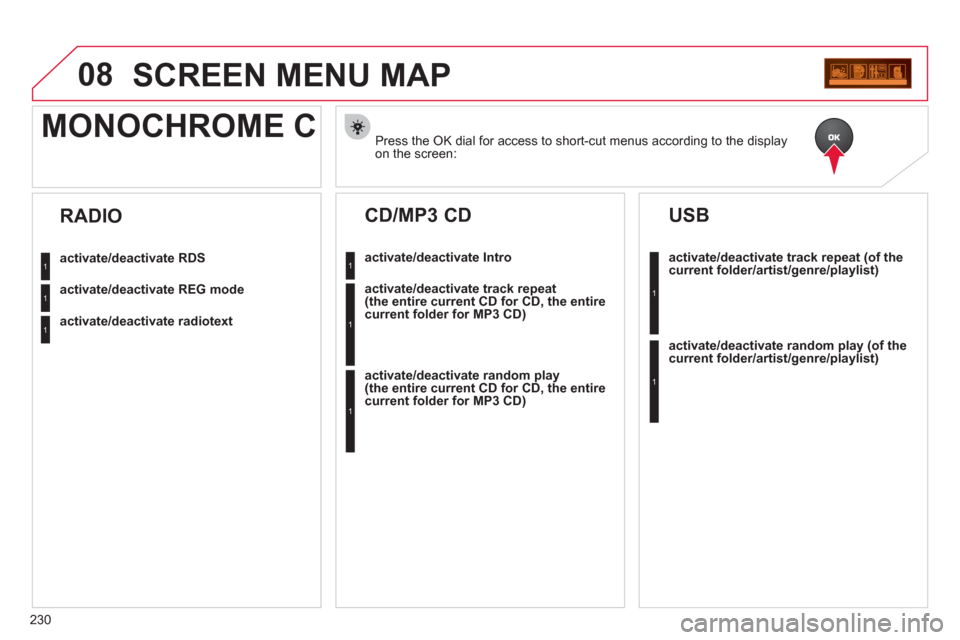
230
08SCREEN MENU MAP
Press the OK dial for access to short-cut menus according to the displayon the screen:
MONOCHROME C
activate/deactivate RDS
activate/deactivate REG mode
activate/deactivate radiotext
RADIO
activate/deactivate Intro
CD/MP3 CD
activate/deactivate track repeat (the entire current CD for CD, the entire current folder for MP3 CD)
activate/deactivate random play (the entire current CD for CD, the entire current folder for MP3 CD)
activate/deactivate track repeat (of the current folder/artist/genre/playlist)
USB
activate/deactivate random play(of thecurrent folder/artist/genre/playlist)
1
1
1
1
1
1
1
1