USB Citroen C3 2012 2.G User Guide
[x] Cancel search | Manufacturer: CITROEN, Model Year: 2012, Model line: C3, Model: Citroen C3 2012 2.GPages: 252, PDF Size: 8.11 MB
Page 216 of 252
214
01 FIRST STEPS
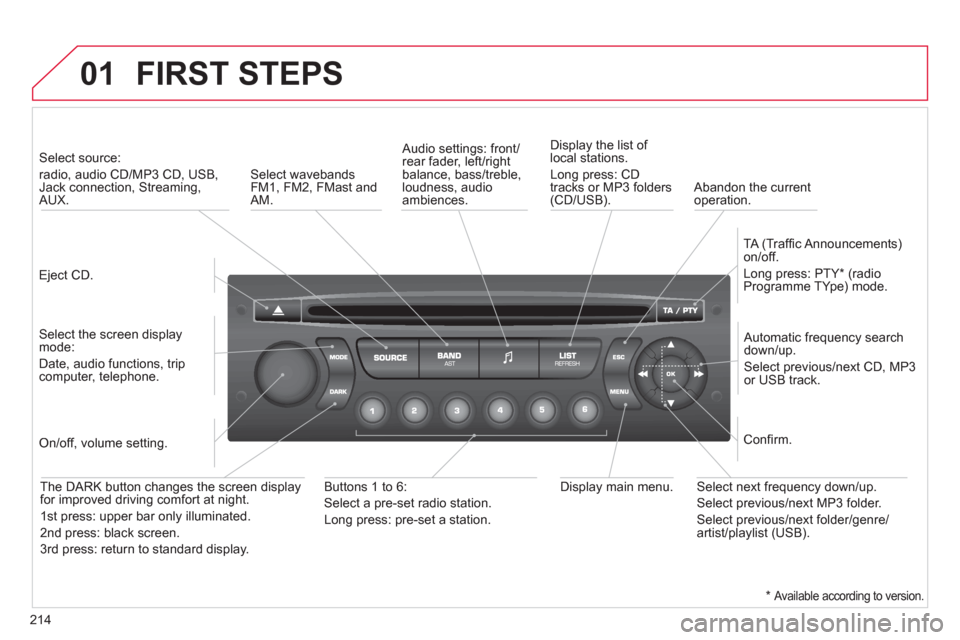
Eject CD.
Select source:
radio, audio CD/MP3 CD, USB, Jack connection, Streaming,AUX.
Select the screen displaymode:
Date, audio functions, tripcomputer, telephone.
Automatic frequency search
down/up.
Select previous/next CD, MP3
or USB track.
Audio settings: front/rear fader, left/right
balance, bass/treble, loudness, audio ambiences. Displa
y the list of local stations.
Lon
g press: CD
tracks or MP3 folders(CD/USB).
TA
(Traffi c Announcements)
on/off.
Lon
g press: PTY * (radio
Programme TYpe) mode.
Display main menu. The DARK button changes the screen display
for improved driving comfort at night.
1
st press: upper bar only illuminated.
2
nd press: black screen.
3 rd press: return to standard displa
y.
On/off, volume setting.
Buttons 1 to 6:
Select a pre-set radio station.
Lon
g press: pre-set a station.
Select next frequency down/up.
Select previous/next MP3 folder.
Select previous/next folder/genre/artist/playlist (USB).
Confi rm.
Select wavebandsFM1, FM2, FMast and AM.
Abandon the current
operation.
*
Available according to version.
Page 217 of 252
215
02STEERING MOUNTED CONTROLS
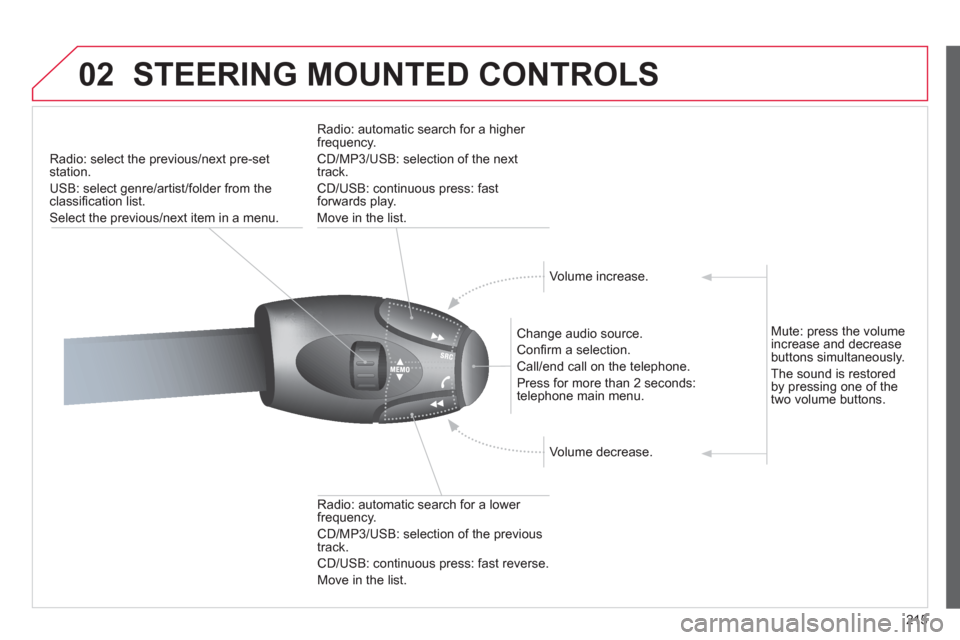
Radio: select the previous/next pre-setstation.
U
SB: select genre/artist/folder from the classifi cation list.
Select the previous/next item in a menu.
Chan
ge audio source.
Confi rm a selection.
Call/end call on the telephone.
Pr
ess for more than 2 seconds:
telephone main menu.
R
adio: automatic search for a lower
frequency.
CD/MP3/USB: selection of the previous
tr
ack.
CD/USB: continuous press: fast reverse.
Move in the list.
Radio: automatic search for a hi
gher
frequency.
CD/MP3/USB: selection of the next
track.
CD/USB: continuous press: fastforwards play.
M
ove in the list.
V
olume increase.
V
olume decrease.
Mute: press the volume increase and decrease buttons simultaneously.
Th
e sound is restoredby pressing one of the
two volume buttons.
Page 218 of 252
216
03 MAIN MENU
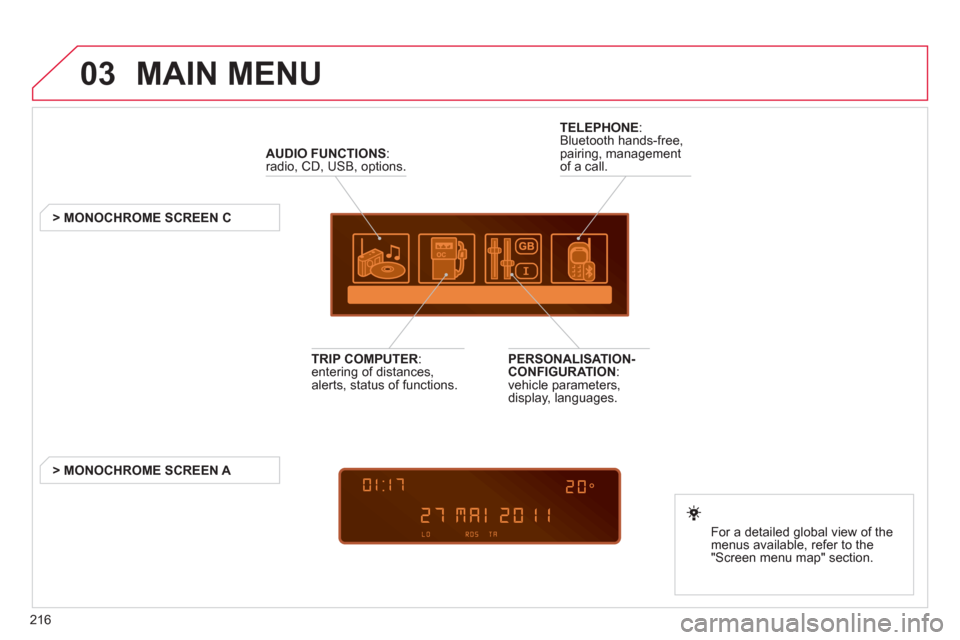
AUDIO FUNCTIONS
:radio, CD, USB, options.
> MONOCHROME SCREEN C
For a detailed
global view of the
menus available, refer to the
"Screen menu ma
p" section.
TELEPHONE
:
Bluetooth hands-free,
pairing, managementof a call.
PERSONALISATION-
CONFIGURATION:
vehicle parameters,
display, languages.
TRIP COMPUTER: entering of distances,alerts, status of functions.
> MONOCHROME
SCREEN A
Page 222 of 252
220
05
1
1
2
3
The system puts together playlists (temporary memory) createdover a period which depends on the capacity of the USB device.
The other sources are available durin
g this time.
The pla
ylists are updated each time the ignition is switched off or each time a USB memory stick is connected.
When connectin
g for the fi rst time, the classifi cation suggested
is by folder. When you reconnect, the classifi cation selected
previously is retained.
Connect the memory stick to the port, directly or using a lead. If the audio equipment is switched
on, the USB source is detected as soon as it
is connected. Pla
y begins automatically after a
delay which depends on the capacity of the USB memory stick.
The
fi le formats supported are .mp3 (mpeg1 layer 3 only), .wma (standard 9 only,
128 kbits/sec compression), .wav and .ogg.
Certain playlist formats are supported (.m3u, ...)
On reconnection of the previous memory stickused, play is resumed automatically with the last
track played.
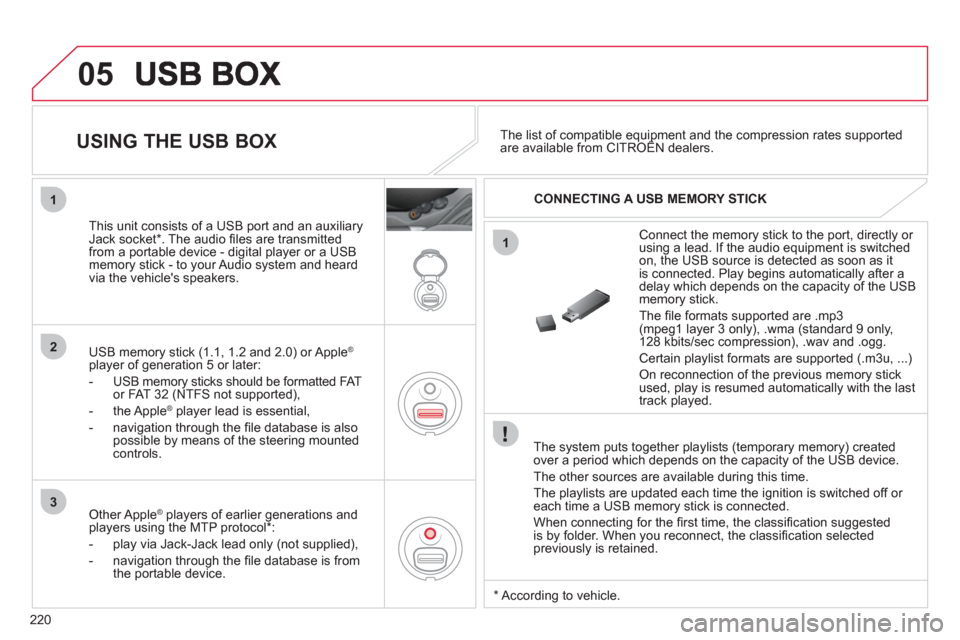
This unit consists o
f a USB port and an auxiliaryJack socket * . The audio fi les are transmitted
from a portable device - digital player or a USBmemory stick - to your Audio system and heard
via the vehicle's speakers.
USB memor
y stick (1.1, 1.2 and 2.0) or Apple®
player of generation 5 or later:
- U
SB memory sticks should be formatted FAT
or FAT 32 (NTFS not supported),
- the Apple ®player lead is essential,
- navi
gation through the fi le database is also
possible by means of the steering mountedcontrols.
The list of compatible equipment and the compression rates supported are available from CITROËN dealers. pqpp
USING THE USB BOX
CONNECTING A USB MEMORY STICK
Other Apple®
players of earlier generations and®
players using the MTP protocol * :
- pla
y via Jack-Jack lead only (not supplied),
- navi
gation through the fi le database is from
the portable device.
*
Accordin
g to vehicle.
Page 223 of 252
221
3
4
05
2
1
LISTREFRESH
LISTREFRESH
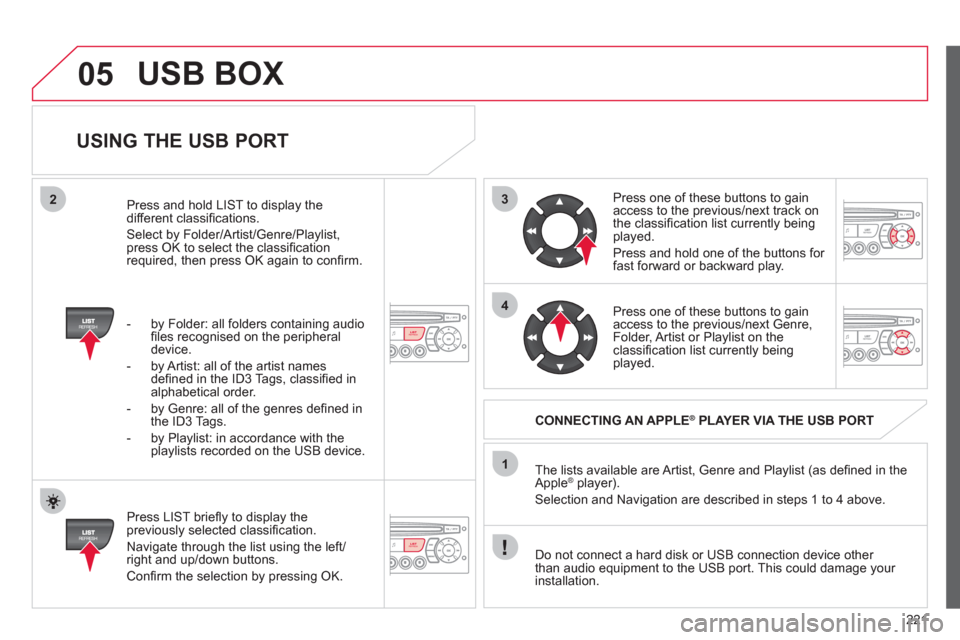
USING THE USB PORT
Press LIST briefl y to display thepreviously selected classifi cation.
Navi
gate through the list using the left/right and up/down buttons.
Confi rm the selection by pressing OK. The lists available are Artist, Genre and Pla
ylist (as defi ned in the
Apple ®player).
Selection and Navigation are described in steps 1 to 4 above.
Do not connect a hard disk or
USB connection device other
than audio equipment to the USB port. This could damage your
installation.
CONNECTING AN APPLE®PLAYER VIA THE USB PORT®
Press one of these buttons to gain
access to the previous/next track on
the classifi cation list currently beingplayed.
Pr
ess and hold one of the buttons for fast forward or backward play.
Press one of these buttons to
gain
access to the previous/next Genre,
Folder, Artist or Playlist on theclassifi cation list currently being played.
Press and hold LI
ST to display the different classifi cations.
Select b
y Folder/Artist/Genre/Playlist, press OK to select the classifi cation required, then press OK again to confi rm.
- b
y Folder: all folders containing audio fi les recognised on the peripheraldevice.
- by Artist: all o
f the artist names
defi ned in the ID3 Tags, classifi ed in alphabetical order.
- b
y Genre: all of the genres defi ned in
the ID3 Tags.
- b
y Playlist: in accordance with the
playlists recorded on the USB device.
USB BOX
Page 224 of 252
222
05
1
21
2
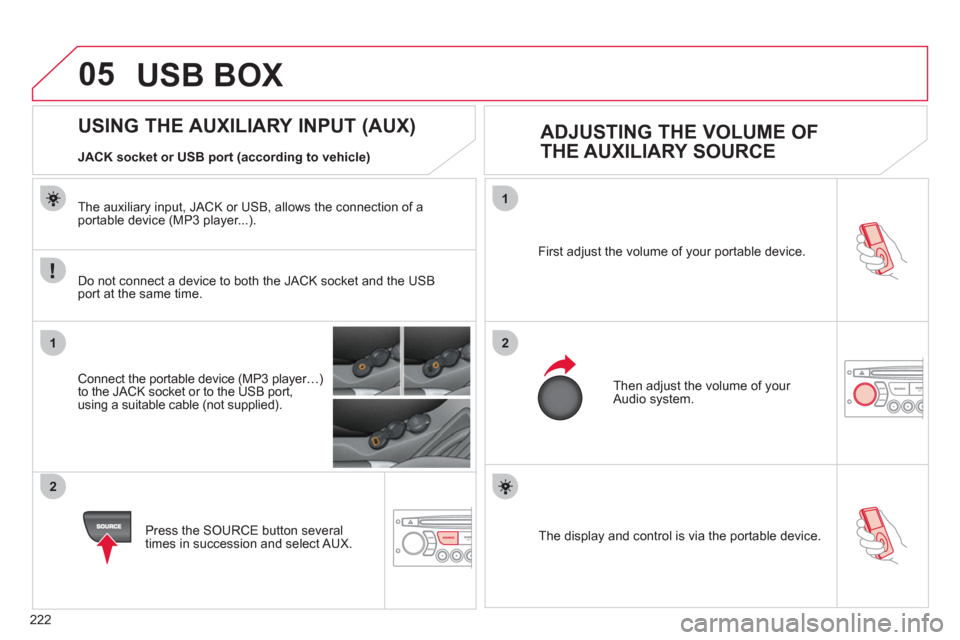
SOURCE The display and control is via the portable device. First ad
just the volume of your portable device.
Then ad
just the volume of your Audio system.
USING THE AUXILIARY INPUT (AUX)
ADJUSTING THE VOLUME OF
THE AUXILIARY SOURCE
JACK socket or USB port (according to vehicle)
Do not connect a device to both the
JACK socket and the USB port at the same time.
Connect the portable device
(MP3 player…)to the JACK socket or to the USB port,
using a suitable cable (not supplied).
Pr
ess the SOURCE button several
times in succession and select AUX.
The auxiliar
y input, JACK or USB, allows the connection of a portable device (MP3 player...).
USB BOX
Page 232 of 252
230
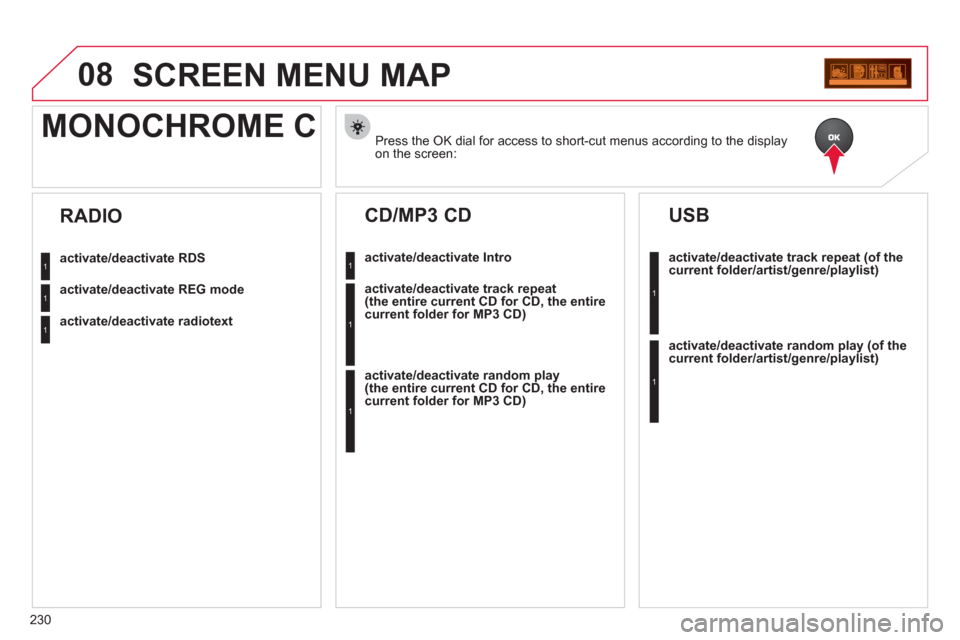
08SCREEN MENU MAP
Press the OK dial for access to short-cut menus according to the displayon the screen:
MONOCHROME C
activate/deactivate RDS
activate/deactivate REG mode
activate/deactivate radiotext
RADIO
activate/deactivate Intro
CD/MP3 CD
activate/deactivate track repeat (the entire current CD for CD, the entire current folder for MP3 CD)
activate/deactivate random play (the entire current CD for CD, the entire current folder for MP3 CD)
activate/deactivate track repeat (of the current folder/artist/genre/playlist)
USB
activate/deactivate random play(of thecurrent folder/artist/genre/playlist)
1
1
1
1
1
1
1
1
Page 235 of 252
233
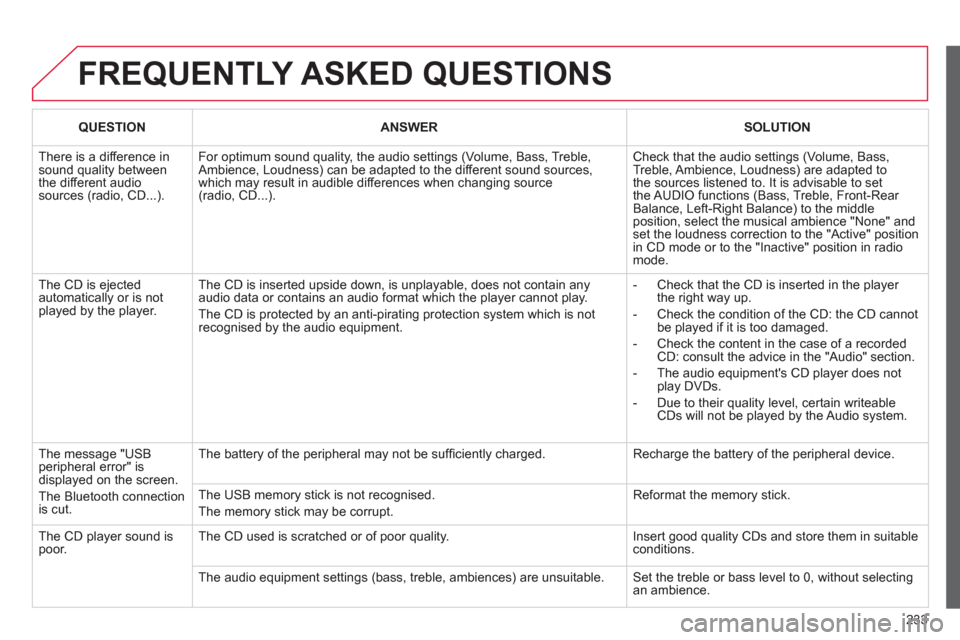
FREQUENTLY ASKED QUESTIONS
QUESTIONANSWERSOLUTION
There is a difference in sound quality betweenthe different audiosources (radio, CD...).
For optimum sound quality, the audio settings (Volume, Bass, Treble, Ambience, Loudness) can be adapted to the different sound sources,which may result in audible differences when changing source (radio, CD...).
Check that the audio settings (Volume, Bass, Treble, Ambience, Loudness) are adapted tothe sources listened to. It is advisable to setthe AUDIO functions (Bass, Treble, Front-Rear Balance, Left-Right Balance) to the middle position, select the musical ambience "None" and set the loudness correction to the "Active" position in CD mode or to the "Inactive" position in radio mode.
The CD is ejected automatically or is not played by the player.
The CD is inserted upside down, is unplayable, does not contain any audio data or contains an audio format which the player cannot play.
The CD is protected by an anti-pirating protection system which is not recognised by the audio equipment.
- Check that the CD is inserted in the player the right way up.
- Check the condition of the CD: the CD cannot be played if it is too damaged.
- Check the content in the case of a recordedCD: consult the advice in the "Audio" section.
- The audio equipment's CD player does notplay DVDs.
- Due to their quality level, certain writeableCDs will not be played by the Audio system.
The message "USB peripheral error" isdisplayed on the screen.
The Bluetooth connectionis cut.
The battery of the peripheral may not be suffi ciently charged.
Recharge the battery of the peripheral device.
The USB memory stick is not recognised.
The memory stick may be corrupt.
Reformat the memory stick.
The CD player sound ispoor.The CD used is scratched or of poor quality.
Insert good quality CDs and store them in suitable conditions.
The audio equipment settings (bass, treble, ambiences) are unsuitable. Set the treble or bass level to 0, without selectingan ambience.
Page 243 of 252
241
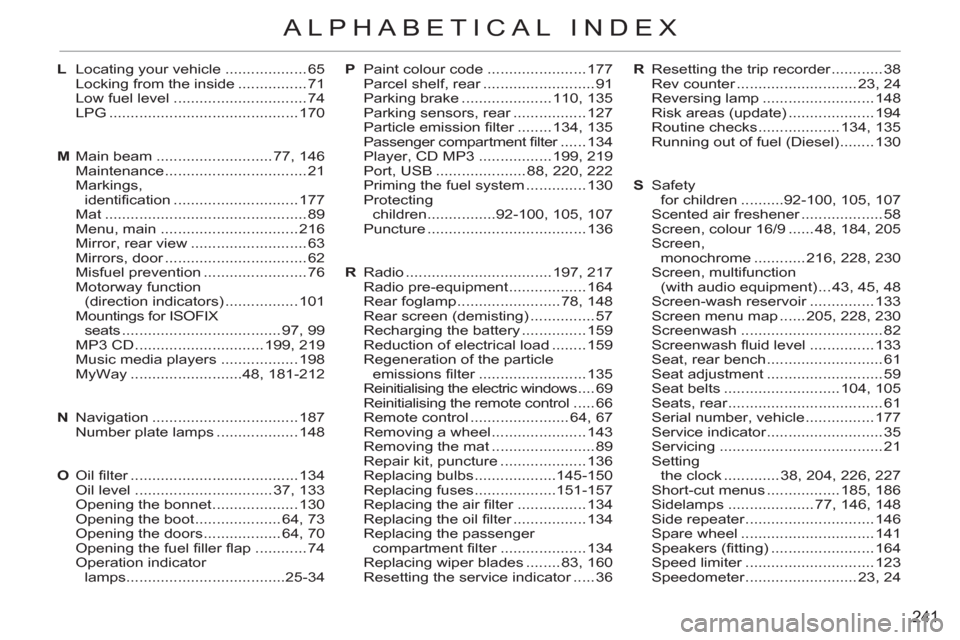
ALPHABETICAL INDEX
R Resetting the trip recorder ............ 38
Rev counter ............................ 23, 24
Reversing lamp .......................... 148
Risk areas (update) .................... 194
Routine checks ................... 134, 135
Running out of fuel (Diesel) ........ 130
S Safety
for children ..........92-100, 105, 107
Scented air freshener ................... 58
Screen, colour 16/9 ...... 48, 184, 205
Screen,
monochrome ............ 216, 228, 230
Screen, multifunction
(with audio equipment) ... 43, 45, 48
Screen-wash reservoir ............... 133
Screen menu map ...... 205, 228, 230
Screenwash ................................. 82
Screenwash fluid level ............... 133
Seat, rear bench ........................... 61
Seat adjustment ........................... 59
Seat belts ........................... 104, 105
Seats, rear .................................... 61
Serial number, vehicle ................ 177
Service indicator ........................... 35
Servicing ...................................... 21
Setting
the clock ............. 38, 204, 226, 227
Short-cut menus ................. 185, 186
Sidelamps .................... 77, 146, 148
Side repeater .............................. 146
Spare wheel ............................... 141
Speakers (fitting) ........................ 164
Speed limiter .............................. 123
Speedometer .......................... 23, 24 P Paint colour code ....................... 177
Parcel shelf, rear .......................... 91
Parking brake ..................... 110, 135
Parking sensors, rear ................. 127
Particle emission filter ........ 134, 135
Passenger compartment filter ...... 134
Player, CD MP3 ................. 199, 219
Port, USB ..................... 88, 220, 222
Priming the fuel system .............. 130
Protecting
children ................92-100, 105, 107
Puncture ..................................... 136
R Radio .................................. 197, 217
Radio pre-equipment .................. 164
Rear foglamp ........................ 78, 148
Rear screen (demisting) ............... 57
Recharging the battery ............... 159
Reduction of electrical load ........ 159
Regeneration of the particle
emissions filter ......................... 135
Reinitialising the electric windows .... 69
Reinitialising the remote control ..... 66
Remote control ....................... 64, 67
Removing a wheel ...................... 143
Removing the mat ........................ 89
Repair kit, puncture .................... 136
Replacing bulbs ...................145-150
Replacing fuses ...................151-157
Replacing the air filter ................ 134
Replacing the oil filter ................. 134
Replacing the passenger
compartment filter .................... 134
Replacing wiper blades ........ 83, 160
Resetting the service indicator ..... 36 L Locating your vehicle ................... 65
Locking from the inside ................ 71
Low fuel level ............................... 74
LPG ............................................ 170
M Main beam ........................... 77, 146
Maintenance ................................. 21
Markings,
identification ............................. 177
Mat ............................................... 89
Menu, main ................................ 216
Mirror, rear view ........................... 63
Mirrors, door ................................. 62
Misfuel prevention ........................ 76
Motorway function
(direction indicators) ................. 101
Mountings for ISOFIX
seats ..................................... 97, 99
MP3 CD .............................. 199, 219
Music media players .................. 198
MyWay ..........................48, 181-212
N Navigation .................................. 187
Number plate lamps ................... 148
O Oil filter ....................................... 134
Oil level ................................ 37, 133
Opening the bonnet .................... 130
Opening the boot .................... 64, 73
Opening the doors .................. 64, 70
Opening the fuel filler flap ............ 74
Operation indicator
lamps .....................................25-34
Page 244 of 252
242
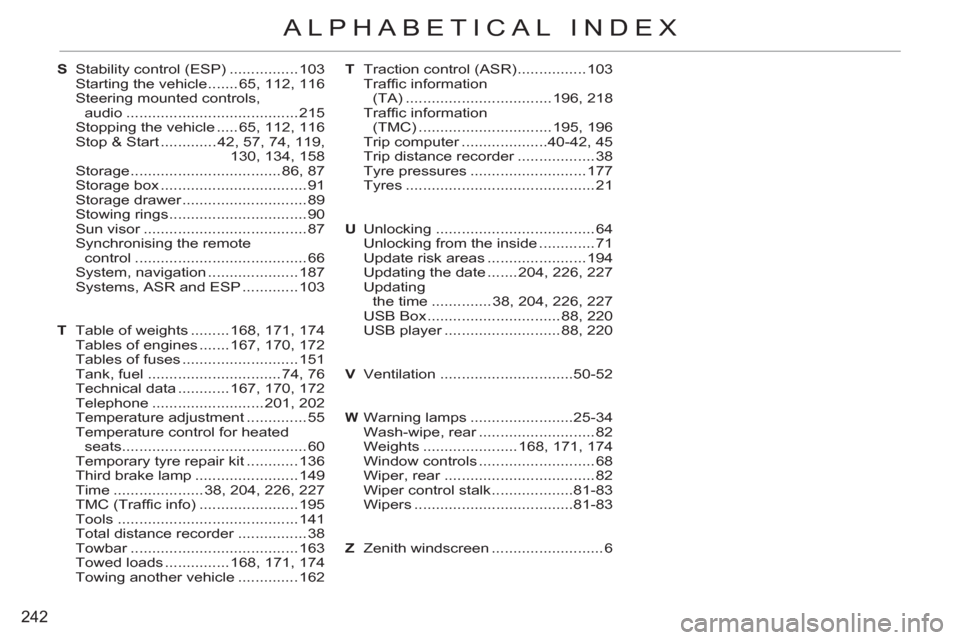
ALPHABETICAL INDEX
S Stability control (ESP) ................ 103
Starting the vehicle ....... 65, 112, 116
Steering mounted controls,
audio ........................................ 215
Stopping the vehicle ..... 65, 112, 116
Stop & Start ............. 42, 57, 74, 119,
130, 134, 158
Storage ................................... 86, 87
Storage box .................................. 91
Storage drawer ............................. 89
Stowing rings ................................ 90
Sun visor ...................................... 87
Synchronising the remote
control ........................................ 66
System, navigation ..................... 187
Systems, ASR and ESP ............. 103
T Table of weights ......... 168, 171, 174
Tables of engines ....... 167, 170, 172
Tables of fuses ........................... 151
Tank, fuel ............................... 74, 76
Technical data ............ 167, 170, 172
Telephone .......................... 201, 202
Temperature adjustment .............. 55
Temperature control for heated
seats ........................................... 60
Temporary tyre repair kit ............ 136
Third brake lamp ........................ 149
Time ..................... 38, 204, 226, 227
TMC (Traffic info) ....................... 195
Tools .......................................... 141
Total distance recorder ................ 38
Towbar ....................................... 163
Towed loads ............... 168, 171, 174
Towing another vehicle .............. 162T Traction control (ASR) ................ 103
Traffic information
(TA) .................................. 196, 218
Traffic information
(TMC) ............................... 195, 196
Trip computer ....................40-42, 45
Trip distance recorder .................. 38
Tyre pressures ........................... 177
Tyres ............................................ 21
U Unlocking ..................................... 64
Unlocking from the inside ............. 71
Update risk areas ....................... 194
Updating the date ....... 204, 226, 227
Updating
the time .............. 38, 204, 226, 227
USB Box ............................... 88, 220
USB player ........................... 88, 220
V Ventilation ...............................50-52
W Warning lamps ........................25-34
Wash-wipe, rear ........................... 82
Weights ...................... 168, 171, 174
Window controls ........................... 68
Wiper, rear ................................... 82
Wiper control stalk ...................81-83
Wipers .....................................81-83
Z Zenith windscreen .......................... 6