audio system Citroen C3 2012 2.G User Guide
[x] Cancel search | Manufacturer: CITROEN, Model Year: 2012, Model line: C3, Model: Citroen C3 2012 2.GPages: 252, PDF Size: 8.11 MB
Page 155 of 252
11
153
PRACTICAL INFORMATION
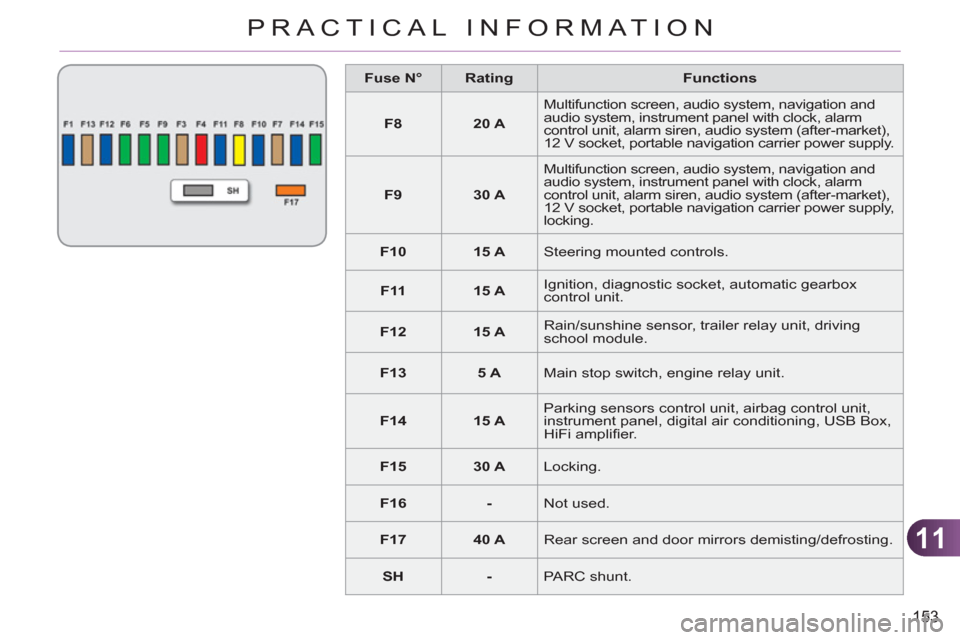
Fuse N°
Rating
Functions
F8
20 A
Multifunction screen, audio system, navigation and
audio system, instrument panel with clock, alarm
control unit, alarm siren, audio system (after-market),
12 V socket, portable navigation carrier power supply.
F9
30 A
Multifunction screen, audio system, navigation and
audio system, instrument panel with clock, alarm
control unit, alarm siren, audio system (after-market),
12 V socket, portable navigation carrier power supply,
locking.
F10
15 A
Steering mounted controls.
F11
15 A
Ignition, diagnostic socket, automatic gearbox
control unit.
F12
15 A
Rain/sunshine sensor, trailer relay unit, driving
school module.
F13
5 A
Main stop switch, engine relay unit.
F14
15 A
Parking sensors control unit, airbag control unit,
instrument panel, digital air conditioning, USB Box,
HiFi amplifi er.
F15
30 A
Locking.
F16
-
Not used.
F17
40 A
Rear screen and door mirrors demisting/defrosting.
SH
-
PARC shunt.
Page 162 of 252
11
160
PRACTICAL INFORMATION
If the telephone is being used at
the same time on the MyWay au-
dio navigation system, it will be
interrupted after 10 minutes. A fl at battery prevents the engine
from starting (refer to the corre-
sponding paragraph).
ENERGY ECONOMY MODE
System which manages the period of
use of certain functions to conserve a
suffi cient level of charge in the battery.
After the engine has stopped, you can
still use functions such as the audio
equipment, windscreen wipers, dipped
beam headlamps, courtesy lamps, etc.
for a maximum combined period of
thirty minutes.
Switching to economy mode
Once this period has elapsed, a message ap-
pears on the multifunction screen indicating
that the vehicle has switched to economy mode
and the active functions are put on standby.
Exiting economy mode
These functions are reactivated auto-
matically the next time the vehicle is
driven.
)
In order to resume the use of these
functions immediately, start the en-
gine and let it run for a few minutes.
The time available to you will then be
double the period for which the engine is
left running. However, this period will al-
ways be between fi ve and thirty minutes.
This period may be greatly re-
duced if the battery is not fully
charged.
CHANGING A FRONT OR REARWIPER BLADE
Procedure for replacing a worn wiper
blade with a new one without the use
of tools.
Before removing a front wiper blade
)
Within one minute after switching off
the ignition, operate the wiper stalk
to position the wiper blades in the
vertical position.
This position must be used in order to
avoid damaging the wiper blade and the
bonnet.
Removal
)
Raise the corresponding wiper arm.
)
Unclip the wiper blade and remove it.
Fitting
)
At the front, check the size of the wip-
er blade as the shorter blade is fi tted
to the passenger side of the vehicle.
)
Put the corresponding new wiper
blade in place and clip it.
)
Fold down the wiper arm carefully.
After fitting a front wiper blade
)
Switch on the ignition.
)
Operate the wiper stalk again to
park the wiper blades.
Page 166 of 252
11
164
PRACTICAL INFORMATION
AUDIO PRE-EQUIPMENT
Your vehicle is equipped with certain
factory-fi tted audio equipment:
- a dual-function aerial at the rear of
the roof,
- a coaxial aerial cable,
- basic interference suppression,
- cabling for speakers in the front
doors and tweeters in the dash-
board,
- cabling for speakers in the rear
doors
- a 40-way connector.
Fitting an audio unit
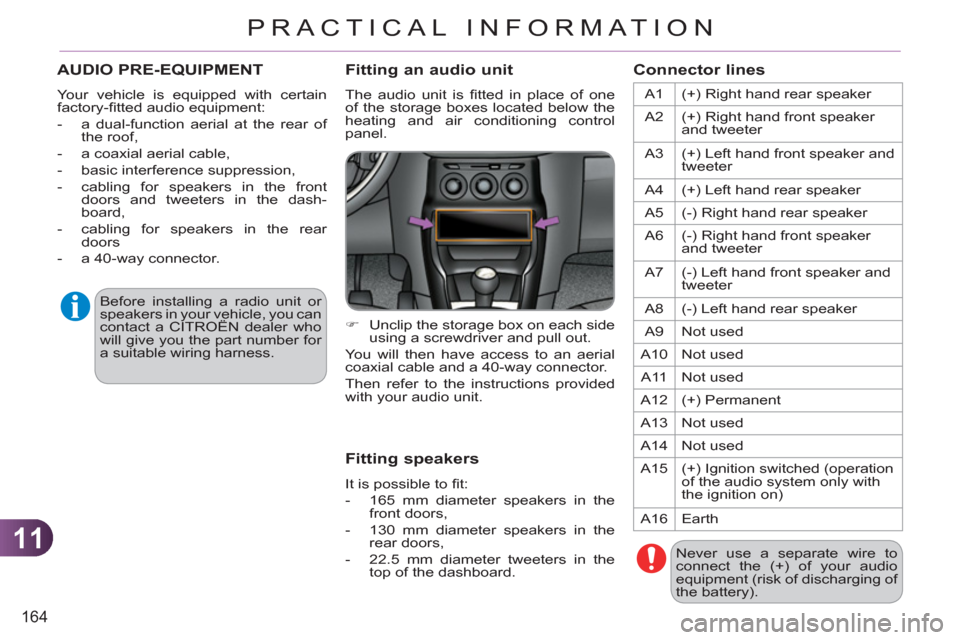
The audio unit is fi tted in place of one
of the storage boxes located below the
heating and air conditioning control
panel.
Fitting speakers
It is possible to fi t:
- 165 mm diameter speakers in the
front doors,
- 130 mm diameter speakers in the
rear doors,
- 22.5 mm diameter tweeters in the
top of the dashboard.
Connector lines
A1 (+) Right hand rear speaker
A2 (+) Right hand front speaker
and tweeter
A3 (+) Left hand front speaker and
tweeter
A4 (+) Left hand rear speaker
A5 (-) Right hand rear speaker
A6 (-) Right hand front speaker
and tweeter
A7 (-) Left hand front speaker and
tweeter
A8 (-) Left hand rear speaker
A9 Not used
A10 Not used
A11 Not used
A12 (+) Permanent
A13 Not used
A14 Not used
A15 (+) Ignition switched (operation
of the audio system only with
the ignition on)
A16 Earth
Never use a separate wire to
connect the (+) of your audio
equipment (risk of discharging of
the battery). Before installing a radio unit or
speakers in your vehicle, you can
contact a CITROËN dealer who
will give you the part number for
a suitable wiring harness.
)
Unclip the storage box on each side
using a screwdriver and pull out.
You will then have access to an aerial
coaxial cable and a 40-way connector.
Then refer to the instructions provided
with your audio unit.
Page 168 of 252
11
166
PRACTICAL INFORMATION
Depending on the legislation in
force in the country, it may be
compulsory to have a high vis-
ibility safety vest, warning trian-
gle and spare bulbs and fuses
available in the vehicle.
The fi tting of electrical equipment
or accessories which are not rec-
ommended by CITROËN may
result in a failure of your vehicle's
electronic system and excessive
electrical consumption.
Please note this precaution.
You are advised to contact a
CITROËN representative to be
shown the range of recommend-
ed equipment and accessories.
Installation of radio
communication transmitters
Before installing any after-
market radio communication
transmitter, you can contact a
CITROËN dealer for the speci-
fi cation of transmitters which
can be fi tted (frequency, maxi-
mum power, aerial position,
specifi c installation require-
ments), in line with the Vehicle
Electromagnetic Compatibility
Directive (2004/104/EC).
"Multimedia":
Bluetooth
® hands-free system, audio
equipment, portable satellite navigation
system, semi-integral portable navigation
system carrier, speed camera warning,
DVD player, auxiliary cable for connect-
ing a portable MP3 player, USB Box, Hi-
Fi module, speakers, Wi-Fi on board... By going to a CITROËN dealer, you
can also obtain cleaning and mainte-
nance products (interior and exterior) -
including ecological products in the
"TECHNATURE" range - products for
topping up (screenwash fl uid...), touch
up pens and paint aerosols for the exact
colour of your vehicle, recharges (car-
tridge for the temporary puncture repair
kit...), ...
Page 183 of 252
181
The MyWay is protected in such a way that it will onlyoperate in your vehicle. If it is to be installed in another vehicle, contact a CITROËN dealer for confi guration of py
the system.
Certain functions described in this handbook will
become available during the year.
MyWay
For safety reasons, the driver must carry out operations which require prolonged attention while the vehicle is stationary.
When the en
gine is switched off and to prevent
discharging of the battery, the MyWay switches off
following the activation of the Energy Economy mode.
MULTIMEDIA AUDIO SYSTEM/BLUETOOTH TELEPHONE
SATELLITE NAVIGATION SYSTEM FOR EUROPE BY SD CARD
01 First steps
CONTENTS
02 Steering mounted controls
03 General operation
04 Navigation - Guidance
05 Traffic information
06 Radio
07 Music media players
08 Bluetooth telephone
09 Configuration
10 Screen menu map p.
p.
p.
p.
p.
p.
p.
p.
p.
p.
Frequently asked questions p. 182
183
184
187
195
197
198
201
204
205
209
Page 184 of 252
182
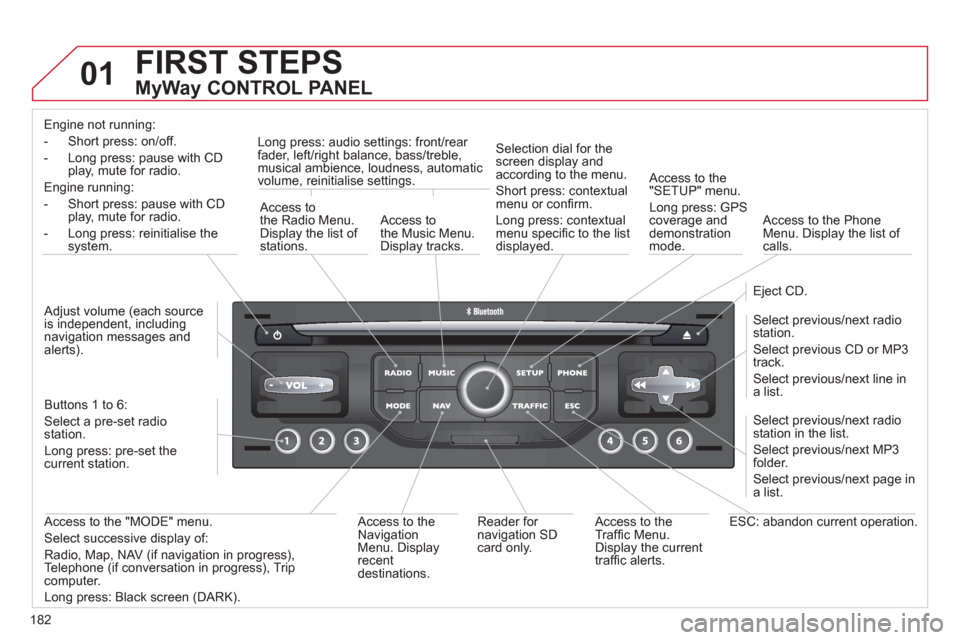
01 FIRST STEPS
MyWay CONTROL PANEL
Engine not running:
-
Short press: on/off.
- Long press: pause with
CD play, mute for radio.
Engine running:
- Short
press: pause with CD play, mute for radio.
-
Long press: reinitialise thesystem.
Access to
the Radio Menu. Display the list of stations.
Access to
the Music Menu.Display tracks. Lon
g press: audio settings: front/rear fader, left/right balance, bass/treble,
musical ambience, loudness, automatic
volume, reinitialise settings.
Selection dial for the
screen display and according to the menu.
Short press: contextual
menu or confi rm.
Long press: contextual
menu specifi c to the list
displayed.
A
ccess to the"SETUP" menu.
Lon
g press: GPS coverage anddemonstration
mode.
Access to the PhoneMenu. Display the list of calls.
E
ject CD.
Select previous/next radio station.
Select previous CD or MP3
track.
Select previous/next line in a list.
Select
previous/next radio station in the list.
Select previous/next MP3
folder.
Select previous/next page in a list.
E
SC: abandon current operation.
Access to theTraffi c Menu. Display the current
traffi c alerts. R
eader for navigation SDcard only.
A
ccess to theNavigation Menu. Displayrecent destinations.
A
ccess to the "MODE" menu.
Select successive display of:
Radio, Map, NAV (if navigation in progress),
Telephone (if conversation in progress), Tripcomputer.
Long press: Black screen (DARK). Buttons 1 to
6:
Select a pre-set radiostation.
Long press: pre-set the current station.
Ad
just volume (each source
is independent, including
navigation messages andalerts).
Page 211 of 252
209
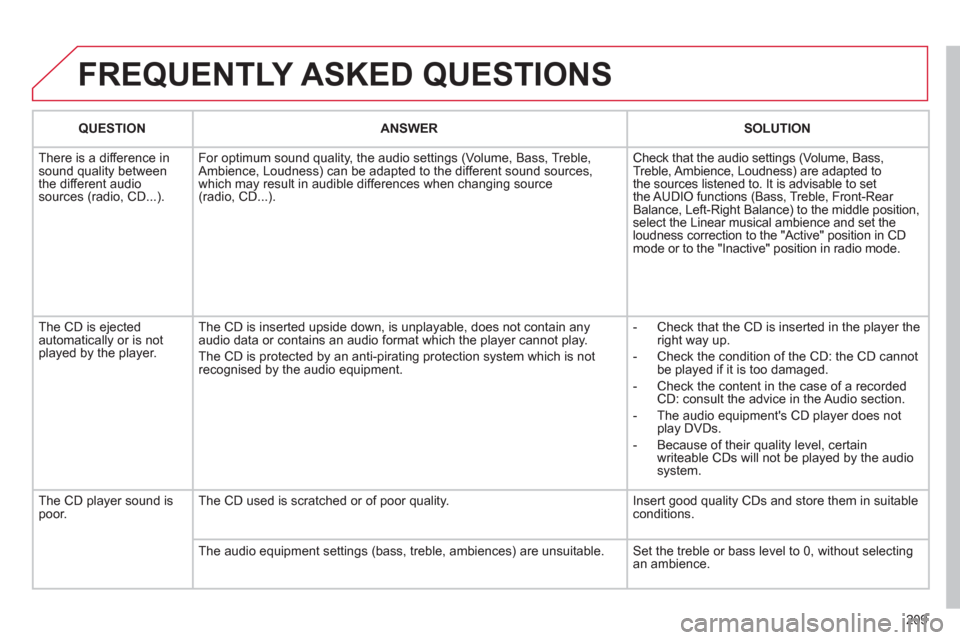
FREQUENTLY ASKED QUESTIONS
QUESTIONANSWER SOLUTION
There is a difference in sound quality between
the different audiosources (radio, CD...). For optimum sound qualit
y, the audio settings (Volume, Bass, Treble,
Ambience, Loudness) can be adapted to the different sound sources,
which may result in audible differences when changing source (radio, CD...). Check that the audio settin
gs (Volume, Bass,
Treble, Ambience, Loudness) are adapted to
the sources listened to. It is advisable to set
the AUDIO functions (Bass, Treble, Front-Rear
Balance, Left-Right Balance) to the middle position, select the Linear musical ambience and set theloudness correction to the "Active" position in CDmode or to the "Inactive" position in radio mode.
The
CD is ejected
automatically or is not played by the player. The
CD is inserted upside down, is unplayable, does not contain any audio data or contains an audio format which the player cannot play.
The CD is protected b
y an anti-pirating protection system which is not recognised by the audio equipment.
-
Check that the CD is inserted in the player the
right way up.
-
Check the condition of the CD: the CD cannot
be played if it is too damaged.
-
Check the content in the case of a recordedCD: consult the advice in the Audio section.
- The audio equipment's
CD player does not
play DVDs.
- Because o
f their quality level, certain
writeable CDs will not be played by the audio
system.
The CD pla
yer sound ispoor.The CD used is scratched or of poor quality. Insert good quality CDs and store them in suitable conditions.
The audio equipment settings
(bass, treble, ambiences) are unsuitable. Set the treble or bass level to 0, without selectingan ambience.
Page 212 of 252
210
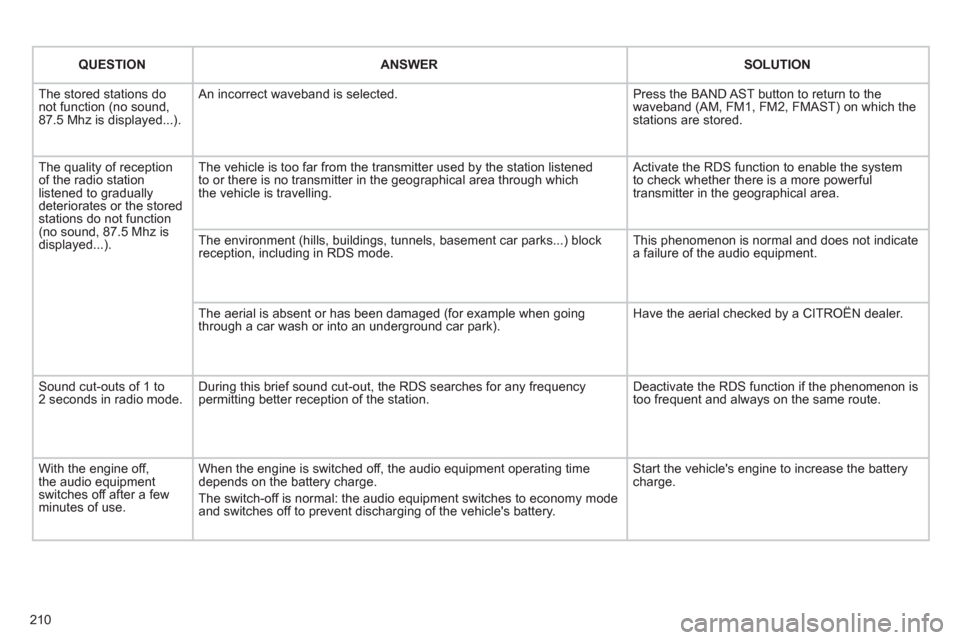
QUESTIONANSWERSOLUTION
The stored stations donot function (no sound, 87.5 Mhz is displayed...).
An incorrect waveband is selected.
Press the BAND AST button to return to the waveband (AM, FM1, FM2, FMAST) on which thestations are stored.
The quality of receptionof the radio station listened to graduallydeteriorates or the stored stations do not function(no sound, 87.5 Mhz is displayed...).
The vehicle is too far from the transmitter used by the station listenedto or there is no transmitter in the geographical area through whichthe vehicle is travelling.
Activate the RDS function to enable the system to check whether there is a more powerful transmitter in the geographical area.
The environment (hills, buildings, tunnels, basement car parks...) block reception, including in RDS mode.
This phenomenon is normal and does not indicate a failure of the audio equipment.
The aerial is absent or has been damaged (for example when goingthrough a car wash or into an underground car park).
Have the aerial checked by a CITROËN dealer.
Sound cut-outs of 1 to2 seconds in radio mode.During this brief sound cut-out, the RDS searches for any frequency permitting better reception of the station.
Deactivate the RDS function if the phenomenon is too frequent and always on the same route.
With the engine off, the audio equipment switches off after a few minutes of use.
When the engine is switched off, the audio equipment operating timedepends on the battery charge.
The switch-off is normal: the audio equipment switches to economy mode and switches off to prevent discharging of the vehicle's battery.
Start the vehicle's engine to increase the batterycharge.
Page 215 of 252
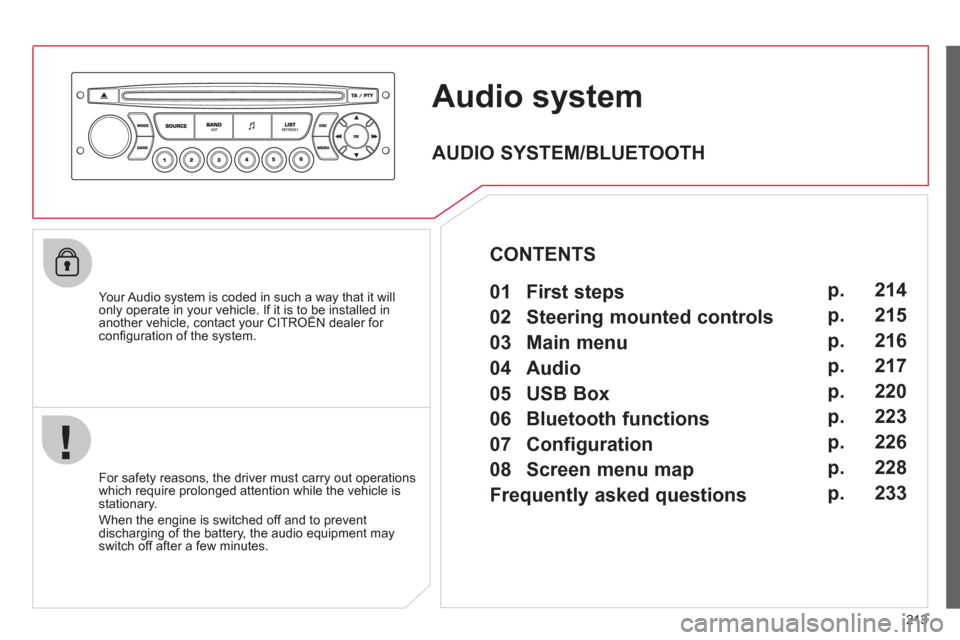
213
Audio system
Your Audio system is coded in such a way that it willonly operate in your vehicle. If it is to be installed inanother vehicle, contact your CITROËN dealer for yp y
confi guration of the system.
For safet
y reasons, the driver must carry out operations
which require prolonged attention while the vehicle is stationary.
When the en
gine is switched off and to prevent
discharging of the battery, the audio equipment mayswitch off after a few minutes.
AUDIO SYSTEM/BLUETOOTH
01 First steps
02 Steering mounted controls
03 Main menu
04 Audio
05 USB Box
06 Bluetooth functions
07 Configuration
08 Screen menu map
Frequently asked questions p.
p.
p.
p.
p.
p.
p.
p.
p. 214
215
216
217
220
223
226
228
233
CONTENTS
Page 219 of 252
217
04
1
2
3
4
1
2
3
4
SOURCE
BANDAST
LISTREFRESH
MENU
AUDIO
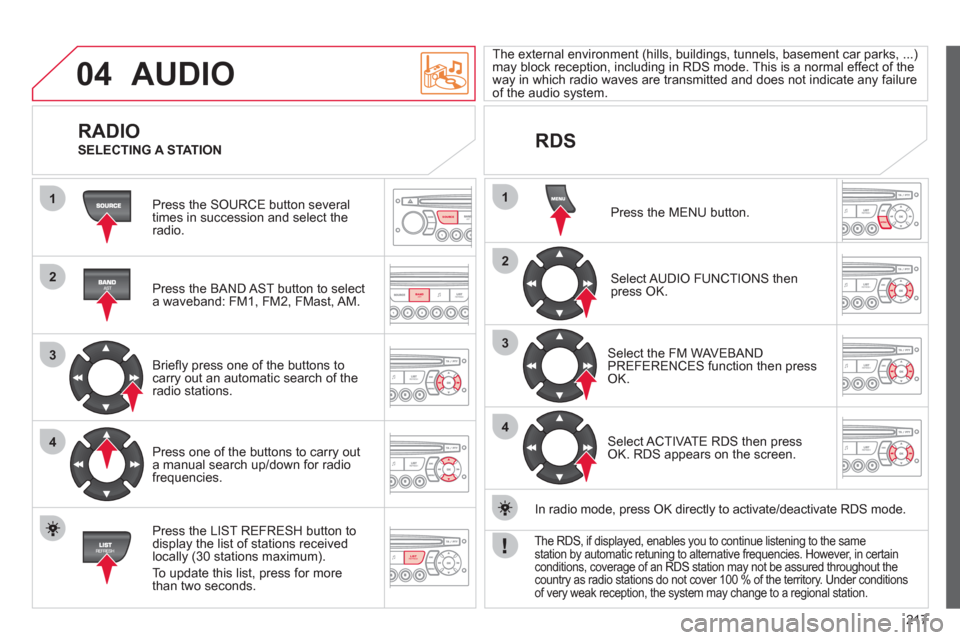
Press the SOURCE button several
times in succession and select theradio.
Press the BAND A
ST button to select
a waveband: FM1, FM2, FMast, AM.
Briefl
y press one of the buttons tocarry out an automatic search of theradio stations.
Press one o
f the buttons to carry out
a manual search up/down for radiofrequencies.
Press the LI
ST REFRESH button to
display the list of stations received
locally (30 stations maximum).
To update this list, press for more
t
han two seconds.
The external environment
(hills, buildings, tunnels, basement car parks, ...)may block reception, including in RDS mode. This is a normal effect of the
way in which radio waves are transmitted and does not indicate any failure of the audio system.
RDS
RADIO
SELECTING A STATION
Press the MENU button.
Select AUDIO FUNCTIONS thenpress OK.
Select the FM WAVEBANDPREFERENCES function then pressOK.
Select ACTIVATE RDS then pressOK. RDS appears on the screen.
In radio mode, press
OK directly to activate/deactivate RDS mode.
The RDS, if displayed, enables you to continue listening to the samestation by automatic retuning to alternative frequencies. However, in certainconditions, coverage of an RDS station may not be assured throughout thecountry as radio stations do not cover 100 % of the territory. Under conditions
of very weak reception, the system may change to a regional station.