AUX Citroen C3 2013 2.G User Guide
[x] Cancel search | Manufacturer: CITROEN, Model Year: 2013, Model line: C3, Model: Citroen C3 2013 2.GPages: 284, PDF Size: 9.23 MB
Page 239 of 284
08
237
MUSIC MEDIA PLAYERS
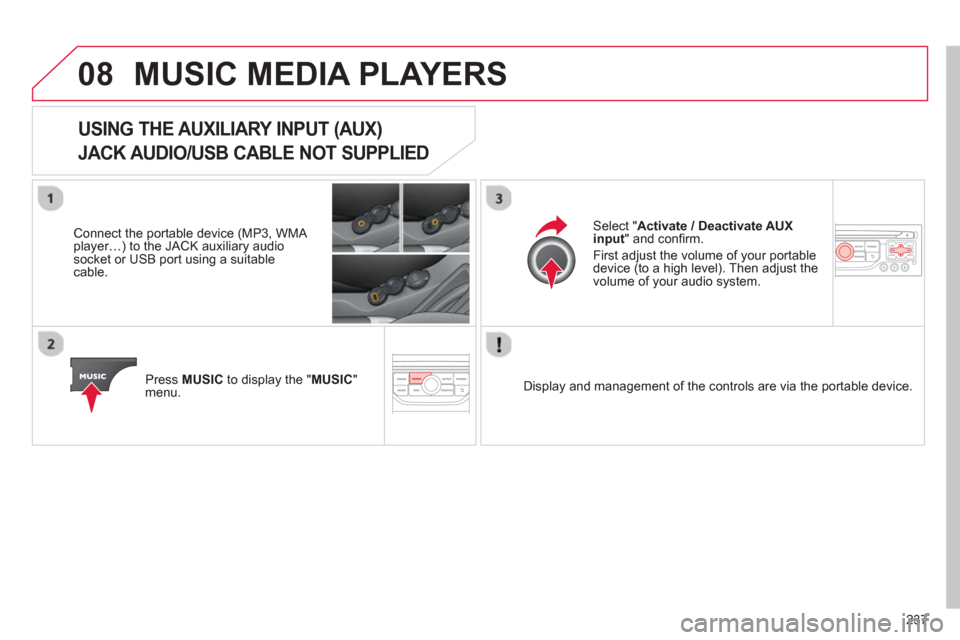
USING THE AUXILIARY INPUT (AUX)
JACK AUDIO/USB CABLE NOT SUPPLIED
Connect the portable device (MP3, WMA player…) to the JACK auxiliary audio socket or USB port using a suitablecable.
Pr
ess MUSICto display the "MUSIC
"
menu.
Select "Activate / Deactivate AUXinput
" and confi rm.
First ad
just the volume of your portable
device (to a high level). Then adjust the
volume of your audio system.
Displa
y and management of the controls are via the portable device.
Page 244 of 284
11
242
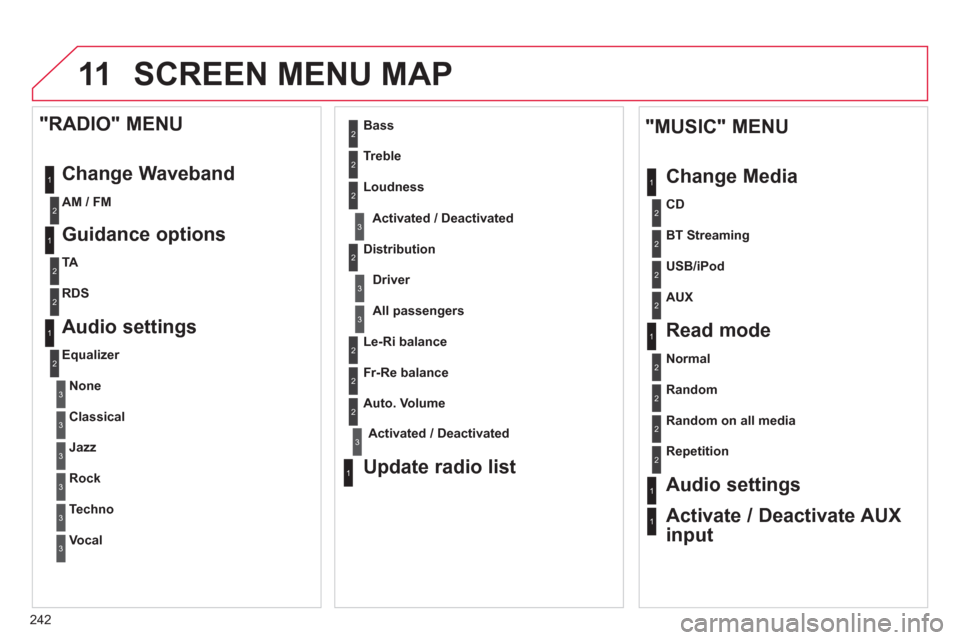
SCREEN MENU MAP
1
1
2
1
1
2
2
2
2
2
2
2
3
3
2
2
2
1
Random on all media
Repetition
Audio settings
Activate / Deactivate AUX
input
"MUSIC" MENU
Chan
ge Media
Read mode
Normal
Random
All passengers
Le-
Ri balance
Fr-Re balance
Auto. Volume
Update radio list
Bass
Treble
Loudness
Distribution
Driver
1
2
2
1
1
3
3
3
3
3
3
2
Equalizer
"RADIO" MENU
Chan
ge Waveband
Guidance o
ptions
TA
RDS
Audio settings
None
Classical
Jaz
z
Rock
Techno
Vocal
2
2
2
2
USB/iPod
AUX
CD
BT Streamin
g
2
AM / FM
3Activated / Deactivated
3Activated / Deactivated
Page 254 of 284
01
252
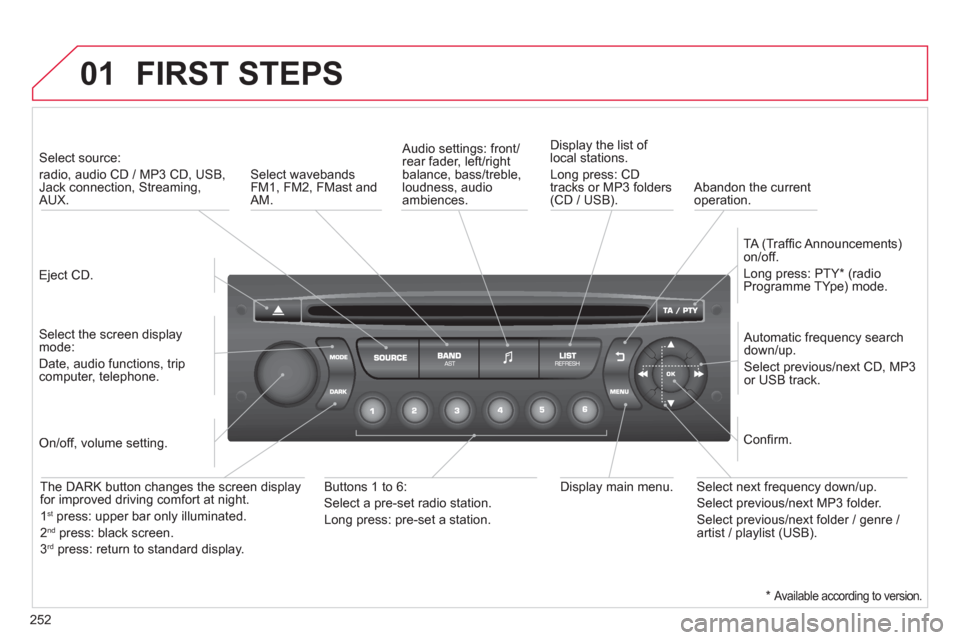
FIRST STEPS
Eject CD.
Select source:
radio, audio CD / MP3 CD, USB,Jack connection, Streaming,AUX.
Select the screen displaymode:
Date, audio functions, tripcomputer, telephone.
Automatic frequency search
down/up.
Select previous/next CD, MP3
or USB track.
Audio settings: front/rear fader, left/right
balance, bass/treble, loudness, audio ambiences. Displa
y the list of local stations.
Lon
g press: CD
tracks or MP3 folders(CD / USB).
TA
(Traffi c Announcements)
on/off.
Lon
g press: PTY * (radio
Programme TYpe) mode.
Display main menu. The DARK button changes the screen display
for improved driving comfort at night.
1st
press: upper bar only illuminated.
2ndpress: black screen.
3rdpress: return to standard display.
On/off, volume setting.
Buttons 1 to 6:
Select a pre-set radio station.
Lon
g press: pre-set a station.
Select next frequency down/up.
Select previous/next MP3 folder.
Select previous/next folder / genre /
artist / playlist (USB).
Confi rm.
Select wavebandsFM1, FM2, FMast and AM.
Abandon the current
operation.
*
Available according to version.
Page 260 of 284
05 USB BOX
The system puts together playlists (temporary memory) createdover a period which depends on the capacity of the USB device.
The other sources are available durin
g this time.
The pla
ylists are updated each time the ignition is switched off or each time a USB memory stick is connected.
When connectin
g for the fi rst time, the classifi cation suggested
is by folder. When you reconnect, the classifi cation selected
previously is retained.
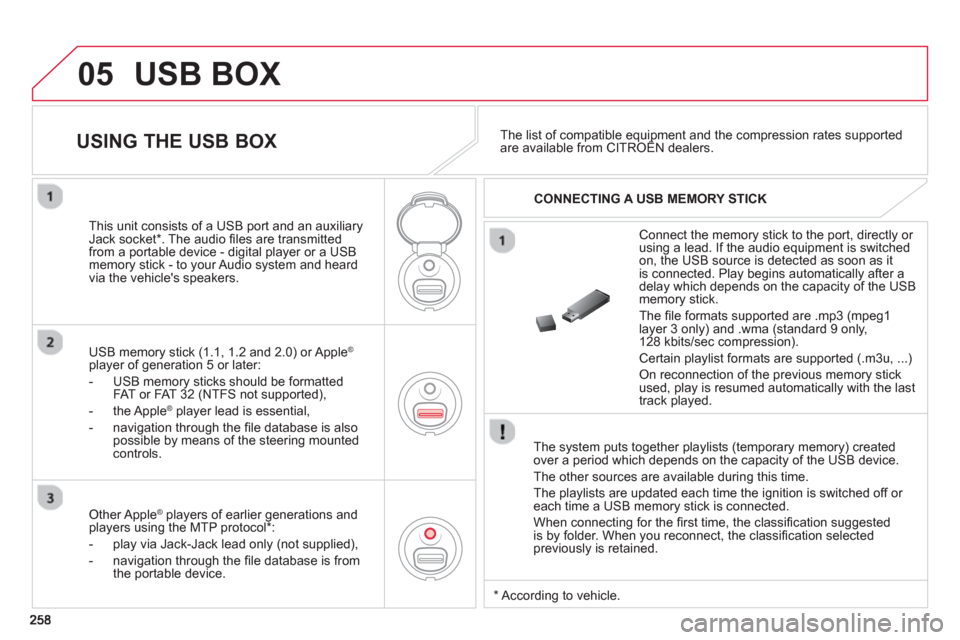
Connect the memory stick to the port, directly or using a lead. If the audio equipment is switched
on, the USB source is detected as soon as it
is connected. Pla
y begins automatically after a
delay which depends on the capacity of the USB memory stick.
The
fi le formats supported are .mp3 (mpeg1 layer 3 only) and .wma (standard 9 only,
128 kbits/sec compression).
Certain playlist formats are supported (.m3u, ...)
On reconnection of the previous memory stickused, play is resumed automatically with the last
track played.
This unit consists o
f a USB port and an auxiliaryJack socket * . The audio fi les are transmitted
from a portable device - digital player or a USBmemory stick - to your Audio system and heard
via the vehicle's speakers.
USB memor
y stick (1.1, 1.2 and 2.0) or Apple®
player of generation 5 or later:
- U
SB memory sticks should be formattedFAT or FAT 32 (NTFS not supported),
- the Apple ®player lead is essential,
- navi
gation through the fi le database is also
possible by means of the steering mountedcontrols.
The list of compatible equipment and the compression rates supported are available from CITROËN dealers. pqpp
USING THE USB BOX
CONNECTING A USB MEMORY STICK
Other Apple®
players of earlier generations and®
players using the MTP protocol * :
- pla
y via Jack-Jack lead only (not supplied),
- navi
gation through the fi le database is from
the portable device.
*
Accordin
g to vehicle.
Page 262 of 284
05
260
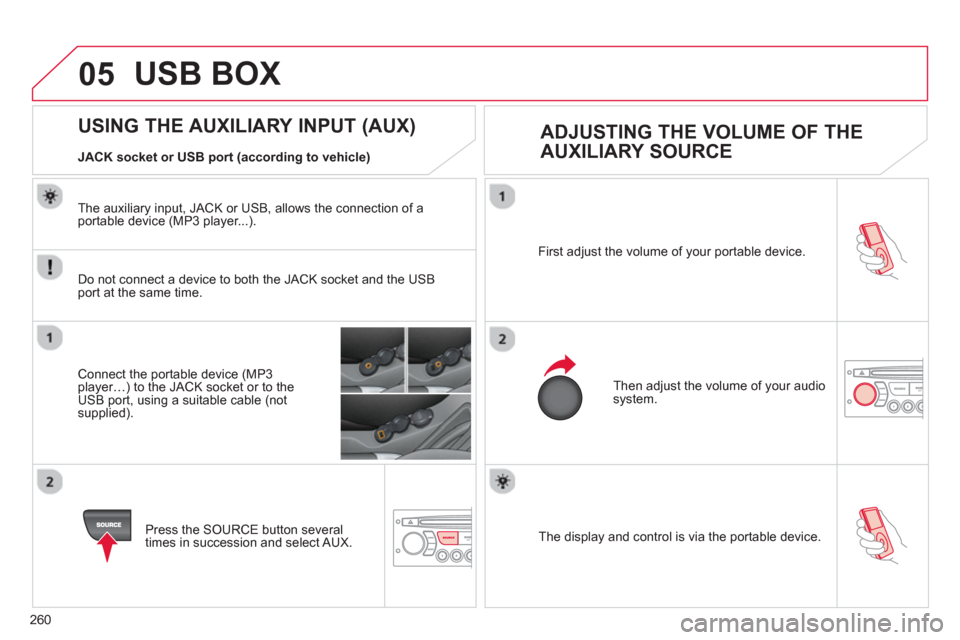
The display and control is via the portable device. First ad
just the volume of your portable device.
Then ad
just the volume of your audio system.
USING THE AUXILIARY INPUT (AUX)
ADJUSTING THE VOLUME OF THE
AUXILIARY SOURCE
JACK socket or USB port (according to vehicle)
USB BOX
Do not connect a device to both the JACK socket and the USB port at the same time.
Connect the portable device (MP3 player…) to the JACK socket or to theUSB port, using a suitable cable (notsupplied).
Press the
SOURCE button several
times in succession and select AUX.
The auxiliar
y input, JACK or USB, allows the connection of a portable device (MP3 player...).
Page 274 of 284
Visual search
272
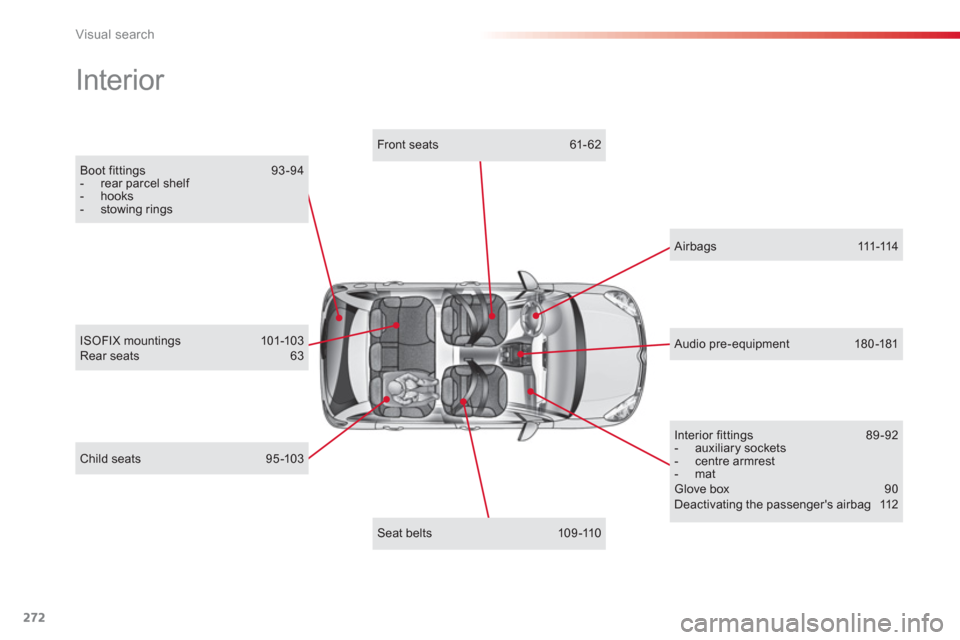
Boot fittings 93 -94 - rear parcel shelf - hooks - stowing rings
Interior
Child seats 95-103
ISOFIX mountings 101-103 Rear seats 63
Airbags 111-114
Interior fittings 89 -92 - auxiliary sockets - centre armrest - mat Glove box 90 Deactivating the passenger's airbag 112
Seat belts 109-110
Front seats 61- 62
Audio pre-equipment 180 -181
Page 277 of 284
.
Alphabetical index
275
ABS and EBFD systems.............................107Accessories ................................................182Accessory socket, 12V.................................91Adjusting headlamps....................................83Adjusting head restraints ..............................62Adjusting the steering wheel.........................65Airbags ...................................................97, 111Airbags, curtain ....................................113,114Airbags, front........................................111,114Airbags, lateral.....................................113,114Air conditioning.................................53, 54, 57Air conditioning, digital..................................57Air conditioning, manual ...............................54Air filter........................................................r142Air flow....................................................54, 58Air intake.................................................55, 58Air recirculation.......................................55, 58Air vents ........................................................52Ambient temperature (display) ......................23Anti-lock braking system (ABS)..................107Anti-pinch ......................................................70Anti-theft........................................................67Armrest, front................................................90Assistance call ....................................106,196Audible warning..........................................106Audio streaming (Bluetooth)...............236, 263Audio system...............................................251Automatic illumination of headlamps......79, 82Automatic operation of hazard warning lamps .... 105Automatic rain sensitive windscreen
wipers...................................................84, 86Auxiliary socket...................................237,260Auxiliary sockets ...................91, 237, 258, 260
Child lock.....................................................104Children ..........................................95-104,112Child seats ............................................95-103Child seats, conventional..............................98Clock .............................................................38Closing the boot......................................66, 75Closing the doors ....................................66,72Connectors, audio .................91, 237,258, 260Coolant level...............................................141Courtesy mirror.............................................r90Cruise control..............................................130Cup holder.....................................................r89
AB
C
Capacity, fuel tank........................................76CD MP3...............................................233,257Central locking........................................66, 73Changing a bulb ................................... 157-163Changing a fuse ...................................164-170Changing a wheel................................149-156Changing a wiper blade ........................86,175Changing the remote control battery ............68Changing the time.........................................38Checking levels ...................................140,141Checking the engine oil level................37, 140Checking tyre pressures (using the kit) ......148Checks .................................................138-143
Battery.................................................142, 171Battery, charging .........................................172Battery, remote control...........................68,69Black panel....................................................39Blind ................................................................6Bluetooth (hands-free)......................................220,261Bluetooth (telephone)..........................220, 261Bonnet .........................................................136Boot...............................................................75Boot lamp..............................................88,163Brake discs ..................................................143Brake lamps................................................161Brake pads .................................................. 143Braking assistance system .........................107
Daytime running lamps.................................83Deactivating the passenger airbag........................................................112Deactivating the rear windows......................71Defrosting ................................................56,59Demisting................................................56,59Dials and gauges .................................... 23, 24Diesel additive level....................................141Dimensions.................................................193Dipped beam .........................................79,158Dipstick..................................................37,140Direction indicators.....................105, 15 8, 161Doors.............................................................72Doors emergency control.............................74Door pockets .................................................89Driving economically ....................................21
D