service Citroen C3 2013 2.G User Guide
[x] Cancel search | Manufacturer: CITROEN, Model Year: 2013, Model line: C3, Model: Citroen C3 2013 2.GPages: 284, PDF Size: 9.23 MB
Page 198 of 284
196
EMERGENCY OR ASSISTANCE CALL
CITROËN LOCALISED EMERGENCY CALL
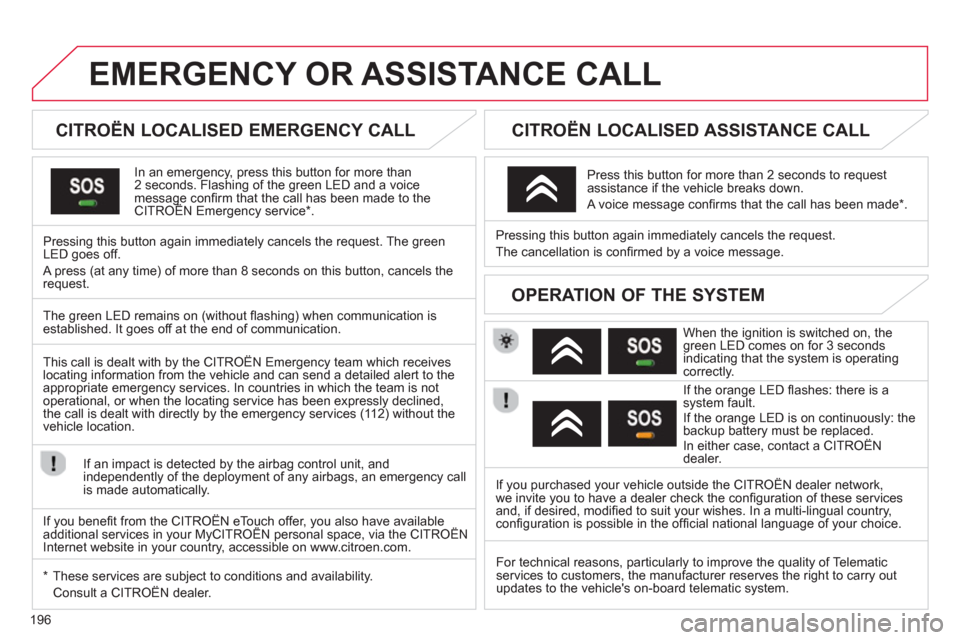
In an emergency, press this button for more than2 seconds. Flashing of the green LED and a voice message confi rm that the call has been made to the CITROËN Emergency service * . gg
Pressing this button again immediately cancels the request. The green LED goes off.
A press
(at any time) of more than 8 seconds on this button, cancels the
request.
CITROËN LOCALISED ASSISTANCE CALL
When the ignition is switched on, thegreen LED comes on for 3 seconds
indicating that the system is operating correctly.
If the oran
ge LED fl ashes: there is asystem fault.
If the orange LED is on continuously: the
backup battery must be replaced.
In either case, contact a CITROËN
dealer. Pressin
g this button again immediately cancels the request.
The cancellation is confi rmed b
y a voice message.
Press this button for more than 2 seconds to request
assistance if the vehicle breaks down.
A voice message confi rms that the call has been made *
.
OPERATION OF THE SYSTEM
The green LED remains on (without fl ashing) when communication is established. It goes off at the end of communication.
This call is dealt with b
y the CITROËN Emergency team which receiveslocating information from the vehicle and can send a detailed alert to theappropriate emergency services. In countries in which the team is not
operational, or when the locating service has been expressly declined,
the call is dealt with directl
y by the emergency services (11 2) without the
vehicle location.
If an impact is detected b
y the airbag control unit, and
independently of the deployment of any airbags, an emergency callis made automatically.
*
These services are sub
ject to conditions and availability.
Consult a CITROËN dealer. If you purchased your vehicle outside the CITROËN dealer network,
we invite
you to have a dealer check the confi guration of these servicesand, if desired, modifi ed to suit your wishes. In a multi-lingual country, confi guration is possible in the offi cial national language of your choice.
For technical reasons, particularl
y to improve the quality of Telematic services to customers, the manufacturer reserves the right to carry out
updates to the vehicle's on-board telematic system.
If you benefi t from the CITROËN eTouch offer, you also have availableadditional services in your MyCITROËN personal space, via the CITROËN y,y
Internet website in your country, accessible on www.citroen.com.
Page 209 of 284
04
207
TOWARDS POINTS OF INTEREST (POI)
NAVIGATION - GUIDANCE
The points of interest (POI) indicate all of the service locations in the vicinity(hotels, various businesses, airports...).
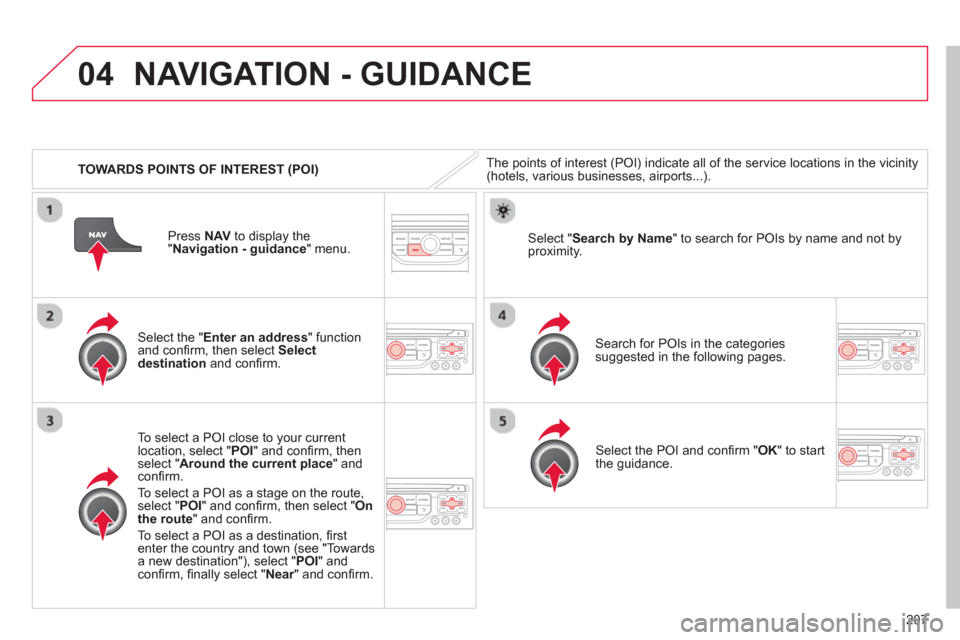
Select the " Enter an address
" function
and confi rm, then select Select
destinationand confi rm.
To select a P
OI close to your currentlocation, select "POI" and confi rm, thenselect " Around the current place
" and confi rm.
To select a P
OI as a stage on the route,select " POI" and confi rm, then select " On
the route" and confi rm.
To select a P
OI as a destination, fi rst enter the country and town (see "Towards
a new destination"), select "POI" andconfi rm, fi nally select "Near" and confi rm.r
Search for POIs in the categories
suggested in the following pages.
Select " Search by Name
" to search for POIs by name and not byproximity.
Select the POI and confi rm " OK" to start
the guidance. Pr
ess NAV
to display the
"Navigation - guidance" menu.
Page 223 of 284
06
221
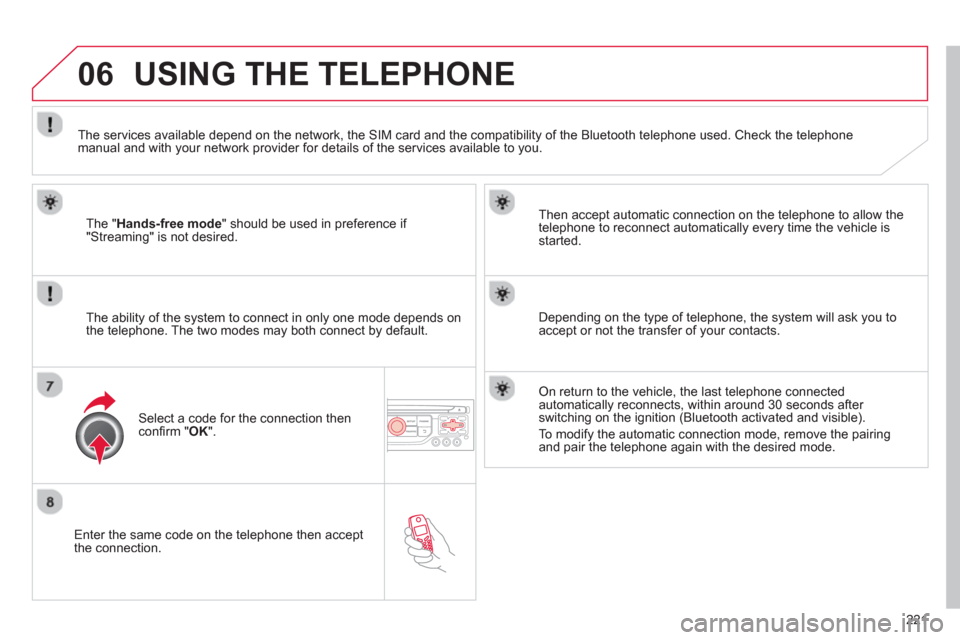
Enter the same code on the telephone then accept
the connection.
Then accept automatic connection on the telephone to allow the
te
lephone to reconnect automatically every time the vehicle is started.
The abilit
y of the system to connect in only one mode depends on
the telephone. The two modes may both connect by default.
USING THE TELEPHONE
The "Hands-free mode
" should be used in preference if "Streaming" is not desired.
The services available depend on the network, the
SIM card and the compatibility of the Bluetooth telephone used. Check the telephone manual and with your network provider for details of the services available to you.
Select a code for the connection thenconfi rm "OK".
Depending on the type of telephone, the system will ask you to
accept or not the transfer of your contacts.
On return to the vehicle, the last telephone connected
automatically reconnects, within around 30 seconds after switching on the ignition (Bluetooth activated and visible).
To modi
fy the automatic connection mode, remove the pairingand pair the telephone again with the desired mode.
Page 229 of 284
06
227
USING THE TELEPHONE
OPTIONS DURING A CALL *
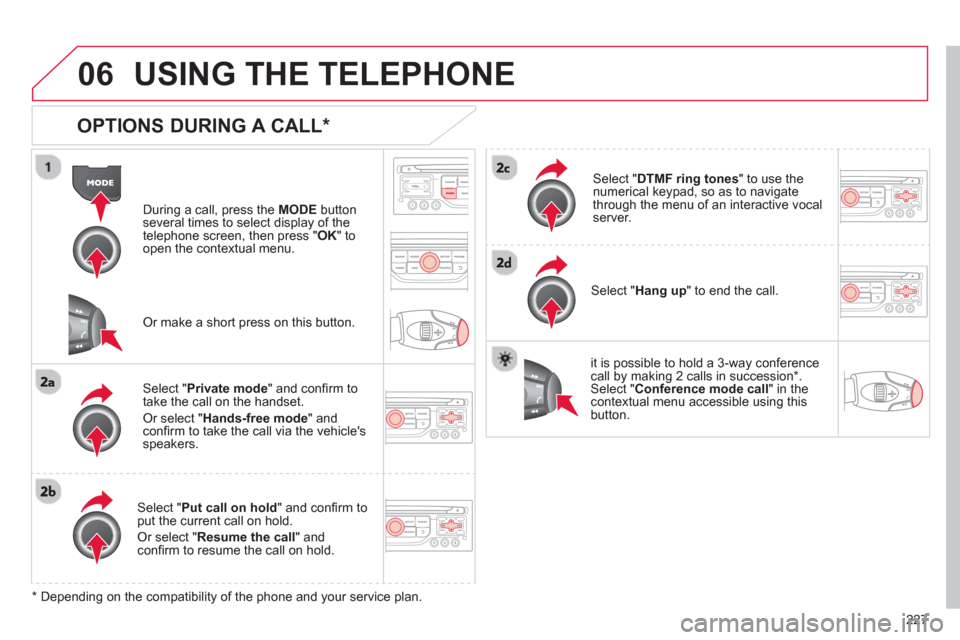
During a call, press the MODE
button
several times to select display of the
telephone screen, then press " OK " to
open the contextual menu.
Select " Private mode
" and confi rm totake the call on the handset.
Or select " Hands-free mode" andconfi rm to take the call via the vehicle's
speakers.
Select " Put call on hold" and confi rm to put the current call on hold.
Or select " Resume the call" andconfi rm to resume the call on hold.
Select " DTMF ring tones
" to use thenumerical keypad, so as to navigate
through the menu of an interactive vocal server.
Select " Hang up " to end the call.
*
Depending on the compatibility of the phone and your service plan.
it is possible to hold a 3-wa
y conferencecall by making 2 calls in succession*. Select "Conferencemode call" in the contextual menu accessible using thisbutton.
Or make a short press on this button.
Page 263 of 284
06
261
BLUETOOTH FUNCTIONS
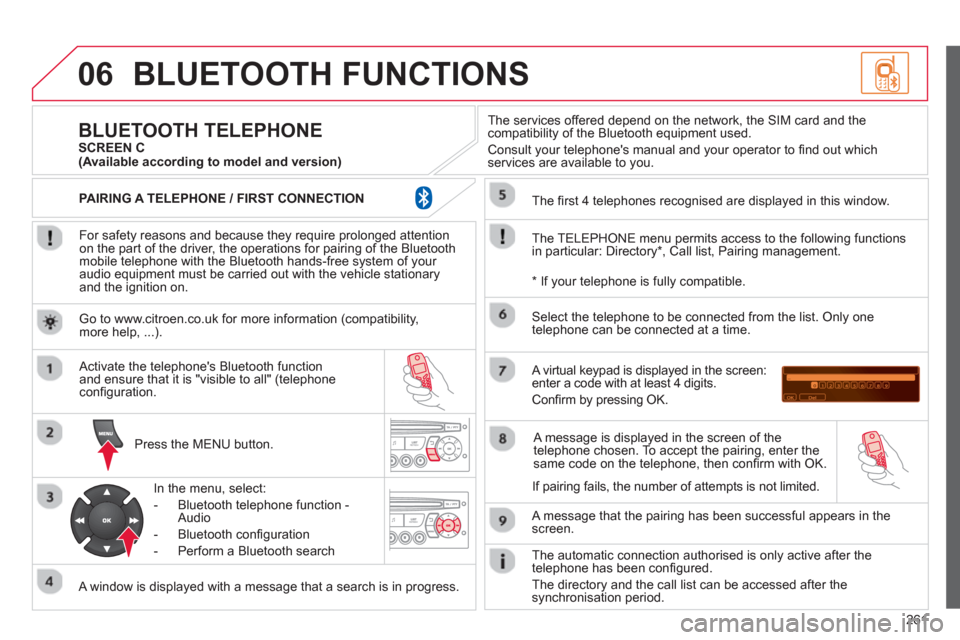
For safety reasons and because they require prolonged attentionon the part of the driver, the operations for pairing of the Bluetooth mobile telephone with the Bluetooth hands-free system of your
audio equipment must be carried out with the vehicle stationary
and the ignition on.
Pr
ess the MENU button.
A window is displayed with a message that a search is in progress.
Activate the telephone's Bluetooth
function
and ensure that it is "visible to all" (telephone confi guration.
In the menu, select:
- Bluetooth telephone
function -
Audio
- Bluetooth confi
guration
- P
erform a Bluetooth search
The services o
ffered depend on the network, the SIM card and thecompatibility of the Bluetooth equipment used.
Consult your telephone's manual and your operator to fi nd out which
services are available to you.
BLUETOOTH TELEPHONE SCREEN C
The TELEPH
ONE menu permits access to the following functions
in particular: Directory * , Call list, Pairing management.
The
fi rst 4 telephones recognised are displayed in this window.
A virtual ke
ypad is displayed in the screen:enter a code with at least 4 digits.
Confi rm by pressing OK.
A messa
ge that the pairing has been successful appears in thescreen.
Select the telephone to be connected from the list.
Only one
telephone can be connected at a time.
A messa
ge is displayed in the screen of the
telephone chosen. To accept the pairing, enter the same code on the telephone, then confi rm with OK.
The automatic connection authorised is onl
y active after the
telephone has been confi gured.
The directory and the call list can be accessed a
fter thesynchronisation period.
(Available according to model and version)
*
If your telephone is fully compatible.
I
f pairing fails, the number of attempts is not limited. Go to www.citroen.co.uk for more information
(compatibility, more help, ...).
PAIRING A TELEPHONE / FIR
ST CONNECTION
Page 280 of 284
Alphabetical index
278
RS
Radio...................................................229, 255Radio pre-equipment ..................................180Rear foglamp.........................................80, 161Rear screen(demisting)..................................................59Recharging the battery...............................172Reduction of electrical load........................174Regeneration of the par ticleemissions filter..........................................r142Reinitialisingthe electric windows...................................71Reinitialisingthe remote control.......................................68Remote control........................................66, 69Removing a wheel...................................... 152Removing the mat.........................................92Repair kit, puncture.....................................144Replacing bulbs ...................................157-163Replacing fuses...................................164-170Replacing the air filter.................................r142Replacing the oil filter.................................r142Replacing the passengercompartment filter....................................r142Replacing wiper blades.........................86,175Resetting the service indicator.....................r36Resetting the trip recorder............................r38Rev counter.............................................r23, 24Reversing camera .......................................134Reversing lamp...........................................161Risk areas (update)..................................... 208Routine checks ...................................142,143Running out of fuel (Diesel)........................137
T
Safety for children..........................95 -104, 112Scented air freshener...................................r60Screen, colour 16/9.......................................50Screen, colour and mapping...............201,240Screen, monochrome ................254,264,266Screen, multifunction(with audio equipment)...................43, 46, 50Screen-wash reservoir................................141Screen menu map......................240,264,266Screenwash..................................................85Screenwash fluid level................................141Seat, rear bench...........................................63Seat adjustment............................................61Seat belts ......................................98, 109,110Seats, rear.....................................................r63Serial number, vehicle................................194Ser vice indicator...........................................r35Servicing.......................................................21Setting the clock...........................................38Short-cut menus.........................................202Sidelamps.....................................79, 159,161Side repeater...............................................159Snow chains................................................156Spare wheel................................................150Speakers (fitting).........................................180Speed limiter...............................................r128Speedometer..........................................r23,24Stability control (ESP) .................................108Starting the vehicle........................67, 117, 121Steering mounted controls, audio .......200, 253Stopping the vehicle ......................67, 117, 121Stop & Start.......42, 59,76, 124, 136, 142, 171Storage ....................................................89,90
Storage box ...................................................94Storage drawer..............................................92Stowing rings................................................93Sun visor.......................................................r90Synchronising the remote control.................68Synthesiser, voice.......................................214System, navigation ......................................203Systems, ASR and ESP..............................108
Table of weights ..........................184,187, 189Ta b l e s of engines........185, 18 6, 188, 19 0, 191Tables of fuses ............................................164Ta n k, fuel.................................................76, 78Te c hnical data......................................184-193Te l e p h o ne...........................................220, 261Temperature adjustment.........................54,57Te mperature control for heated seats .......... 62Te m p o r a ry tyre repair kit .............................144Third brake lamp.........................................162Time........................................................23, 38TMC (Tr a f f i c i n f o)........................................217To o l s............................................................149Total distance recorder.................................r38To w b a r.........................................................r178Towed loads ................185, 186, 188, 190, 191To w i ng another vehicle ...............................177Tr a c t i o n c o n t r o l (ASR)................................108Tr affic information (TA).......................218,256