navigation Citroen C3 2014 2.G Owner's Guide
[x] Cancel search | Manufacturer: CITROEN, Model Year: 2014, Model line: C3, Model: Citroen C3 2014 2.GPages: 284, PDF Size: 9.01 MB
Page 214 of 284
04
212
C3_en_Chap13b_RT6-2-8_ed01-2014
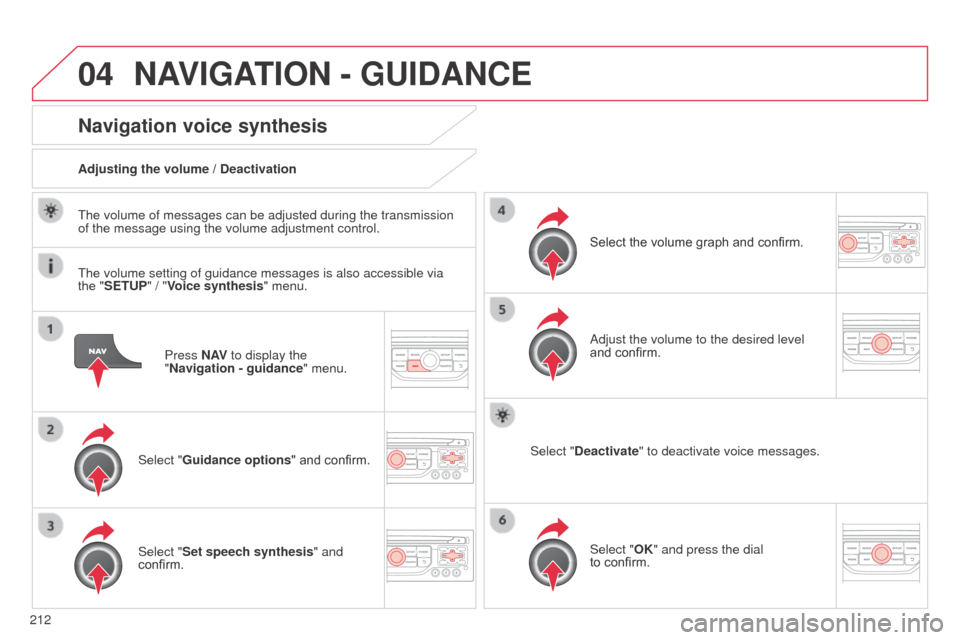
Press N AV to display the
"Navigation - guidance " menu.
Navigation voice synthesis
Select "Guidance options " and confirm.
Adjusting the volume / Deactivation
Select "Set speech synthesis" and
confirm. Select the volume graph and confirm.
Select "Deactivate " to deactivate voice messages.
Select "OK" and press the dial
to
confirm.
a
djust the volume to the desired level
and confirm.
The volume of messages can be adjusted during the transmission
of the message using the volume adjustment control.
The volume setting of guidance messages is also accessible via
the "SETUP" / "
Voice synthesis" menu.
NAVIGATION - GUIDANCE
Page 215 of 284
04
213
C3_en_Chap13b_RT6-2-8_ed01-2014
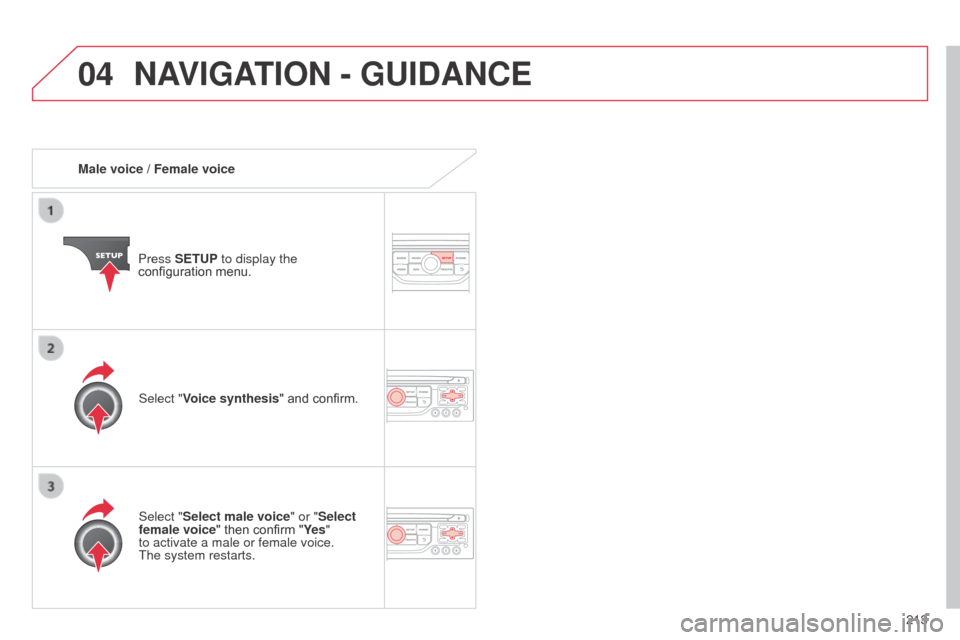
Male voice / Female voicePress SETUP to display the
configuration menu.
Select "Select male voice" or "Select
female voice" then confirm "Ye s "
to activate a male or female voice.
The
system restarts.
Select "Voice synthesis" and confirm.
NAVIGATION - GUIDANCE
Page 217 of 284
05
215
C3_en_Chap13b_RT6-2-8_ed01-2014
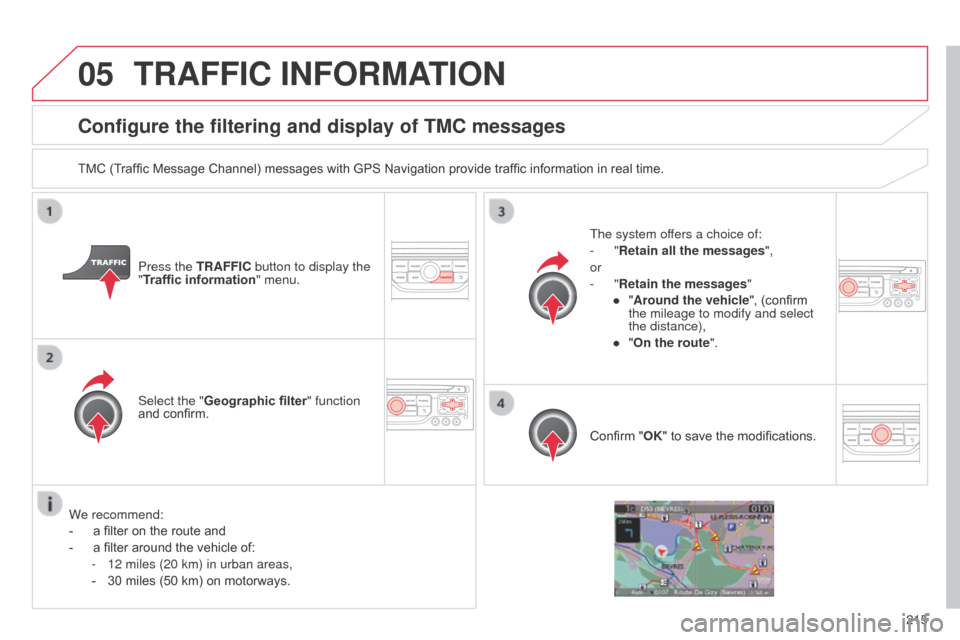
Configure the filtering and display of TMC messages
TMC (Traffic Message Channel) messages with GPS Navigation provide traffic information in real time.Press the TRAFFIC button to display the
"Traffic information" menu.
Select the "Geographic filter" function
and confirm. The system offers a choice of:
-
"Retain all the messages",
or
-
"Retain the messages"
●
"
Around the vehicle", (confirm
the mileage to modify and select
the distance),
●
"
On the route".
Confirm "OK" to save the modifications.
We recommend:
-
a filter on the route and
-
a filter around the vehicle of:
-
12 miles (20 km) in urban areas,
-
30 miles (50 km) on motorways.
TRAFFIC INFORMATION
Page 240 of 284
11
238
C3_en_Chap13b_RT6-2-8_ed01-2014
SCREEN MENU MAP(S)
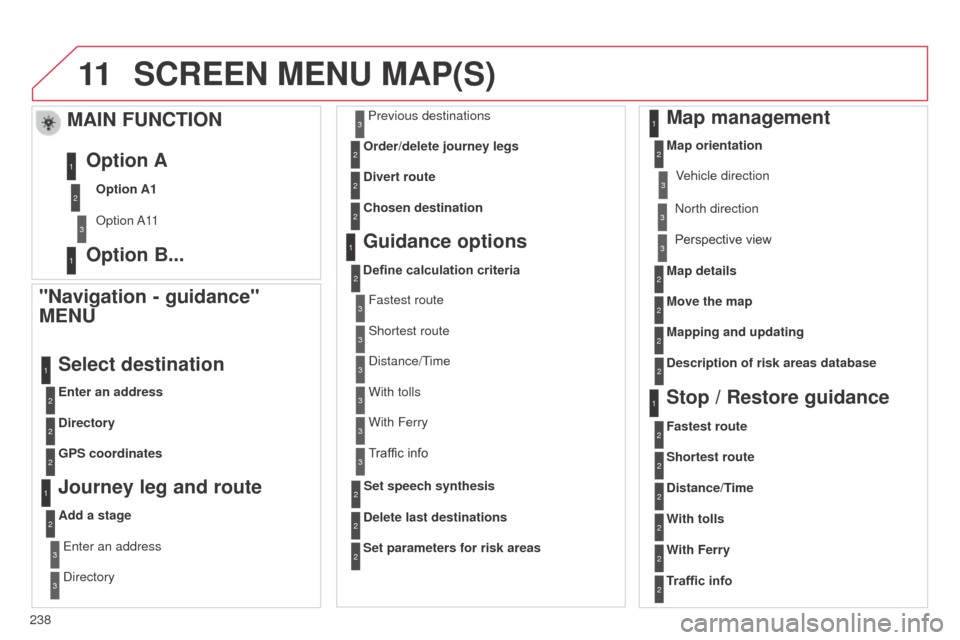
"Navigation - guidance"
MENU
Enter an address
Select destination
Directory
GPS coordinates
Journey leg and route
Add a stageEnter an address
d
irectory Previous destinations
Order/delete journey legs
Divert route
Chosen destination
Guidance options
Define calculation criteria
Delete last destinations
Map management
Map orientation
MAIN FUNCTION
Option A1
o
ption a 11
Option A
Option B...
Map details
Move the map
Mapping and updating
Description of risk areas database
Stop / Restore guidance
1
2
3
1
3
3
2
2
2
2
1
3
1
1
2
2
2
2
2
2
2
2
2
2
1
1
Set parameters for risk areas2
Fastest route2
Shortest route
Distance/Time
With tolls2
2
2
With Ferry2
Traffic info2
Set speech synthesisFastest route
Shortest route
3
3
2
distance/Time
With tolls3
3
With Ferry
Traffic info3
3
3
3
3
north direction
V ehicle direction
Perspective view
Page 258 of 284
05
256
C3_en_Chap13c_Rd45_ed01_2014
USB PLAYER
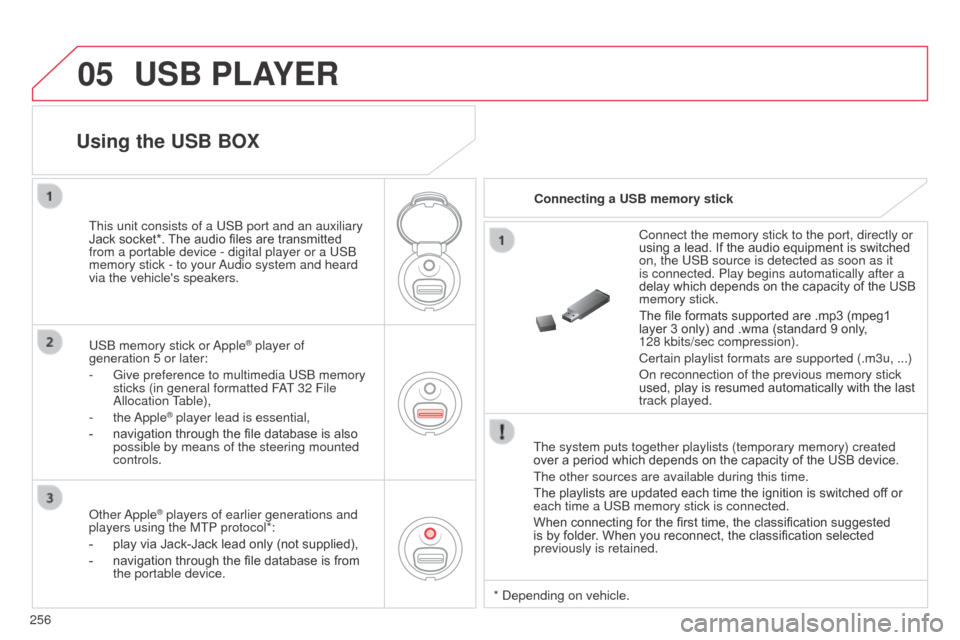
The system puts together playlists (temporary memory) created
over a period which depends on the capacity of the USB device.
The other sources are available during this time.
The playlists are updated each time the ignition is switched off or
each time a USb memory stick is connected.
When connecting for the first time, the classification suggested
is by folder. When you reconnect, the classification selected
previously is retained. Connect the memory stick to the port, directly or
using a lead. If the audio equipment is switched
on, the US
b source is detected as soon as it
is connected. Play begins automatically after a
delay which depends on the capacity of the USB
memory stick.
The file formats supported are .mp3 (mpeg1
layer 3 only) and .wma (standard 9 only,
128 kbits/sec compression).
Certain playlist formats are supported (.m3u, ...)
o
n reconnection of the previous memory stick
used, play is resumed automatically with the last
track played.
This unit consists of a US
b
port and an auxiliary
Jack socket*. The audio files are transmitted
from a portable device - digital player or a US
b
memory stick - to your
a
udio system and heard
via the vehicle's speakers.
US
b
memory stick or
a
pple
® player of
generation 5 or later:
-
Give preference to multimedia US
b memory
sticks (in general formatted F
aT
32 File
a
llocation Table),
-
the
a
pple
® player lead is essential,
-
navigation through the file database is also
possible by means of the steering mounted
controls.
Using the USB BOX
Connecting a USB memory stick
o
ther
a
pple
® players of earlier generations and
players using the MTP protocol*:
-
play via Jack-Jack lead only (not supplied),
-
navigation through the file database is from
the portable device. *
d epending on vehicle.
Page 278 of 284
276
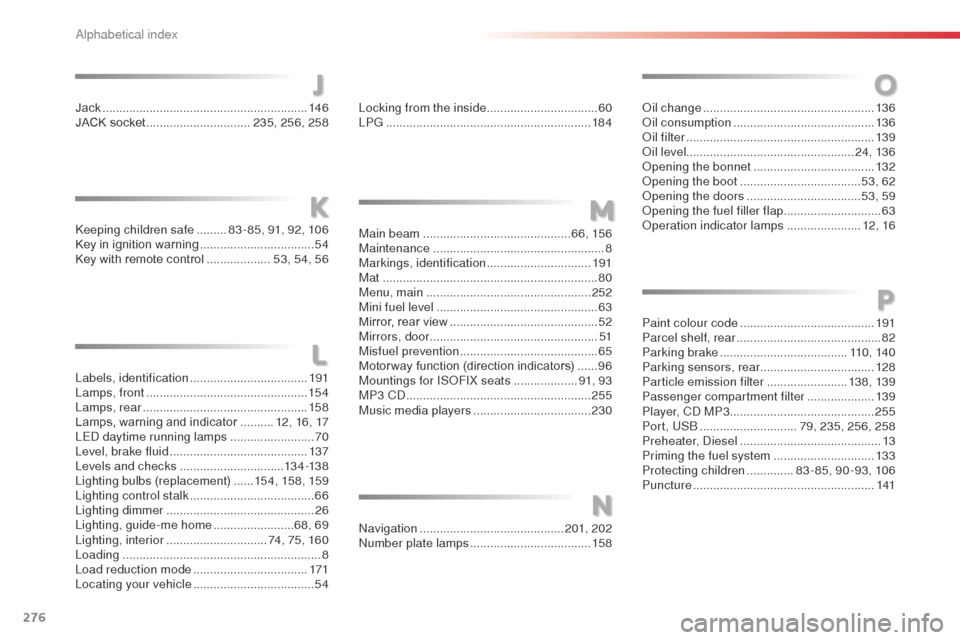
Labels, identification ...................................19 1
Lamps, front ................................................ 15 4
Lamps, rear
................................................. 15 8
Lamps, warning and indicator
..........12, 16, 17
LE
d da
ytime running lamps
.........................70
Level, brake fluid
......................................... 13
7
Levels and checks
............................... 13 4 -13 8
Lighting bulbs (replacement)
...... 15
4, 15 8, 159
Lighting control stalk
..................................... 66
Lighting dimmer
..............................
..............26
Lighting, guide-me home
........................68, 69
Lighting, interior
.............................. 74, 75, 160
Loading
........................................................... 8
Load reduction mode
..................................171
Locating your vehicle
.................................... 54
ke
eping children safe
.........
8
3 - 85, 91, 92, 106
Key in ignition warning ..................................
54
Key with remote control ...................
53, 54, 56
Jack
........
.....................................................
146
JACK socket ...............................
235, 256, 258
J
L
KM
Locking from the inside ................................. 60
LP G ....... ...................................................... 18 4
Main beam
............................................ 6 6, 15 6
Maintenance
................................................... 8
Markings, identification
...............................191
Mat
................................................................ 80
Menu, main
................................................. 252
Mini fuel level
................................................ 63
Mirror, rear view
............................................ 52
Mirrors, door .................................................. 51
Misfuel prevention
...............................
..........65
Motor way function (direction indicators)
......96
Mountings for IS
oF
IX seats
...................91, 93
MP3 C
d
....................................................... 255
Music media players
................................... 230
N
navigation ........................................... 201, 202nu
mber plate lamps .................................... 15
8
O
oil change ................................................... 13 6oi
l consumption .......................................... 13 6
oil
filter
...............
......................................... 13 9
oi
l level .................................................. 24, 13 6
op
ening the bonnet
.................................... 13
2
op
ening the boot
..............................
......53, 62
op
ening the doors
...............................
...53, 59
op
ening the fuel filler flap
.............................63op
eration indicator lamps
......................12, 16
Paint colour code
........................................ 191
Parcel shelf, rear
........................................... 8
2
Parking brake
...................................... 11 0 , 14 0
Parking sensors, rear ..................................128
Particle emission filter
........................13 8, 13 9
Passenger compartment filter
....................13 9
Player, C
d
MP3 ........................................... 255
Port, US
b
............................. 7
9, 235, 256, 258
Preheater,
d
i
esel
.......................................... 13
Priming the fuel system
..............................13 3
Protecting children
..............83 - 85, 90 -93, 106
Puncture
...................................................... 141
P
alphabetical index
Page 279 of 284
277
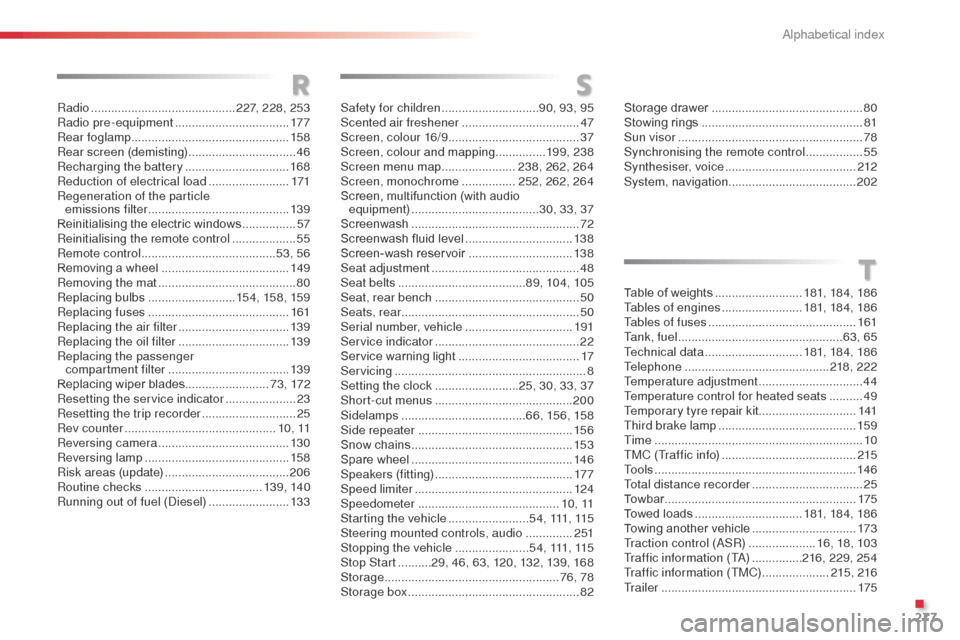
Radio ........................................... 227, 228, 253
Radio pre-equipment .................................. 17
7
Rear foglamp ............................................... 15 8
Rear screen (demisting)
................................46
Recharging the battery
............................... 16
8
Reduction of electrical load
........................171
Regeneration of the particle emissions filter
.......................................... 13 9
Reinitialising the electric windows
................57
Reinitialising the remote control
................... 55
R
emote control
........................................ 5
3, 56
Removing a wheel
...................................... 149
Removing the mat
......................................... 80
Replacing bulbs
..........................15 4, 15 8, 159
Replacing fuses
..............................
............161
Replacing the air filter
.................................13 9
Replacing the oil filter
................................. 13
9
Replacing the passenger compartment filter
.................................... 13 9
Replacing wiper blades .........................73 , 172
Resetting the service indicator
.....................23
Resetting the trip recorder
............................25
Rev counter
............................................. 1 0 , 11
Reversing camera
....................................... 13 0
Reversing lamp
........................................... 15
8
Risk areas (update)
..................................... 206
Routine checks
................................... 13 9, 14 0
Running out of fuel (
di
esel)
........................13
3
RS
T
Safety for children .............................9 0, 93, 95
Scented air freshener ................................... 47
S
creen, colour 16/9 ....................................... 37
Screen, colour and mapping ...............19 9, 238
Screen menu map
......................238, 262, 264
Screen, monochrome
................252, 262, 264
Screen, multifunction (with audio equipment)
...................................... 30, 33, 37
Screenwash
.................................................. 72
Screenwash fluid level
................................13 8
Screen-wash reservoir
...............................13 8
Seat adjustment
...............................
.............48
Seat belts
...................................... 8
9, 104, 105
Seat, rear bench
........................................... 50
Seats, rear
..................................................... 50
Serial number, vehicle
................................ 19
1
Service indicator
........................................... 22
Service warning light
.................................... 17
S
ervicing
...............................
..........................8
Setting the clock
.........................25, 30, 33, 37
Short-cut menus
......................................... 200
Sidelamps
..................................... 6 6, 15 6, 15 8
Side repeater
..............................
................15 6
Snow chains
................................................ 15
3
Spare wheel
...............................
.................146
Speakers (fitting)
......................................... 17 7
Speed limiter
............................................... 124
Speedometer
.......................................... 1 0 , 11
Starting the vehicle
........................5 4 , 111, 115
Steering mounted controls, audio
..............2 51
Stopping the vehicle
......................5 4 , 111, 115
Stop Start
..........29, 46, 63, 120, 132, 139, 168
Storage
.................................................... 76, 78
Storage box
................................................... 8
2Table of weights
..........................18
1, 18 4, 18 6
Tables of engines
........................181, 18 4, 18 6
Tables of fuses
............................................161
Ta n k , f u e l
.................................................63, 65
Technical data
.............................181, 18 4, 18 6
Telephone
...........................................218, 222
Temperature adjustment
............................... 44
T
emperature control for heated seats
..........49
Temporary tyre repair kit .............................141
Third brake lamp
.........................................159
Time
..............................................................10
TMC (Traffic info)
........................................2
15
To o l s
............................................................146
Total distance recorder
.................................25
To w b a r
.........................................................175
Towed loads
................................181, 18 4, 18 6
Towing another vehicle
...............................17
3
Traction control (
aS
R)
....................16, 18, 103
Traffic information (T
a)
...............216, 229, 254
Traffic information (TMC)
.................... 21
5, 216
Tr a i l e r
..........................................................175
Storage drawer
.............................................80
Stowing rings
................................................81
Sun visor
.......................................................78
Synchronising the remote control
.................55
Synthesiser, voice
....................................... 2
12
System, navigation ...................................... 202
.
alphabetical index