aux Citroen C3 2015 2.G User Guide
[x] Cancel search | Manufacturer: CITROEN, Model Year: 2015, Model line: C3, Model: Citroen C3 2015 2.GPages: 401, PDF Size: 13.04 MB
Page 248 of 401
246
Media
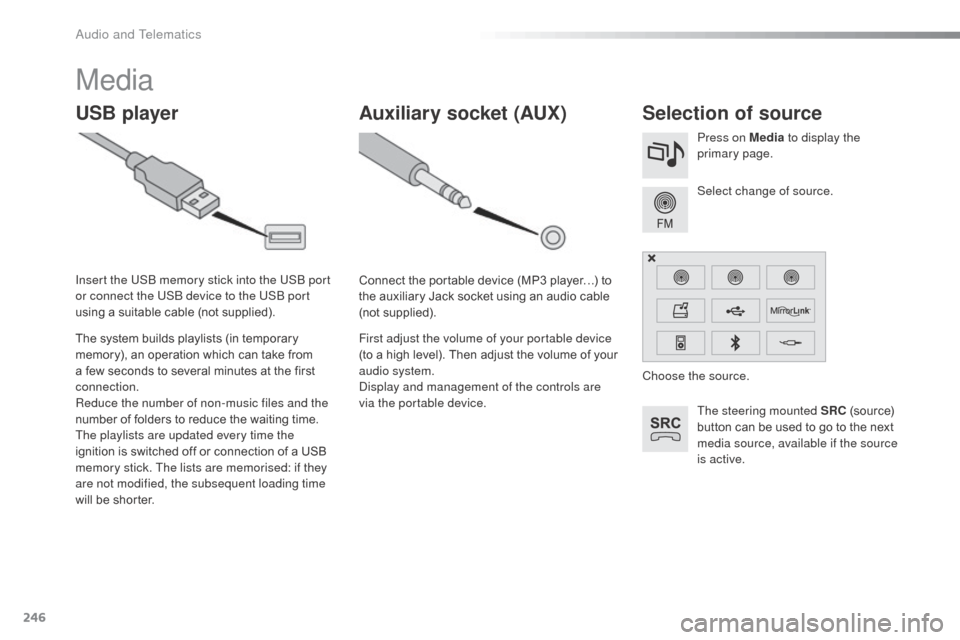
USB playerSelection of source
The steering mounted SRC (source)
button can be used to go to the next
media source, available if the source
is active. Select change of source. Press on Media to display the
primary page.
The system builds playlists (in temporary
memory), an operation which can take from
a few seconds to several minutes at the first
connection.
Reduce the number of non-music files and the
number of folders to reduce the waiting time.
The playlists are updated every time the
ignition is switched off or connection of a USB
memory stick. The lists are memorised: if they
are not modified, the subsequent loading time
will be shorter. Insert the US
b
memory stick into the US
b
port
or connect the US
b
device to the US
b
port
using a suitable cable (not supplied).
Auxiliary socket (AUX)
Connect the portable device (MP3 player…) to
the auxiliary Jack socket using an audio cable
(not supplied).
First adjust the volume of your portable device
(to a high level). Then adjust the volume of your
audio system.
di
splay and management of the controls are
via the portable device. Choose the source.
audio and Telematics
Page 249 of 401
247
The audio equipment will only play audio
files with ".wma, .aac, .flac, .ogg and. mp3"
file extensions and with a bit rate of between
32 Kbps and 320 Kbps.
It also supports VBR (Variable Bit Rate) mode.
No other type of file (.mp4,
...) can be played.
".wma" files must be of the standard
wma
9 type.
The sampling rates supported are 11, 22, 44
and 48 KHz.
It is advisable to restrict file names to
20
characters, without using of special
characters (e.g.: " " ? ; ù) to avoid any playing
and displaying problems.
Information and advice
Use only USB memory sticks formatted FAT32
(file allocation table).
The system supports USb
mass
storage portable players,
b
l
ack
be
rry
®
devices or
apple® players via USb
ports. The adaptor cable not supplied.
Control of the peripheral device is with
the audio system controls.
ot
her peripherals, not recognised on
connection, must be connected to the
auxiliary socket using a Jack cable (not
supplied).
It is recommended that the US
b
cable
for the portable device is used. The system does not support the
simultaneous connection of two
identical devices (two memory sticks
or two Apple
® players) but it is possible
t
o connect one memory stick and one
apple® player at the same time.
.
audio and Telematics
Page 251 of 401
249
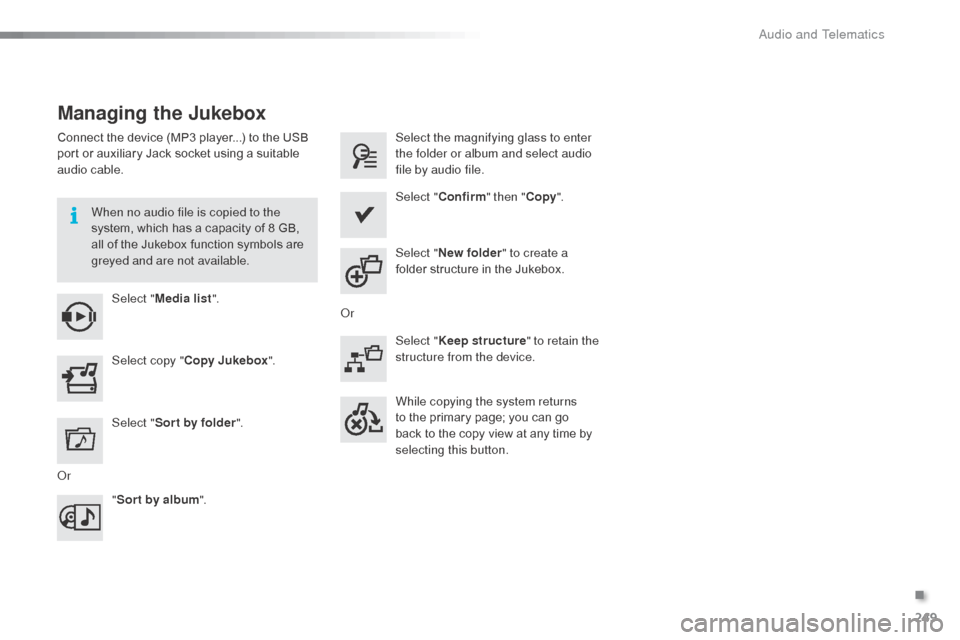
Managing the Jukebox
Connect the device (MP3 player...) to the USB
port or auxiliary Jack socket using a suitable
audio cable.When no audio file is copied to the
system, which has a capacity of 8 GB,
all of the Jukebox function symbols are
greyed and are not available.Select " Media list ". Select the magnifying glass to enter
the folder or album and select audio
file by audio file.
Select copy " Copy Jukebox ". Select "
Confirm " then "Copy".
Select " Sor t by folder ". Select "
New folder " to create a
folder structure in the Jukebox.
" Sor t by album ". Select "
Keep structure " to retain the
structure from the device.
While copying the system returns
to the primary page; you can go
back to the copy view at any time by
selecting this button.
o
r
o
r
.
Audio and Telematics
Page 282 of 401
280
C3_en_Chap13c_RD45_ed01-2015
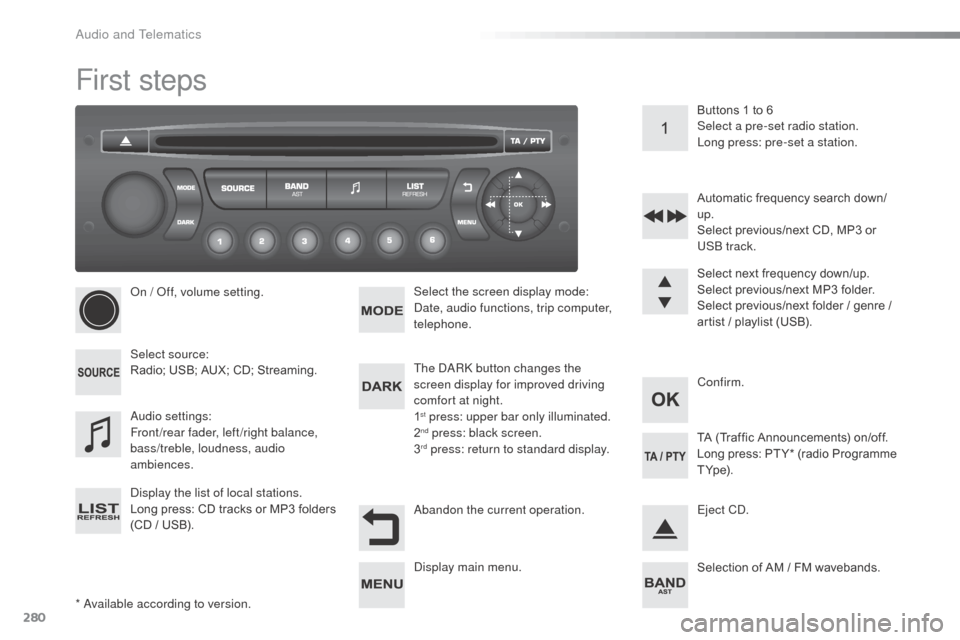
First steps
* available according to version.
on /
o
f
f, volume setting.
Select source:
Radio; USB; AUX; CD; Streaming.
di
splay the list of local stations.
Long press: CD tracks or MP3 folders
(CD / USB). Select the screen display mode:
da
te, audio functions, trip computer,
telephone.
aud
io settings:
Front/rear fader, left/right balance,
bass/treble, loudness, audio
ambiences. The da
Rk
button changes the
screen display for improved driving
comfort at night.
1
st press: upper bar only illuminated.
2nd press: black screen.
3rd press: return to standard display. Select next frequency down/up.
Select previous/next MP3 folder.
Select previous/next folder / genre /
artist / playlist (USB).
ab
andon the current operation. Confirm. Buttons 1 to 6
Select a pre-set radio station.
Long press: pre-set a station.
Automatic frequency search down/
up.
Select previous/next CD, MP3 or
US
b
track.
Eject C
d
.
di
splay main menu. TA (Traffic Announcements) on/off.
Long press: PT Y* (radio Programme
T Yp e).
Selection of AM / FM wavebands.
audio and Telematics
Page 284 of 401
282
C3_en_Chap13c_RD45_ed01-2015
Menus
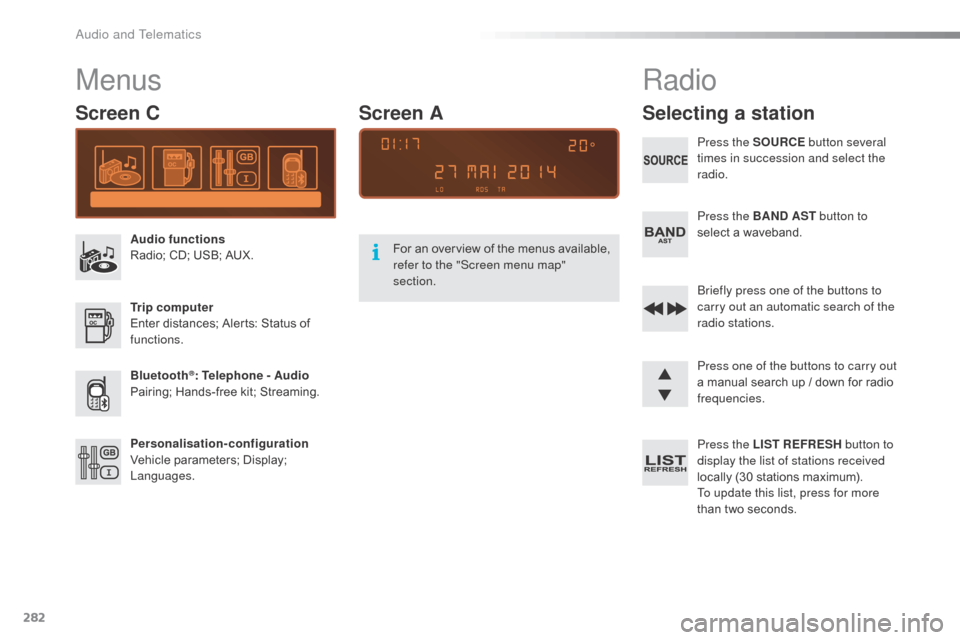
Screen C
Audio functions
Radio; CD; USB; AUX.
Trip computer
Enter distances; Alerts: Status of
functions.
Bluetooth
®: Telephone - Audio
Pairing; Hands-free kit; Streaming.
Personalisation-configuration
Vehicle parameters; Display;
Languages. For an overview of the menus available,
refer to the "Screen menu map"
section.
Screen A
Radio
Selecting a station
Press the SOURCE
button several
times in succession and select the
radio.
Press the BAND AST button to
select a waveband.
br
iefly press one of the buttons to
carry out an automatic search of the
radio stations.
Press one of the buttons to carry out
a manual search up / down for radio
frequencies.
Press the LIST REFRESH button to
display the list of stations received
locally (30 stations maximum).
To update this list, press for more
than two seconds.
audio and Telematics
Page 286 of 401
284
C3_en_Chap13c_RD45_ed01-2015
Media
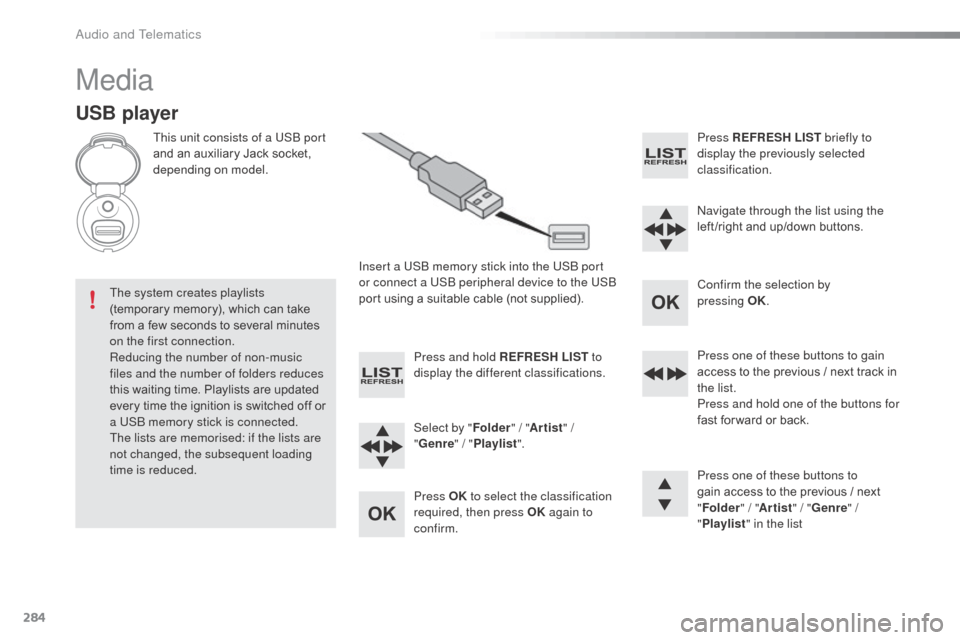
USB player
This unit consists of a USb port
and an auxiliary Jack socket,
depending on model.
Insert a US
b
memory stick into the US
b
port
or connect a US
b
peripheral device to the US
b
port using a suitable cable (not supplied).
The system creates playlists
(temporary memory), which can take
from a few seconds to several minutes
on the first connection.
Reducing the number of non-music
files and the number of folders reduces
this waiting time. Playlists are updated
every time the ignition is switched off or
a US
b
memory stick is connected.
The lists are memorised: if the lists are
not changed, the subsequent loading
time is reduced. Press and hold REFRESH LIST
to
display the different classifications.
Select by " Folder" / "Artist " /
" Genre " / "Playlist ".
Press OK to select the classification
required, then press OK again to
confirm. Press REFRESH LIST
briefly to
display the previously selected
classification.
na
vigate through the list using the
left /right and up/down buttons.
Confirm the selection by
pressing
OK.
Press one of these buttons to gain
access to the previous / next track in
the list.
Press and hold one of the buttons for
fast for ward or back.
Press one of these buttons to
gain access to the previous / next
" Folder " / "Artist " / "Genre " /
" Playlist " in the list
audio and Telematics
Page 287 of 401
285
C3_en_Chap13c_RD45_ed01-2015
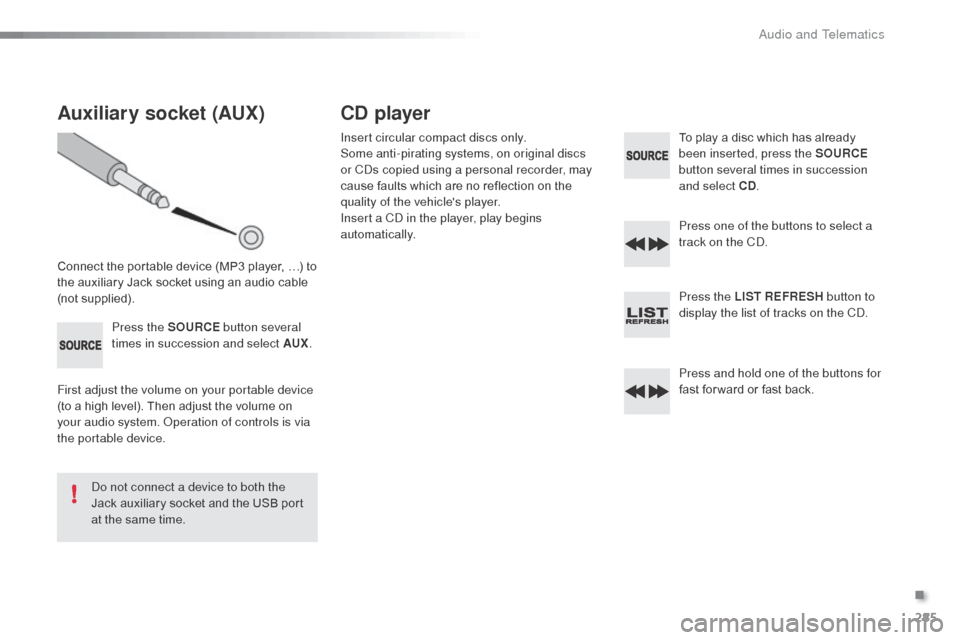
Auxiliary socket (AUX)
Connect the portable device (MP3 player, …) to
the auxiliary Jack socket using an audio cable
(not supplied).Press the SOURCE button several
times in succession and select AUX .
First adjust the volume on your portable device
(to a high level). Then adjust the volume on
your audio system.
o
p
eration of controls is via
the portable device.
do n
ot connect a device to both the
Jack auxiliary socket and the USB port
at the same time.
CD player
Insert circular compact discs only.
Some anti-pirating systems, on original discs
or C
ds c
opied using a personal recorder, may
cause faults which are no reflection on the
quality of the vehicle's player.
Insert a C
d
in the player, play begins
automatically. To play a disc which has already
been inserted, press the SOURCE
button several times in succession
and select CD .
Press one of the buttons to select a
track on the C
d.
P
ress the LIST REFRESH button to
display the list of tracks on the C
d.
P
ress and hold one of the buttons for
fast for ward or fast back.
.
Audio and Telematics
Page 304 of 401
302
C3_en_Chap14_Recherche-visuel-Index-Alpha_ed01-2015
abS and EbFd systems ...............................109ac
cessories .................................................... 61
Accessory socket, 12V
...................................85
a
dditive, a d
blu
e
.............................. 22, 156, 162
ad
justing headlamps
...................................... 76
a
djusting head restraints
................................55
Adjusting the steering wheel
..........................58
ad
vice on driving
.......................................... 117
air
bags
.................................................... 20, 113
ai
rbags, curtain
...................................... 11
5 , 11 6
air
bags, front .......................................... 113 , 11 6
air
bags, lateral
....................................... 115 , 11 6
air
conditioning
........................................... 8, 46
air
conditioning, digital
.............................46, 50
air
conditioning, manual
...........................46, 47
ai
r filter .......................................................... 150
Air flow
..............................
.........................47, 51
air
intake
................................................... 48, 51
air
recirculation
......................................... 48, 51
ai
r vents
.......................................................... 45
Ambient temperature (display) ........................10
an
ti-lock braking system
(A BS)
.......................................................... 109
an
ti-pinch
........................................................ 67
ant
i-theft
....................................................... 118
apple® player ........................................2 48, 287ar
mrest, front .................................................. 84
as
sistance call
...................................... 104, 215
Audible warning
............................................ 104
au
dio cable
................................... 246, 284, 285
Audio streaming (Bluetooth)
.................2
48, 287
au
dio system ................................................. 279
A
B
C
battery ................................................... 150, 193ba
ttery, charging ........................................... 193
bat
tery, remote control
............................. 6
4, 65
bla
ck panel ...................................................... 29
bli
nd
................................................................ 83
b
lueH
di
................................................... 24, 156
bl
uetooth connection
............................269, 287
Bluetooth (telephone)
............................264, 288
bo
nnet
........................................................... 14 4
b
oot
................................................................. 71
bo
ot lamp
................................................ 81, 184
br
ake discs
.................................................... 1
51
br
ake lamps
.................................................. 182
br
ake pads
.................................................... 151
br
aking assistance system
...........................10
9
au
tomatic illumination of headlamps
........
72, 75
Automatic operation of hazard warning lamps
..............................
............................
103
Automatic rain sensitive windscreen wipers
...............
......................................
77, 79
Auxiliary socket ...............................
85, 246, 285Capacity, fuel tank
..............................
..........
152
C d
.................................................................
285
CD MP3 .........................................................
286
Central locking
..........................................
63, 69
Changing a bulb
.....................................
178 -18 4
Changing a fuse
.....................................
18 5 -191
Changing a wheel ..................................
171-17 7
Changing a wiper blade ..........................
79, 192
Changing the date
...............................
35, 39, 44
Changing the remote control battery
..............
64
Changing the time
.........................
28, 35, 39, 44
Checking levels ...................................... 14 7-149
Checking the engine oil level ...................27, 147
Checking tyre pressures (using the kit)
..............................
................169
Checks
...............
....................................14 5 -151
Child lock
...............................
........................102
Child seats, IS
oF
IX
.................................9
9 -10 0
Children
...............................
.............89 -102, 114
Child seats
.....................8
9 -91, 95, 96, 99, 101
Child seats, conventional
................................95
C
ITR
oËn C
onnect Box ...............................215
C
ITR
oËn L
ocalised Emergency Call...........215
Clock
.............................................28, 35, 39, 44
Closing the boot
........................................63, 71
Closing the doors
......................................63, 68
Connectors, audio
........................... 8
5, 246, 285
Coolant level
.................................................149
Cruise control
................................................ 13
8
Cup holder
...............................
........................82
alphabetical index
Page 339 of 401
11
C3-additif_en_Chap13b_SMEGplus_ed01-2015
Volume adjustment (each source is independent,
including traffic announcements (TA) and
navigation instructions).
Mute the sound by pressing simultaneously on
the volume increase and reduce buttons.
Unmute the sound by pressing one of the two
volume buttons. Press Menu
to display the menu
carousel.
Increase volume.
Reduce volume.
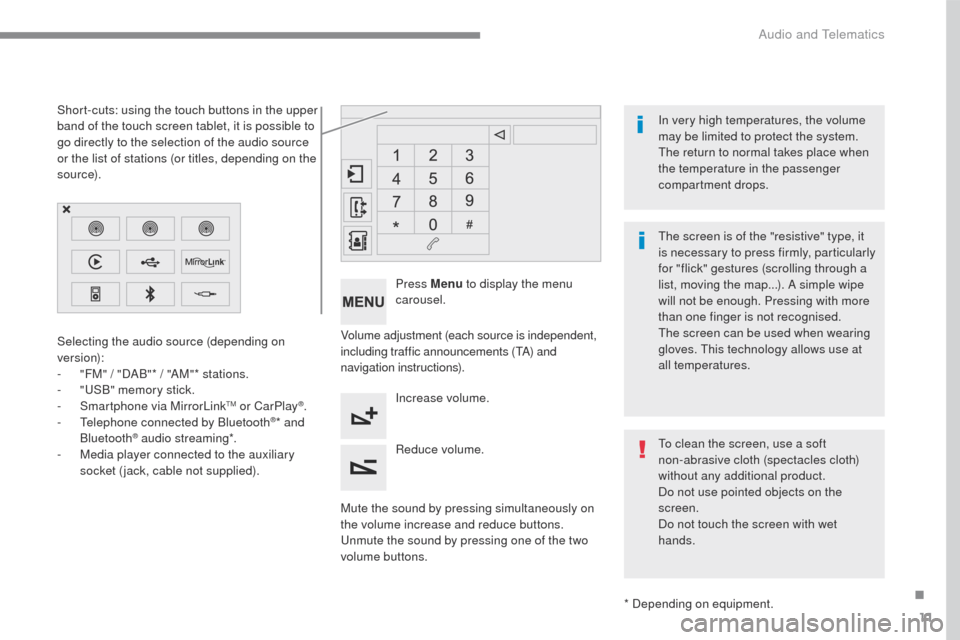
Selecting the audio source (depending on
version):
-
"
FM" / "DAB"* / "AM"* stations.
-
"
USB" memory stick.
-
S
martphone via MirrorLink
TM or CarPlay®.
- T
elephone connected by Bluetooth®* and
Bluetooth® audio streaming*.
-
M
edia player connected to the auxiliary
socket (jack, cable not supplied).
* Depending on equipment.
Short-cuts: using the touch buttons in the upper
band of the touch screen tablet, it is possible to
go directly to the selection of the audio source
or the list of stations (or titles, depending on the
s o u r c e).
The screen is of the "resistive" type, it
is necessary to press firmly, particularly
for "flick" gestures (scrolling through a
list, moving the map...). A simple wipe
will not be enough. Pressing with more
than one finger is not recognised.
The screen can be used when wearing
gloves. This technology allows use at
all temperatures. In very high temperatures, the volume
may be limited to protect the system.
The return to normal takes place when
the temperature in the passenger
compartment drops.
To clean the screen, use a soft
non-abrasive cloth (spectacles cloth)
without any additional product.
Do not use pointed objects on the
screen.
Do not touch the screen with wet
hands.
.
Audio and Telematics
Page 357 of 401
29
C3-additif_en_Chap13b_SMEGplus_ed01-2015
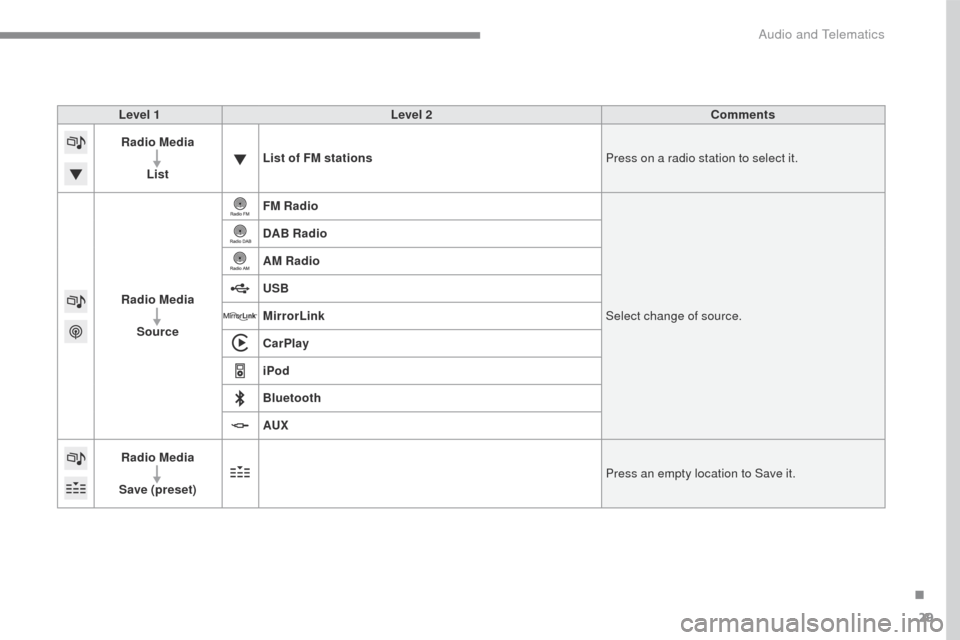
Level 1Level 2 Comments
Radio Media
List List of FM stations
Press on a radio station to select it.
Radio Media Source FM Radio
Select change of source.
DAB Radio
AM Radio
USB
MirrorLink
CarPlay
iPod
Bluetooth
AUX
Radio Media
Save (preset) Press an empty location to Save it.
.
Audio and Telematics