Radio Citroen C3 2015 2.G Owner's Guide
[x] Cancel search | Manufacturer: CITROEN, Model Year: 2015, Model line: C3, Model: Citroen C3 2015 2.GPages: 401, PDF Size: 13.04 MB
Page 307 of 401
305
C3_en_Chap14_Recherche-visuel-Index-Alpha_ed01-2015
P
Radio ..................................................... 236, 282
Radio pre-equipment ...................................... 59
RdS
....................................................... 243, 283
Rear foglamp ................................................. 182
Rear screen (demisting)
..................................52
Recharging the battery
................................. 19
4
Reduction of electrical load
..........................19 6
Regeneration of the particle filter
...................................... 150
Reinitialising the electric windows
..................67
Reinitialising the remote control
..................... 64
R
emote control
.......................................... 63
-65
Removing a wheel
........................................ 174
Removing the mat
........................................... 86
Replacing bulbs
..................................... 178 -18 4
R
S
Safety for children ............................8 9 -102, 114
Scented air freshener ..................................... 53
S
creen menu
....................... 222, 224, 228, 236,
238, 240, 250, 252, 254, 264, 266
Screen menu map
...............222, 224, 228, 236,
238, 240, 250, 252, 254, 264, 266, 290, 291
Screen, monochrome
.......34, 37, 282, 290, 291
Screenwash
.................................................... 78
Screenwash reservoir
...................................149
SCR (Selective Catalytic Reduction)
.................................................. 15
6
Seat adjustment
...............................
...............54Seat belts
.........................................
9
5, 111, 112
Seats, rear
.......................................................
56
Serial number, vehicle
.................................. 2
13
Service indicator
.............................................
24
Service warning lamp .....................................
17
Servicing
...............................
............................
8
Settings (Menus)
.................
34, 37, 42, 250, 290
Setting the clock ...........................
28, 35, 39, 44
Sidelamps
.......................................
72, 180, 182
Side repeater
..............................
..................
180
Snow chains
..................................................
19
7
Spare wheel
...............................
...................
171
Speakers (fitting)
.............................................
59
Speed limiter
.................................................
13 6
Speedometer
............................................
10, 11
Starting the engine
.......................................
118
Steering mounted controls, audio
...................................................
220, 281
Stop & Start
......................................
33, 52, 132,
144, 150, 152, 193
Storage
......................................................
82, 84
Storage box ..................................................... 88
St orage drawer ...............................................
86
Stowing rings ..................................................87
Sun visor
.........................................................84
Switching off the engine
...............................11
8
Synchronising the remote control
...................64
System settings
.............................................257
Paint colour code
..........................................
213
Parcel shelf, rear
............................................. 88
P
arking brake
.........................................
121, 151
Parking sensors, rear .................................... 140
Particle filter
..........................................
149, 150
Passenger compartment filter
......................
150
Player, CD MP3
.....................................
285, 286
Port, US
b
........................................
8
5, 246, 284
Preheater,
d
i
esel
............................................
13
Priming the fuel system
................................
155
Protecting children
...........................
89 -102, 114
Puncture
........................................................
166Replacing fuses
..............................
.......
18 5 -191
Replacing the air filter
...................................
150
Replacing the oil filter
................................... 15
0
Replacing the passenger compartment filter
......................................
150
Replacing wiper blades ...........................79, 192
Resetting the service indicator
.......................
26
Resetting the trip recorder
..............................
28
Rev counter
...............................................
10, 11
Reversing camera
.........................................
142
Reversing lamp
............................................. 18
2
Risk areas (update) .......................................
233
Routine checks
.....................................
150, 151
Running out of fuel (Diesel)
..........................
15
5
.
alphabetical index
Page 330 of 401

Multifunction screens
2
C3-additif_en_Chap02_Ecrans-multifonction_ed01-2015
Menus
Navigation Navigation is available depending on country and/or trim level. Refer to the "Audio and telematics" section.
Telephone Refer to the "Audio and telematics"
section.
1. Volume / mute. Refer to the "Audio and telematics" section.
Radio Media Refer to the "Audio and telematics" section.
Settings Allows configuration of the display and the system.
Refer to the corresponding section.
Connected services. (Depending on equipment). Allows you to run some of your smartphone's applications via
MirrorLinkTM or CarPlay®. Refer to the "Audio and telematics" section.
Driving Allows access to the trip computer and, depending on version, the
adjustment of settings for certain functions. Refer to the corresponding section.
Press this button, then choose the desired menu.
Page 337 of 401

9
C3-additif_en_Chap13b_SMEGplus_ed01-2015
7-inch touch screen tablet
GPS satellite navigation - Multimedia audio - Bluetooth® telephone
Contents
First steps
1 0
Steering mounted controls
1
2
M enus
13
N
avigation
1
4
Navigation - Guidance
2
2
Traffic
26
R
adio Media
2
8
Radio
34
DAB (Digital Audio Broadcasting) radio
3
6
Media
38
Settings
40
Connected services
4
8
MirrorLink
TM 48
C
arPlay® 52
T
elephone
54
Frequently asked questions
6
2
The system is protected in such a way that it will only operate in
your vehicle. As a safety measure, the driver should only carry out operations
which require prolonged attention while the vehicle is stationary.
The display of an energy economy mode message signals that
electrical systems operating are going into standby.
Refer to the energy economy mode section.
.
Audio and Telematics
Page 340 of 401
12
C3-additif_en_Chap13b_SMEGplus_ed01-2015
Steering mounted controls
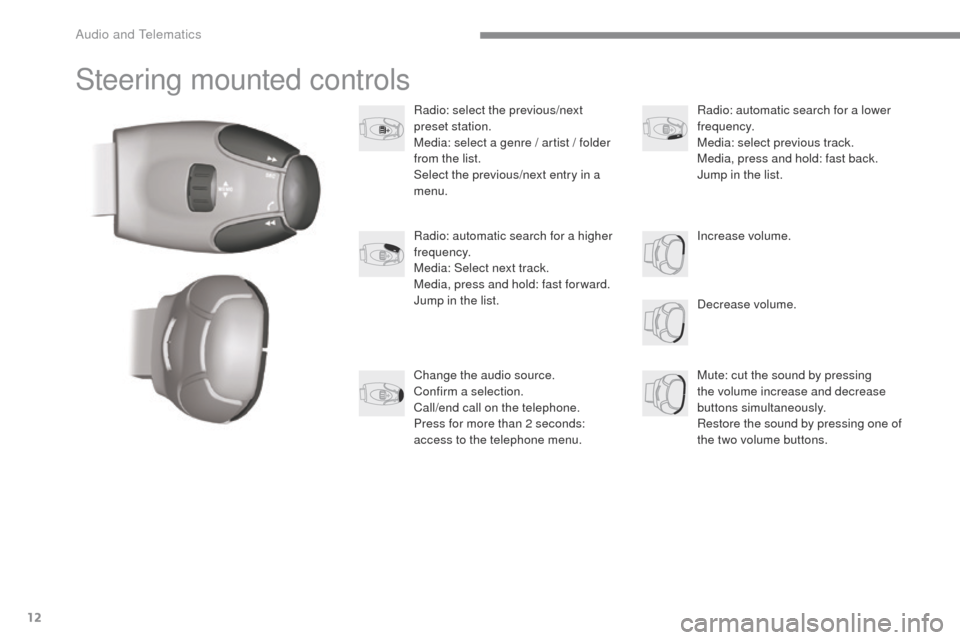
Radio: select the previous/next
preset station.
Media: select a genre / artist / folder
from the list.
Select the previous/next entry in a
menu.Decrease volume.
Radio: automatic search for a higher
frequency.
Media: Select next track.
Media, press and hold: fast for ward.
Jump in the list.
Mute: cut the sound by pressing
the volume increase and decrease
buttons simultaneously.
Restore the sound by pressing one of
the two volume buttons. Radio: automatic search for a lower
frequency.
Media: select previous track.
Media, press and hold: fast back.
Jump in the list.
Change the audio source.
Confirm a selection.
Call/end call on the telephone.
Press for more than 2 seconds:
access to the telephone menu. Increase volume.
Audio and Telematics
Page 341 of 401
13
C3-additif_en_Chap13b_SMEGplus_ed01-2015
Menus
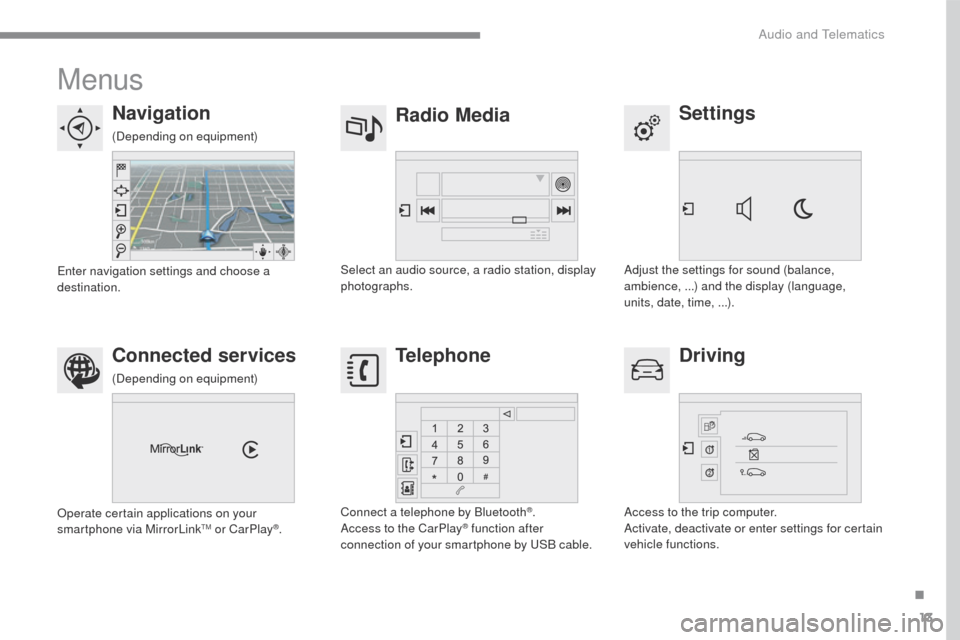
Settings
Radio Media
Navigation
Driving
Connected services Telephone
Adjust the settings for sound (balance,
ambience, ...) and the display (language,
units, date, time, ...).
Select an audio source, a radio station, display
photographs.
Enter navigation settings and choose a
destination.
Access to the trip computer.
Activate, deactivate or enter settings for certain
vehicle functions.
Operate certain applications on your
smartphone via MirrorLink
TM or CarPlay®.
Connect a telephone by Bluetooth
®.
Access to the CarPlay® function after
connection of your smartphone by USB cable.
(Depending on equipment)
(Depending on equipment)
.
Audio and Telematics
Page 355 of 401
27
C3-additif_en_Chap13b_SMEGplus_ed01-2015
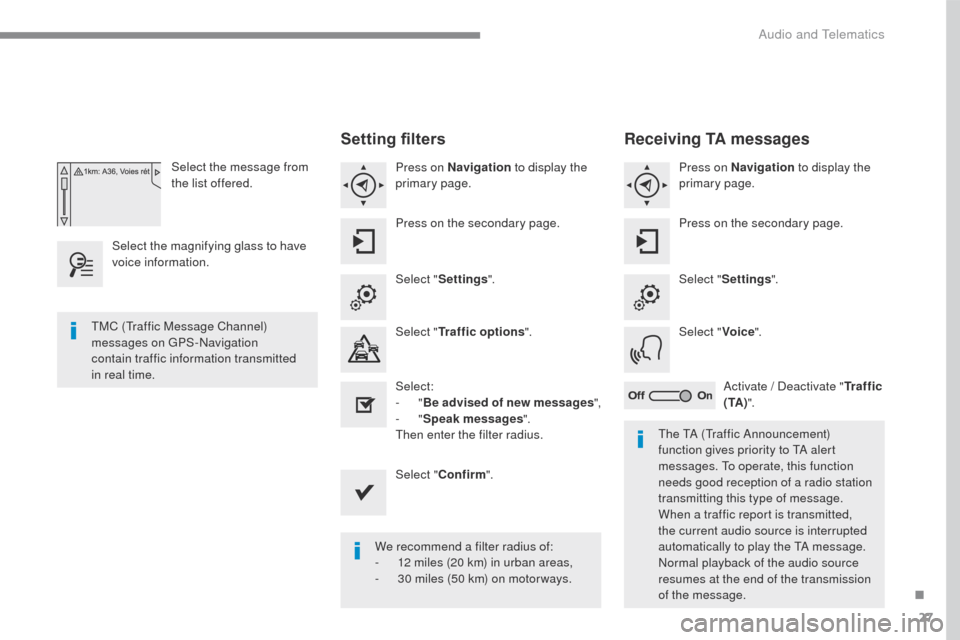
Select the message from
the list offered.
Select the magnifying glass to have
voice information.
Setting filters
Press on Navigation to display the
primary page.
Press on the secondary page.
Select " Settings ".
Select " Traffic options ".
Select:
-
"Be advised of new messages ",
-
"Speak messages ".
Then enter the filter radius.
Select " Confirm ".
We recommend a filter radius of:
-
1
2 miles (20 km) in urban areas,
-
3
0 miles (50 km) on motor ways.
TMC (Traffic Message Channel)
messages on GPS-Navigation
contain
traffic information transmitted
in real time.
The TA (Traffic Announcement)
function gives priority to TA alert
messages. To operate, this function
needs good reception of a radio station
transmitting this type of message.
When a traffic report is transmitted,
the current audio source is interrupted
automatically to play the TA message.
Normal playback of the audio source
resumes at the end of the transmission
of the message.
Receiving TA messages
Press on Navigation to display the
primary page.
Press on the secondary page.
Select " Settings ".
Select " Voice".
Activate / Deactivate " Tr a f f i c
( TA ) ".
.
Audio and Telematics
Page 356 of 401
28
C3-additif_en_Chap13b_SMEGplus_ed01-2015
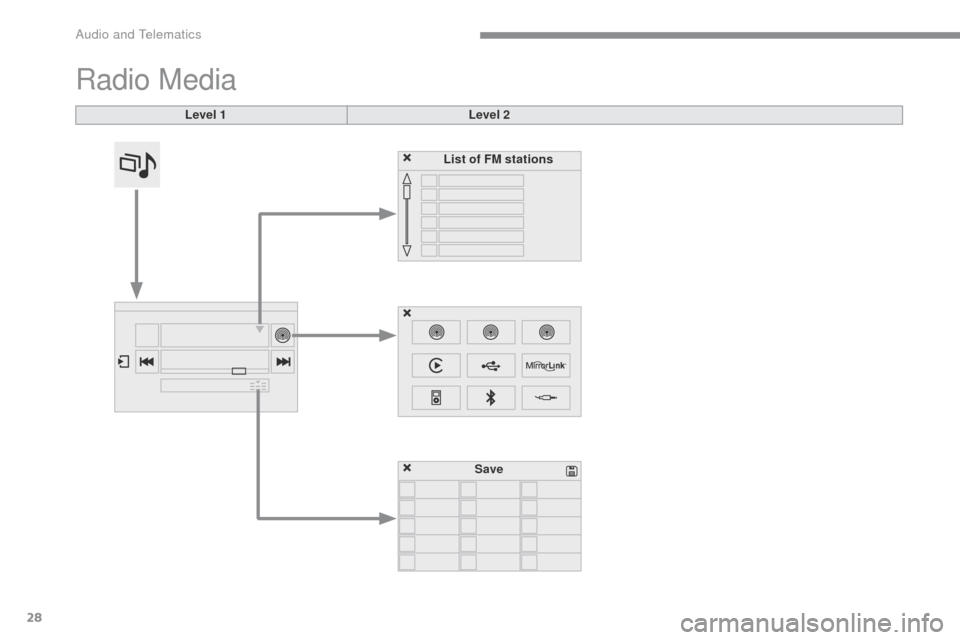
Radio Media
Level 1Level 2
List of FM stations
Save
Audio and Telematics
Page 357 of 401
29
C3-additif_en_Chap13b_SMEGplus_ed01-2015
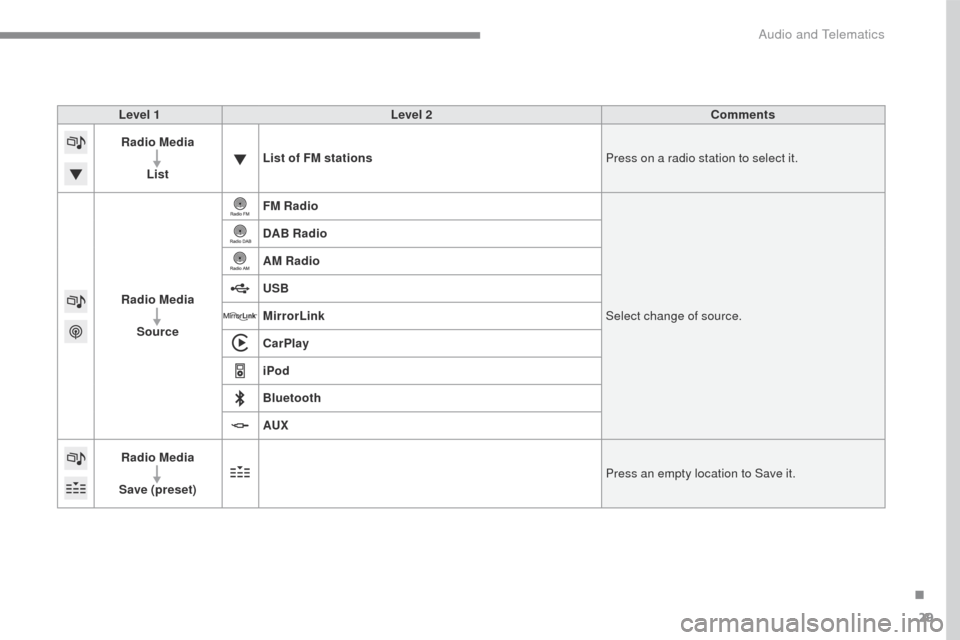
Level 1Level 2 Comments
Radio Media
List List of FM stations
Press on a radio station to select it.
Radio Media Source FM Radio
Select change of source.
DAB Radio
AM Radio
USB
MirrorLink
CarPlay
iPod
Bluetooth
AUX
Radio Media
Save (preset) Press an empty location to Save it.
.
Audio and Telematics
Page 359 of 401
31
C3-additif_en_Chap13b_SMEGplus_ed01-2015
Level 1Level 2 Level 3 Comments
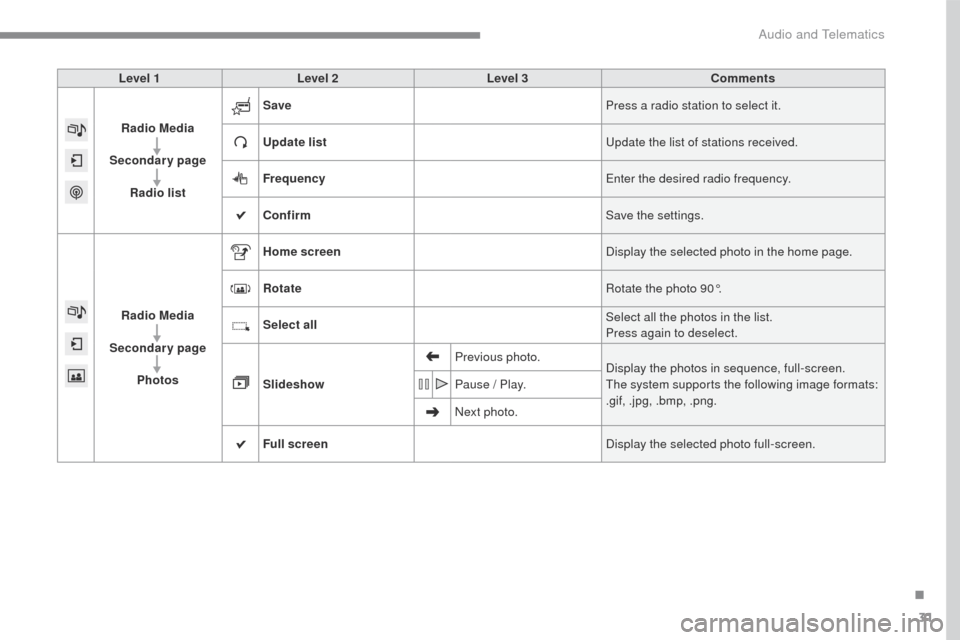
Radio Media
Secondary page Radio list Save
Press a radio station to select it.
Update list Update the list of stations received.
Frequency Enter the desired radio frequency.
Confirm Save the settings.
Radio Media
Secondary page Photos Home screen
Display the selected photo in the home page.
Rotate Rotate the photo 90°.
Select all Select all the photos in the list.
Press again to deselect.
Slideshow Previous photo.
Display the photos in sequence, full-screen.
The system supports the following image formats:
.gif, .jpg, .bmp, .png.
Pause / Play.
Next photo.
Full screen Display the selected photo full-screen.
.
Audio and Telematics
Page 361 of 401
33
C3-additif_en_Chap13b_SMEGplus_ed01-2015
Level 1Level 2 Level 3 Comments
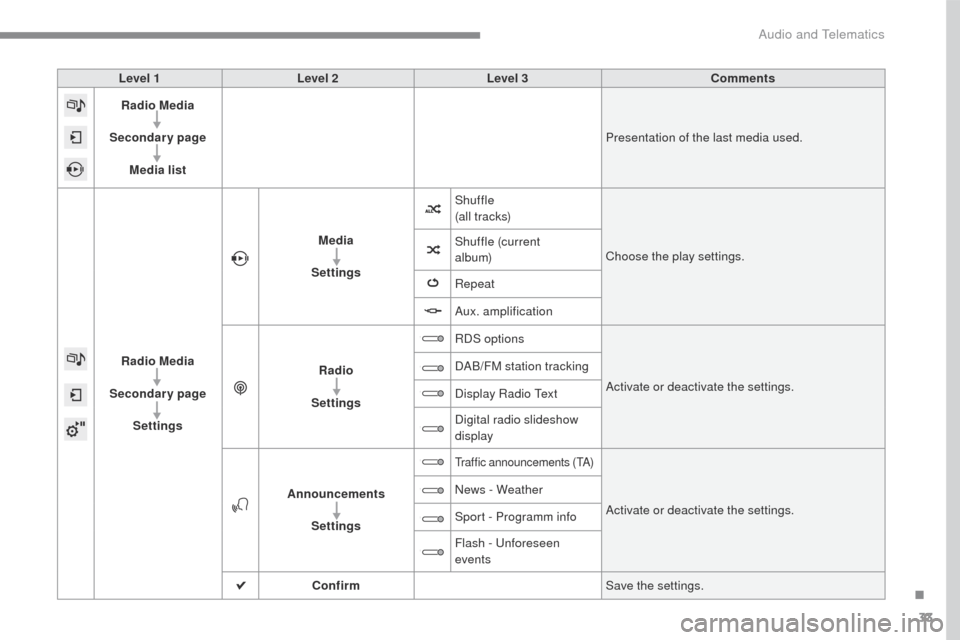
Radio Media
Secondary page Media list Presentation of the last media used.
Radio Media
Secondary page Settings Media
Settings Shuffle
(a l l t r ac ks)
Choose the play settings.
Shuffle (current
album)
Repeat
Aux. amplification
Radio
Settings RDS options
Activate or deactivate the settings.
DAB/FM station tracking
Display Radio Text
Digital radio slideshow
display
Announcements Settings
Traffic announcements (TA)
Activate or deactivate the settings.
News - Weather
Sport - Programm info
Flash - Unforeseen
events
Confirm Save the settings.
.
Audio and Telematics