Wiper Citroen C3 2015 2.G Owner's Manual
[x] Cancel search | Manufacturer: CITROEN, Model Year: 2015, Model line: C3, Model: Citroen C3 2015 2.GPages: 401, PDF Size: 13.04 MB
Page 4 of 401
.
.
Child seats 89
Deactivating the passenger's front airbag 9 2
IS
oF
IX child seats
9
8
Child lock
1
02
Child safety
Instrument panels 1 0
Indicator and warning lamps 1 2
Adjustment buttons
2
8
Trip computer
3
0
MonitoringOver view
Monochrome screen A 3
4
Monochrome screen C 3 7
Touch screen tablet
4
0
Multifunction screens
Ventilation 45
Heating 4 7
Manual air conditioning
4
7
Front demist - defrost
4
9
Digital air conditioning
5
0
Rear screen demist - defrost
5
2
Scented air freshener
5
3
Front seats
5
4
Rear seats
5
6
Mirrors
5
7
Steering wheel adjustment
5
8
Audio pre-equipment
5
9
Accessories
6
1
Comfort
Remote control key 63
Window controls 6 6
Doors
6
8
Boot
7
1
access
Lighting controls 72
LED daytime running lamps 7 6
Headlamp adjustment
7
6
Wiper controls
7
7
Courtesy lamps
8
0
Interior mood lighting
8
1
Boot lamp
8
1
Visibility
Interior fittings 82
Boot fittings 87
Fittings
Eco-driving
C3_en_Chap00a_sommaire_ed01-2015
Contents
Page 5 of 401
.
.
Direction indicators 103
Hazard warning lamps 1 03
Horn
10
4
Emergency or assistance call
1
04
Under-inflation detection
1
05
Braking assistance systems
1
09
Trajectory control systems
1
10
Front seat belts
1
11
Airbags
1
13
Safety
Driving recommendations 1 17
Starting-switching off the engine 1 18
Parking brake
1
21
6 -speed manual gearbox
1
21
Electronic gearbox (ETG)
1
22
Automatic gearbox
1
27
Gear shift indicator
1
31
Stop & Start
1
32
Hill start assist
1
35
Speed limiter
1
36
Cruise control
1
38
Rear parking sensors
1
40
Reversing camera
1
42
driving
Emergency or assistance 2 15
7-inch touch screen tablet 2 17
Audio system
2
79
audio and telematics
Alphabetical index
Bonnet 14 4
Petrol engines 1 45
Diesel engines
1
46
Checking levels
1
47
Checks
15
0
Checks
Fuel tank 152
Misfuel prevention (Diesel) 1 54
Running out of fuel (Diesel)
1
55
a
d
blu
e
® additive and SCR system
(BlueHDi Diesel) 1 56
Temporary puncture repair kit
1
66
Changing a wheel
1
71
Changing a bulb
1
78
Changing a fuse
1
85
Changing a wiper blade
1
92
Battery
1
93
Energy economy mode
1
96
Snow chains
1
97
Towing the vehicle
1
98
Towing a trailer
2
00
Practical information Technical data
Petrol engines 2
02
Petrol weights 2 04
LPG engines
2
06
LPG weights
2
07
Diesel engines
2
08
Diesel weights
2
10
Dimensions
2
12
Identification markings
2
13
Visual search
C3_en_Chap00a_sommaire_ed01-2015
Contents
Page 17 of 401
15
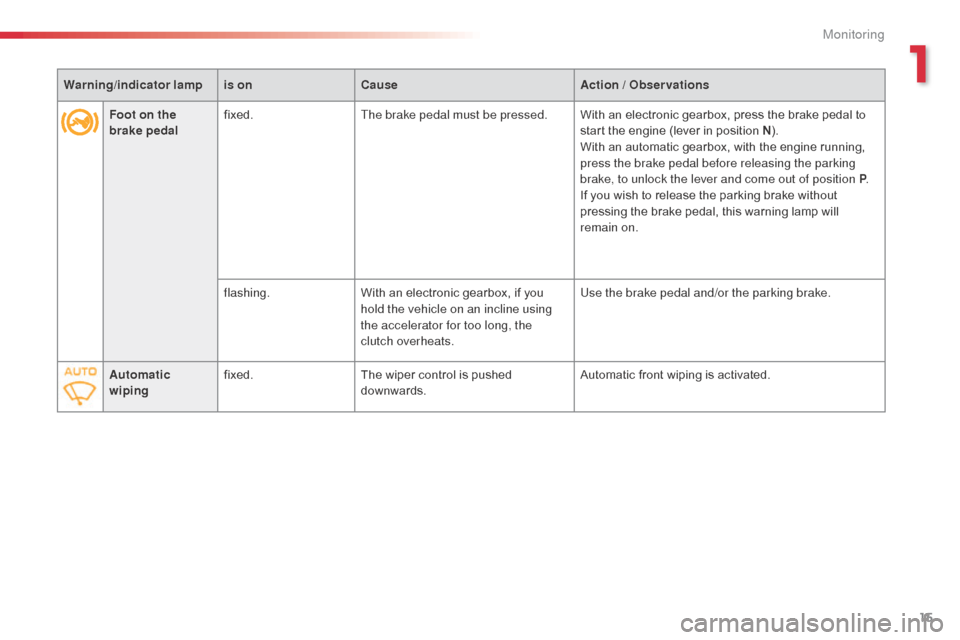
Foot on the
brake pedalfixed.
The brake pedal must be pressed. With an electronic gearbox, press the brake pedal to
start the engine (lever in position N).
With an automatic gearbox, with the engine running,
press the brake pedal before releasing the parking
brake, to unlock the lever and come out of position P .
If you wish to release the parking brake without
pressing the brake pedal, this warning lamp will
remain on.
flashing. With an electronic gearbox, if you
hold the vehicle on an incline using
the accelerator for too long, the
clutch overheats. Use the brake pedal and/or the parking brake.
Automatic
wiping fixed.
The wiper control is pushed
downwards. Automatic front wiping is activated.
Warning
/indicator lampis on Cause Action / Observations
1
Monitoring
Page 32 of 401
30
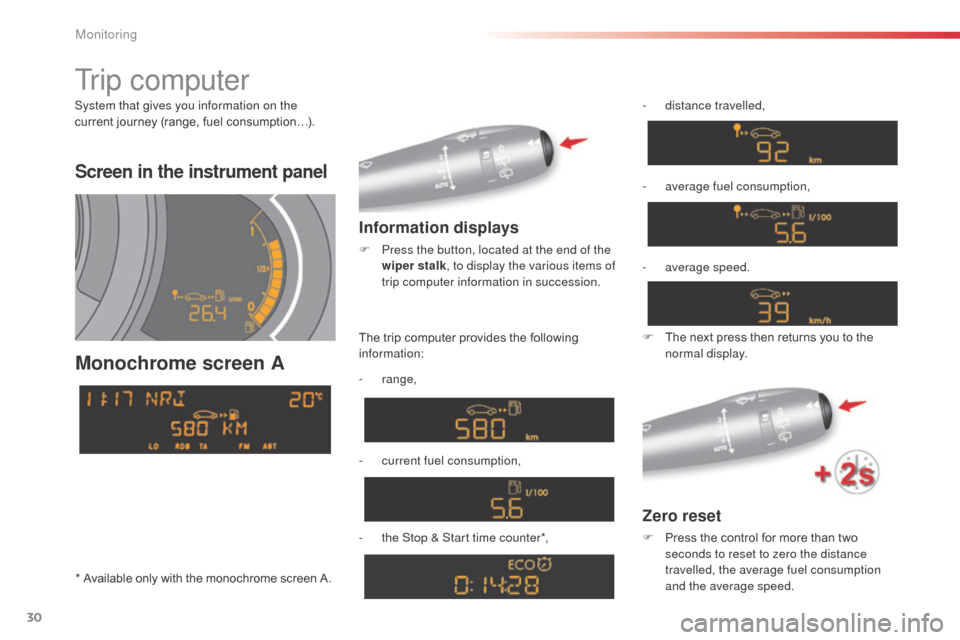
Screen in the instrument panel
Monochrome screen A
Information displays
F Press the button, located at the end of the wiper stalk , to display the various items of
trip computer information in succession.
Zero reset
F Press the control for more than two seconds to reset to zero the distance
travelled, the average fuel consumption
and the average speed.
The trip computer provides the following
information:
-
range,
-
c
urrent fuel consumption,
-
t
he Stop & Start time counter*, -
d
istance travelled,
-
a
verage fuel consumption,
F
T
he next press then returns you to the
normal display.
Tr i p c o m p u t e r
System that gives you information on the
current journey (range, fuel consumption…).
-
a
verage speed.
* Available only with the monochrome screen A.
Monitoring
Page 33 of 401
31
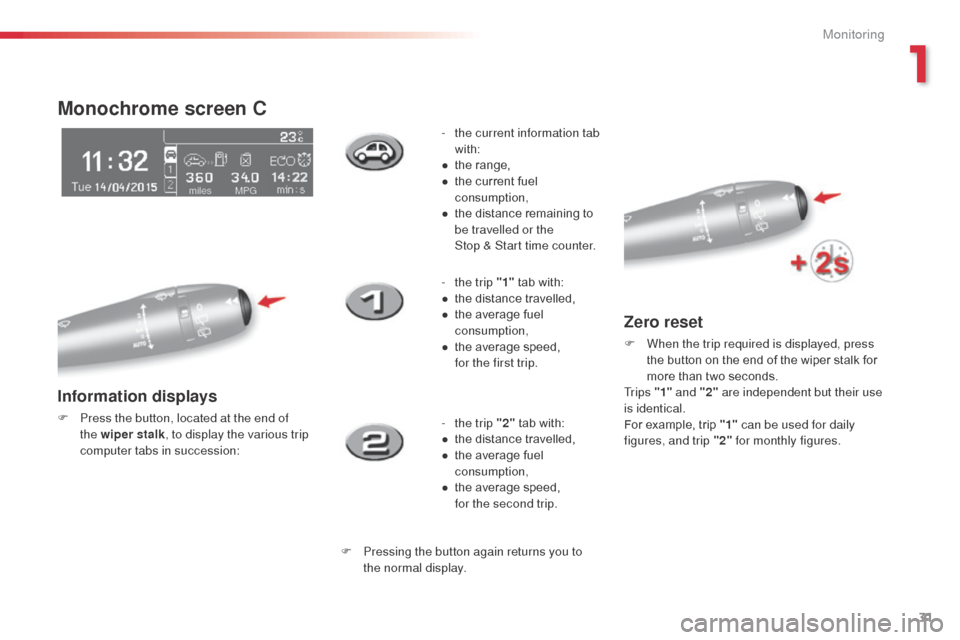
Monochrome screen C
Information displays
F Press the button, located at the end of the wiper stalk , to display the various trip
computer tabs in succession: -
t
he current information tab
with:
●
t
he range,
●
t
he current fuel
consumption,
●
t
he distance remaining to
be travelled or the
Stop & Start time counter.
-
t
he trip "1"
tab with:
●
t
he distance travelled,
●
t
he average fuel
consumption,
●
t
he average speed,
f
or the first trip.
- t he trip "2" tab with:
●
t
he distance travelled,
●
t
he average fuel
consumption,
●
t
he average speed,
f
or the second trip.
F Pressing the button again returns you to the normal display.
Zero reset
F When the trip required is displayed, press the button on the end of the wiper stalk for
more than two seconds.
Tr i p s "1" and "2" are independent but their use
is identical.
For example, trip "1" can be used for daily
figures, and trip "2" for monthly figures.
1
Monitoring
Page 44 of 401
42
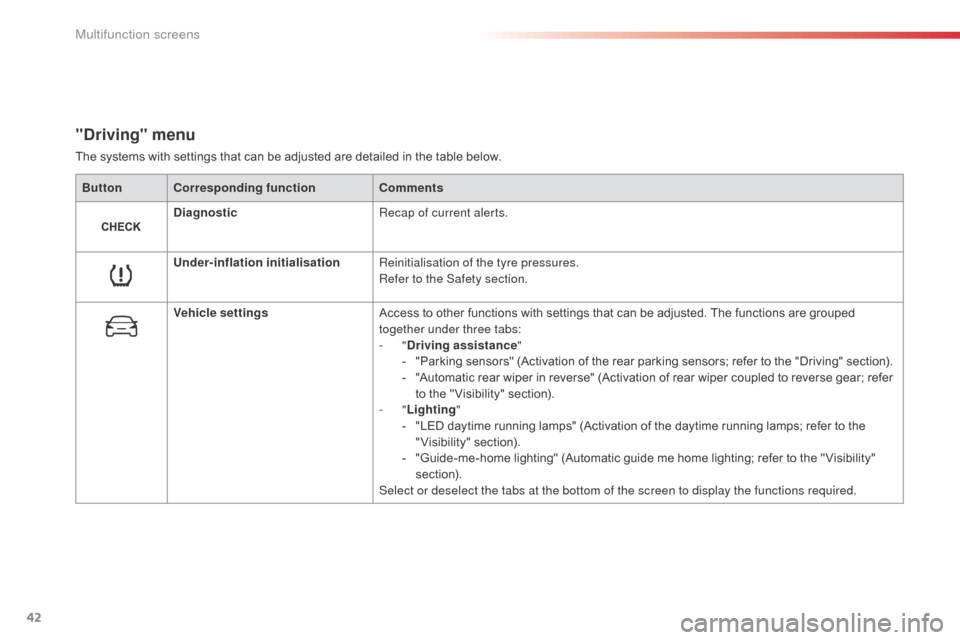
"Driving" menu
The systems with settings that can be adjusted are detailed in the table below.Button Corresponding function Comments
Diagnostic Recap of current alerts.
Under-inflation initialisation Reinitialisation of the tyre pressures.
Refer to the Safety section.
Vehicle settings Access to other functions with settings that can be adjusted. The functions are grouped
together under three tabs:
-
"Driving assistance "
-
"
Parking sensors" (Activation of the rear parking sensors; refer to the "Driving" section).
-
"
Automatic rear wiper in reverse" (Activation of rear wiper coupled to reverse gear; refer
to the " Visibility" section).
-
"Lighting "
-
"
LED daytime running lamps" (Activation of the daytime running lamps; refer to the
"Visibility" section).
-
"
Guide-me-home lighting" (Automatic guide me home lighting; refer to the " Visibility"
section).
Select or deselect the tabs at the bottom of the screen to display the functions required.
Multifunction screens
Page 77 of 401
75
Association with the automatic
"Guide-me-home" lighting
Association with the automatic illumination of
headlamps provides "guide-me-home" lighting
with the following additional options:
-
s
election of the lighting duration to 15, 30 or
60 seconds in the functions that can be set
in the vehicle configuration menu (except in
the case of the monochrome screen
a
, f
or
which the duration is set: 60 seconds),
-
a
utomatic activation of "guide-me-home"
lighting when automatic illumination of
headlamps is in operation.
Operating fault
In the event of a fault with the
sunshine sensor, the lighting
come on, this warning lamp is displayed in the
instrument panel and/or a message appears in
the screen, accompanied by an audible signal.
Contact a CITR
oËn
dealer or a qualified
workshop.
In fog or snow, the sunshine sensor
may detect sufficient light. Therefore,
the lighting will not come on
automatically.
do n
ot cover the sunshine sensor,
coupled with the rain sensor and
located in the centre of the windscreen
behind the rear view mirror; the
associated functions would no longer
be controlled.
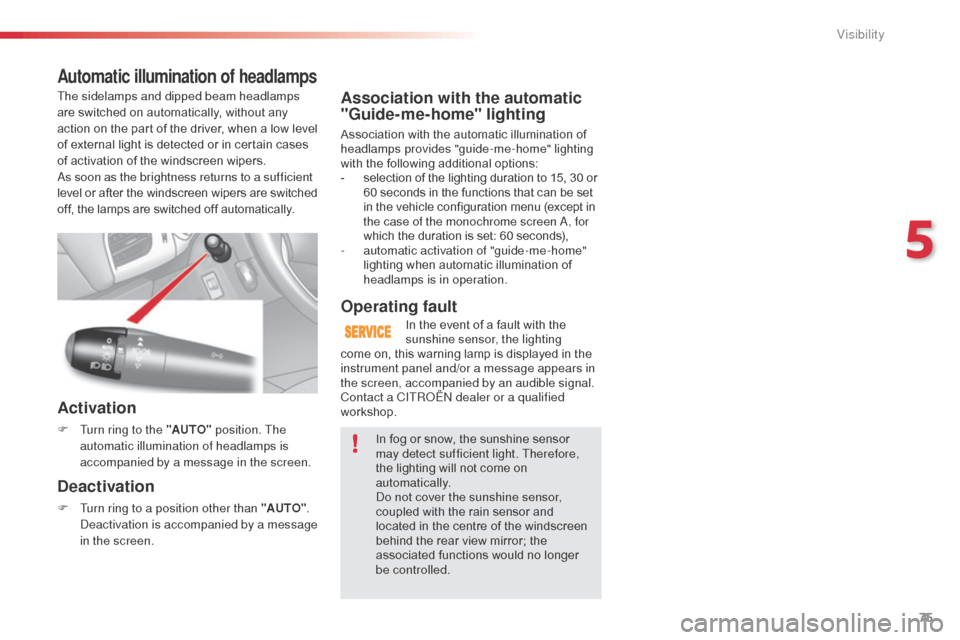
Automatic illumination of headlamps
Activation
F Turn ring to the "AUTO" position. The
automatic illumination of headlamps is
accompanied by a message in the screen.
Deactivation
F Turn ring to a position other than "AUTO" . de
activation is accompanied by a message
in the screen.
The sidelamps and dipped beam headlamps
are switched on automatically, without any
action on the part of the driver, when a low level
of external light is detected or in certain cases
of activation of the windscreen wipers.
as s
oon as the brightness returns to a sufficient
level or after the windscreen wipers are switched
off, the lamps are switched off automatically.
5
Visibility
Page 79 of 401
77
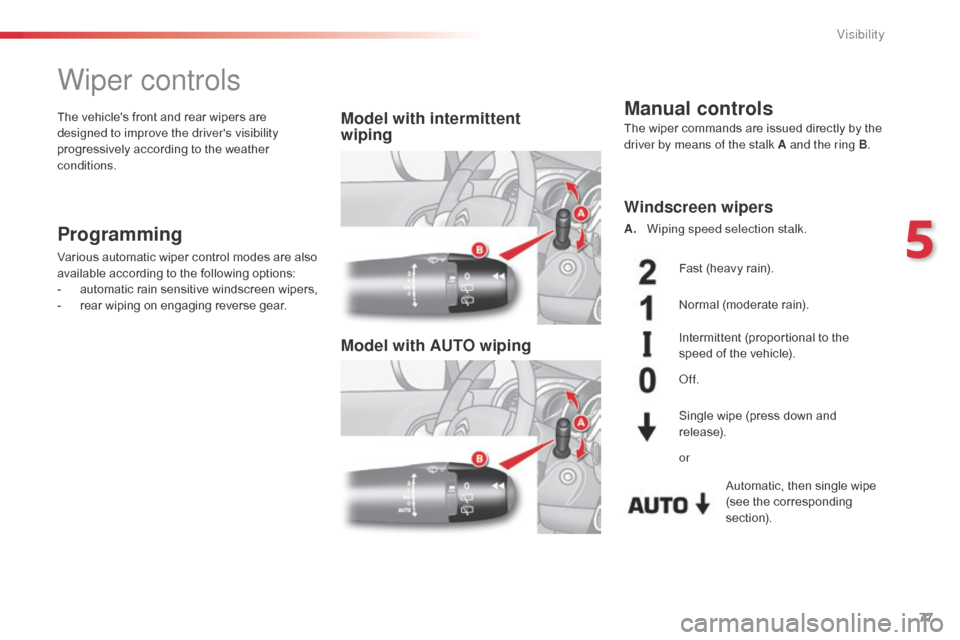
Wiper controls
Programming
Various automatic wiper control modes are also
available according to the following options:
-
a
utomatic rain sensitive windscreen wipers,
-
r
ear wiping on engaging reverse gear.
Model with intermittent
wiping
Model with AUTO wipingThe vehicle's front and rear wipers are
designed to improve the driver's visibility
progressively according to the weather
conditions.Manual controls
Windscreen wipers
A. Wiping speed selection stalk.
Single wipe (press down and
release).
or Fast (heavy rain).
Normal (moderate rain).
Intermittent (proportional to the
speed of the vehicle).
of
f.Automatic, then single wipe
(see the corresponding
section).
The wiper commands are issued directly by the
driver by means of the stalk A and the ring B
.
5
Visibility
Page 80 of 401
78
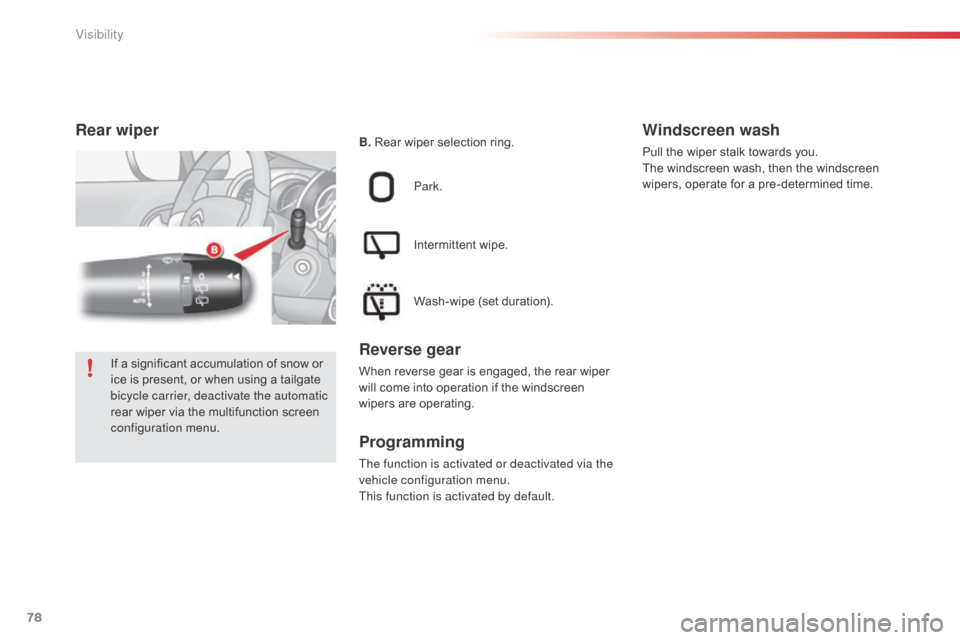
Rear wiper
Park.
Intermittent wipe.
Wash-wipe (set duration).
Reverse gear
When reverse gear is engaged, the rear wiper
will come into operation if the windscreen
wipers are operating.
Programming
The function is activated or deactivated via the
vehicle configuration menu.
This function is activated by default.
Windscreen wash
Pull the wiper stalk towards you.
The windscreen wash, then the windscreen
wipers, operate for a pre-determined time.
B.
Rear wiper selection ring.
If a significant accumulation of snow or
ice is present, or when using a tailgate
bicycle carrier, deactivate the automatic
rear wiper via the multifunction screen
configuration menu.
Visibility
Page 81 of 401
79
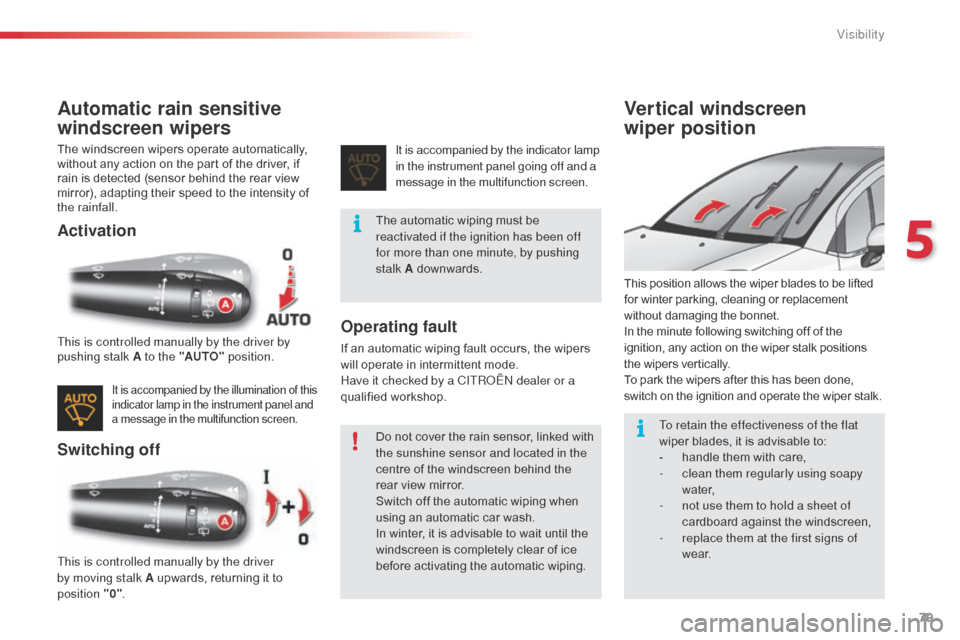
Automatic rain sensitive
windscreen wipers
The windscreen wipers operate automatically,
without any action on the part of the driver, if
rain is detected (sensor behind the rear view
mirror), adapting their speed to the intensity of
the rainfall.
Activation
Switching offOperating fault
If an automatic wiping fault occurs, the wipers
will operate in intermittent mode.
Have it checked by a CITR
oËn
dealer or a
qualified workshop.
Vertical windscreen
wiper position
This position allows the wiper blades to be lifted
for winter parking, cleaning or replacement
without damaging the bonnet.
In the minute following switching off of the
ignition, any action on the wiper stalk positions
the wipers vertically.
To park the wipers after this has been done,
switch on the ignition and operate the wiper stalk.
This is controlled manually by the driver by
pushing stalk A to the "AUTO"
position.
This is controlled manually by the driver
by moving stalk A upwards, returning it to
position
"0" . It is accompanied by the indicator lamp
in the instrument panel going off and a
message in the multifunction screen.
It is accompanied by the illumination of this
indicator lamp in the instrument panel and
a message in the multifunction screen.
The automatic wiping must be
reactivated if the ignition has been off
for more than one minute, by pushing
stalk A downwards.
Do not cover the rain sensor, linked with
the sunshine sensor and located in the
centre of the windscreen behind the
rear view mirror.
Switch off the automatic wiping when
using an automatic car wash.
In winter, it is advisable to wait until the
windscreen is completely clear of ice
before activating the automatic wiping.
To retain the effectiveness of the flat
wiper blades, it is advisable to:
-
h
andle them with care,
-
c
lean them regularly using soapy
water,
-
n
ot use them to hold a sheet of
cardboard against the windscreen,
-
r
eplace them at the first signs of
w e a r.
5
Visibility