setting date and time CITROEN C3 2021 User Guide
[x] Cancel search | Manufacturer: CITROEN, Model Year: 2021, Model line: C3, Model: CITROEN C3 2021Pages: 450, PDF Size: 10.11 MB
Page 305 of 450
31
.
Audio and Telematics
As a safety measure and because it requires sustained attention by the driver, using a smartphone when driving is prohibited. All operations must be done with the
vehicle stationary . vehicle stationary . vehicle stationary
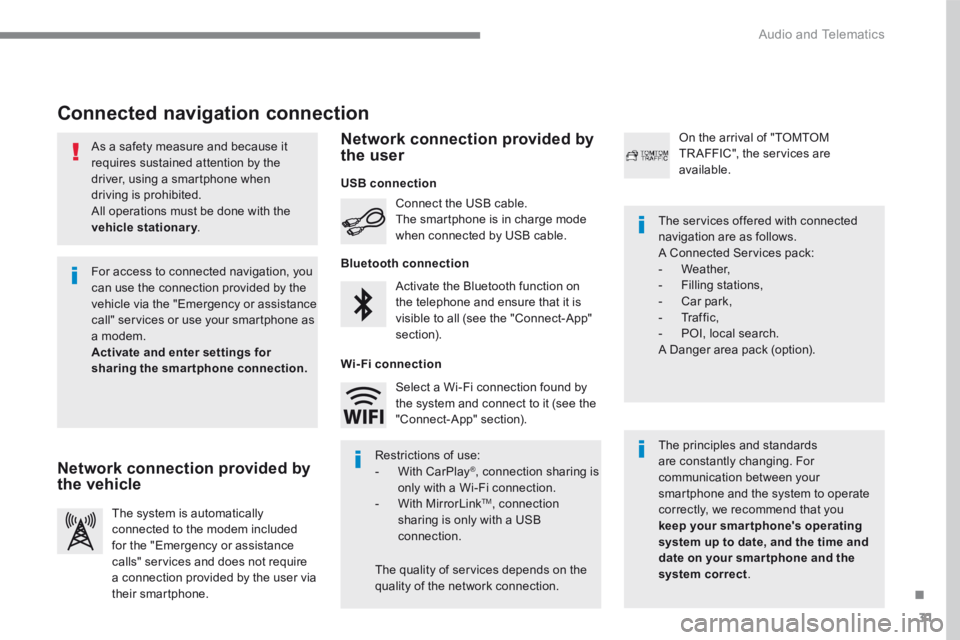
Connected navigation connection
The principles and standards are constantly changing. For communication between your smartphone and the system to operate correctly, we recommend that you keep your smar tphone's operating system up to date, and the time and date on your smar tphone and the system correct.
The services offered with connected navigation are as follows. A Connected Services pack: - Weather, - Filling stations, - Car park, - Traffic, - POI, local search. A Danger area pack (option).
Activate the Bluetooth function on the telephone and ensure that it is visible to all (see the "Connect-App" section).
Connect the USB cable. The smartphone is in charge mode when connected by USB cable.
The system is automatically connected to the modem included for the "Emergency or assistance calls" services and does not require a connection provided by the user via
their smartphone.
On the arrival of "TOMTOM TR AFFIC", the services are available.
For access to connected navigation, you can use the connection provided by the vehicle via the "Emergency or assistance call" services or use your smartphone as a modem. Activate and enter settings for sharing the smartphone connection.
Restrictions of use: - With CarPlay ® , connection sharing is only with a Wi-Fi connection. - W i t h M i r r o r L i n k TM , connection sharing is only with a USB connection.
The quality of services depends on the quality of the network connection.
Select a Wi-Fi connection found by the system and connect to it (see the "Connect-App" section).
USB connection
Network connection provided by the vehicle
Network connection provided by the user
Bluetooth connection
Wi-Fi connection
Page 338 of 450
64
Audio and Telematics
Media
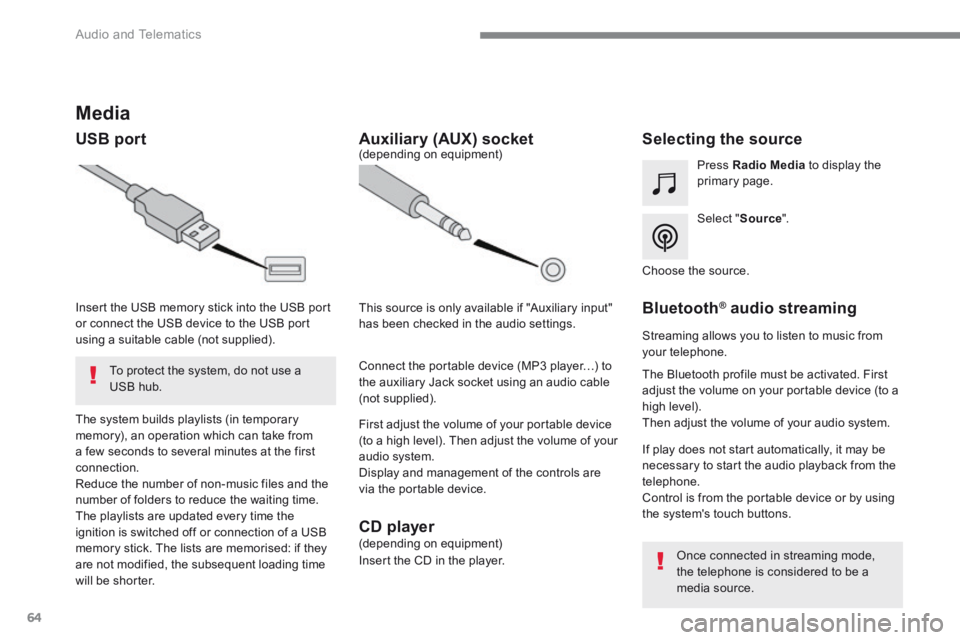
USB port Selecting the source
Select " Source ".
Press Radio Media to display the primary page.
The system builds playlists (in temporary memory), an operation which can take from a few seconds to several minutes at the first connection. Reduce the number of non-music files and the number of folders to reduce the waiting time. The playlists are updated every time the ignition is switched off or connection of a USB memory stick. The lists are memorised: if they are not modified, the subsequent loading time will be shorter.
Insert the USB memory stick into the USB port or connect the USB device to the USB port using a suitable cable (not supplied).
Auxiliary (AUX) socket
First adjust the volume of your portable device (to a high level). Then adjust the volume of your audio system. Display and management of the controls are via the portable device.
This source is only available if "Auxiliary input" has been checked in the audio settings.
(depending on equipment)
Connect the portable device (MP3 player…) to the auxiliary Jack socket using an audio cable (not supplied).
Choose the source.
Bluetooth ® Bluetooth ® Bluetooth audio streaming ® audio streaming ®
Streaming allows you to listen to music from your telephone.
The Bluetooth profile must be activated. First adjust the volume on your portable device (to a high level). Then adjust the volume of your audio system.
If play does not start automatically, it may be necessary to start the audio playback from the telephone. Control is from the portable device or by using the system's touch buttons.
Once connected in streaming mode, the telephone is considered to be a media source.
To protect the system, do not use a USB hub.
CD player (depending on equipment)
Insert the CD in the player.
Page 357 of 450
83
.
1
17
18
1
1
20
19
21
22
Audio and Telematics
Level 2Level 3Level 4Comments
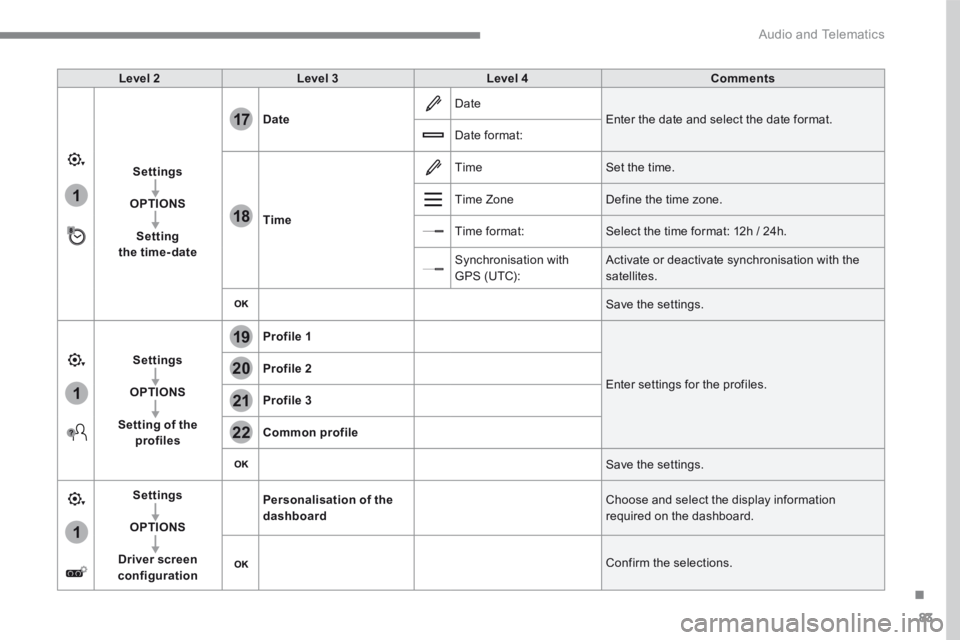
Settings
OPTIONS
Setting the time-date
Date Date Enter the date and select the date format. Date format:
Time
Time Set the time.
Time Zone Define the time zone.
Time format: Select the time format: 12h / 24h.
Synchronisation with GPS (UTC): Activate or deactivate synchronisation with the satellites.
Save the settings.
Settings
OPTIONS
Setting of the profiles
Profile 1
Enter settings for the profiles. Profile 2
Profile 3
Common profile
Save the settings.
Settings
OPTIONS
Driver screen configuration
Personalisation of the dashboard Choose and select the display information required on the dashboard.
Confirm the selections.
Page 360 of 450
86
111
8
9
10
15
161
Audio and Telematics
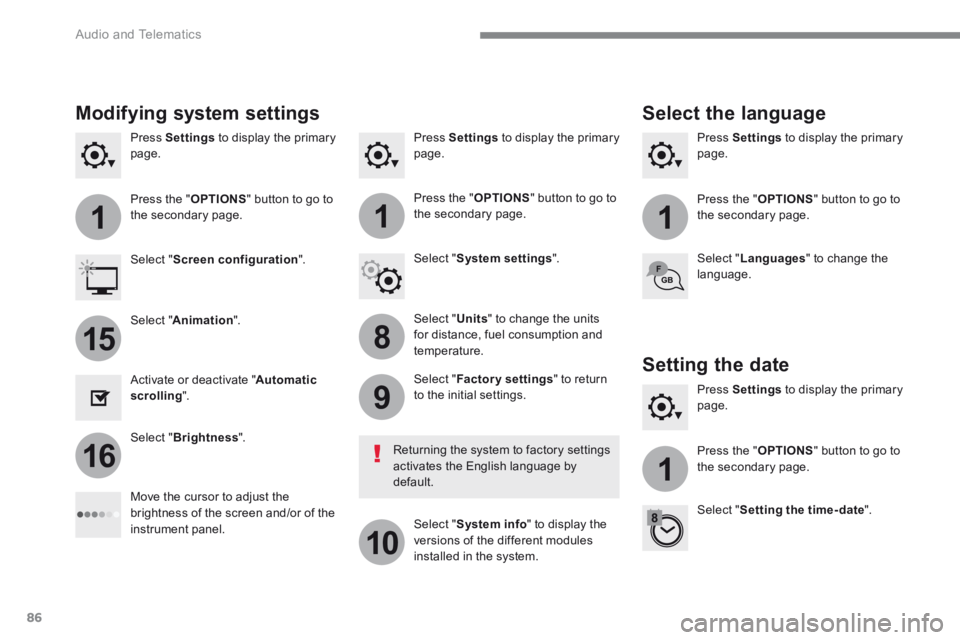
Press Settings to display the primary page. Press Settings to display the primary page. Press Settings to display the primary page.
Press the " OPTIONS " button to go to the secondary page. Press the " OPTIONS " button to go to the secondary page. Press the " OPTIONS " button to go to the secondary page.
Select " System settings ". Select " Screen configuration ".
Select " Units " to change the units for distance, fuel consumption and temperature.
Select " Languages " to change the language.
Activate or deactivate " Automatic scrolling ".
Move the cursor to adjust the brightness of the screen and/or of the instrument panel.
Select " Factory settings " to return to the initial settings.
Select " System info " to display the versions of the different modules installed in the system.
Modifying system settings
Returning the system to factory settings activates the English language by default.
Select " Animation ".
Select " Brightness ".
Select the language
Press Settings to display the primary page.
Press the " OPTIONS " button to go to the secondary page.
Select " Setting the time- date ".
Setting the date
Page 361 of 450
87
.
1
17
18
Audio and Telematics
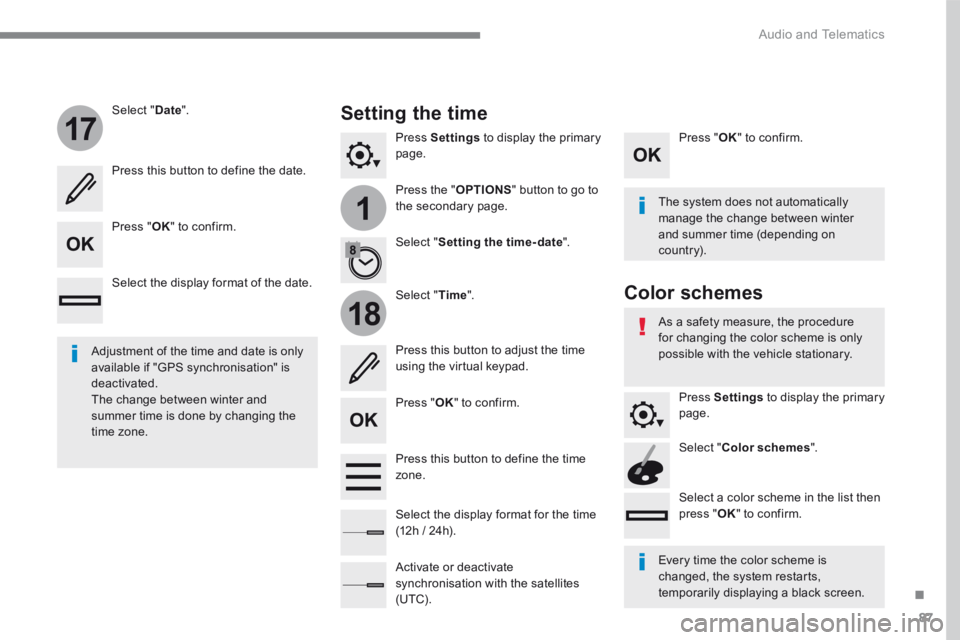
Press Settings to display the primary page.
Press the " OPTIONS " button to go to the secondary page.
Select " Date ".
Select " Time ".
Select " Setting the time- date ".
Adjustment of the time and date is only available if "GPS synchronisation" is deactivated. The change between winter and summer time is done by changing the time zone.
The system does not automatically manage the change between winter and summer time (depending on c ountr y).
Setting the time
Press this button to define the date.
Press this button to adjust the time using the virtual keypad.
Press " OK " to confirm.
Press " OK " to confirm.
Press " OK " to confirm.
Press this button to define the time z o n e .
Select the display format of the date.
Select the display format for the time (12h / 24h).
Activate or deactivate synchronisation with the satellites (UTC).
Every time the color scheme is changed, the system restarts, temporarily displaying a black screen.
As a safety measure, the procedure for changing the color scheme is only possible with the vehicle stationary.
Press Settings to display the primary page.
Select " Color schemes ".
Select a color scheme in the list then press " OK " to confirm.
Color schemes
Page 368 of 450
94
Audio and Telematics
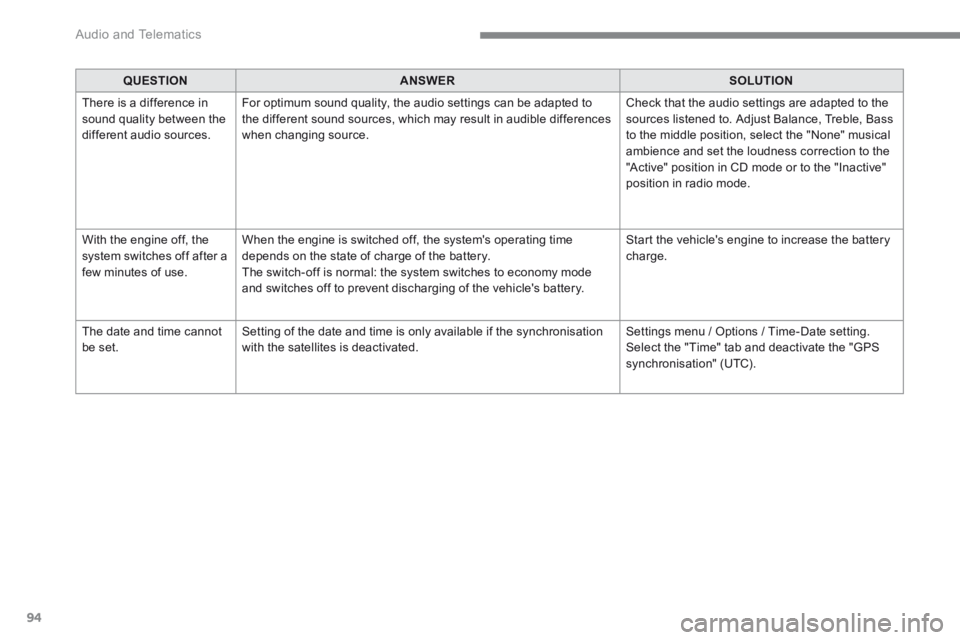
QUESTIONANSWERSOLUTION
There is a difference in sound quality between the different audio sources.
For optimum sound quality, the audio settings can be adapted to the different sound sources, which may result in audible differences when changing source.
Check that the audio settings are adapted to the sources listened to. Adjust Balance, Treble, Bass to the middle position, select the "None" musical ambience and set the loudness correction to the "Active" position in CD mode or to the "Inactive" position in radio mode.
With the engine off, the system switches off after a few minutes of use.
When the engine is switched off, the system's operating time depends on the state of charge of the battery. The switch-off is normal: the system switches to economy mode and switches off to prevent discharging of the vehicle's battery.
Start the vehicle's engine to increase the battery charge.
The date and time cannot be set. Setting of the date and time is only available if the synchronisation with the satellites is deactivated. Settings menu / Options / Time-Date setting. Select the "Time" tab and deactivate the "GPS synchronisation" (UTC).
Page 375 of 450
101
.
Audio and Telematics
Transversal-Citroen_en_Chap02_RCC-2-2-0_ed01-2016
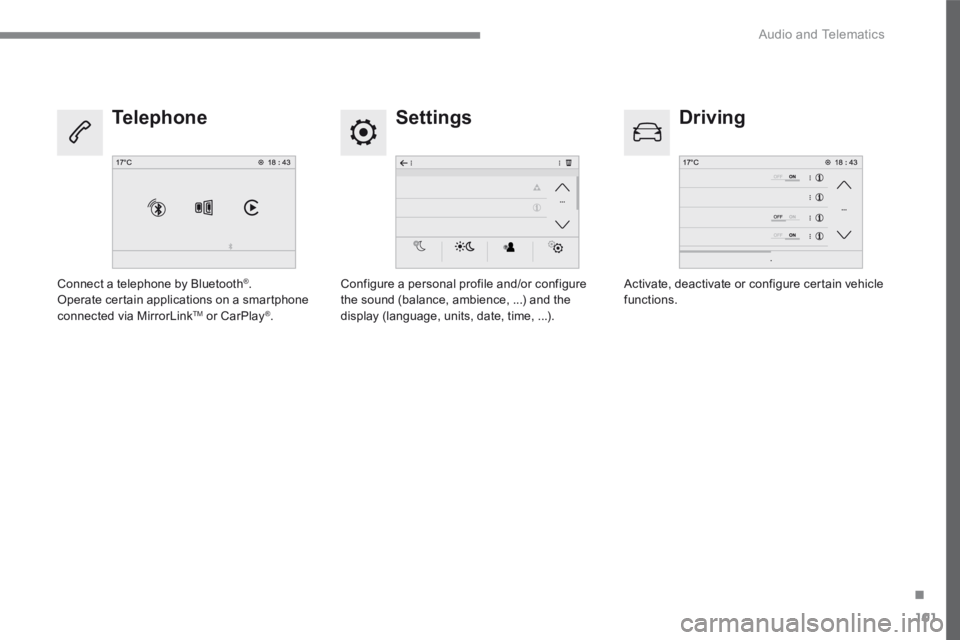
Settings Driving Telephone
Configure a personal profile and/or configure the sound (balance, ambience, ...) and the display (language, units, date, time, ...).
Activate, deactivate or configure certain vehicle functions. Connect a telephone by Bluetooth ® . Operate certain applications on a smartphone connected via MirrorLink TM or CarPlay ® .
Page 390 of 450
116
1
Audio and Telematics
Transversal-Citroen_en_Chap02_RCC-2-2-0_ed01-2016
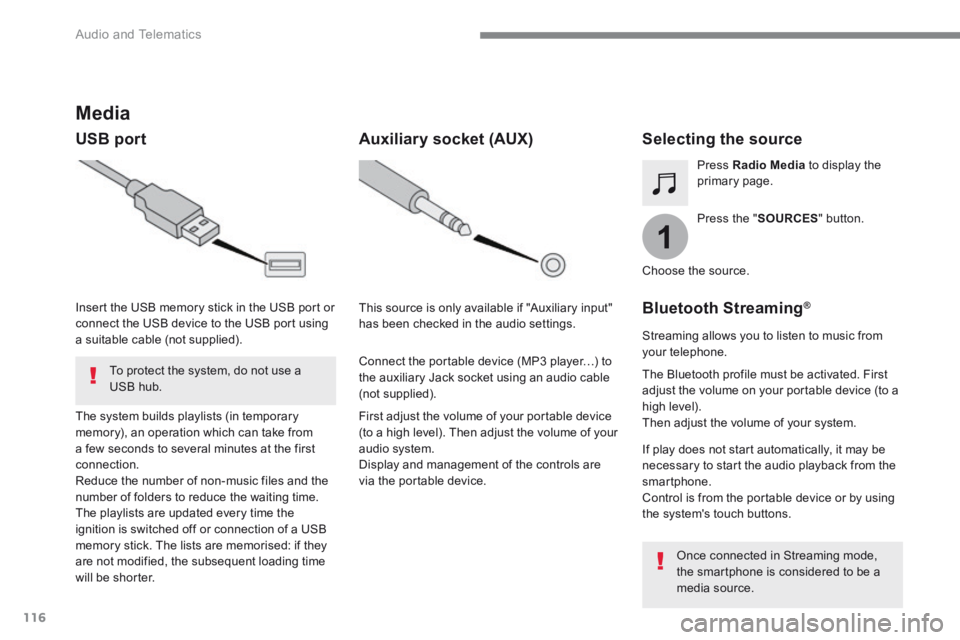
Media
USB port Selecting the source
Press the " SOURCES " button.
Press Radio Media to display the primary page.
The system builds playlists (in temporary memory), an operation which can take from a few seconds to several minutes at the first connection. Reduce the number of non-music files and the number of folders to reduce the waiting time. The playlists are updated every time the ignition is switched off or connection of a USB memory stick. The lists are memorised: if they are not modified, the subsequent loading time will be shorter.
Insert the USB memory stick in the USB port or connect the USB device to the USB port using a suitable cable (not supplied).
Auxiliary socket (AUX)
First adjust the volume of your portable device (to a high level). Then adjust the volume of your audio system. Display and management of the controls are via the portable device.
This source is only available if "Auxiliary input" has been checked in the audio settings.
Connect the portable device (MP3 player…) to the auxiliary Jack socket using an audio cable (not supplied).
Choose the source.
Bluetooth Streaming ®Bluetooth Streaming ®Bluetooth Streaming
Streaming allows you to listen to music from your telephone.
The Bluetooth profile must be activated. First adjust the volume on your portable device (to a high level). Then adjust the volume of your system.
If play does not start automatically, it may be necessary to start the audio playback from the smartphone. Control is from the portable device or by using the system's touch buttons.
Once connected in Streaming mode, the smartphone is considered to be a media source.
To protect the system, do not use a USB hub.
Page 409 of 450
135
.
Audio and Telematics
Transversal-Citroen_en_Chap02_RCC-2-2-0_ed01-2016
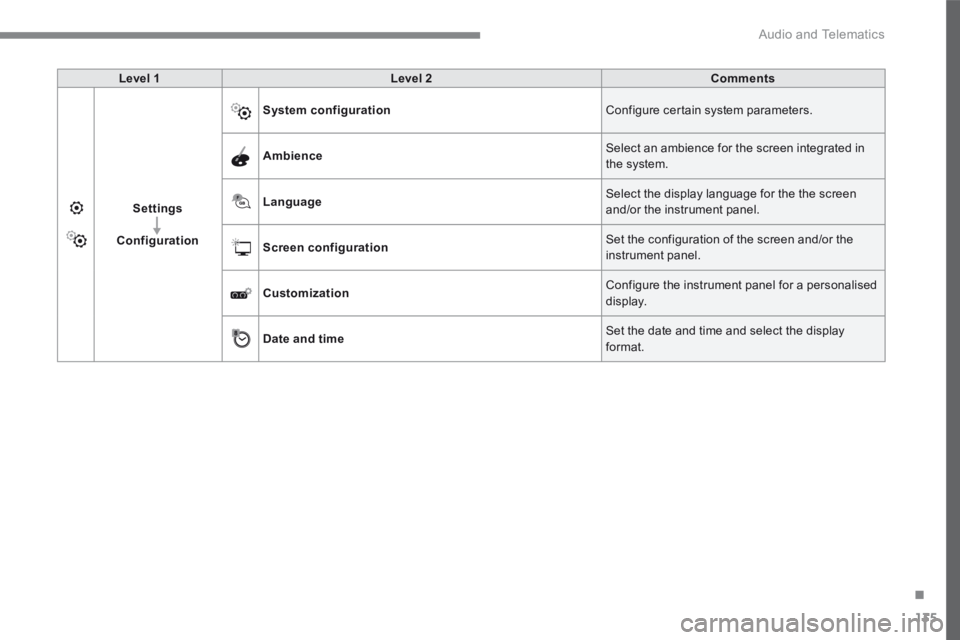
Level 1Level 2Comments
Settings
Configuration
System configuration Configure certain system parameters.
Ambience Select an ambience for the screen integrated in the system.
Language Select the display language for the the screen and/or the instrument panel.
Screen configuration Set the configuration of the screen and/or the instrument panel.
Customization Configure the instrument panel for a personalised display.
Date and time Set the date and time and select the display format.
Page 413 of 450
139
.
12
13
14
15
Audio and Telematics
Transversal-Citroen_en_Chap02_RCC-2-2-0_ed01-2016
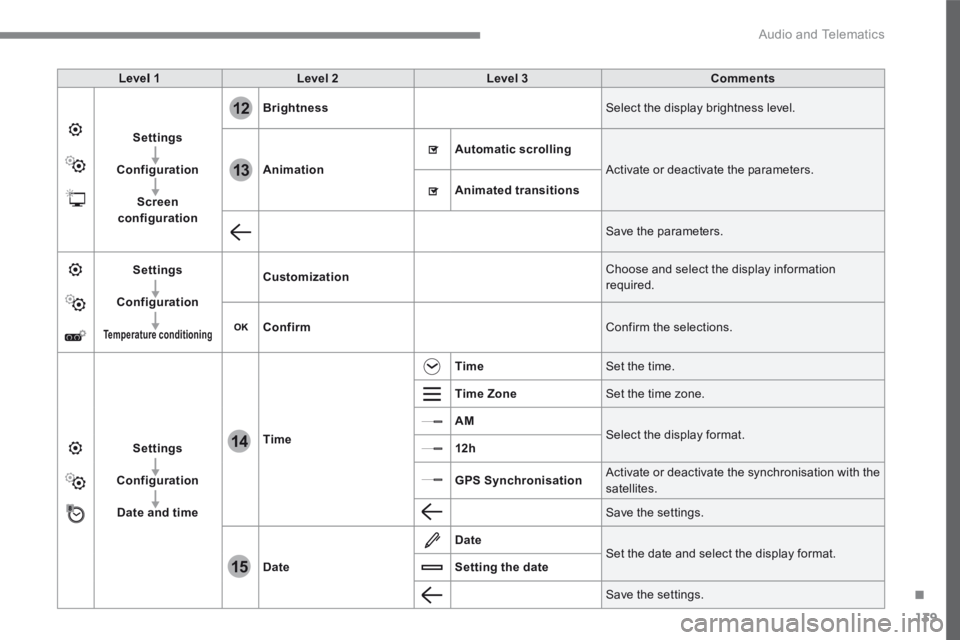
Level 1Level 2Level 3Comments
Settings
Configuration
Screen configuration
Brightness Select the display brightness level.
Animation
Automatic scrolling
Activate or deactivate the parameters.
Animated transitions
Save the parameters.
Settings
Configuration
Temperature conditioning
Customization Choose and select the display information required.
Confirm Confirm the selections.
Settings
Configuration
Date and time
Time
Time Set the time.
Time Zone Set the time zone.
AM Select the display format. 12h
GPS Synchronisation Activate or deactivate the synchronisation with the satellites.
Save the settings.
Date
Date Set the date and select the display format. Setting the date
Save the settings.