steering wheel CITROEN C3 2021 User Guide
[x] Cancel search | Manufacturer: CITROEN, Model Year: 2021, Model line: C3, Model: CITROEN C3 2021Pages: 450, PDF Size: 10.11 MB
Page 158 of 450
156
B618_en_Chap06_conduite_ed01-2016
Starting / Switching off the engine with Keyless Entry and
Starting
Starting the engine
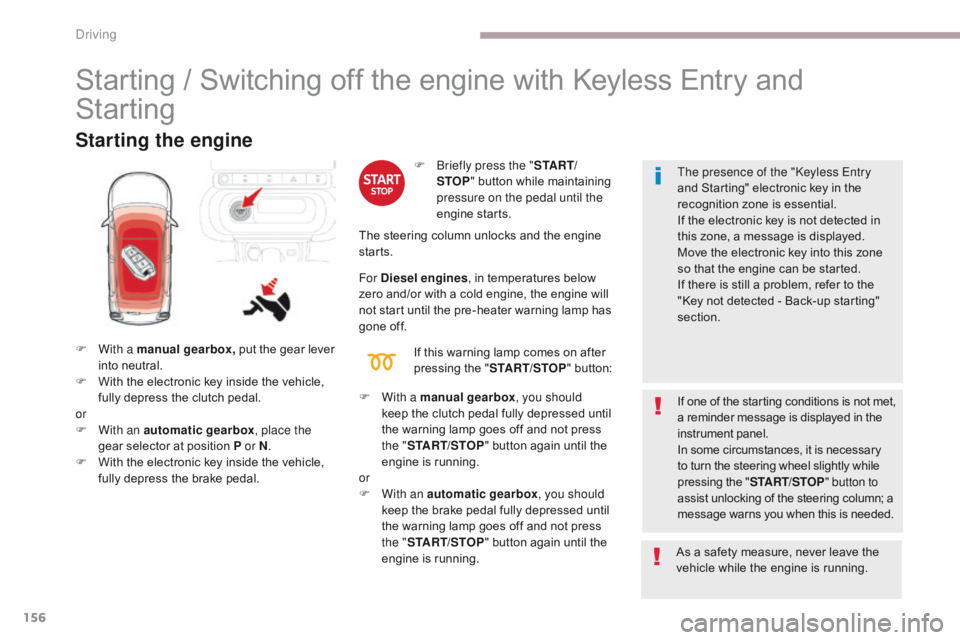
F With a manual gearbox, put the gear lever
into neutral.
F
W
ith the electronic key inside the vehicle,
fully depress the clutch pedal.
or
F
W
ith an automatic gearbox , place the
gear selector at position P or N .
F
W
ith the electronic key inside the vehicle,
fully depress the brake pedal. If one of the starting conditions is not met,
a reminder message is displayed in the
instrument panel.
In some circumstances, it is necessary
to turn the steering wheel slightly while
pressing the "
START/STOP " button to
assist unlocking of the steering column; a
message warns you when this is needed. The presence of the "Keyless Entry
and Starting" electronic key in the
recognition zone is essential.
If the electronic key is not detected in
this zone, a message is displayed.
Move the electronic key into this zone
so that the engine can be started.
If there is still a problem, refer to the
"Key not detected - Back-up starting"
section.
F
B
riefly press the "
S TA R T/
STOP " button while maintaining
pressure on the pedal until the
engine starts.
The steering column unlocks and the engine
starts.
For Diesel engines , in temperatures below
zero and/or with a cold engine, the engine will
not start until the pre-heater warning lamp has
gone off.
If this warning lamp comes on after
pressing the " START/STOP " button:
F
W
ith a manual gearbox, you should
keep the clutch pedal fully depressed until
the warning lamp goes off and not press
the
"START/STOP " button again until the
engine is running.
or
F
W
ith an automatic gearbox, you should
keep the brake pedal fully depressed until
the warning lamp goes off and not press
the " START/STOP " button again until the
engine is running. As a safety measure, never leave the
vehicle while the engine is running.
Driving
Page 174 of 450
172
B618_en_Chap06_conduite_ed01-2016
Display in the instrument panel
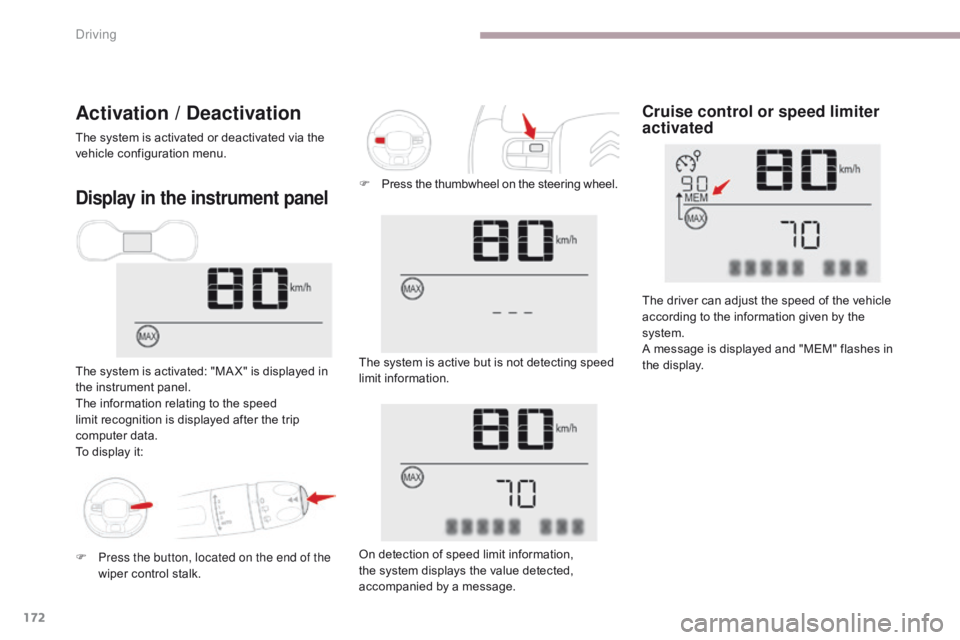
The system is activated: "MA X" is displayed in
the instrument panel.
The information relating to the speed
limit recognition is displayed after the trip
computer data.
To display it: The system is active but is not detecting speed
limit information.
On detection of speed limit information,
the system displays the value detected,
accompanied by a message.
Cruise control or speed limiter
activatedActivation / Deactivation
The system is activated or deactivated via the
vehicle configuration menu.
The driver can adjust the speed of the vehicle
according to the information given by the
system.
A message is displayed and "MEM" flashes in
the display.
F
P
ress the thumbwheel on the steering wheel.
F
P
ress the button, located on the end of the
wiper control stalk.
Driving
Page 175 of 450
173
B618_en_Chap06_conduite_ed01-2016
Operating limits
The legislation on speed limits is specific to
each country.
The system does not take account of reduced
speed limits in the following cases:
-
p
oor weather (rain, snow),
-
a
tmospheric pollution,
-
t
railer, caravan,
-
d
riving with a space-saver type spare
wheel or snow chains fitted,
-
p
uncture repair using the temporary
repair
k
it,
-
y
oung drivers,
-
...
T
he system may be disrupted or not work at all
in the following situations:
-
p
oor visibility (inadequate street lighting,
falling snow, rain, fog),
-
w
indscreen area ahead of the camera dirty,
misty, frosty, covered with snow, damaged
or masked by a sticker,
-
f
ault with the camera,
-
o
bsolete or incorrect mapping,
-
h
idden road signs (other vehicles,
vegetation, snow),
-
s
peed limit signs that do not conform to the
standard, are damaged or distorted.
Memorising the speed setting
This memorisation is in addition to the display
of Speed limit recognition .
The driver can choose to adapt the speed
setting to the speed limit suggested, by
pressing the memorisation button at the speed
limiter / cruise control switch.
This speed setting then replaces the previous
speed setting for the speed limiter and/or cruise
control. For more information on the Speed
limiter or the Cruise control , refer to
the corresponding sections.
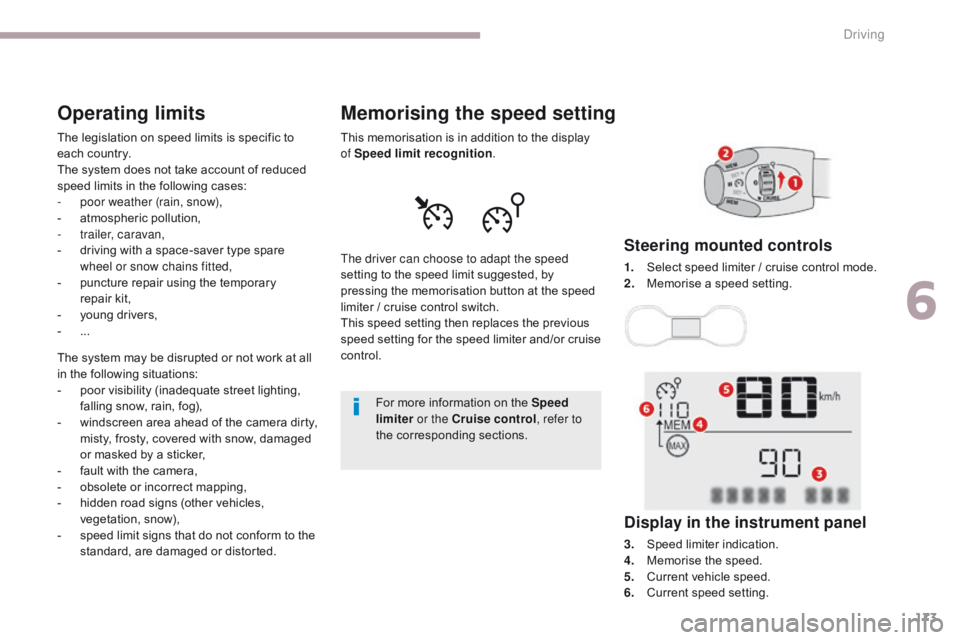
Steering mounted controls
1. Select speed limiter / cruise control mode.
2. M emorise a speed setting.
Display in the instrument panel
3. Speed limiter indication.
4. Memorise the speed.
5.
C
urrent vehicle speed.
6.
C
urrent speed setting.
6
Driving
Page 193 of 450
191
B618_en_Chap06_conduite_ed01-2016
Under-inflation alertReinitialisation
Before reinitialising the system, ensure
that the pressures of the four tyres are
correct for the use of the vehicle and in
line with the recommendations on the
tyre pressure label.
The under-inflation alert can only
be relied on if the reinitialisation of
the system has been done with the
pressures in the four tyres correctly
adjusted.
The under-inflation detection system
does not give a warning if a pressure is
incorrect at the time of reinitialisation.
This is given by fixed illumination of
this warning lamp, accompanied by
an audible signal and, depending on
equipment, the display of a message.
It is necessary to reinitialise the system every
time one or more tyre pressures are adjusted,
and after changing one or more wheels.
F
R
educe speed immediately, avoid
excessive steering movements and sudden
braking.
F
S
top the vehicle as soon as it is safe to
do
so. F
I
f you have a compressor, such as the one
in the temporary puncture repair kit, check
the pressures of the four tyres when cold.
F
I
f it is not possible to make this check
immediately, drive carefully at reduced
speed.
or
F
I
n the event of a puncture, use the
temporary puncture repair kit or the spare
wheel (depending on equipment).
The loss of pressure detected does not
always cause visible bulging of the tyre.
Do not satisfy yourself with just a visual
check. The alert is maintained until the system
is reinitialised.
6
Driving
Page 245 of 450

243
B618_en_Chap08_En-cas-de-panne_ed01-2016
Dashboard fuses
The 2 fuseboxes are placed in the lower
dashboard, below the steering wheel.Fuse
N° Rating
(A) Functions
F29 -Not used.
F30 30Heated rear screen.
F31 10Heated mirrors.
F32 -Not used.
F33 40Front electric windows.
F34 40Rear electric windows.
F35 30Heated front seats.
F36 -Not used.
F37 -Not used.
F38 -Not used.
F39 -Not used.
F40 -Not used.
Access to the fuses
F Unclip the cover by pulling at top left, then
right.
Upper fusebox
8
In the event of a breakdown
Page 254 of 450
252
B618_en_Chap08_En-cas-de-panne_ed01-2016
To w i n g
General recommendations
Observe the legislation in force in your country.
Ensure that the weight of the towing vehicle is higher than that of the towed vehicle.
The driver must remain at the wheel of the towed vehicle and must have a valid driving licence.
When towing a vehicle with all four wheels on the ground, always use an approved towing arm;
rope and straps are prohibited.
The towing vehicle must move off gently.
When towing a vehicle with the engine off, there is no longer any power assistance for braking or
steering.
In the following cases, you must always call on a professional recovery service:
- vehicle broken down on a motor way or fast road,- four-wheel drive vehicle,- when it is not possible to put the gearbox into neutral, unlock the steering, or release the
parking brake,
- towing with only two wheels on the ground,- where there is no approved towing arm available...
Procedure for having your vehicle towed or for towing another vehicle using the towing eye.
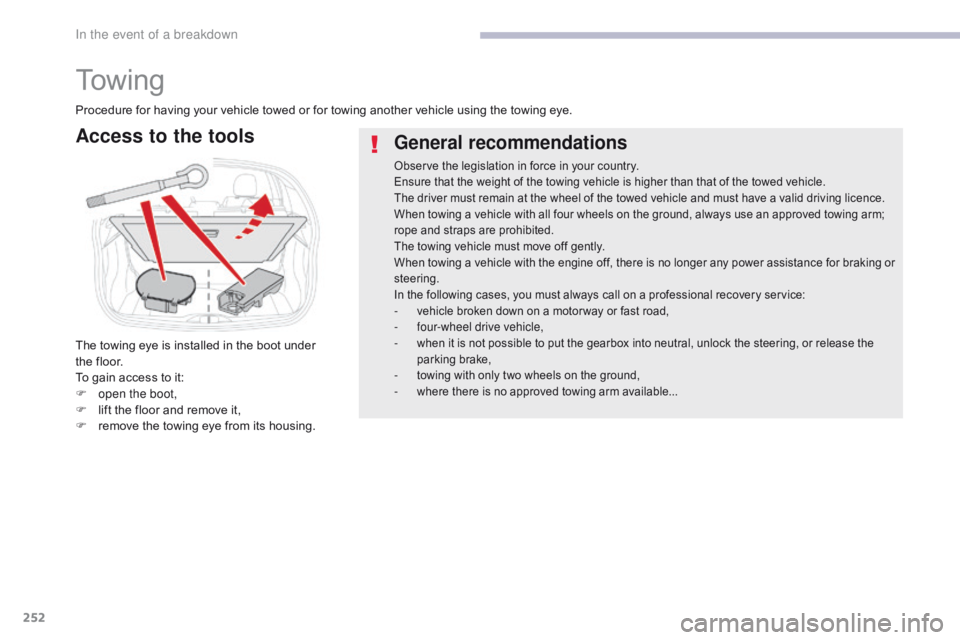
Access to the tools
The towing eye is installed in the boot under
the floor.
To gain access to it:
F
o
pen the boot,
F
l
ift the floor and remove it,
F
r
emove the towing eye from its housing.
In the event of a breakdown
Page 262 of 450

260
B618_en_Chap11_index-alpha_ed01-2016
Accessories ...........................................117, 157
AdBlue® ............................... ......26, 36, 215, 216
Adjusting headlamps .................................... 11
2
Adjusting head restraints
................................ 77
A
djusting seat
................................................. 76
A
djusting the air distribution
.....................8
5, 88
Adjusting the air flow
.................................8
5, 88
Adjusting the date
..................................... 4
1, 54
Adjusting the height and reach of the steering wheel
...............................
.........82
Adjusting the temperature
........................8
5, 88
Adjusting the time
............................... 4
1, 54, 55
Advice on driving
..............................
....151, 152
Airbags
...............
............................. 29, 129, 137
Airbags, curtain
..................................... 13
2, 13 3
Airbags, front......................................... 13 0, 13 3
Airbags, lateral
...................................... 13
1, 13 3
AIRBUMP
® .................................................... 2 19
Air conditioning ............................... ............ 9, 87
Air conditioning, automatic
.......................8
4, 88
Air conditioning, manual
........................... 8
4, 86
Air intake
...............
.................................... 86, 88
Air vents
..............................
............................ 83
Alarm
............................................................... 72
A
nti-lock braking system (ABS)
....................12
3
Anti-slip regulation (ASR)
............................. 12
3
Anti-theft
..............................
.........................153
Armrest, front
............................................9
6, 98
Assistance call
...............................
....... 119, 121
Assistance, emergency braking
................... 12
3
Audio system
...............................
....................41
Auxiliary socket
............................................... 98
ABChild seats, ISOFIX .......................14 3 -145, 147
C ITROËN C onnect Box ....................... 1 19, 121
C
ITROËN
L
ocalised Emergency Call... 119, 121
Closing the boot
...............................
......... 57, 69
Closing the doors
.......................... 5
7, 60, 61, 68
Coat hanger
..............................
......................99
Configuration, vehicle
......................... 4
1, 44, 46
ConnectedCAM C
ITROËN
™
.......................19
3
Control, electric windows
................................ 74
C
ontrol, emergency boot release
...................69
C
ontrol, emergency door
................................ 64
C
ontrol, heated seats
...................................... 78
C
ontrol stalk, lighting
.............. 1
6, 105, 106, 110
Control stalk, wipers
..............................11
3 -115
Courtesy lamp
...............................
..........94, 240
Cruise control
................................ 1
70, 173, 178
Cruise control by speed limit recognition
.....17
3
Cup holder
...............................
........................96
Capacity, fuel tank
..............................
.......... 19 6
Cap, fuel filler
................................................ 19
6
Central locking
.................................... 6
0, 61, 70
Changing a bulb
........................... 2
34, 238, 240
Changing a fuse
............................ 2
41, 243, 246
Changing a wheel
...............................
. 226, 227
Changing a wiper blade
........................ 11
6 , 2 0 4
Changing the remote control battery
.............. 66
C
hecking the engine oil level
.......................... 35
C
hecking the levels
............................... 2
0 9 -212
Checking tyre pressures (using the kit)
........ 2
21
Checks
...............
................... 207, 208, 213, 214
Child lock
...............................
........................ 150
Children
...............................
... 141, 143 -145, 147
Children (safety)
...............................
............. 150
Child seats
............ 1
28, 134-136, 140, 141, 149
Child seats, conventional
...................... 14
0, 141
Child seats, i-Size
...............................
.......... 147 Date (setting)
...............................
.............. 41, 54
Daytime running lamps
.........1
06, 110, 234, 235
Deactivating the passenger airbag
....... 13
0, 137
Deadlocking
...............................
............... 57, 62
Demisting - defrosting
...............................9
2, 93
Dimensions
..............................
.....................257
Dipstick
................
....................................35, 209
Direction indicators
...... 1
08, 110, 234, 235, 238
Display screen, instrument panel
.................16
5
Doors
..............................................................
.68
Driving economically ......................................... 9
Driving time warning
..................................... 18
2
Dynamic stability control (DSC)
...... 2
2, 123, 125
C
D
Battery ................................... 203, 213, 248 -251
Battery, charging ............................... ............250
Battery, remote control
.............................6
3, 66
Blanking screen (snow shield)
......................2
01
Blind, panoramic roof
...................................... 95
B
lind spot monitoring system
........................18
4
Blind spot sensors
.................................. 18
, 18 4
BlueHDi
...............................
......32, 36, 215, 220
Bonnet
...............
............................................ 206
Boot
........
.......................................... 69, 95, 100
Brake discs
.................................................... 2
14
Brake lamps
...............................
...................238
Brakes
..................................................... 2
2, 214
Bulbs (changing)
...............................
... 234, 238
Alphabetical index
Page 265 of 450
263
B618_en_Chap11_index-alpha_ed01-2016
Safety, children .............................13 0, 13 4 -13 6,
141, 143 -145, 147
Screen, cold climate
..................................... 2
01
Screen, monochrome
..................................... 41
S
creenwash, front
......................................... 11
4
Screenwash, rear
...............................
...........114
SCR (Selective Catalytic Reduction) system
................
................................... 27, 215
Seat belts
....................................... 12
6 -128, 14 0
Seats, front
...............................
.......................76
Seats, heated
...............................
...................78
Seats, rear
....................................................... 79
Sel
ector, gear
................................................ 16
1
Serial number, vehicle
..................................25
8
Service indicator
.......................................3
2, 34
Servicing
...............................
............................ 9Tables of fuses
.............................. 2
41, 243, 246
Tank, fuel
...............................
................19 6, 198
Temperature, coolant
...................................... 31
T
hird brake lamp
...........................................23
9
Three flashes (direction indicators)
.............. 10
8
Time (setting)
..............................
........ 41, 54, 55
S
T
Settings, equipment ......................4 0, 41, 44, 46
Sidelamps .................... 1 05, 110, 234, 235, 238
Side repeater
..............................
..................237
Snow chains
..........................................1
90, 200
Socket, 12 V accessory
............................9
6, 97
Socket, auxiliary
...............................
...............98
Sockets, audio
................................................ 98
Spe
ed limiter
...............................
.. 170, 173, 175
Speed limit recognition
................................. 17
1
Stability control (ESC) ...................................123
Starting the engine
....................... 1
53, 156, 161
Starting using another battery
..............1
58, 249
Stay, bonnet
...............................
...................206
Steering wheel, adjustment
............................8
2
Stop
...............
.................................................. 20
Stopping the vehicle
..................... 1
53, 156, 161
Stop & Start
.......................... 1
8, 52, 84, 92, 167,
196, 206, 213, 251
Stop (warning lamp)
........................................ 20
St
orage
................
............................................ 97
Sun visor
...................................................9
6, 97
Switching off the engine
...............................15
3
Synchronising the remote control
...................67
R
emoving the mat
...............................
............ 99
Replacing bulbs ..............................
..... 234, 238
Replacing fuses
..............................
...... 241, 243
Replacing the air filter
................................... 2
13
Replacing the oil filter
................................... 2
13
Replacing the passenger
compartment filter
...................................... 2
13
Reservoir, screenwash
................................. 2
11
Resetting the service indicator
....................... 34
R
esetting the trip recorder
.............................. 39
R
eversing camera
...............................
.......... 189
Reversing lamp
............................................. 23
8
Roof bars
....................................................... 20
5
Running out of fuel (Diesel)
.......................... 2
20 To o l s ................
..................................... 226, 227
Total distance recorder ................................... 39
T
ouch screen.............................................44, 46
To w b a r
................
...................................152, 202
Towing another vehicle
.................................2
52
Towing eye
....................................................10
1
Traction control (ASR)
.................... 2
2, 123, 125
Tr a i l e r
...............
.....................................152, 202
Triangle, warning ................................... 101, 2 20
Trip computer
............................................5
0-52
Trip distance recorder
..................................... 39
T
y r e s
..........................................................9
, 258
Tyre under-inflation detection
...............
............... 30, 190, 192, 225
U
Under floor storage .......................................10 1
Under-inflation (detection) ............................ 19
0
Unlocking
..............................
.................... 57, 59
Unlocking from the inside
...............................70
U
pdating the date
............................................ 54
U
pdating the time
......................................5
4, 55
.
Alphabetical index
Page 283 of 450
9
.
Audio and Telematics
Global voice commands
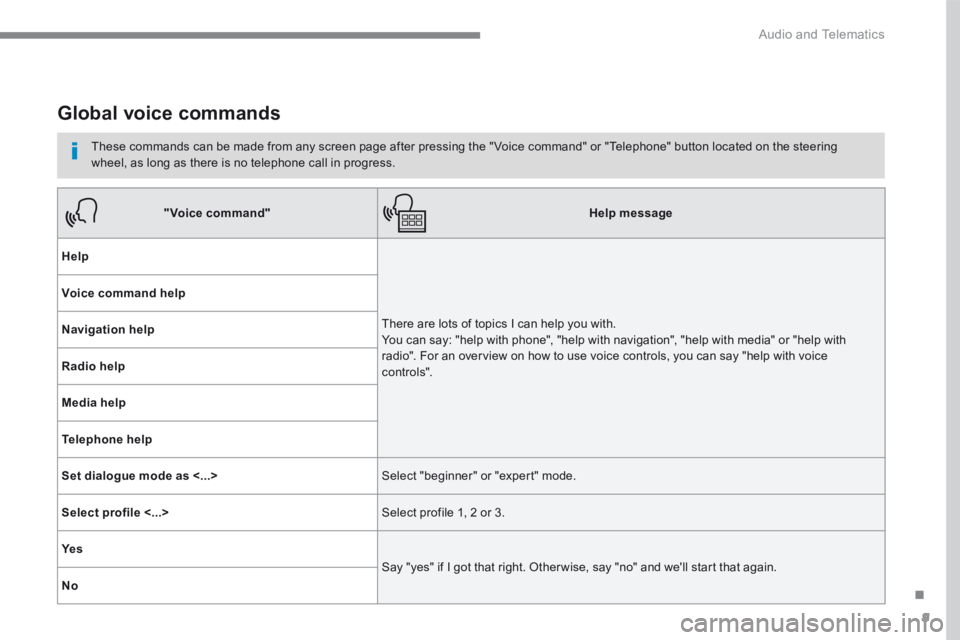
These commands can be made from any screen page after pressing the " Voice command" or "Telephone" button located on the steering wheel, as long as there is no telephone call in progress.
"Voice command"Help message
Help
There are lots of topics I can help you with. You can say: "help with phone", "help with navigation", "help with media" or "help with radio". For an overview on how to use voice controls, you can say "help with voice c ont ro ls".
Voice command help
Navigation help
Radio help
Media help
Telephone help
Set dialogue mode as <...> Select "beginner" or "expert" mode.
Select profile <...> Select profile 1, 2 or 3.
Ye s
Say "yes" if I got that right. Other wise, say "no" and we'll start that again.
No
Page 284 of 450
10
Audio and Telematics
"Navigation" voice commands
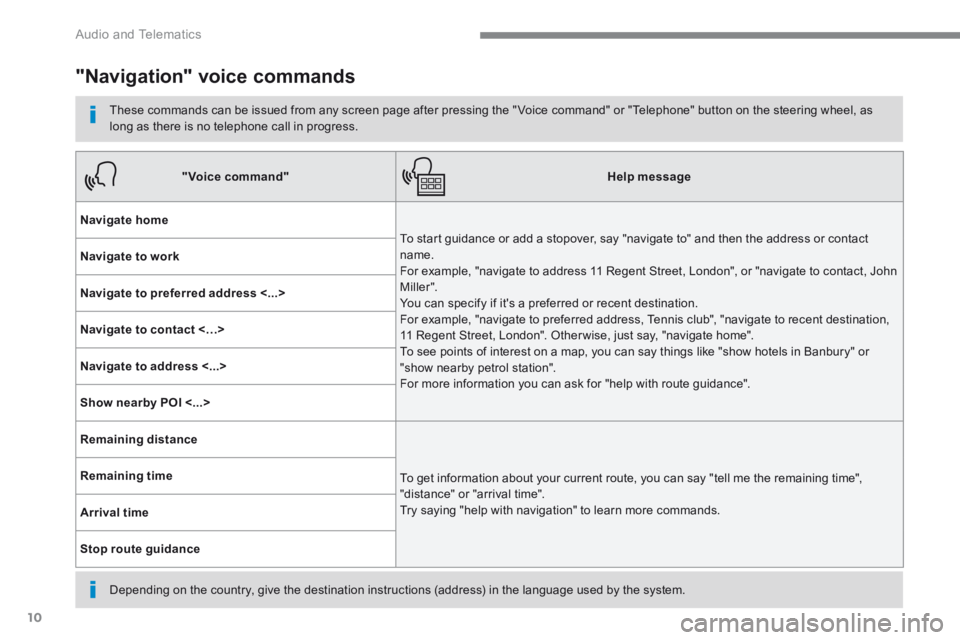
These commands can be issued from any screen page after pressing the " Voice command" or "Telephone" button on the steering wheel, as long as there is no telephone call in progress.
Depending on the country, give the destination instructions (address) in the language used by the system.
"Voice command"Help message
Navigate home
To start guidance or add a stopover, say "navigate to" and then the address or contact name. For example, "navigate to address 11 Regent Street, London", or "navigate to contact, John M iller ". You can specify if it's a preferred or recent destination. For example, "navigate to preferred address, Tennis club", "navigate to recent destination, 11 Regent Street, London". Other wise, just say, "navigate home". To see points of interest on a map, you can say things like "show hotels in Banbury" or "show nearby petrol station". For more information you can ask for "help with route guidance".
Navigate to work
Navigate to preferred address <...>
Navigate to contact <…>
Navigate to address <...>
Show nearby POI <...>
Remaining distance
To get information about your current route, you can say "tell me the remaining time", "distance" or "arrival time". Try saying "help with navigation" to learn more commands.
Remaining time
Arrival time
Stop route guidance