set time CITROEN C3 2021 Service Manual
[x] Cancel search | Manufacturer: CITROEN, Model Year: 2021, Model line: C3, Model: CITROEN C3 2021Pages: 450, PDF Size: 10.11 MB
Page 373 of 450
99
.
Audio and Telematics
Transversal-Citroen_en_Chap02_RCC-2-2-0_ed01-2016
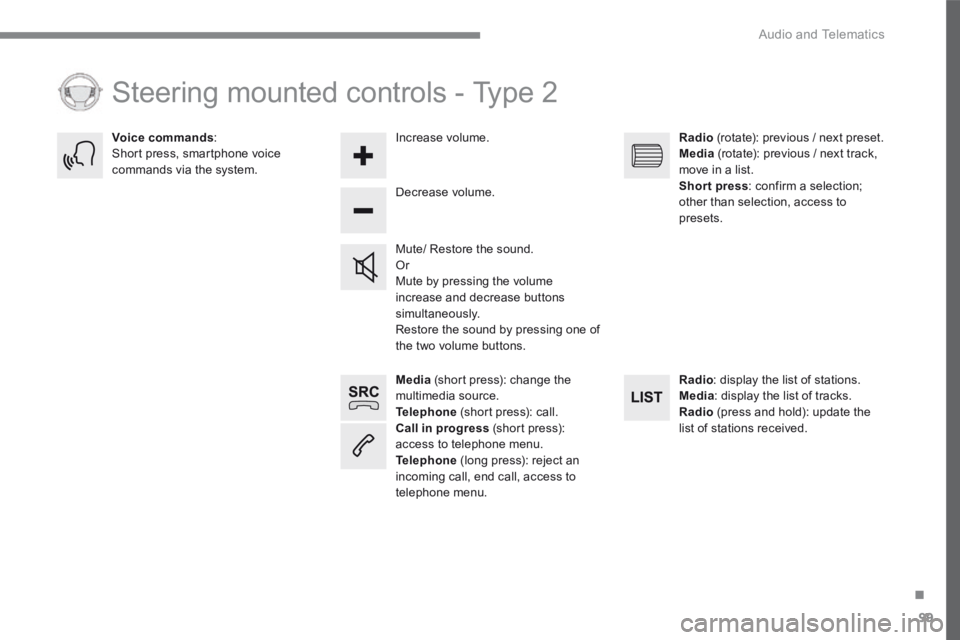
Media (short press): change the multimedia source. Telephone (short press): call. Call in progress (short press): access to telephone menu. Telephone (long press): reject an incoming call, end call, access to telephone menu.
Decrease volume.
Voice commands : Short press, smartphone voice commands via the system.
Mute/ Restore the sound. Or Mute by pressing the volume increase and decrease buttons simultaneously. Restore the sound by pressing one of the two volume buttons.
Radio (rotate): previous / next preset. Media (rotate): previous / next track, move in a list. Short press : confirm a selection; other than selection, access to presets.
Radio : display the list of stations. Media : display the list of tracks. Radio (press and hold): update the list of stations received.
Increase volume.
Steering mounted controls - Type 2
Page 375 of 450
101
.
Audio and Telematics
Transversal-Citroen_en_Chap02_RCC-2-2-0_ed01-2016
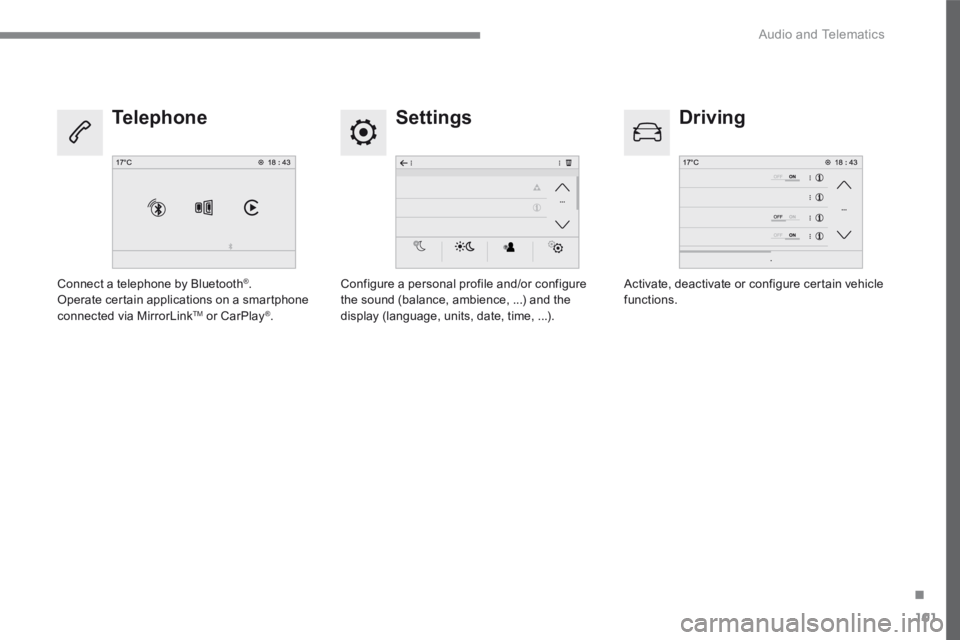
Settings Driving Telephone
Configure a personal profile and/or configure the sound (balance, ambience, ...) and the display (language, units, date, time, ...).
Activate, deactivate or configure certain vehicle functions. Connect a telephone by Bluetooth ® . Operate certain applications on a smartphone connected via MirrorLink TM or CarPlay ® .
Page 390 of 450
116
1
Audio and Telematics
Transversal-Citroen_en_Chap02_RCC-2-2-0_ed01-2016
Media
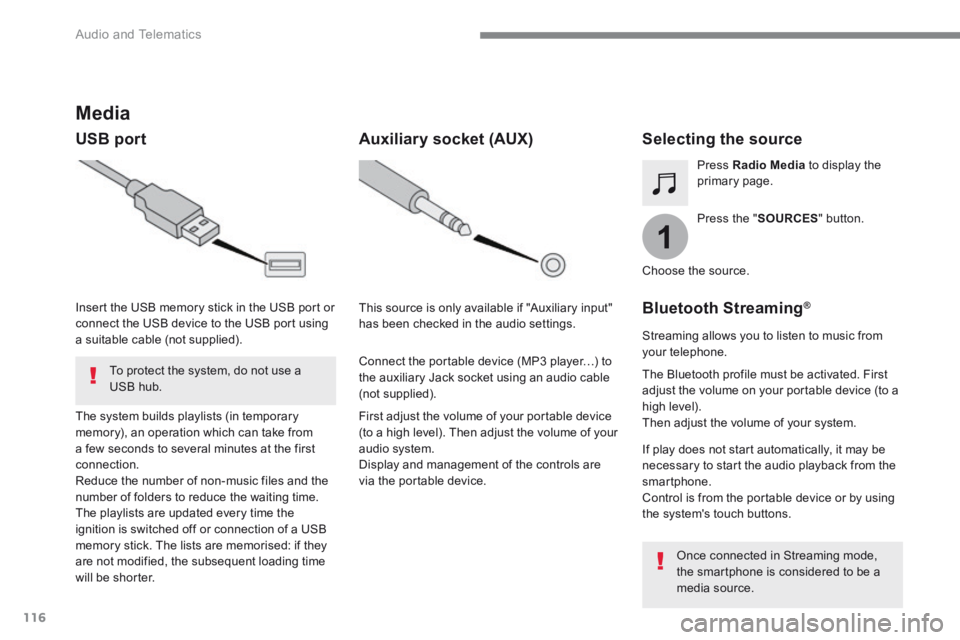
USB port Selecting the source
Press the " SOURCES " button.
Press Radio Media to display the primary page.
The system builds playlists (in temporary memory), an operation which can take from a few seconds to several minutes at the first connection. Reduce the number of non-music files and the number of folders to reduce the waiting time. The playlists are updated every time the ignition is switched off or connection of a USB memory stick. The lists are memorised: if they are not modified, the subsequent loading time will be shorter.
Insert the USB memory stick in the USB port or connect the USB device to the USB port using a suitable cable (not supplied).
Auxiliary socket (AUX)
First adjust the volume of your portable device (to a high level). Then adjust the volume of your audio system. Display and management of the controls are via the portable device.
This source is only available if "Auxiliary input" has been checked in the audio settings.
Connect the portable device (MP3 player…) to the auxiliary Jack socket using an audio cable (not supplied).
Choose the source.
Bluetooth Streaming ®Bluetooth Streaming ®Bluetooth Streaming
Streaming allows you to listen to music from your telephone.
The Bluetooth profile must be activated. First adjust the volume on your portable device (to a high level). Then adjust the volume of your system.
If play does not start automatically, it may be necessary to start the audio playback from the smartphone. Control is from the portable device or by using the system's touch buttons.
Once connected in Streaming mode, the smartphone is considered to be a media source.
To protect the system, do not use a USB hub.
Page 409 of 450
135
.
Audio and Telematics
Transversal-Citroen_en_Chap02_RCC-2-2-0_ed01-2016
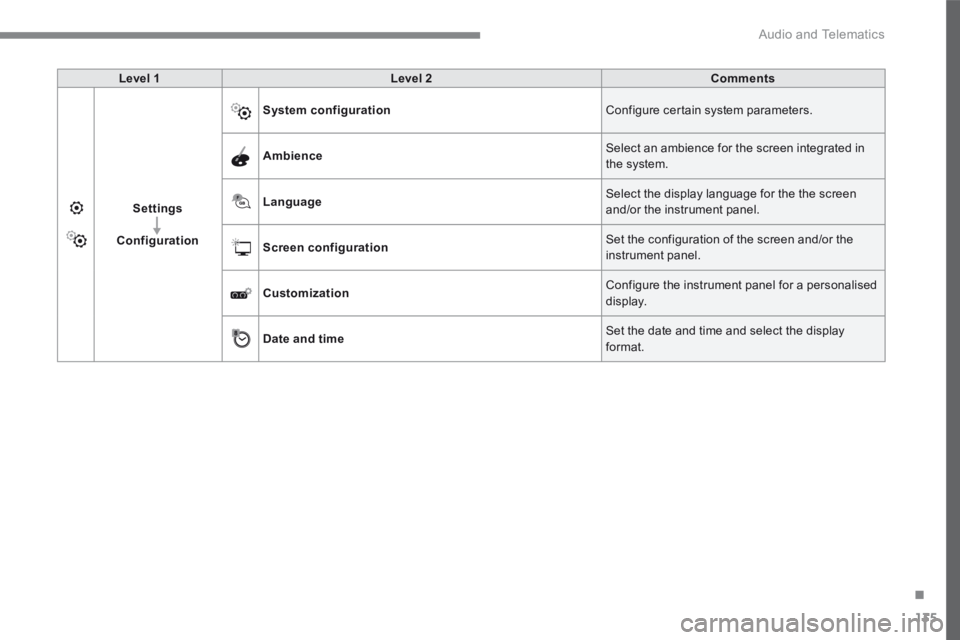
Level 1Level 2Comments
Settings
Configuration
System configuration Configure certain system parameters.
Ambience Select an ambience for the screen integrated in the system.
Language Select the display language for the the screen and/or the instrument panel.
Screen configuration Set the configuration of the screen and/or the instrument panel.
Customization Configure the instrument panel for a personalised display.
Date and time Set the date and time and select the display format.
Page 413 of 450
139
.
12
13
14
15
Audio and Telematics
Transversal-Citroen_en_Chap02_RCC-2-2-0_ed01-2016
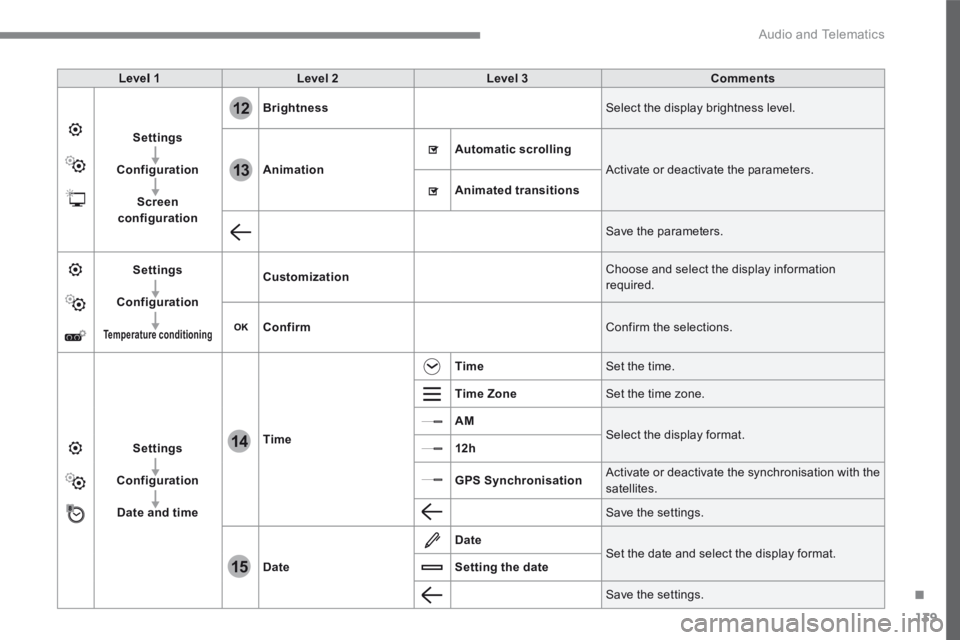
Level 1Level 2Level 3Comments
Settings
Configuration
Screen configuration
Brightness Select the display brightness level.
Animation
Automatic scrolling
Activate or deactivate the parameters.
Animated transitions
Save the parameters.
Settings
Configuration
Temperature conditioning
Customization Choose and select the display information required.
Confirm Confirm the selections.
Settings
Configuration
Date and time
Time
Time Set the time.
Time Zone Set the time zone.
AM Select the display format. 12h
GPS Synchronisation Activate or deactivate the synchronisation with the satellites.
Save the settings.
Date
Date Set the date and select the display format. Setting the date
Save the settings.
Page 416 of 450
142
15
14
Audio and Telematics
Transversal-Citroen_en_Chap02_RCC-2-2-0_ed01-2016
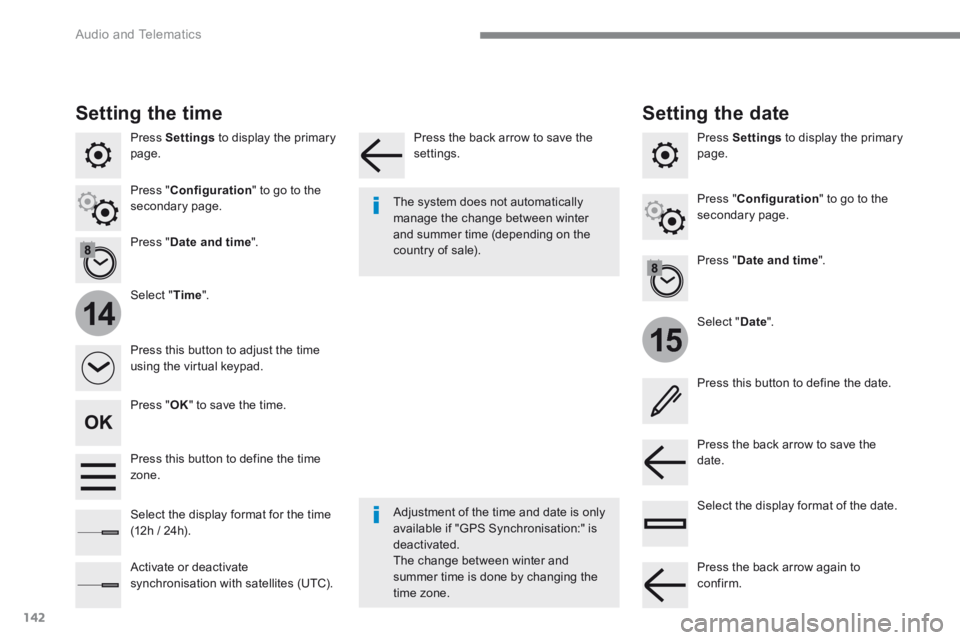
Press Settings to display the primary page.
Select " Date ".
Select " Time ".
Press " Date and time ".
Adjustment of the time and date is only available if "GPS Synchronisation:" is deactivated. The change between winter and summer time is done by changing the
time zone.
The system does not automatically manage the change between winter and summer time (depending on the country of sale).
Setting the time
Press this button to define the date.
Press this button to adjust the time using the virtual keypad.
Press the back arrow to save the date. Press this button to define the time z o n e .
Select the display format of the date. Select the display format for the time (12h / 24h).
Activate or deactivate synchronisation with satellites (UTC).
Press Settings to display the primary page.
Press " Date and time ".
Setting the date
Press " Configuration " to go to the secondary page. Press " Configuration " to go to the secondary page.
Press " OK " to save the time.
Press the back arrow to save the settings.
Press the back arrow again to confirm.
Page 420 of 450
146
Audio and Telematics
Transversal-Citroen_en_Chap02_RCC-2-2-0_ed01-2016
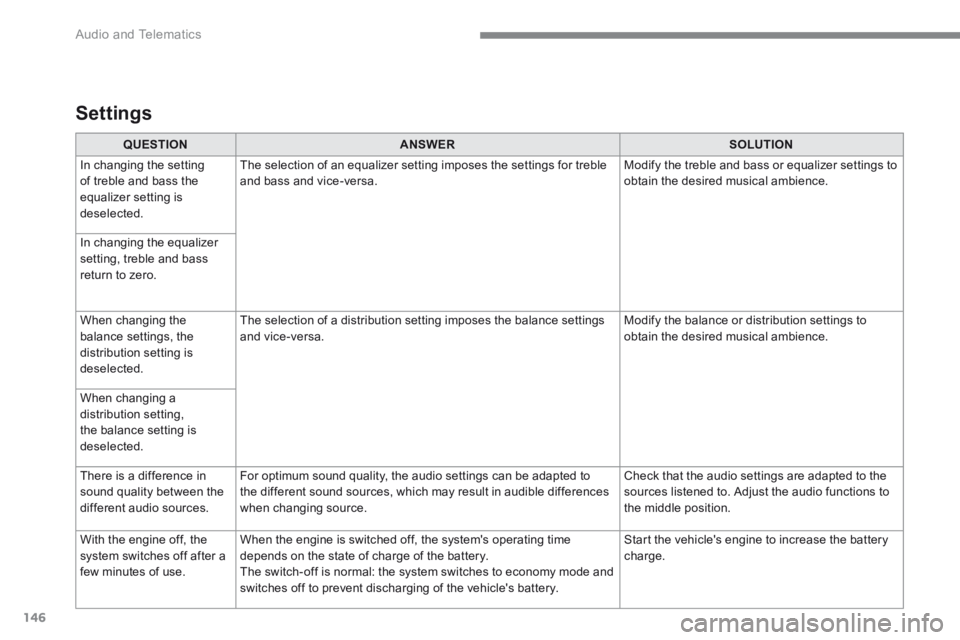
QUESTIONANSWERSOLUTION
In changing the setting of treble and bass the equalizer setting is deselected.
The selection of an equalizer setting imposes the settings for treble and bass and vice-versa. Modify the treble and bass or equalizer settings to obtain the desired musical ambience.
In changing the equalizer setting, treble and bass return to zero.
When changing the balance settings, the distribution setting is deselected.
The selection of a distribution setting imposes the balance settings and vice-versa. Modify the balance or distribution settings to obtain the desired musical ambience.
When changing a distribution setting, the balance setting is deselected.
There is a difference in sound quality between the different audio sources.
For optimum sound quality, the audio settings can be adapted to the different sound sources, which may result in audible differences when changing source.
Check that the audio settings are adapted to the sources listened to. Adjust the audio functions to the middle position.
With the engine off, the system switches off after a few minutes of use.
When the engine is switched off, the system's operating time depends on the state of charge of the battery. The switch-off is normal: the system switches to economy mode and switches off to prevent discharging of the vehicle's battery.
Start the vehicle's engine to increase the battery charge.
Settings
Page 425 of 450
151
.
Audio and Telematics
Transversal-Citroen_en_Chap03_RD6_ed01-2016
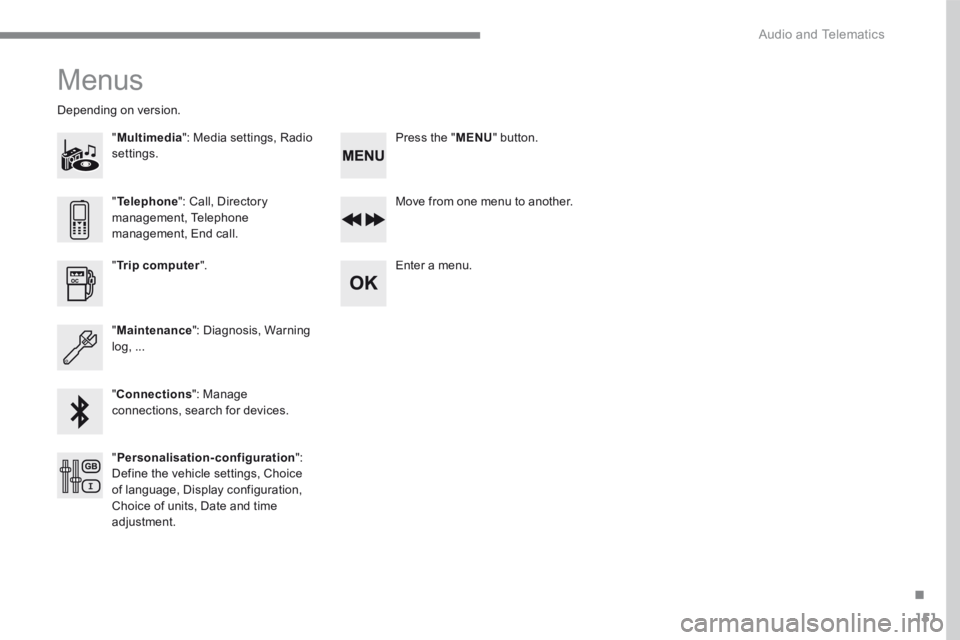
Menus
"Multimedia ": Media settings, Radio settings.
D e p e n d i n g o n v e r s i o n .
Move from one menu to another.
Enter a menu. " Trip computer ".
" Maintenance ": Diagnosis, Warning log, ...
"Connections ": Manage connections, search for devices.
" Telephone ": Call, Directory management, Telephone management, End call.
" Personalisation-configuration ": Define the vehicle settings, Choice of language, Display configuration, Choice of units, Date and time adjustment.
Press the " MENU " button.
Page 440 of 450
166
Audio and Telematics
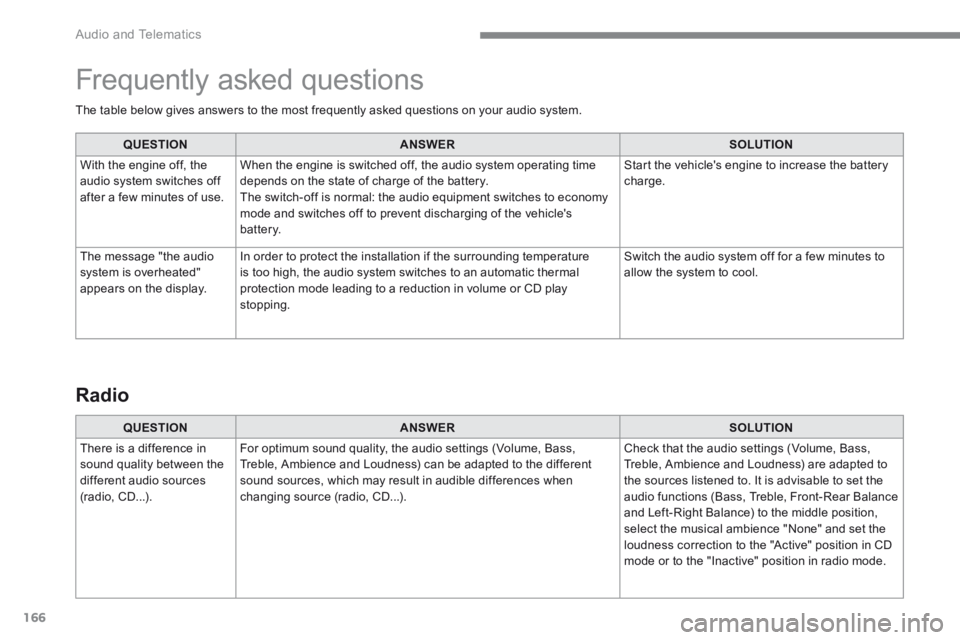
The table below gives answers to the most frequently asked questions on your audio system.
QUESTIONANSWERSOLUTION
With the engine off, the audio system switches off after a few minutes of use.
When the engine is switched off, the audio system operating time depends on the state of charge of the battery. The switch-off is normal: the audio equipment switches to economy mode and switches off to prevent discharging of the vehicle's battery.
Start the vehicle's engine to increase the battery charge.
The message "the audio system is overheated" appears on the display.
In order to protect the installation if the surrounding temperature is too high, the audio system switches to an automatic thermal protection mode leading to a reduction in volume or CD play stopping.
Switch the audio system off for a few minutes to allow the system to cool.
Frequently asked questions
QUESTIONANSWERSOLUTION
There is a difference in sound quality between the different audio sources (radio, CD...).
For optimum sound quality, the audio settings (Volume, Bass, Treble, Ambience and Loudness) can be adapted to the different sound sources, which may result in audible differences when changing source (radio, CD...).
Check that the audio settings (Volume, Bass, Treble, Ambience and Loudness) are adapted to the sources listened to. It is advisable to set the audio functions (Bass, Treble, Front-Rear Balance and Left-Right Balance) to the middle position, select the musical ambience "None" and set the loudness correction to the "Active" position in CD mode or to the "Inactive" position in radio mode.
Radio
Page 442 of 450
168
Audio and Telematics
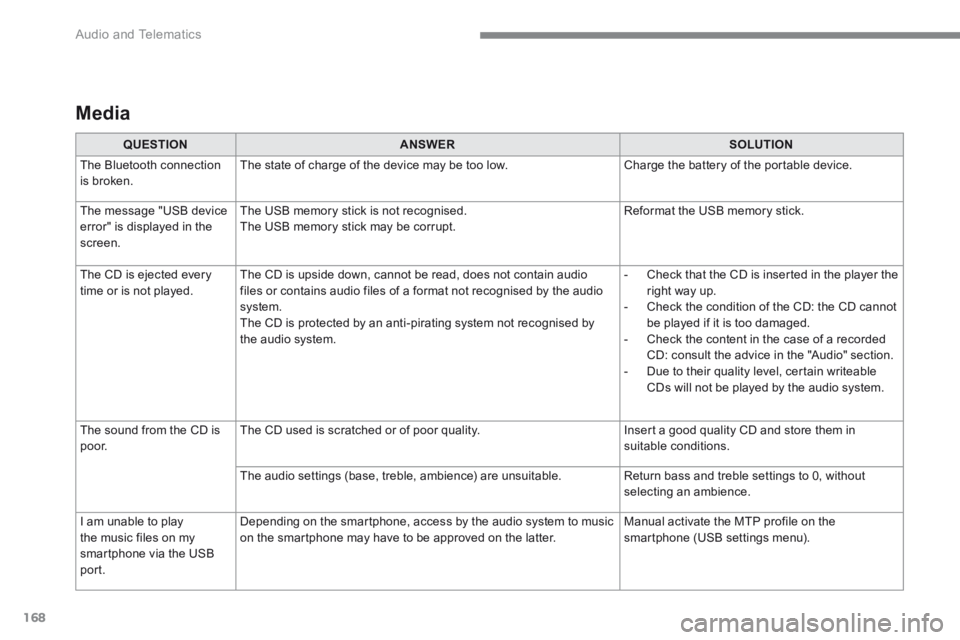
Media
QUESTIONANSWERSOLUTION
The Bluetooth connection is broken. The state of charge of the device may be too low. Charge the battery of the portable device.
The message "USB device
error" is displayed in the screen.
The USB memory stick is not recognised.
The USB memory stick may be corrupt.
Reformat the USB memory stick.
The CD is ejected every time or is not played. The CD is upside down, cannot be read, does not contain audio files or contains audio files of a format not recognised by the audio system. The CD is protected by an anti-pirating system not recognised by the audio system.
- Check that the CD is inserted in the player the right way up. - Check the condition of the CD: the CD cannot be played if it is too damaged. - Check the content in the case of a recorded CD: consult the advice in the "Audio" section. - Due to their quality level, certain writeable CDs will not be played by the audio system.
The sound from the CD is p o o r. The CD used is scratched or of poor quality. Insert a good quality CD and store them in suitable conditions.
The audio settings (base, treble, ambience) are unsuitable. Return bass and treble settings to 0, without selecting an ambience.
I am unable to play
the music files on my smartphone via the USB port.
Depending on the smartphone, access by the audio system to music
on the smartphone may have to be approved on the latter.
Manual activate the MTP profile on the
smartphone (USB settings menu).