instrument panel CITROEN C3 2021 Repair Manual
[x] Cancel search | Manufacturer: CITROEN, Model Year: 2021, Model line: C3, Model: CITROEN C3 2021Pages: 450, PDF Size: 10.11 MB
Page 231 of 450
229
B618_en_Chap08_En-cas-de-panne_ed01-2016
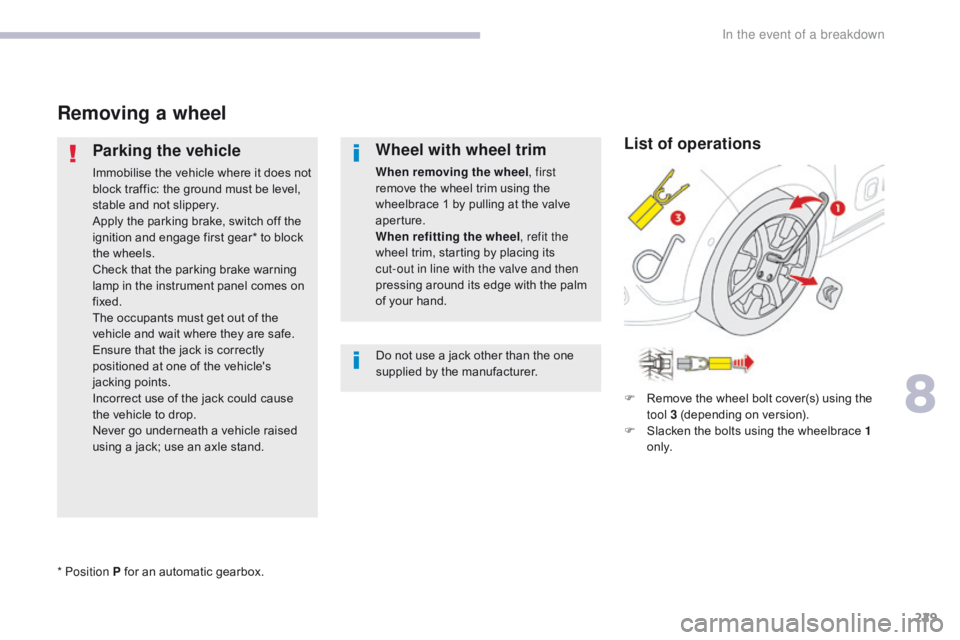
Removing a wheel
Parking the vehicle
Immobilise the vehicle where it does not
block traffic: the ground must be level,
stable and not slippery.
Apply the parking brake, switch off the
ignition and engage first gear* to block
the wheels.
Check that the parking brake warning
lamp in the instrument panel comes on
fixed.
The occupants must get out of the
vehicle and wait where they are safe.
Ensure that the jack is correctly
positioned at one of the vehicle's
jacking points.
Incorrect use of the jack could cause
the vehicle to drop.
Never go underneath a vehicle raised
using a jack; use an axle stand.
Wheel with wheel trim
When removing the wheel, first
remove the wheel trim using the
wheelbrace 1 by pulling at the valve
aperture.
When refitting the wheel , refit the
wheel trim, starting by placing its
cut-out in line with the valve and then
pressing around its edge with the palm
of your hand.
Do not use a jack other than the one
supplied by the manufacturer.
* Position P for an automatic gearbox. F
R
emove the wheel bolt cover(s) using the
tool 3 (depending on version).
F
S
lacken the bolts using the wheelbrace 1
o n l y.
List of operations
8
In the event of a breakdown
Page 246 of 450

244
B618_en_Chap08_En-cas-de-panne_ed01-2016
Lower fusebox
FuseN° Rating
(A) Functions
F1 10Electrochromatic interior mirror, heated rear screen,
particle
filter pump (Diesel), parking sensors, power steering,
LPG
system, clutch pedal switch, exterior mirror adjustment.
F10(+) -
F11 (Gnd) 30Locking / unlocking of the doors and fuel filler flap (depending
on engine).
F13 10Rain and sunshine sensor, air conditioning, front camera.
F14 5Alarm, telematic unit.
F16 3Automatic gearbox gear selector, brake pedal switch,
Stop & Start system.
F17 5Instrument panel, driving school module.
F18 5Air conditioning, gear selector position indicator (automatic
gearbox).
F19 3Steering mounted controls.
F21 3START/STOP switch or button.
F23 5Seat belts not fastened warning lamps display.
In the event of a breakdown
Page 262 of 450

260
B618_en_Chap11_index-alpha_ed01-2016
Accessories ...........................................117, 157
AdBlue® ............................... ......26, 36, 215, 216
Adjusting headlamps .................................... 11
2
Adjusting head restraints
................................ 77
A
djusting seat
................................................. 76
A
djusting the air distribution
.....................8
5, 88
Adjusting the air flow
.................................8
5, 88
Adjusting the date
..................................... 4
1, 54
Adjusting the height and reach of the steering wheel
...............................
.........82
Adjusting the temperature
........................8
5, 88
Adjusting the time
............................... 4
1, 54, 55
Advice on driving
..............................
....151, 152
Airbags
...............
............................. 29, 129, 137
Airbags, curtain
..................................... 13
2, 13 3
Airbags, front......................................... 13 0, 13 3
Airbags, lateral
...................................... 13
1, 13 3
AIRBUMP
® .................................................... 2 19
Air conditioning ............................... ............ 9, 87
Air conditioning, automatic
.......................8
4, 88
Air conditioning, manual
........................... 8
4, 86
Air intake
...............
.................................... 86, 88
Air vents
..............................
............................ 83
Alarm
............................................................... 72
A
nti-lock braking system (ABS)
....................12
3
Anti-slip regulation (ASR)
............................. 12
3
Anti-theft
..............................
.........................153
Armrest, front
............................................9
6, 98
Assistance call
...............................
....... 119, 121
Assistance, emergency braking
................... 12
3
Audio system
...............................
....................41
Auxiliary socket
............................................... 98
ABChild seats, ISOFIX .......................14 3 -145, 147
C ITROËN C onnect Box ....................... 1 19, 121
C
ITROËN
L
ocalised Emergency Call... 119, 121
Closing the boot
...............................
......... 57, 69
Closing the doors
.......................... 5
7, 60, 61, 68
Coat hanger
..............................
......................99
Configuration, vehicle
......................... 4
1, 44, 46
ConnectedCAM C
ITROËN
™
.......................19
3
Control, electric windows
................................ 74
C
ontrol, emergency boot release
...................69
C
ontrol, emergency door
................................ 64
C
ontrol, heated seats
...................................... 78
C
ontrol stalk, lighting
.............. 1
6, 105, 106, 110
Control stalk, wipers
..............................11
3 -115
Courtesy lamp
...............................
..........94, 240
Cruise control
................................ 1
70, 173, 178
Cruise control by speed limit recognition
.....17
3
Cup holder
...............................
........................96
Capacity, fuel tank
..............................
.......... 19 6
Cap, fuel filler
................................................ 19
6
Central locking
.................................... 6
0, 61, 70
Changing a bulb
........................... 2
34, 238, 240
Changing a fuse
............................ 2
41, 243, 246
Changing a wheel
...............................
. 226, 227
Changing a wiper blade
........................ 11
6 , 2 0 4
Changing the remote control battery
.............. 66
C
hecking the engine oil level
.......................... 35
C
hecking the levels
............................... 2
0 9 -212
Checking tyre pressures (using the kit)
........ 2
21
Checks
...............
................... 207, 208, 213, 214
Child lock
...............................
........................ 150
Children
...............................
... 141, 143 -145, 147
Children (safety)
...............................
............. 150
Child seats
............ 1
28, 134-136, 140, 141, 149
Child seats, conventional
...................... 14
0, 141
Child seats, i-Size
...............................
.......... 147 Date (setting)
...............................
.............. 41, 54
Daytime running lamps
.........1
06, 110, 234, 235
Deactivating the passenger airbag
....... 13
0, 137
Deadlocking
...............................
............... 57, 62
Demisting - defrosting
...............................9
2, 93
Dimensions
..............................
.....................257
Dipstick
................
....................................35, 209
Direction indicators
...... 1
08, 110, 234, 235, 238
Display screen, instrument panel
.................16
5
Doors
..............................................................
.68
Driving economically ......................................... 9
Driving time warning
..................................... 18
2
Dynamic stability control (DSC)
...... 2
2, 123, 125
C
D
Battery ................................... 203, 213, 248 -251
Battery, charging ............................... ............250
Battery, remote control
.............................6
3, 66
Blanking screen (snow shield)
......................2
01
Blind, panoramic roof
...................................... 95
B
lind spot monitoring system
........................18
4
Blind spot sensors
.................................. 18
, 18 4
BlueHDi
...............................
......32, 36, 215, 220
Bonnet
...............
............................................ 206
Boot
........
.......................................... 69, 95, 100
Brake discs
.................................................... 2
14
Brake lamps
...............................
...................238
Brakes
..................................................... 2
2, 214
Bulbs (changing)
...............................
... 234, 238
Alphabetical index
Page 263 of 450

261
B618_en_Chap11_index-alpha_ed01-2016
Earth point, remote ............................... 207, 208
Eco-driving (advice) .......................................... 9
E
conomy mode
...............................
..............203
Electronic brake force distribution (EBFD)
...12
3
Emergency braking assistance (EBA)
..........12
3
Emergency call
..................................... 1
19, 121
Emergency switching off
...............................15
8
Emergency warning lamps
................... 1
18, 220
Emissions control system, SCR
.....................2
7
Energy economy mode
.................................20
3
Engine compartment
............................ 2
07, 208
Engine, Diesel
.............................. 1
99, 208, 220
Engine, petrol
........................................1
99, 207
Engines
..............................
...................254-256
Environment
...............................
.................9, 63
Electronic stability control (ESC)
..................12
3Gauge, fuel....................................................
19 6
Gearbox, automatic
... 9
, 161, 166, 167, 214, 248
Gearbox, manual
........ 9
, 96, 160, 166, 167, 214
Gear efficiency indicator
............................... 16
5
Gear lever
..............................
........................... 9
Gear lever, manual gearbox
.........................16
0
Glove box
..................................................9
6, 97
Hazard warning lamps
.......................... 1
18, 220
Headlamps, automatic illumination
...............................
... 106, 109, 111
Headlamps, dipped beam
............ 1
05, 234, 235
Headlamps, main beam
............... 1
05, 234, 236
Head restraints, front
......................................77
H
ead restraints, rear
.......................................79
H
eating
................
..................................9, 85, 86
Hill start assist
...............................................16
6
Hooks
...............................
.............................101
Horn ............................................................... 118
G
H
I
F
Folding the rear seats .....................................79
Fu el............................................................9, 199
Fuel consumption
.............................................. 9
F
uel tank........................................................ 198
Fusebox, engine compartment
..................... 24
6
Fuses
................
............................. 241, 243, 246
E
Fatigue detection .............................. ............182
Filling the fuel tank ........................1 96, 198, 199
Filter, air
...............
......................................... 213
Filter, Diesel fuel
........................................... 20
8
Filter, oil
......................................................... 2
13
Filter, particle
........................................ 21
2, 213
Filter, passenger compartment
..................... 2
13
Fitting a wheel
...............................
................229
Fitting roof bars
............................................. 20
5
Fittings, boot
......................................... 10
0, 102
Fittings, interior
.........................................9
6, 97
Flap, fuel filler
...............................
.........19 6, 198
Flashing indicators
........................ 1
08, 110, 235
Foglamps, rear
...................................... 1
07, 238
Foglamps, front
............................. 1
07, 234, 236 Ignition
................
............................. 91, 155, 157
Immobiliser, electronic
............................6
3, 153
Indicator, AdBlue
® range ...........................2 6, 36
Indicator, coolant temperature ........................ 3
1
Indicator, engine oil level
................................ 35
I
ndicator lamps, operation
........................ 1
6, 19
Indicators, direction
..............................1
08, 235
Inflating tyres
..............................
......9, 221, 258
Instrument panel
...............................
........ 11, 13
ISOFIX
...............
................................... 143, 14 4
Key
.......
.................................. 56, 59, 61, 63, 64
Key, electronic
........................................... 5
9 - 61
Keyless Entry and Starting
.............................5
9, 61, 63, 153, 156
Key not recognised
....................................... 15
8
Key with remote control
................................ 15
3
Kit, temporary puncture repair
..............1
01, 2 21
Jack
........
.............................................. 226, 227
Jump starting
..............................
..................249
K
J
.
Alphabetical index
Page 277 of 450
3
.
12:13
18,5 21,5
23 °C
Audio and Telematics
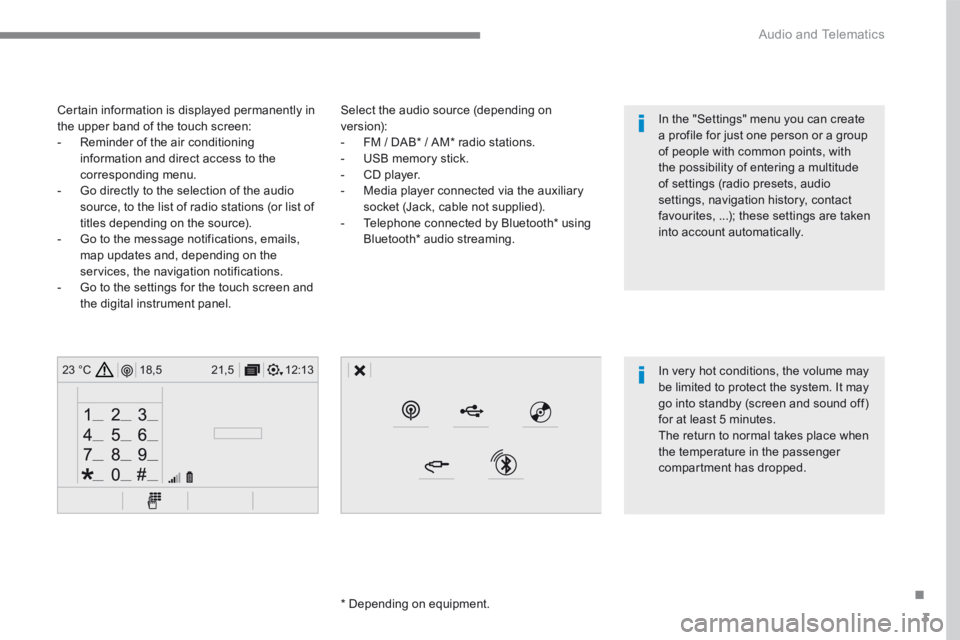
Select the audio source (depending on version): - FM / DAB * / AM * radio stations. - USB memory stick. - CD player. - Media player connected via the auxiliary socket (Jack, cable not supplied). - Telephone connected by Bluetooth * using
Bluetooth * audio streaming.
* Depending on equipment.
Certain information is displayed permanently in the upper band of the touch screen: - Reminder of the air conditioning information and direct access to the corresponding menu. - Go directly to the selection of the audio source, to the list of radio stations (or list of titles depending on the source).
- Go to the message notifications, emails, map updates and, depending on the services, the navigation notifications. - Go to the settings for the touch screen and the digital instrument panel.
In very hot conditions, the volume may be limited to protect the system. It may go into standby (screen and sound off) for at least 5 minutes.
The return to normal takes place when the temperature in the passenger compartment has dropped.
In the "Settings" menu you can create a profile for just one person or a group of people with common points, with the possibility of entering a multitude of settings (radio presets, audio settings, navigation history, contact favourites, ...); these settings are taken into account automatically.
Page 355 of 450
81
.
1
15
16
1
1
11
12
13
14
9
8
10
Audio and Telematics
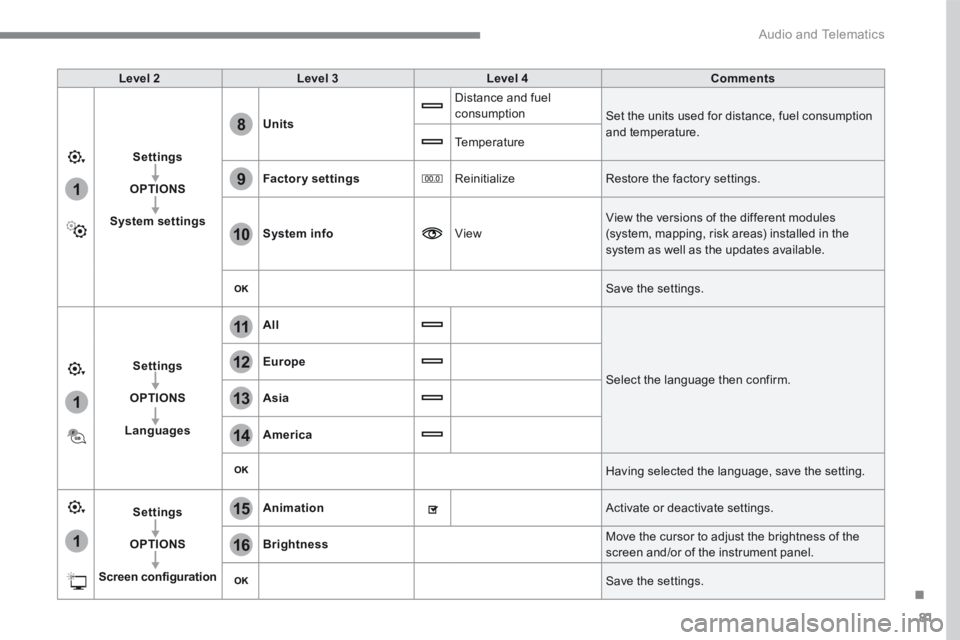
Level 2Level 3Level 4Comments
Settings
OPTIONS
System settings
Units
Distance and fuel consumption Set the units used for distance, fuel consumption and temperature. Temperature
Factory settings Reinitialize Restore the factory settings.
System info View
View the versions of the different modules
(system, mapping, risk areas) installed in the system as well as the updates available.
Save the settings.
Settings
OPTIONS
Languages
All
Select the language then confirm.
Europe
Asia
America
Having selected the language, save the setting.
Settings
OPTIONS
Screen configuration
Animation Activate or deactivate settings.
Brightness Move the cursor to adjust the brightness of the screen and/or of the instrument panel.
Save the settings.
Page 360 of 450
86
111
8
9
10
15
161
Audio and Telematics
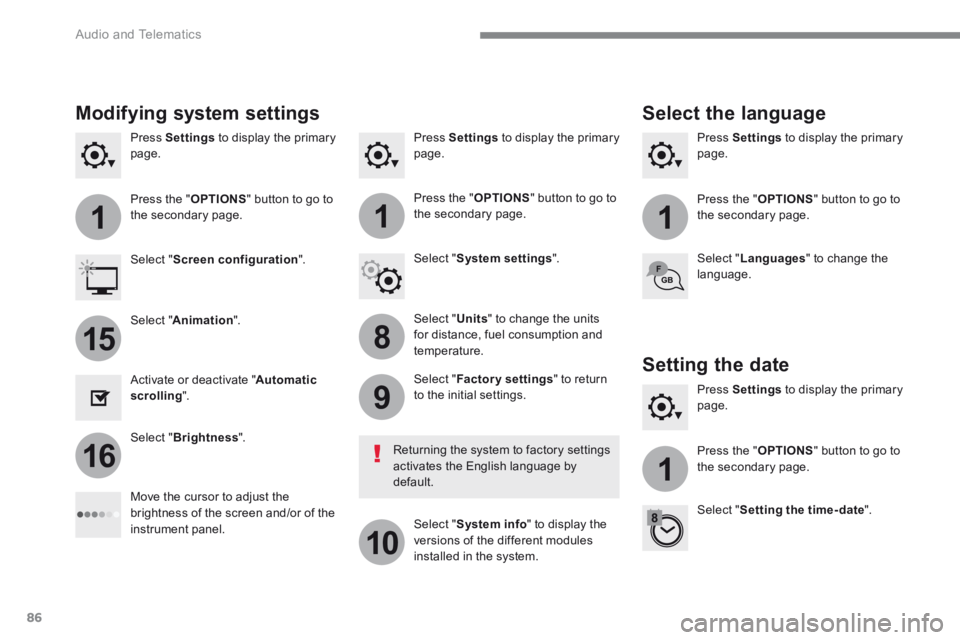
Press Settings to display the primary page. Press Settings to display the primary page. Press Settings to display the primary page.
Press the " OPTIONS " button to go to the secondary page. Press the " OPTIONS " button to go to the secondary page. Press the " OPTIONS " button to go to the secondary page.
Select " System settings ". Select " Screen configuration ".
Select " Units " to change the units for distance, fuel consumption and temperature.
Select " Languages " to change the language.
Activate or deactivate " Automatic scrolling ".
Move the cursor to adjust the brightness of the screen and/or of the instrument panel.
Select " Factory settings " to return to the initial settings.
Select " System info " to display the versions of the different modules installed in the system.
Modifying system settings
Returning the system to factory settings activates the English language by default.
Select " Animation ".
Select " Brightness ".
Select the language
Press Settings to display the primary page.
Press the " OPTIONS " button to go to the secondary page.
Select " Setting the time- date ".
Setting the date
Page 371 of 450
97
.
Audio and Telematics
Transversal-Citroen_en_Chap02_RCC-2-2-0_ed01-2016
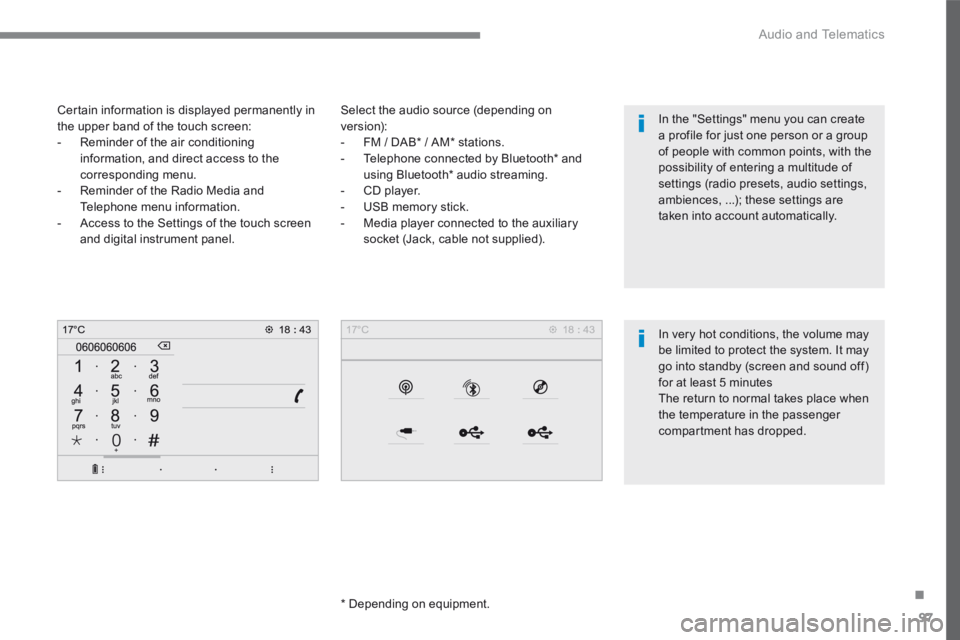
Select the audio source (depending on version): - FM / DAB * / AM * stations. - Telephone connected by Bluetooth * and using Bluetooth * audio streaming. - CD player. - USB memory stick. - Media player connected to the auxiliary
socket (Jack, cable not supplied).
* Depending on equipment.
Certain information is displayed permanently in the upper band of the touch screen: - Reminder of the air conditioning information, and direct access to the corresponding menu. - Reminder of the Radio Media and Telephone menu information. - Access to the Settings of the touch screen
and digital instrument panel.
In very hot conditions, the volume may be limited to protect the system. It may go into standby (screen and sound off) for at least 5 minutes The return to normal takes place when the temperature in the passenger
compartment has dropped.
In the "Settings" menu you can create a profile for just one person or a group of people with common points, with the possibility of entering a multitude of settings (radio presets, audio settings, ambiences, ...); these settings are taken into account automatically.
Page 407 of 450
133
.
1
2
3
4
Audio and Telematics
Transversal-Citroen_en_Chap02_RCC-2-2-0_ed01-2016
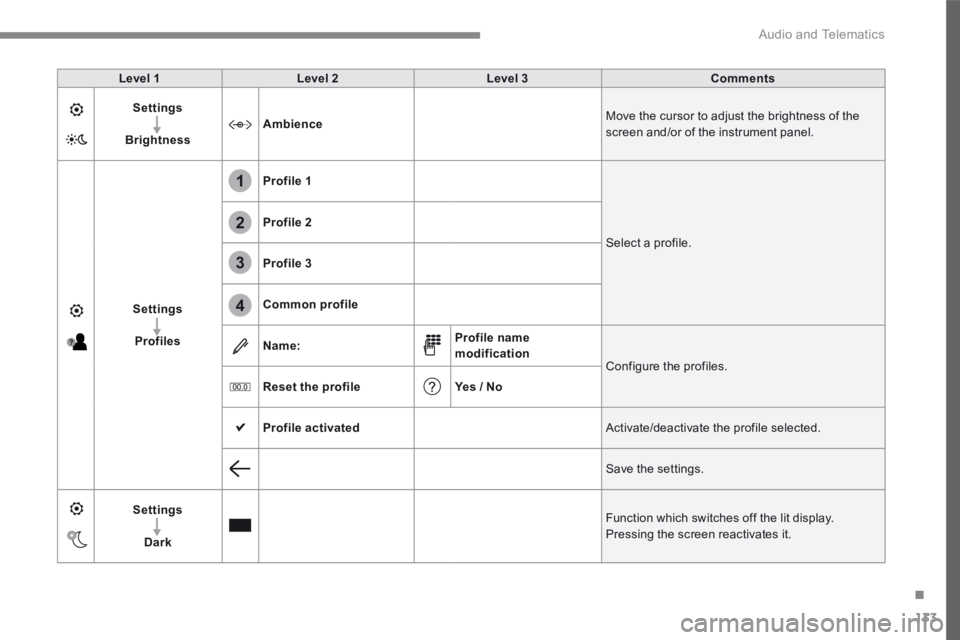
Level 1Level 2Level 3Comments
Settings
BrightnessAmbience Move the cursor to adjust the brightness of the screen and/or of the instrument panel.
Settings
Profiles
Profile 1
Select a profile.
Profile 2
Profile 3
Common profile
Name:Profile name modification Configure the profiles.
Reset the profileYes / No
Profile activated Activate/deactivate the profile selected.
Save the settings.
Settings
Dark
Function which switches off the lit display. Pressing the screen reactivates it.
Page 409 of 450
135
.
Audio and Telematics
Transversal-Citroen_en_Chap02_RCC-2-2-0_ed01-2016
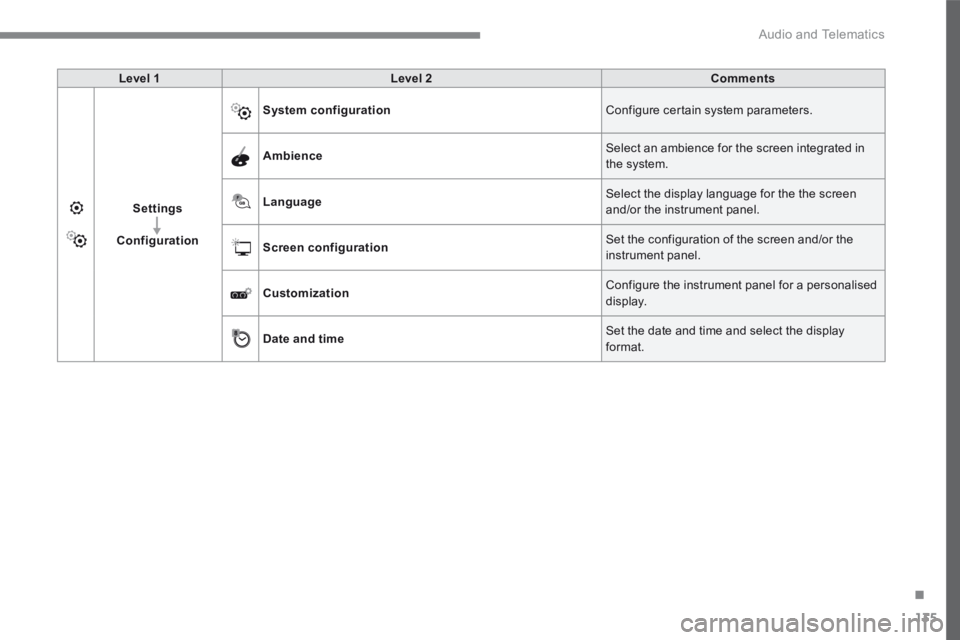
Level 1Level 2Comments
Settings
Configuration
System configuration Configure certain system parameters.
Ambience Select an ambience for the screen integrated in the system.
Language Select the display language for the the screen and/or the instrument panel.
Screen configuration Set the configuration of the screen and/or the instrument panel.
Customization Configure the instrument panel for a personalised display.
Date and time Set the date and time and select the display format.