steering CITROEN C3 2022 Owner's Guide
[x] Cancel search | Manufacturer: CITROEN, Model Year: 2022, Model line: C3, Model: CITROEN C3 2022Pages: 450, PDF Size: 10.11 MB
Page 262 of 450
260
B618_en_Chap11_index-alpha_ed01-2016
Accessories ...........................................117, 157
AdBlue® ............................... ......26, 36, 215, 216
Adjusting headlamps .................................... 11
2
Adjusting head restraints
................................ 77
A
djusting seat
................................................. 76
A
djusting the air distribution
.....................8
5, 88
Adjusting the air flow
.................................8
5, 88
Adjusting the date
..................................... 4
1, 54
Adjusting the height and reach of the steering wheel
...............................
.........82
Adjusting the temperature
........................8
5, 88
Adjusting the time
............................... 4
1, 54, 55
Advice on driving
..............................
....151, 152
Airbags
...............
............................. 29, 129, 137
Airbags, curtain
..................................... 13
2, 13 3
Airbags, front......................................... 13 0, 13 3
Airbags, lateral
...................................... 13
1, 13 3
AIRBUMP
® .................................................... 2 19
Air conditioning ............................... ............ 9, 87
Air conditioning, automatic
.......................8
4, 88
Air conditioning, manual
........................... 8
4, 86
Air intake
...............
.................................... 86, 88
Air vents
..............................
............................ 83
Alarm
............................................................... 72
A
nti-lock braking system (ABS)
....................12
3
Anti-slip regulation (ASR)
............................. 12
3
Anti-theft
..............................
.........................153
Armrest, front
............................................9
6, 98
Assistance call
...............................
....... 119, 121
Assistance, emergency braking
................... 12
3
Audio system
...............................
....................41
Auxiliary socket
............................................... 98
ABChild seats, ISOFIX .......................14 3 -145, 147
C ITROËN C onnect Box ....................... 1 19, 121
C
ITROËN
L
ocalised Emergency Call... 119, 121
Closing the boot
...............................
......... 57, 69
Closing the doors
.......................... 5
7, 60, 61, 68
Coat hanger
..............................
......................99
Configuration, vehicle
......................... 4
1, 44, 46
ConnectedCAM C
ITROËN
™
.......................19
3
Control, electric windows
................................ 74
C
ontrol, emergency boot release
...................69
C
ontrol, emergency door
................................ 64
C
ontrol, heated seats
...................................... 78
C
ontrol stalk, lighting
.............. 1
6, 105, 106, 110
Control stalk, wipers
..............................11
3 -115
Courtesy lamp
...............................
..........94, 240
Cruise control
................................ 1
70, 173, 178
Cruise control by speed limit recognition
.....17
3
Cup holder
...............................
........................96
Capacity, fuel tank
..............................
.......... 19 6
Cap, fuel filler
................................................ 19
6
Central locking
.................................... 6
0, 61, 70
Changing a bulb
........................... 2
34, 238, 240
Changing a fuse
............................ 2
41, 243, 246
Changing a wheel
...............................
. 226, 227
Changing a wiper blade
........................ 11
6 , 2 0 4
Changing the remote control battery
.............. 66
C
hecking the engine oil level
.......................... 35
C
hecking the levels
............................... 2
0 9 -212
Checking tyre pressures (using the kit)
........ 2
21
Checks
...............
................... 207, 208, 213, 214
Child lock
...............................
........................ 150
Children
...............................
... 141, 143 -145, 147
Children (safety)
...............................
............. 150
Child seats
............ 1
28, 134-136, 140, 141, 149
Child seats, conventional
...................... 14
0, 141
Child seats, i-Size
...............................
.......... 147 Date (setting)
...............................
.............. 41, 54
Daytime running lamps
.........1
06, 110, 234, 235
Deactivating the passenger airbag
....... 13
0, 137
Deadlocking
...............................
............... 57, 62
Demisting - defrosting
...............................9
2, 93
Dimensions
..............................
.....................257
Dipstick
................
....................................35, 209
Direction indicators
...... 1
08, 110, 234, 235, 238
Display screen, instrument panel
.................16
5
Doors
..............................................................
.68
Driving economically ......................................... 9
Driving time warning
..................................... 18
2
Dynamic stability control (DSC)
...... 2
2, 123, 125
C
D
Battery ................................... 203, 213, 248 -251
Battery, charging ............................... ............250
Battery, remote control
.............................6
3, 66
Blanking screen (snow shield)
......................2
01
Blind, panoramic roof
...................................... 95
B
lind spot monitoring system
........................18
4
Blind spot sensors
.................................. 18
, 18 4
BlueHDi
...............................
......32, 36, 215, 220
Bonnet
...............
............................................ 206
Boot
........
.......................................... 69, 95, 100
Brake discs
.................................................... 2
14
Brake lamps
...............................
...................238
Brakes
..................................................... 2
2, 214
Bulbs (changing)
...............................
... 234, 238
Alphabetical index
Page 265 of 450
263
B618_en_Chap11_index-alpha_ed01-2016
Safety, children .............................13 0, 13 4 -13 6,
141, 143 -145, 147
Screen, cold climate
..................................... 2
01
Screen, monochrome
..................................... 41
S
creenwash, front
......................................... 11
4
Screenwash, rear
...............................
...........114
SCR (Selective Catalytic Reduction) system
................
................................... 27, 215
Seat belts
....................................... 12
6 -128, 14 0
Seats, front
...............................
.......................76
Seats, heated
...............................
...................78
Seats, rear
....................................................... 79
Sel
ector, gear
................................................ 16
1
Serial number, vehicle
..................................25
8
Service indicator
.......................................3
2, 34
Servicing
...............................
............................ 9Tables of fuses
.............................. 2
41, 243, 246
Tank, fuel
...............................
................19 6, 198
Temperature, coolant
...................................... 31
T
hird brake lamp
...........................................23
9
Three flashes (direction indicators)
.............. 10
8
Time (setting)
..............................
........ 41, 54, 55
S
T
Settings, equipment ......................4 0, 41, 44, 46
Sidelamps .................... 1 05, 110, 234, 235, 238
Side repeater
..............................
..................237
Snow chains
..........................................1
90, 200
Socket, 12 V accessory
............................9
6, 97
Socket, auxiliary
...............................
...............98
Sockets, audio
................................................ 98
Spe
ed limiter
...............................
.. 170, 173, 175
Speed limit recognition
................................. 17
1
Stability control (ESC) ...................................123
Starting the engine
....................... 1
53, 156, 161
Starting using another battery
..............1
58, 249
Stay, bonnet
...............................
...................206
Steering wheel, adjustment
............................8
2
Stop
...............
.................................................. 20
Stopping the vehicle
..................... 1
53, 156, 161
Stop & Start
.......................... 1
8, 52, 84, 92, 167,
196, 206, 213, 251
Stop (warning lamp)
........................................ 20
St
orage
................
............................................ 97
Sun visor
...................................................9
6, 97
Switching off the engine
...............................15
3
Synchronising the remote control
...................67
R
emoving the mat
...............................
............ 99
Replacing bulbs ..............................
..... 234, 238
Replacing fuses
..............................
...... 241, 243
Replacing the air filter
................................... 2
13
Replacing the oil filter
................................... 2
13
Replacing the passenger
compartment filter
...................................... 2
13
Reservoir, screenwash
................................. 2
11
Resetting the service indicator
....................... 34
R
esetting the trip recorder
.............................. 39
R
eversing camera
...............................
.......... 189
Reversing lamp
............................................. 23
8
Roof bars
....................................................... 20
5
Running out of fuel (Diesel)
.......................... 2
20 To o l s ................
..................................... 226, 227
Total distance recorder ................................... 39
T
ouch screen.............................................44, 46
To w b a r
................
...................................152, 202
Towing another vehicle
.................................2
52
Towing eye
....................................................10
1
Traction control (ASR)
.................... 2
2, 123, 125
Tr a i l e r
...............
.....................................152, 202
Triangle, warning ................................... 101, 2 20
Trip computer
............................................5
0-52
Trip distance recorder
..................................... 39
T
y r e s
..........................................................9
, 258
Tyre under-inflation detection
...............
............... 30, 190, 192, 225
U
Under floor storage .......................................10 1
Under-inflation (detection) ............................ 19
0
Unlocking
..............................
.................... 57, 59
Unlocking from the inside
...............................70
U
pdating the date
............................................ 54
U
pdating the time
......................................5
4, 55
.
Alphabetical index
Page 275 of 450

1
.
Audio and Telematics
CITROËN Connect Nav
GPS satellite navigation - Applications - Multimedia audio - Bluetooth ® GPS satellite navigation - Applications - Multimedia audio - Bluetooth ® GPS satellite navigation - Applications - Multimedia audio - Bluetooth telephone ® telephone ®
Contents First steps 2
Steering mounted controls 5
Menus 6
Voice commands 8
Navigation 14
Connected navigation 30
Applications 40
Radio Media 54
Telephone 66
Settings 78
Frequently asked questions 88
The system is protected in such a way that it will only operate in your vehicle. Displaying of the Energy Economy Mode message signals that a change to standby is imminent.
The different functions and settings described vary according to the version and configuration of your vehicle.
The link below gives access to OSS (Open Source Software) codes for the system. http://www.psa-peugeot-citroen.com/oss
As a safety measure and because it requires sustained attention by the driver, the pairing of a Bluetooth mobile telephone with the Bluetooth hands-free system of your audio system must be done with the vehicle stationaryand the ignition on.
Page 279 of 450
5
.
Audio and Telematics
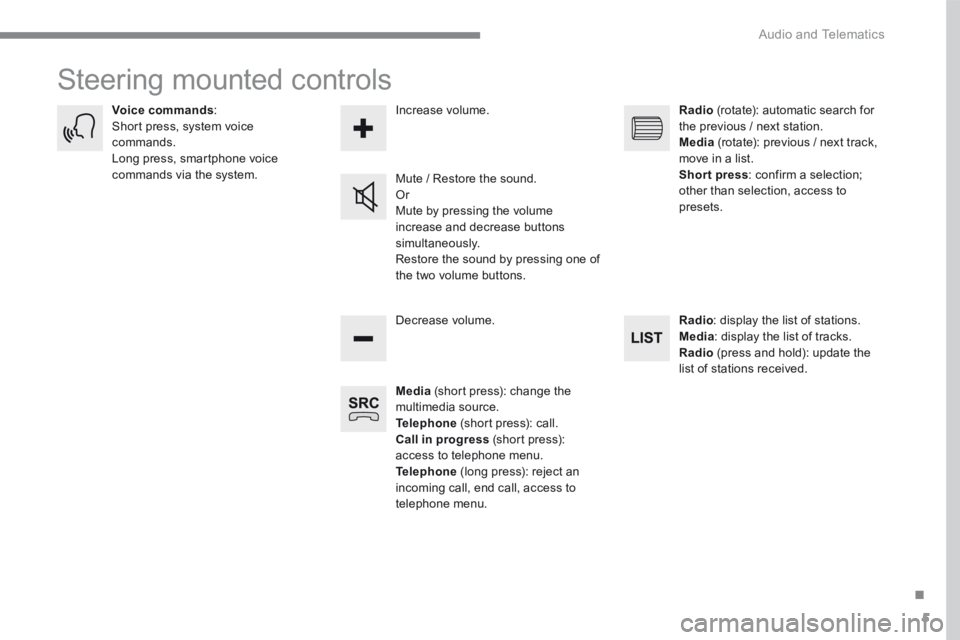
Steering mounted controls
Media (short press): change the multimedia source. Telephone (short press): call. Call in progress (short press): access to telephone menu. Telephone (long press): reject an incoming call, end call, access to telephone menu.
Decrease volume.
Voice commands : Short press, system voice commands. Long press, smartphone voice commands via the system. Mute / Restore the sound. Or Mute by pressing the volume
increase and decrease buttons simultaneously. Restore the sound by pressing one of the two volume buttons.
Radio (rotate): automatic search for the previous / next station. Media (rotate): previous / next track, move in a list. Short press : confirm a selection; other than selection, access to presets.
Radio : display the list of stations. Media : display the list of tracks. Radio (press and hold): update the list of stations received.
Increase volume.
Page 282 of 450

8
Audio and Telematics
Voice commands
First steps Steering mounted controls Information - Using the system
Press the Push To Talk button and tell me what you'd like after the tone. Remember you can interrupt me at any time by pressing this button. If you
press it again while I'm waiting for you to speak, it'll end the conversation. If you need to start over, say "cancel". If you want to undo something, say "undo". And to get information and tips at any time, just say "help". If you ask to me do something and there's some information missing that I need, I'll give you some examples or take you through it step by step. There's more information available in "novice" mode. You can set the dialogue mode to "expert" when you feel comfortable.
To ensure that voice commands are always recognised by the system, please observe the following recommendations: - speak in a normal tone without breaking up words or raising your voice. - always wait for the "beep" (audible signal) before speaking. - for best operation, it is recommended that the windows and opening roof be closed to avoid extraneous interference (according to version). - before making a voice command, ask other passengers to not speak.
The voice commands, with a choice of 12 languages (English, French, Italian, Spanish, German, Dutch, Portuguese, Polish, Turkish, Russian, Arabic, Brazilian), are made using the language previously chosen and set in the system.
The voice commands in Arabic for: "Navigate to address" and "Display POI in the city", are not available.
Alternative synonyms can be used for some voice commands. E.g. Guide to / Navigate to / Go to /...
Example of a "voice command" for navigation: "Navigate to address 11 Regent Street, London" .
Example of a "voice command" for the radio and media: "Play ar tist Madonna" .
Example of a "voice command" for the telephone: "Call David Miller" .
Pressing this button activates the voice commands function.
Page 283 of 450
9
.
Audio and Telematics
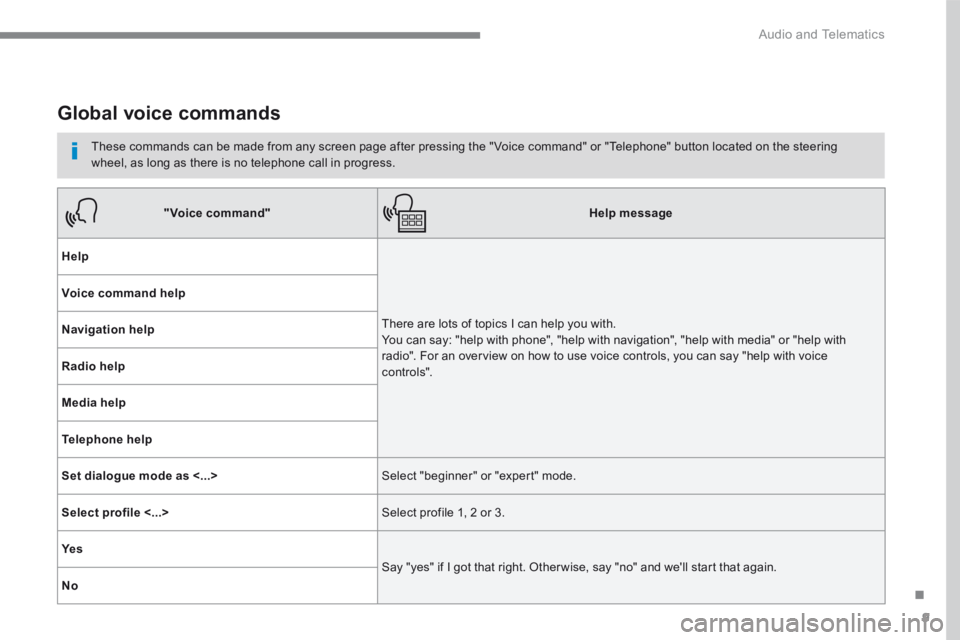
Global voice commands
These commands can be made from any screen page after pressing the " Voice command" or "Telephone" button located on the steering wheel, as long as there is no telephone call in progress.
"Voice command"Help message
Help
There are lots of topics I can help you with. You can say: "help with phone", "help with navigation", "help with media" or "help with radio". For an overview on how to use voice controls, you can say "help with voice c ont ro ls".
Voice command help
Navigation help
Radio help
Media help
Telephone help
Set dialogue mode as <...> Select "beginner" or "expert" mode.
Select profile <...> Select profile 1, 2 or 3.
Ye s
Say "yes" if I got that right. Other wise, say "no" and we'll start that again.
No
Page 284 of 450

10
Audio and Telematics
"Navigation" voice commands
These commands can be issued from any screen page after pressing the " Voice command" or "Telephone" button on the steering wheel, as long as there is no telephone call in progress.
Depending on the country, give the destination instructions (address) in the language used by the system.
"Voice command"Help message
Navigate home
To start guidance or add a stopover, say "navigate to" and then the address or contact name. For example, "navigate to address 11 Regent Street, London", or "navigate to contact, John M iller ". You can specify if it's a preferred or recent destination. For example, "navigate to preferred address, Tennis club", "navigate to recent destination, 11 Regent Street, London". Other wise, just say, "navigate home". To see points of interest on a map, you can say things like "show hotels in Banbury" or "show nearby petrol station". For more information you can ask for "help with route guidance".
Navigate to work
Navigate to preferred address <...>
Navigate to contact <…>
Navigate to address <...>
Show nearby POI <...>
Remaining distance
To get information about your current route, you can say "tell me the remaining time", "distance" or "arrival time". Try saying "help with navigation" to learn more commands.
Remaining time
Arrival time
Stop route guidance
Page 285 of 450
11
.
Audio and Telematics
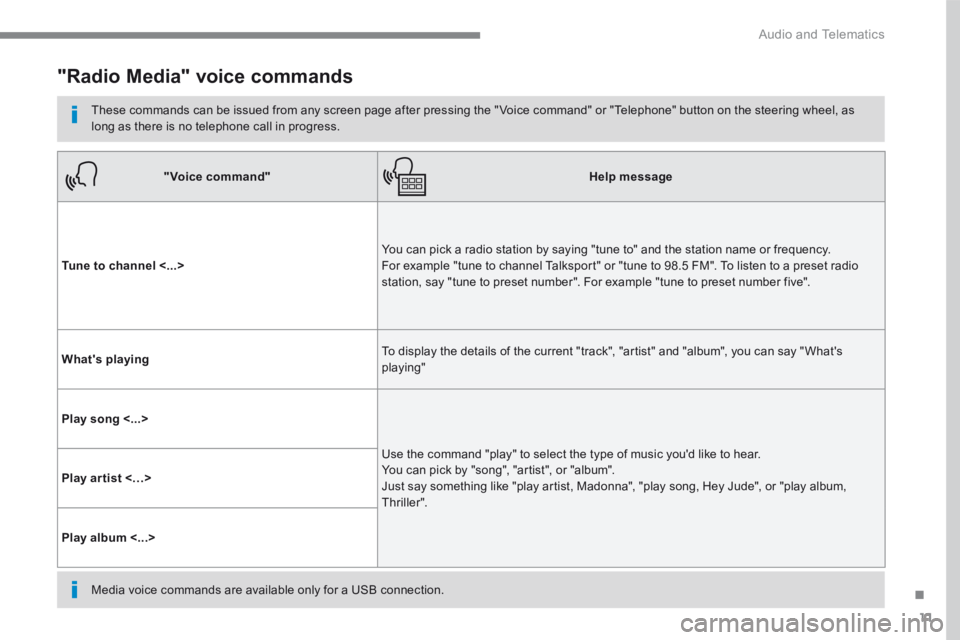
"Radio Media" voice commands
These commands can be issued from any screen page after pressing the " Voice command" or "Telephone" button on the steering wheel, as long as there is no telephone call in progress.
"Voice command"Help message
Tune to channel <...> You can pick a radio station by saying "tune to" and the station name or frequency. For example "tune to channel Talksport" or "tune to 98.5 FM". To listen to a preset radio station, say "tune to preset number". For example "tune to preset number five".
What's playing To display the details of the current "track", "artist" and "album", you can say " What's playing"
Play song <...>
Use the command "play" to select the type of music you'd like to hear. You can pick by "song", "artist", or "album". Just say something like "play artist, Madonna", "play song, Hey Jude", or "play album, T hr iller ".
Play ar tist <…>
Play album <...>
Media voice commands are available only for a USB connection.
Page 286 of 450
12
Audio and Telematics
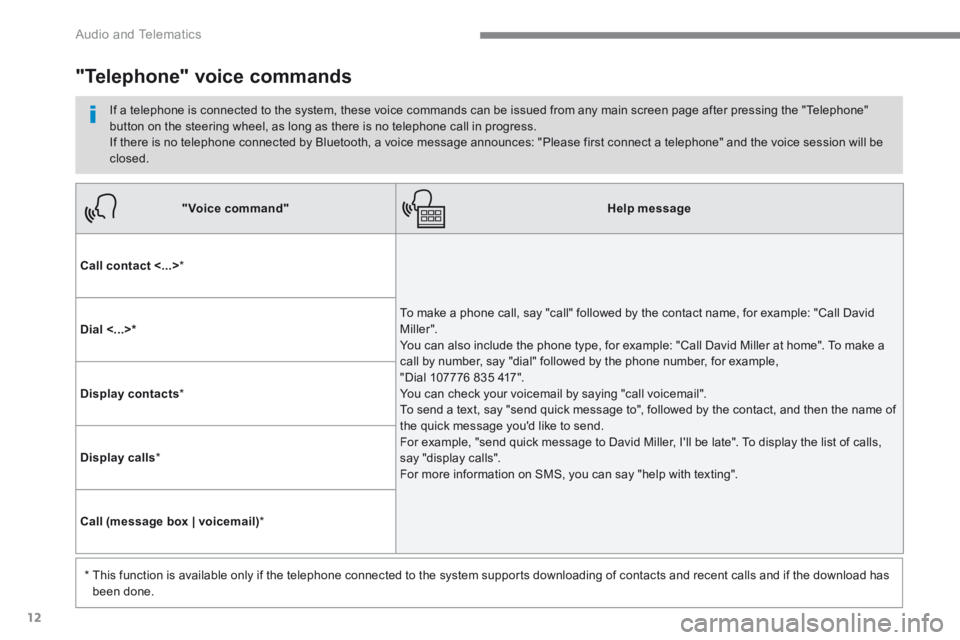
"Voice command"Help message
Call contact <...> *
To make a phone call, say "call" followed by the contact name, for example: "Call David M iller ". You can also include the phone type, for example: "Call David Miller at home". To make a call by number, say "dial" followed by the phone number, for example, "Dial 107776 835 417". You can check your voicemail by saying "call voicemail". To send a text, say "send quick message to", followed by the contact, and then the name of the quick message you'd like to send. For example, "send quick message to David Miller, I'll be late". To display the list of calls, say "display calls". For more information on SMS, you can say "help with texting".
Dial <...> *
Display contacts *
Display calls *
Call (message box | voicemail) *
* This function is available only if the telephone connected to the system supports downloading of contacts and recent calls and if the download has
been done.
"Telephone" voice commands
If a telephone is connected to the system, these voice commands can be issued from any main screen page after pressing the "Telephone" button on the steering wheel, as long as there is no telephone call in progress. If there is no telephone connected by Bluetooth, a voice message announces: "Please first connect a telephone" and the voice session will be closed.
Page 287 of 450
13
.
Audio and Telematics
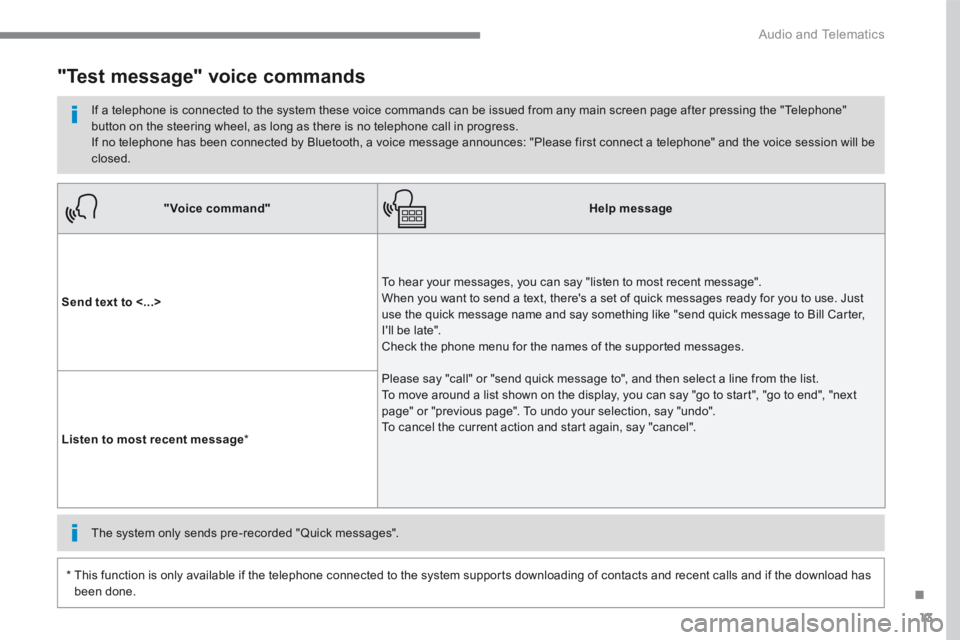
"Voice command"Help message
Send text to <...>
To hear your messages, you can say "listen to most recent message". When you want to send a text, there's a set of quick messages ready for you to use. Just use the quick message name and say something like "send quick message to Bill Carter, I'll be late". Check the phone menu for the names of the supported messages.
Please say "call" or "send quick message to", and then select a line from the list. To move around a list shown on the display, you can say "go to start", "go to end", "next page" or "previous page". To undo your selection, say "undo". To cancel the current action and start again, say "cancel". Listen to most recent message *
"Test message" voice commands
If a telephone is connected to the system these voice commands can be issued from any main screen page after pressing the "Telephone" button on the steering wheel, as long as there is no telephone call in progress. If no telephone has been connected by Bluetooth, a voice message announces: "Please first connect a telephone" and the voice session will be closed.
* This function is only available if the telephone connected to the system supports downloading of contacts and recent calls and if the download has
been done.
The system only sends pre-recorded "Quick messages".