reset CITROEN C3 AIRCROSS 2017 Owner's Manual
[x] Cancel search | Manufacturer: CITROEN, Model Year: 2017, Model line: C3 AIRCROSS, Model: CITROEN C3 AIRCROSS 2017Pages: 308, PDF Size: 9.13 MB
Page 254 of 308
2
First steps
With the engine running, a press
mutes the sound.
With the ignition off, a press turns
the system on.
Adjustment of the volume.
Use the buttons on either side of or below the
touch screen for access to the menus, then
press the virtual buttons in the touch screen.
Depending on the model, use the "Source" or
"Menu" buttons either side of the touch screen
for access to the menus, then press the virtual
buttons in the touch screen.
You can display the menu at any time by
pressing the screen briefly with three fingers.
All of the touch areas of the screen are white.
Press in the grey zone to go back a level or
confirm.
Press the back arrow to go back a level or
confirm. The touch screen is of the "capacitive"
type.
To clean the screen, use a soft, non-
abrasive cloth (e.g. spectacles cloth) with
no additional product.
Do not use sharp objects on the screen.
Do not touch the screen with wet hands.
*
D
epending on equipment.
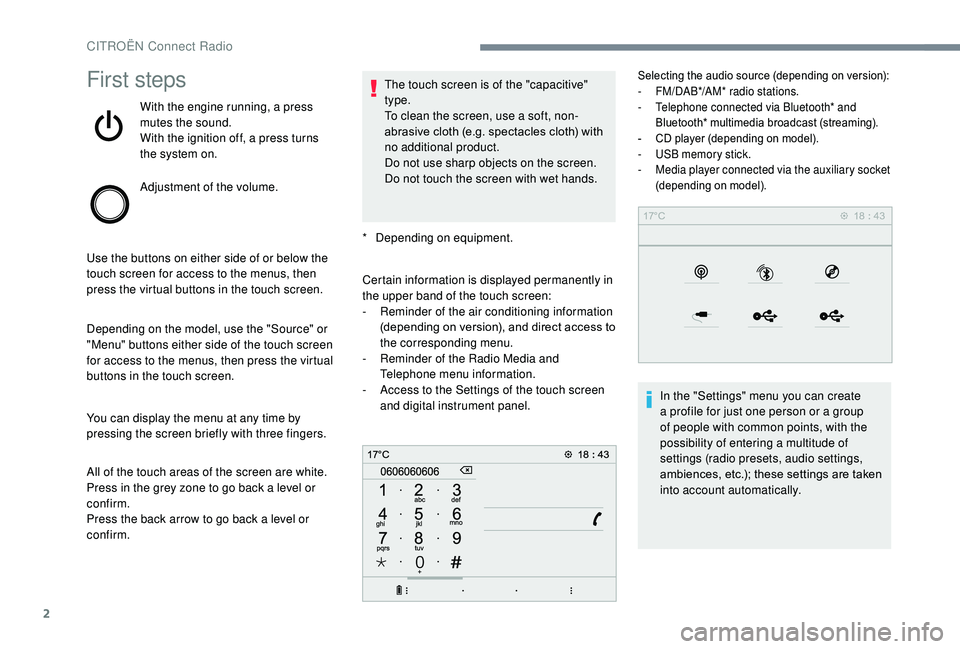
Certain information is displayed permanently in
the upper band of the touch screen:
-
R
eminder of the air conditioning information
(depending on version), and direct access to
the corresponding menu.
-
R
eminder of the Radio Media and
Telephone menu information.
-
A
ccess to the Settings of the touch screen
and digital instrument panel.
Selecting the audio source (depending on version):
- F M/DAB*/AM* radio stations.
-
T
elephone connected via Bluetooth* and
Bluetooth* multimedia broadcast (streaming).
-
C
D player (depending on model).
-
U
SB memory stick.
-
M
edia player connected via the auxiliary socket
(depending on model).
In the "Settings" menu you can create
a profile for just one person or a group
of people with common points, with the
possibility of entering a multitude of
settings (radio presets, audio settings,
ambiences, etc.); these settings are taken
into account automatically.
CITROËN Connect Radio
Page 255 of 308
3
In very hot conditions, the volume may
be limited to protect the system. It may go
into standby (screen and sound off) for at
least 5 minutes
The return to normal takes place when
the temperature in the passenger
compartment has dropped.
Steering mounted controls
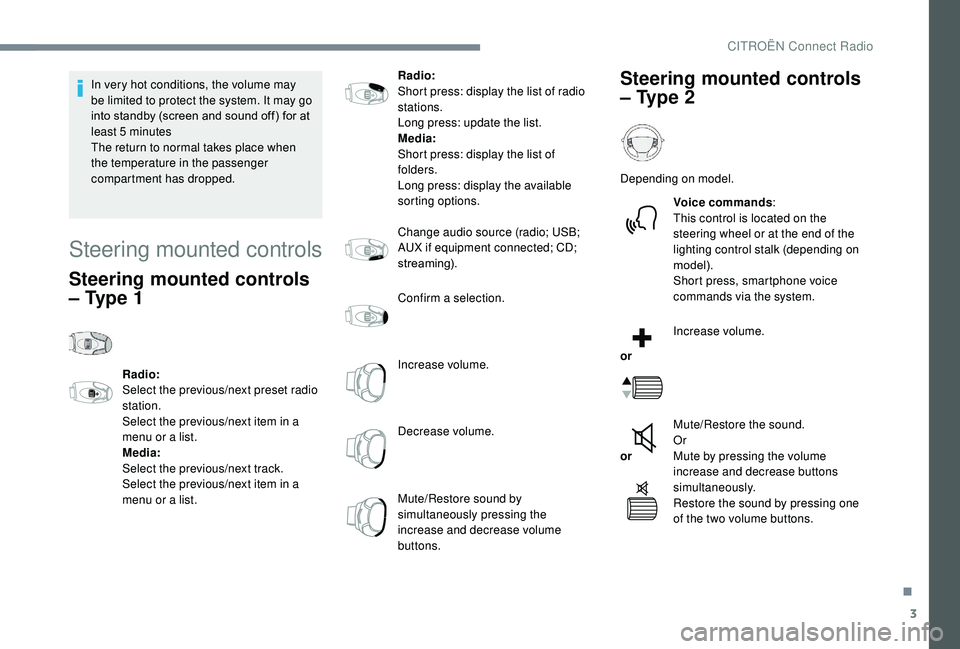
Steering mounted controls
– Type 1
Radio:
Select the previous/next preset radio
station.
Select the previous/next item in a
menu or a list.
Media:
Select the previous/next track.
Select the previous/next item in a
menu or a list. Radio:
Short press: display the list of radio
stations.
Long press: update the list.
Media:
Short press: display the list of
folders.
Long press: display the available
sorting options.
Change audio source (radio; USB;
AUX if equipment connected; CD;
streaming).
Confirm a selection.
Increase volume.
Decrease volume.
Mute/Restore sound by
simultaneously pressing the
increase and decrease volume
buttons.
Steering mounted controls
– Type 2
Depending on model.
Voice commands :
This control is located on the
steering wheel or at the end of the
lighting control stalk (depending on
model).
Short press, smartphone voice
commands via the system.
or Increase volume.
or Mute/Restore the sound.
Or
Mute by pressing the volume
increase and decrease buttons
simultaneously.
Restore the sound by pressing one
of the two volume buttons.
.
CITROËN Connect Radio
Page 256 of 308
4
21,518,5
or Decrease volume.
or Media
(short press): change the
multimedia source.
Telephone (short press): start
telephone call.
Call in progress (short press):
access telephone menu.
Telephone (long press): reject an
incoming call, end call; when no call
is in progress, access telephone
menu.
or Radio
(rotate): previous/next preset.
Media (rotate): previous/next track,
move in a list.
Short press : confirm a selection; if
nothing selected, access to presets.
Radio : display the list of stations.
Media : display the list of tracks.
Radio (press and hold): update the
list of stations received.Menus
Depending on model/Depending on version
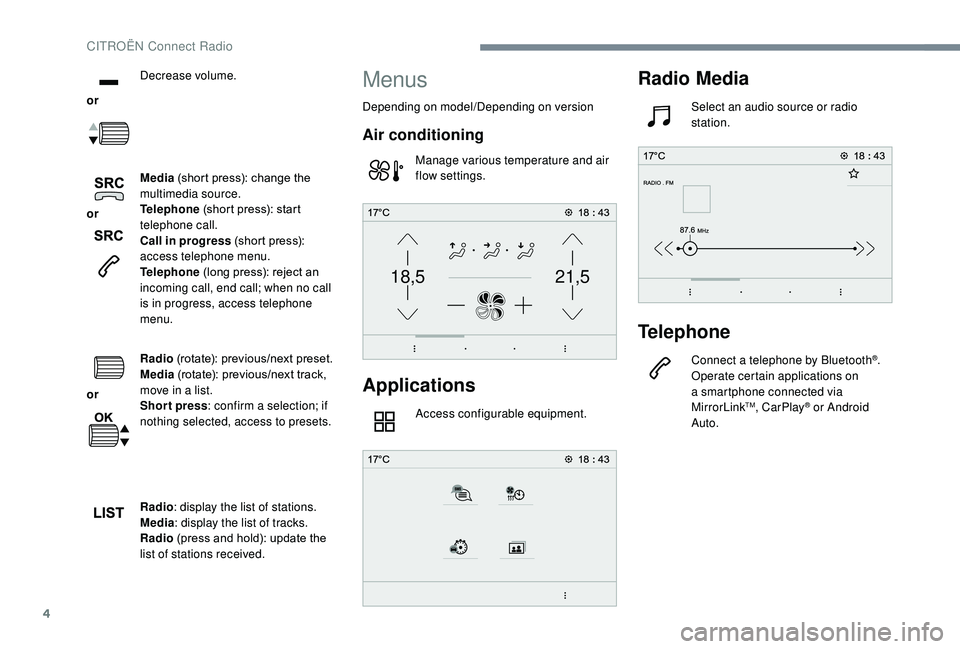
Air conditioning
Manage various temperature and air
flow settings.
Applications
Access configurable equipment.
Radio Media
Select an audio source or radio
station.
Telephone
Connect a telephone by Bluetooth®.
Operate certain applications on
a smartphone connected via
MirrorLink
TM, CarPlay® or Android
Auto.
CITROËN Connect Radio
Page 258 of 308
6
Managing messages
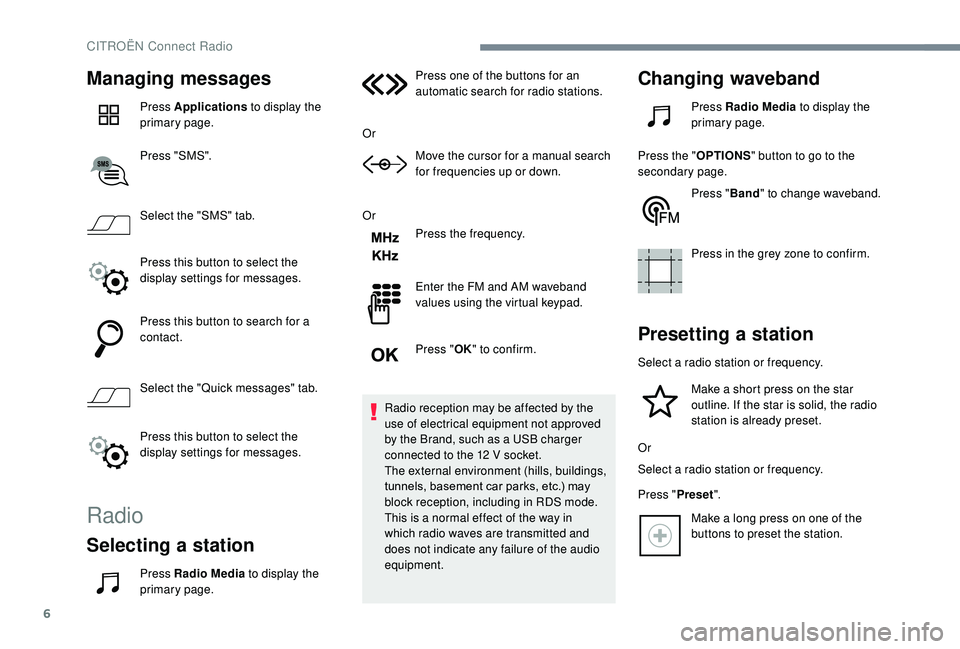
Press Applications to display the
primary page.
Press "SMS".
Select the "SMS" tab.
Press this button to select the
display settings for messages.
Press this button to search for a
contact.
Select the "Quick messages" tab.
Press this button to select the
display settings for messages.
Radio
Selecting a station
Press Radio Media to display the
primary page. Press one of the buttons for an
automatic search for radio stations.
Or Move the cursor for a manual search
for frequencies up or down.
Or Press the frequency.
Enter the FM and AM waveband
values using the virtual keypad.
Press "OK" to confirm.
Radio reception may be affected by the
use of electrical equipment not approved
by the Brand, such as a USB charger
connected to the 12 V socket.
The external environment (hills, buildings,
tunnels, basement car parks, etc.) may
block reception, including in RDS mode.
This is a normal effect of the way in
which radio waves are transmitted and
does not indicate any failure of the audio
equipment.
Changing waveband
Press Radio Media to display the
primary page.
Press the " OPTIONS" button to go to the
secondary page.
Press "Band" to change waveband.
Press in the grey zone to confirm.
Presetting a station
Select a radio station or frequency. Make a short press on the star
outline. If the star is solid, the radio
station is already preset.
Or
Select a radio station or frequency.
Press " Preset".
Make a long press on one of the
buttons to preset the station.
CITROËN Connect Radio
Page 274 of 308
22
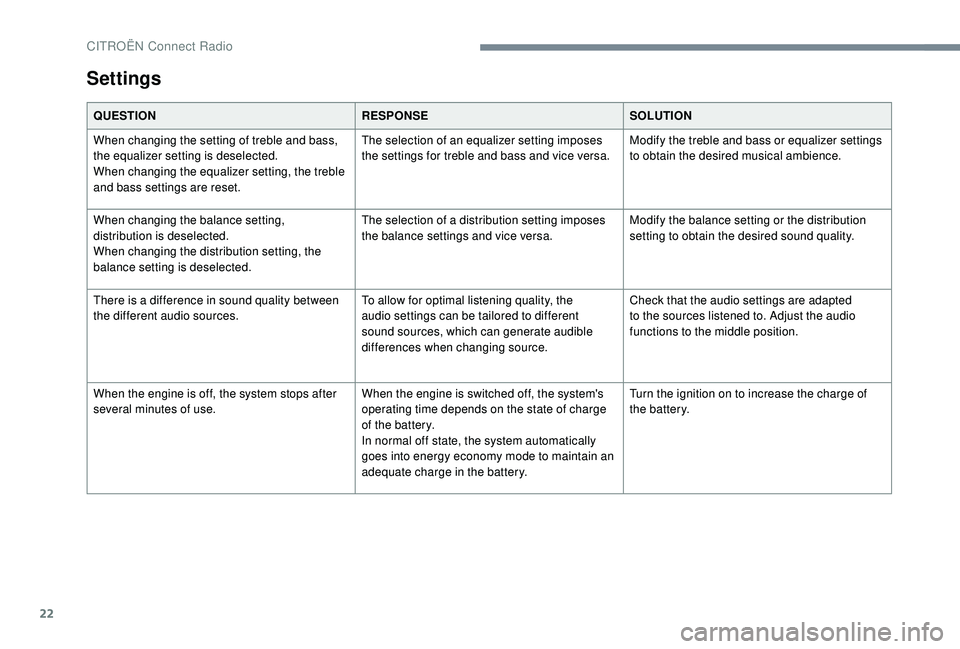
Settings
QUESTIONRESPONSESOLUTION
When changing the setting of treble and bass,
the equalizer setting is deselected.
When changing the equalizer setting, the treble
and bass settings are reset. The selection of an equalizer setting imposes
the settings for treble and bass and vice versa.
Modify the treble and bass or equalizer settings
to obtain the desired musical ambience.
When changing the balance setting,
distribution is deselected.
When changing the distribution setting, the
balance setting is deselected. The selection of a distribution setting imposes
the balance settings and vice versa.
Modify the balance setting or the distribution
setting to obtain the desired sound quality.
There is a difference in sound quality between
the different audio sources. To allow for optimal listening quality, the
audio settings can be tailored to different
sound sources, which can generate audible
differences when changing source.Check that the audio settings are adapted
to the sources listened to. Adjust the audio
functions to the middle position.
When the engine is off, the system stops after
several minutes of use. When the engine is switched off, the system's
operating time depends on the state of charge
of the battery.
In normal off state, the system automatically
goes into energy economy mode to maintain an
adequate charge in the battery.Turn the ignition on to increase the charge of
the battery.
CITROËN Connect Radio
Page 276 of 308
2
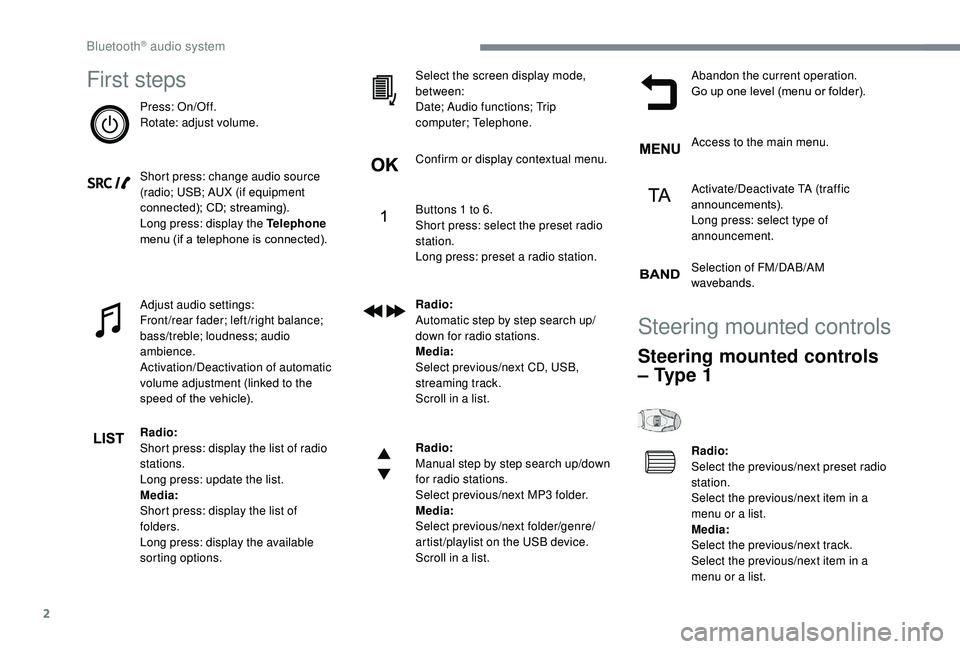
First steps
Press: On/Off.
Rotate: adjust volume.
Short press: change audio source
(radio; USB; AUX (if equipment
connected); CD; streaming).
Long press: display the Telephone
menu (if a telephone is connected).
Adjust audio settings:
Front/rear fader; left/right balance;
bass/treble; loudness; audio
ambience.
Activation/Deactivation of automatic
volume adjustment (linked to the
speed of the vehicle).
Radio:
Short press: display the list of radio
stations.
Long press: update the list.
Media:
Short press: display the list of
folders.
Long press: display the available
sorting options.Select the screen display mode,
between:
Date; Audio functions; Trip
computer; Telephone.
Confirm or display contextual menu.
Buttons 1 to 6.
Short press: select the preset radio
station.
Long press: preset a radio station.
Radio:
Automatic step by step search up/
down for radio stations.
Media:
Select previous/next CD, USB,
streaming track.
Scroll in a list.
Radio:
Manual step by step search up/down
for radio stations.
Select previous/next MP3 folder.
Media:
Select previous/next folder/genre/
artist/playlist on the USB device.
Scroll in a list.
Abandon the current operation.
Go up one level (menu or folder).
Access to the main menu.
Activate/Deactivate TA (traffic
announcements).
Long press: select type of
announcement.
Selection of FM/DAB/AM
wavebands.
Steering mounted controls
Steering mounted controls
– Type 1
Radio:
Select the previous/next preset radio
station.
Select the previous/next item in a
menu or a list.
Media:
Select the previous/next track.
Select the previous/next item in a
menu or a list.
Bluetooth® audio system
Page 278 of 308
4
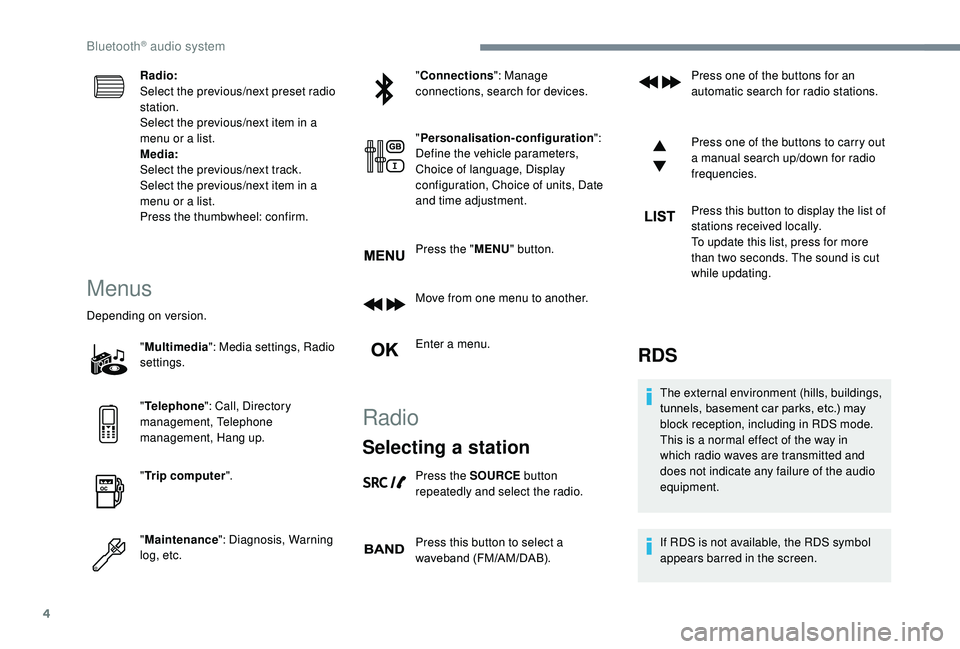
Radio:
Select the previous/next preset radio
station.
Select the previous/next item in a
menu or a list.
Media:
Select the previous/next track.
Select the previous/next item in a
menu or a list.
Press the thumbwheel: confirm.
Menus
Depending on version."Multimedia ": Media settings, Radio
settings.
" Telephone ": Call, Directory
management, Telephone
management, Hang up.
" Trip computer ".
" Maintenance ": Diagnosis, Warning
log, etc. "
Connections ": Manage
connections, search for devices.
" Personalisation-configuration ":
Define the vehicle parameters,
Choice of language, Display
configuration, Choice of units, Date
and time adjustment.
Press the " MENU" button.
Move from one menu to another.
Enter a menu.
Radio
Selecting a station
Press the SOURCE button
repeatedly and select the radio.
Press this button to select a
waveband (FM/AM/DAB). Press one of the buttons for an
automatic search for radio stations.
Press one of the buttons to carry out
a manual search up/down for radio
frequencies.
Press this button to display the list of
stations received locally.
To update this list, press for more
than two seconds. The sound is cut
while updating.
RDS
The external environment (hills, buildings,
tunnels, basement car parks, etc.) may
block reception, including in RDS mode.
This is a normal effect of the way in
which radio waves are transmitted and
does not indicate any failure of the audio
equipment.
If RDS is not available, the RDS symbol
appears barred in the screen.
Bluetooth® audio system
Page 280 of 308
6
When the radio station is displayed
in the screen, press OK to display
the contextual menu.
Select " RadioText (TXT) display "
and confirm OK to save.
DAB (Digital Audio
Broadcasting) radio
Depending on version
If the current DAB radio station is not
available on FM, "DAB FM" is struck out. When changing region, an update of the
list of preset radio stations is advisable.
Display of the list of all radio stations
and "multiplexes".
Terrestrial digital radio
Digital radio provides a superior audio
quality and also additional categories of
traffic announcements (TA INFO).
The different "multiplex ser vices" offer a
choice of radio stations in alphabetical
o r d e r.Change of band (FM1, FM2, DAB,
e t c .)
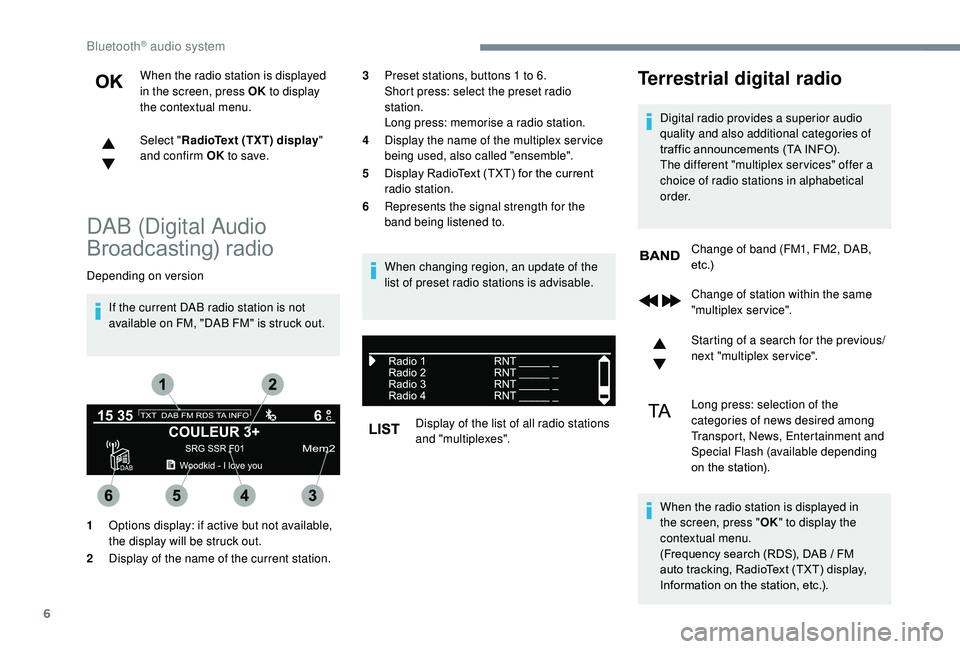
1 Options display: if active but not available,
the display will be struck out.
2 Display of the name of the current station. 3
Preset stations, buttons 1 to 6.
Short press: select the preset radio
station.
Long press: memorise a radio station.
4 Display the name of the multiplex ser vice
being used, also called "ensemble".
5 Display RadioText (TXT) for the current
radio station.
6 Represents the signal strength for the
band being listened to.
Change of station within the same
"multiplex service".
Starting of a search for the previous/
next "multiplex service".
Long press: selection of the
categories of news desired among
Transport, News, Entertainment and
Special Flash (available depending
on the station).
When the radio station is displayed in
the screen, press " OK" to display the
contextual menu.
(Frequency search (RDS), DAB
/ FM
auto tracking, RadioText (TXT) display,
Information on the station, etc.).
Bluetooth® audio system
Page 290 of 308
16
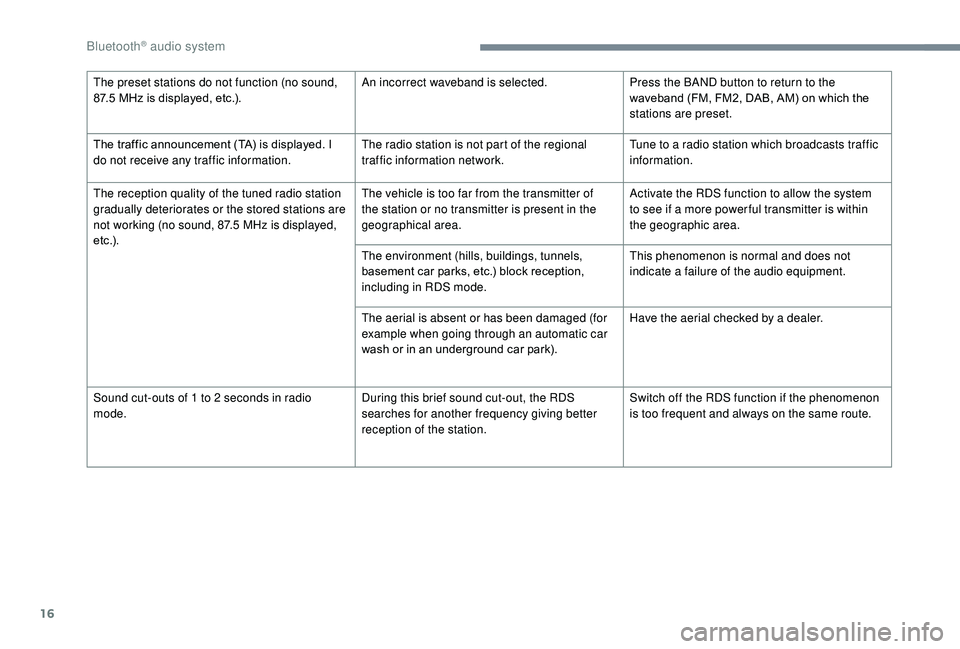
The preset stations do not function (no sound,
87.5 MHz is displayed, etc.). An incorrect waveband is selected.
Press the BAND button to return to the
waveband (FM, FM2, DAB, AM) on which the
stations are preset.
The traffic announcement (TA) is displayed. I
do not receive any traffic information. The radio station is not part of the regional
traffic information network.Tune to a radio station which broadcasts traffic
information.
The reception quality of the tuned radio station
gradually deteriorates or the stored stations are
not working (no sound, 87.5
MHz is displayed,
e t c .) . The vehicle is too far from the transmitter of
the station or no transmitter is present in the
geographical area.
Activate the RDS function to allow the system
to see if a more power ful transmitter is within
the geographic area.
The environment (hills, buildings, tunnels,
basement car parks, etc.) block reception,
including in RDS mode. This phenomenon is normal and does not
indicate a failure of the audio equipment.
The aerial is absent or has been damaged (for
example when going through an automatic car
wash or in an underground car park). Have the aerial checked by a dealer.
Sound cut-outs of 1 to 2
seconds in radio
mode. During this brief sound cut-out, the RDS
searches for another frequency giving better
reception of the station.Switch off the RDS function if the phenomenon
is too frequent and always on the same route.
Bluetooth® audio system
Page 296 of 308
216
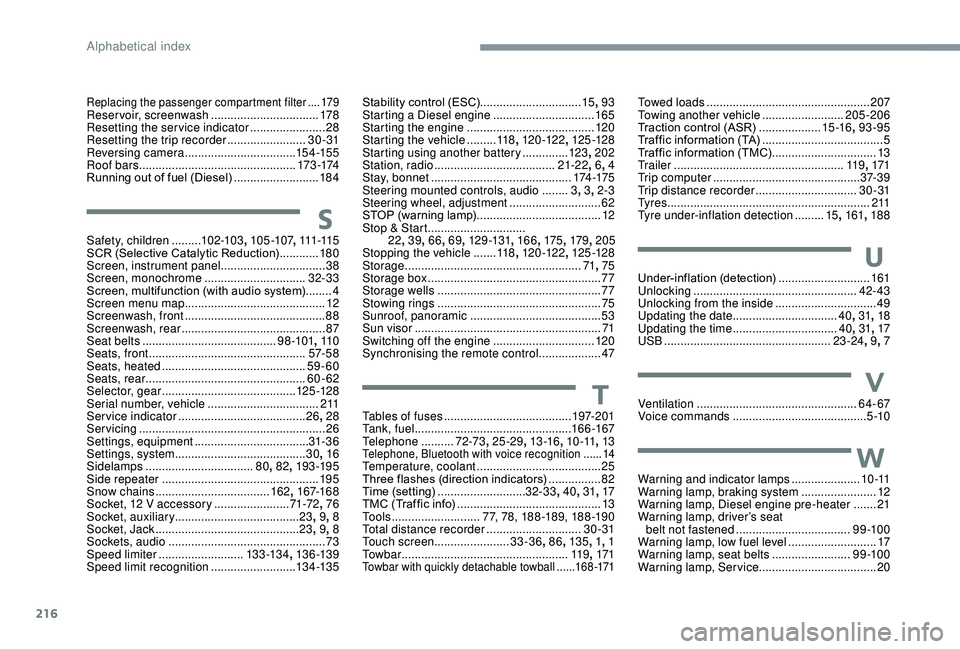
Replacing the passenger compartment filter ....179Reservoir, screenwash .................................178
Resetting the service indicator .......................28
Resetting the trip recorder
........................3 0 - 31
Reversing camera
...............................
...15 4 -15 5
Roof bars
................................................ 173 -174
Running out of fuel (Diesel)
..........................18 4
SSafety, children .........102-103 , 105 -107 , 111 -115
SCR (Selective Catalytic Reduction) ............18 0
Screen, instrument panel
................................38
Screen, monochrome
...............................32-33
Screen, multifunction (with audio system)
........4
Screen menu map
........................................... 12
Screenwash, front
........................................... 88
Screenwash, rear
............................................ 87
Seat belts
......................................... 9 8 -101, 11 0
Seats, front
...............................
.................57- 5 8
Seats, heated
............................................ 59-60
Seats, rear
................................................. 60-62
Selector, gear
......................................... 125 -128
Serial number, vehicle
..................................2 11
Service indicator
....................................... 26, 28
Servicing
......................................................... 26
S
ettings, equipment
................................... 31- 3 6
Settings, system
........................................ 30, 16
Sidelamps
................................. 80,
82, 193 -195
Side repeater
................................................ 195
Snow chains
................................... 162, 167-168
Socket, 12
V accessory .......................71-72, 76
Socket, auxiliary
...................................... 23,
9, 8
Socket, Jack
............................................ 23, 9, 8
Sockets, audio
................................................ 73
Spe
ed limiter
.......................... 13
3 -13 4, 13 6 -13 9
Speed limit recognition
.......................... 13
4 -13 5
Stability control (ESC)...............................15, 93
Starting a Diesel engine ............................... 16
5
Starting the engine
....................................... 12
0
Starting the vehicle
......... 11
8, 120 -12 2 , 125 -128
Starting using another battery
..............123, 202
Station, radio
...............................
......21-22 , 6, 4
Stay, bonnet
........................................... 174 -175
Steering mounted controls, audio
........ 3,
3, 2-3
Steering wheel, adjustment
............................ 62
S
TOP (warning lamp)
...................................... 12
St
op & Start
..............................
22 , 39 , 66 , 69, 12 9 -131 , 166, 175, 179 , 205
Stopping the vehicle
.......11 8, 120 -12 2 , 125 -128
Storage
...................................................... 71, 75
Storage box
..................................................... 77
Storage wells
.................................................. 77
Stowing rings
.................................................. 75
Sunroof, panoramic
........................................ 53
S
un visor
...............................
..........................71
Switching off the engine
...............................120
Synchronising the remote control
...................47
TTables of fuses ....................................... 1 97-2 01
Ta n k , f u e l ................................................ 166 -167
Telephone
.......... 7
2-73, 25 -29 , 13 -16, 1 0 -11, 13
Telephone, Bluetooth with voice recognition ......14Temperature, coolant ...................................... 25
Three flashes (direction indicators) ................8
2
Time (setting)
........................... 32-33, 40, 31, 17
TMC (Traffic info)
............................................ 13
T
o o l s
........................... 77, 78, 188 -189, 188 -19 0
Total distance recorder
.............................3 0 - 31
Touch screen ....................... 33-36, 86, 13 5 , 1, 1
To w b a r
...............................
....................11 9, 171
Towbar with quickly detachable towball ...... 1 6 8 -171
Towed loads .................................................. 207
Towing another vehicle .........................205-206
Traction control (ASR)
...................15 -16, 93-95
Traffic information (TA)
.....................................5
Traffic information (TMC)
................................13
Tr a i l e r
...............
..................................... 11 9, 171
Trip computer
............................................. 37- 3 9
Trip distance recorder
............................... 3
0 - 31
Ty r e s
.............................................................. 2 11
Tyre under-inflation detection
.........15, 161 , 188
UUnder-inflation (detection) ............................161
Unlocking .................................................. 42- 43
Unlocking from the inside
...............................49
Updating the date
................................ 40,
31, 18
Updating the time
...............................
.40 , 31 , 17
USB
................................................... 23 -24, 9, 7
VVentilation ................................................. 64- 67
Voice commands ......................................... 5 -10
WWarning and indicator lamps .....................1 0 -11
Warning lamp, braking system .......................12
Warning lamp, Diesel engine pre-heater
.......21
Warning lamp, driver’s seat belt not fastened
...............................
....9 9 -10 0
Warning lamp, low fuel level
...........................17
Warning lamp, seat belts
........................9 9 -10 0
Warning lamp, Service ....................................20
Alphabetical index