ad blue CITROEN C3 AIRCROSS 2018 Owner's Manual
[x] Cancel search | Manufacturer: CITROEN, Model Year: 2018, Model line: C3 AIRCROSS, Model: CITROEN C3 AIRCROSS 2018Pages: 308, PDF Size: 9.13 MB
Page 182 of 308
180
Automatic gearbox
The gearbox does not require any
maintenance (no oil change).
Brake pads
Brake wear depends on the style
of driving, particularly in the case
of vehicles used in town, over short
distances. It may be necessary to
have the condition of the brakes
checked, even between vehicle
services.
Unless there is a leak in the circuit, a drop in
the brake fluid level indicates that the brake
pads are worn.
Brake disc wear
For information on checking brake
disc wear, contact a CITROËN or a
qualified workshop.
Parking brake
If excessive travel or a loss of
effectiveness of this system is
noticed, the parking brake must
be checked, even between two
services.
Checking this system must be done by a
CITROËN dealer or a qualified workshop.
Only use products recommended by
CITROËN or products of equivalent quality
and specification.
In order to optimise the operation of
components as important as those in the
braking system, CITROËN selects and
offers very specific products.
After washing the vehicle, dampness, or
in wintry conditions, ice can form on the
brake discs and pads: braking efficiency
may be reduced. Make light brake
applications to dry and defrost the brakes.
AdBlue® (BlueHDi
engines)
SCR system
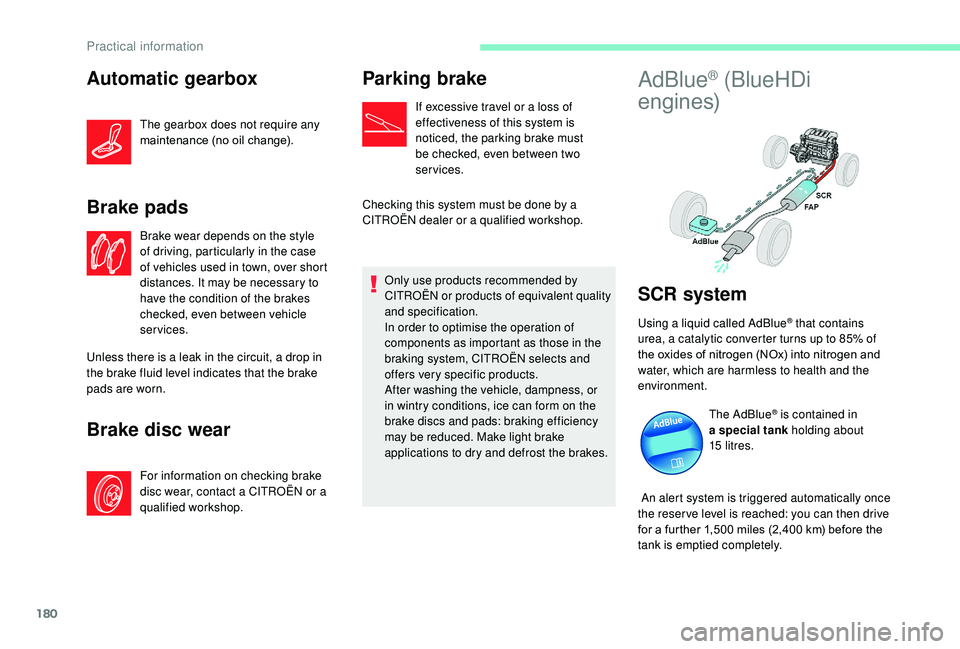
Using a liquid called AdBlue® that contains
urea, a catalytic converter turns up to 85% of
the oxides of nitrogen (NOx) into nitrogen and
water, which are harmless to health and the
environment.
The AdBlue
® is contained in
a special tank holding about
15
litres.
An alert system is triggered automatically once
the reser ve level is reached: you can then drive
for a further 1,500
miles (2,400 km) before the
tank is emptied completely.
Practical information
Page 183 of 308
181
During each scheduled ser vice of your vehicle
by a CITROËN dealer or a qualified workshop,
the AdBlue
® tank is refilled in order to allow
normal operation of the SCR system.
If the estimated mileage of your vehicle
between two ser vices is greater than around
12,000
miles (20,000 km), it will be necessary
to top up the AdBlue
®.
Once the AdBlue
® tank is empty, a system
r
equired by regulations prevents starting
of the engine.
If the SCR
system is faulty, the level of
emissions from your vehicle will no longer
meet the Euro 6 standard: your vehicle
becomes polluting.
In the event of a confirmed fault with the
SCR system, you must go to a CITROËN
dealer or a qualified workshop as soon
as possible: after a running distance of
680
miles (1,100
km), a system will be
triggered automatically to prevent engine
starting.
In either case, a range indicator gives you
the distance you can travel before the
vehicle is immobilised.
For more information on the Warning
and indicator lamps and the associated
alerts, refer to the corresponding section. Freezing of AdBlue
®
AdBlue® freezes at temperatures below
around -11°C.
The SCR system includes a heater for the
AdBlue
® tank, allowing you to continue
driving in all weather conditions.
Topping up with AdBlue®
Before topping up, please read the
following warnings carefully.
Precautions for use
The AdBlue® solution is based on urea. This
liquid is non-flammable, colourless and
odourless (when kept in a cool place).
In the event of contact with the skin, wash the
affected area with soap and water. In the event
of contact with the eyes, wash (irrigate) the
eyes with large amounts of water or with an eye
wash solution for at least 15
minutes. If you feel
a persistent burning sensation or irritation, get
medical attention.
If swallowed, immediately wash out the mouth
with clean water and then drink plenty of water. Keep AdBlue
® out of the reach of children,
in its original container.
Never transfer AdBlue
® to another
container: it would become contaminated.
Use only AdBlue
® fluid that meets the
ISO
22241 standard.
Never dilute AdBlue
® with water.
Never pour AdBlue® into the Diesel fuel
tank.
Containers are available from a
CITROËN
dealer or a qualified workshop.
In certain conditions (at high temperature,
for example), the risk of release of ammonia
cannot be excluded: do not inhale the vapour.
Ammonia has an irritant effect on mucous
membranes (eyes, nose and throat).
You can also visit a ser vice station
equipped with AdBlue pumps specially
designed for private vehicles and light
goods vehicles.
7
Practical information
Page 184 of 308
182
Recommendations on storage
AdBlue® freezes at about -11°C and
deteriorates above 25°C. It should be stored in
a cool place and protected from direct sunlight.
Under these conditions, the fluid can be kept
for at least a year.
If the fluid has frozen, it can be used once
it has completely thawed out at ambient
temperature.
Never keep AdBlue
® containers in your
vehicle.
Procedure
In cold weather, before per forming the top-up,
ensure that the temperature is above -11°C.
Otherwise the AdBlue
® may be frozen and so
cannot be poured into the tank.
Park your vehicle in a warmer area for a few
hours to allow the top-up to be carried out. F
S
witch off the ignition and remove the key to
switch off the engine.
or
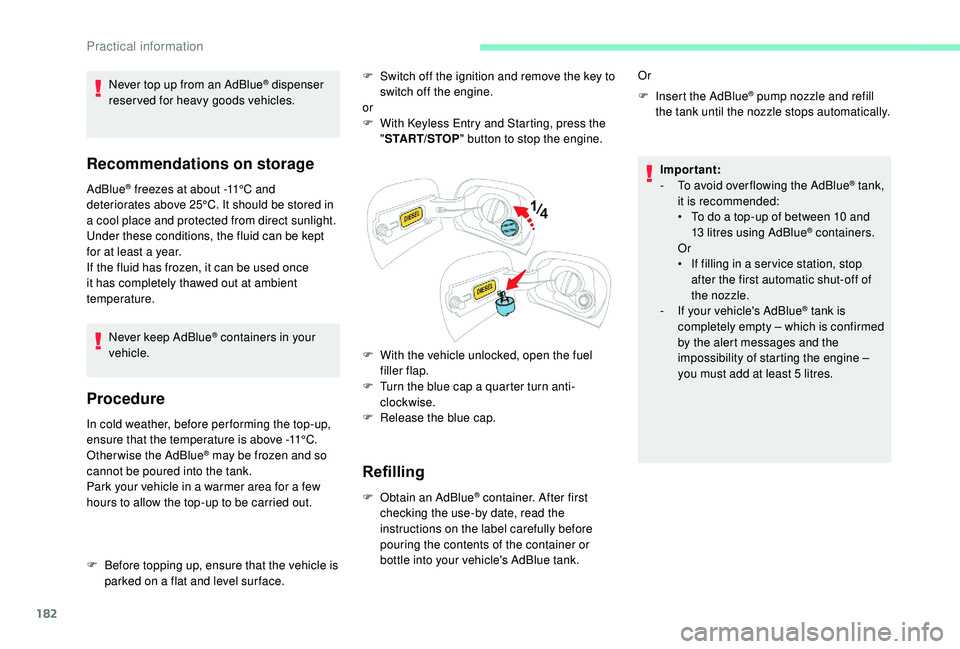
F
W
ith
K
eyless Entry and Starting, press the
" START/STOP " button to stop the engine.
F
W
ith the vehicle unlocked, open the fuel
filler flap.
F
T
urn the blue cap a quarter turn anti-
clockwise.
F
R
elease the blue cap.
Refilling
F Obtain an AdBlue® container. After first
checking the use-by date, read the
instructions on the label carefully before
pouring the contents of the container or
bottle into your vehicle's AdBlue tank. F
I
nsert the AdBlue
® pump nozzle and refill
the tank until the nozzle stops automatically.
Or
Important:
-
T
o avoid over flowing the AdBlue
® tank,
i
t is recommended:
•
T
o do a top-up of between 10 and
13
litres using AdBlue
® containers.
Or
•
I
f filling in a ser vice station, stop
after the first automatic shut-off of
the nozzle.
-
I
f your vehicle's AdBlue
® tank is
completely empty – which is confirmed
by the alert messages and the
impossibility of starting the engine –
you must add at least 5
litres.
Never top up from an AdBlue
® dispenser
reserved for heavy goods vehicles.
F
B
efore topping up, ensure that the vehicle is
parked on a flat and level sur face.
Practical information
Page 185 of 308
183
After refilling
F Per form the operations in reverse order.
Important: in the event of a top-up after a
breakdown because of a lack of AdBlue,
you must wait around 5 minutes before
switching on the ignition, without opening
the driver’s door, unlocking the vehicle,
introducing the key into the ignition
switch, or introducing the key of the
K
eyless Entr y and Star ting system into
the passenger compartment.
Switch on the ignition, then wait for
10
seconds before starting the engine.
7
Practical information
Page 186 of 308
184
Running out of fuel
(Diesel)
On vehicles fitted with Diesel engines, the fuel
system must be primed if you run out of fuel.
If the engine does not start first time, do not
keep trying but start the procedure again from
the beginning.For more information on Misfuel
prevention (Diesel) , refer to the
corresponding section.
BlueHDi engines
F Fill the fuel tank with at least five litres of Diesel fuel.
F
S
witch on the ignition (without starting the
engine).
F
W
ait around 6 seconds and switch off the
ignition.
F
R
epeat the operation 10 times.
F
O
perate the starter to run the engine.
Other HDi engines
(Except BlueHDi version)
F
F
ill the fuel tank with at least five litres of
Diesel fuel. F
O
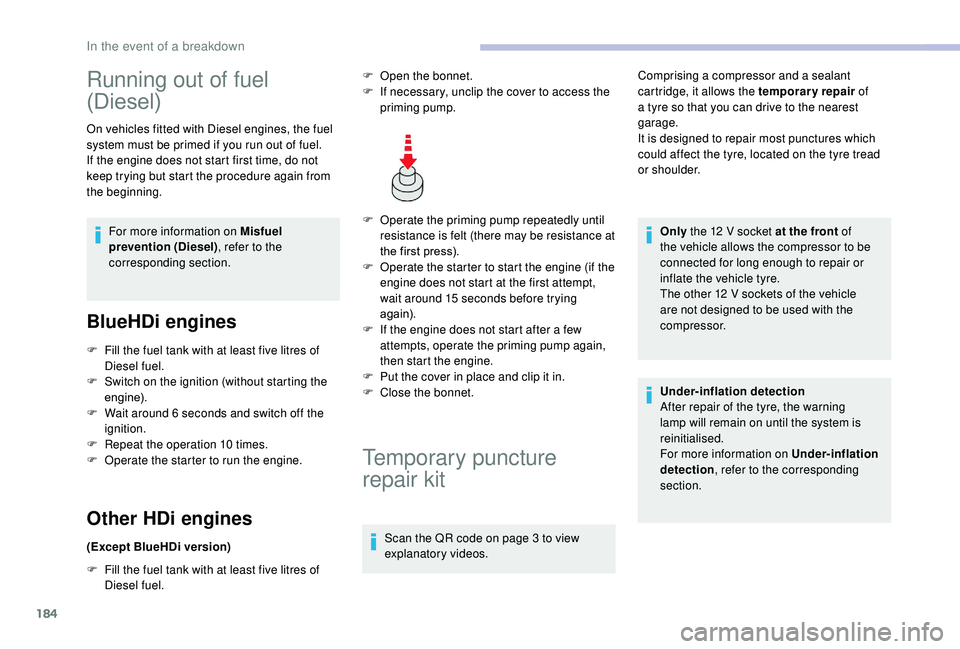
perate the priming pump repeatedly until
resistance is felt (there may be resistance at
the first press).
F
O
perate the starter to start the engine (if the
engine does not start at the first attempt,
wait around 15 seconds before trying
again).
F
I
f the engine does not start after a few
attempts, operate the priming pump again,
then start the engine.
F
P
ut the cover in place and clip it in.
F
C
lose the bonnet.
Temporary puncture
repair kit
Scan the QR code on page 3 to view
explanatory videos.Comprising a compressor and a sealant
cartridge, it allows the temporary repair
of
a tyre so that you can drive to the nearest
garage.
It is designed to repair most punctures which
could affect the tyre, located on the tyre tread
or shoulder.
Only the 12 V socket at the front of
the vehicle allows the compressor to be
connected for long enough to repair or
inflate the vehicle tyre.
The other 12 V sockets of the vehicle
are not designed to be used with the
compressor.
Under-inflation detection
After repair of the tyre, the warning
lamp will remain on until the system is
reinitialised.
For more information on Under-inflation
detection , refer to the corresponding
section.
F
O
pen the bonnet.
F
I
f necessary, unclip the cover to access the
priming pump.
In the event of a breakdown
Page 211 of 308
209
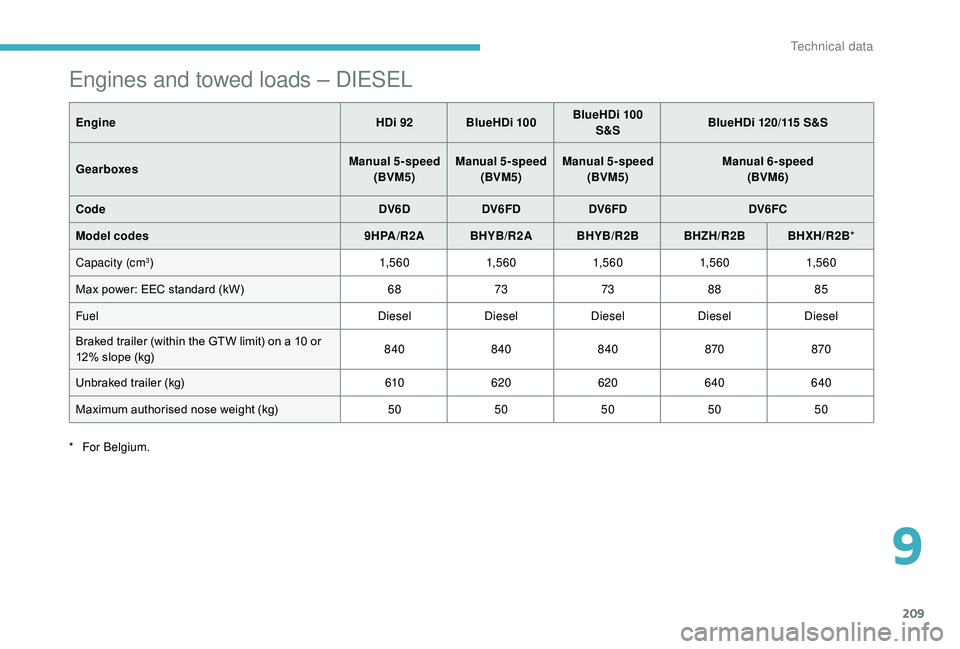
Engines and towed loads – DIESEL
EngineHDi 92 BlueHDi 100BlueHDi 100
S&S BlueHDi 120/115 S&S
Gearboxes Manual 5-speed
(BVM5) Manual 5-speed
(BVM5) Manual 5-speed
(BVM5) Manual 6-speed
(BVM6)
Code DV6DDV6FD DV6FD DV6FC
Model codes 9HPA/R2A BHYB/R2A BHYB/R2B BHZH/R2BBHXH/R2B*
Capacity (cm
3) 1,5 6 01,5 6 01,5 6 01,5 6 01,5 6 0
Max power: EEC standard (kW) 68737388 85
Fuel DieselDieselDieselDieselDiesel
Braked trailer (within the GTW limit) on a 10 or
12% slope (kg) 840
840840 870870
Unbraked trailer (kg) 610620 620640 640
Maximum authorised nose weight (kg) 5050505050
*
F
or Belgium.
9
Technical data
Page 215 of 308
1
CITROËN Connect Nav
GPS satellite navigation –
Applications – Multimedia
audio system – Bluetooth
®
telephone
Contents
First steps
2
S
teering mounted controls
3
M
enus
3
V
oice commands
5
N
avigation
11
Connected navigation
1
3
Applications
16
Radio
21
DAB radio (Digital Audio Broadcasting)
2
2
Media
23
Telephone
25
Settings
29
Frequently asked questions
3
2The different functions and settings
described vary according to the version
and configuration of your vehicle.
As a safety measure and because it
requires sustained attention by the
driver, the pairing of a Bluetooth mobile
telephone with the Bluetooth hands-free
system of your audio system must be
done with the vehicle stationary
and the
ignition on.
The system is protected in such a way that
it will only operate in your vehicle.
The display of the message Energy
Economy Mode signals that a change to
standby is imminent.
The link below gives access to OSS (Open
Source Software) codes for the system.
https://www.groupe-psa.com/fr/oss/
https://www.groupe-psa.com/en/oss/
.
CITROËN Connect Nav
Page 216 of 308
2
12:13
18,5 21,5
23 °CFirst steps
With the engine running, a press
mutes the sound.
With the ignition off, a press turns
the system on.
Adjustment of the volume.
Use the buttons either side of or below the
touch screen for access to the menus, then
press the virtual buttons in the touch screen.
Depending on the model, use the "Source" or
"Menu" buttons either side of the touch screen
for access to the menus, then press the virtual
buttons in the touch screen.
You can display the menu at any time by
pressing the screen briefly with three fingers.
All of the touch areas of the screen are white.
Press the cross to go back a level.
Press "OK" to confirm. The touch screen is of the "capacitive"
type.
To clean the screen, use a soft, non-
abrasive cloth (e.g. spectacles cloth) with
no additional product.
Do not use sharp objects on the screen.
Do not touch the screen with wet hands.
*
D
epending on equipment
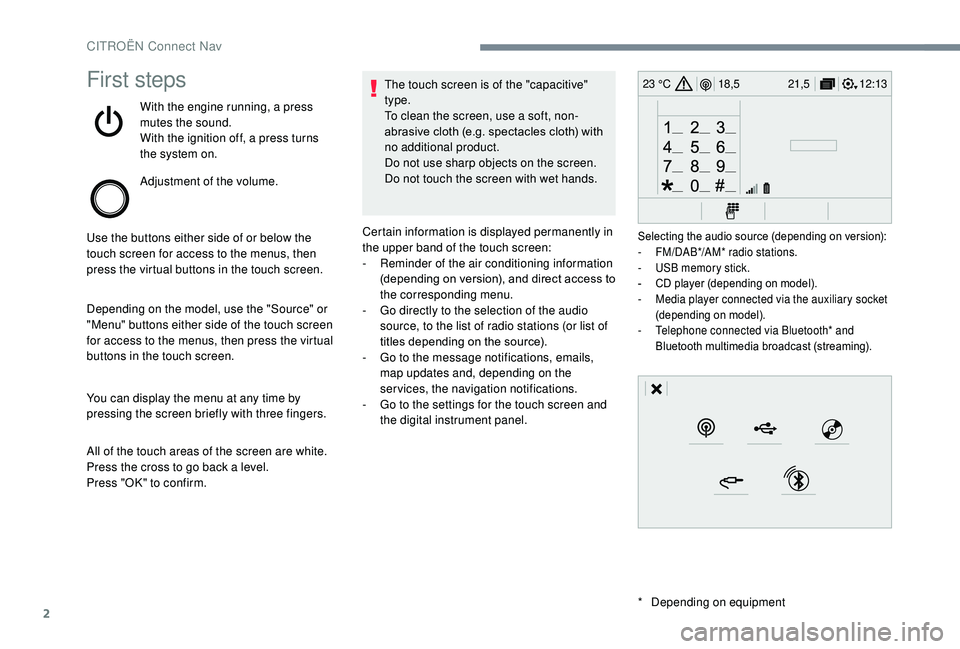
Certain information is displayed permanently in
the upper band of the touch screen:
-
R
eminder of the air conditioning information
(depending on version), and direct access to
the corresponding menu.
-
G
o directly to the selection of the audio
source, to the list of radio stations (or list of
titles depending on the source).
-
G
o to the message notifications, emails,
map updates and, depending on the
services, the navigation notifications.
-
G
o to the settings for the touch screen and
the digital instrument panel.
Selecting the audio source (depending on version):
- F M/DAB*/AM* radio stations.
-
U
SB memory stick.
-
C
D player (depending on model).
-
M
edia player connected via the auxiliary socket
(depending on model).
-
T
elephone connected via Bluetooth* and
Bluetooth multimedia broadcast (streaming).
CITROËN Connect Nav
Page 218 of 308
4
12:13
18,5 21,5
23 °C
FM/87.5 MHz
87.5MHz
12:13
18,5 21,5
23 °C
12:13
18,5 21,5
23 °C
12:13
18,5 21,5
23 °C
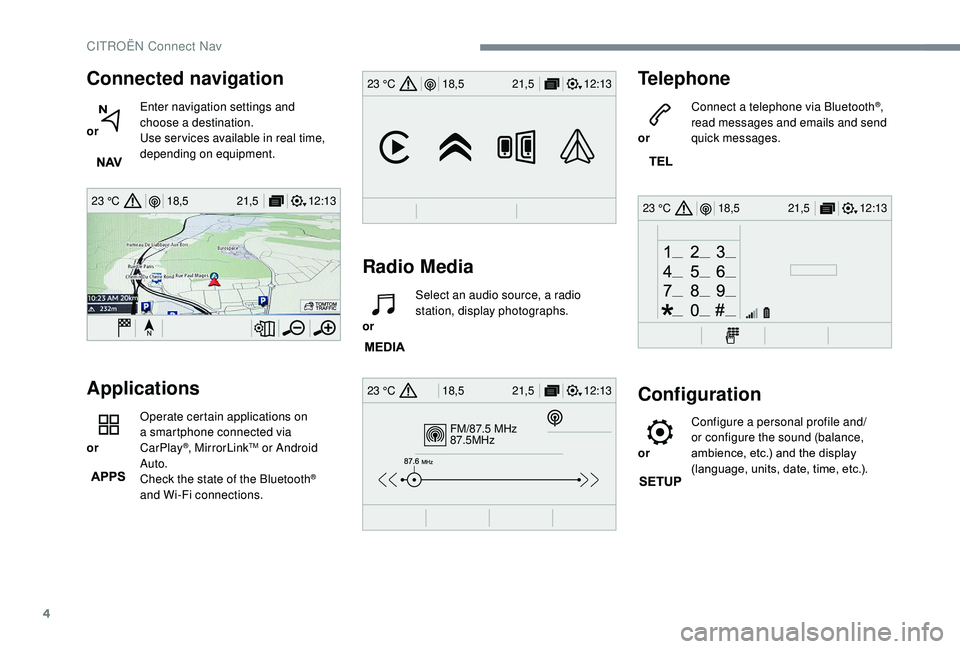
Connected navigation
or Enter navigation settings and
choose a destination.
Use ser vices available in real time,
depending on equipment.
Applications
or Operate certain applications on
a smartphone connected via
CarPlay
®, MirrorLinkTM or Android
Auto.
Check the state of the Bluetooth
®
and Wi-Fi connections.
Radio Media
or Select an audio source, a radio
station, display photographs.
Telephone
or Connect a telephone via Bluetooth®,
read messages and emails and send
quick messages.
Configuration
or Configure a personal profile and/
or configure the sound (balance,
ambience, etc.) and the display
(language, units, date, time, etc.).
CITROËN Connect Nav
Page 223 of 308
9
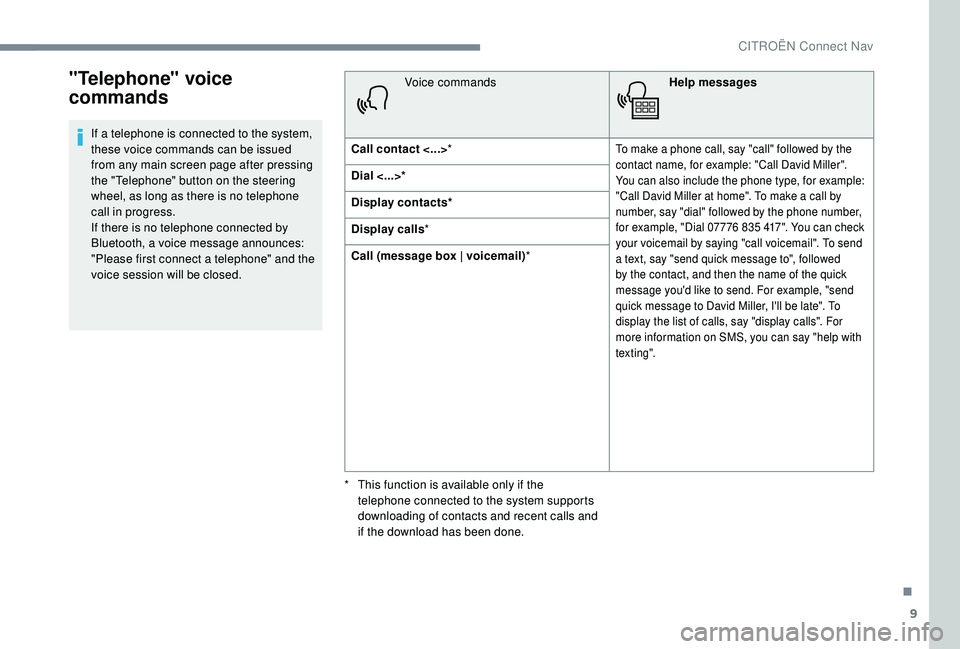
"Telephone" voice
commands
If a telephone is connected to the system,
these voice commands can be issued
from any main screen page after pressing
the "Telephone" button on the steering
wheel, as long as there is no telephone
call in progress.
If there is no telephone connected by
Bluetooth, a voice message announces:
"Please first connect a telephone" and the
voice session will be closed.Voice commands
Help messages
Call contact <...> *To make a phone call, say "call" followed by the
contact name, for example: "Call David Miller".
You can also include the phone type, for example:
"Call David Miller at home". To make a call by
number, say "dial" followed by the phone number,
for example, "Dial 07776 835 417". You can check
your voicemail by saying "call voicemail". To send
a text, say "send quick message to", followed
by the contact, and then the name of the quick
message you'd like to send. For example, "send
quick message to David Miller, I'll be late". To
display the list of calls, say "display calls". For
more information on SMS, you can say "help with
tex t ing".
Dial <...>*
Display contacts*
Display calls*
Call (message box | voicemail) *
*
T
his function is available only if the
telephone connected to the system supports
downloading of contacts and recent calls and
if the download has been done.
.
CITROËN Connect Nav