park assist CITROEN C3 AIRCROSS 2023 Owners Manual
[x] Cancel search | Manufacturer: CITROEN, Model Year: 2023, Model line: C3 AIRCROSS, Model: CITROEN C3 AIRCROSS 2023Pages: 244, PDF Size: 7.09 MB
Page 4 of 244
2
Contents
■
Overview
■
Eco-driving
1InstrumentsInstrument panels 8
Warning and indicator lamps 9
Indicators 14
Distance recorders 17
Equipment configuration for vehicles without
screen
17
Monochrome screen C 18
Touch screen 19
Trip computer 20
Setting the date and time 23
2AccessRemote control / Key 24
Keyless Entry and Start 25
Back-up procedures 27
Doors 29
Boot 30
Central locking 30
Alarm 31
Panoramic sunroof 32
Electric windows 34
3Ease of use and comfortFront seats 36
Rear seats 38
Steering wheel adjustment 41
Mirrors 41
Ventilation 42
Heating/Manual air conditioning 44
Automatic air conditioning 44
Front demist - defrost 46
Heated windscreen 46
Rear screen demist - defrost 47
Front fittings 47
Rear fittings 50
Boot fittings 51
Courtesy lamps 53
Interior ambient lighting 54
4Lighting and visibilityLighting control stalk 55
Direction indicators 56
Automatic illumination of headlamps 57
Guide-me-home and welcome lighting 57
Automatic lighting systems - General
recommendations
58
Automatic headlamp dipping 58
Headlamp beam height adjustment 59
Cornering lighting 59
Wiper control stalk 60
Changing a wiper blade 62
Automatic wipers 62
5SafetyGeneral safety recommendations 64
Hazard warning lamps 64
Horn 65
Emergency or assistance 65
Electronic stability control (ESC) 67
Grip control 68
Hill Assist Descent Control 69
Seat belts 70
Airbags 73
Child seats 75
Deactivating the front passenger airbag 77
ISOFIX child seats 78
i-Size child seats 80
Installing child seats 80
Child lock 83
6DrivingDriving recommendations 84
Starting / Switching off the engine with the key 86
Starting/Switching off the engine with
Keyless Entry and Start
87
Parking brake 89
5-speed manual gearbox 89
6-speed manual gearbox 90
Automatic gearbox (EAT6) 90
Gear shift indicator 92
Hill start assist 93
Stop & Start 93
Tyre under-inflation detection 95
Driving and manoeuvring aids - General
recommendations
97
Head-up display 98
Memorising speeds 99
Road signs recognition 100
Speed limiter 102
Cruise control - Specific recommendations 104
Cruise control 104
Active Safety Brake with Collision Risk Alert and
Intelligent emergency braking assistance
106
Distraction detection 109
Lane departure warning system 11 0
Blind spot monitoring 111
Page 5 of 244
3
Contents
Parking sensors 11 2
Top Rear Vision 11 3
Park Assist 11 6
7Practical informationCompatibility of fuels 121
Refuelling 121
Misfuel prevention (Diesel) 122
Snow chains 123
Towing device with quickly detachable
towball
123
Towing device 126
Energy economy mode 127
Roof bars 127
Bonnet 128
Engine compartment 129
Checking levels 130
Checks 132
AdBlue® (BlueHDi) 133
Advice on care and maintenance 135
8In the event of a breakdownRunning out of fuel (Diesel) 137
Tool kit 137
Temporary puncture repair kit 138
Spare wheel 141
Changing a bulb 144
Fuses 147
12
V battery 147
Towing 150
9Technical dataEngine technical data and towed loads 153
Petrol engines 154
Diesel engines 156
Dimensions 157
Identification markings 157
10Bluetooth® audio systemFirst steps 159
Steering mounted controls 160
Menus 160
Radio 161
DAB (Digital Audio Broadcasting) radio 162
Media 163
Telephone 165
Frequently asked questions 168
11CITROËN Connect RadioFirst steps 171
Steering mounted controls 172
Menus 173
Applications 174
Radio 174
DAB (Digital Audio Broadcasting) radio 176
Media 176
Telephone 178
Settings 181
Frequently asked questions 182
12CITROËN Connect NavFirst steps 184
Steering mounted controls 185
Menus 185
Voice commands 187
Navigation 190
Connected navigation 193
Applications 195
Radio 198
DAB (Digital Audio Broadcasting) radio 199
Media 199
Telephone 201
Settings 203
Frequently asked questions 205
13Event data recorders
■
Alphabetical index
bit.ly/helpPSA
Access to additional videos
Page 6 of 244
4
Overview
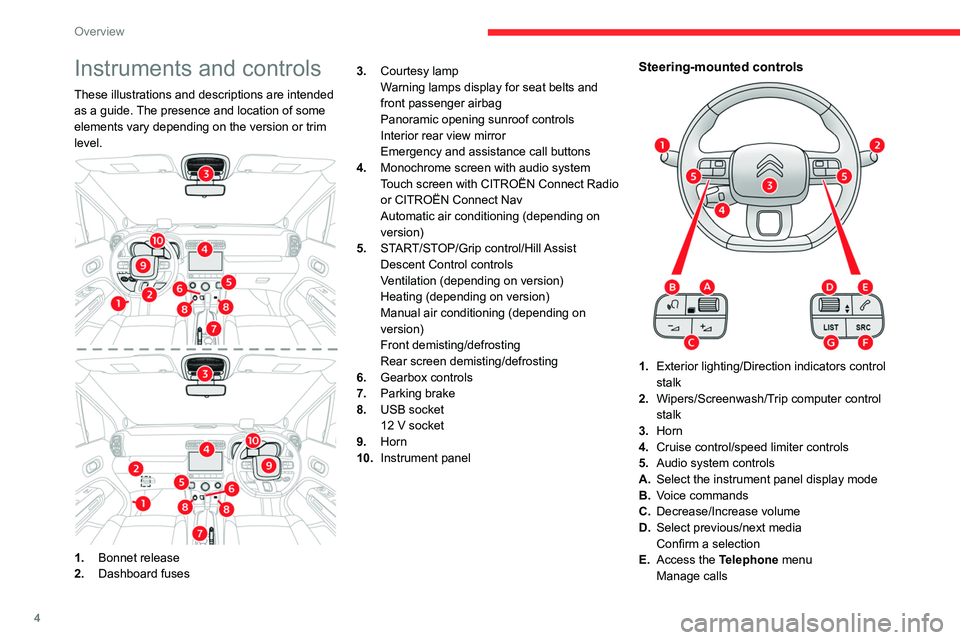
Instruments and controls
These illustrations and descriptions are intended
as a guide. The presence and location of some
elements vary depending on the version or trim
level.
1.Bonnet release
2. Dashboard fuses 3.
Courtesy lamp
Warning lamps display for seat belts and
front passenger airbag
Panoramic opening sunroof controls
Interior rear view mirror
Emergency and assistance call buttons
4. Monochrome screen with audio system
Touch screen with CITROËN Connect Radio
or CITROËN Connect Nav
Automatic air conditioning (depending on
version)
5. START/STOP/Grip control/Hill Assist
Descent Control controls
Ventilation (depending on version)
Heating (depending on version)
Manual air conditioning (depending on
version)
Front demisting/defrosting
Rear screen demisting/defrosting
6. Gearbox controls
7. Parking brake
8. USB socket
12 V socket
9. Horn
10. Instrument panel
Steering-mounted controls
1.Exterior lighting/Direction indicators control
stalk
2. Wipers/Screenwash/Trip computer control
stalk
3. Horn
4. Cruise control/speed limiter controls
5. Audio system controls
A. Select the instrument panel display mode
B. Voice commands
C. Decrease/Increase volume
D. Select previous/next media
Confirm a selection
E. Access the Telephone menu
Manage calls
Page 7 of 244
5
Overview
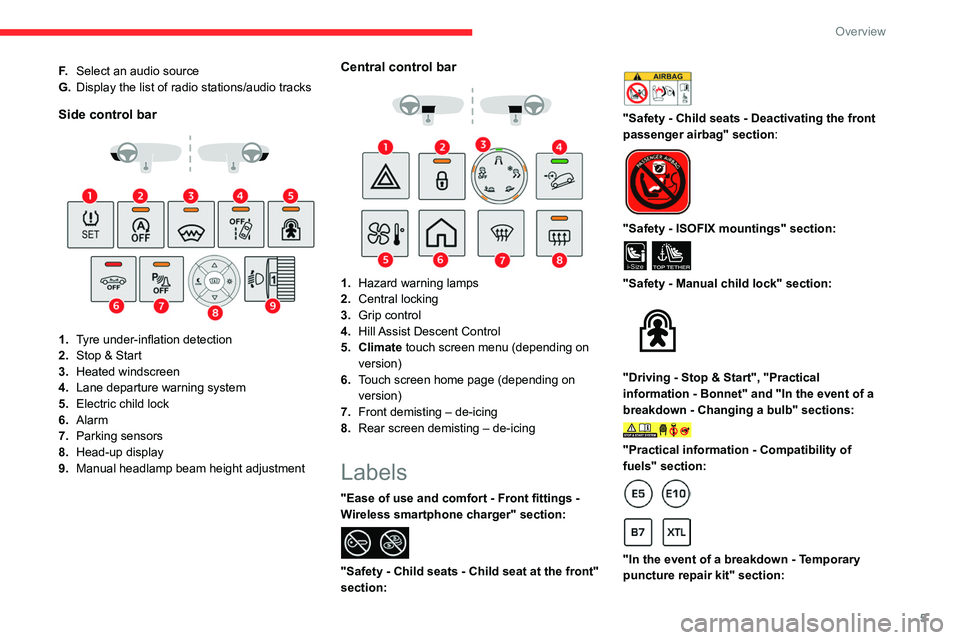
F.Select an audio source
G. Display the list of radio stations/audio tracks
Side control bar
1.Tyre under-inflation detection
2. Stop & Start
3. Heated windscreen
4. Lane departure warning system
5. Electric child lock
6. Alarm
7. Parking sensors
8. Head-up display
9. Manual headlamp beam height adjustment
Central control bar
1.Hazard warning lamps
2. Central locking
3. Grip control
4. Hill Assist Descent Control
5. Climate touch screen menu (depending on version)
6. Touch screen home page (depending on
version)
7. Front demisting – de-icing
8. Rear screen demisting – de-icing
Labels
"Ease of use and comfort - Front fittings -
Wireless smartphone charger" section:
"Safety - Child seats - Child seat at the front"
section:
"Safety - Child seats - Deactivating the front
passenger airbag" section:
"Safety - ISOFIX mountings" section:
i-SizeTOP TETHER
"Safety - Manual child lock" section:
"Driving - Stop & Start", "Practical
information - Bonnet" and "In the event of a
breakdown - Changing a bulb" sections:
"Practical information - Compatibility of
fuels" section:
"In the event of a breakdown - Temporary
puncture repair kit" section:
Page 20 of 244
18
Instruments
Pressing this button takes you back up a
level or cancels the current operation.
Display screen menus
– LIGHTING :
• GUIDE LAMPS (Guide-me-home lighting),
•
DIR HEADLAMPS (Directional headlamps).
–
DRIVE ASSIST
:
•
COLLISION
ALT (Automatic emergency
braking),
•
VIGILANCE
ALT (Fatigue Detection System),
•
ADVISED SPEED (Speed limit recognition).
–
COMFOR
T :
•
REAR WIPE REV (Automatic windscreen
wiper when reversing).
For more information on one of these functions,
refer to the corresponding section.
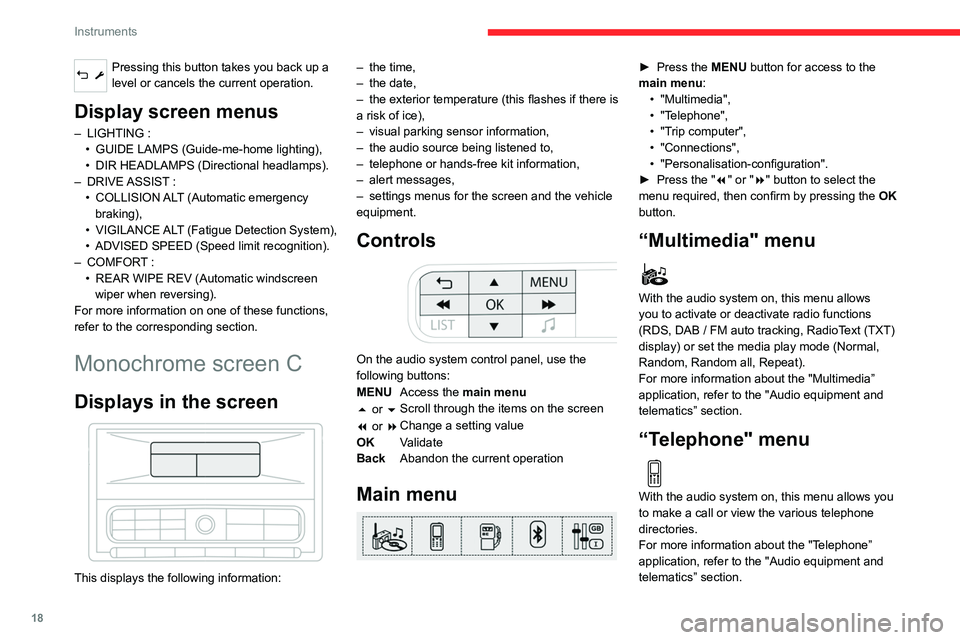
Monochrome screen C
Displays in the screen
This displays the following information: –
the time,
–
the date,
–
the exterior temperature (this flashes if there is
a risk of ice),
–
visual parking sensor information,
–
the audio source being listened to,
–
telephone or hands-free kit information,
–
alert messages,
–
settings menus for the screen and the vehicle
equipment.
Controls
On the audio system control panel, use the
following buttons:
MENU Access the main menu
5 or 6 Scroll through the items on the screen
7 or 8 Change a setting value
OK Validate
Back Abandon the current operation
Main menu
► Press the MENU button for access to the
main menu: •
"Multimedia",
•
"T
elephone",
•
"T
rip computer",
•
"Connections",
•
"Personalisation-configuration".
►
Press the "
7" or "8" button to select the
menu required, then confirm by pressing the OK
button.
“Multimedia" menu
With the audio system on, this menu allows
you to activate or deactivate radio functions
(RDS, DAB
/ FM auto tracking, RadioText (TXT)
display) or set the media play mode (Normal,
Random, Random all, Repeat).
For more information about the "Multimedia”
application, refer to the "Audio equipment and
telematics” section.
“Telephone" menu
With the audio system on, this menu allows you
to make a call or view the various telephone
directories.
For more information about the "Telephone”
application, refer to the "Audio equipment and
telematics” section.
“Trip computer" menu
This menu allows you to consult information
concerning the status of the vehicle.
Warning log
It summarises the alert messages of the
functions, displaying them on the screen.
“Connections" menu
With the audio system on, this menu allows a
Bluetooth device (telephone, media player) to be
paired and the connection mode to be defined
(hands-free kit, playing of audio files).
For more information about the "Connections”
application, refer to the "Audio equipment and
telematics” section.
“Personalisation-
configuration" menu
This menu gives access to the following
functions:
– “Define the vehicle parameters".
– “Display configuration".
Page 21 of 244
19
Instruments
1“Trip computer" menu
This menu allows you to consult information
concerning the status of the vehicle.
Warning log
It summarises the alert messages of the
functions, displaying them on the screen.
“Connections" menu
With the audio system on, this menu allows a
Bluetooth device (telephone, media player) to be
paired and the connection mode to be defined
(hands-free kit, playing of audio files).
For more information about the "Connections”
application, refer to the "Audio equipment and
telematics” section.
“Personalisation-
configuration" menu
This menu gives access to the following
functions:
–
“Define the vehicle parameters".
–
“Display configuration".
Define the vehicle parameters
This menu allows the following equipment to be
activated / deactivated, depending on the version
and/or country of sale:
"Lighting "
–
"Directional headlamps",
–
"Follow-me-home headlamps",
–
"W
elcome lighting".
"Comfort"
–
"Rear wipe in reverse gear".
"
Driving assistance"
–
Auto. emergency braking,
–
Fatigue Detection System,
–
Speed recommendation.
For more information on the different equipment,
refer to the corresponding sections.
Display configuration
This menu allows you to change the language
used by the display from a defined list.
This menu gives access to the following settings:
–
“Choice of units".
–
“Date and time adjustment".
–
“Display personalisation".
–
“Choice of language".
As a safety measure, the driver must only carry out operations that require
sustained attention when stationary.
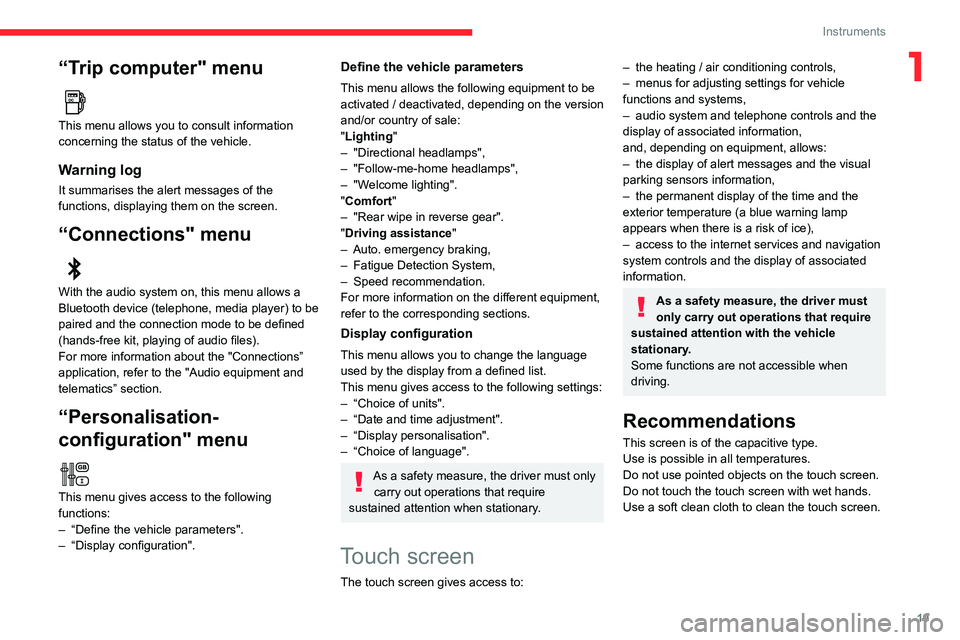
Touch screen
The touch screen gives access to:
– the heating / air conditioning controls,
– menus for adjusting settings for vehicle
functions and systems,
–
audio system and telephone controls and the
display of associated information,
and, depending on equipment, allows:
–
the display of alert messages and the visual
parking sensors information,
–
the permanent display of the time and the
exterior temperature (a blue warning lamp
appears when there is a risk of ice),
–
access to the internet services and navigation
system controls and the display of associated
information.
As a safety measure, the driver must
only carry out operations that require
sustained attention with the vehicle
stationary.
Some functions are not accessible when
driving.
Recommendations
This screen is of the capacitive type.
Use is possible in all temperatures.
Do not use pointed objects on the touch screen.
Do not touch the touch screen with wet hands.
Use a soft clean cloth to clean the touch screen.
Page 88 of 244
86
Driving
Starting / Switching off the
engine with the key
Key ignition switch
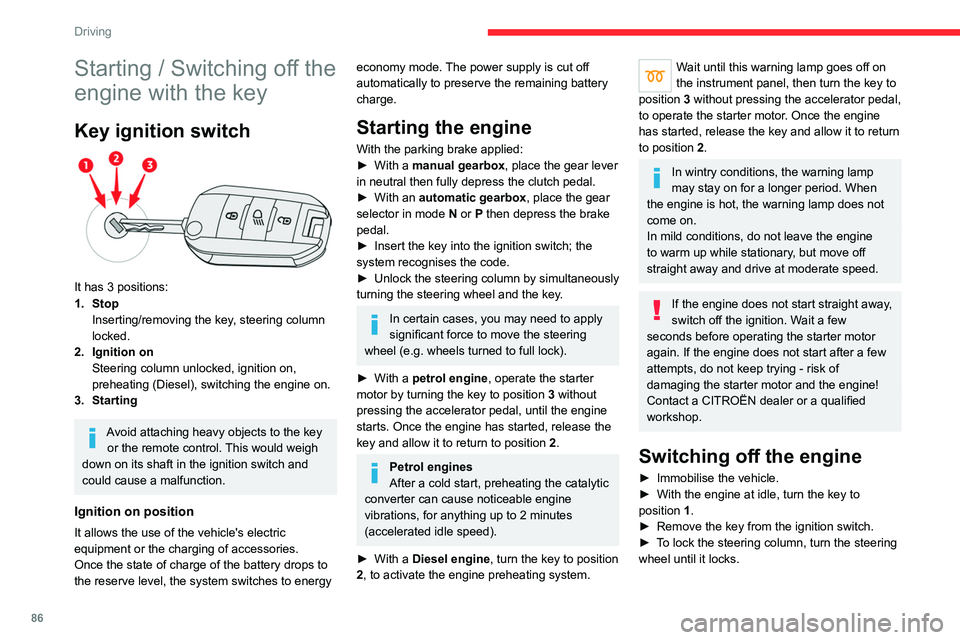
It has 3 positions:
1. StopInserting/removing the key, steering column
locked.
2. Ignition on Steering column unlocked, ignition on,
preheating (Diesel), switching the engine on.
3. Starting
Avoid attaching heavy objects to the key or the remote control. This would weigh
down on its shaft in the ignition switch and
could cause a malfunction.
Ignition on position
It allows the use of the vehicle's electric
equipment or the charging of accessories.
Once the state of charge of the battery drops to
the reserve level, the system switches to energy
economy mode. The power supply is cut off
automatically to preserve the remaining battery
charge.
Starting the engine
With the parking brake applied:
► With a manual gearbox, place the gear lever
in neutral then fully depress the clutch pedal.
►
With an
automatic gearbox, place the gear
selector in mode N or P then depress the brake
pedal.
►
Insert the key into the ignition switch; the
system recognises the code.
►
Unlock
the steering column by simultaneously
turning the steering wheel and the key.
In certain cases, you may need to apply
significant force to move the steering
wheel (e.g.
wheels turned to full lock).
►
With a
petrol engine , operate the starter
motor by turning the key to position 3 without
pressing the accelerator pedal, until the engine
starts. Once the engine has started, release the
key and allow it to return to position 2.
Petrol engines
After a cold start, preheating the catalytic
converter can cause noticeable engine
vibrations, for anything up to 2 minutes
(accelerated idle speed).
►
With a
Diesel engine, turn the key to position
2, to
activate the engine preheating system.
Wait until this warning lamp goes off on
the instrument panel, then turn the key to
position 3 without pressing the accelerator pedal,
to operate the starter motor. Once the engine
has started, release the key and allow it to return
to position 2.
In wintry conditions, the warning lamp
may stay on for a longer period. When
the engine is hot, the warning lamp does not
come on.
In mild conditions, do not leave the engine
to warm up while stationary, but move off
straight away and drive at moderate speed.
If the engine does not start straight away,
switch off the ignition. Wait a few
seconds before operating the starter motor
again. If the engine does not start after a few
attempts, do not keep trying - risk of
damaging the starter motor and the engine!
Contact a CITROËN dealer or a qualified
workshop.
Switching off the engine
► Immobilise the vehicle.
► With the engine at idle, turn the key to
position 1
.
►
Remove the key from the ignition switch.
►
T
o lock the steering column, turn the steering
wheel until it locks.
To facilitate unlocking of the steering column, it is recommended that the
wheels be returned to the straight ahead
position before switching off the engine.
Never switch off the ignition before the
complete immobilisation of the vehicle.
With the engine off, the braking and steering
assistance systems are also cut off - risk of
loss of control of the vehicle!
Check that the parking brake is correctly
applied, particularly on sloping ground.
When leaving the vehicle, keep the key in
your possession and lock the vehicle.
Energy economy mode
After the engine has stopped (position 1. Stop),
for a maximum combined duration of 30 minutes,
you can still use functions such as the audio and
telematics system, courtesy lamps or dipped
beam headlamps.
For more information on Energy
economy mode, refer to the
corresponding section.
Key left in
When the driver's door is opened, a
message is displayed, accompanied by an
audible signal, if the key has been left in the
ignition switch in position 1.
Page 89 of 244
87
Driving
6To facilitate unlocking of the steering column, it is recommended that the
wheels be returned to the straight ahead
position before switching off the engine.
Never switch off the ignition before the
complete immobilisation of the vehicle.
With the engine off, the braking and steering
assistance systems are also cut off - risk of
loss of control of the vehicle!
Check that the parking brake is correctly
applied, particularly on sloping ground.
When leaving the vehicle, keep the key in
your possession and lock the vehicle.
Energy economy mode
After the engine has stopped (position 1. Stop),
for a maximum combined duration of 30 minutes,
you can still use functions such as the audio and
telematics system, courtesy lamps or dipped
beam headlamps.
For more information on Energy
economy mode, refer to the
corresponding section.
Key left in
When the driver's door is opened, a
message is displayed, accompanied by an
audible signal, if the key has been left in the
ignition switch in position 1.
If the key has been left in the ignition switch
in position 2, the ignition will be switched off
automatically after one hour.
To switch the ignition back on, turn the key to
position 1, then back to position 2.
Starting/Switching off the
engine with Keyless Entry
and Start
The electronic key must be present in the
passenger compartment.
If the electronic key is not detected, a
message is displayed.
Move the electronic key so that the engine
can be started or switched off.
If there is still a problem, refer to the "Key
not detected - Back-up starting or Back-up
switch-off" section.
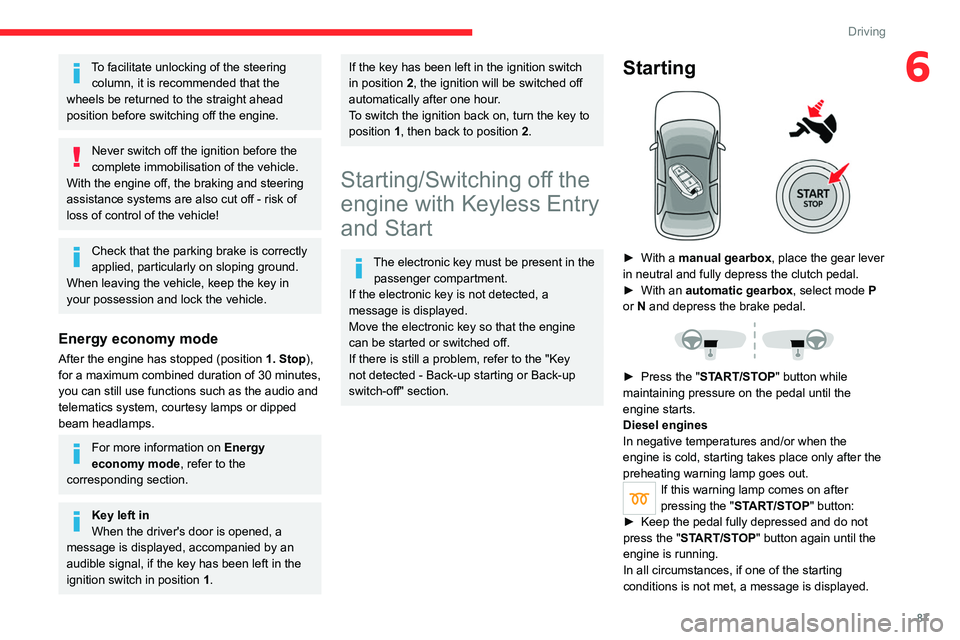
Starting
► With a manual gearbox, place the gear lever
in neutral and fully depress the clutch pedal.
►
With an
automatic gearbox, select mode P
or
N and depress the brake pedal.
► Press the " START/STOP" button while
maintaining pressure on the pedal until the
engine starts.
Diesel engines
In negative temperatures and/or when the
engine is cold, starting takes place only after the
preheating warning lamp goes out.
If this warning lamp comes on after
pressing the " START/STOP" button:
►
Keep the pedal fully depressed and do not
press the "
START/STOP" button again until the
engine is running.
In all circumstances, if one of the starting
conditions is not met, a message is displayed.
Page 90 of 244
88
Driving
In some circumstances, a message indicates
that it is necessary to turn the steering wheel
while pressing the "START/STOP" button to
assist unlocking of the steering column.
Petrol engines
With Petrol engines, after a cold start,
pre-heating the catalytic converter can cause
noticeable engine vibrations, for anything up
to 2 minutes (accelerated idle speed).
Switching off
► Immobilise the vehicle using the parking
brake.
►
With a
manual gearbox, ideally put the gear
lever into neutral.
►
With an
automatic gearbox, ideally select
mode
P or N.
►
Press the "
START/STOP" button.
In some circumstances, it is necessary to turn
the steering wheel to lock the steering column.
If the vehicle is not immobilised, the
engine will not stop.
With the engine off, the braking and
steering assistance systems are also cut
off - risk of loss of control of the vehicle!
Never leave your vehicle with the
electronic key still inside.
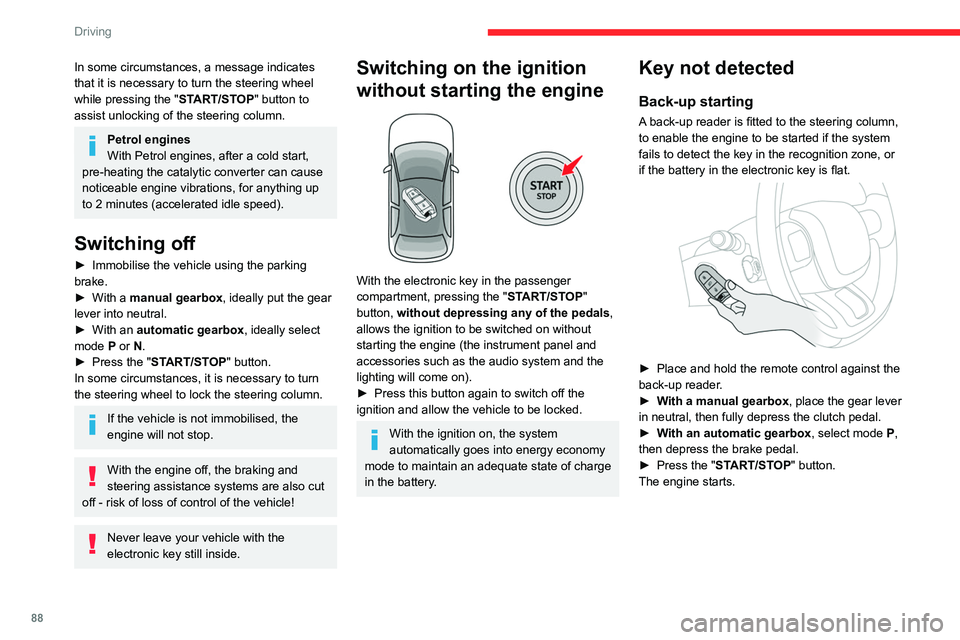
Switching on the ignition
without starting the engine
With the electronic key in the passenger
compartment, pressing the " START/STOP"
button, without depressing any of the pedals ,
allows the ignition to be switched on without
starting the engine (the instrument panel and
accessories such as the audio system and the
lighting will come on).
►
Press this button again to switch off the
ignition and allow the vehicle to be locked.
With the ignition on, the system
automatically goes into energy economy
mode to maintain an adequate state of charge
in the battery.
Key not detected
Back-up starting
A back-up reader is fitted to the steering column,
to enable the engine to be started if the system
fails to detect the key in the recognition zone, or
if the battery in the electronic key is flat.
► Place and hold the remote control against the
back-up reader .
►
W
ith a manual gearbox, place the gear lever
in neutral, then fully depress the clutch pedal.
►
W
ith an automatic gearbox, select mode P,
then depress the brake pedal.
►
Press the "
START/STOP" button.
The engine starts.
Back-up switch-off
If the electronic key is not detected or is no
longer in the recognition zone, a message
appears in the instrument panel when closing a
door or trying to switch off the engine.
► To confirm the instruction to switch off the
engine, press the " START/STOP" button for
approximately 5 seconds.
In the event of a fault with the electronic key,
contact a CITROËN dealer or a qualified
workshop.
Emergency switch-off
In case of emergency only, the engine can be
switched off without conditions (even when
driving).
► Press the "START/STOP" button for about
5 seconds.
In this case, the steering column locks as soon
as the vehicle stops.
Page 94 of 244
92
Driving
This programme improves starting and traction
when grip is poor.
Return to automatic operation
► At any time, press the selected button ("S" or
"T") again to exit the activated programme and
return to auto-adaptive mode.
Manual operation
To limit fuel consumption during an extended standstill with the engine
running (for example, in a traffic jam), set the
gear selector to N and apply the parking
brake.
►
Selecting position
M
enables sequential
shifting between the six gears.
►
T
o shift up/down through the gears, push the
control backwards/forwards.
The gearbox only changes gear if the vehicle
speed and engine speed conditions allow;
otherwise, the rules for automatic operation are
temporarily applied.
D disappears, and the gears engaged appear in
succession on the instrument panel.
If the engine speed is too low or too high, the
selected gear flashes for a few seconds, then the
gear actually engaged is shown.
It is possible to change from position D to
position M
at any time.
When the vehicle is stationary or moving
very slowly, the gearbox selects gear M1
automatically.
The Sport and Snow programmes are inactive
in manual operation.
This symbol is displayed if a gear is not engaged correctly (gear selector between
two positions).
Switching off the vehicle
Before switching off the engine, it is possible to
engage position P or N to place the gearbox in
neutral.
In both cases, apply the parking brake to
immobilise the vehicle.
If the gear selector is not in position P,
when the driver's door is opened or
approximately 45 seconds after the ignition is
switched off, an audible signal sounds and a
message appears.
►
Return the gear selector to P
; the audible
signal stops and the message disappears.
Malfunction
In the event of a malfunction, this warning
lamp comes on and a message is
displayed, when the ignition is switched on.
In this case, the gearbox goes into back-up
mode and is locked in 3
rd gear. You may feel a
significant jolt (without risk to the gearbox) when
changing from
P
to R and from N to R.
Do not exceed 62 mph (100
km/h), local speed
restrictions permitting.
Have the system checked by a CITROËN dealer
or a qualified workshop.
There is a risk of damaging the gearbox: – If the accelerator and brake pedals are
depressed simultaneously
.
–
In the event of a battery failure, forcing the
selector from position P
to another position.
Automatic gearbox
Never try to start the engine by pushing
the vehicle.
Gear shift indicator
(Depending on engine)
This system is designed to reduce fuel
consumption by recommending the most suitable
gear.
Operation
Depending on the driving situation and
the vehicle's equipment, the system may
recommend skipping one or more gears.
Gear engagement recommendations are
not to be considered mandatory. Indeed, the
configuration of the road, the traffic density and
safety remain determining factors when choosing
the best gear. Therefore, the driver remains
responsible for deciding whether or not to follow
the system’s advice.
The system cannot be deactivated.
With an automatic gearbox, the system is
only active in manual operation.
The information appears on the instrument panel, in the form of an arrow
and the recommended gear.
The system adapts the gear change instructions according to the driving
conditions (e.g. slope, load) and driving style
(e.g. power demand, acceleration, braking).
The system never suggests:
– engaging first gear;
– engaging reverse gear.
Hill start assist
This system keeps the vehicle briefly stationary
(for approximately 2 seconds) when making a hill
start, while you transfer your foot from the brake
pedal to the accelerator pedal.
The system is only active when:
– The vehicle is completely stationary, with your
foot on the brake pedal.
– Certain slope conditions are met.
– The driver’s door is closed.
Do not leave the vehicle while it is being
held temporarily by hill start assist.
If someone needs to get out of the vehicle
with the engine running, apply the parking
brake manually. Then check that the parking
brake indicator lamp is on fixed on the
instrument panel.