ignition Citroen C3 DAG 2010 2.G User Guide
[x] Cancel search | Manufacturer: CITROEN, Model Year: 2010, Model line: C3 DAG, Model: Citroen C3 DAG 2010 2.GPages: 203, PDF Size: 7.66 MB
Page 13 of 203

1
MONITORING
The level read will only be cor-
rect if the vehicle is on level
ground and the engine has been
off for more than 15 minutes.
Engine oil level indicator
System which informs the driver whether
the engine oil level is correct or not.
This information is indicated for a few
seconds when the ignition is switched
on, after the service information.
Oil level correct
This is indicated by the fl ashing of
"OIL" ,
linked with the service warning lamp, ac-
companied by an audible signal and a
message on the multifunction screen.
If the lack of oil is confi rmed by a check
using the dipstick, it is essential that the
level is topped up to prevent damage to
the engine.
Lack of oil
This is indicated by the fl ashing of
"OIL
--" . Consult a CITROËN dealer.
Oil level indicator fault
Dipstick
There are 2 marks on the
dipstick:
- A = max; never exceed
this level (risk of dam-
age to the engine),
- B = min; top up the level
via the oil fi ller cap, using
the grade of oil suited to
your engine.
Refer to the "Checks" section to locate
the dipstick and the oil fi ller cap on your
engine.
Page 14 of 203

1
MONITORING
Total distance recorder
System which measures the total dis-
tance travelled by the vehicle during its
life.
The total and trip distances are dis-
played for thirty seconds when the
ignition is switched off, when the driver's
door is opened and when the vehicle is
locked or unlocked.
With the ignition on, press the button
until zeros appear.
Trip distance recorder
System which measures a distance
travelled during a day or other period
since it was reset to zero by the driver. Clock
Adjusting the time - Choice of units
press the button for more than
two seconds: °C or °F is displayed,
press the button to select °C or °F,
press the button for more than
two seconds to complete the adjust-
ments.
After approximately 30 seconds without
any action, the screen returns to the
normal display.
To adjust the time of the clock and
choose the units used by the screen,
use the right-hand button on the instru-
ment panel, carrying out the operations
in the following order:
press the button for more than
two seconds: the minutes fl ash,
press the button to increase the
minutes,
press the button for more than
two seconds: the hours fl ash,
press the button to increase the hours,
press the button for more than
two seconds: 24 H or 12 H is dis-
played,
press the button to select 24 H or
12 H,
Page 17 of 203

1
MONITORING
A few definitions… Range
(miles or km)
This indicates the distance
which can still be travelled with the fuel
remaining in the tank in relation to the
average fuel consumption over the last
few miles (kilometres) travelled. Current fuel consumption
(mpg or l/100 km or km/l)
This is the average fuel con-
sumption during the last few
seconds.
Average fuel
consumption
(mpg or l/100 km or km/l)
This is the average fuel consumption
since the last trip computer zero reset. Average speed
(mph or km/h)
This is the average speed cal-
culated since the last trip computer zero
reset (ignition on).
Distance travelled
(miles or km)
This indicates the distance
travelled since the last trip computer
zero reset.
This value may vary following a
change in the style of driving or
the relief, resulting in a signifi -
cant change in the current fuel
consumption.
If dashes are displayed continu-
ously while driving in place of
the digits, contact a CITROËN
dealer. This function is only displayed
from 20 mph (30 km/h).
When the range falls below 20 miles
(30 km), dashes are displayed. After fi ll-
ing with at least 5 litres of fuel, the range
is recalculated and is displayed when it
exceeds 60 miles (100 km). Distance remaining to
destination
(miles or km)
This is the distance remaining to be
travelled to the fi nal destination. It can
be entered by the user.
If the distance is not entered, dashes
are displayed in place of the digits.
Page 19 of 203

1
MONITORING
A few definitions… Range
(miles or km)
This indicates the distance
which can still be travelled with the fuel
remaining in the tank in relation to the
average fuel consumption over the last
few miles (kilometres) travelled. Current fuel consumption
(mpg or l/100 km or km/l)
This is the average fuel con-
sumption during the last few
seconds.
Average fuel
consumption
(mpg or l/100 km or km/l)
This is the average fuel consumption
since the last trip computer zero reset. Average speed
(mph or km/h)
This is the average speed cal-
culated since the last trip computer zero
reset (ignition on).
Distance travelled
(miles or km)
This indicates the distance
travelled since the last trip computer
zero reset.
This value may vary following a
change in the style of driving or
the relief, resulting in a signifi -
cant change in the current fuel
consumption.
If dashes are displayed continu-
ously while driving in place of
the digits, contact a CITROËN
dealer. This function is only displayed
from 20 mph (30 km/h).
When the range falls below 20 miles
(30 km), dashes are displayed. After fi ll-
ing with at least 5 litres of fuel, the range
is recalculated and is displayed when it
exceeds 60 miles (100 km). Distance remaining to
destination
(miles or km)
This is the distance remaining to be
travelled to the fi nal destination. It can
be entered by the user.
If the distance is not entered, dashes
are displayed in place of the digits.
Page 43 of 203

4
ACCESS
Anti-theft protection
Electronic engine immobiliser
The key contains an electronic chip
which has a special code. When the
ignition is switched on, this code must
be recognised in order for starting to be
possible.
This electronic engine immobiliser locks
the engine management system a few
minutes after the ignition is switched off
and prevents starting of the engine by
anyone who does not have the key. In the event of a malfunc-
tion, you are informed by
lighting of this warning
lamp, an audible signal
and a message on the multifunction
screen.
In this case, your vehicle does not start;
contact a CITROËN dealer as soon as
possible. Ignition switch
- Position 1:
Stop
- Position 2: Ignition
- Position 3: Starting
Starting the vehicle
Insert the key in the ignition switch.
The system recognises the starting code.
Turn the key fully towards the fascia
to position 3 (Starting) .
When the engine starts, release the
key. Switching the vehicle off
Immobilise the vehicle.
Turn the key fully towards you to po-
sition 1 (Stop) .
Remove the key from the ignition
switch.
Do not attach any heavy objects
to the key as this could weigh
down on it when in the ignition
switch and cause a fault.
Key reminder
If the key is left in the igni-
tion switch, an audible signal
sounds when the driver's door is
opened.
Locating your vehicle
Press the closed padlock
to locate your locked ve-
hicle in a car park.
This is indicated by lighting of the cour-
tesy lamps and fl ashing of the direction
indicators for a few seconds.
Page 44 of 203
4
ACCESS
Remote control problem
Following disconnection of the vehicle
battery, replacement of the remote con-
trol battery or in the event of a remote
control malfunction, you can no longer
unlock, lock or locate your vehicle.
First of all, use the key in the lock to
unlock or lock your vehicle.
Then, reinitialise the remote control.
If the problem persists, contact a
CITROËN dealer as soon as possible.
Reinitialisation
Switch off the ignition.
Turn the key to position 2 (Ignition) .
Press the closed padlock immedi-
ately for a few seconds.
Switch off the ignition and remove
the key from the ignition switch.
The remote control is fully operational
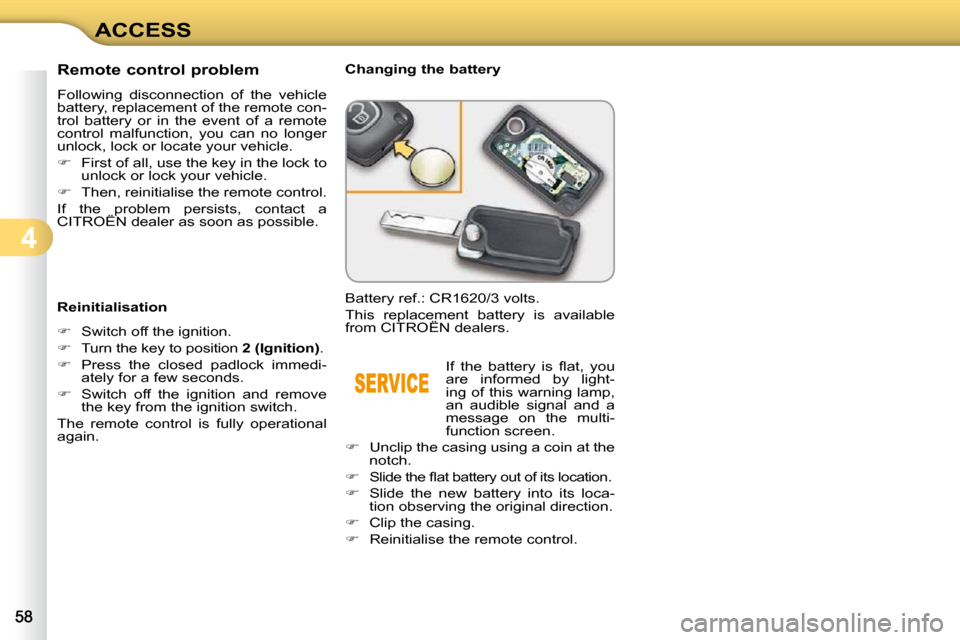
again. Changing the battery
Battery ref.: CR1620/3 volts.
This replacement battery is available
from CITROËN dealers.
If the battery is fl at, you
are informed by light-
ing of this warning lamp,
an audible signal and a
message on the multi-
function screen.
Unclip the casing using a coin at the
notch.
Slide the fl at battery out of its location.
Slide the new battery into its loca-
tion observing the original direction.
Clip the casing.
Reinitialise the remote control.
Page 45 of 203
4
ACCESS
Lost keys
Visit a CITROËN dealer with the vehicle's V5 registration do cument and
your personal identifi cation documents.
The CITROËN dealer will be able to retrieve the key code a nd the tran-
sponder code required to order a replacement key. Do not throw the remote con-
trol batteries away, they contain
metals which are harmful to the
environment.
Take them to an approved col-
lection point.
Remote control
The high frequency remote control is a sensitive system; do not o perate
it while it is in your pocket as there is a possibility that i t may unlock the
vehicle, without you being aware of it.
Do not repeatedly press the buttons of your remote control out of range and
out of sight of your vehicle. You run the risk of stopping it from working and
the remote control would have to be reinitialised.
The remote control does not operate when the key is in the ignition, even
when the ignition is switched off, except for reinitialisat ion.
Locking the vehicle
Driving with the doors locked may make access to t he passenger compartment
by the emergency services more diffi cult in an emer gency.
As a safety precaution (with children on board), remove the key fro m the
ignition when you leave the vehicle, even for a short time.
Anti-theft protection
Do not make any modifi cations to the electronic engine immobi liser
system; this could cause malfunctions.
When purchasing a second-hand vehicle
Have the key codes memorised by a CITROËN dealer, to ensure tha t the
keys in your possession are the only ones which can start the vehicle .
Page 46 of 203

4
ACCESS
Anti-theft protection
Electronic engine immobiliser
The key contains an electronic chip
which has a special code. When the
ignition is switched on, this code must
be recognised in order for starting to be
possible.
This electronic engine immobiliser locks
the engine management system a few
minutes after the ignition is switched off
and prevents starting of the engine by
anyone who does not have the key. In the event of a malfunc-
tion, you are informed by
lighting of this warning
lamp, an audible signal
and a message on the multifunction
screen.
In this case, your vehicle does not start;
contact a CITROËN dealer as soon as
possible. Ignition switch
- Position 1:
Stop
- Position 2: Ignition
- Position 3: Starting
Starting the vehicle
Insert the key in the ignition switch.
The system recognises the starting code.
Turn the key fully towards the fascia
to position 3 (Starting) .
When the engine starts, release the
key. Switching the vehicle off
Immobilise the vehicle.
Turn the key fully towards you to po-
sition 1 (Stop) .
Remove the key from the ignition
switch.
Do not attach any heavy objects
to the key as this could weigh
down on it when in the ignition
switch and cause a fault.
Key reminder
If the key is left in the igni-
tion switch, an audible signal
sounds when the driver's door is
opened.
Locating your vehicle
Press the closed padlock
to locate your locked ve-
hicle in a car park.
This is indicated by lighting of the cour-
tesy lamps and fl ashing of the direction
indicators for a few seconds.
Page 47 of 203

4
ACCESS
Anti-theft protection
Electronic engine immobiliser
The key contains an electronic chip
which has a special code. When the
ignition is switched on, this code must
be recognised in order for starting to be
possible.
This electronic engine immobiliser locks
the engine management system a few
minutes after the ignition is switched off
and prevents starting of the engine by
anyone who does not have the key. In the event of a malfunc-
tion, you are informed by
lighting of this warning
lamp, an audible signal
and a message on the multifunction
screen.
In this case, your vehicle does not start;
contact a CITROËN dealer as soon as
possible. Ignition switch
- Position 1:
Stop
- Position 2: Ignition
- Position 3: Starting
Starting the vehicle
Insert the key in the ignition switch.
The system recognises the starting code.
Turn the key fully towards the fascia
to position 3 (Starting) .
When the engine starts, release the
key. Switching the vehicle off
Immobilise the vehicle.
Turn the key fully towards you to po-
sition 1 (Stop) .
Remove the key from the ignition
switch.
Do not attach any heavy objects
to the key as this could weigh
down on it when in the ignition
switch and cause a fault.
Key reminder
If the key is left in the igni-
tion switch, an audible signal
sounds when the driver's door is
opened.
Locating your vehicle
Press the closed padlock
to locate your locked ve-
hicle in a car park.
This is indicated by lighting of the cour-
tesy lamps and fl ashing of the direction
indicators for a few seconds.
Page 48 of 203
4
ACCESS
Lost keys
Visit a CITROËN dealer with the vehicle's V5 registration do cument and
your personal identifi cation documents.
The CITROËN dealer will be able to retrieve the key code a nd the tran-
sponder code required to order a replacement key. Do not throw the remote con-
trol batteries away, they contain
metals which are harmful to the
environment.
Take them to an approved col-
lection point.
Remote control
The high frequency remote control is a sensitive system; do not o perate
it while it is in your pocket as there is a possibility that i t may unlock the
vehicle, without you being aware of it.
Do not repeatedly press the buttons of your remote control out of range and
out of sight of your vehicle. You run the risk of stopping it from working and
the remote control would have to be reinitialised.
The remote control does not operate when the key is in the ignition, even
when the ignition is switched off, except for reinitialisat ion.
Locking the vehicle
Driving with the doors locked may make access to t he passenger compartment
by the emergency services more diffi cult in an emer gency.
As a safety precaution (with children on board), remove the key fro m the
ignition when you leave the vehicle, even for a short time.
Anti-theft protection
Do not make any modifi cations to the electronic engine immobi liser
system; this could cause malfunctions.
When purchasing a second-hand vehicle
Have the key codes memorised by a CITROËN dealer, to ensure tha t the
keys in your possession are the only ones which can start the vehicle .