battery CITROEN C3 PICASSO 2010 User Guide
[x] Cancel search | Manufacturer: CITROEN, Model Year: 2010, Model line: C3 PICASSO, Model: CITROEN C3 PICASSO 2010Pages: 244, PDF Size: 8.29 MB
Page 130 of 244
10
CHECKS
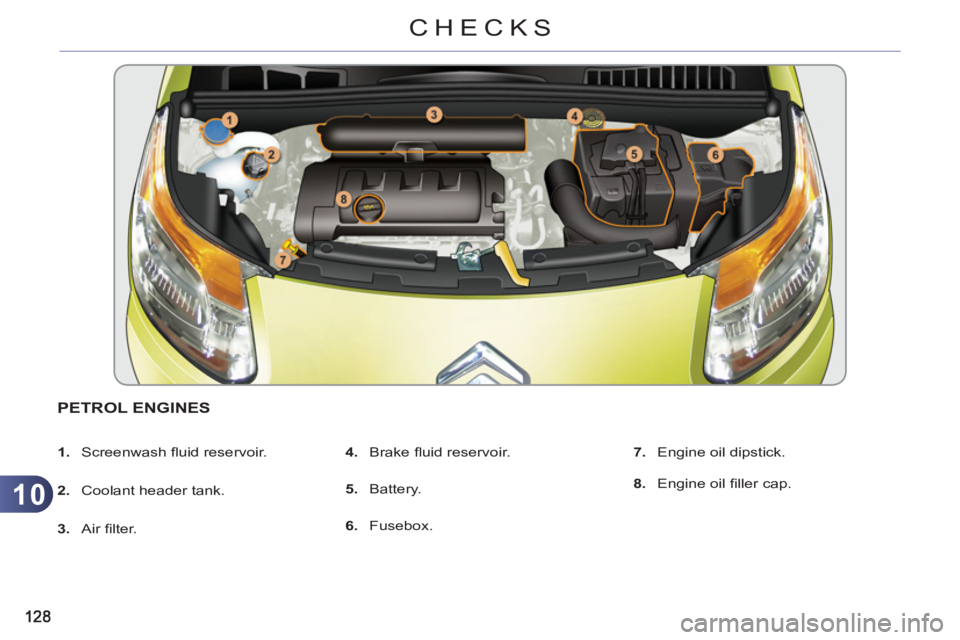
PETROL ENGINES
1.
Screenwash fl uid reservoir.
2.
Coolant header tank.
3.
Air fi lter.
4.
Brake fl uid reservoir.
5.
Battery.
6.
Fusebox.
7.
Engine oil dipstick.
8.
Engine oil fi ller cap.
Page 131 of 244
10
CHECKS
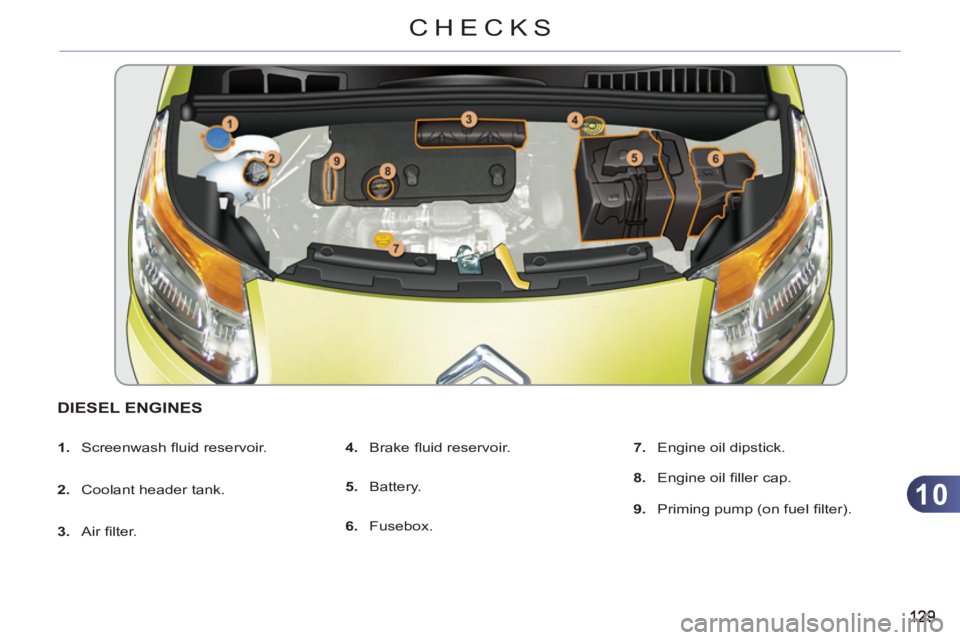
DIESEL ENGINES
1.
Screenwash fl uid reservoir.
2.
Coolant header tank.
3.
Air fi lter.
4.
Brake fl uid reservoir.
5.
Battery.
6.
Fusebox.
7.
Engine oil dipstick.
8.
Engine oil fi ller cap.
9.
Priming pump (on fuel fi lter).
Page 133 of 244

10
131
CHECKS
Avoid prolonged contact of used
oil or fl uids with the skin.
Most of these fl uids are harmful to
health or indeed very corrosive.
Do not discard used oil or fl uids
into sewers or onto the ground.
Take used oil to a CITROËN
dealer or a qualifi ed workshop
(France) or to an authorised
waste disposal site.
Diesel additive level (Diesel engine
with particle emission filter)
Used products CHECK
S
Batter
y
The battery does not require any
maintenance.
However, check that the terminals
are clean and correctly tightened,
particularly in summer and winter.
When carrying out work on the battery, re-
fer to the "Practical information" section for
details of the precautions to be taken before
disconnecting the battery and following its
reconnection.
Air filter and passenger compartment filter
Refer to the servicing booklet
for details of the replacement
intervals for these components.
Depending on the environment
(e.g. dusty atmosphere) and
the use of the vehicle (e.g. city driving),
replace them twice as often if neces-
sary
(refer to the "Engines" section).
A clogged passenger compartment fi lter
may have an adverse effect on the per-
formance of the air conditioning system
and generate undesirable odours.
Oil filter
Replace the oil fi lter each time
the engine oil is changed.
Refer to the servicing booklet
for details of the replacement
interval for this component.
Topping up
This additive must be topped up by a
CITROËN dealer or a qualifi ed work-
shop without delay.
Unless otherwise indicated, check these
components in accordance with the servic-
ing booklet and according to your engine.
Otherwise, have them checked by a
CITROËN dealer or a qualifi ed workshop.
The presence of this label, in particular
with the Stop & Start system, indicates
the use of a specifi c 12 V lead-acid bat-
tery with special technology and speci-
fi cation, for which the involvement of a
CITROËN dealer or a qualifi ed work-
shop is required when replacing or dis-
connecting the battery.
Failure to observe this recommendation
may shorten the life of the battery. The additive reservoir low
level is indicated by fi xed illu-
mination of this warning lamp,
accompanied by an audible warning and
a message in the multifunction screen.
Page 153 of 244
11
151
PRACTICAL INFORMATION
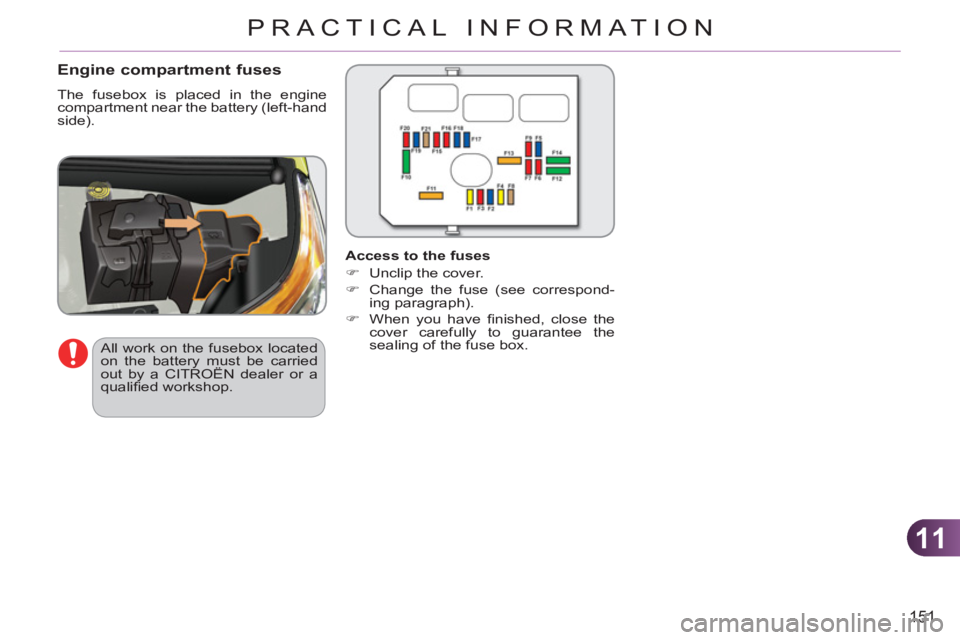
Engine compartment fuses
The fusebox is placed in the engine
compartment near the battery (left-hand
side).
All work on the fusebox located
on the battery must be carried
out by a CITROËN dealer or a
qualifi ed workshop.
Access to the fuses
)
Unclip the cover.
)
Change the fuse (see correspond-
ing paragraph).
)
When you have fi nished, close the
cover carefully to guarantee the
sealing of the fuse box.
Page 157 of 244

11
PRACTICAL INFORMATION
BATTERY
Procedure for charging your battery
when it is fl at or for starting the engine
using another battery.
Access to the battery
Starting using another battery
)
Connect the red cable to the posi-
tive terminal (+) of the fl at battery A
,
then to the positive terminal (+) of
the slave battery B
.
)
Connect one end of the green or black
cable to the negative terminal (-) of the
slave battery B
.
)
Connect the other end of the green
or black cable to the remote nega-
tive terminal (-) of your vehicle.
)
Start the slave vehicle.
)
Operate the starter of the broken
down vehicle and let the engine run.
)
Wait until the engine returns to idle
and disconnect the cables.
The battery is located under the bonnet.
To gain access to it:
)
open the bonnet using the interior
release lever, then the exterior safety
catch,
)
secure the bonnet stay,
)
lift the plastic cover on the (+) terminal.
The presence of this label, in
particular with the Stop & Start
system, indicates the use of a
12 V lead-acid battery with spe-
cial technology and specifi cation;
the involvement of a CITROËN
dealer or a qualifi ed workshop is
essential when replacing or dis-
connecting the battery.
Failure to observe this recommen-
dation may cause premature wear
of the battery.
After refi tting the battery by a
CITROËN dealer or a qualifi ed
workshop, the Stop & Start system
will only be active after a continu-
ous period of immobilisation of the
vehicle, a period which depends
on the climatic conditions and the
state of charge of the battery (up to
about 8 hours).
Page 158 of 244

11
156
PRACTICAL INFORMATION
Batteries contain harmful sub-
stances such as sulphuric acid
and lead. They must be dis-
posed of in accordance with
regulations and must not, in any
circumstances, be discarded
with household waste.
Take used remote control bat-
teries and vehicle batteries to a
special collection point.
Charging the battery using a battery charger LOAD REDUCTION MODE
System which manages the use of
certain functions according to the level
of charge remaining in the battery.
When the vehicle is being driven, the
load reduction function temporarily de-
activates certain functions, such as
the air conditioning, the heated rear
screen...
The deactivated functions are reactivat-
ed automatically as soon as conditions
permit.
Do not push the vehicle to start
the engine if your vehicle is fi t-
ted with the electronic gearbox
system.
Do not disconnect the battery to
charge it.
)
Follow the instructions for use pro-
vided by the manufacturer of the
charger.
Page 159 of 244

11
157
PRACTICAL INFORMATION
A fl at battery prevents the en-
gine from starting (refer to the
corresponding paragraph).
If the telephone is being used
at the same time on the MyWay
audio navigation system, it will
be interrupted after 10 minutes.
ENERGY ECONOMY MODE
System which manages the period of
use of certain functions to conserve a
suffi cient level of charge in the battery.
After the engine has stopped, you can
still use functions such as the audio
equipment, windscreen wipers, dipped
beam headlamps, courtesy lamps, etc.
for a maximum combined period of
thirty minutes.
This period may be greatly reduced if
the battery is not fully charged.
Exiting economy mode
These functions are reactivated auto-
matically the next time the vehicle is
driven.
)
In order to resume the use of these
functions immediately, start the en-
gine and let it run for a few minutes.
The time available to you will then be dou-
ble the period for which the engine is left
running. However, this period will always
be between fi ve and thirty minutes.
Switching to economy mode
Once this period has elapsed, a mes-
sage appears on the multifunction
screen indicating that the vehicle has
switched to economy mode and the
active functions are put on standby.
CHANGING A FRONT OR REARWIPER BLADE
Procedure for replacing a worn wiper
blade with a new one without the use
of tools.
Removal
)
Raise the corresponding wiper arm.
)
Unclip the wiper blade and remove it.
Fitting
)
At the front, check the size of the
wiper blade as the shorter blade is
fi tted to the passenger side of the
vehicle.
)
Put the corresponding new wiper
blade in place and clip it.
)
Fold down the wiper arm carefully.
Before removing a front wiper blade
)
Within one minute after switching off
the ignition, operate the wiper stalk
to position the wiper blades in the
vertical position.
This position must be used in order to
avoid damaging the wiper blade and the
bonnet.
After fitting a front wiper blade
)
Switch on the ignition.
)
Operate the wiper stalk again to
park the wiper blades.
Page 176 of 244
174
EMERGENCY OR ASSISTANCE CALL
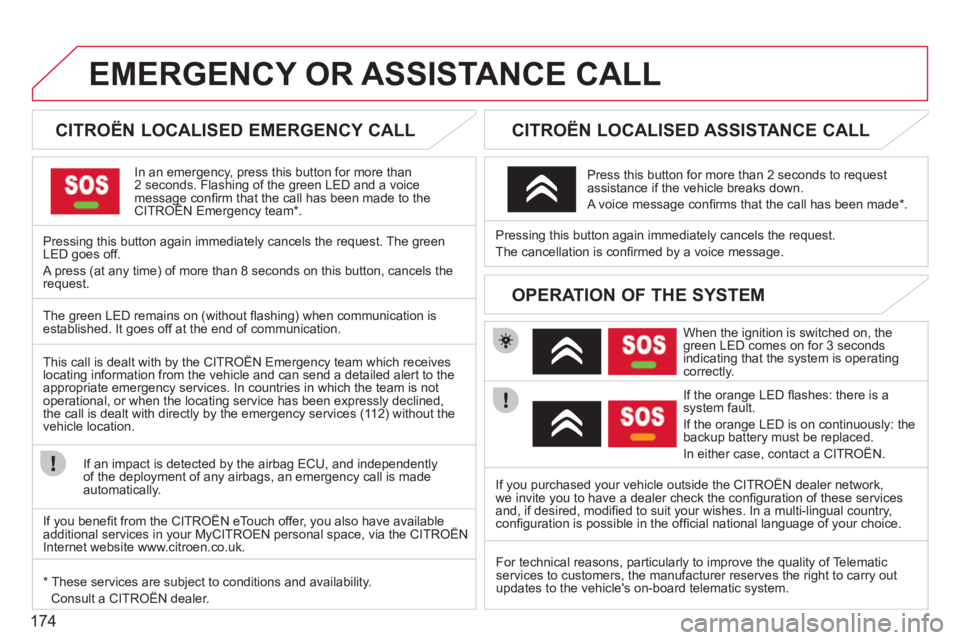
CITROËN LOCALISED EMERGENCY CALL
In an emergency, press this button for more than2 seconds. Flashing of the green LED and a voice message confi rm that the call has been made to the CITROËN Emergency team * .gg
Pressing this button again immediately cancels the request. The green LED goes off.
A press
(at any time) of more than 8 seconds on this button, cancels the
request.
CITROËN LOCALISED ASSISTANCE CALL
When the ignition is switched on, thegreen LED comes on for 3 seconds
indicating that the system is operating correctly.
If the oran
ge LED fl ashes: there is asystem fault.
If the oran
ge LED is on continuously: thebackup battery must be replaced.
In either case, contact a CITRO
ËN. Pressin
g this button again immediately cancels the request.
The cancellation is confi rmed b
y a voice message.
Press this button for more than 2 seconds to request
assistance if the vehicle breaks down.
A voice message confi rms that the call has been made *
.
OPERATION OF THE SYSTEM
The green LED remains on (without fl ashing) when communication is established. It goes off at the end of communication.
This call is dealt with b
y the CITROËN Emergency team which receiveslocating information from the vehicle and can send a detailed alert to theappropriate emergency services. In countries in which the team is not
operational, or when the locating service has been expressly declined,
the call is dealt with directl
y by the emergency services (11 2) without the
vehicle location.
If an impact is detected b
y the airbag ECU, and independentlyof the deployment of any airbags, an emergency call is made
automatically.
*
These services are subject to conditions and availability.
Consult a CITROËN dealer.If you purchased your vehicle outside the CITROËN dealer network,
we invite
you to have a dealer check the confi guration of these servicesand, if desired, modifi ed to suit your wishes. In a multi-lingual country, confi guration is possible in the offi cial national language of your choice.
For technical reasons, particularl
y to improve the quality of Telematic services to customers, the manufacturer reserves the right to carry out
updates to the vehicle's on-board telematic system.
If you benefi t from the CITROËN eTouch offer, you also have availableadditional services in your MyCITROEN personal space, via the CITROËN y,y
Internet website www.citroen.co.uk.
Page 177 of 244

175
The MyWay is protected in such a way that it will onlyoperate in your vehicle. If it is to be installed in another vehicle, contact a CITROËN dealer for confi guration of py
the system.
Certain functions described in this handbook will
become available during the year.
MyWay
For safety reasons, the driver must carry out operations which require prolonged attention while the vehicle is stationary.
When the en
gine is switched off and to prevent
discharging of the battery, the MyWay switches off
following the activation of the Energy Economy mode.
MULTIMEDIA AUDIO SYSTEM/BLUETOOTH TELEPHONE
SATELLITE NAVIGATION SYSTEM FOR EUROPE BY SD CARD
01 First steps
CONTENTS
02 Steering mounted controls
03 General operation
04 Navigation - Guidance
05 Traffic information
06 Radio
07 Music media players
08 Bluetooth telephone
09 Configuration
10 Screen menu map p.
p.
p.
p.
p.
p.
p.
p.
p.
p.
Frequently asked questions p. 176
177
178
181
189
191
192
195
198
199
203
Page 200 of 244
198
09
4 3 2 1
65
CONFIGURATION
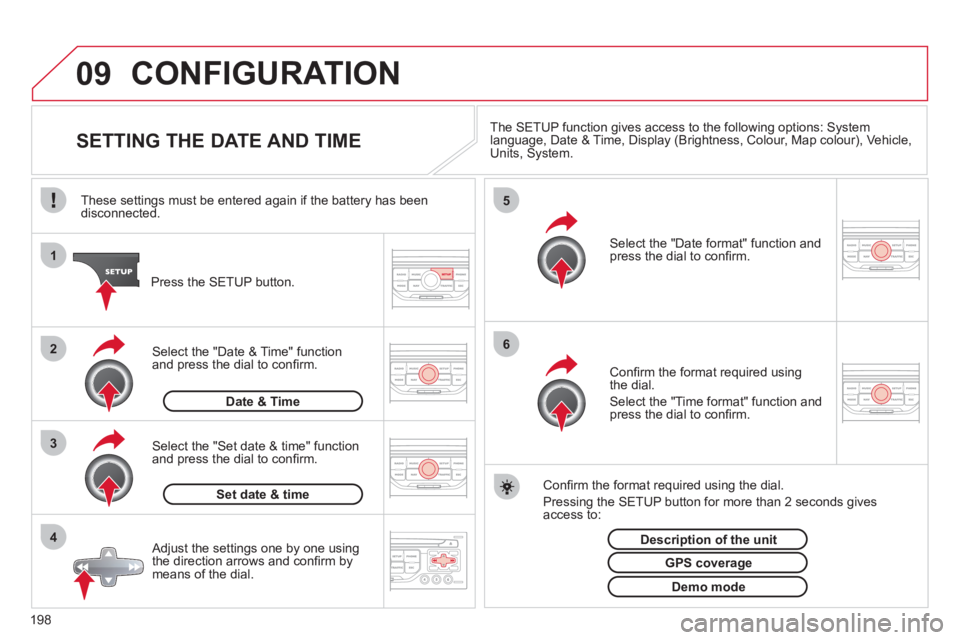
SETTING THE DATE AND TIME The SETUP function gives access to the following options: Systemlanguage, Date & Time, Display (Brightness, Colour, Map colour), Vehicle,Units, System.
Adjust the settings one by one usingthe direction arrows and confi rm bymeans of the dial.
Select the "Date format" function andpress the dial to confi rm.
Select the "Set date
& time" function
and press the dial to confi rm.
Confi rm the format required using the dial.
Pressing the
SETUP button for more than 2 seconds gives access to: These settin
gs must be entered again if the battery has been disconnected.
Pr
ess the SETUP button.
Confi rm the format required usingthe dial.
Select the "Time format" function and press the dial to confi rm.
Set date & tim
e
Select the "Date & Time" function
and press the dial to confi rm.
Demo mode
GPS coverage
Description of the unit
Date & Time