wheel Citroen C3 PICASSO 2014 1.G User Guide
[x] Cancel search | Manufacturer: CITROEN, Model Year: 2014, Model line: C3 PICASSO, Model: Citroen C3 PICASSO 2014 1.GPages: 292, PDF Size: 9.23 MB
Page 111 of 292
109
C3Picasso_en_Chap08_securite_ed01-2014
Tyre under-inflation detection
System which automatically checks the pressure of the tyres while driving.
The system monitors the pressures on the four
tyres, once the vehicle is moving.
It compares the information given by the four
wheel speed sensors with reference values,
which must be reinitialised ever y time the
tyre pressures are adjusted or a wheel
changed.
The system triggers an alert as soon as it
detects a drop in the inflation pressure of one
or more tyres. The under-inflation detection system
does not replace the vigilance or the
responsibility of the driver.
This system does not avoid the need to
check the tyre pressures (including the
spare wheel) every month as well as
before a long journey.
Driving with under-inflated tyres impairs
road holding, extends braking distances
and causes premature tyre wear,
particularly under arduous condition
(high loading, high speed, long journey).The inflation pressures defined for
your vehicle can be found on the tyre
pressure label.
See the "Identification markings"
section.
Tyre pressures should be checked
when the tyres are "cold" (vehicle
stopped for 1 hour or after a journey of
less than 6 miles (10 km) at moderate
speeds).
Other wise (when hot), add 0.3 bar to
the pressures shown on the label.
Driving with under-inflated tyres
increases fuel consumption.
8
Safety
Page 112 of 292
110
C3Picasso_en_Chap08_securite_ed01-2014
Under-inflation alert
This is given by fixed illumination of
this warning lamp, accompanied by
an audible signal and, depending on
equipment, the display of a message.
F
R
educe speed immediately, avoid
excessive steering movements and sudden
braking
F
S
top the vehicle as soon as it is safe to do so. The loss of pressure detected does not
always cause visible bulging of the tyre.
Do not satisfy yourself with just a visual
check. The alert is maintained until the system
is reinitialised.
F
I n the event of a puncture, use the
temporary puncture repair kit or the spare
wheel (depending on equipment),
or
F
i
f you have a compressor, such as the one
in the temporary puncture repair kit, check
the pressures of the four tyres when cold,
or
F
i
f it is not possible to make this check
immediately, drive carefully at reduced
speed.
Reinitialisation
It is necessary to reinitialise the system every
time one or more tyre pressure is adjusted, and
after changing one or more wheels.
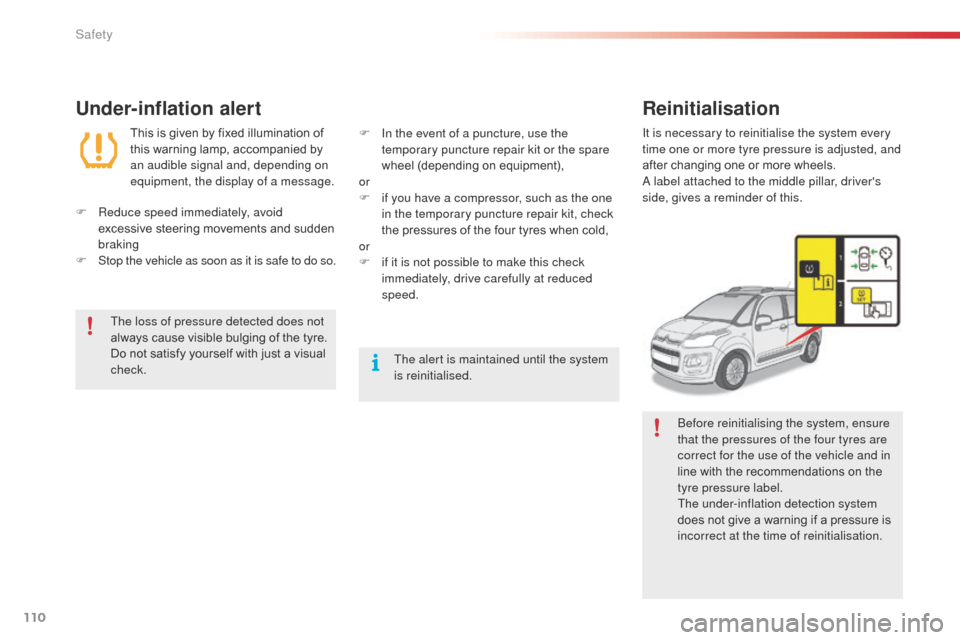
a
label attached to the middle pillar, driver's
side, gives a reminder of this.
be
fore reinitialising the system, ensure
that the pressures of the four tyres are
correct for the use of the vehicle and in
line with the recommendations on the
tyre pressure label.
The under-inflation detection system
does not give a warning if a pressure is
incorrect at the time of reinitialisation.
Safety
Page 115 of 292
113
C3Picasso_en_Chap08_securite_ed01-2014
braking assistance systems
Anti-lock braking system
and electronic brake force
distribution
Linked systems which improve the stability and
manoeuvrability of your vehicle when braking,
in particular on poor or slippery sur faces.
Activation
The anti-lock braking system comes into
operation automatically when there is a risk of
wheel lock.
no
rmal operation of the ab
S m
ay make itself
felt by slight vibration of the brake pedal.
When braking in an emergency, press
very firmly without releasing the
pressure.
Group of supplementary systems which help
you to obtain optimum braking in complete
safety in emergency situations:
-
a
nti-lock braking system (
a
b
S
),
-
e
lectronic brake force distribution (E
bFd)
,
-
em
ergency braking assistance (E
ba)
.
Operating fault
If this warning lamp comes on,
accompanied by an audible signal
and a message in the screen, it
indicates a malfunction of the anti-
lock braking system which could
result in loss of control of the vehicle
when braking.
If this warning lamp comes on,
together with the STOP
and ABS
warning lamps, accompanied by an
audible signal and a message in the
screen, it indicates a malfunction of
the electronic brake force distribution
which could result in loss of control of
the vehicle when braking.
Emergency braking assistance
System which, in an emergency, enables you
to obtain the optimum braking pressure more
quickly, thus reducing the stopping distance.
Activation
It is triggered by the speed at which the brake
pedal is pressed.
The effect of this is a reduction in the
resistance of the pedal and an increase in
braking efficiency.
In either case, contact a CITR
oËn
dealer or a
qualified workshop. When braking in an emergency, press
firmly without releasing the pressure.
When replacing wheels (tyres and
rims), ensure that they conform to the
manufacturer's recommendations.
You must stop as soon as it is safe to do so.
8
Safety
Page 116 of 292
114
C3Picasso_en_Chap08_securite_ed01-2014
Deactivation
In exceptional conditions (starting a vehicle
which is bogged down, stuck in snow, on soft
ground...), it may be advisable to deactivate the
DSC and ASR systems, so that the wheels can
move freely and regain grip.
F
P
ress the button, located in the centre of
the dashboard.
If this warning lamp comes on in the
instrument panel and the indicator
lamp on the button comes on, this
indicates that the
d
S
C and a
S
R
systems are deactivated.
Reactivation
These systems are reactivated automatically
each time the ignition is switched back on or
from 30 mph (50 km/h).
F
P
ress the button again to reactivate them
manually.
Operating fault
If this warning lamp comes on,
accompanied by an audible signal
and a message in the multifunction
screen, this indicates a malfunction
of these systems.
Trajectory control systems
The anti-slip regulation (also known as traction
control) optimises traction to prevent skidding of
the wheels, by acting on the brakes of the driving
wheels and on the engine.
The electronic stability control acts on the brake
of one or more wheels and on the engine to keep
the vehicle on the trajectory required by the driver,
within the limits of the laws of physics.
Anti-slip regulation (ASR)
and dynamic stability
control (DSC)
This is indicated by flashing of this
warning lamp in the instrument panel.
Activation
These systems are activated automatically
each time the vehicle is started.
They come into operation in the event of a grip
or trajectory problem. The
d
S
C/
aS
R systems offer
exceptional safety in normal driving, but
this should not encourage the driver to
take extra risks or drive at high speed.
The correct operation of these
systems depends on observation of
the manufacturer's recommendations
regarding wheels (tyres and rims),
braking components, electronic
components and assembly and repair
procedures.
af
ter an impact, have these systems
checked by a CITR
oËn
dealer or a
qualified workshop.
Have it checked by a CITR
oËn
dealer or a
qualified workshop.
Safety
Page 121 of 292
119
C3Picasso_en_Chap08_securite_ed01-2014
airbags
Front airbags
System which protects the driver and front
passenger in the event of a serious front impact
in order to limit the risk of injury to the head and
chest.
The driver's airbag is fitted in the centre of the
steering wheel; the front passenger's airbag is
fitted in the dashboard above the glove box.
Deployment
The airbags are deployed, except for the
passenger's front airbag if it is deactivated,
in the event of a serious front impact applied
to all or part of the front impact zone A, in
the longitudinal centreline of the vehicle on a
horizontal plane and directed from the front to
the rear of the vehicle.
The front airbag inflates between the front
occupant of the vehicle and the dashboard to
cushion their for ward movement.
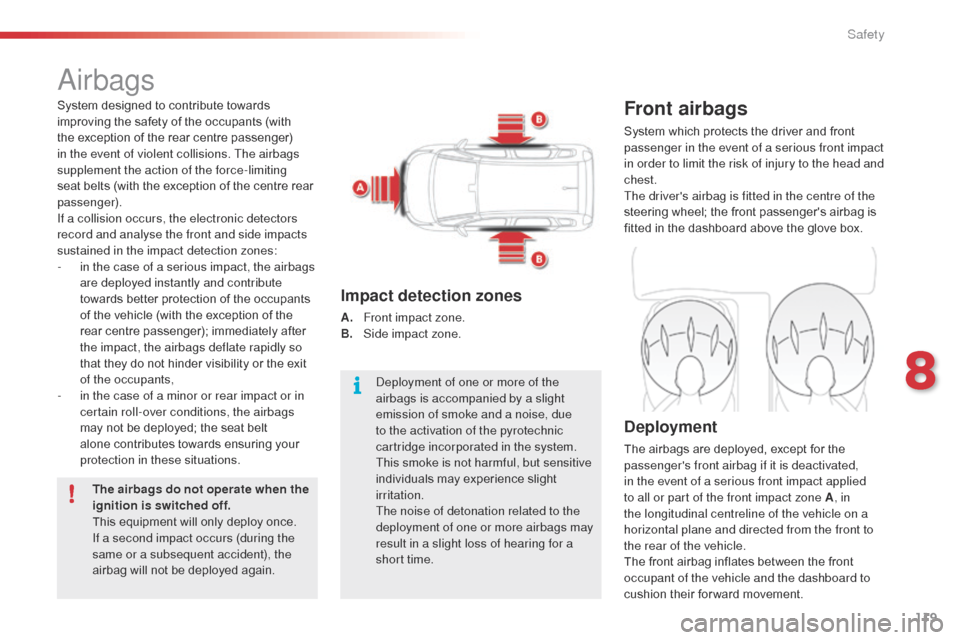
Impact detection zones
A. Front impact zone.
B. S ide impact zone.
System designed to contribute towards
improving the safety of the occupants (with
the exception of the rear centre passenger)
in the event of violent collisions. The airbags
supplement the action of the force-limiting
seat belts (with the exception of the centre rear
passenger).
If a collision occurs, the electronic detectors
record and analyse the front and side impacts
sustained in the impact detection zones:
-
i
n the case of a serious impact, the airbags
are deployed instantly and contribute
towards better protection of the occupants
of the vehicle (with the exception of the
rear centre passenger); immediately after
the impact, the airbags deflate rapidly so
that they do not hinder visibility or the exit
of the occupants,
-
i
n the case of a minor or rear impact or in
certain roll-over conditions, the airbags
may not be deployed; the seat belt
alone contributes towards ensuring your
protection in these situations.
The airbags do not operate when the
ignition is switched off.
This equipment will only deploy once.
If a second impact occurs (during the
same or a subsequent accident), the
airbag will not be deployed again.
de
ployment of one or more of the
airbags is accompanied by a slight
emission of smoke and a noise, due
to the activation of the pyrotechnic
cartridge incorporated in the system.
This smoke is not harmful, but sensitive
individuals may experience slight
irritation.
The noise of detonation related to the
deployment of one or more airbags may
result in a slight loss of hearing for a
short time.
8
Safety
Page 124 of 292
122
C3Picasso_en_Chap08_securite_ed01-2014
Front airbags
Do not drive holding the steering wheel by its spokes or resting your hands on the centre part
of the wheel.
Passengers must not place their feet on the dashboard.
do n
ot smoke as deployment of the airbags can cause burns or the risk of injury from a
cigarette or pipe.
Never remove or pierce the steering wheel or hit it violently.
Do not fit or attach anything to the steering wheel or dashboard, this could cause injuries with
deployment of the airbags.
Lateral airbags
Use only approved covers on the seats, compatible with the deployment the lateral airbags.
For information on the range of seat covers suitable for your vehicle, you can contact a
CITR
oËn
dealer.
Refer to the "
ac
cessories" section.
Do not fix or attach anything to the seat backs (clothing...). This could cause injury to the chest
or arms if the lateral airbag is deployed.
Do not sit with the upper part of the body any nearer to the door than necessary.
Curtain airbags
Do not fix or attach anything to the roof. This could cause injury to the head if the curtain
airbag is deployed.
If fitted on your vehicle, do not remove the grab handles installed on the roof, they play a part
in securing the curtain airbags.
Do not leave anything between the
occupants and the airbags (a child, pet,
object...). This could hamper the operation of
the airbags or injure the occupants.
af
ter an accident or if the vehicle has been
stolen or broken into, have the airbag
systems checked.
All work on the airbag system must be
carried out by a CITR
oËn
dealer or a
qualified workshop.
Even if all of the precautions mentioned
are observed, a risk of injury or of minor
burns to the head, chest or arms when an
airbag is deployed cannot be ruled out. The
bag inflates almost instantly (within a few
milliseconds) then deflates within the same
time discharging the hot gas via openings
provided for this purpose.
For the airbags to be fully
effective, observe the following
safety rules:
Sit in a normal upright position.
Wear a correctly adjusted seat belt.
Safety
Page 125 of 292
123
C3Picasso_en_Chap09_conduite_ed01-2014
Parking brake
Applying
F Pull the parking brake lever fully up to immobilise your vehicle.
When the vehicle is being driven, if this warning lamp
and the STOP warning lamp come on, accompanied
by an audible signal and a message in the
multifunction screen, this indicates that the parking
brake is still on or has not been properly released.
Releasing
F Pull the parking brake lever gently, press the release button then lower the lever
fully.
6-speed manual
gearbox
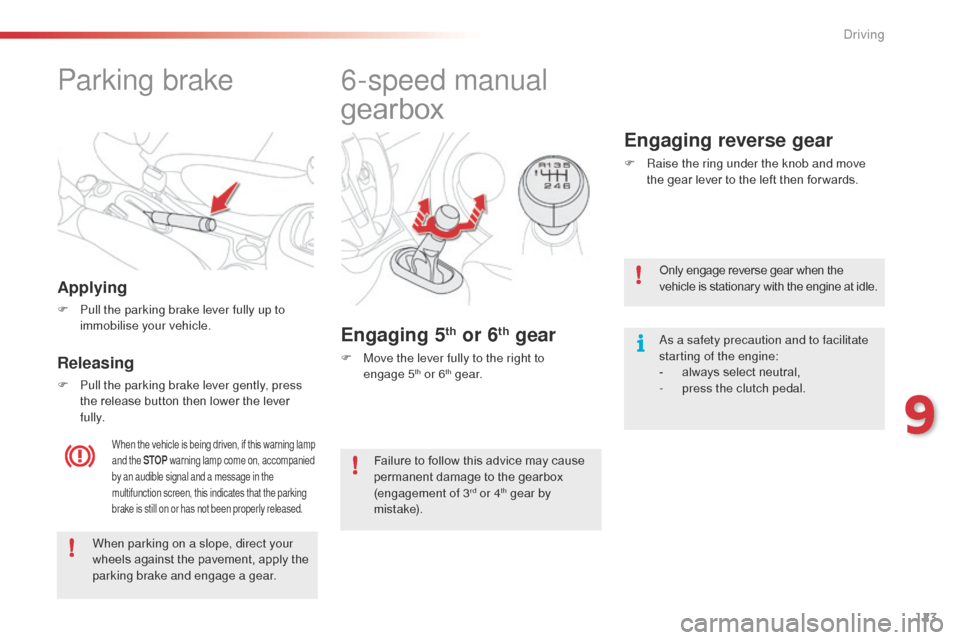
Engaging 5th or 6th gear
F Move the lever fully to the right to engage 5th or 6th g e a r.
Engaging reverse gear
F Raise the ring under the knob and move the gear lever to the left then for wards.
When parking on a slope, direct your
wheels against the pavement, apply the
parking brake and engage a gear. Only engage reverse gear when the
vehicle is stationary with the engine at idle.
as a s
afety precaution and to facilitate
starting of the engine:
-
a
lways select neutral,
-
p
ress the clutch pedal.
Failure to follow this advice may cause
permanent damage to the gearbox
(engagement of 3
rd or 4th gear by
m i st a ke).
9
driving
Page 126 of 292
124
C3Picasso_en_Chap09_conduite_ed01-2014
6-speed electronic gearbox system
Six-speed electronic gearbox system which
offers a choice between the comfort of fully
automatic operation or the pleasure of manual
gear changing.
There are two driving modes:
-
a
utomated mode for automatic control
of the gears by the gearbox, without any
action on the part of the driver
-
m
anual mode for sequential gear changing
by the driver using the gear lever or the
steering mounted paddles.
In automated mode, you can temporarily take
over control of gear changing.Gear lever
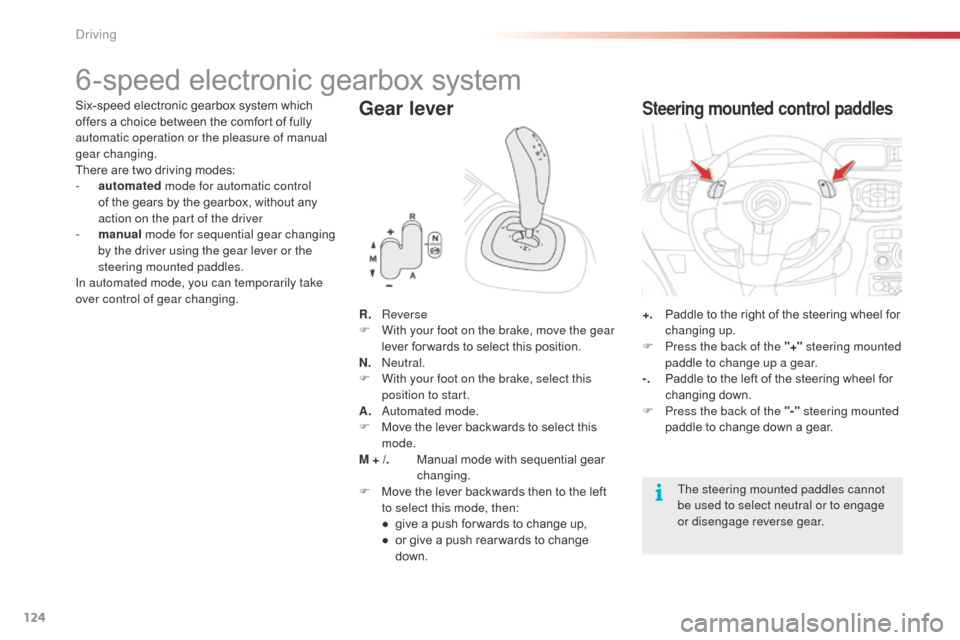
R. Reverse
F W ith your foot on the brake, move the gear
lever for wards to select this position.
N.
n
e
utral.
F
W
ith your foot on the brake, select this
position to start.
A.
a
u
tomated mode.
F
M
ove the lever backwards to select this
mode.
M + /.
M
anual mode with sequential gear
changing.
F
M
ove the lever backwards then to the left
to select this mode, then:
●
g
ive a push for wards to change up,
●
o
r give a push rear wards to change
down. +. P
addle to the right of the steering wheel for
changing up.
F
P
ress the back of the "+" steering mounted
paddle to change up a gear.
-.
P
addle to the left of the steering wheel for
changing down.
F
P
ress the back of the "-" steering mounted
paddle to change down a gear.
Steering mounted control paddles
The steering mounted paddles cannot
be used to select neutral or to engage
or disengage reverse gear.
driving
Page 135 of 292
133
C3Picasso_en_Chap09_conduite_ed01-2014
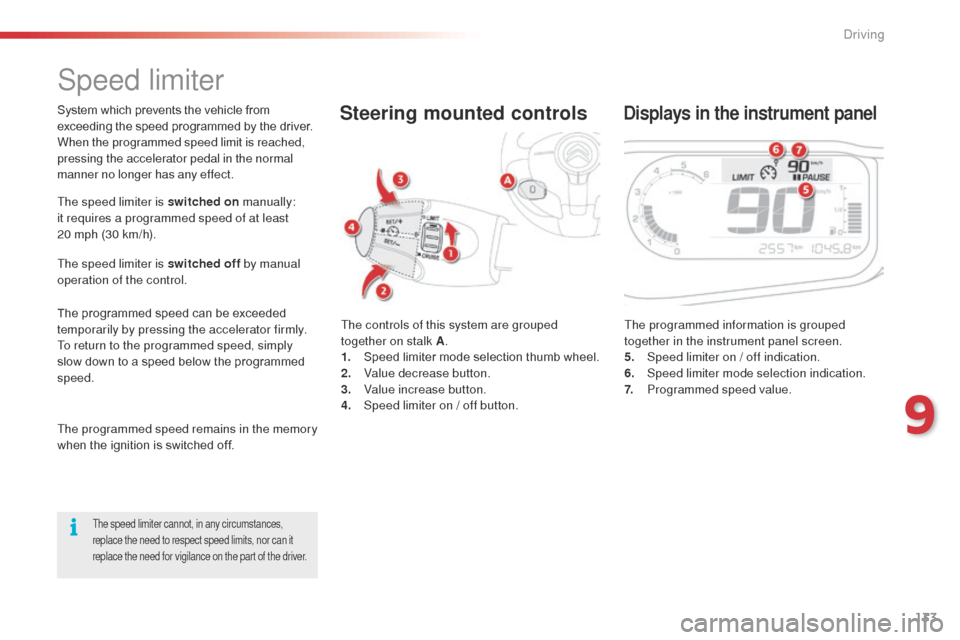
Speed limiter
The controls of this system are grouped
together on stalk A.
1.
S
peed limiter mode selection thumb wheel.
2.
V
alue decrease button.
3.
V
alue increase button.
4.
S
peed limiter on / off button. The programmed information is grouped
together in the instrument panel screen.
5.
S
peed limiter on / off indication.
6.
Spe
ed limiter mode selection indication.
7.
P
rogrammed speed value.
Steering mounted controlsDisplays in the instrument panel
The speed limiter is switched on manually:
it requires a programmed speed of at least
20
mph (30 km/h).
The speed limiter is switched off by manual
operation of the control.
The programmed speed can be exceeded
temporarily by pressing the accelerator firmly.
To return to the programmed speed, simply
slow down to a speed below the programmed
speed.
The programmed speed remains in the memory
when the ignition is switched off.
The speed limiter cannot, in any circumstances,
replace the need to respect speed limits, nor can it
replace the need for vigilance on the part of the driver.
System which prevents the vehicle from
exceeding the speed programmed by the driver.
When the programmed speed limit is reached,
pressing the accelerator pedal in the normal
manner no longer has any effect.
9
driving
Page 136 of 292

134
C3Picasso_en_Chap09_conduite_ed01-2014
Programming
F Turn thumb wheel 1 to the "LIMIT"
position: the speed limiter mode
is selected but is not switched on
(P
a
U
S E).
You do not have to switch the speed limiter
on in order to set the speed.
Exceeding the programmed speed
Pressing the accelerator pedal to exceed the programmed speed will not have
any effect unless you press the pedal firmly past the point of resistance.
The speed limiter is deactivated temporarily and the programmed speed,
which is still displayed, flashes.
Returning to the programmed speed, by means of intentional or unintentional
deceleration of the vehicle, automatically cancels the flashing of the
programmed speed.
Leaving limiter mode
F Turn thumb wheel 1 to the "0" position: the speed limiter mode is
deselected. The display returns to the distance recorder.
Operating fault
In the event of a speed limiter fault, the speed
is cleared resulting in flashing of the dashes.
Have it checked by a CITR
oËn
dealer or a
qualified workshop.
F
S
et the speed value by pressing button 2 or 3 (e.g.: 55 mph
(90
km/h)).
You can then change the programmed speed using buttons 2 and 3 :
-
b
y + or - 1 mph (km/h) = short press,
-
b
y + or - 5 mph (km/h) = long press,
-
i
n steps of + or - 5 mph (km/h) = maintained press.
F
S
witch the speed limiter on by pressing button 4 .
F
S
witch the speed limiter off by pressing button 4 : the display
confirms that it has been switched off (PAUSE).
F
S
witch the speed limiter back on by pressing button 4 again.
on a s
teep descent or in the event of
sharp acceleration, the speed limiter
will not be able to prevent the vehicle
from exceeding the programmed speed.
To avoid any risk of jamming of the
pedals:
-
e
nsure that the mat is secured
c o r r e c t l y,
-
d
o not fit one mat on top of another.
driving