radio Citroen C3 PICASSO 2014 1.G Owner's Guide
[x] Cancel search | Manufacturer: CITROEN, Model Year: 2014, Model line: C3 PICASSO, Model: Citroen C3 PICASSO 2014 1.GPages: 292, PDF Size: 9.23 MB
Page 254 of 292

252
C3Picasso_en_Chap13b_RT6-2-8_ed01-2014
FREQUENTLY ASKED QUESTIONS
QUESTION ANSWER SOLUTION
In changing the setting
of treble and bass the
equalizer setting is
deselected. The selection of an equalizer setting imposes the balance settings.
Modifying one without the other is not possible.
Modify the balance or equalizer settings to obtain
the desired musical ambience.
In changing the equalizer
setting, treble and bass
return to zero.
When changing the
balance settings, the
distribution setting is
deselected. The selection of a distribution setting imposes the balance settings.
Modifying one without the other is not possible.
Modify the balance or distribution settings to
obtain the desired musical ambience.
When changing an
distribution setting,
the balance setting is
deselected.
There is a difference in
sound quality between
the different audio
sources (radio, C
d ...).For optimum sound quality, the audio settings for Volume,
b ass, Treble,
Equalizer and Loudness can be adapted to the different sound sources,
which may result in audible differences when changing source (radio,
C
d ...). Check that the audio settings for (Volume,
b ass,
Treble, Equalizer, Loudness) are adapted to
the sources listened to. It is advisable to set the
a
U d I o functions ( b ass, Treble, Fr-Re balance,
Le-Ri balance) to the middle position, select the
"
n one", musical ambience and set the loudness
correction to the "
a ctive" position in C d mode or
to the "Inactive" position in radio mode.
Page 258 of 292

01
256
C3Picasso_en_Chap13c_Rd45_ed01_2014
FIRST STEPS
Eject Cd.
Select source:
radio, audio C
d / MP3 C d , US b ,
Jack connection, Streaming,
a
UX.
Select the screen display
mode:
d
ate, audio functions, trip
computer, telephone.
a
utomatic frequency search
down/up.
Select previous/next CD, MP3
or US
b track.
a
udio settings: front/
rear fader, left/right
balance, bass/treble,
loudness, audio
ambiences.
d
isplay the list of
local stations.
Long press: C d
tracks or MP3
folders (C d / US b ).
TA (Traffic Announcements)
on/off.
Long press: PTY* (radio
Programme TYpe) mode.
d
isplay main menu.
The
da R k button changes the screen display
for improved driving comfort at night.
1
st press: upper bar only illuminated.
2nd press: black screen.
3rd press: return to standard display.
o
n/off, volume setting.
b
uttons 1 to 6:
Select a pre-set radio station.
Long press: pre-set a station. Select next frequency down/up.
Select previous/next MP3 folder.
Select previous/next folder / genre /
artist / playlist (US
b ).
Confirm.
Selection of
a
M / FM
wavebands.
a
bandon the current
operation.
*
available according to version.
Page 259 of 292

02
257
C3Picasso_en_Chap13c_Rd45_ed01_2014
STEERING MOUNTED CONTROLS
Radio: automatic search for a higher frequency.
CD / MP3 / USB: selection of the next track.
CD / USB: continuous press: fast forwards play.
Move in the list.Change audio source.
Confirm a selection.
Call/end call on the telephone.
Press for more than 2 seconds:
telephone main menu.
Radio: automatic search for a lower
frequency.
C
d / MP3 / US b : selection of the
previous track.
C
d / US b : continuous press: fast
reverse.
Move in the list.
Radio: select the previous/next pre-set
station.
US
b
: select genre / artist / folder from the
classification list.
Select the previous/next item in a menu. Volume increase.
Volume decrease.Mute: press the volume
increase and decrease
buttons simultaneously.
The sound is restored
by pressing one of the
two
volume buttons.
Page 260 of 292

03
258
C3Picasso_en_Chap13c_Rd45_ed01_2014
MAIN MENU
AUDIO FUNCTIONS:
radio, Cd , US b , options.
Screen C
For a detailed global view of the
menus available, refer to the
"Screen menu map" section.
TELEPHONE:
b
luetooth hands-free,
pairing, management
of a call.
PERSONALISATION-
CONFIGURATION:
vehicle parameters,
display, languages.
TRIP COMPUTER: entering
of distances, alerts, status of
functions.
Screen A
Page 261 of 292

04
259
C3Picasso_en_Chap13c_Rd45_ed01_2014
AUDIO
Press the SoURCE button several
times in succession and select the
radio.
Press the
band
a
ST button to select
a waveband: FM1, FM2, FMast, AM.
Briefly press one of the buttons to
carry out an automatic search of the
radio stations.
Press one of the buttons to carry out
a manual search up / down for radio
frequencies.
Press the LIST REFRESH button to
display the list of stations received
locally (30 stations maximum).
To update this list, press for more
than two seconds. The external environment (hills, buildings, tunnels, basement car parks,
...)
may block reception, including in R
d S mode. This is a normal effect of the
way in which radio waves are transmitted and does not indicate any failure
of the audio system.
RDS
RadioSelecting a station
Press the ME n U button.
Select
a
U d I o FU n CTI on S then
press
ok .
Select the FM W
aVE
band
PREFERE
n CES function then
press
ok .
Select
a
CTIV
aTE R
d S then press
ok
. R d S appears on the screen.
In radio mode, press
ok directly to activate / deactivate R d S
mode.
The RdS, if displayed, enables you to continue listening to the same station b\
y
automatic retuning to alternative frequencies. However , in certain conditions,
coverage of an R
d S station may not be assured throughout the country as
radio stations do not cover 100 % of the territory. Under conditions of very
weak reception, the system may change to a regional station.
Page 262 of 292

04
260
C3Picasso_en_Chap13c_Rd45_ed01_2014
AUDIO
Insert circular compact discs only.
Some anti-pirating systems, on original discs or Cd s copied using a
personal recorder, may cause faults which are no reflection on the
quality of the vehicle's player.
Without pressing the EJECT button, insert a CD in the player, play
begins automatically.
CD
Playing a CD
To play a disc which has already been
inserted, press the S o URCE button
several times in succession and
select C
d .
Press one of the buttons to select a
track on the C
d .
Press the LIST REFRESH button to display the list of tracks on
the
C
d
. Press and hold one of the buttons for
fast forwards or fast backwards.
Receiving TA messages
Press the Ta button to activate or
deactivate traffic messages.
The
TA (Traffic Announcement) function gives priority to TA alert
messages. To operate, this function needs good reception of a
radio station transmitting this type of message. When a traffic
report is transmitted, the current audio source (Radio, C d , ...) is
interrupted automatically to play the T
a message.
n ormal playback
of the audio source resumes at the end of the transmission of the
message.
Page 270 of 292

07
268
C3Picasso_en_Chap13c_Rd45_ed01_2014
SCREEN MENU MAP(S)
Radio-CD
* The settings vary according to vehicle.REG mode
CD repeat
Shuffle play
Vehicle config*
R wiper in rev
Options
Guide lighting
Diagnostic
RDS options
View
a
bandon
1
2
3
3
1
2
2
2
2
1
2
2
Screen A
MAIN FUNCTION
Option A1
o
ption a 11
Option A
Option B...1
2
3
1
Page 272 of 292
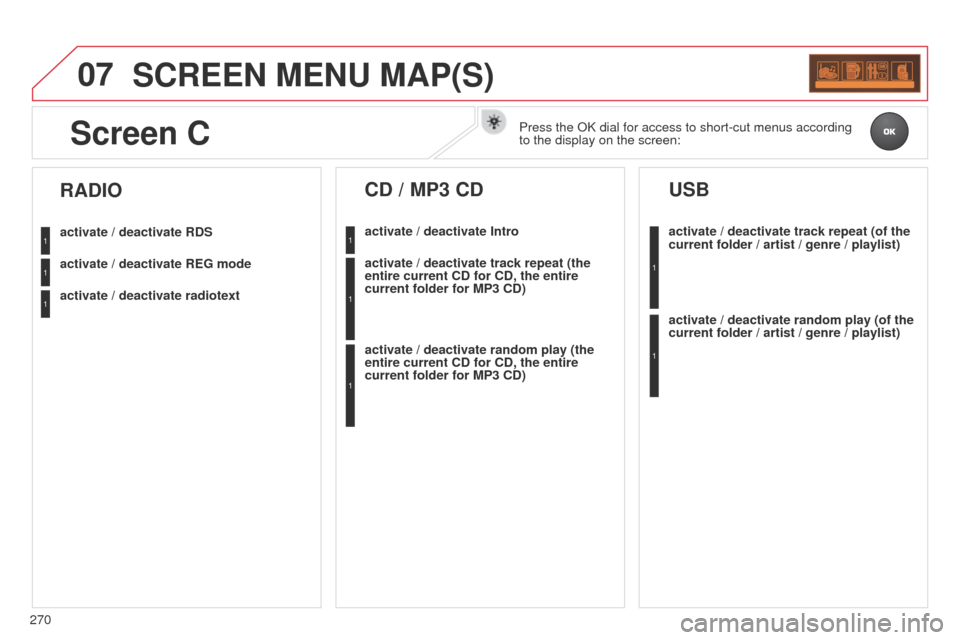
07
270
C3Picasso_en_Chap13c_Rd45_ed01_2014
SCREEN MENU MAP(S)
activate / deactivate RDS
activate / deactivate REG mode
activate / deactivate radiotext
RADIO
activate / deactivate Intro
CD / MP3 CD
activate / deactivate track repeat (the
entire current CD for CD, the entire
current folder for MP3 CD)
activate / deactivate random play (the
entire current CD for CD, the entire
current folder for MP3 CD)activate / deactivate track repeat (of the
current folder / artist / genre / playlist)
USB
activate / deactivate random play (of the
current folder / artist / genre / playlist)
1
1
1
1
1
1
1
1
Screen CPress the ok dial for access to short-cut menus according
to the display on the screen:
Page 273 of 292

07
271
C3Picasso_en_Chap13c_Rd45_ed01_2014
SCREEN MENU MAP(S)
Audio functions
alternative frequencies (RdS)
activate / deactivate
FM
preferences
Regional mode (REG) activate / deactivate
Radio-text information (RDTXT) activate / deactivate
1
2
3
4
3
4
3
4
Play modes
a
lbum repeat (RPT)
activate / deactivate
Track random play (R
d M)
activate / deactivate2
3
4
3
4
Trip computer
Distance: x miles
Enter distance to destination
d
iagnostics
Alert log
Systems activated or deactivated
State of systems*
1
2
3
3
2
3
2
* The settings vary according to vehicle.
Screen CPressing the MEnU button displays:
Page 275 of 292

273
C3Picasso_en_Chap13c_Rd45_ed01_2014
FREQUENTLY ASKED QUESTIONS
QUESTION ANSWER SOLUTION
There is a difference in
sound quality between
the different audio
sources (radio, C
d ...).For optimum sound quality, the audio settings (Volume,
b ass, Treble,
a
mbience, Loudness) can be adapted to the different sound sources,
which may result in audible differences when changing source (radio,
C
d ...). Check that the audio settings (Volume,
b ass,
Treble,
a
mbience, Loudness) are adapted to
the sources listened to. It is advisable to set
the
a
U d I o functions ( b ass, Treble, Front-Rear
b
alance, Left-Right b alance) to the middle
position, select the musical ambience "
n one" and
set the loudness correction to the "
a ctive" position
in C
d mode or to the "Inactive" position in radio
mode.
The C
d is ejected
automatically or is not
played by the player. The CD is inserted upside down, is unplayable, does not contain any
audio data or contains an audio format which the player cannot play
.
The CD is protected by an anti-pirating protection system which is not
recognised by the audio equipment. -
Check that the C
d is inserted in the player the
right way up.
-
Check the condition of the C
d : the C d cannot
be played if it is too damaged.
-
Check the content in the case of a recorded
C
d : consult the advice in the " a udio" section.
-
The audio equipment's C
d player does not
play
d V d s.
-
Due to their quality level, certain writeable
CDs will not be played by the audio system.
The message "US
b
peripheral error" is
displayed on the screen.
The
b
luetooth connection
is cut. The battery of the peripheral may not be sufficiently charged.
Recharge the battery of the peripheral device.
The US
b memory stick is not recognised.
The memory stick may be corrupt. Reformat the memory stick.