battery CITROEN C3 PICASSO 2017 User Guide
[x] Cancel search | Manufacturer: CITROEN, Model Year: 2017, Model line: C3 PICASSO, Model: CITROEN C3 PICASSO 2017Pages: 292, PDF Size: 8.23 MB
Page 150 of 292

148
C3Picasso_en_Chap10_verification_ed01-2015
Particle filter (Diesel)
The start of saturation of the
particle filter is indicated by
the temporary illumination of this warning lamp
accompanied by a message in the multifunction
screen.
As soon as the traffic conditions permit, regenerate
the filter by driving at a speed of at least 40 mph
(60 km/h) until the warning lamp goes off.
If the warning lamp stays on, this indicates a low
additive level.
For more information on checking levels, refer to
the corresponding section.
On a new vehicle, the first particle
filter regeneration operations may be
accompanied by a "burning" smell,
which is per fectly normal.
Following prolonged operation of the
vehicle at very low speed or at idle,
you may, in exceptional circumstances,
notice the emission of water vapour at
the exhaust on acceleration. This does
not affect the behaviour of the vehicle
or the environment.
Checks
12 V battery
The battery does not require any maintenance.
However, check that the terminals are clean
and correctly tightened, particularly in summer
and winter.
Air filter and passenger compartment filter
Refer to the manufacturer's
service schedule for details of the
replacement intervals for these
components.
Oil filter
Replace the oil filter each time the
engine oil is changed.
Refer to the manufacturer's
service schedule for details of
the replacement interval for this
component.
Unless other wise indicated, check these components in accordance with the manufacturer's service schedule and according to your engine.
Other wise, have them checked by a CITROËN dealer or a qualified workshop.
When carrying out work on the battery, refer
to the "12 V battery" section for details of the
precautions to be taken before disconnecting
the battery and following its reconnection.
Depending on the environment (e.g. dusty
atmosphere) and the use of the vehicle
(e.g.
city driving), replace them twice as often
if necessary .
A clogged passenger compartment filter may
have an adverse effect on the per formance
of the air conditioning system and generate
undesirable odours.
Checks
Page 183 of 292

181
C3Picasso_en_Chap11_informations-pratiques_ed01-2015
Engine compartment fuses
The fusebox is placed in the engine
compartment near the battery (left-hand side).
Access to fuses
F Unclip the cover.
F C hange the fuse (see corresponding
paragraph).
F
W
hen you have finished, close the cover
carefully to ensure the correct sealing of
the fusebox.
All work on these fuses, located on
the battery, must be carried out by
a CITROËN dealer or a qualified
workshop.
11
Practical information
Page 187 of 292

185
C3Picasso_en_Chap11_informations-pratiques_ed01-2015
BatteryProcedure for charging your battery when it is flat or for starting the engine using another battery.
Access to the battery
The battery is located under the bonnet.
To gain access to it:
F
o
pen the bonnet using the interior release
lever, then the exterior safety catch,
F
s
ecure the bonnet stay,
F
l
ift the plastic cover on the (+) terminal. First check that the slave battery has a
nominal voltage of 12 V and a capacity
at least equal to that of the discharged
battery.
Do not try to start the engine by
connecting a battery charger.
Do not disconnect the (+) terminal when
the engine is running.
F
C
onnect the red cable to the positive
terminal (+) of the flat battery A , then to the
positive terminal (+) of the slave battery B.
F
C
onnect one end of the green or black
cable to the negative terminal (-) of the
slave battery B (or earth point on the other
vehicle).
F
C
onnect the other end of the green or
black cable to the negative terminal C (or
the engine mounting) of the broken-down
vehicle.
F
S
tart the engine of the other vehicle and
allow it to run for a few minutes.
Starting using another
battery
When the battery on your vehicle is discharged,
the engine can be started using a slave battery
(external or on another vehicle) and jump leads.
F
O
perate the starter of the broken-down
vehicle and let the engine run.
I
f the engine does not start immediately,
switch off the ignition and wait a few
moments before trying again.
F
W
ait until the engine returns to idle, then
disconnect the jump leads in reverse order.
Some functions are not available if the
battery is not sufficiently charged.
11
Practical information
Page 188 of 292

186
C3Picasso_en_Chap11_informations-pratiques_ed01-2015
Charging the battery using
a battery charger
F Follow the instructions for use provided by the manufacturer of the charger. Protect your eyes and face before
handling the battery.
All operations on the battery must be
carried out in a well ventilated area
away from naked flames and sources
of sparks, so as to avoid the risk of
explosion and fire.
Do not try to charge a frozen battery;
the battery must first be thawed out to
avoid the risk of explosion. If the battery
has been frozen, before charging have
it checked by a CITROËN dealer or a
qualified workshop who will check that
the internal components have not been
damaged and the casing is not cracked,
which could cause a leak of toxic and
corrosive acid.
Do not reverse the polarity and use only
a 12 V charger.
Do not disconnect the terminals while
the engine is running.
Do not charge the batteries without
disconnecting the terminals first.
Wash your hands after wards.
Batteries contain harmful substances such
as sulphuric acid and lead. They must be
disposed of in accordance with regulations
and must not, in any circumstances, be
discarded with household waste.
Take used remote control batteries and
vehicle batteries to a special collection
point.
Practical information
Page 189 of 292

187
C3Picasso_en_Chap11_informations-pratiques_ed01-2015
Load reduction mode
System which manages the use of certain
functions according to the level of charge
remaining in the battery.
When the vehicle is being driven, the load
reduction function temporarily deactivates
certain functions, such as the air conditioning,
the heated rear screen...
The deactivated functions are reactivated
automatically as soon as conditions permit.
Energy economy mode
Exiting economy mode
These functions are reactivated automatically
the next time the vehicle is driven.
F
I
n order to resume the use of these
functions immediately, start the engine and
let it run for a few minutes.
The time available to you will then be double
the period for which the engine is left running.
However, this period will always be between
five and thirty minutes.
Switching to economy mode
Once this period has elapsed, a message
appears on the multifunction screen indicating
that the vehicle has switched to economy mode
and the active functions are put on standby.
A flat battery prevents the engine from
starting (refer to the corresponding
paragraph).
If the telephone is being used at the
same time on the eMyWay audio
navigation system, it will be interrupted
after 10 minutes.
System which manages the period of use of certain functions to conserve a sufficient level of
charge in the battery.
After the engine has stopped, you can still use functions such as the audio equipment,
windscreen
wipers, dipped beam headlamps, courtesy lamps, etc. for a maximum combined period of
thirty
minutes.
This period may be greatly reduced if the battery is not fully charged.
11
Practical information
Page 203 of 292
201
C3Picasso_en_Chap13a_RT6-2-8_ed01-2015
The system is protected in such a way that it will only
operate in your vehicle.
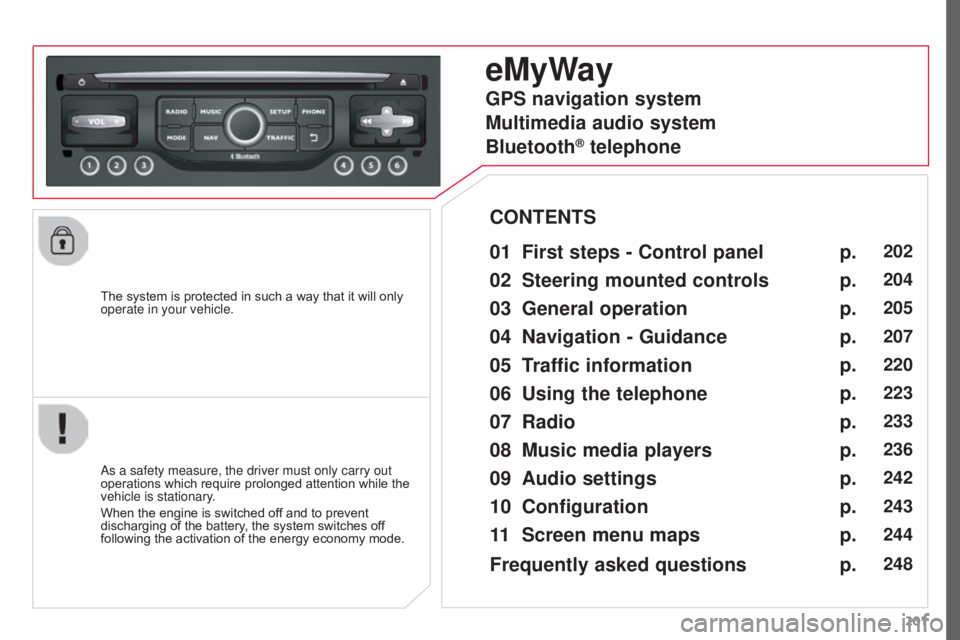
eMyWay
01 First steps - Control panel
As a safety measure, the driver must only carry out
operations which require prolonged attention while the
vehicle is stationary.
When the engine is switched off and to prevent
discharging of the battery, the system switches off
following the activation of the energy economy mode.
CONTENTS
02
Steering mounted
controls
03
General operation
04
Navigation
- Guidance
05
T
raffic information
06
Using
the telephone
07
Radio
08
Music media players
09
Audio
settings
10
Configuration
11
Screen menu
maps p.
p.
p.
p.
p.
p.
p.
p.
p.
p.
p.
202
204
205
207
220
223
233
236
242
243
244
GPS navigation system
Multimedia audio system
Bluetooth
® telephone
Frequently asked questions p.
248
Page 255 of 292

253
C3Picasso_en_Chap13a_RT6-2-8_ed01-2015
FREQUENTLY ASKED QUESTIONS
QUESTION ANSWER SOLUTION
With the engine off, the
system switches off after
a few minutes of use. When the engine is switched off, the system's operating time depends on
the state of charge of the battery.
The switch-off is normal: economy mode is activated automatically to
maintain the state of charge of the vehicle's battery, needed for engine
starting. (See the "Energy economy mode" section). Start the vehicle's engine to increase the battery
charge.
Playback of my USB
memory stick starts only
after a very long wait
(around 2 to 3 minutes). Some files supplied with the memory stick may greatly slow down access
to reading the memory stick (multiplication by 10 of the catalogue time\
).
Delete the files supplied with the memory stick
and limit the number of sub-folders in the file
structure on the memory stick.
When I connect my
iPhone as telephone and
to the USB port at the
same time, I am unable
to play the music files. When the iPhone connects automatically as a telephone, it forces the
streaming function. The streaming function takes the place of the USB
function which is then not useable, there is a period without sound of the
track being played with Apple
® players.
Disconnect and reconnect to the USB port
(the
USB function takes priority over streaming).
Page 257 of 292

255
C3PICASSO_EN_CHAP13B_RD45_ED01_2015
Audio system
Your Audio system is coded in such a way that it will
only operate in your vehicle.
For safety reasons, the driver must only carry out
operations which require prolonged attention while the
vehicle is stationary.
When the engine is switched off and to prevent
discharging of the battery, the audio equipment may
switch off after a few minutes.
Audio system / Bluetooth®
01 First steps
02
Steering mounted
controls
03
Main
menu
04
Audio
05
USB Box
06
Bluetooth
functions
07
Screen menu map(s)
Frequently
asked questions p.
p.
p.
p.
p.
p.
p.
p.
256
257
258
259
262
265
268
273
CONTENTS
Page 275 of 292

273
C3PICASSO_EN_CHAP13B_RD45_ED01_2015
FREQUENTLY ASKED QUESTIONS
QUESTION ANSWER SOLUTION
There is a difference in
sound quality between
the different audio
sources (radio, CD...). For optimum sound quality, the audio settings (Volume, Bass, Treble,
Ambience, Loudness) can be adapted to the different sound sources,
which may result in audible differences when changing source (radio,
CD...). Check that the audio settings (Volume, Bass,
Treble, Ambience, Loudness) are adapted to
the sources listened to. It is advisable to set
the AUDIO functions (Bass, Treble, Front-Rear
Balance, Left-Right Balance) to the middle
position, select the musical ambience "None" and
set the loudness correction to the "Active" position
in CD mode or to the "Inactive" position in radio
mode.
The CD is ejected
automatically or is not
played by the player. The CD is inserted upside down, is unplayable, does not contain any
audio data or contains an audio format which the player cannot play
.
The CD is protected by an anti-pirating protection system which is not
recognised by the audio equipment. -
Check that the CD is inserted in the player the
right way up.
-
Check the condition of the CD: the CD cannot
be played if it is too damaged.
-
Check the content in the case of a recorded
CD: consult the advice in the "Audio" section.
-
The audio equipment's CD player does not
play DVDs.
-
Due to their quality level, certain writeable
CDs will not be played by the audio system.
The message "USB
peripheral error" is
displayed on the screen.
The Bluetooth connection
is cut. The battery of the peripheral may not be sufficiently charged.
Recharge the battery of the peripheral device.
The USB memory stick is not recognised.
The memory stick may be corrupt. Reformat the memory stick.
Page 277 of 292

275
C3PICASSO_EN_CHAP13B_RD45_ED01_2015
FREQUENTLY ASKED QUESTIONS
QUESTION ANSWER SOLUTION
Sound cut-outs of 1 to
2
seconds in radio mode. During this brief sound cut-out, the RDS searches for any frequency
permitting better reception of the station. Deactivate the RDS function if the phenomenon is
too frequent and always on the same route.
With the engine off,
the audio equipment
switches off after a few
minutes of use. When the engine is switched off, the audio equipment operating time
depends on the battery charge.
The switch-off is normal: the audio equipment switches to economy mode
and switches off to prevent discharging of the vehicle's battery. Start the vehicle's engine to increase the battery
charge.
The message "the audio
system is overheated"
appears on the display. In order to protect the installation if the surrounding temperature is t\
oo
high, the audio equipment switches to an automatic thermal protection
mode leading to a reduction of the volume or stopping of the playing of \
the CD. Switch the audio system off for a few minutes to
allow the system to cool.