ignition CITROEN C3 PICASSO 2017 Workshop Manual
[x] Cancel search | Manufacturer: CITROEN, Model Year: 2017, Model line: C3 PICASSO, Model: CITROEN C3 PICASSO 2017Pages: 292, PDF Size: 8.23 MB
Page 170 of 292
168
C3Picasso_en_Chap11_informations-pratiques_ed01-2015
Never store bottles of AdBlue® in your
vehicle.
AdBlue
® freezes at about -11°C and
deteriorates above 25°C. It is recommended
that bottles be stored in a cool area and
protected from direct sunlight.
Under these conditions, the additive can be
kept for at least a year.
If the additive has frozen, it can be used once it
has completely thawed out.
Recommendations on storage
Before topping-up, ensure that the vehicle is
parked on a flat and level sur face.
In wintry conditions, ensure that the
temperature of the vehicle is above -11°C.
Otherwise the AdBlue
® may be frozen and
so cannot be poured into its tank. Park your
vehicle in a warmer area for a few hours to
allow the top-up to be carried out.
Procedure
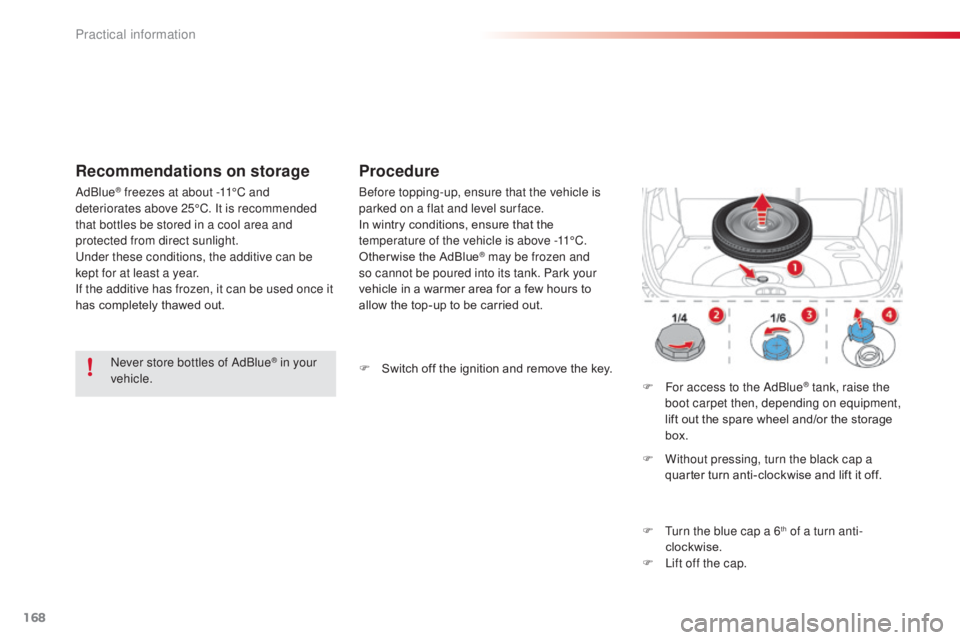
F For access to the AdBlue® tank, raise the
boot carpet then, depending on equipment,
lift out the spare wheel and/or the storage
box.
F
W
ithout pressing, turn the black cap a
quarter turn anti-clockwise and lift it off.
F
T
urn the blue cap a 6
th of a turn anti-
clockwise.
F
L
ift off the cap.
F
S
witch off the ignition and remove the key.
Practical information
Page 171 of 292

169
C3Picasso_en_Chap11_informations-pratiques_ed01-2015
F Obtain a bottle of AdBlue®. After first
checking the use-by date, read carefully
the instructions on use on the label before
pouring the contents of the bottle into your
vehicle's AdBlue
® tank.
Important : if your vehicle's
AdBlue
® tank is completely empty -
w
hich is confirmed by the alert
messages and the impossibility of
starting the engine, you must add at
least 3.8 litres (so two 1.89 litre bottles). If any additive is split or splashed, wash
immediately with cold water or wipe with
a damp cloth.
If the additive has crystallised, clean it
off using a sponge and hot water.
Important:
in the event of a top-up after
a breakdown because of a lack of
additive , you must wait around 5 minutes
before switching on the ignition, without
opening the driver's door, locking the
vehicle or introducing the key into the
ignition switch .
Switch on the ignition, then, after
10
seconds, start the engine.
Never dispose of AdBlue
® additive
bottles in the household waste. Place
them in a special container provided
this purpose or take them to your dealer.
F
A
fter emptying the bottle, wipe away any
spillage around the tank filler using a damp
cloth.
F
R
efit the blue cap to the tank and turn it a
6th of a turn clockwise, to its stop.
F
R
efit the black cap and turn it a quarter of
a turn clockwise without pressing. Ensure
that the indicator on the cap lines up with
the indicator on the support.
F
D
epending on equipment, return the spare
wheel and/or the storage box to the bottom
of the boot.
F
R
efit the boot carpet and close the tailgate.
11
Practical information
Page 182 of 292

180
C3Picasso_en_Chap11_informations-pratiques_ed01-2015
Fuse N°Rating Functions
F8 20 AMultifunction screen, audio system, navigation radio.
F9 30 AAudio system (aftermarket), 12 V socket.
F10 15 ASteering wheel controls.
F11 15 AIgnition, diagnostic socket.
F12 15 ARain / sunshine sensor, trailer relay unit.
F13 5 AMain stop switch, engine relay unit.
F14 15 AParking assistance control unit, seat belt unfastened warning
lamp, airbag control unit, instrument panel, air conditioning,
USB Box.
F15 30 ALocking.
F16 -Not used.
F17 40 ARear screen and door mirrors demist/defrost.
SH -PARC shunt.
Practical information
Page 184 of 292

182
C3Picasso_en_Chap11_informations-pratiques_ed01-2015
Fuse table
Fuse N°Rating Functions
F1 20 AEngine control unit supply, cooling fan unit control, multifunction
engine control main relay.
F2 15 AHorn.
F3 10 AFront / rear wash-wipe.
F4 20 ADaytime running lamps.
F5 15 ADiesel heater (Diesel engine), fuel pump (petrol engine)
F6 10 AABS/ESP control unit, ABS/ESP cut-off relay, secondary stop
switch.
F7 10 AElectric power steering.
F8 25 AStarter motor control.
F9 10 ASwitching and protection unit (Diesel).
F10 30 ADiesel engine injection pump valve, injectors and ignition coils
(petrol engine)
F11 40 AAir conditioning fan.
Practical information
Page 185 of 292

183
C3Picasso_en_Chap11_informations-pratiques_ed01-2015
Fuse N°Rating Functions
F12 30 AWindscreen wipers slow / fast speed.
F13 40 ABuilt-in systems inter face supply (ignition positive).
F14 30 AValvetronic supply (petrol).
F15 10 ARight-hand main beam headlamp.
F16 10 ALeft-hand main beam headlamp.
F17 15 ALeft-hand dipped beam headlamp.
F18 15 ARight-hand dipped beam headlamp.
F19 15 AMultifunction engine management supply (petrol engine), air
cooling electrovalves (Diesel).
F20 10 AMultifunction engine management supply (petrol engine), Turbo
pressure regulation electrovalve (Diesel), engine coolant level
sensor (Diesel).
F21 5 AFan assembly control supply, APC, ABS ESP relays.
11
Practical information
Page 187 of 292

185
C3Picasso_en_Chap11_informations-pratiques_ed01-2015
BatteryProcedure for charging your battery when it is flat or for starting the engine using another battery.
Access to the battery
The battery is located under the bonnet.
To gain access to it:
F
o
pen the bonnet using the interior release
lever, then the exterior safety catch,
F
s
ecure the bonnet stay,
F
l
ift the plastic cover on the (+) terminal. First check that the slave battery has a
nominal voltage of 12 V and a capacity
at least equal to that of the discharged
battery.
Do not try to start the engine by
connecting a battery charger.
Do not disconnect the (+) terminal when
the engine is running.
F
C
onnect the red cable to the positive
terminal (+) of the flat battery A , then to the
positive terminal (+) of the slave battery B.
F
C
onnect one end of the green or black
cable to the negative terminal (-) of the
slave battery B (or earth point on the other
vehicle).
F
C
onnect the other end of the green or
black cable to the negative terminal C (or
the engine mounting) of the broken-down
vehicle.
F
S
tart the engine of the other vehicle and
allow it to run for a few minutes.
Starting using another
battery
When the battery on your vehicle is discharged,
the engine can be started using a slave battery
(external or on another vehicle) and jump leads.
F
O
perate the starter of the broken-down
vehicle and let the engine run.
I
f the engine does not start immediately,
switch off the ignition and wait a few
moments before trying again.
F
W
ait until the engine returns to idle, then
disconnect the jump leads in reverse order.
Some functions are not available if the
battery is not sufficiently charged.
11
Practical information
Page 190 of 292
188
C3Picasso_en_Chap11_informations-pratiques_ed01-2015
Changing a front or rear wiper blade
Removal
F Raise the corresponding wiper arm.
F U nclip the wiper blade and remove it.
Fitting
F At the front, check the size of the wiper blade as the shorter blade is fitted to the
passenger side of the vehicle.
F
P
ut the corresponding new wiper blade in
place and clip it.
F
F
old down the wiper arm carefully.
Before removing a front
wiper blade
F Within one minute after switching off the ignition, operate the wiper stalk to position
the wiper blades in the vertical position.
This position must be used in order to avoid
damaging the wiper blade and the bonnet.
After fitting a front wiper
blade
F Switch on the ignition.
F O perate the wiper stalk again to park the
wiper blades.
Procedure for replacing a worn wiper blade with a new one without the use of tools.
Practical information
Page 227 of 292

06
225
C3Picasso_en_Chap13a_RT6-2-8_ed01-2015
USING THE TELEPHONE
Select "Connect" and confirm.
The system offers to connect the
telephone:
-
in "
Hands-free mode" (telephone
only),
-
in "
Audio" mode (streaming: playing
music files on the telephone),
-
or "
All" (for selection of both
modes).
Select "OK" and confirm. Then accept automatic connection on the telephone to allow the
telephone to reconnect automatically every time the vehicle is
started.
The ability of the system to connect in only one mode depends on
the telephone. The two modes may both connect by default. The "Hands-free mode" should be used in preference if
"Streaming" is not desired.
The services available depend on the network, the SIM card and the compatibility of the Bluetooth telephone used. Check the telephone
manual and with your network provider for details of the services available to you.
Depending on the type of telephone, the system will ask you to
accept or not the transfer of your contacts.
On return to the vehicle,the last telephone connected
automatically reconnects, within around 30 seconds after
switching on the ignition (Bluetooth activated and visible).
To modify the automatic connection mode, remove the pairing
and pair the telephone again with the desired mode.
Enter a minimum 4 figure code in the telephone
and confirm.
Enter the same code in the system,
select "OK" and confirm.
Select the name of the desired
peripheral from the list of devices
detected then confirm.
Page 240 of 292
08
238
C3Picasso_en_Chap13a_RT6-2-8_ed01-2015
Insert the CD in the player, insert the USB
memory stick in the USB player or connect the
USB peripheral to the USB port using a suitable
cable (not supplied).
The system builds playlists (in temporary
memory), an operation which can take from
a few seconds to several minutes at the first
connection.
Reduce the number of non-music files and the
number of folders to reduce the waiting time.
The playlists are updated every time the ignition
is switched off or connection of a USB memory
stick. However, the system memorises these
lists and if they are not modified, the loading
time will be shorter.
Play starts automatically after a period which
depends on the capacity of the USB memory
stick.Selection of source
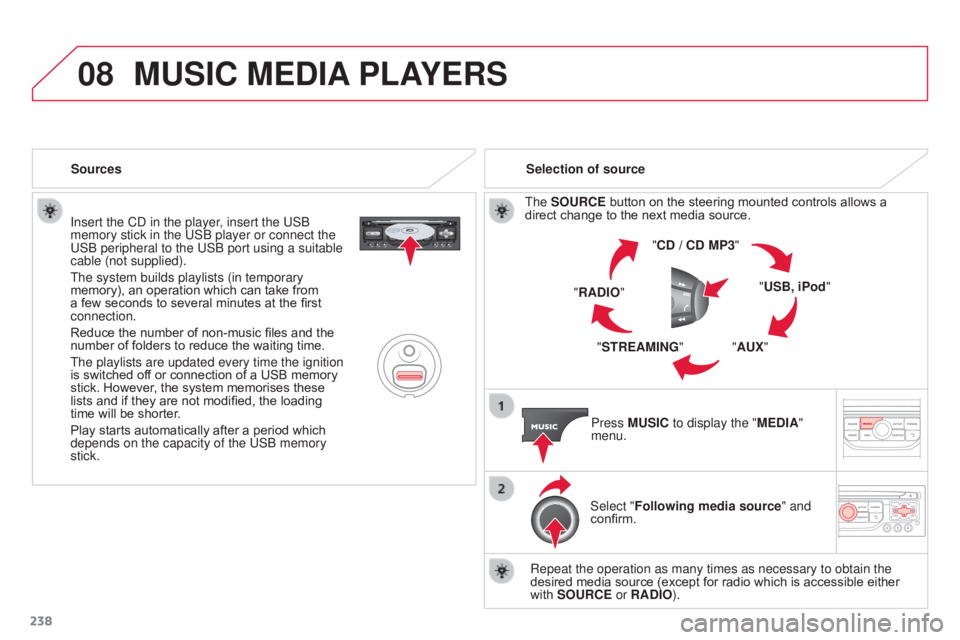
The SOURCE button on the steering mounted controls allows a
direct change to the next media source. "CD / CD MP3"
"USB, iPod"
"AUX"
"STREAMING"
"RADIO"
Press MUSIC to display the "MEDIA"
menu.
Select "Following media source " and
confirm.
Repeat the operation as many times as necessary to obtain the
desired media source (except for radio which is accessible either
with SOURCE or RADIO).
Sources
MUSIC MEDIA
PLAYERS
Page 264 of 292

05
262
C3PICASSO_EN_CHAP13B_RD45_ED01_2015
USB PLAYER
The system puts together playlists (temporary memory) created
over a period which depends on the capacity of the USB device.
The other sources are available during this time.
The playlists are updated each time the ignition is switched off or
each time a USB memory stick is connected.
When connecting for the first time, the classification suggested
is by folder. When you reconnect, the classification selected
previously is retained.Connect the memory stick to the port, directly or
using a lead. If the audio equipment is switched
on, the USB source is detected as soon as it is
connected. Play begins automatically after a delay
which depends on the capacity of the USB memory
stick.
The file formats supported are .mp3 (mpeg1 layer
3 only)
and .wma (standard 9 only, 128 kbits/sec compression).
Certain playlist formats are supported (.m3u, ...)
On reconnection of the previous memory stick used,
play is resumed automatically with the last track
played.
This unit consists of a USB port and an auxiliary
Jack socket*. The audio files are transmitted
from a portable device - digital player or a USB
memory stick - to your Audio system and heard
via the vehicle's speakers.
USB memory stick or Apple
® player of
generation 5 or later:
-
Use only USB memory sticks formatted
F
AT32 (File Allocation Table),
-
the Apple® player lead is essential,
-
navigation through the file database is also
possible by means of the steering mounted
controls.
Using the USB PORT
Connecting a USB memory stick
Other Apple
® players of earlier generations and
players using the MTP protocol*:
-
play via Jack-Jack lead only (not supplied),
-
navigation through the file database is from
the portable device. *
Depending on vehicle.