phone CITROEN C3 PICASSO 2017 Owners Manual
[x] Cancel search | Manufacturer: CITROEN, Model Year: 2017, Model line: C3 PICASSO, Model: CITROEN C3 PICASSO 2017Pages: 292, PDF Size: 8.23 MB
Page 38 of 292

36
C3Picasso_en_Chap02_ecran-multifonction_ed01-2015
This displays the following information:
- time,
-
date,
-
a
mbient temperature (this flashes if there is
a risk of ice),
-
s
tate of the openings (doors, boot, etc.),
-
a
udio sources (radio, CD, USB port, etc.),
-
t
rip computer (refer to the end of the
section).
Warning messages or information messages
may appear temporarily. These can be cleared
by pressing the "Back" button. From the audio equipment control panel, you
can:
F
p
ress the "MENU" button for access to the
main menu ,
F
p
ress the "5" or " 6" buttons to scroll
through the items on the screen,
F
p
ress the "MODE" button to change the
permanent application (trip computer,
audio source...),
F
p
ress the "7" or " 8" buttons to change a
setting value,
F
p
ress the "OK" button to confirm,
or
F
p
ress the "Back" button to abandon the
operation in progress.
Main menu
F Press the "MENU" button for access to the
main menu :
-
a
udio functions,
-
t
rip computer (refer to the end of the
section),
-
personalisation-configuration,
-
t
elephone (hands-free kit).
F
P
ress the " 5" or " 6" buttons to select the
menu required, then confirm by pressing
the "OK" button.
Monochrome screen C
ControlsDisplays in the screen
Multifunction screens
Page 41 of 292

39
C3Picasso_en_Chap02_ecran-multifonction_ed01-2015
Choice of language
Once this menu has been selected, you can
change the language used by the display, by
choosing a new language from the list offered.
Telephone menu
With the Audio system on and this menu
selected, you can configure your Bluetooth
hands-free system (pairing), view the various
telephone directories (calls log, services...) and
manage your calls (call, hang up, double call,
secret mode...).
For more information on the "Telephone"
application, refer to the Audio system part in
the "Audio and telematics" section.
As a safety measure, configuration of
the multifunction screen by the driver
must only be done when stationary.Display configuration
Once this menu has been selected, you can
gain access to the following settings:
-
b
rightness-video setting,
-
d
ate and time setting,
-
s
election of the units.Once the fuel consumption unit has
been changed to mpg, the information
relating to speed and distance also
changes to miles.
Adjust the date and time
F
Sel
ect the " Date and time adjustment "
function using the " 5" or " 6" button.
F
P
ress the "OK" button to confirm the
selection.
F
A
djust the settings one by one using
the
"7 " or " 8" button then confirm with
the
"OK" button.
F
T
hen select the "OK" box in the screen
and then confirm.
2
Multifunction screens
Page 88 of 292
86
C3Picasso_en_Chap06_amenagement_ed01-2015
Storage drawer
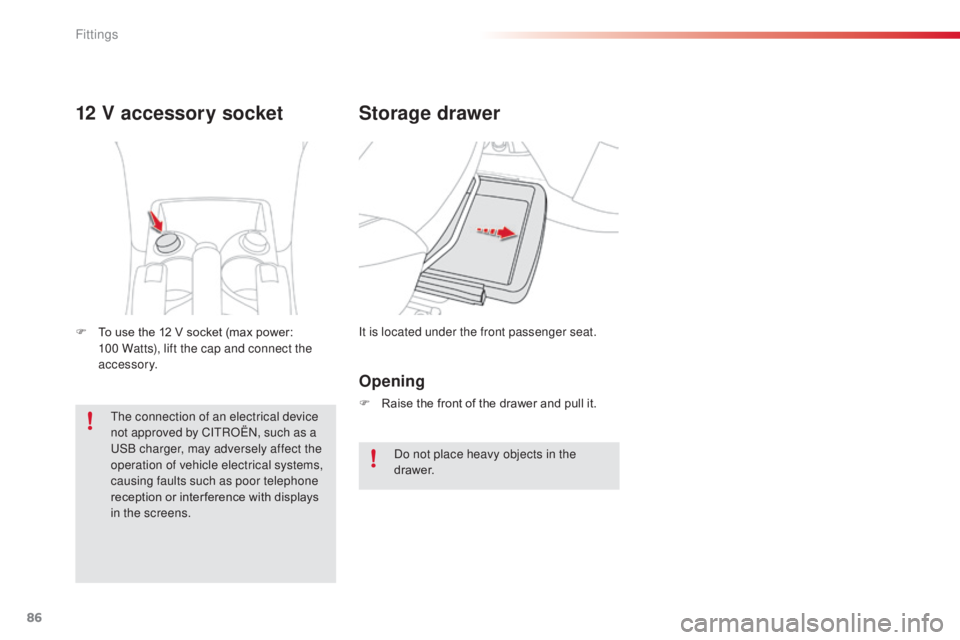
It is located under the front passenger seat.
12 V accessory socket
F To use the 12 V socket (max power:
100 Watts), lift the cap and connect the
accessory.
Opening
F Raise the front of the drawer and pull it.
Do not place heavy objects in the
drawer.
The connection of an electrical device
not approved by CITROËN, such as a
USB charger, may adversely affect the
operation of vehicle electrical systems,
causing faults such as poor telephone
reception or inter ference with displays
in the screens.
Fittings
Page 189 of 292

187
C3Picasso_en_Chap11_informations-pratiques_ed01-2015
Load reduction mode
System which manages the use of certain
functions according to the level of charge
remaining in the battery.
When the vehicle is being driven, the load
reduction function temporarily deactivates
certain functions, such as the air conditioning,
the heated rear screen...
The deactivated functions are reactivated
automatically as soon as conditions permit.
Energy economy mode
Exiting economy mode
These functions are reactivated automatically
the next time the vehicle is driven.
F
I
n order to resume the use of these
functions immediately, start the engine and
let it run for a few minutes.
The time available to you will then be double
the period for which the engine is left running.
However, this period will always be between
five and thirty minutes.
Switching to economy mode
Once this period has elapsed, a message
appears on the multifunction screen indicating
that the vehicle has switched to economy mode
and the active functions are put on standby.
A flat battery prevents the engine from
starting (refer to the corresponding
paragraph).
If the telephone is being used at the
same time on the eMyWay audio
navigation system, it will be interrupted
after 10 minutes.
System which manages the period of use of certain functions to conserve a sufficient level of
charge in the battery.
After the engine has stopped, you can still use functions such as the audio equipment,
windscreen
wipers, dipped beam headlamps, courtesy lamps, etc. for a maximum combined period of
thirty
minutes.
This period may be greatly reduced if the battery is not fully charged.
11
Practical information
Page 196 of 292
194
C3Picasso_en_Chap11_informations-pratiques_ed01-2015
"Multimedia":
semi-integral navigation systems, Bluetooth®
hands free kit, audio systems inter faced to
steering mounted controls, speakers,
DVD player, portable navigation systems,
mapping updates, Hi-Fi module, driving aid
assistant, rear multimedia support, telephone
and smartphone carriers, iPhone
® charger,
head-up display, 230 Volt socket, fleet
management unit,
... The fitting of electrical equipment or
accessories which are not recommended
by CITROËN may result in a failure of
your vehicle's electronic system and
excessive electrical consumption.
Contact a CITROËN dealer
for information on the range of
recommended equipment and
accessories.
Installation of radio
communication
transmitters
Before installing any after-market radio
communication transmitter, you can
contact a CITROËN dealer for the
specification of transmitters which can
be fitted (frequency, maximum power,
aerial position, specific installation
requirements), in line with the Vehicle
Electromagnetic Compatibility Directive
(2004/104/EC).By visiting a CITROËN
dealer, you can
also obtain cleaning and maintenance
products (interior and exterior),
including the ecological products in
the "TECHNATURE" range, products
for topping up (screenwash fluid...),
touch-up pens and paint aerosols the
exact colour of your vehicle, recharges
(cartridge for the temporary puncture
repair kit...), ... Depending on the legislation in force in
the country, certain safety equipment
may be compulsory: high visibility
safety vests, warning triangles,
breathalyzers, spare bulbs, spare fuses,
fire extinguisher, first aid kit, mud flaps
at the rear of the vehicle.
Practical information
Page 203 of 292
201
C3Picasso_en_Chap13a_RT6-2-8_ed01-2015
The system is protected in such a way that it will only
operate in your vehicle.
eMyWay
01 First steps - Control panel
As a safety measure, the driver must only carry out
operations which require prolonged attention while the
vehicle is stationary.
When the engine is switched off and to prevent
discharging of the battery, the system switches off
following the activation of the energy economy mode.
CONTENTS
02
Steering mounted
controls
03
General operation
04
Navigation
- Guidance
05
T
raffic information
06
Using
the telephone
07
Radio
08
Music media players
09
Audio
settings
10
Configuration
11
Screen menu
maps p.
p.
p.
p.
p.
p.
p.
p.
p.
p.
p.
202
204
205
207
220
223
233
236
242
243
244
GPS navigation system
Multimedia audio system
Bluetooth
® telephone
Frequently asked questions p.
248
Page 205 of 292
01
203
C3Picasso_en_Chap13a_RT6-2-8_ed01-2015
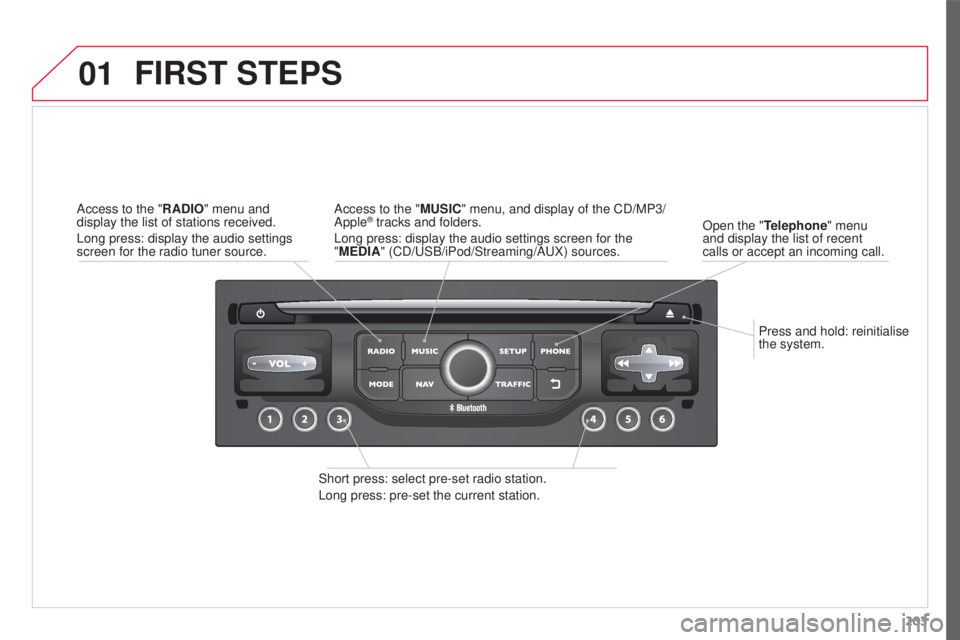
Press and hold: reinitialise
the system.
Open the "Telephone" menu
and display the list of recent
calls or accept an incoming call.
FIRST STEPS
Short press: select pre-set radio station.
Long press: pre-set the current station. Access to the "MUSIC" menu, and display of the CD/MP3/
Apple
® tracks and folders.
Long press: display the audio settings screen for the
"MEDIA" (CD/USB/iPod/Streaming/AUX) sources.
Access to the "RADIO" menu and
display the list of stations received.
Long press: display the audio settings
screen for the radio tuner source.
Page 206 of 292
02
204
C3Picasso_en_Chap13a_RT6-2-8_ed01-2015
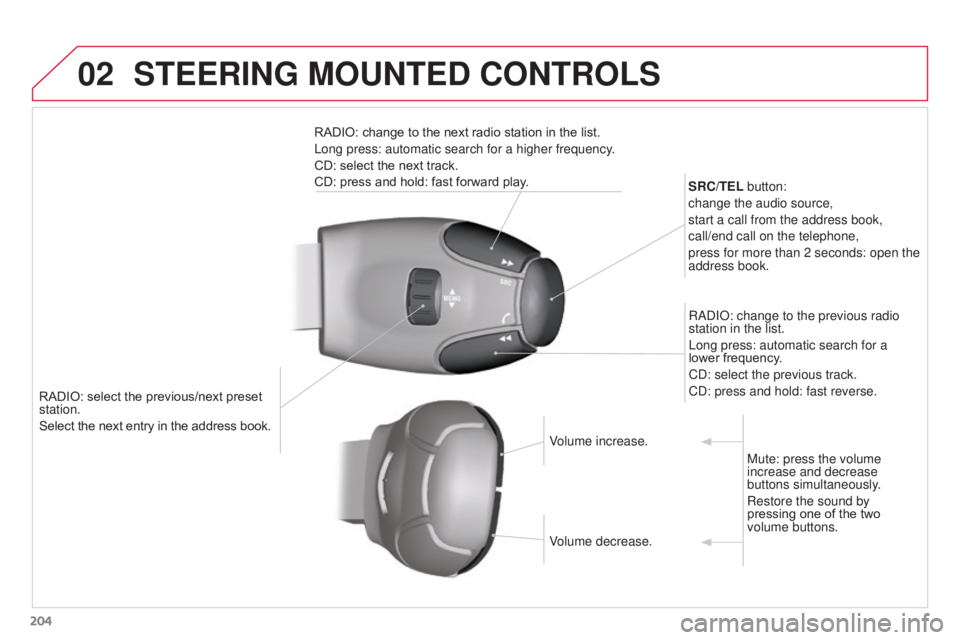
RADIO: select the previous/next preset
station.
Select the next entry in the address book.SRC/TEL button:
change the audio source,
start a call from the address book,
call/end call on the telephone,
press for more than 2 seconds: open the
address book.
RADIO: change to the previous radio
station in the list.
Long press: automatic search for a
lower frequency.
CD: select the previous track.
CD: press and hold: fast reverse.
RADIO: change to the next radio station in the list.
Long press: automatic search for a higher frequency.
CD: select the next track.
CD: press and hold: fast forward play.
Volume increase.
Volume decrease.Mute: press the volume
increase and decrease
buttons simultaneously.
Restore the sound by
pressing one of the two
volume buttons.
STEERING MOUNTED CONTROLS
Page 207 of 292
03
205
C3Picasso_en_Chap13a_RT6-2-8_ed01-2015
For the details of the menus, refer to the "Screen menu map"
section.
For cleaning the screen, the use of a soft, non-abrasive cloth
(spectacles cloth) is recommended, with no additional product.
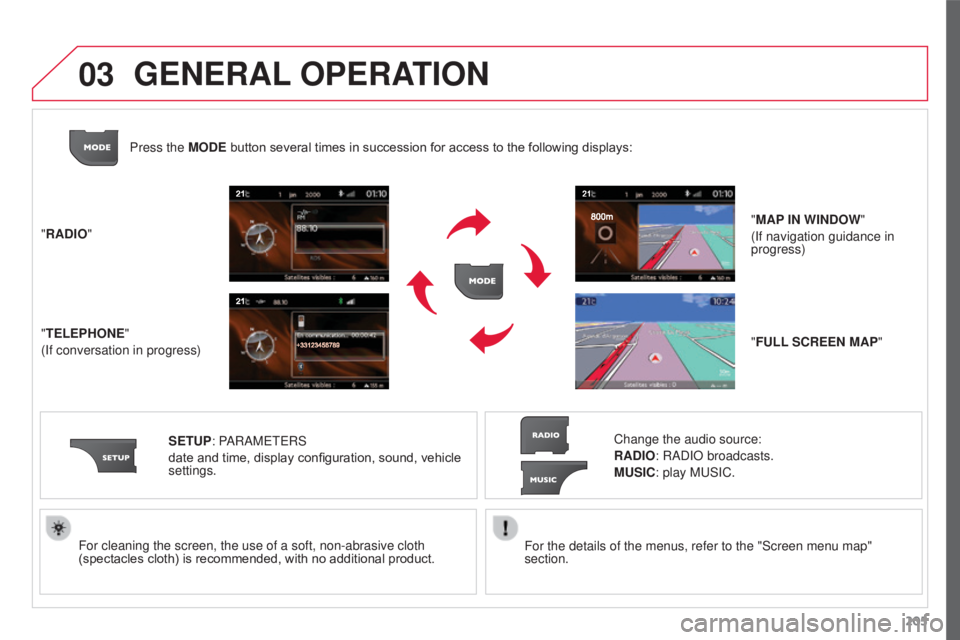
"RADIO"
"TELEPHONE"
(If conversation in progress)
SETUP: PARAMETERS
date and time, display configuration, sound, vehicle
settings. Change the audio source:
RADIO: RADIO broadcasts.
MUSIC: play MUSIC.
Press the MODE button several times in succession for access to the following displays:
"FULL SCREEN MAP" "MAP IN WINDOW"
(If navigation guidance in
progress)
GENERAL OPERATION
Page 208 of 292
03
206
C3Picasso_en_Chap13a_RT6-2-8_ed01-2015
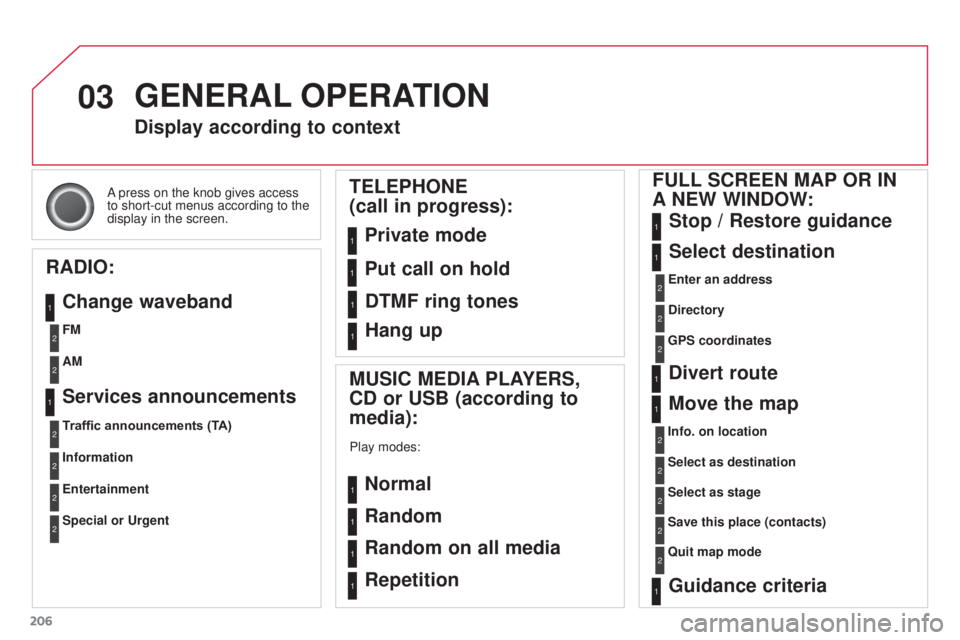
A press on the knob gives access
to short-cut menus according to the
display in the screen.
Display according to context
RADIO: Change waveband
MUSIC MEDIA PLAYERS,
CD or USB (according to
media):
Play modes:
Normal
Random
Random on all media
Repetition
TELEPHONE
(call in progress):
Private mode FULL SCREEN MAP OR IN
A
NEW WINDOW:
Stop / Restore guidance
Select destination
Enter an address
Directory
GPS coordinates
Divert route
Move the map
Info. on location
Select as destination Select as stage
Save this place (contacts)
Quit map mode
Guidance criteria
Put call on hold
DTMF ring tones
Hang up
1
1
1
1
1
1
1
2
2
2
2
2
1
2
2
2
1
1
1
1
1
1FM
Traffic announcements (TA) AM
Information
Entertainment
Special or Urgent2
2
2
2
2
2
Services announcements1
GENERAL OPERATION