ignition Citroen C3 RHD 2014 2.G User Guide
[x] Cancel search | Manufacturer: CITROEN, Model Year: 2014, Model line: C3 RHD, Model: Citroen C3 RHD 2014 2.GPages: 284, PDF Size: 8.99 MB
Page 26 of 284
24
Engine oil level
indicator*
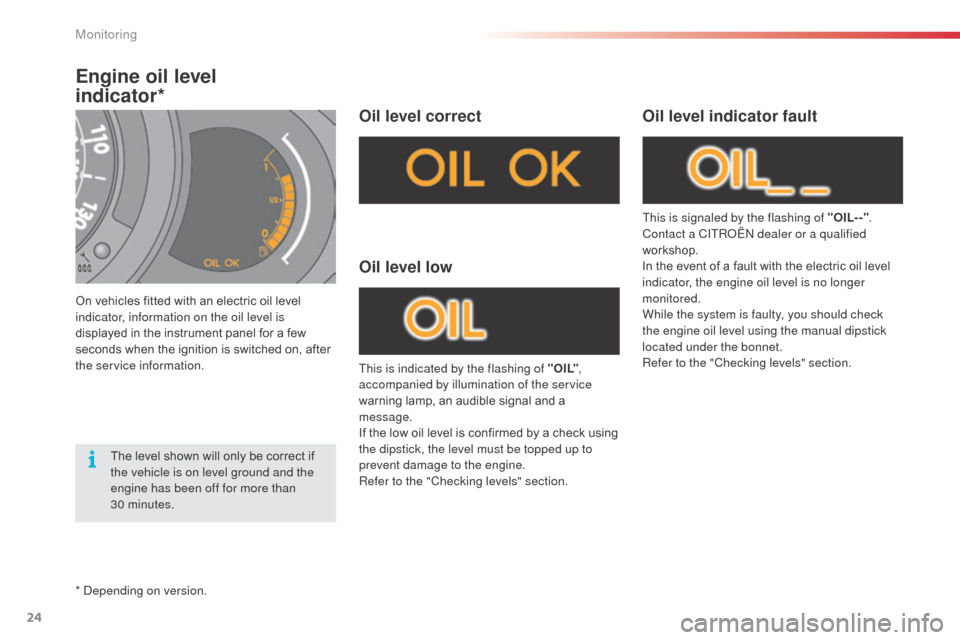
On vehicles fitted with an electric oil level
indicator, information on the oil level is
displayed in the instrument panel for a few
seconds when the ignition is switched on, after
the service information.
Oil level correct
This is indicated by the flashing of " O I L",
accompanied by illumination of the service
warning lamp, an audible signal and a
message.
If the low oil level is confirmed by a check using
the dipstick, the level must be topped up to
prevent damage to the engine.
Refer to the "Checking levels" section.
Oil level low
This is signaled by the flashing of "OIL- -" .
Contact a CITRoËn dealer or a qualified
workshop.
In the event of a fault with the electric oil level
indicator, the engine oil level is no longer
monitored.
While the system is faulty, you should check
the engine oil level using the manual dipstick
located under the bonnet.
Refer to the "Checking levels" section.
Oil level indicator fault
The level shown will only be correct if
the vehicle is on level ground and the
engine has been off for more than
30 minutes.
*
d
ep
ending on version.
Monitoring
Page 27 of 284
25
Distance recorders
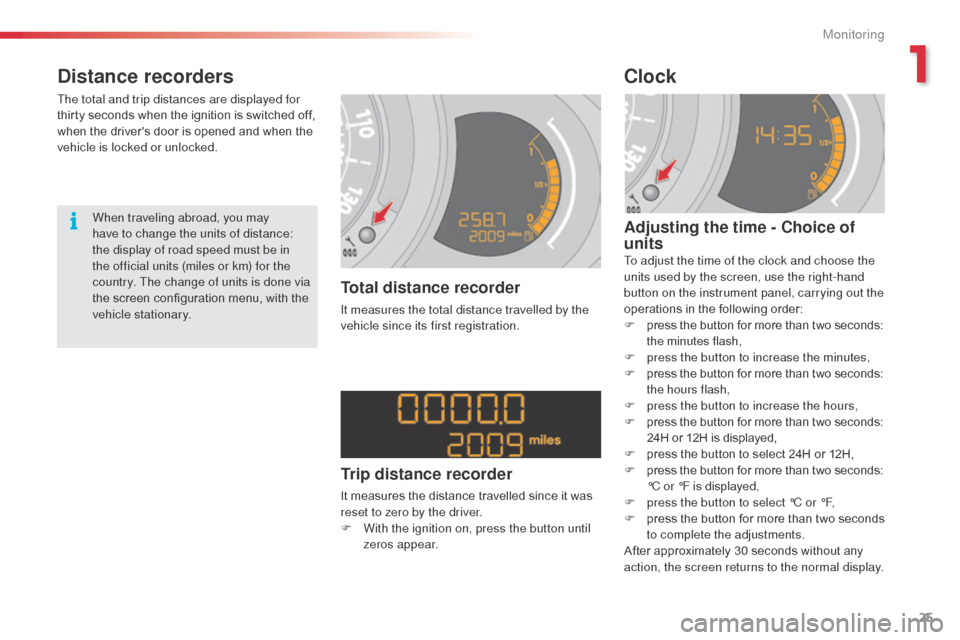
The total and trip distances are displayed for
thirty seconds when the ignition is switched off,
when the driver's door is opened and when the
vehicle is locked or unlocked.
Total distance recorder
It measures the total distance travelled by the
vehicle since its first registration.
Clock
Adjusting the time - Choice of
units
To adjust the time of the clock and choose the
units used by the screen, use the right-hand
button on the instrument panel, carrying out the
operations in the following order:
F
p
ress the button for more than two seconds:
the minutes flash,
F
p
ress the button to increase the minutes,
F
p
ress the button for more than two seconds:
the hours flash,
F
p
ress the button to increase the hours,
F
p
ress the button for more than two seconds:
24H or 12H is displayed,
F
p
ress the button to select 24H or 12H,
F
p
ress the button for more than two seconds:
°C or °F is displayed,
F
p
ress the button to select °C or °F,
F
p
ress the button for more than two seconds
to complete the adjustments.
After approximately 30 seconds without any
action, the screen returns to the normal display.
When traveling abroad, you may
have to change the units of distance:
the display of road speed must be in
the official units (miles or km) for the
country. The change of units is done via
the screen configuration menu, with the
vehicle stationary.
Trip distance recorder
It measures the distance travelled since it was
reset to zero by the driver.
F
W
ith the ignition on, press the button until
zeros appear.
1
Monitoring
Page 31 of 284
29
Trip computer, a few definitions
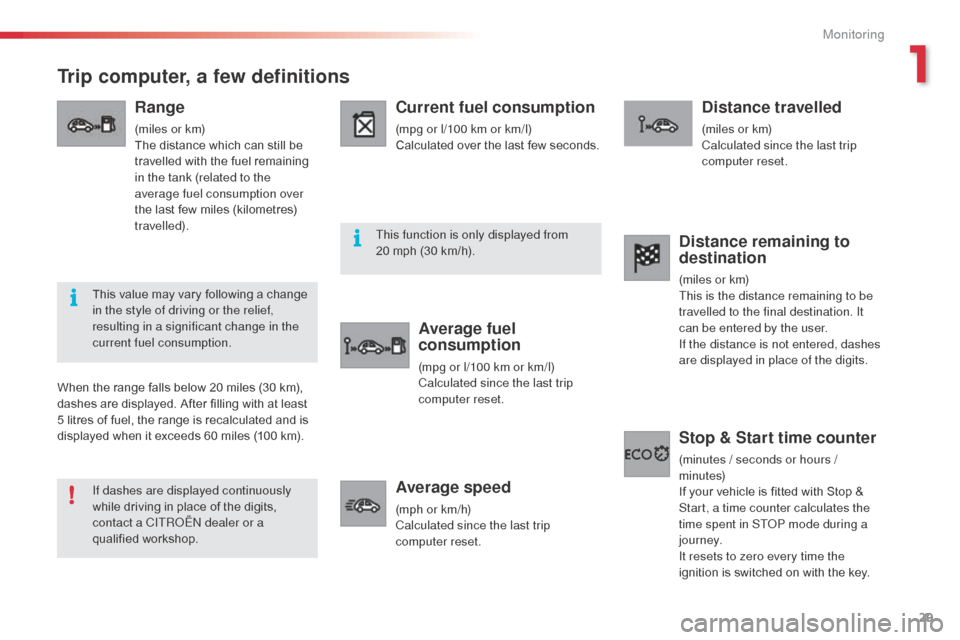
Range
(miles or km)
The distance which can still be
travelled with the fuel remaining
in the tank (related to the
average fuel consumption over
the last few miles (kilometres)
travelled).
Current fuel consumption
(mpg or l/100 km or km/l)
Calculated over the last few seconds.
Average fuel
consumption
(mpg or l/100 km or km/l)
Calculated since the last trip
computer reset.
Average speed
(mph or km/h)
Calculated since the last trip
computer reset.
Distance travelled
(miles or km)
Calculated since the last trip
computer reset.
When the range falls below 20 miles (30 km),
dashes are displayed. After filling with at least
5 litres of fuel, the range is recalculated and is
displayed when it exceeds 60 miles (100 km).
Distance remaining to
destination
(miles or km)
This is the distance remaining to be
travelled to the final destination. It
can be entered by the user.
If the distance is not entered, dashes
are displayed in place of the digits.
Stop & Start time counter
(minutes / seconds or hours /
minutes)
If your vehicle is fitted with Stop &
Start, a time counter calculates the
time spent in ST
oP m
ode during a
j o u r n ey.
It resets to zero every time the
ignition is switched on with the key.
If dashes are displayed continuously
while driving in place of the digits,
contact a CITR
oËn
dealer or a
qualified workshop. This value may vary following a change
in the style of driving or the relief,
resulting in a significant change in the
current fuel consumption. This function is only displayed from
20 mph (30 km/h).
1
Monitoring
Page 53 of 284
51
Mirrors
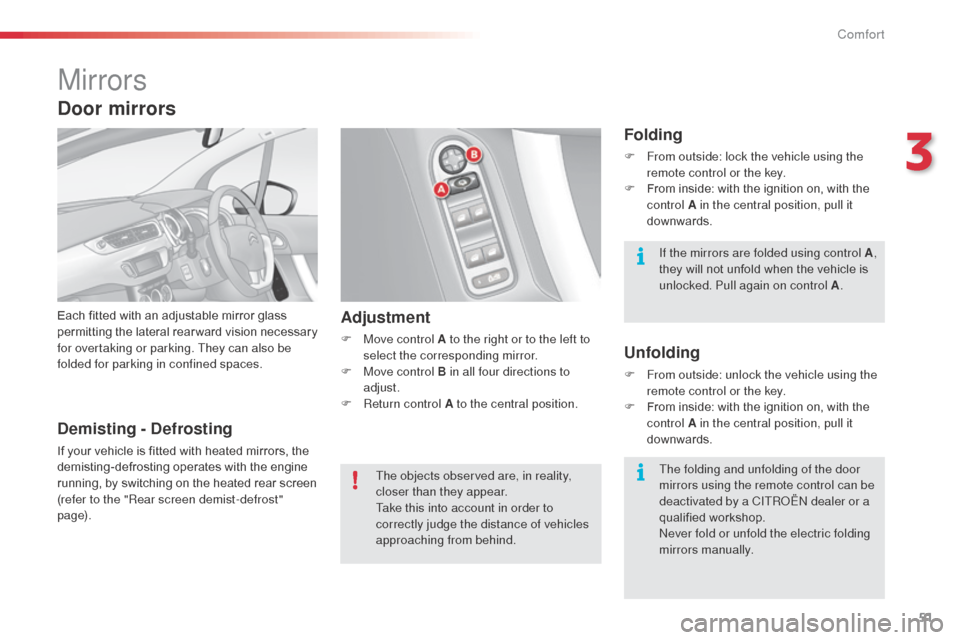
Each fitted with an adjustable mirror glass
permitting the lateral rearward vision necessary
for overtaking or parking. They can also be
folded for parking in confined spaces.Adjustment
F Move control A to the right or to the left to select the corresponding mirror.
F
M
ove control B in all four directions to
adjust.
F
R
eturn control A to the central position.
Folding
F From outside: lock the vehicle using the remote control or the key.
F
F
rom inside: with the ignition on, with the
control A in the central position, pull it
downwards.
Unfolding
F From outside: unlock the vehicle using the remote control or the key.
F
F
rom inside: with the ignition on, with the
control A in the central position, pull it
downwards.
Demisting - Defrosting
If your vehicle is fitted with heated mirrors, the
demisting-defrosting operates with the engine
running, by switching on the heated rear screen
(refer to the "Rear screen demist-defrost"
page).
Door mirrors
The objects observed are, in reality,
closer than they appear.
Take this into account in order to
correctly judge the distance of vehicles
approaching from behind. If the mirrors are folded using control A
,
they will not unfold when the vehicle is
unlocked. Pull again on control A .
The folding and unfolding of the door
mirrors using the remote control can be
deactivated by a CITR
oËn
dealer or a
qualified workshop.
ne
ver fold or unfold the electric folding
mirrors manually.
3
Comfort
Page 57 of 284
55
Anti-theft protection
Electronic engine immobiliser
The key contains an electronic chip which has
a special code. When the ignition is switched
on, this code must be recognised in order for
starting to be possible.
This electronic engine immobiliser locks the
engine management system a few minutes
after the ignition is switched off and prevents
starting of the engine by anyone who does not
have the key.In the event of a fault, you are
informed by illumination of this
warning lamp, an audible signal and
a message in the screen.
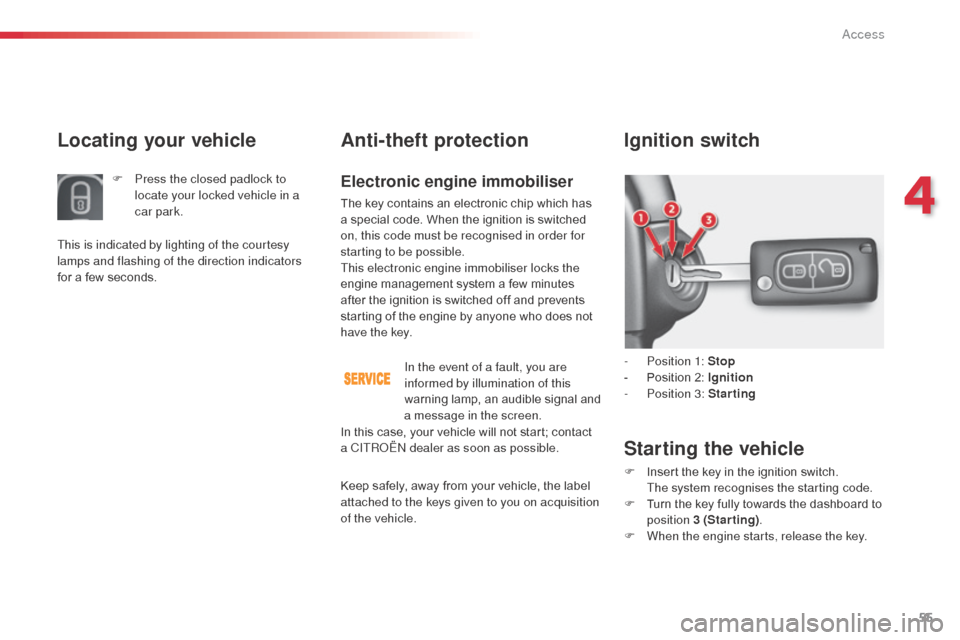
Ignition switch
- Position 1: Stop
- P osition 2: Ignition
-
P
osition 3: Starting
Starting the vehicle
F Insert the key in the ignition switch. The system recognises the starting code.
F
T
urn the key fully towards the dashboard to
position 3 (Starting) .
F
W
hen the engine starts, release the key.
Locating your vehicle
F Press the closed padlock to locate your locked vehicle in a
car park.
This is indicated by lighting of the courtesy
lamps and flashing of the direction indicators
for a few seconds.
In this case, your vehicle will not start; contact
a CITR
oËn
dealer as soon as possible.
Keep safely, away from your vehicle, the label
attached to the keys given to you on acquisition
of the vehicle.
4
Access
Page 58 of 284
56
Remote control problem
Reinitialisation
F Switch off the ignition.
F T urn the key to position 2 (Ignition on) .
F
P
ress the closed padlock immediately for a
few seconds.
F
S
witch off the ignition and remove the key
from the ignition switch.
The remote control is fully operational again.
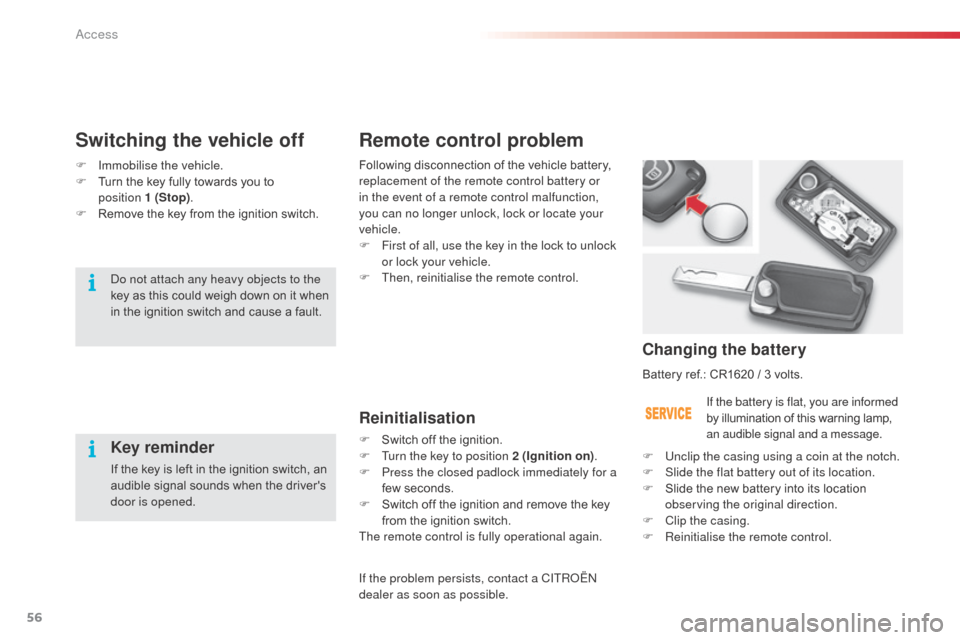
Changing the battery
Battery ref.: CR1620 / 3 volts.
If the battery is flat, you are informed
by illumination of this warning lamp,
an audible signal and a message.
F
U
nclip the casing using a coin at the notch.
F
S
lide the flat battery out of its location.
F
S
lide the new battery into its location
observing the original direction.
F
C
lip the casing.
F
R
einitialise the remote control.
Switching the vehicle off
Key reminder
If the key is left in the ignition switch, an
audible signal sounds when the driver's
door is opened.
do n
ot attach any heavy objects to the
key as this could weigh down on it when
in the ignition switch and cause a fault. Following disconnection of the vehicle battery,
replacement of the remote control battery or
in the event of a remote control malfunction,
you can no longer unlock, lock or locate your
vehicle.
F
F
irst of all, use the key in the lock to unlock
or lock your vehicle.
F
T
hen, reinitialise the remote control.
F
Imm
obilise the vehicle.
F
T
urn the key fully towards you to
position 1 (Stop) .
F
R
emove the key from the ignition switch.
If the problem persists, contact a CITR
oËn
dealer as soon as possible.
Access
Page 59 of 284
57
Lost keys
Go to a CITROËN dealer with the vehicle's registration document, your personal
identification documents and if possible the key code label.
The CITROËN dealer will be able to look up the key code and the transponder code
required to order a new key.
Remote control
The high frequency remote control is a sensitive system; do not operate it while it is in your
pocket as there is a possibility that it may unlock the vehicle, without you being aware of it.
do n
ot repeatedly press the buttons of your remote control out of range and out of sight of
your vehicle. You run the risk of stopping it from working and the remote control would have
to be reinitialised.
No remote control can operate when the key is in the ignition switch, even when the ignition
is switched off, except for reinitialisation.
Locking the vehicle
Driving with the doors locked may make access to the passenger compartment by the emergency
services more difficult in an emergency.
as a s
afety precaution, never leave children alone in the vehicle, except for a very short period.
In all cases, it is essential to remove the key from the ignition switch when leaving the vehicle.
Anti-theft protection
Do not make any modifications to the electronic engine immobiliser system; this could
cause malfunctions.
When purchasing a second-hand vehicle
Have the pairing of all of the keys in your possession checked by a CITRoËn dealer, to
ensure that only your keys can be used to open and start the vehicle. Do not throw the remote control
batteries away, they contain metals
which are harmful to the environment.
Take them to an approved collection
point.
4
Access
Page 60 of 284
58
alarm
System which protects and provides a deterrent against the theft of your vehicle. It provides two types of protection, exterior and interior, as well as a
self-protection function.
do n
ot make any modifications to
the alarm system, this could cause
malfunctions. If an opening - door or boot - is not
closed fully, the vehicle is not locked,
but the exterior perimeter protection
will be activated after 45 seconds at
the same time as the interior volumetric
protection.
Exterior perimeter protection
The system detects opening of the vehicle.
The alarm is triggered if anyone tries to enter
the vehicle by forcing a door, the boot or the
bonnet.
Interior volumetric protection
The system detects any variation in the volume
in the passenger compartment.
The alarm is triggered if anyone breaks a
window or moves inside the vehicle.
If you wish to leave a pet in the vehicle or a
window partially open, deactivate the interior
volumetric protection.
Self-protection function
The system detects the putting out of service of
its components.
The alarm is triggered if anyone tries to put
the wires of the siren, the central control or the
battery out of service.
Locking the vehicle with full
alarm
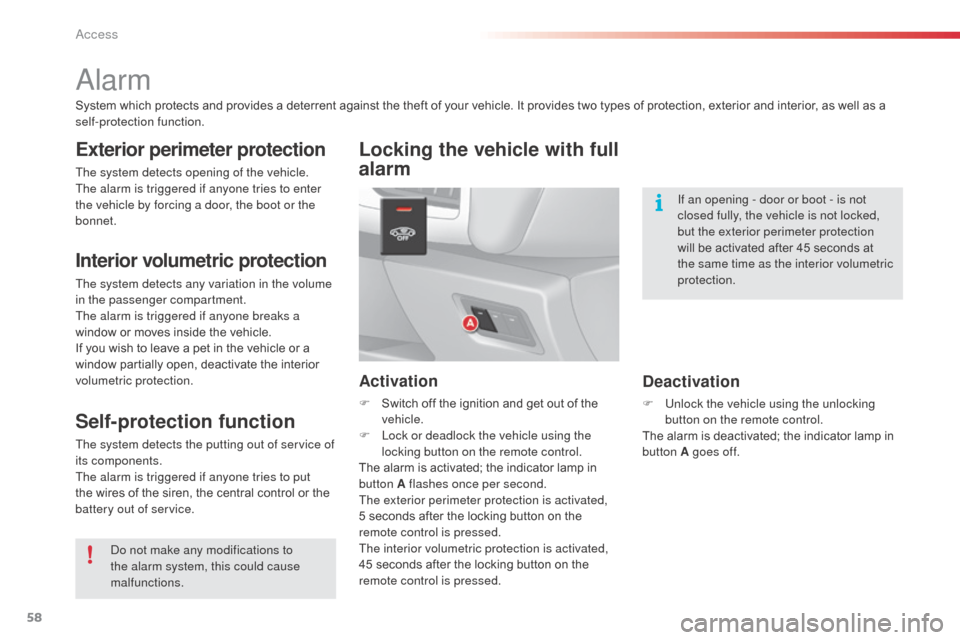
Activation
F Switch off the ignition and get out of the
vehicle.
F
L
ock or deadlock the vehicle using the
locking button on the remote control.
The alarm is activated; the indicator lamp in
button A flashes once per second.
The exterior perimeter protection is activated,
5
seconds after the locking button on the
remote control is pressed.
The interior volumetric protection is activated,
45 seconds after the locking button on the
remote control is pressed.
Deactivation
F Unlock the vehicle using the unlocking button on the remote control.
The alarm is deactivated; the indicator lamp in
button A goes off.
access
Page 61 of 284
59
Locking the vehicle
with exterior perimeter
protection only
Deactivation of the interior
volumetric protection
F Switch off the ignition.
F W ithin ten seconds, press button A until
the indicator lamp is on continuously.
F
G
et out of the vehicle.
F
L
ock or deadlock the vehicle without delay
using the locking button on the remote
control.
The exterior perimeter protection alone remains
activated; the indicator lamp in button A flashes
once per second. If the indicator lamp in button A flashes
rapidly, this indicates that the alarm was
triggered during your absence. When
the ignition is switched on, this flashing
stops immediately.
To avoid triggering the alarm when
washing your vehicle, lock it using the
key in the driver's door lock.
To be effective, this deactivation must
be carried out each time the ignition is
switched off.
Reactivation of the interior
volumetric protection
F Unlock the vehicle using the unlocking
button on the remote control.
F
R
elock the vehicle using the remote
control.
The alarm is activated again with both types
of protection; the indicator lamp in button A
flashes once per second.
Triggering of the alarm
This is indicated by sounding of the siren
and flashing of the direction indicators for
approximately thirty seconds.
af
ter it has been triggered, both types of
protection are again operational.
If the alarm is triggered ten times in
succession, the eleventh time will result in it
becoming inactive.
Failure of the remote control
F Unlock the vehicle using the key in the driver's door lock.
F
O
pen the door; the alarm is triggered.
F
S
witch on the ignition; the alarm stops.
Locking the vehicle without
activating the alarm
F Lock or deadlock the vehicle using the key in the driver's or passenger's door lock.
Malfunction
When the ignition is switched on, illumination of
the indicator lamp in button A for ten seconds
indicates malfunction with the siren.
Have it checked by a CITR
oËn
dealer or a
qualified workshop.
*
a
c
cording to country.
Automatic activation*
2 minutes after the last door or the boot is
closed, the alarm is activated automatically.
F
T
o avoid triggering the alarm on entering
the vehicle, first press the unlocking button
on the remote control.
4
Access
Page 62 of 284
60
Window controlsSystem which opens or closes a window manually or automatically. It is fitted with a system which provides protection if an obstacle is detected on the
one-touch models and a deactivation system to prevent misuse of the rear switches on all models.
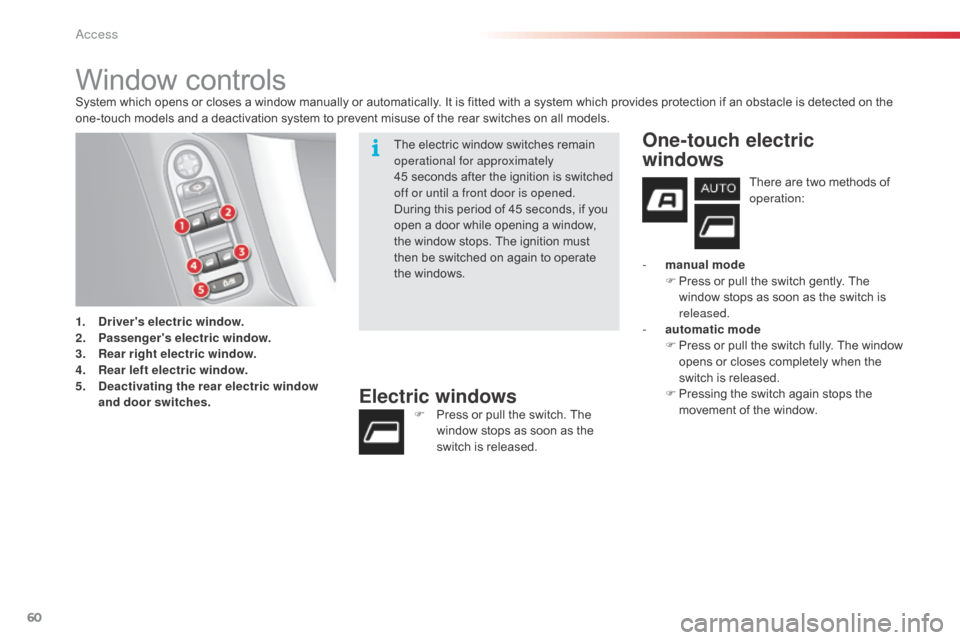
1.
D
river's electric window.
2.
P
assenger's electric window.
3.
R
ear right electric window.
4.
R
ear left electric window.
5.
D
eactivating the rear electric window
and door switches.
Electric windowsF Press or pull the switch. The window stops as soon as the
switch is released.
One-touch electric
windows
There are two methods of
operation:
-
m
anual mode
F
P
ress or pull the switch gently. The
window stops as soon as the switch is
released.
-
a
utomatic mode
F
P
ress or pull the switch fully. The window
opens or closes completely when the
switch is released.
F
P
ressing the switch again stops the
movement of the window.
The electric window switches remain
operational for approximately
45 seconds after the ignition is switched
off or until a front door is opened.
During this period of 45 seconds, if you
open a door while opening a window,
the window stops. The ignition must
then be switched on again to operate
the windows.
Access