ABS Citroen C3 RHD 2014 2.G Owner's Manual
[x] Cancel search | Manufacturer: CITROEN, Model Year: 2014, Model line: C3 RHD, Model: Citroen C3 RHD 2014 2.GPages: 284, PDF Size: 8.99 MB
Page 20 of 284
18
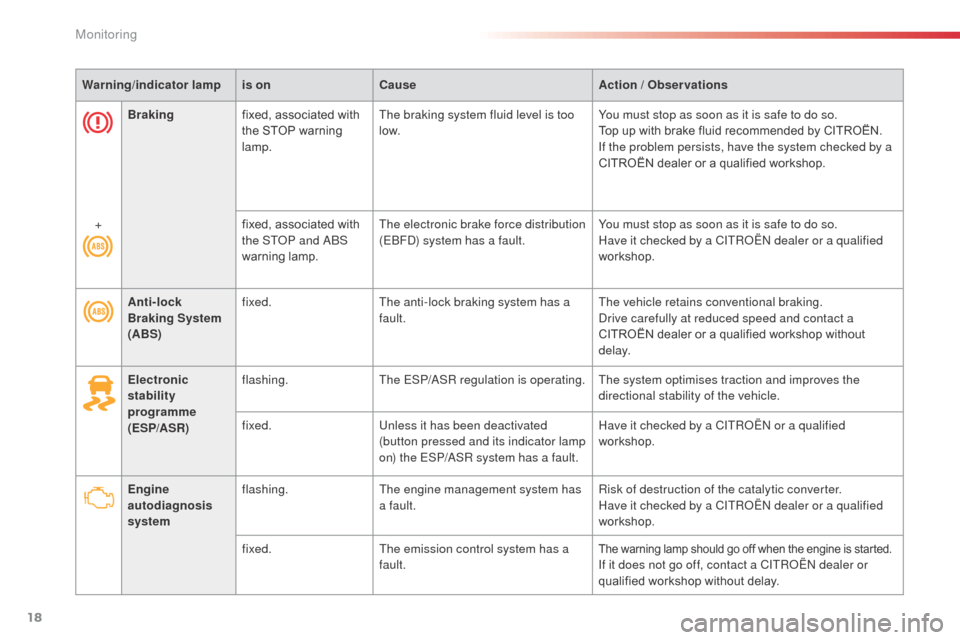
Anti-lock
Braking System
(ABS)fixed.
The anti-lock braking system has a
fault. The vehicle retains conventional braking.dr
ive carefully at reduced speed and contact a
CITROËN dealer or a qualified workshop without
d e l ay.
Electronic
stability
programme
(ESP/ASR) flashing.
The ESP/
aS
R regulation is operating. The system optimises traction and improves the directional stability of the vehicle.
fixed. Unless it has been deactivated
(button pressed and its indicator lamp
on) the ESP/
aS
R system has a fault.Have it checked by a CITR
oËn
or a qualified
workshop.
Engine
autodiagnosis
system flashing.
The engine management system has
a fault. Risk of destruction of the catalytic converter.
Have it checked by a CITR
oËn
dealer or a qualified
workshop.
fixed. The emission control system has a
fault.
The warning lamp should go off when the engine is started.If it does not go off, contact a CITRoËn dealer or
qualified workshop without delay.
Braking
fixed, associated with
the STOP warning
lamp. The braking system fluid level is too
low.
You must stop as soon as it is safe to do so.
Top up with brake fluid recommended by CITROËN.
If the problem persists, have the system checked by a
CITROËN dealer or a qualified workshop.
+ fixed, associated with
the ST
oP a
nd
ab
S
w
arning lamp.
The electronic brake force distribution
(E
bFd) s
ystem has a fault.
You must stop as soon as it is safe to do so.
Have it checked by a CITR
oËn
dealer or a qualified
workshop.
Warning
/indicator lampis on Cause Action / Observations
Monitoring
Page 30 of 284
28
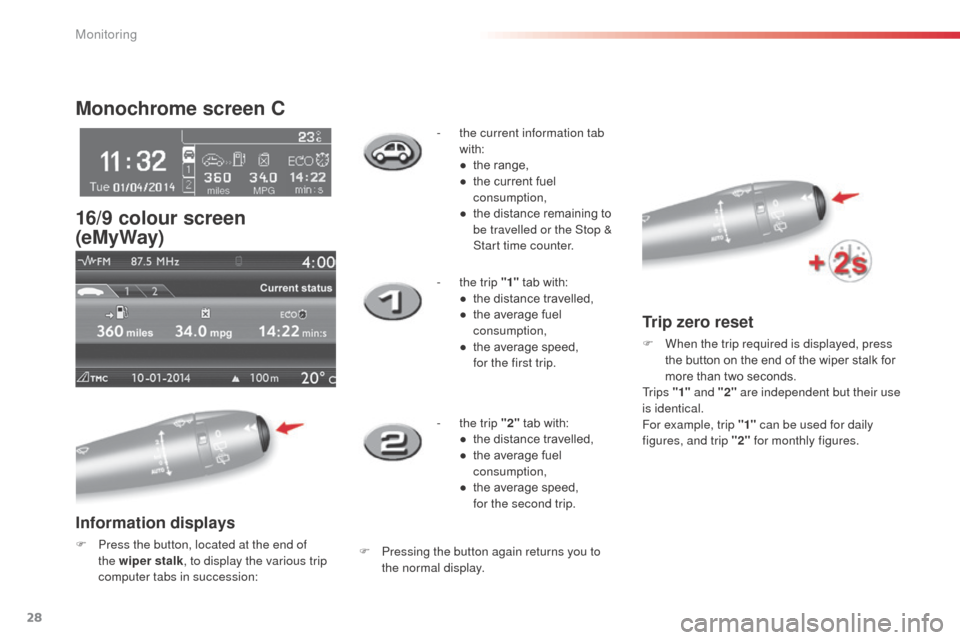
Monochrome screen C
16/9 colour screen
(eMyWay)
Information displays
F Press the button, located at the end of the wiper stalk , to display the various trip
computer tabs in succession: -
t
he current information tab
with:
●
t
he range,
●
t
he current fuel
consumption,
●
t
he distance remaining to
be travelled or the Stop &
Start time counter.
-
t
he trip "1"
tab with:
●
t
he distance travelled,
●
t
he average fuel
consumption,
●
t
he average speed,
f
or the first trip.
-
t
he trip "2"
tab with:
●
t
he distance travelled,
●
t
he average fuel
consumption,
●
t
he average speed,
f
or the second trip.F Pressing the button again returns you to
the normal display.
Trip zero reset
F When the trip required is displayed, press the button on the end of the wiper stalk for
more than two seconds.
Tr i p s "1" and "2" are independent but their use
is identical.
For example, trip "1" can be used for daily
figures, and trip "2" for monthly figures.
Monitoring
Page 61 of 284
59
Locking the vehicle
with exterior perimeter
protection only
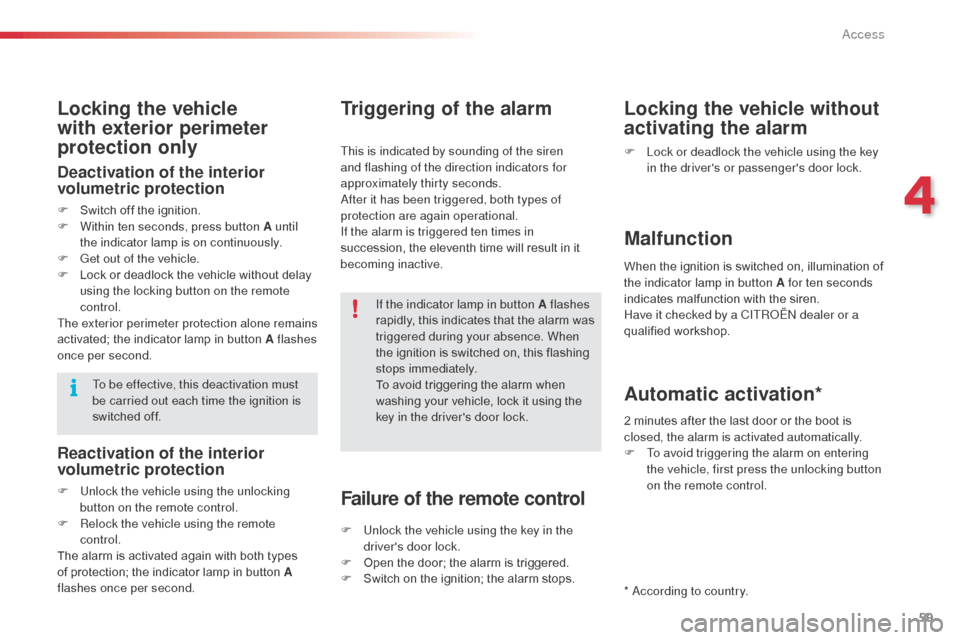
Deactivation of the interior
volumetric protection
F Switch off the ignition.
F W ithin ten seconds, press button A until
the indicator lamp is on continuously.
F
G
et out of the vehicle.
F
L
ock or deadlock the vehicle without delay
using the locking button on the remote
control.
The exterior perimeter protection alone remains
activated; the indicator lamp in button A flashes
once per second. If the indicator lamp in button A flashes
rapidly, this indicates that the alarm was
triggered during your absence. When
the ignition is switched on, this flashing
stops immediately.
To avoid triggering the alarm when
washing your vehicle, lock it using the
key in the driver's door lock.
To be effective, this deactivation must
be carried out each time the ignition is
switched off.
Reactivation of the interior
volumetric protection
F Unlock the vehicle using the unlocking
button on the remote control.
F
R
elock the vehicle using the remote
control.
The alarm is activated again with both types
of protection; the indicator lamp in button A
flashes once per second.
Triggering of the alarm
This is indicated by sounding of the siren
and flashing of the direction indicators for
approximately thirty seconds.
af
ter it has been triggered, both types of
protection are again operational.
If the alarm is triggered ten times in
succession, the eleventh time will result in it
becoming inactive.
Failure of the remote control
F Unlock the vehicle using the key in the driver's door lock.
F
O
pen the door; the alarm is triggered.
F
S
witch on the ignition; the alarm stops.
Locking the vehicle without
activating the alarm
F Lock or deadlock the vehicle using the key in the driver's or passenger's door lock.
Malfunction
When the ignition is switched on, illumination of
the indicator lamp in button A for ten seconds
indicates malfunction with the siren.
Have it checked by a CITR
oËn
dealer or a
qualified workshop.
*
a
c
cording to country.
Automatic activation*
2 minutes after the last door or the boot is
closed, the alarm is activated automatically.
F
T
o avoid triggering the alarm on entering
the vehicle, first press the unlocking button
on the remote control.
4
Access
Page 107 of 284
105
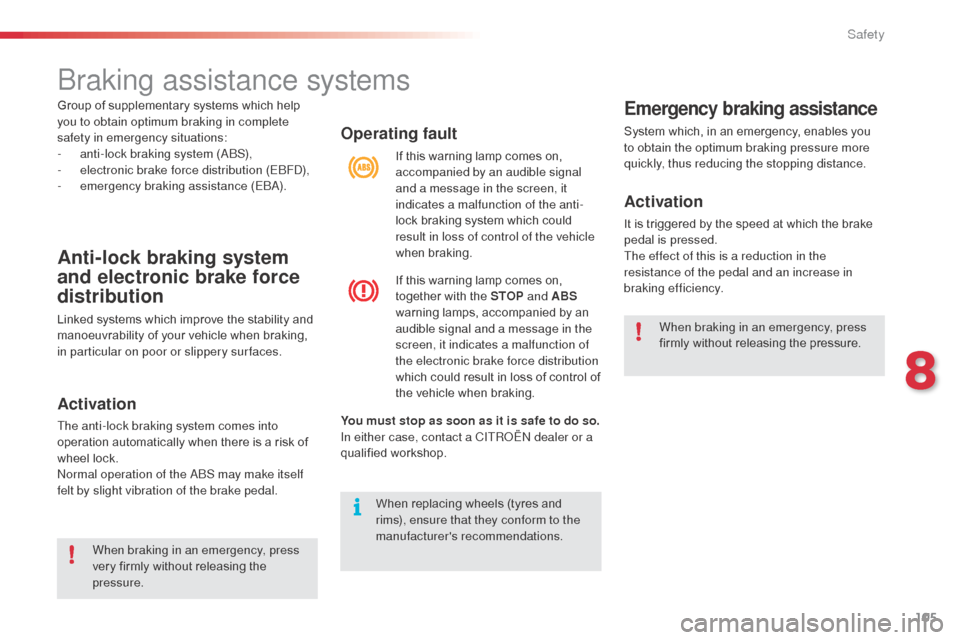
Operating fault
You must stop as soon as it is safe to do so.
In either case, contact a CITRoËn dealer or a
qualified workshop. If this warning lamp comes on,
accompanied by an audible signal
and a message in the screen, it
indicates a malfunction of the anti-
lock braking system which could
result in loss of control of the vehicle
when braking.
If this warning lamp comes on,
together with the STOP and ABS
warning lamps, accompanied by an
audible signal and a message in the
screen, it indicates a malfunction of
the electronic brake force distribution
which could result in loss of control of
the vehicle when braking.
Emergency braking assistance
System which, in an emergency, enables you
to obtain the optimum braking pressure more
quickly, thus reducing the stopping distance.
Activation
It is triggered by the speed at which the brake
pedal is pressed.
The effect of this is a reduction in the
resistance of the pedal and an increase in
braking efficiency.
When replacing wheels (tyres and
rims), ensure that they conform to the
manufacturer's recommendations. When braking in an emergency, press
firmly without releasing the pressure.
braking assistance systems
Anti-lock braking system
and electronic brake force
distribution
Linked systems which improve the stability and
manoeuvrability of your vehicle when braking,
in particular on poor or slippery sur faces.
Activation
The anti-lock braking system comes into
operation automatically when there is a risk of
wheel lock.
no
rmal operation of the ab
S m
ay make itself
felt by slight vibration of the brake pedal.
When braking in an emergency, press
very firmly without releasing the
pressure.
Group of supplementary systems which help
you to obtain optimum braking in complete
safety in emergency situations:
-
a
nti-lock braking system (
a
b
S
),
-
e
lectronic brake force distribution (E
bFd)
,
-
em
ergency braking assistance (E
ba)
.
8
Safety
Page 161 of 284
159
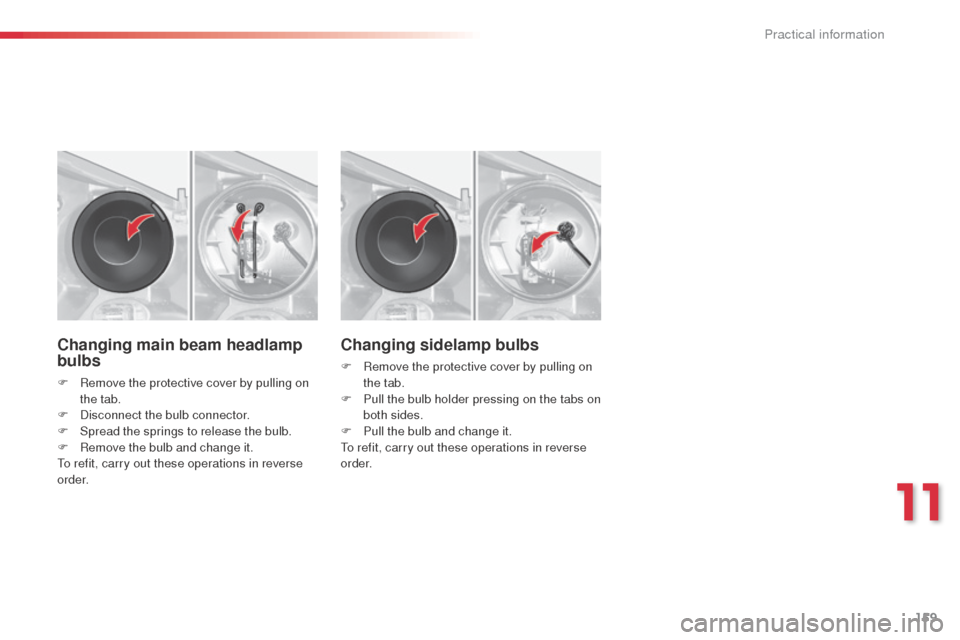
Changing main beam headlamp
bulbs
F Remove the protective cover by pulling on the tab.
F
d
i
sconnect the bulb connector.
F
S
pread the springs to release the bulb.
F
R
emove the bulb and change it.
To refit, carry out these operations in reverse
o r d e r.
Changing sidelamp bulbs
F Remove the protective cover by pulling on the tab.
F
P
ull the bulb holder pressing on the tabs on
both sides.
F
P
ull the bulb and change it.
To refit, carry out these operations in reverse
o r d e r.
11
Practical information
Page 163 of 284
161
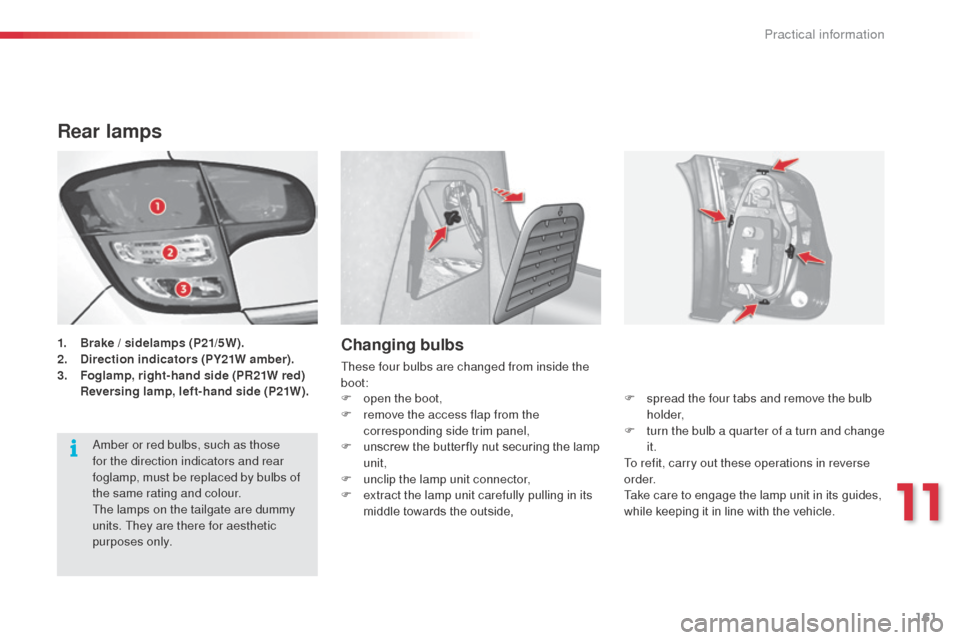
Rear lamps
1. Brake / sidelamps (P21/5W).
2. Direction indicators (PY21W amber) .
3.
F
oglamp, right-hand side (PR21W red)
R
eversing lamp, left-hand side (P21W).Changing bulbs
These four bulbs are changed from inside the
boot: F
s
pread the four tabs and remove the bulb
h o l d e r,
F
t
urn the bulb a quarter of a turn and change
it.
To refit, carry out these operations in reverse
o r d e r.
Take care to engage the lamp unit in its guides,
while keeping it in line with the vehicle.
F
o
pen the boot,
F
r
emove the access flap from the
corresponding side trim panel,
F
u
nscrew the butter fly nut securing the lamp
unit,
F
u
nclip the lamp unit connector,
F
e
xtract the lamp unit carefully pulling in its
middle towards the outside,
am
ber or red bulbs, such as those
for the direction indicators and rear
foglamp, must be replaced by bulbs of
the same rating and colour.
The lamps on the tailgate are dummy
units. They are there for aesthetic
purposes only.
11
Practical information
Page 170 of 284
168
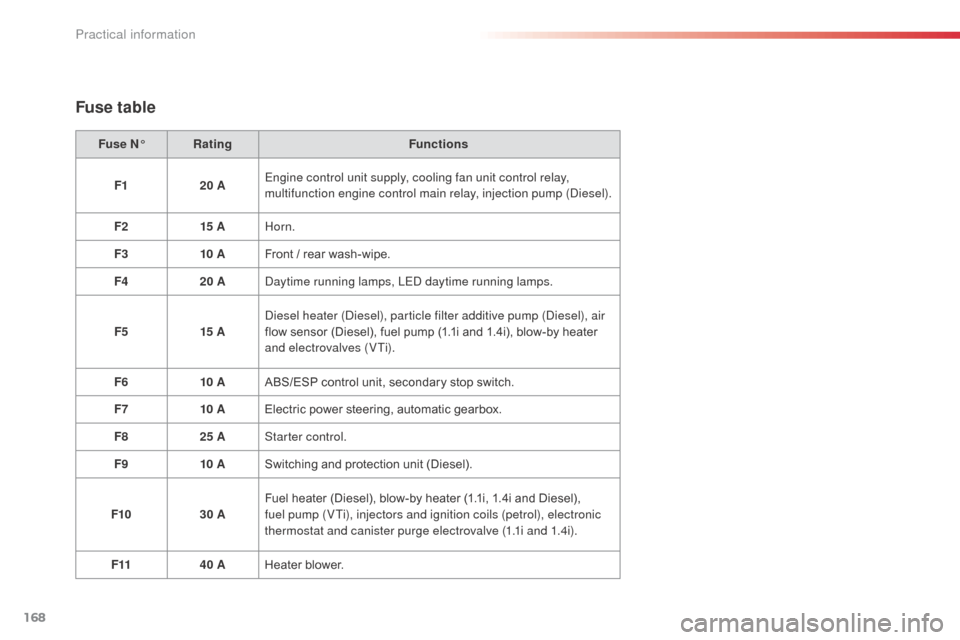
Fuse N°Rating Functions
F1 20 AEngine control unit supply, cooling fan unit control relay,
multifunction engine control main relay, injection pump (
die
sel).
F2 15 AHorn.
F3 10 AFront / rear wash-wipe.
F4 20 A
da
ytime running lamps, LE
d d
aytime running lamps.
F5 15 A
di
esel heater (
di
esel), particle filter additive pump (
di
esel), air
flow sensor (Diesel), fuel pump (1.1i and 1.4i), blow-by heater
and electrovalves (VTi).
F6 10 AABS/ESP control unit, secondary stop switch.
F7 10 AElectric power steering, automatic gearbox.
F8 25 AStarter control.
F9 10 ASwitching and protection unit (Diesel).
F10 30 AFuel heater (Diesel), blow-by heater (1.1i, 1.4i and Diesel),
fuel pump (VTi), injectors and ignition coils (petrol), electronic
thermostat and canister purge electrovalve (1.1i and 1.4i).
F11 40 AHeater blower.
Fuse table
Practical information
Page 179 of 284
177
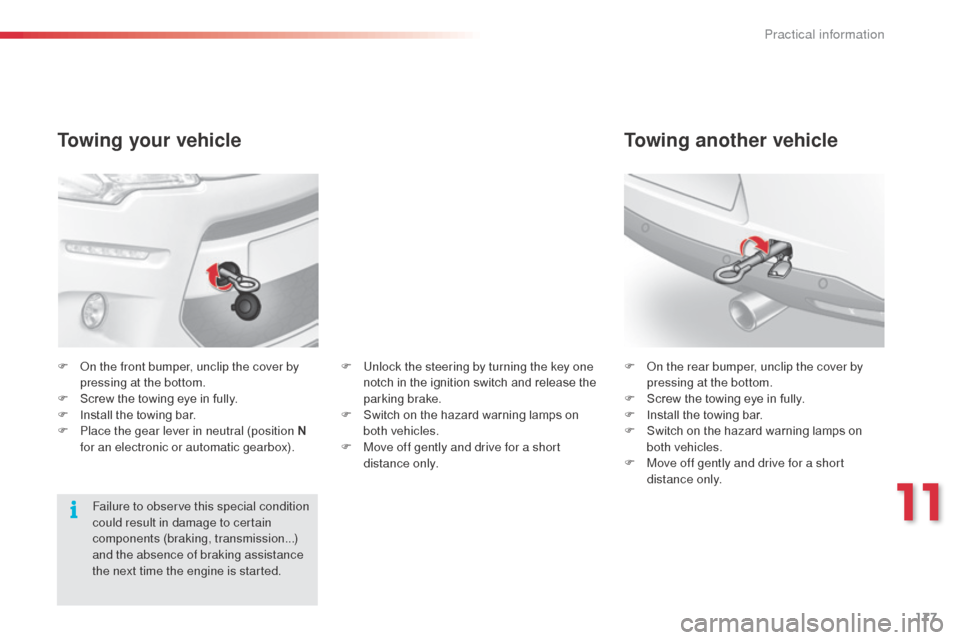
Towing your vehicle
F on the front bumper, unclip the cover by pressing at the bottom.
F
S
crew the towing eye in fully.
F
I
nstall the towing bar.
F
P
lace the gear lever in neutral (position N
for an electronic or automatic gearbox). F
on t he rear bumper, unclip the cover by
pressing at the bottom.
F
S
crew the towing eye in fully.
F
I
nstall the towing bar.
F
S
witch on the hazard warning lamps on
both vehicles.
F
M
ove off gently and drive for a short
distance only.
Towing another vehicle
Failure to observe this special condition
could result in damage to certain
components (braking, transmission...)
and the absence of braking assistance
the next time the engine is started. F
U
nlock the steering by turning the key one
notch in the ignition switch and release the
parking brake.
F
S
witch on the hazard warning lamps on
both vehicles.
F
M
ove off gently and drive for a short
distance only.
11
Practical information
Page 249 of 284
247
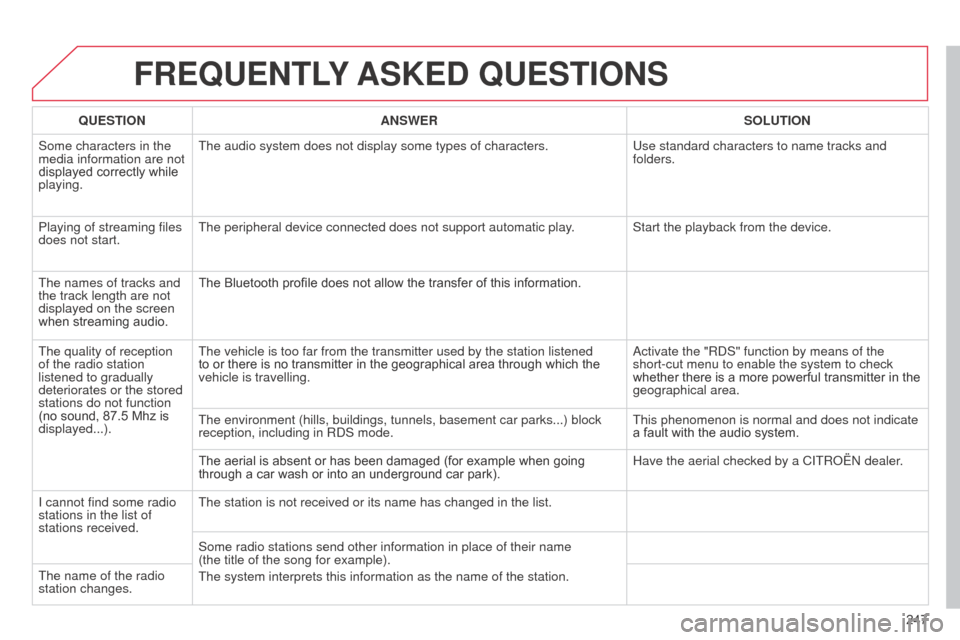
FREQUENTLY ASKED QUESTIONS
QUESTION ANSWER SOLUTION
Some characters in the
media information are not
displayed correctly while
playing. The audio system does not display some types of characters.
Use standard characters to name tracks and
folders.
Playing of streaming files
does not start. The peripheral device connected does not support automatic play. Start the playback from the device.
The names of tracks and
the track length are not
displayed on the screen
when streaming audio. The Bluetooth profile does not allow the transfer of this information.
The quality of reception
of the radio station
listened to gradually
deteriorates or the stored
stations do not function
(no sound, 87.5
Mhz is
displayed...). The vehicle is too far from the transmitter used by the station listened\
to or there is no transmitter in the geographical area through which the
vehicle is travelling.
a
ctivate the "R d S" function by means of the
short-cut menu to enable the system to check
whether there is a more powerful transmitter in the
geographical area.
The environment (hills, buildings, tunnels, basement car parks...) blo\
ck
reception, including in R
d S mode. This phenomenon is normal and does not indicate
a fault with the audio system.
The aerial is absent or has been damaged (for example when going
through a car wash or into an underground car park). Have the aerial checked by a CITR
o Ë n dealer.
I cannot find some radio
stations in the list of
stations received. The station is not received or its name has changed in the list.
Some radio stations send other information in place of their name
(the
title of the song for example).
The system interprets this information as the name of the station.
The name of the radio
station changes.
Page 272 of 284
270
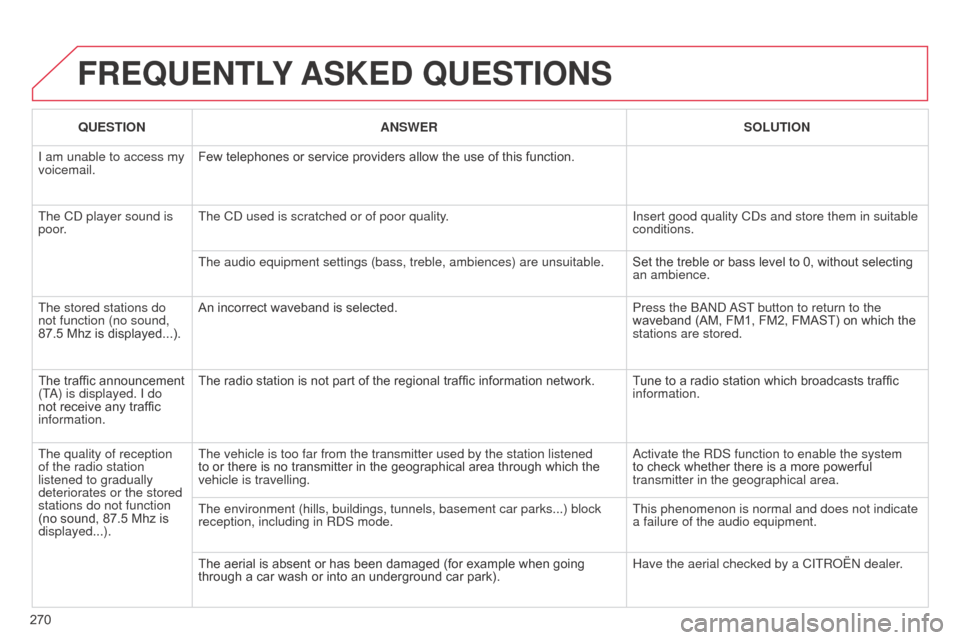
FREQUENTLY ASKED QUESTIONS
QUESTION ANSWER SOLUTION
I am unable to access my
voicemail. Few telephones or service providers allow the use of this function.
The C
d player sound is
poor. The C
d used is scratched or of poor quality. Insert good quality C
d s and store them in suitable
conditions.
The audio equipment settings (bass, treble, ambiences) are unsuitable.\
Set the treble or bass level to 0, without selecting
an ambience.
The stored stations do
not function (no sound,
87.5 Mhz is displayed...). An incorrect waveband is selected.
Press the
band
a
ST button to return to the
waveband (AM, FM1, FM2, FMAST) on which the
stations are stored.
The traffic announcement
(T
a
) is displayed. I do
not receive any traffic
information. The radio station is not part of the regional traffic information network.
Tune to a radio station which broadcasts traffic
information.
The quality of reception
of the radio station
listened to gradually
deteriorates or the stored
stations do not function
(no sound, 87.5
Mhz is
displayed...). The vehicle is too far from the transmitter used by the station listened\
to or there is no transmitter in the geographical area through which the
vehicle is travelling.
a
ctivate the R d S function to enable the system
to check whether there is a more powerful
transmitter in the geographical area.
The environment (hills, buildings, tunnels, basement car parks...) blo\
ck
reception, including in R
d S mode. This phenomenon is normal and does not indicate
a failure of the audio equipment.
The aerial is absent or has been damaged (for example when going
through a car wash or into an underground car park). Have the aerial checked by a CITR
o Ë n dealer.