jack Citroen C3 RHD 2017 2.G Owner's Manual
[x] Cancel search | Manufacturer: CITROEN, Model Year: 2017, Model line: C3 RHD, Model: Citroen C3 RHD 2017 2.GPages: 442, PDF Size: 9.75 MB
Page 223 of 442
221
Spare wheel
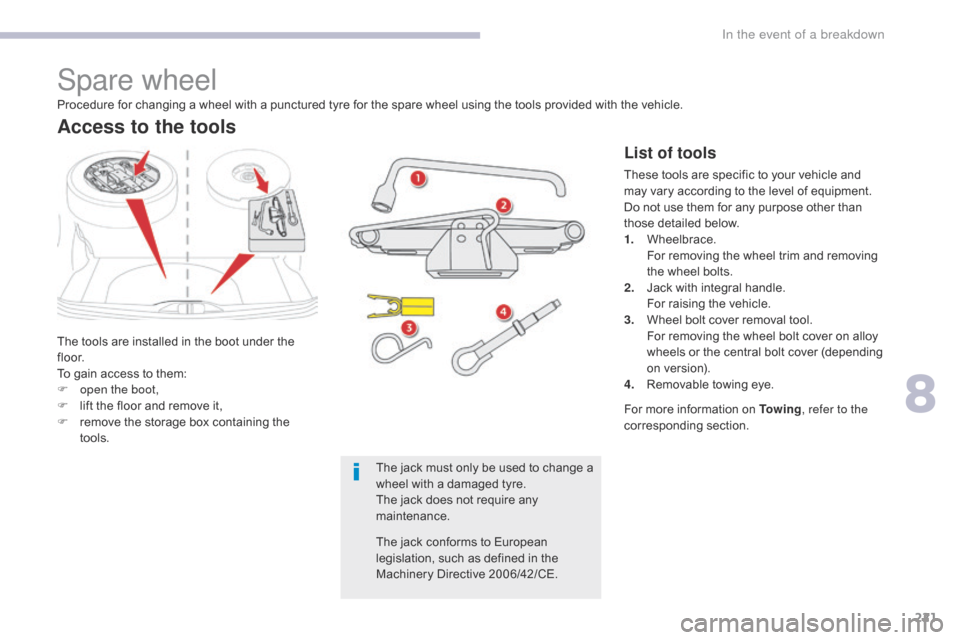
The tools are installed in the boot under the
f l o o r.
To gain access to them:
F
o
pen the boot,
F
l
ift the floor and remove it,
F
r
emove the storage box containing the
tools.
Access to the tools
List of tools
These tools are specific to your vehicle and
may vary according to the level of equipment.
Do not use them for any purpose other than
those detailed below.
1.
W
heelbrace.
F
or removing the wheel trim and removing
the wheel bolts.
2.
J
ack with integral handle.
F
or raising the vehicle.
3.
W
heel bolt cover removal tool.
F
or removing the wheel bolt cover on alloy
wheels or the central bolt cover (depending
on version).
4.
R
emovable towing eye.
Procedure for changing a wheel with a punctured tyre for the spare wheel using the tools provided with the vehicle.
For more information on To w i n g, refer to the
corresponding section.
The jack must only be used to change a
wheel with a damaged tyre.
The jack does not require any
maintenance.
The jack conforms to European
legislation, such as defined in the
Machinery Directive 2006/42/CE.
8
In the event of a breakdown
Page 226 of 442
224
Removing a wheel
Parking the vehicle
Immobilise the vehicle where it does not
block traffic: the ground must be level,
stable and not slippery.
Apply the parking brake, switch off the
ignition and engage first gear* to block
the wheels.
Check that the parking brake warning
lamp in the instrument panel comes on
fixed.
The occupants must get out of the
vehicle and wait where they are safe.
Ensure that the jack is correctly
positioned at one of the vehicle's
jacking points.
Incorrect use of the jack could cause
the vehicle to drop.
Never go underneath a vehicle raised
using a jack; use an axle stand.
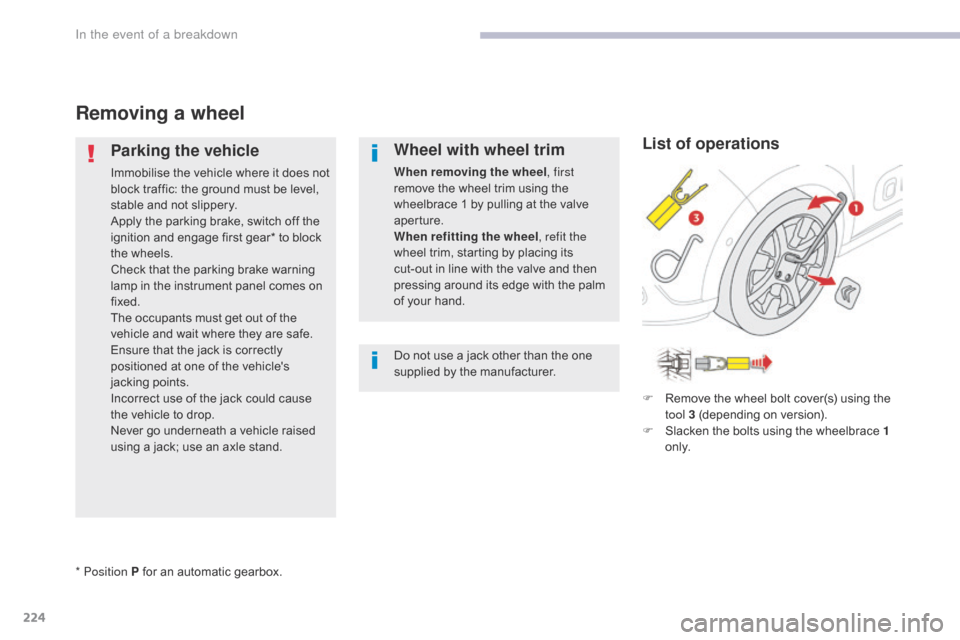
Wheel with wheel trim
When removing the wheel, first
remove the wheel trim using the
wheelbrace 1 by pulling at the valve
aperture.
When refitting the wheel , refit the
wheel trim, starting by placing its
cut-out in line with the valve and then
pressing around its edge with the palm
of your hand.
Do not use a jack other than the one
supplied by the manufacturer.
* Position P for an automatic gearbox. F
R
emove the wheel bolt cover(s) using the
tool 3 (depending on version).
F
S
lacken the bolts using the wheelbrace 1
o n l y.
List of operations
In the event of a breakdown
Page 227 of 442
225
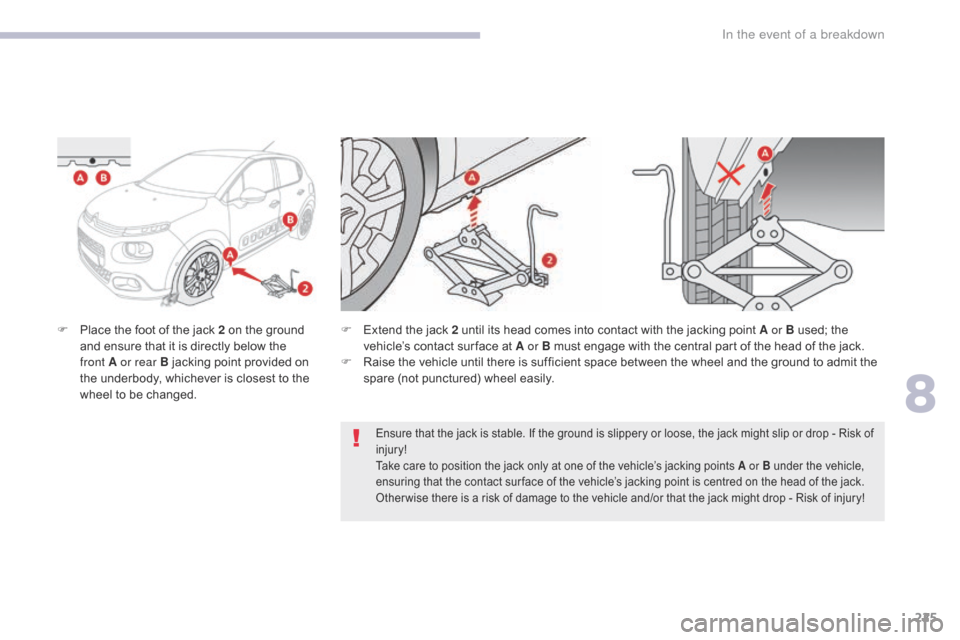
F Place the foot of the jack 2 on the ground and ensure that it is directly below the
front
A or rear B jacking point provided on
the underbody, whichever is closest to the
wheel to be changed. F
E xtend the jack 2 until its head comes into contact with the jacking point A or B used; the
vehicle’s contact sur face at A or B must engage with the central part of the head of the jack.
F
R
aise the vehicle until there is sufficient space between the wheel and the ground to admit the
spare (not punctured) wheel easily.
Ensure that the jack is stable. If the ground is slippery or loose, the jack might slip or drop - Risk of
injury!
Take care to position the jack only at one of the vehicle’s jacking points A or B under the vehicle,
ensuring that the contact sur face of the vehicle’s jacking point is centred on the head of the jack.
Other wise there is a risk of damage to the vehicle and/or that the jack might drop - Risk of injury!
8
In the event of a breakdown
Page 230 of 442
228
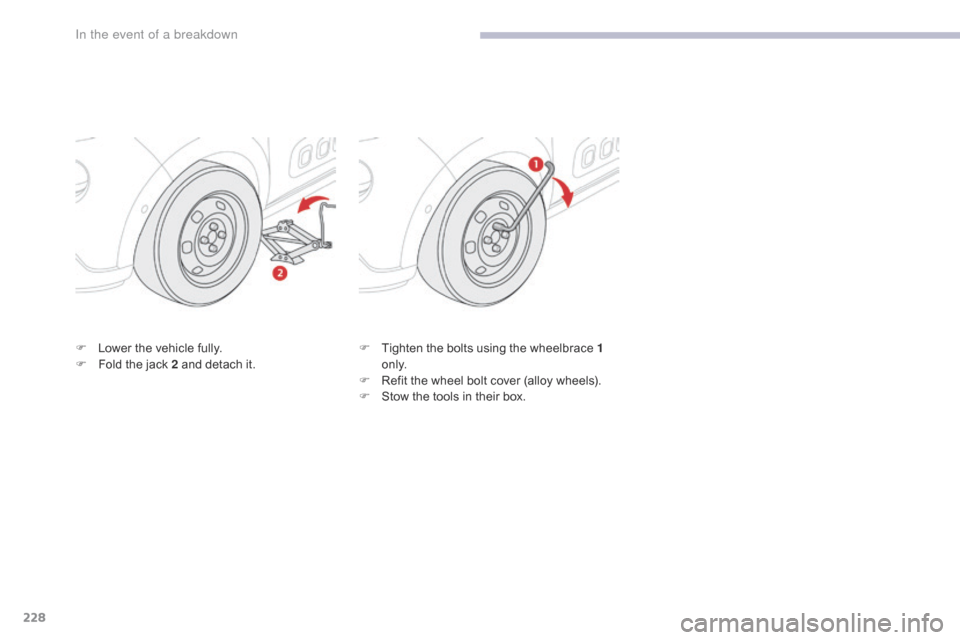
F Lower the vehicle fully.
F F old the jack 2 and detach it. F
T ighten the bolts using the wheelbrace 1
o n l y.
F
R
efit the wheel bolt cover (alloy wheels).
F
S
tow the tools in their box.
In the event of a breakdown
Page 258 of 442
256
Maintenance (advice) ....................................2 14
Maintenance, routine ........................................ 9
M
ap reading lamps
......................................... 90
M
arkings, identification
................................. 25
3
Mat
.......
.....................................................92, 95
Memorising a speed
..................................... 16
6
Mirror, rear view
............................................ 10
0
Mirrors, door............................................99, 180
Misfuel prevention
...............................
..........19 4
Mountings, Isofix
...............................
............13 9 Pads, brake
...................................................
20
9
Paint colour code
..........................................
25
3
Panoramic glass sunroof
................................
91
P
arcel shelf, rear ....................................... 9 7, 98
Parking brake ..................................1 5, 155, 209
Parking sensors, rear.................................... 183
Plates, identification ...................................... 253
Port, USB
..................................................
92, 94
Pre-heater, Diesel
...............................
............15
Pressures, tyres
....................................2
20, 253
Pre-tensioning seat belts
..............................12
4
Priming the fuel system
................................2
15
Protecting children
........................ 1
26, 130 -132,
137, 139 -141, 143
Protectors
...................................................... 2
14
Puncture
................
........................................216
Number plate lamps
...................................... 23
4
M
P
N
Lighting, interior ..............................................90
L ighting, welcome ......................................... 10
7
Loading
..............................
............................... 9
Load reduction mode
.................................... 19
8
Localised Assistance Call
......................11
5 , 117
Locating your vehicle
...................................... 55
Lo
cking
......................................................5
4, 60
Locking from the inside
..............................
........................67
Low fuel level
..............................
..................192Oil change
............................... ......................204
Oil consumption
............................................20
4
Oil, engine
...............................
......................204
Opening the bonnet
......................................2
01
Opening the boot
..............................
. 54, 56, 66
Opening the doors
............................. 5
4, 56, 65
O
Labels, identification .....................................25 3
Lamp, boot ............................... ............... 91, 235
Lamps, parking
............................................. 10
6
Lane Departure Warning System (LDWS)
...17
9
LEDs - Light-emitting diodes
........................10
6
Level, AdBlue
................................................ 2
07
Level, brake fluid
........................................... 20
5
Level, Diesel additive
.................................... 2
07
Level, engine coolant
..............................2
8, 206
Level, engine oil
...............................
.......32, 204
Levels and checks
..............................
..202-207
Level, screenwash fluid
................................20
6
Lighting
................
............................................ 14
Lighting, guide-me home
..............................10
7
L
Key ......................................... 53, 56, 58, 60, 61
Key, electronic ...........................................56
-58
Keyless Entry and Starting
... 5
6, 58, 60, 149, 152
Key not recognised
....................................... 15
4
Key with remote control
................................14
9
Kit, temporary puncture repair
................ 9
7, 216K
Jack .................................................94, 221, 222
Jump starting .............................. ..................244
J
Alphabetical index
Page 269 of 442
3
.
12:13
18,5 21,5
23 °C
Audio and Telematics
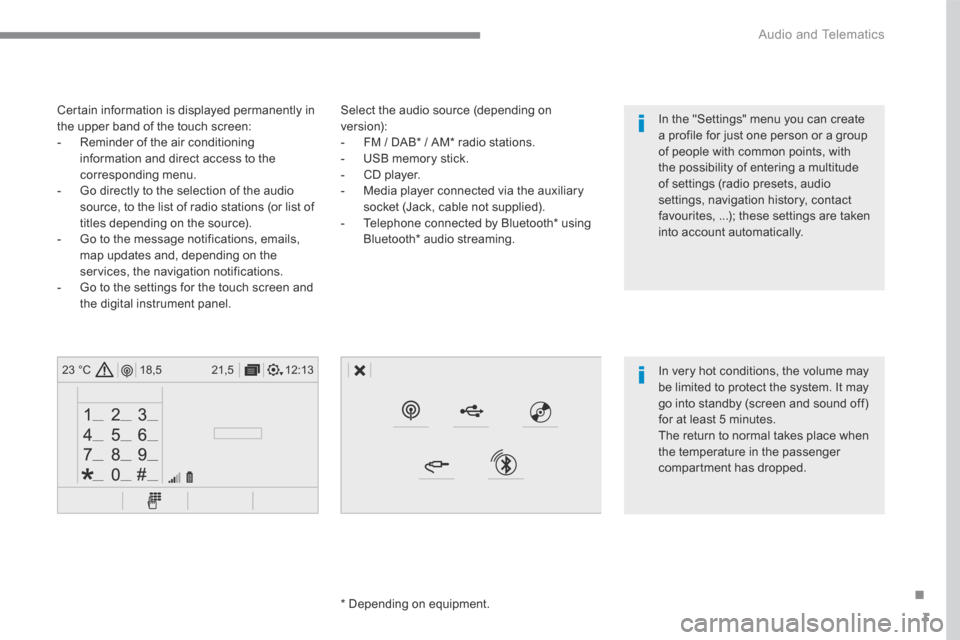
Select the audio source (depending on version): - FM / DAB * / AM * radio stations. - USB memory stick. - CD player. - Media player connected via the auxiliary socket (Jack, cable not supplied). - Telephone connected by Bluetooth * using
Bluetooth * audio streaming.
* Depending on equipment.
Certain information is displayed permanently in the upper band of the touch screen: - Reminder of the air conditioning information and direct access to the corresponding menu. - Go directly to the selection of the audio source, to the list of radio stations (or list of titles depending on the source).
- Go to the message notifications, emails, map updates and, depending on the services, the navigation notifications. - Go to the settings for the touch screen and the digital instrument panel.
In very hot conditions, the volume may be limited to protect the system. It may go into standby (screen and sound off) for at least 5 minutes.
The return to normal takes place when the temperature in the passenger compartment has dropped.
In the "Settings" menu you can create a profile for just one person or a group of people with common points, with the possibility of entering a multitude of settings (radio presets, audio settings, navigation history, contact favourites, ...); these settings are taken into account automatically.
Page 330 of 442
64
Audio and Telematics
Media
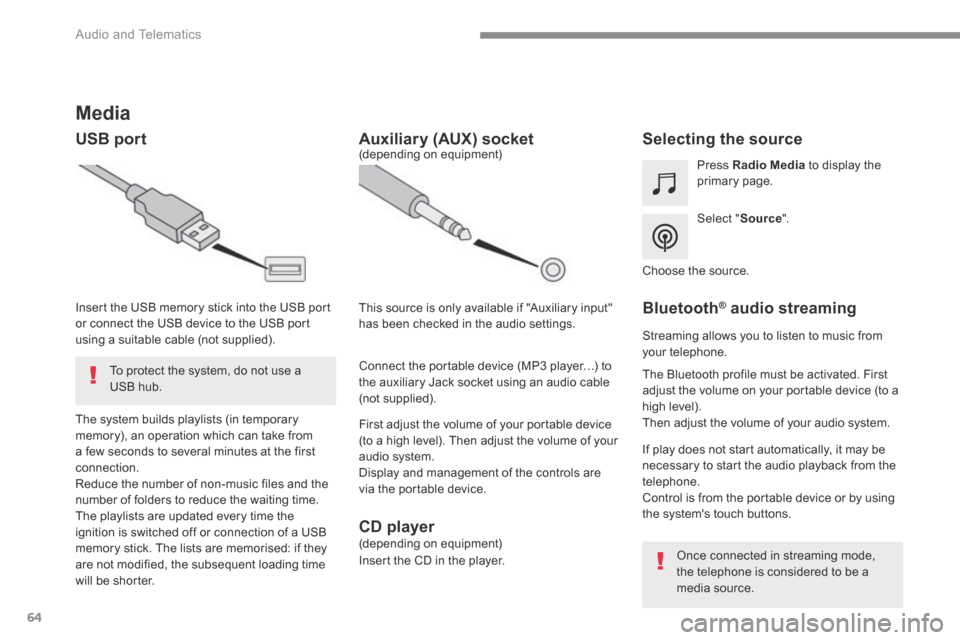
USB port Selecting the source
Select " Source ".
Press Radio Media to display the primary page.
The system builds playlists (in temporary memory), an operation which can take from a few seconds to several minutes at the first connection. Reduce the number of non-music files and the number of folders to reduce the waiting time. The playlists are updated every time the ignition is switched off or connection of a USB memory stick. The lists are memorised: if they are not modified, the subsequent loading time will be shorter.
Insert the USB memory stick into the USB port or connect the USB device to the USB port using a suitable cable (not supplied).
Auxiliary (AUX) socket
First adjust the volume of your portable device (to a high level). Then adjust the volume of your audio system. Display and management of the controls are via the portable device.
This source is only available if "Auxiliary input" has been checked in the audio settings.
(depending on equipment)
Connect the portable device (MP3 player…) to the auxiliary Jack socket using an audio cable (not supplied).
Choose the source.
Bluetooth ® Bluetooth ® Bluetooth audio streaming ® audio streaming ®
Streaming allows you to listen to music from your telephone.
The Bluetooth profile must be activated. First adjust the volume on your portable device (to a high level). Then adjust the volume of your audio system.
If play does not start automatically, it may be necessary to start the audio playback from the telephone. Control is from the portable device or by using the system's touch buttons.
Once connected in streaming mode, the telephone is considered to be a media source.
To protect the system, do not use a USB hub.
CD player (depending on equipment)
Insert the CD in the player.
Page 331 of 442
65
.
Audio and Telematics
Connecting Apple ® Connecting Apple ® Connecting Apple players ® players ®
Connect the Apple ® player to the USB port ® player to the USB port ®
using a suitable cable (not supplied). Play starts automatically.
Control is via the audio system.
The classifications available are those of the portable device connected (artists / albums / genres / playlists / audiobooks / podcasts). The default classification used is by artist. To modify the classification used, return to the first level of the menu then select the desired classification (playlists for example) and confirm to go down through the menu to the desired track.
The version of software in the audio system may not be compatible with the generation of your Apple ® player. ® player. ®
The audio equipment will only play audio files with ".wma, .aac, .flac, .ogg and .mp3" file extensions and with a bit rate of between 32 Kbps and 320 Kbps. It also supports VBR (Variable Bit Rate) mode. No other type of file (.mp4, ...) can be played. ".wma" files must be of the standard wma 9 type. The sampling rates supported are 32, 44 and 48 KHz.
In order to be able to play a burned CDR or CDRW, when burning it is preferable to select
standards ISO 9660 level 1, 2 or Joliet. If the disc is burned in another format, it may not be played correctly. It is recommended that the same burning standard is always used on an individual disc, with as low a speed as possible (4x maximum) for the best sound quality. In the particular case of a multi-session CD, the Joliet standard is recommended.
It is advisable to restrict file names to 20 characters, without using of special characters (e.g.: " " ? ; ù) to avoid any playing and displaying problems.
Information and advice
Use only USB memory sticks formatted FAT 32 (file allocation table).
The system supports USB mass storage devices, BlackBerry ® devices ® devices ®
or Apple ® players via USB ports. The ® players via USB ports. The ®
adaptor cable is not supplied.
Control of the peripheral device is with the audio system controls. Other peripherals, not recognised on connection, must be connected to the auxiliary socket using a Jack cable (not supplied) or via Bluetooth streaming, depending on compatibility.
It is recommended that the original USB cable for the portable device is used.
To protect the system, do not use a USB hub.
Page 363 of 442
97
.
Audio and Telematics
Transversal-Citroen_en_Chap02_RCC-2-2-0_ed01-2016
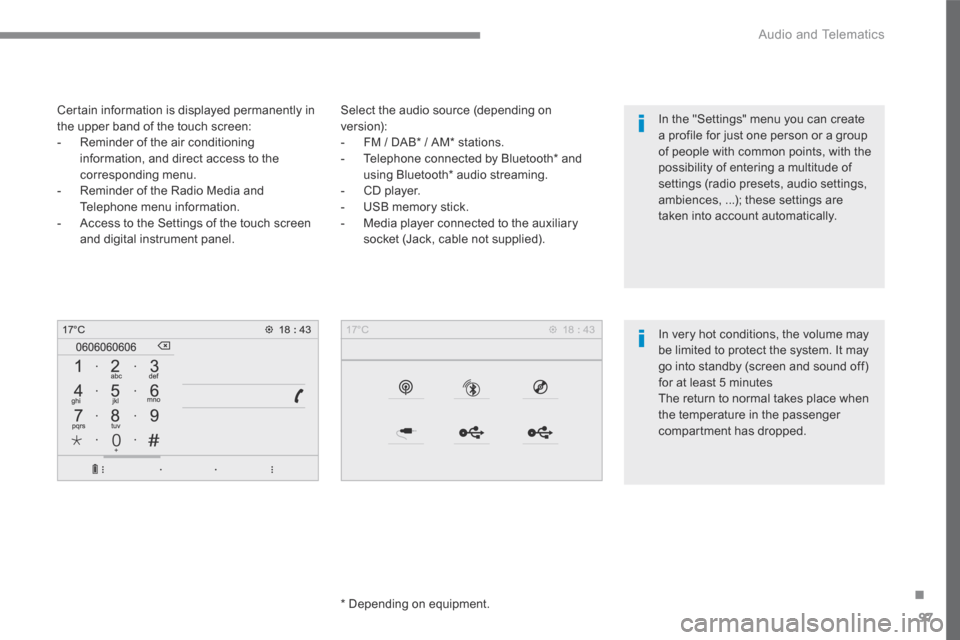
Select the audio source (depending on version): - FM / DAB * / AM * stations. - Telephone connected by Bluetooth * and using Bluetooth * audio streaming. - CD player. - USB memory stick. - Media player connected to the auxiliary
socket (Jack, cable not supplied).
* Depending on equipment.
Certain information is displayed permanently in the upper band of the touch screen: - Reminder of the air conditioning information, and direct access to the corresponding menu. - Reminder of the Radio Media and Telephone menu information. - Access to the Settings of the touch screen
and digital instrument panel.
In very hot conditions, the volume may be limited to protect the system. It may go into standby (screen and sound off) for at least 5 minutes The return to normal takes place when the temperature in the passenger
compartment has dropped.
In the "Settings" menu you can create a profile for just one person or a group of people with common points, with the possibility of entering a multitude of settings (radio presets, audio settings, ambiences, ...); these settings are taken into account automatically.
Page 382 of 442
116
1
Audio and Telematics
Transversal-Citroen_en_Chap02_RCC-2-2-0_ed01-2016
Media
USB port Selecting the source
Press the " SOURCES " button.
Press Radio Media to display the primary page.
The system builds playlists (in temporary memory), an operation which can take from a few seconds to several minutes at the first connection. Reduce the number of non-music files and the number of folders to reduce the waiting time. The playlists are updated every time the ignition is switched off or connection of a USB memory stick. The lists are memorised: if they are not modified, the subsequent loading time will be shorter.
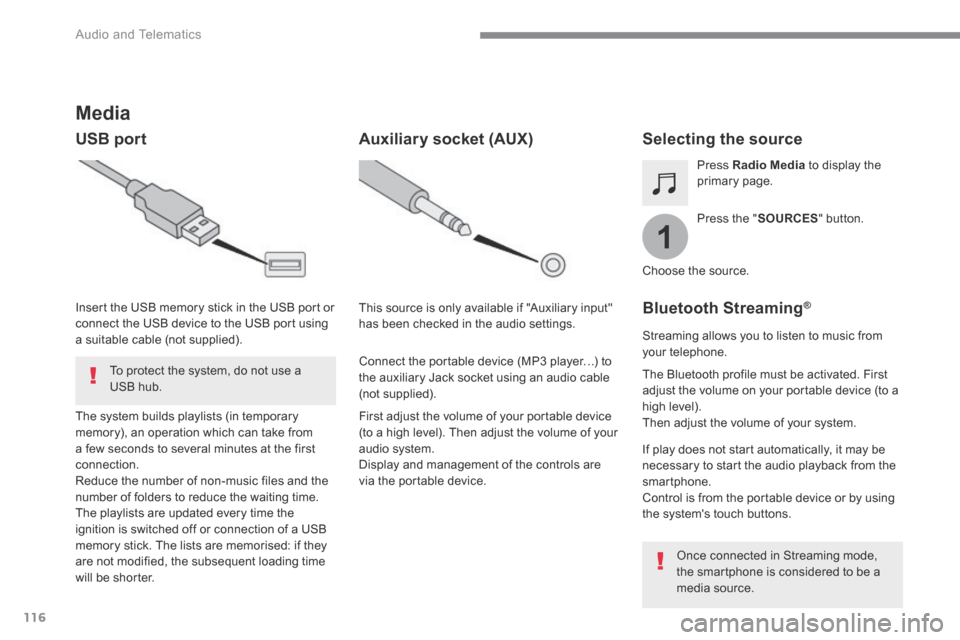
Insert the USB memory stick in the USB port or connect the USB device to the USB port using a suitable cable (not supplied).
Auxiliary socket (AUX)
First adjust the volume of your portable device (to a high level). Then adjust the volume of your audio system. Display and management of the controls are via the portable device.
This source is only available if "Auxiliary input" has been checked in the audio settings.
Connect the portable device (MP3 player…) to the auxiliary Jack socket using an audio cable (not supplied).
Choose the source.
Bluetooth Streaming ®Bluetooth Streaming ®Bluetooth Streaming
Streaming allows you to listen to music from your telephone.
The Bluetooth profile must be activated. First adjust the volume on your portable device (to a high level). Then adjust the volume of your system.
If play does not start automatically, it may be necessary to start the audio playback from the smartphone. Control is from the portable device or by using the system's touch buttons.
Once connected in Streaming mode, the smartphone is considered to be a media source.
To protect the system, do not use a USB hub.