phone Citroen C4 2008 1.G Owner's Manual
[x] Cancel search | Manufacturer: CITROEN, Model Year: 2008, Model line: C4, Model: Citroen C4 2008 1.GPages: 257, PDF Size: 8.06 MB
Page 4 of 257
7
F A M I L I A R I S A T I O N
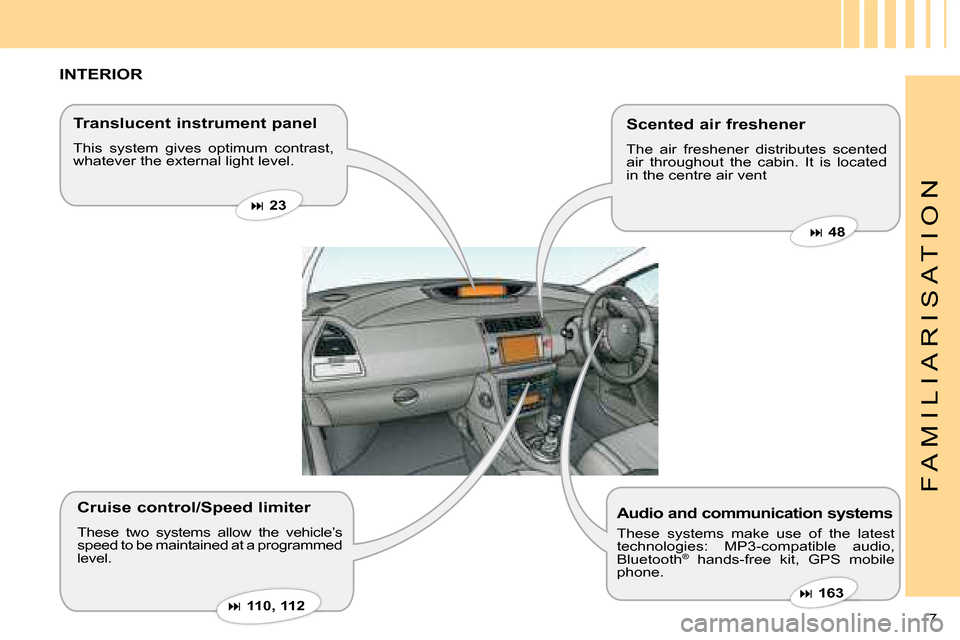
INTERIOR
Translucent instrument panel
This system gives optimum contrast, whatever the external light level.
Audio and communication systems
These systems make use of the latest technologies: MP3-compatible audio, Bluetooth® hands-free kit, GPS mobile ®
phone.
Scented air freshener
The air freshener distributes scented air throughout the cabin. It is located in the centre air vent
Cruise control/Speed limiter
These two systems allow the vehicle’s speed to be maintained at a programmed level.
23
163
48
110 , 112
Page 7 of 257
10
F A M I L I A R I S A T I O N
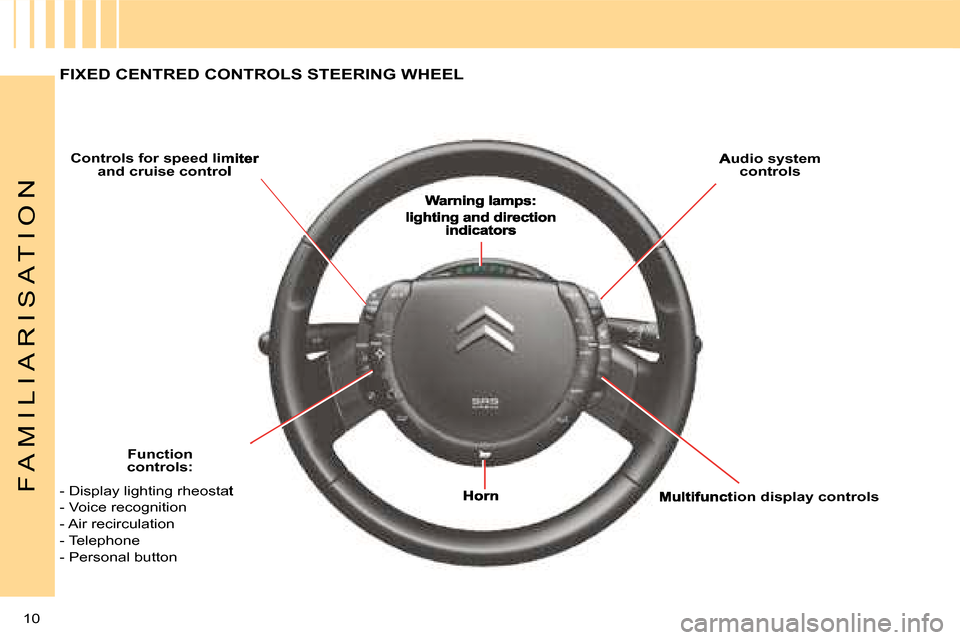
FIXED CENTRED CONTROLS STEERING WHEEL
Controls for speed limiter and cruise control Audio system controls
Function controls:
Multifunction display controls- Display lighting rheostat
- Voice recognition
- Air recirculation
- Telephone
- Personal button
Page 9 of 257
12
F A M I L I A R I S A T I O N
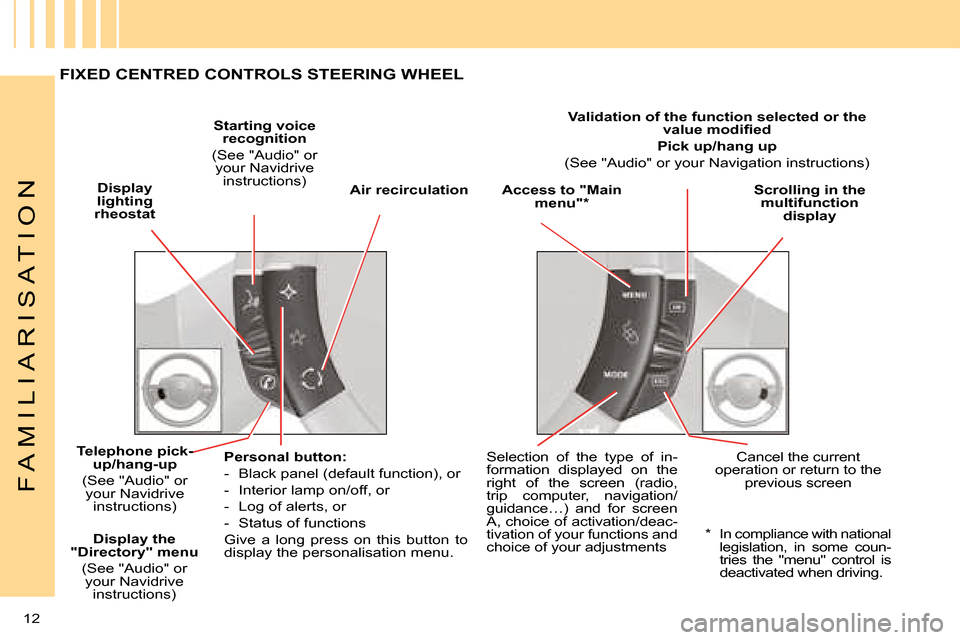
Display lighting rheostat
Starting voice recognition
(See "Audio" or your Navidrive instructions)Access to "Main menu"*Scrolling in the multifunction display
Telephone pick-elephone pick-elephone pick-up/hang-up
(See "Audio" or your Navidrive instructions)
Personal button:
- Black panel (default function), or
- Interior lamp on/off, or
- Log of alerts, or
- Status of functions
Give a long press on this button to display the personalisation menu.
Selection of the type of in-formation displayed on the right of the screen (radio, trip computer, navigation/guidance…) and for screen A, choice of activation/deac-tivation of your functions and choice of your adjustments
Cancel the current operation or return to the previous screen
Air recirculation
Validation of the function selected or the value modifi ed
Pick up/hang up
(See "Audio" or your Navigation instructions)
* In compliance with national legislation, in some coun-tries the "menu" control is deactivated when driving.
Display the "Directory" menu
(See "Audio" or your Navidrive instructions)
FIXED CENTRED CONTROLS STEERING WHEEL
Page 36 of 257
37
II
M U L T I F U N C T I O N D I S P L A Y
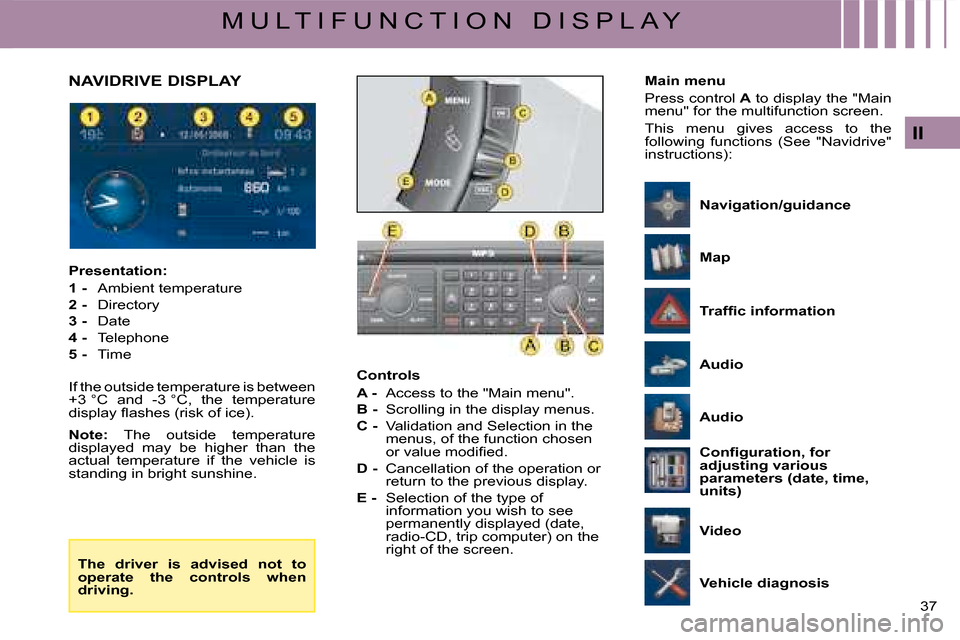
Controls
A - Access to the "Main menu".
B - Scrolling in the display menus.
C - Validation and Selection in the menus, of the function chosen or value modifi ed.
D - Cancellation of the operation or return to the previous display.
E - Selection of the type of information you wish to see permanently displayed (date, radio-CD, trip computer) on the right of the screen.
Presentation:
1 - Ambient temperature
2 - Directory
3 - Date
4 - Telephone
5 - Time
If the outside temperature is between +3 °C and -3 °C, the temperature display fl ashes (risk of ice).
Note: The outside temperature displayed may be higher than the actual temperature if the vehicle is standing in bright sunshine.
NAVIDRIVE DISPLAYMain menu
Press control A to display the "Main menu" for the multifunction screen.
This menu gives access to the following functions (See "Navidrive" instructions):
The driver is advised not to operate the controls when driving.
Traffi c information
Vehicle diagnosis
Audio
Confi guration, for adjusting various parameters (date, time, units)
Map
Video
Navigation/guidance
Audio
Page 57 of 257
58
IV
A C C E S S
Note: The simultaneous use of other high frequency equipment (mobile telephones, domestic alarms...) may momentarily hinder the operation of the remote control.
In the event of a permanent fault, the remote control should be reini-tialised. (See next page).
It is dangerous to deadlock the vehicle when someone is inside as unlocking from the interior is impossible (without the remote control).
When closing the windows using the remote control, the user should make sure that nobody is obstructing the windows from shutting properly.
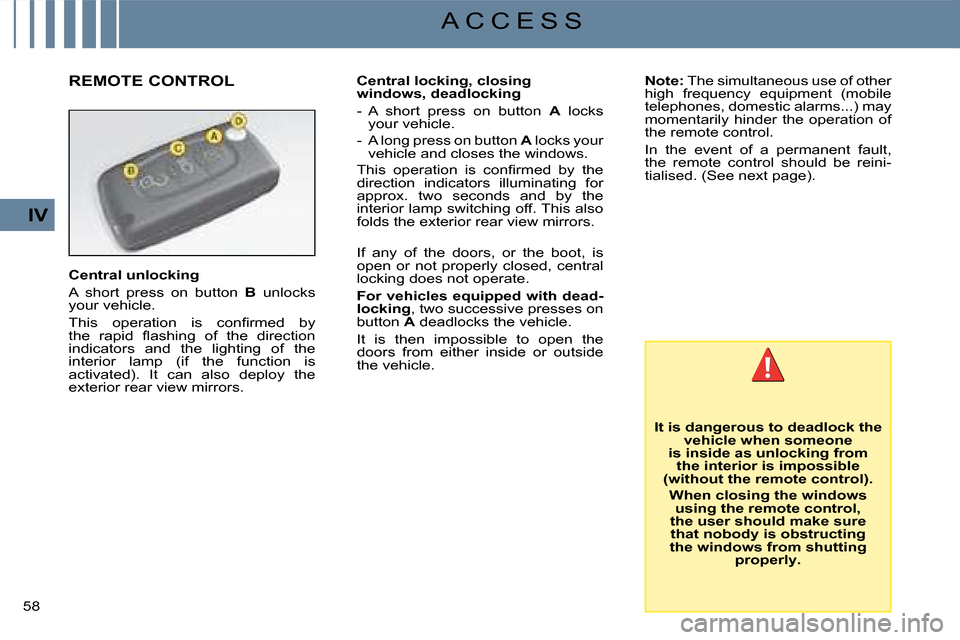
Central unlocking
A short press on button B unlocks your vehicle.
This operation is confi rmed by the rapid fl ashing of the direction indicators and the lighting of the interior lamp (if the function is activated). It can also deploy the exterior rear view mirrors.
Central locking, closing windows, deadlocking
- A short press on button A locks your vehicle.
- A long press on button A locks your vehicle and closes the windows.
This operation is confi rmed by the direction indicators illuminating for approx. two seconds and by the interior lamp switching off. This also folds the exterior rear view mirrors.
If any of the doors, or the boot, is open or not properly closed, central locking does not operate.
For vehicles equipped with dead-locking, two successive presses on button A deadlocks the vehicle.
It is then impossible to open the doors from either inside or outside the vehicle.
REMOTE CONTROL
Page 77 of 257
73
VI
I N T E R I O R C O M F O R T
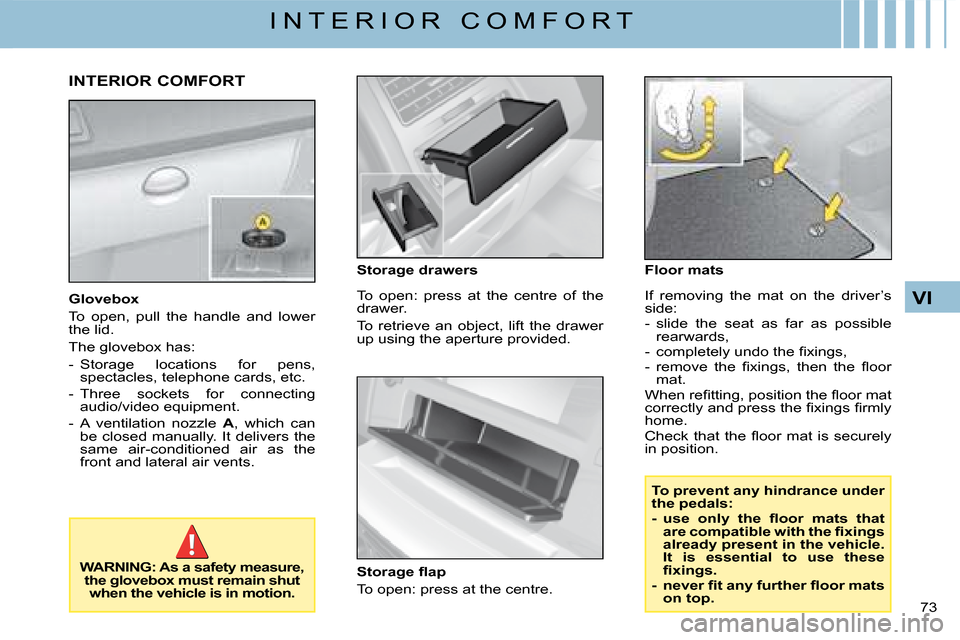
Glovebox
To open, pull the handle and lower the lid.
The glovebox has:
- Storage locations for pens, spectacles, telephone cards, etc.
- Three sockets for connecting audio/video equipment.
- A ventilation nozzle A, which can be closed manually. It delivers the same air-conditioned air as the front and lateral air vents.
WARNING: As a safety measure, the glovebox must remain shut when the vehicle is in motion.
To open: press at the centre of the drawer.
To retrieve an object, lift the drawer up using the aperture provided.
Storage fl ap
To open: press at the centre.
INTERIOR COMFORT
If removing the mat on the driver’s side:- slide the seat as far as possible rearwards,- completely undo the fixings,- remove the fixings, then the fl oor mat.When refi tting, position the fl oor mat correctly and press the fixings fi rmly home.Check that the fl oor mat is securely in position.
To prevent any hindrance under the pedals:- use only the fl oor mats that are compatible with the fixings already present in the vehicle. It is essential to use these fixings.- never fi t any further fl oor mats on top.
Storage drawersFloor mats
Page 186 of 257
174
XIII
A U D I O
HANDS-FREE TELEPHONE
Your audio system may be Bluetooth®
compatible. It allows you to connect a mobile telephone for "hands free" use and even to use its directory.
It permits you to twin up to four telephones, to be able then to connect whichever one you choose.The Bluetooth® functions available and the content of the display are dependent on the type of mobile telephone, its settings and the type of contract you have. For this reason it is advisable to make enquiries with your telephone provider.Prior to any operation:- Your display should be lit up (key in position M).
- Your telephone’s Bluetooth®
system must be activated.
Twinning a telephone
Twinning a telephone consists of having it recognised by the Bluetooth® system on your vehicle. This then permits an instantaneous connection.Twinning can only be performed with ignition switched on, display illuminated, engine stopped. No other telephone should be connected.- The twinning must be performed with the telephone and its Bluetooth® system activated.®
Note:
Refer to the user instructions to familiarise yourself with the features of twinning.- The telephone detects the Bluetooth® system on your vehicle. ®
"C4" displays on your telephone.
You should then select "C4" on your telephone controls. Next you must choose whether or not to accept this twinning then select, on screen Cusing J, M or 8, one of the 4memories. Validate with a press on button L or 7.
Note:
You can select a memory already attributed, although the telephone twinned to this location will no longer be.- Next the telephone asks you to enter an identifi cation code: 1234.
- Validate.
Note:
This entry may be demanded earlier in the twinning sequence.The telephone is now twinned to your Bluetooth® system. For ®
immediate access to the Bluetooth®
functions, it may be necessary to make a connection (see following page "Confi guration: Connecting a twinned mobile telephone").Once the twinning is fi nished, you will be able to connect your telephone via the "Main menu".
Connecting a twinned telephone
Each time you enter the vehicle, after switching on the audio system, your telephone is detected automatically. If more than one telephone is present, the last telephone to have been connected is the fi rst to be recognised.Note:Disconnections may occur. You may have to make a new connection (see following page, "Confi guration: Connecting a twinned mobile telephone").Remarks:- In the event of a problem, it is recommended to switch your telephone off and then on again.- If you switch off your telephone within the fi eld of reception of the Bluetooth® system on your vehicle, the next connection will not be automatic. To restore automatic connection, you will have to connect your telephone manually (see following page, "Confi guration: Connecting a twinned mobile telephone").- If you are already in telephone communication when the audio system is turned on, the latter detects the telephone.- To avoid interference, you are advised not to place your mobile telephone close to your radio.
To accept an incoming call
Using button L or control 7 at the steering wheel.
Page 187 of 257

175
XIII
A U D I O
Main Menu
Press on the Menu control Oto access the Main Menu, then select the "Telephone" icon via buttons J, M or 8 and then validate the selection via button L or 7.You have access:- To the Directory.
- To Confi guration.
- To Communication Management.
You access your choices using J, Mor 8 then you validate them with a press on L or 7.This main menu can also be accessed by pressing button E then button L.
Directory
This menu lets you open:- The telephone Directory of the telephone that is connected.
- The Calls List.
This menu can also be accessed with a press on control 11.
Telephone directory
The starting of a telephone call can be done independently of the telephone or of the audio system, thanks to the directory.The directory is displayed. Select the number via J, M or 8, then validate with a press on L or 7.
Remarks:
- The directory displayed updates itself automatically.
- If the person to be called does not fi gure in the directory, the call can only be made starting from the telephone.
- If you have information recorded in the Vcard format, you must select the person you wish to call, then validate. A list of 4 numbers maximum can be displayed with the following labels: "Home", "Offi ce", "Mobile" and "Car".
Calls list
After selecting this component and then validating, the calls list is displayed with a maximum of: 10 calls made (arrow pointing upward), 10 calls received (arrow pointing downward) and 10 calls not connected.It is possible to make a call starting from this list: Select the number via J, M or 8, then validate with a press on L or 7.
Confi guration
This menu allows you to:- Deleting a twinning.
Using J, M or 8, select this choice then validate via L or 7. Select in the list the telephone that you no longer wish to have twinned. Validate.
- Consulting the list of twinnings.
The list of telephones twinned is displayed.
- Connecting a mobile telephone that is twinned.
Select the telephone that you wish to connect. This access allows you to make a connection manually.
Call management
This menu is accessible during your calls, permitting you to:- Swap a call if there is another call incoming.
- End a call.
- Be in Secret mode.
Remark:
If you are in telephone conversation, you have access to this "Confi guration" menu by means of a press on L or 7.
Page 188 of 257

176
XIII
A U D I O
Swapping a call
During a telephone conversation, the system is able to tell you of a second call incoming. To accept it, validate. To change from one call to the other, select this choice.
End a call
This choice enables you to end a telephone conversation, for example if there is another call incoming.
Secret mode
Selecting this choice allows you not to be heard by the other person. To restore sound to the other person, select deactivation of Secret mode in the menu "Call Management".
Note:
If you wish to transfer a call from the audio system to the mobile telephone (for example when leaving your vehicle), refer to the user instructions for the latter.
Voice recognition
A short press on button 12 starts voice recognition for the telephone.Voice recognition allows you to make a call to a number for which you have recorded a label on the mobile telephone that is twinned and connected.
Remark:
It is possible to stop the call as long as the dialling has not commenced, by means of a short press on button 12.
Remarks:
- While you are on a call, the audio source currently being listened to is paused.
- Some ring tones on your mobile telephone may not be recognised by the Bluetooth® system on your ®
vehicle. A different ring tone will be chosen by the system.
Displays
Press the "MODE" button to display telephone information in the right hand part of the display.
A "Telephone" symbol appears on your display when you connect a mobile telephone.A "Battery" symbol appears at the bottom of the display to indicate the range of the mobile telephone connected.An "Envelope" symbol appears at the bottom of the display to indicate the presence of an unread SMS on the mobile telephone connected.A "Sound track" symbol appears at the bottom of the display to indicate the presence of a message on the mobile telephone connected.
Page 208 of 257
17
07
1
3
5
4
2
1
2
The services offered by the telephone depend on the network, the SIM card and the compatibility of
the Bluetooth equipment used. Refer to your telepho ne's manual and your operator to check which
services you have access to. A list of mobile telep hones which offer the best range of services is
available from dealers.
BLUETOOTH TELEPHONE COMPATIBILITY
CONNECTING A TELEPHONE
For safety reasons and because they require prolong ed attention on
the part of the driver, the operations for pairing the Bluetooth mobile
telephone to the system's hands-free kit must be ca rried out with the
vehicle stationary and the ignition on.
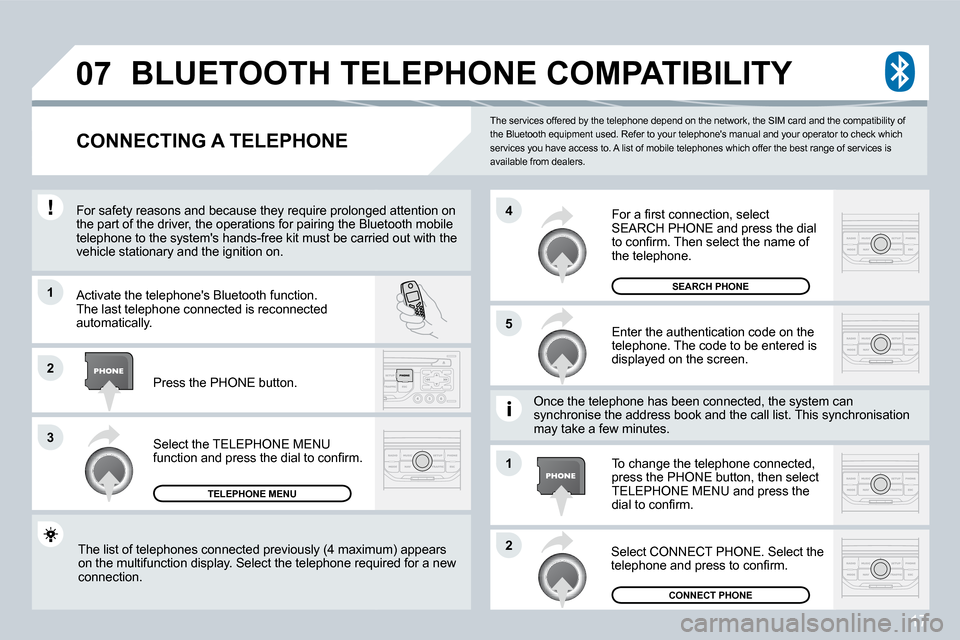
Activate the telephone's Bluetooth function.
The last telephone connected is reconnected
automatically.
Select the TELEPHONE MENU
function and press the dial to conirm.
TELEPHONE MENU
Enter the authentication code on the
telephone. The code to be entered is
displayed on the screen.
To change the telephone connected,
press the PHONE button, then select
TELEPHONE MENU and press the
dial to conirm.
Once the telephone has been connected, the system c
an
synchronise the address book and the call list. Thi s synchronisation
may take a few minutes.
Select CONNECT PHONE. Select the
telephone and press to conirm.
The list of telephones connected previously (4 maxi
mum) appears
on the multifunction display. Select the telephone required for a new
connection. Press the PHONE button.
For a irst connection, select
SEARCH PHONE and press the dial
to conirm. Then select the name of
the telephone.
SEARCH PHONE
CONNECT PHONE