change time Citroen C4 2011 2.G User Guide
[x] Cancel search | Manufacturer: CITROEN, Model Year: 2011, Model line: C4, Model: Citroen C4 2011 2.GPages: 324, PDF Size: 10.11 MB
Page 158 of 324

9
DRIVING
156
Manual operation
)
Select position M
for sequential
changing of the six gears.
)
Push the lever towards the +
sign to
change up a gear.
)
Pull the lever towards the -
sign to
change down a gear.
It is only possible to change from one
gear to another if the vehicle speed and
engine speed permit; otherwise, the
gearbox will operate temporarily in au-
tomatic mode.
D
disappears and the gears
engaged appear in succes-
sion in the instrument panel.
If the engine speed is too low
or too high, the gear selected
fl ashes for a few seconds, then the ac-
tual gear engaged is displayed.
It is possible to change from position D
(automatic) to position M
(manual) at
any time.
When the vehicle is stationary or moving
very slowly, the gearbox selects gear M1
automatically.
The sport and snow programmes do
not operate in manual mode.
Invalid value during manual
operation
This symbol is displayed if a
gear is not engaged correctly
(selector between two posi-
tions).
Stopping the vehicle
Before switching off the engine, you
can engage position P
or N
to place the
gearbox in neutral.
In both cases, apply the parking brake
to immobilise the vehicle, unless it is
programmed to automatic mode.
If the lever is not in position P
,
when the driver's door is opened
or approximately 45 seconds af-
ter the ignition is switched off,
there is an audible signal and a
message appears.
)
Return the lever to position P
;
the audible signal stops and
the message disappears.
You risk damaging the gearbox:
- if you press the accelerator
and brake pedals at the same
time,
- if you force the lever from po-
sition P
to another position
when the battery is fl at. When the ignition is on, the
lighting of this warning lamp,
accompanied by an audible
signal and a message in the multifunction
screen, indicates a gearbox malfunction.
In this case, the gearbox switches to
back-up mode and is locked in 3rd gear.
You may feel a substantial knock when
changing from P
to R
and from N
to R
.
This will not cause any damage to the
gearbox.
Do not exceed 60 mph (100 km/h), local
speed restrictions permitting.
Have it checked by a CITROËN dealer
or a qualifi ed workshop.
This warning lamp may also come on if
a door is opened.
Operating fault
To reduce fuel consumption
when stationary for long periods
with the engine running (traffi c
jam...), position the gear lever at
N
and apply the parking brake,
unless it is programmed in auto-
matic mode.
Page 183 of 324
10
CHECKS
181
CHECKS
Unless otherwise indicated, check
these components in accordance with
the Maintenance and Warranty Guide
and according to your engine.
Otherwise, have them checked by a
CITROËN dealer or a qualifi ed workshop.
Battery
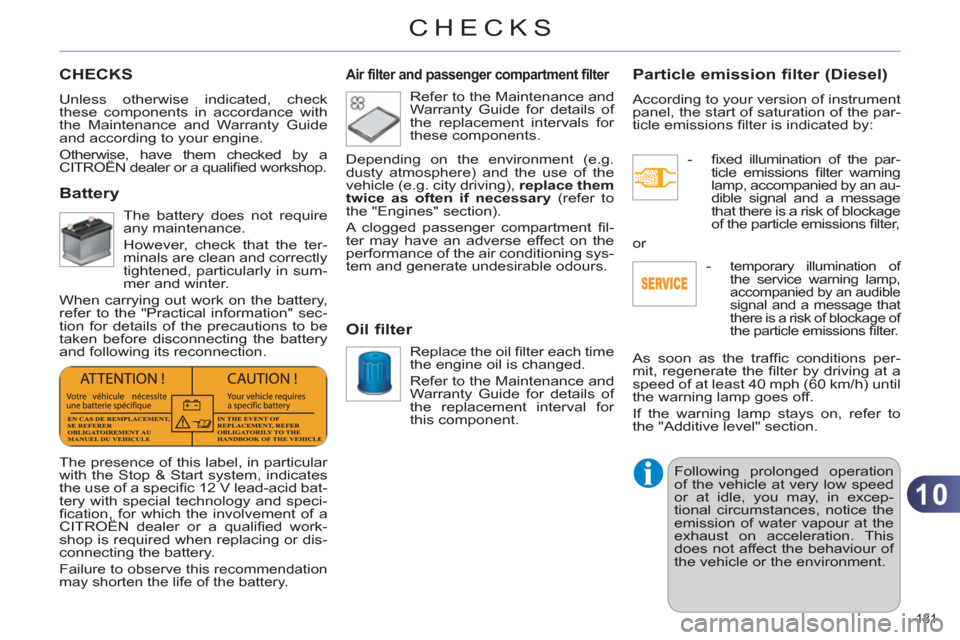
The battery does not require
any maintenance.
However, check that the ter-
minals are clean and correctly
tightened, particularly in sum-
mer and winter.
When carrying out work on the battery,
refer to the "Practical information" sec-
tion for details of the precautions to be
taken before disconnecting the battery
and following its reconnection.
Air filter and passenger compartment filter
Refer to the Maintenance and
Warranty Guide for details of
the replacement intervals for
these components.
Oil filter
Replace the oil fi lter each time
the engine oil is changed.
Refer to the Maintenance and
Warranty Guide for details of
the replacement interval for
this component.
Particle emission filter (Diesel)
According to your version of instrument
panel, the start of saturation of the par-
ticle emissions fi lter is indicated by:
- fi xed illumination of the par-
ticle emissions fi lter warning
lamp, accompanied by an au-
dible signal and a message
that there is a risk of blockage
of the particle emissions fi lter,
The presence of this label, in particular
with the Stop & Start system, indicates
the use of a specifi c 12 V lead-acid bat-
tery with special technology and speci-
fi cation, for which the involvement of a
CITROËN dealer or a qualifi ed work-
shop is required when replacing or dis-
connecting the battery.
Failure to observe this recommendation
may shorten the life of the battery.
Depending on the environment (e.g.
dusty atmosphere) and the use of the
vehicle (e.g. city driving), replace them
twice as often if necessary
(refer to
the "Engines" section).
A clogged passenger compartment fi l-
ter may have an adverse effect on the
performance of the air conditioning sys-
tem and generate undesirable odours.
As soon as the traffi c conditions per-
mit, regenerate the fi lter by driving at a
speed of at least 40 mph (60 km/h) until
the warning lamp goes off.
If the warning lamp stays on, refer to
the "Additive level" section.
Following prolonged operation
of the vehicle at very low speed
or at idle, you may, in excep-
tional circumstances, notice the
emission of water vapour at the
exhaust on acceleration. This
does not affect the behaviour of
the vehicle or the environment. or
-
temporary illumination of
the service warning lamp,
accompanied by an audible signal and a message that
there is a risk of blockage of
the particle emissions fi lter.
Page 196 of 324
11
PRACTICAL INFORMATION
194
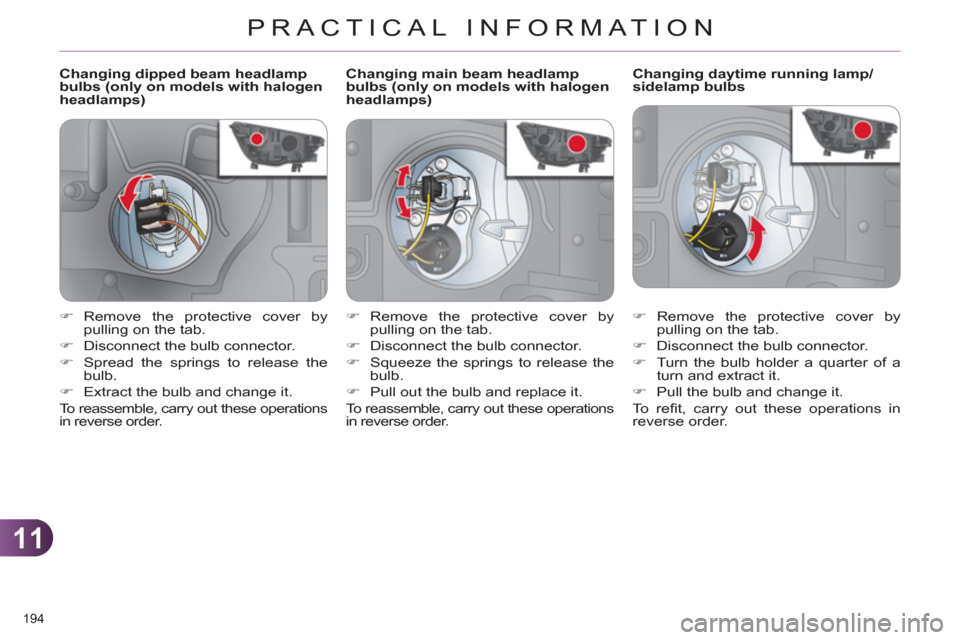
Changing dipped beam headlamp
bulbs (only on models with halogen
headlamps)
Changing daytime running lamp/
sidelamp bulbs
)
Remove the protective cover by
pulling on the tab.
)
Disconnect the bulb connector.
)
Turn the bulb holder a quarter of a
turn and extract it.
)
Pull the bulb and change it.
To r efi t, carry out these operations in
reverse order.
)
Remove the protective cover by
pulling on the tab.
)
Disconnect the bulb connector.
)
Spread the springs to release the
bulb.
)
Extract the bulb and change it.
To reassemble, carry out these operations
in reverse order.
Changing main beam headlamp
bulbs (only on models with halogen
headlamps)
)
Remove the protective cover by
pulling on the tab.
)
Disconnect the bulb connector.
)
Squeeze the springs to release the
bulb.
)
Pull out the bulb and replace it.
To reassemble, carry out these operations
in reverse order.
Page 264 of 324
262
08
1
2
3
MUSIC MEDIA PLAYERS
CD, MP3 CD, USB PLAYER
Insert the CD in the player, insert the USB memorystick in the USB player or connect the USBperipheral to the USB port using a suitable cable (not supplied).
The s
ystem builds playlists (in temporary memory),
an operation which can take from a few seconds to several minutes.
R
educe the number of non-music fi les and the number of folders to reduce the waiting time.
The playlists are updated every time the ignition isswitched off or connection of a USB memory stick.
Pla
y starts automatically after a period which
depends on the capacity of the USB memory stick.
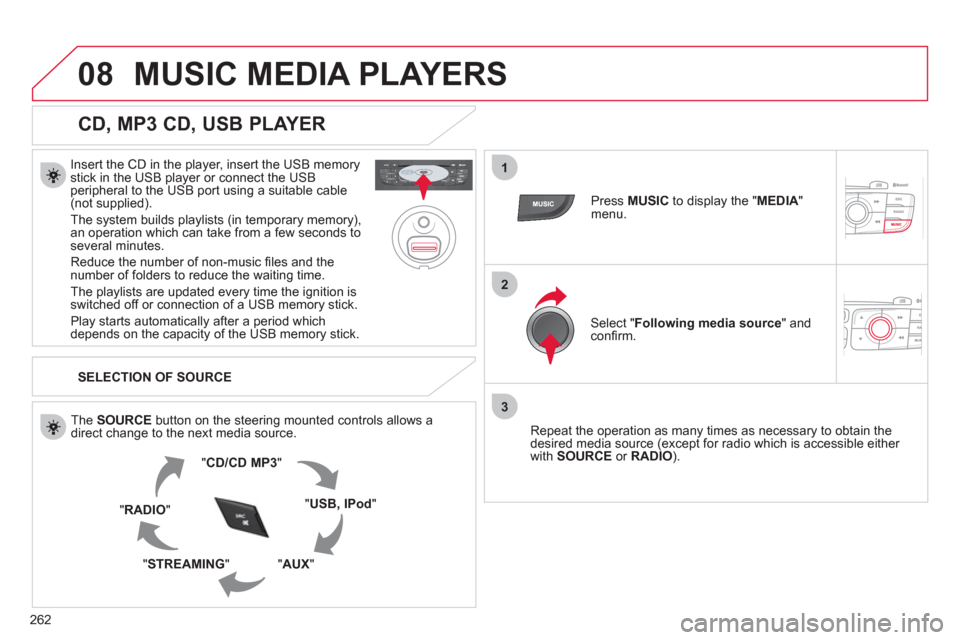
SELECTION OF SOURCE
Th
e SOURCE button on the steering mounted controls allows a
direct change to the next media source.
" CD/CD MP
3
"
"
USB, IPod"
"AUX " "STREAMING "
"RADIO "
Press MUSICto display the "MEDIA"menu.
Select "Following media source
" and confi rm.
Repeat the operation as man
y times as necessary to obtain the
desired media source (except for radio which is accessible either
with SOURCE
or RADIO).
Page 269 of 324
267
10
1
2
3a
3b
1
2
3
4
CONFIGURATION
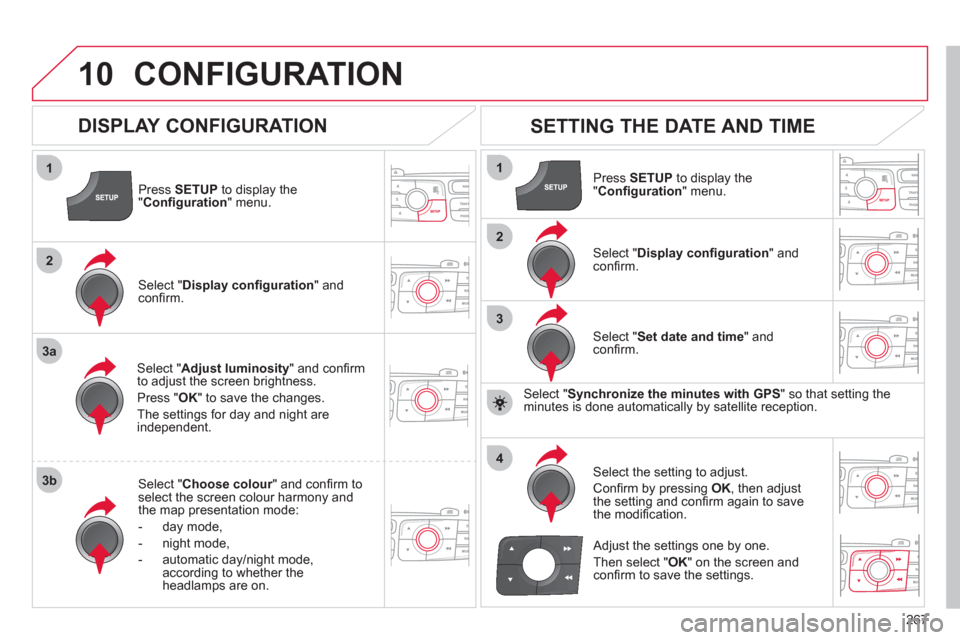
Press SETUP
to display the"Confi guration " menu.
Select " Adjust luminosity" and confi rm
to adjust the screen brightness.
Pr
ess "OK" to save the changes.
The settin
gs for day and night areindependent.
Select " Choose colour" and confi rm torselect the screen colour harmony and
the map presentation mode:
-
day mode,
- n
ight mode,
- automatic day
/night mode,
according to whether the headlamps are on.
SETTING THE DATE AND TIME
Select "Set date and time
" and confi rm.
Select the settin
g to adjust.
Confi rm by pressing OK, then adjust
the setting and confi rm again to save
the modifi cation.
Select " Display confi guration" andconfi rm.
Press SETUPto display the
" Confi guration" menu.
Select "Display confi guration
" andconfi rm.
Adjust the settings one by one.
Th
en select " OK
" on the screen and confi rm to save the settings.
DISPLAY CONFIGURATION
Select " Synchronize the minutes with GPS" so that setting theminutes is done automatically by satellite reception.
Page 283 of 324
281
1
2
1
04AUDIO
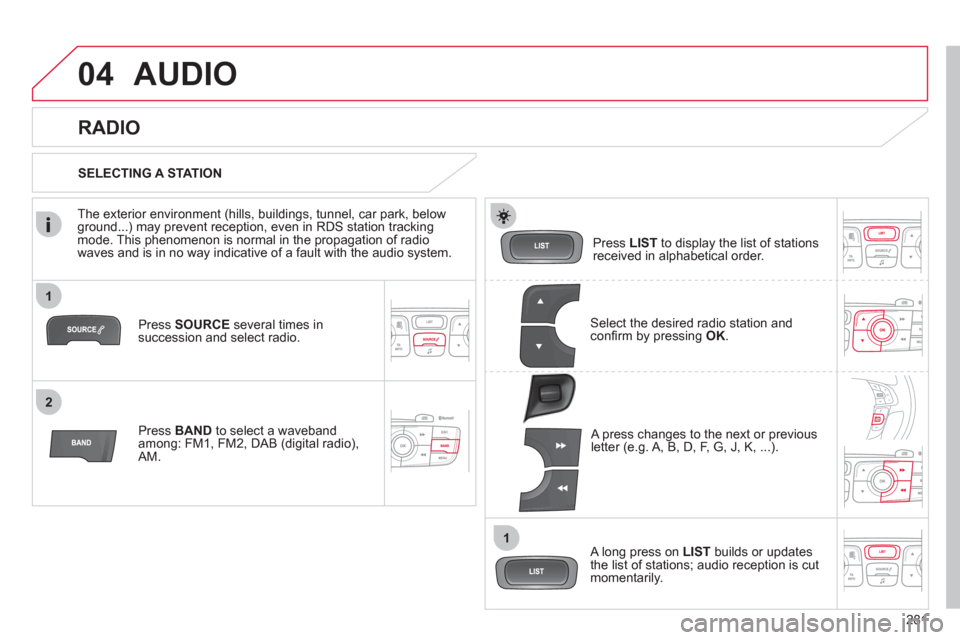
Press SOURCEseveral times in succession and select radio.
Pr
ess BAND to select a waveband among: FM1, FM2, DAB (digital radio), AM.
Press LISTto display the list of stationsreceived in alphabetical order.
A press changes to the next or previous letter (e.g. A, B, D, F, G, J, K, ...).
RADIO
Select the desired radio station andconfi rm by pressing OK.
SELECTING A STATION
A lon
g press on LIST
builds or updates
the list of stations; audio reception is cut
momentarily.
The exterior environment
(hills, buildings, tunnel, car park, belowground...) may prevent reception, even in RDS station tracking mode. This phenomenon is normal in the propagation of radio
waves and is in no way indicative of a fault with the audio system.
Page 304 of 324
302
5
63
4
07
2
1
CONFIGURATION
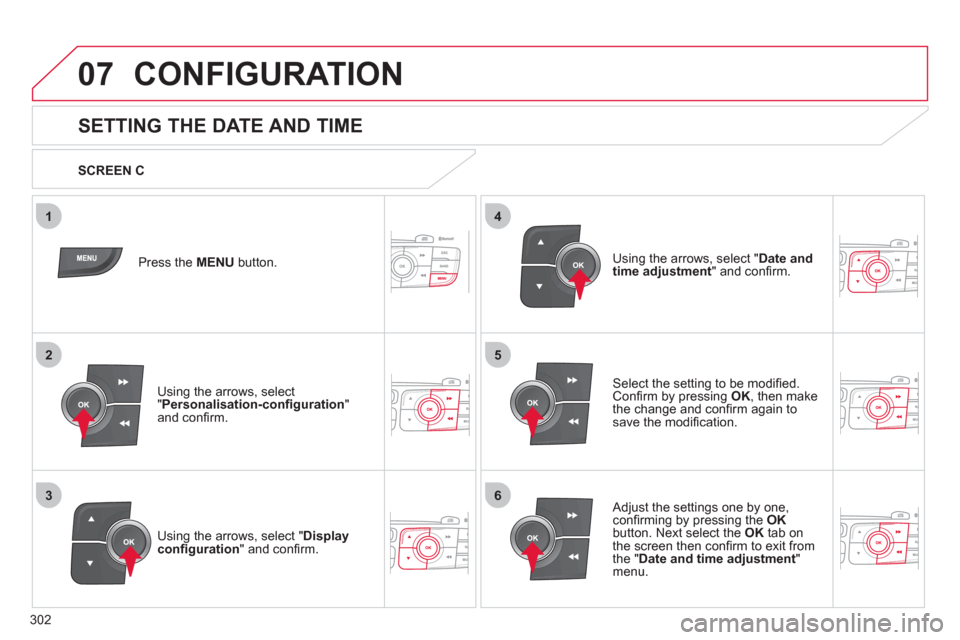
SETTING THE DATE AND TIME
Select the setting to be modifi ed.Confi rm by pressing OK
, then make
the change and confi rm again to save the modifi cation.
Using the arrows, select "Displayconfi guration
" and confi rm.
Press the MENU button.
Usin
g the arrows, select "Personalisation-confi guration"and confi rm.
SCREEN C
Using the arrows, select "
Date and
time adjustment" and confi rm.
Ad
just the settings one by one,confi rming by pressing the OKbutton. Next select the OKtab on
the screen then confi rm to exit from
the " Date and time adjustment"menu.
Page 305 of 324
303
08TRIP COMPUTER
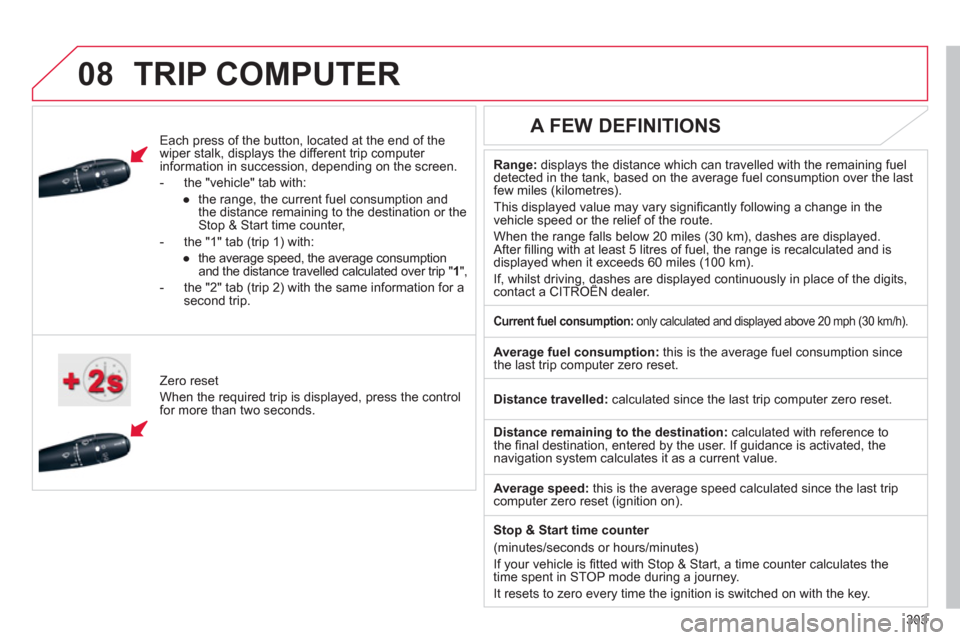
Each press of the button, located at the end of the
wiper stalk, displays the different trip computer
information in succession, depending on the screen.
- th
e "vehicle
" tab with:
●
the ran
ge, the current fuel consumption and
the distance remaining to the destination or the Stop & Start time counter,
- the "1" tab
(trip 1) with:
●
the avera
ge speed, the average consumptionand the distance travelled calculated over trip " 1
",
- the "2" tab
(trip 2) with the same information for a
second trip.
Z
ero reset
When the required trip is displa
yed, press the control
for more than two seconds.
Range:displays the distance which can travelled with the remaining fuel
detected in the tank, based on the average fuel consumption over the last few miles (kilometres).
This displa
yed value may vary signifi cantly following a change in the
vehicle speed or the relief of the route.
When the ran
ge falls below 20 miles (30 km), dashes are displayed.After fi lling with at least 5 litres of fuel, the range is recalculated and is
displayed when it exceeds 60 miles (100 km).
If, whilst driving, dashes are displayed continuously in place of the digits, contact a CITROËN dealer. ,g,
A FEW DEFINITIONS
Current fuel consumption:
only calculated and displayed above 20 mph (30 km/h).
Average fuel consumption:
this is the average fuel consumption since
the last trip computer zero reset.
Distance travelled:calculated since the last trip computer zero reset.
Distance remaining to the destination: calculated with reference to
the fi nal destination, entered by the user. If guidance is activated, the navigation system calculates it as a current value.
Avera
ge speed: this is the average speed calculated since the last tripcomputer zero reset (ignition on).
Sto
p & Start time counter
(minutes/seconds or hours/minutes)
I
f your vehicle is fi tted with Stop & Start, a time counter calculates the
time spent in STOP mode during a journey.
It resets to zero ever
y time the ignition is switched on with the key.