battery Citroen C4 2012 2.G Owner's Guide
[x] Cancel search | Manufacturer: CITROEN, Model Year: 2012, Model line: C4, Model: Citroen C4 2012 2.GPages: 352, PDF Size: 9.82 MB
Page 204 of 352
XI
202
PRACTICAL INFORMATION
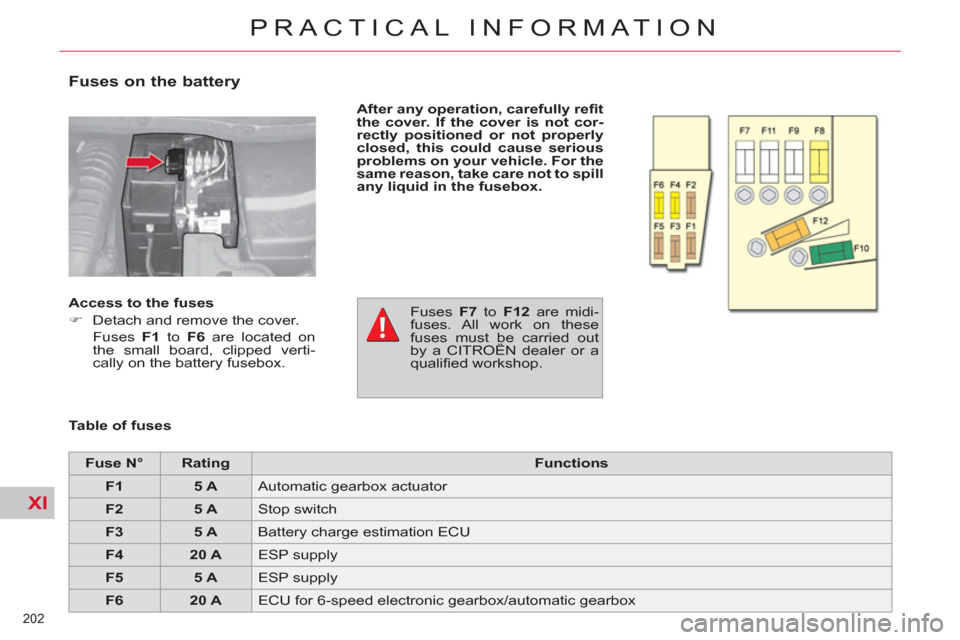
Fuses on the battery
After any operation, carefully refi t
the cover. If the cover is not cor-
rectly positioned or not properly
closed, this could cause serious
problems on your vehicle. For the
same reason, take care not to spill
any liquid in the fusebox.
Table of fuses
Access to the fuses
)
Detach and remove the cover.
Fuses F1
to F6
are located on
the small board, clipped verti-
cally on the battery fusebox.
Fuses F7
to F12
are midi-
fuses. All work on these
fuses must be carried out
by a CITROËN dealer or a
qualifi ed workshop.
Fuse N°
Rating
Functions
F1
5 A
Automatic gearbox actuator
F2
5 A
Stop switch
F3
5 A
Battery charge estimation ECU
F4
20 A
ESP supply
F5
5 A
ESP supply
F6
20 A
ECU for 6-speed electronic gearbox/automatic gearbox
Page 205 of 352

XI
203
PRACTICAL INFORMATION
12 V BATTERY
Procedure for starting the engine
using another battery or for charging
your fl at battery.
The Stop & Start battery does not
have to be disconnected for charging.
The presence of this label, in
particular with the Stop & Start
system, indicates the use of
a 12 V lead-acid battery with
special technology and specifi cation;
the involvement of a CITROËN deal-
er or a qualifi ed workshop is essential
when replacing or disconnecting the
battery.
After refi tting the battery, the Stop &
Start system will only be active after
a continuous period of immobilisa-
tion of the vehicle, a period which
depends on the climatic conditions
and the state of charge of the bat-
tery (up to about 8 hours).
*
or position P
for an automatic gearbox.
Access to the battery
Before doing any work
Immobilise the vehicle: ap-
ply the parking brake, put
the gearbox in neutral * , then switch
off the ignition.
Check that all electrical equipment
is switched off.
Check that the battery posts and
terminals are clean. If they are cov-
ered with sulphate (white or green
deposit), disconnect them and
clean them.
Batteries contain harmful
substances such as sul-
phuric acid and lead. They
must be disposed of in accordance
with regulations and must not, in
any circumstances, be discarded
with household waste.
Take used cell batteries and vehi-
cle batteries to an authorised col-
lection point.
The battery is located under the
bonnet.
For access to the (+) terminal:
)
Release the bonnet using the
interior lever, then the exterior
safety catch,
)
raise the bonnet and secure it
with its stay,
)
lift the plastic cover for access to
the (+) terminal.
Page 206 of 352
XI
204
PRACTICAL INFORMATION
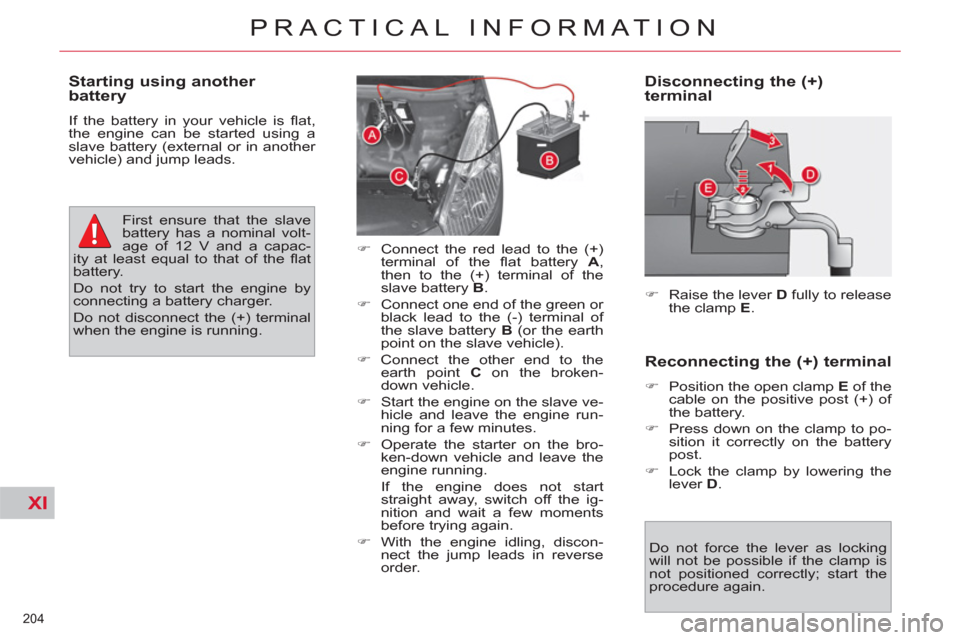
Disconnecting the (+)
terminal
)
Raise the lever D
fully to release
the clamp E
.
Do not force the lever as locking
will not be possible if the clamp is
not positioned correctly; start the
procedure again.
Reconnecting the (+) terminal
)
Position the open clamp E
of the
cable on the positive post (+) of
the battery.
)
Press down on the clamp to po-
sition it correctly on the battery
post.
)
Lock the clamp by lowering the
lever D
.
Starting using another
battery
If the battery in your vehicle is fl at,
the engine can be started using a
slave battery (external or in another
vehicle) and jump leads.
First ensure that the slave
battery has a nominal volt-
age of 12 V and a capac-
ity at least equal to that of the fl at
battery.
Do not try to start the engine by
connecting a battery charger.
Do not disconnect the (+) terminal
when the engine is running.
)
Connect the red lead to the (+)
terminal of the fl at battery A
,
then to the (+) terminal of the
slave battery B
.
)
Connect one end of the green or
black lead to the (-) terminal of
the slave battery B
(or the earth
point on the slave vehicle).
)
Connect the other end to the
earth point C
on the broken-
down vehicle.
)
Start the engine on the slave ve-
hicle and leave the engine run-
ning for a few minutes.
)
Operate the starter on the bro-
ken-down vehicle and leave the
engine running.
If the engine does not start
straight away, switch off the ig-
nition and wait a few moments
before trying again.
)
With the engine idling, discon-
nect the jump leads in reverse
order.
Page 207 of 352
XI
205
PRACTICAL INFORMATION
Before disconnecting
)
Go to the battery.
)
Check that all of the openings -
doors, boot... - are closed but not
locked.
)
Wait at least four minutes after
switching off the ignition.
Charging
)
Disconnect the (+) terminal.
)
Follow the instructions on use
provided by the manufacturer of
the charger.
)
Connect the red cable of the
charger to the (+) post of the bat-
tery, then the black cable to the
(-) terminal.
)
Once charging is complete, dis-
connect the charger cables in re-
verse order.
The charging operation
must be carried out in a
well ventilated area and
well away from naked fl ames and
sources of sparks, so as to avoid
any risk of explosion and fi re.
Do not try to charge a frozen bat-
tery; the battery must fi rst be
thawed out to avoid any risk of ex-
plosion. If the battery has frozen,
before charging, have it checked
by a CITROËN dealer or a quali-
fi ed workshop, who will ensure that
the internal components have not
been damaged and that the casing
is not cracked, which would intro-
duce the risk of a leak of toxic and
corrosive acid.
Charging the battery using
a battery charger
If the battery of your vehicle is fl at
or prior to taking the vehicle out of
service for an extended period, you
can charge the battery using a bat-
tery charger.
For information on the specifi cation
of battery chargers compatible with
your battery, refer to a CITROËN
dealer or a qualifi ed workshop.
It is recommended that the battery
be disconnected if the vehicle is not
be used for more than a month.
Reinitialisation after
reconnection
After any reconnection of the bat-
tery, switch on the ignition and wait
at least one minute before starting,
to allow time for the initialisation of
the electronic systems.
By referring to the corresponding
sections, you should set or initialise
the following systems yourself:
- the date and time,
- the anti-pinch on the driver's
electric window and the sunroof.
- the panoramic sunroof blind,
- the multifunction screen set-
tings,
- the audio system or navigation
system settings,
Check that there no error message
or warning lamp comes on after
switching on the ignition.
However, if minor problems persist
after carrying out these operations,
contact a CITROËN dealer or a
qualifi ed workshop.
Page 208 of 352
XI
206
PRACTICAL INFORMATION
ENERGY ECONOMY MODE
System which manages the duration
of use of certain functions to conserve
a suffi cient level of charge in the
battery.
After the engine has stopped, you can
still use functions such as the audio
and telematics system, windscreen
wipers, dipped beam headlamps,
courtesy lamps, etc. for a maximum
combined duration of thirty minutes.
Switching to economy mode
Once this period has elapsed, a
message appears on the multi-func-
tion screen indicating that the vehi-
cle has switched to economy mode
and the active functions are put on
standby.
If a telephone call is being made at
this time:
- it will be maintained for 10 minu-
tes with your Audio system or
MyWay hands-free system
- it will be maintained for 10 minu-
tes with the NaviDrive, then it will
transfer to your telephone de-
pending on its model.
Exiting economy mode
These functions are reactivated au-
tomatically next time the vehicle is
started.
To resume the use of these functions
immediately, start the engine and let
it run for at least 5 minutes.
A fl at battery prevents the
engine from starting (refer
to the corresponding para-
graph).
This period may be reduced con-
siderably if the battery is not fully
charged.
Page 230 of 352
228
CITROËN LOCALISED EMERGENCY CALL
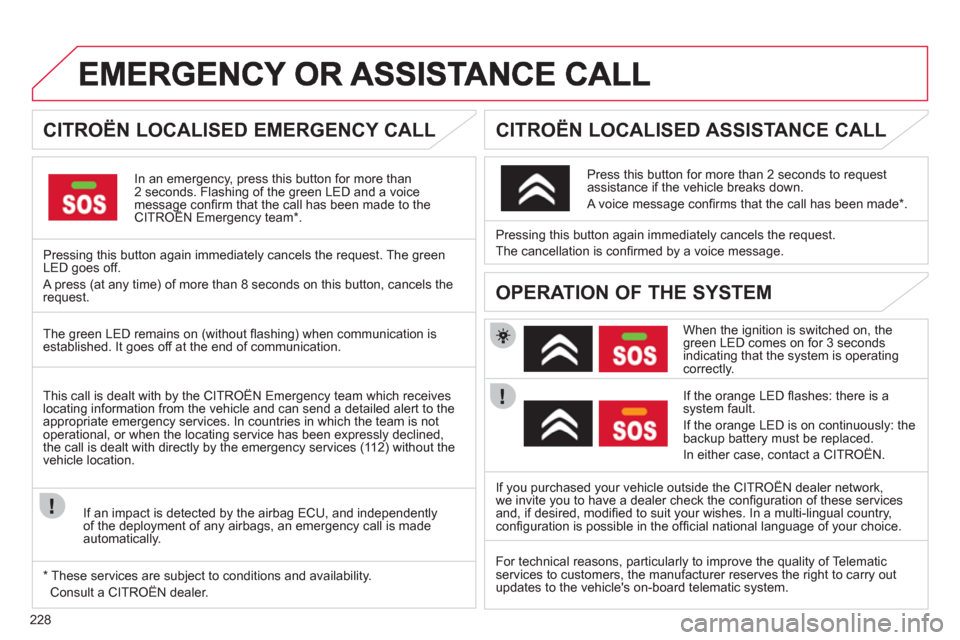
In an emergency, press this button for more than2 seconds. Flashing of the green LED and a voice message confi rm that the call has been made to the CITROËN Emergency team * .gg
Pressing this button again immediately cancels the request. The green LED goes off.
A press
(at any time) of more than 8 seconds on this button, cancels the
request.
CITROËN LOCALISED ASSISTANCE CALL
When the ignition is switched on, thegreen LED comes on for 3 seconds indicating that the system is operating correctly.
I
f the orange LED fl ashes: there is asystem fault.
If the oran
ge LED is on continuously: the
backup battery must be replaced.
In either case, contact a CITRO
ÀN. Pressin
g this button again immediately cancels the request.
The cancellation is con
fi rmed by a voice message.
Press this button
for more than 2 seconds to requestassistance if the vehicle breaks down.
A voice message confi rms that the call has been made * .
OPERATION OF THE SYSTEM
The green LED remains on (without fl ashing) when communication is established. It goes off at the end of communication.
If
you purchased your vehicle outside the CITROËN dealer network,
we invite you to have a dealer check the confi guration of these servicesand, if desired, modifi ed to suit your wishes. In a multi-lingual country, confi guration is possible in the offi cial national language of your choice. This call is dealt with b
y the CITROÀN Emergency team which receiveslocating information from the vehicle and can send a detailed alert to theappropriate emergency services. In countries in which the team is not
operational, or when the locating service has been expressly declined,
the call is dealt with directly by the emergency services (11 2) without the
vehicle location.
I
f an impact is detected by the airbag ECU, and independentlyof the deployment of any airbags, an emergency call is made
automatically.
*
These services are subject to conditions and availability.
Consult a CITRO
ÀN dealer. For technical reasons, particularl
y to improve the quality of Telematic
services to customers, the manufacturer reserves the right to carry out updates to the vehicle's on-board telematic system.
Page 233 of 352
231
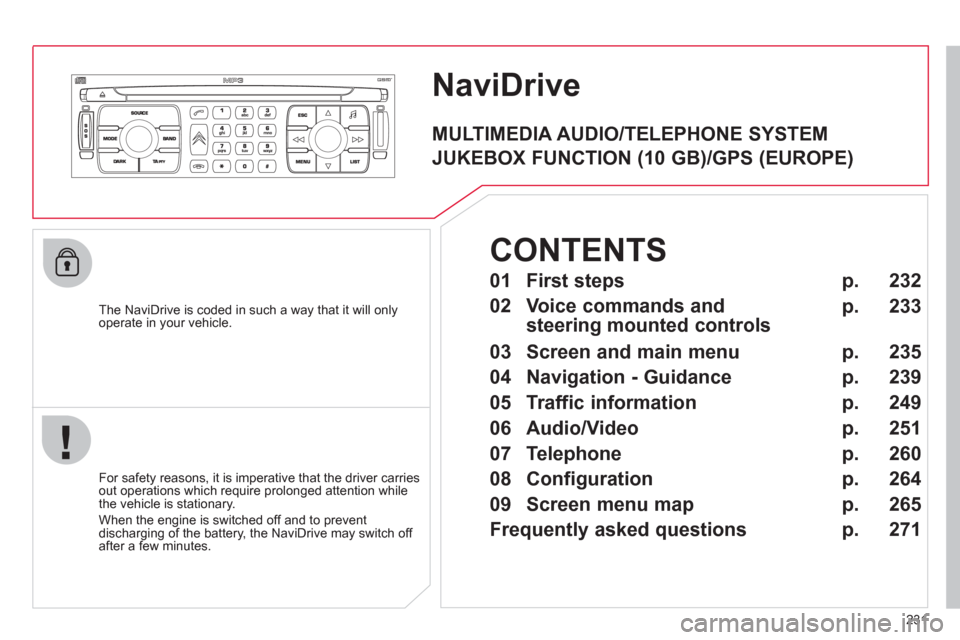
NaviDrive
The NaviDrive is coded in such a way that it will onlyoperate in your vehicle.
For safet
y reasons, it is imperative that the driver carries
out operations which require prolonged attention while
the vehicle is stationary.
When the en
gine is switched off and to prevent
discharging of the battery, the NaviDrive may switch off after a few minutes.
MULTIMEDIA AUDIO/TELEPHONE SYSTEM
JUKEBOX FUNCTION (10 GB)/GPS (EUROPE)
01 First steps
02 Voice commands and
steering mounted controls
03 Screen and main menu
04 Navigation - Guidance
05 Traffic information
06 Audio/Video
07 Telephone
08 Configuration
09 Screen menu map
Frequently asked questions p.
p.
p.
p.
p.
p.
p.
p.
p.
p.
232
233
235
239
249
251
260
264
265
271
CONTENTS
Page 266 of 352
264
08
1
2
3
4
5
6
7
8
CONFIGURATION
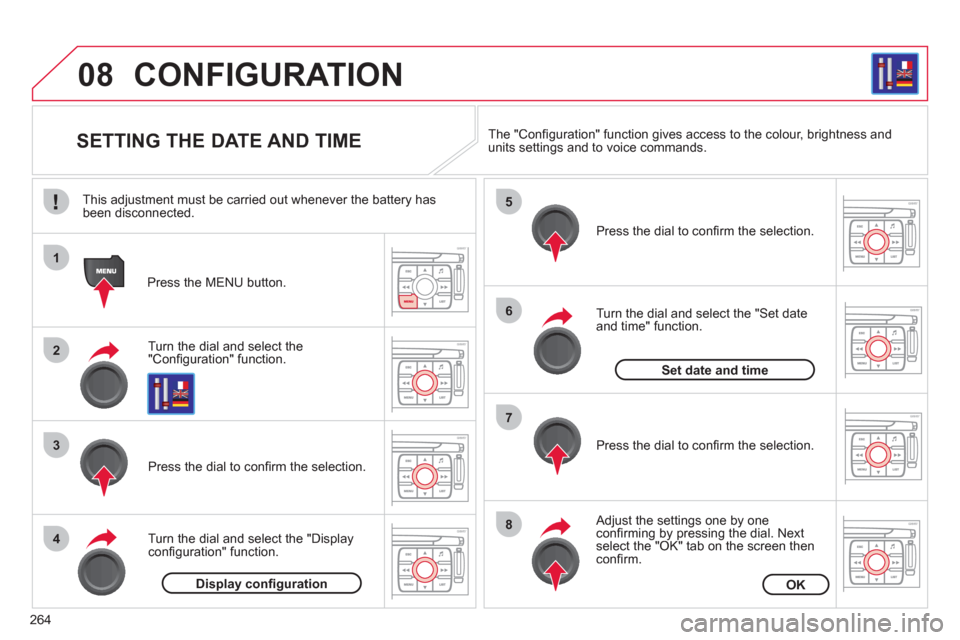
SETTING THE DATE AND TIME
Turn the dial and select the"Confi guration" function.
Press the MENU button.
Pr
ess the dial to confi rm the selection.
Turn the dial and select the "Displa
yconfi guration" function.
Pr
ess the dial to confi rm the selection.
Turn the dial and select the "
Set dateand time" function.
Adjust the settings one by oneconfi rming by pressing the dial. Next select the "OK" tab on the screen then confi rm.
Pr
ess the dial to confi rm the selection. The "
Confi guration" function gives access to the colour, brightness and units settings and to voice commands.
Display confi gurationOK
Set date and time
This adjustment must be carried out whenever the battery has been disconnected.
Page 274 of 352
272
QUESTIONANSWERSOLUTION
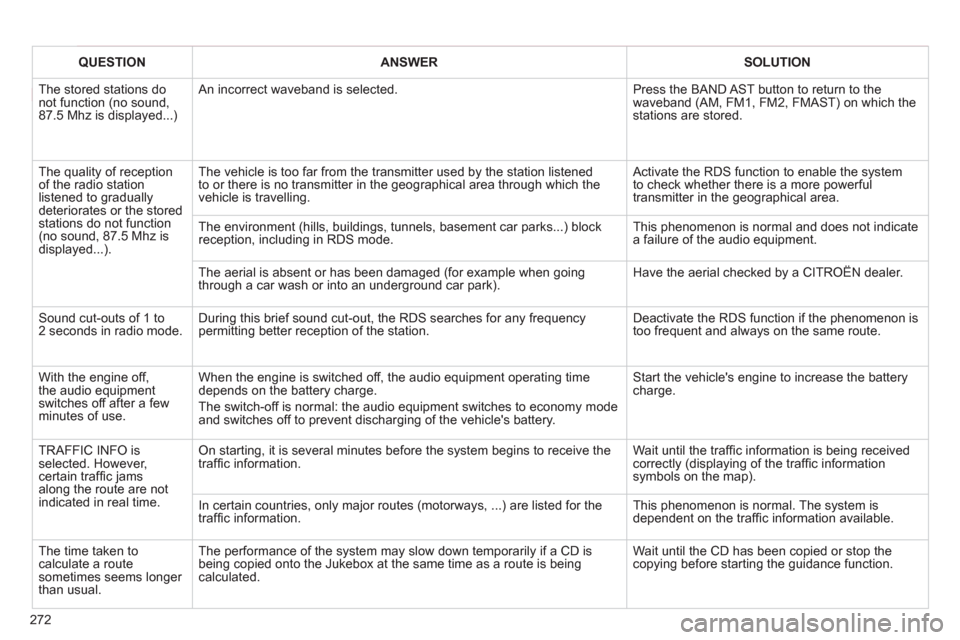
The stored stations donot function (no sound, 87.5 Mhz is displayed...)
An incorrect waveband is selected. Press the BAND AST button to return to the waveband (AM, FM1, FM2, FMAST) on which thestations are stored.
The quality of receptionof the radio station listened to graduallydeteriorates or the stored stations do not function(no sound, 87.5 Mhz is displayed...).
The vehicle is too far from the transmitter used by the station listenedto or there is no transmitter in the geographical area through which the vehicle is travelling.
Activate the RDS function to enable the system to check whether there is a more powerful transmitter in the geographical area.
The environment (hills, buildings, tunnels, basement car parks...) block reception, including in RDS mode.
This phenomenon is normal and does not indicate a failure of the audio equipment.
The aerial is absent or has been damaged (for example when goingthrough a car wash or into an underground car park).
Have the aerial checked by a CITROËN dealer.
Sound cut-outs of 1 to2 seconds in radio mode.During this brief sound cut-out, the RDS searches for any frequency permitting better reception of the station.
Deactivate the RDS function if the phenomenon is too frequent and always on the same route.
With the engine off, the audio equipment switches off after a few minutes of use.
When the engine is switched off, the audio equipment operating timedepends on the battery charge.
The switch-off is normal: the audio equipment switches to economy mode and switches off to prevent discharging of the vehicle's battery.
Start the vehicle's engine to increase the batterycharge.
TRAFFIC INFO is selected. However,certain traffi c jams along the route are notindicated in real time.
On starting, it is several minutes before the system begins to receive thetraffi c information.
Wait until the traffi c information is being received correctly (displaying of the traffi c information symbols on the map).
In certain countries, only major routes (motorways, ...) are listed for thetraffi c information.
This phenomenon is normal. The system isdependent on the traffi c information available.
The time taken to calculate a route sometimes seems longer than usual.
The performance of the system may slow down temporarily if a CD isbeing copied onto the Jukebox at the same time as a route is being calculated.
Wait until the CD has been copied or stop the copying before starting the guidance function.
Page 277 of 352
275
The MyWay is protected in such a way that it will onlyoperate in your vehicle.
Certain functions described in this handbook will
become available during the year.
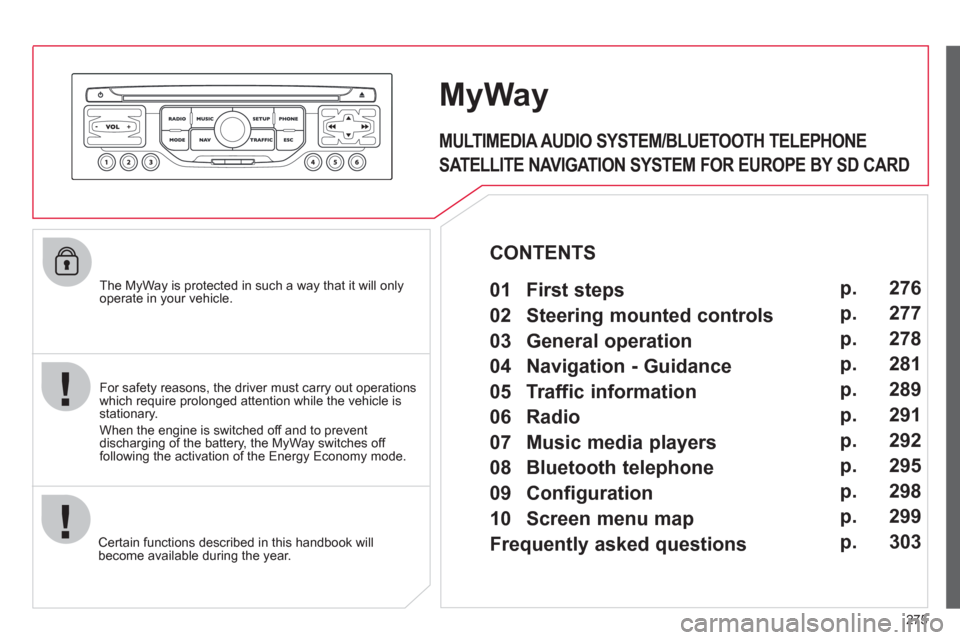
MyWay
For safety reasons, the driver must carry out operations which require prolonged attention while the vehicle is stationary.
When the en
gine is switched off and to prevent
discharging of the battery, the MyWay switches off
following the activation of the Energy Economy mode.
MULTIMEDIA AUDIO SYSTEM/BLUETOOTH TELEPHONE
SATELLITE NAVIGATION SYSTEM FOR EUROPE BY SD CARD
01 First steps
CONTENTS
02 Steering mounted controls
03 General operation
04 Navigation - Guidance
05 Traffic information
06 Radio
07 Music media players
08 Bluetooth telephone
09 Configuration
10 Screen menu map p.
p.
p.
p.
p.
p.
p.
p.
p.
p.
Frequently asked questions p. 276
277
278
281
289
291
292
295
298
299
303