ECO mode Citroen C4 2012 2.G Owner's Guide
[x] Cancel search | Manufacturer: CITROEN, Model Year: 2012, Model line: C4, Model: Citroen C4 2012 2.GPages: 352, PDF Size: 9.82 MB
Page 219 of 352

XII
217
TECHNICAL DATA
WEIGHTS AND TOWED LOADS (in kg)
Diesel engines
HDi 110
Gearboxes
Manual
Electronic gearbox system
Model codes:
UA... UE... UD...
9HZ-C
9HZ-H/P
- Unladen weight
1 530 - 1 484 - 1 489
1 539 - 1 494 - 1 499
- Kerb weight
1 605 - 1 559 - 1 564
1 614 - 1 569 - 1 574
- Payload
720 - 546 - 561
711 - 536 - 561
- Gross vehicle weight (GVW)
2 250 - 2 030 - 2 050
2 250 - 2 030 - 2 060
- Gross train weight (GTW)
on a 12 % gradient
3 130
3 130
-
Braked trailer (within GTW limit)
on a 10 % or 12 % gradient
880 - 1 100 - 1 080
880 - 1 100 - 1 070
- Braked trailer * (with load
transfer within GTW limit)
1 180 - 1 300 - 1 300
1 180 - 1 300 - 1 300
- Unbraked trailer
750
750
- Recommended nose weight
50 - 60 - 60
50 - 60 - 60
The GTW and towed load values indicated apply up to a maximum altitude of 1,000 metres; the towed load mentioned
must be reduced by 10 % for each additional 1,000 metres of altitude.
The speed of a towing vehicle must not exceed 100 km/h (approx. 60 mph) (comply with the legislation in force in your
country).
High ambient temperatures may result in a reduction in the performance of the vehicle in order to protect the engine; when
the ambient temperature is higher than 37 °C, limit the weight towed.
*
The weight of the braked trailer can be increased, within the GTW limit, on condition that the GVW of the towing vehicle is reduced
by the same amount; warning, towing with a lightly loaded towing vehicle may have an adverse effect on its road holding.
Page 220 of 352

XII
218
TECHNICAL DATA
The GTW and towed load values indicated apply up to a maximum altitude of 1,000 metres; the towed load mentioned
must be reduced by 10 % for each additional 1,000 metres of altitude.
The speed of a towing vehicle must not exceed 100 km/h (approx. 60 mph) (comply with the legislation in force in your
country).
High ambient temperatures may result in a reduction in the performance of the vehicle in order to protect the engine; when
the ambient temperature is higher than 37 °C, limit the weight towed.
WEIGHTS AND TOWED LOADS (in kg)
Diesel
engines
HDi 110
Gearboxes
Manual
Electronic gearbox system
Electronic gearbox system
Model codes:
UA... UE... UD...
9HR-8
9HR-8/P
9HR-8/PS
- Unladen weight
1 490 - 1 430 - 1 430
1 510 - 1 470 - 1 420
1 520 - 1 480 - 1 430
- Kerb weight
1 565 - 1 505 - 1 505
1 585 - 1 545 - 1 495
1 595 - 1 555 - 1 505
- Payload
760 - 670 - 620
740 - 630 - 640
730 - 620 - 630
- Gross vehicle weight (GVW)
2 250 - 2 100 - 2 050
2 250 - 2 100 - 2 060
2 250 - 2 100 - 2 060
- Gross train weight (GTW)
on a 12 % gradient
3 130
3 130
3 130
-
Braked trailer (within GTW limit)
on a 10 % or 12 % gradient
880 - 1 030 - 1 080
880 - 1 030 - 1 070
750 - 900 - 940
- Braked trailer * (with load
transfer within GTW limit)
1 180 - 1 330 - 1 380
1 180 - 1 330 - 1 370
1 050 - 1 200 - 1 240
- Unbraked trailer
750
750 - 750 - 745
750
- Recommended nose weight
60
60
60
*
The weight of the braked trailer can be increased, within the GTW limit, on condition that the GVW of the towing vehicle is reduced
by the same amount; warning, towing with a lightly loaded towing vehicle may have an adverse effect on its road holding.
Page 221 of 352

XII
219
TECHNICAL DATA
The GTW and towed load values indicated apply up to a maximum altitude of 1 000 metres; the towed load mentioned
must be reduced by 10 % for each additional 1 000 metres of altitude.
The speed of a towing vehicle must not exceed 62 mph (approx 100 km/h) (comply with the legislation in force in your
country).
High ambient temperatures may result in a reduction in the performance of the vehicle in order to protect the engine; when
the ambient temperature is higher than 37 °C, limit the weight towed.
WEIGHTS AND TOWED LOADS (in kg)
Diesel engines
HDi 138
Gearboxes
Electronic gearbox system
Automatic
Model codes:
UA... UE... UD...
RHJ-H/P
RHR-J
- Unladen weight
1 620 - 1 582 - 1 581
1 650 - 1 611 - 1 640
- Kerb weight
1 695 - 1 657 - 1 656
1 725 - 1 686 - 1 715
- Payload
700 - 558 - 559
700 - 559 - 510
- Gross vehicle weight (GVW)
2 320 - 2 140 - 2 140
2 350 - 2 170 - 2 150
- Gross train weight (GTW)
on a 12 % gradient
3 620 - 3 590 - 3 540
3 550 - 3 520 - 3 550
-
Braked trailer (within GTW limit)
on a 10 % or 12 % gradient
1 300 - 1 450 - 1 400
1 200 - 1 350 - 1 400
- Braked trailer * (with load
transfer with GTW limit)
1 500
1 500
- Unbraked trailer
750
750
- Recommended nose weight
70 - 60 - 60
60
*
The weight of the braked trailer can be increased, within the GTW limit, on condition that the GVW of the towing vehicle is reduced
by the same amount; warning, towing with a lightly loaded towing vehicle may have an adverse effect on its road holding.
Page 223 of 352

XII
221
TECHNICAL DATA
*
If the maximum rear axle weight is exceeded when the vehicle is towing, the maximum speed is limited to 50 mph
(80 km/h) as defi ned by point 2.7 of the EU Directive.
**
If the the gross vehicle weight is exceeded when the vehicle is towing, the maximum speed is limited to 50 mph
(80 km/h) as defi ned by point 2.7 of the EU Directive.
***
Maximum weight of the braked trailer within the GTW limit; warning, towing with a lightly loaded towing vehicle may
have an adverse effect on its road holding.
The GTW and towed load values indicated apply up to a maximum altitude of 1,000 metres; the towed load mentioned
must be reduced by 10 % for each additional 1,000 metres of altitude.
High ambient temperatures may result in a reduction in the performance of the vehicle in order to protect the engine; when
the ambient temperature is higher than 37 °C, limit the weight towed.
WEIGHTS AND TOWED LOADS (in kg)
- COMMERCIAL VERSIONS
Petrol engines
VTi 120
THP 155
Gearboxes
Manual
Electronic gearbox system
Model codes:
UA... UD...
UA5FS-
0/CU1
UD5FS-0/CU1
UA5FV-8/PCU1
UD5FV-8/PCU1
- Unladen weight
1 560 - 1 591
1 600 - 1 590
- Kerb weight
1 635 - 1 666
1 675 - 1 665
- Payload
630 - 624
620 - 620
- Gross vehicle weight (GVW) *
2 190 - 2 215
2 220 - 2 210
- Gross train weight (GTW)
on a 12 % gradient **
3 290 - 3 415
3 420 - 3 410
-
Braked trailer (within GTW limit)
on a 10 % or 12 % gradient ***
1 100 - 1 200
1 200 - 1 200
- Braked trailer (with load
transfer within GTW limit)
-
-
- Unbraked trailer
750 - 750
750 - 750
- Recommended nose weight
70 - 60
70 - 60
Page 224 of 352

XII
222
TECHNICAL DATA
The GTW and towed load values indicated apply up to a maximum altitude of 1,000 metres; the towed load mentioned
must be reduced by 10 % for each additional 1,000 metres of altitude.
High ambient temperatures may result in a reduction in the performance of the vehicle in order to protect the engine; when
the ambient temperature is higher than 37 °C, limit the weight towed. *
If the maximum rear axle weight is exceeded when the vehicle is towing, the maximum speed is limited to 50 mph (80 km/h)
as defi ned by point 2.7 of the EU Directive.
**
If the the gross vehicle weight is exceeded when the vehicle is towing, the maximum speed is limited to 50 mph (80 km/h)
as defi ned by point 2.7 of the EU Directive.
***
Maximum weight of the braked trailer within the GTW limit; warning, towing with a lightly loaded towing vehicle may
have an adverse effect on its road holding.
WEIGHTS AND TOWED LOADS (in kg)
- COMMERCIAL VERSIONS
Diesel
engines
HDi 110
HDi 110
HDi
138
HDi 150
Gearboxes
Manual
Electronic gearbox
system
Manual
Electronic
gearbox system
Electronic
gearbox system
Manual
Model codes
UA... UD...
UA9HZ-C/CU1
UD9HZ-C/CU1
UA9HZ-H/PCU1
UD9HZ-H/PCU1
UA9HR-8/CU1
UD9HR-8/CU1
UA9HR-8/PCU1
UD9HR-8/PCU1
UARHJ-H/PCU1
UDRHJ-H/PCU1
UARHE-8/CU1
UDRHE-8/CU1
- Unladen weight
1 571 - 1 635
1 600 - 1 646
1 630 - 1 630
-
1 665 - 1 691
1 685 - 1 680
- Kerb weight
1 646 - 1 710
1 675 - 1 721
1 705 - 1705
-
1 740 - 1 766
1 760 - 1 755
- Payload
634 - 620
620 - 624
620 - 620
-
620 - 624
620 - 620
- Gross vehicle weight (GVW) *
2 205 - 2 255
2 220 - 2 270
2 250 - 2 250
-
2 285 - 2 315
2 305 - 2 300
- Gross train weight (GTW)
on a 12 % gradient **
3 125 - 3 130
3 120 - 3 130
3 150 - 3 150
-
3 585 - 3 540
3 555 - 3 550
- Braked trailer (within GTW limit)
on a 10 % or 12 % gradient ***
920 - 875
900 - 860
900 - 900
-
1 300 - 1 225
1 250 - 1 250
- Braked trailer (with load
transfer within GTW limit)
-
-
-
-
-
-
- Unbraked trailer
750 - 750
750 - 750
750 - 750
-
750 - 750
750 - 750
- Recommended nose weight
40 - 60
40 - 60
70 - 60
-
55 - 60
70 - 60
Page 234 of 352
232
01
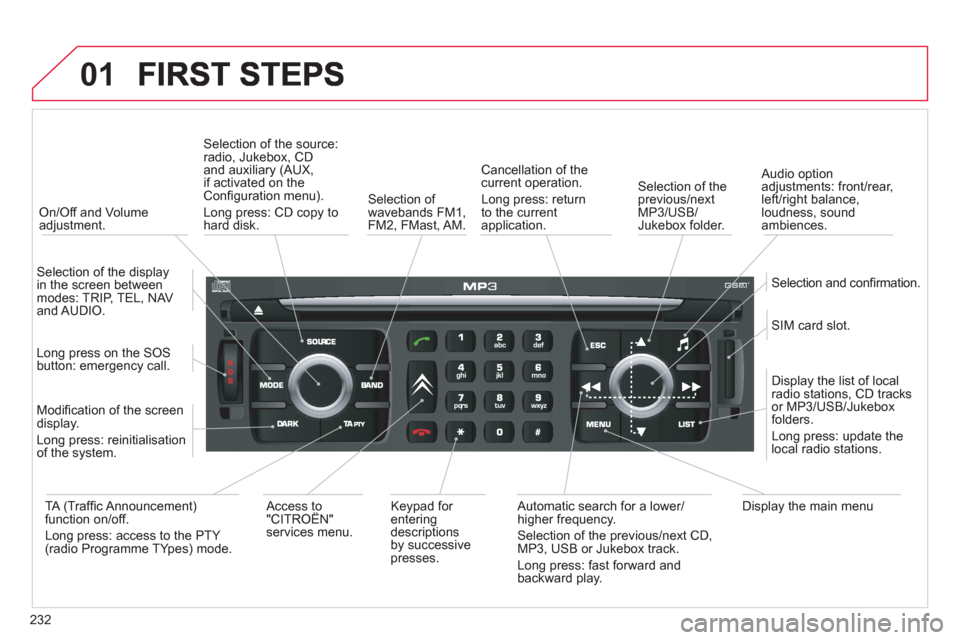
On/Off and Volumeadjustment.
Selection of the source:radio, Jukebox, CD and auxiliary (AUX,
if activated on theConfi guration menu).
Lon
g press: CD copy to
hard disk.
Selection of
wavebands FM1,
FM2, FMast, AM.
Cancellation of the current operation.
Long press: return
t
o the currentapplication.
Selection of the previous/nextMP3/USB/Jukebox folder.
Selection and confi rmation.
Audio option
adjustments: front/rear,
left/right balance,
loudness, sound
ambiences.
SIM card slot.
Displa
y the list of local radio stations, CD tracks
or MP3/USB/Jukeboxfolders.
Lon
g press: update thelocal radio stations.
Display the main menu
Automatic search for a lower/higher frequency.
Selection of the previous/next CD, MP3, USB or Jukebox track.
Lon
g press: fast forward and
backward play. Ke
ypad for enteringdescriptions by successive presses.
Access to
"CITROËN"services menu.
TA
(Traffi c Announcement) function on/off.
Long press: access to the PTY (radio Programme TYpes) mode. M
odifi cation of the screen
display.
Long press: reinitialisation
of the system.
Lon
g press on the SOS
button: emergency call.
Selection of the displa
y in the screen betweenmodes: TRIP, TEL, NAV
and AUDIO.
Page 235 of 352
233
02
32
15
4
2
1
32
15
4
3
4
VOICE COMMANDS AND STEERING MOUNTED CONTROLS
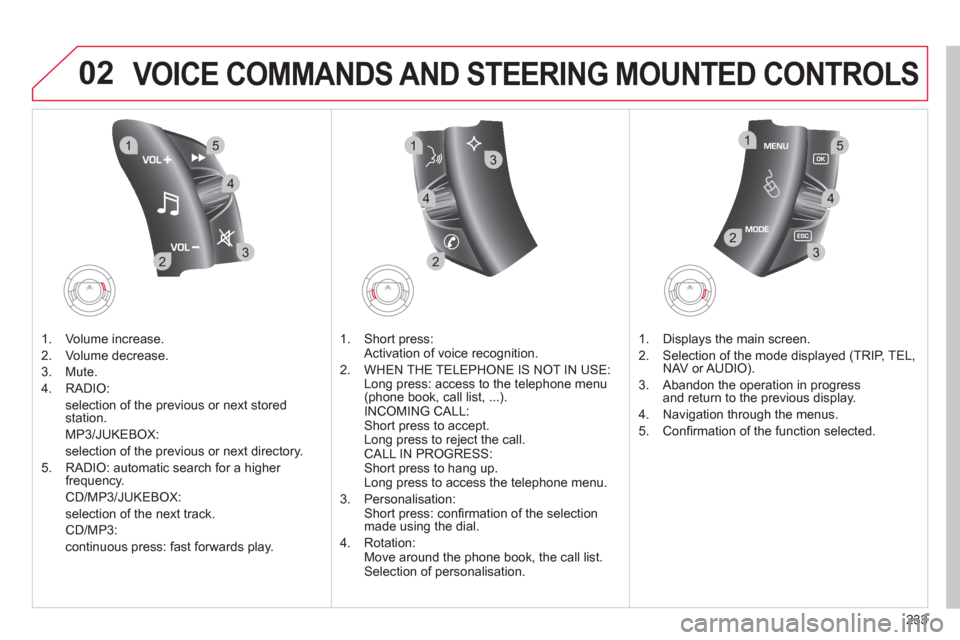
1. Volume increase.
2. V
olume decrease.
3. Mute.
4. RADI
O:
selection o
f the previous or next storedstation.
MP
3/JUKEBOX:
selection of the previous or next director
y.
5. RADI
O: automatic search for a higher frequency.
CD/MP3/JUKEBOX:
selection of the next track.
CD/MP3:
continuous press: fast forwards pla
y.
1. Short press:
Activation o
f voice recognition.
2. WHEN THE TELEPH
ONE IS NOT IN USE:
Long press: access to the telephone menu
(phone book, call list, ...).
INCOMING CALL:
Short press to accept.
Long press to reject the call.
CALL IN PROGRESS:
Short press to hang up.
Long press to access the telephone menu.
3. Personalisation:
Short press: confi rmation of the selection
ma
de using the dial.
4. Rotation:
Move around the phone book, the call list.
Selection of personalisation.
1. Displa
ys the main screen.
2.
Selection of the mode displayed (TRIP, TEL,NAV or AUDIO).
3. Abandon the operation in progress
and return to the previous display.
4. Navi
gation through the menus.
5. Confi rmation of the function selected.
Page 253 of 352
251
06
1
2
4
3
1
2
4
3
AUDIO/VIDEO
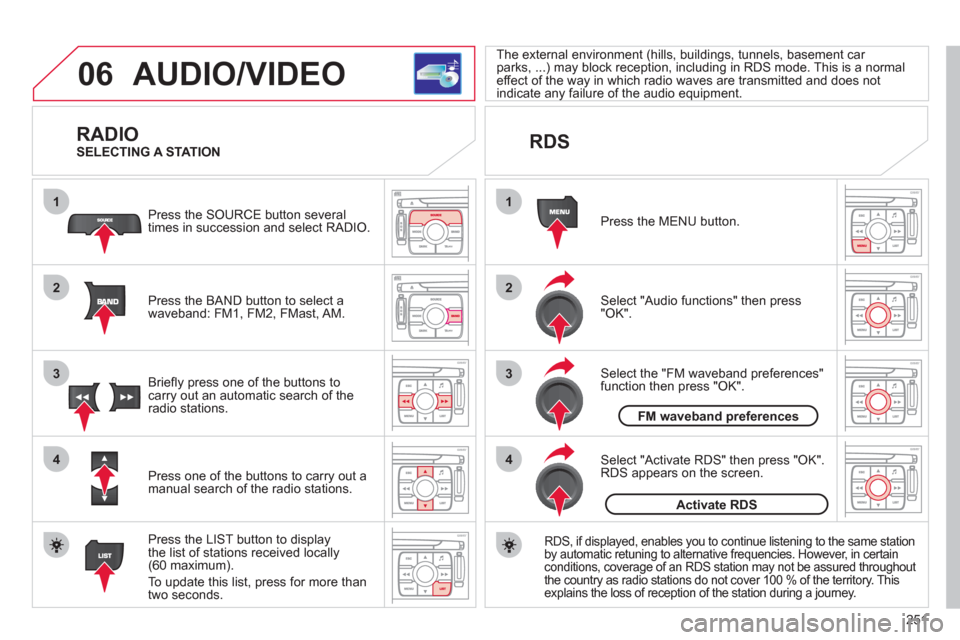
RADIO
Press the BAND button to select awaveband: FM1, FM2, FMast, AM. Pr
ess the SOURCE button several
times in succession and select RADIO.
Press the LIST button to displa
ythe list of stations received locally(60 maximum).
To update this list, press for more than
tw
o seconds.
Press one of the buttons to carr
y out a
manual search of the radio stations. Brie
fl y press one of the buttons tocarry out an automatic search of the radio stations.
RDS
Select "Audio functions" then press"OK".
Press the MENU button.
RDS, if displayed, enables you to continue listening to the same stationby automatic retuning to alternative frequencies. However, in certain conditions, coverage of an RDS station may not be assured throughout
the country as radio stations do not cover 100 % of the territory. This explains the loss of reception of the station during a journey.
Select "Activate RDS" then press "OK". RDS appears on the screen.
Select the "FM waveband preferences" function then press "OK". The external environment
(hills, buildings, tunnels, basement car parks, ...) may block reception, including in RDS mode. This is a normaleffect of the way in which radio waves are transmitted and does notindicate any failure of the audio equipment.
SELECTING A STATION
FM waveband preferences
Activate RDS
Page 263 of 352
261
07
1
2
3
4
BLUETOOTH TELEPHONE
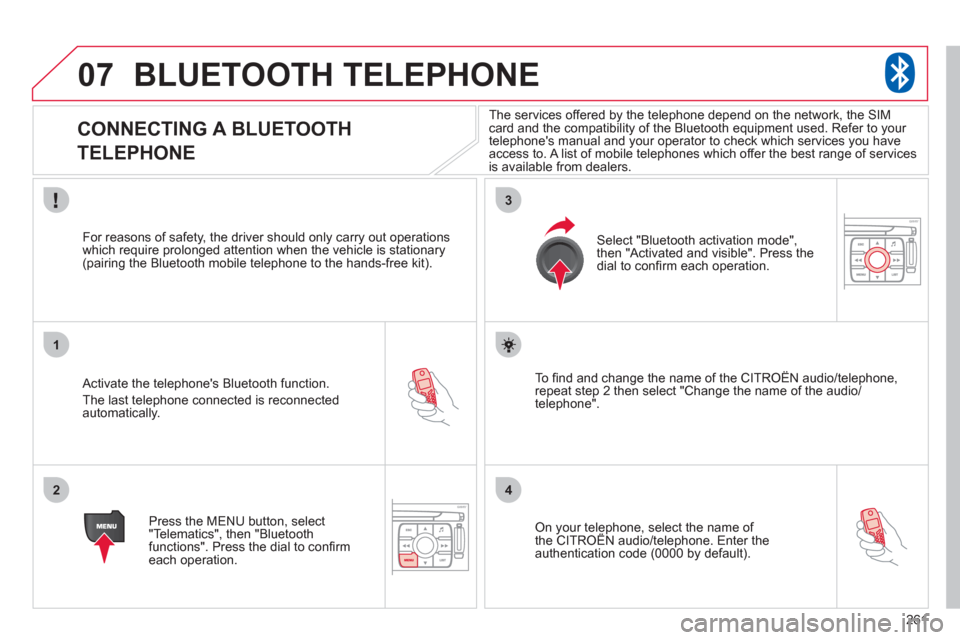
CONNECTING A BLUETOOTH
TELEPHONE
Activate the telephone's Bluetooth function.
The last telephone connected is reconnectedautomatically.
For reasons o
f safety, the driver should only carry out operations
which require prolonged attention when the vehicle is stationary (pairing the Bluetooth mobile telephone to the hands-free kit).
Press the MENU button, select
"Telematics", then "Bluetoothfunctions". Press the dial to confi rmeach operation.
To fi nd and chan
ge the name of the CITROËN audio/telephone,
repeat step 2 then select "Change the name of the audio/
telephone".
Select "Bluetooth activation mode"
,
then "Activated and visible". Press thedial to confi rm each operation.
On your telephone, select the name of the CITROÀN audio/telephone. Enter the yp,
authentication code (0000 by default).
The services offered b
y the telephone depend on the network, the SIM card and the compatibility of the Bluetooth equipment used. Refer to your
telephone's manual and your operator to check which services you have
access to. A list of mobile telephones which offer the best range of services
is available from dealers.
Page 265 of 352
263
07
1
2
4
3
6
5
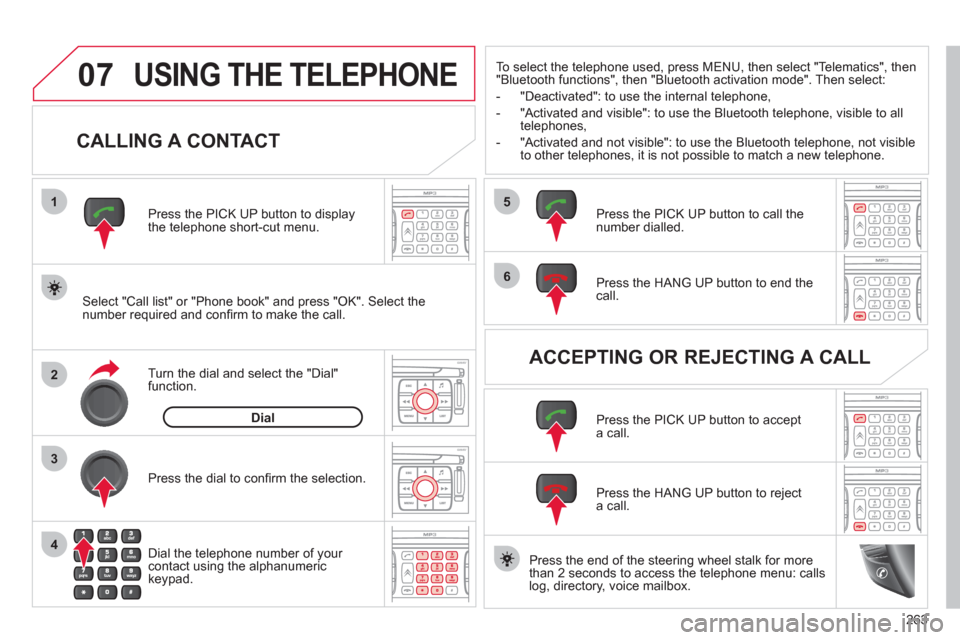
USING THE TELEPHONE
CALLING A CONTACT
Select "Call list" or "Phone book" and press "OK". Select thenumber required and confi rm to make the call. Press the PICK UP button to displa
ythe telephone short-cut menu.
Dial the telephone number of
your contact using the alphanumeric keypad. Pr
ess the dial to confi rm the selection.
Press the HAN
G UP button to end the call.
Press the PI
CK UP button to call thenumber dialled.
Press the HANG UP button to re
ject a call.
Press the PI
CK UP button to accept a call.
ACCEPTING OR REJECTING A CALL Turn the dial and select the "Dial" function.
Dial
To select the telephone used, press MENU, then select "Telematics", then
"Bluetooth functions", then "Bluetooth activation mode". Then select:
-
"Deactivated": to use the internal telephone,
- "Activated and visible": to use the Bluetooth telephone, visible to all
telephones,
- "Activated and not visible": to use the Bluetooth tele
phone, not visible
to other telephones, it is not possible to match a new telephone.
Press the end of the steerin
g wheel stalk for more
than 2 seconds to access the telephone menu: calls
log, directory, voice mailbox.