engine Citroen C4 2012 2.G Owners Manual
[x] Cancel search | Manufacturer: CITROEN, Model Year: 2012, Model line: C4, Model: Citroen C4 2012 2.GPages: 332, PDF Size: 28.33 MB
Page 225 of 332
12
TECHNICAL DATA
223
MODELS:
ENGINES AND GEARBOXES
Model codes:
NC...
9HJC
9HP0
9HR8
9HR8
/ S
9HR8/PS
9HR8/1PS
9HR8/2PS
RHE8
DIESEL ENGINES
HDi 90
HDi 90 PEF
HDi 110 PEF
HDi 150 PEF
Cubic capacity (cc)
1 560
1 560
1 560
1 997
Bore x stroke (mm)
75 x 88.3
75 x 88.3
75 x 88.3
85 x 88
Max power: EU standard (kW)
68
68
82
110
Max power engine speed (rpm)
4 000
4 000
3 600
3 750
Max torque: EU standard (Nm)
230
230
270
340
Max torque engine speed (rpm)
1 750
1 750
1 750
2 000
Fuel
Diesel
Diesel
Diesel
Diesel
Catalytic converter
yes
yes
yes
yes
Particle emissions fi lter (PEF)
no
yes
yes
yes
GEARBOXES
Manual
(5-speed)
Manual
(5-speed)
Manual
(6-speed)
Electronic
gearbox system
(6-speed)
Manual
(6-speed)
OIL CAPACITIES (in litres)
Engine (with fi lter replacement)
3.75
3.75
3.75
3.75
-
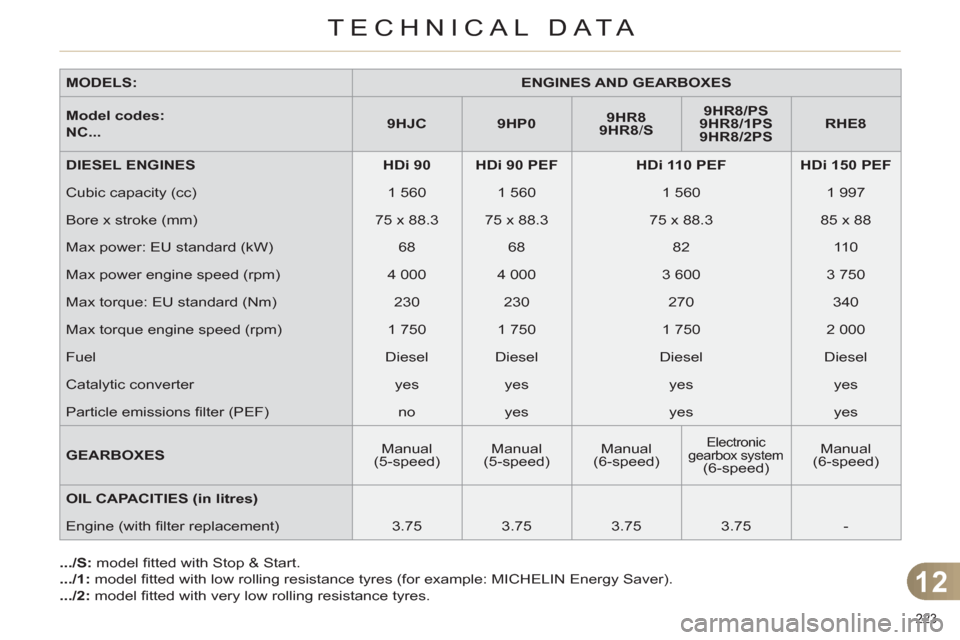
.../S:
model fi tted with Stop & Start.
.../1:
model fi tted with low rolling resistance tyres (for example: MICHELIN Energy Saver).
.../2:
model fi tted with very low rolling resistance tyres.
Page 226 of 332
12
TECHNICAL DATA
224
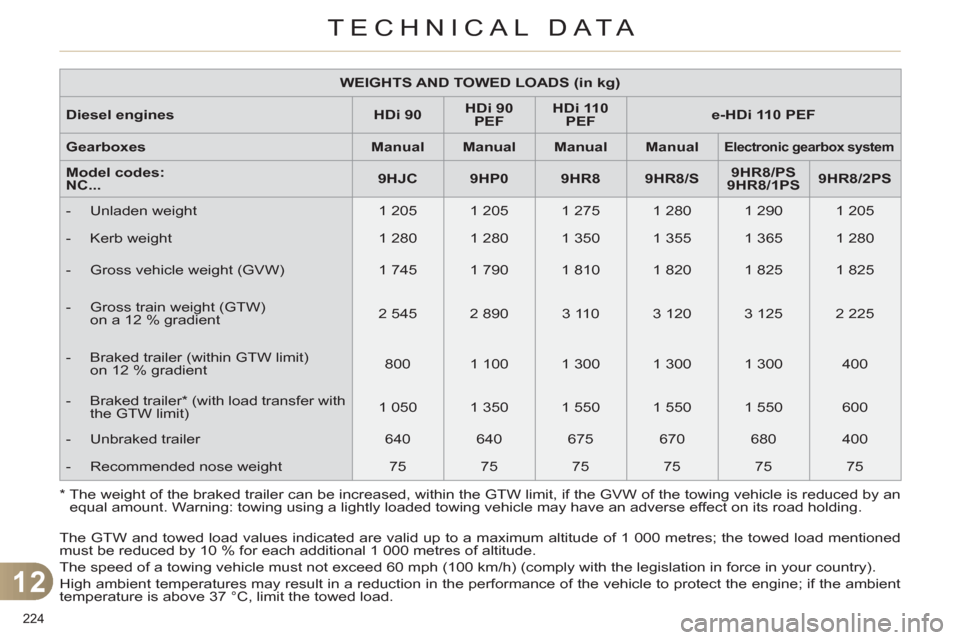
*
The weight of the braked trailer can be increased, within the GTW limit, if the GVW of the towing vehicle is reduced by an
equal amount. Warning: towing using a lightly loaded towing vehicle may have an adverse effect on its road holding.
The GTW and towed load values indicated are valid up to a maximum altitude of 1 000 metres; the towed load mentioned
must be reduced by 10 % for each additional 1 000 metres of altitude.
The speed of a towing vehicle must not exceed 60 mph (100 km/h) (comply with the legislation in force in your country).
High ambient temperatures may result in a reduction in the performance of the vehicle to protect the engine; if the ambient
temperature is above 37 °C, limit the towed load.
WEIGHTS AND TOWED LOADS (in kg)
Diesel engines
HDi 90
HDi 90
PEF
HDi 110
PEF
e-HDi 110 PEF
Gearboxes
Manual
Manual
Manual
Manual
Electronic gearbox system
Model codes:
NC...
9HJC
9HP0
9HR8
9HR8/S
9HR8/P
S
9HR8/1PS
9HR8/2PS
- Unladen weight
1 205
1 205
1 275
1 280
1 290
1 205
- Kerb weight
1 280
1 280
1 350
1 355
1 365
1 280
- Gross vehicle weight (GVW)
1 745
1 790
1 810
1 820
1 825
1 825
- Gross train weight (GTW)
on a 12 % gradient
2 545
2 890
3 110
3 120
3 125
2 225
- Braked trailer (within GTW limit)
on 12 % gradient
800
1 100
1 300
1 300
1 300
400
- Braked trailer * (with load transfer with
the GTW limit)
1 050
1 350
1 550
1 550
1 550
600
- Unbraked trailer
640
640
675
670
680
400
- Recommended nose weight
75
75
75
75
75
75
Page 227 of 332
12
TECHNICAL DATA
225
WEIGHTS AND TOWED LOADS (in kg)
Diesel engines
HDi 150 PEF
Gearboxes
Manual
Model codes:
NC...
RHE8
- Unladen weight
1 320
- Kerb weight
1 395
- Gross vehicle weight (GVW)
1 885
- Gross train weight (GTW)
on 12 % gradient
3 385
- Braked trailer (within GTW limit)
on 12 % gradient
1 500
- Braked trailer * (with load transfer with
the GTW limit)
1 750
- Unbraked trailer
695
- Recommended nose weight
75
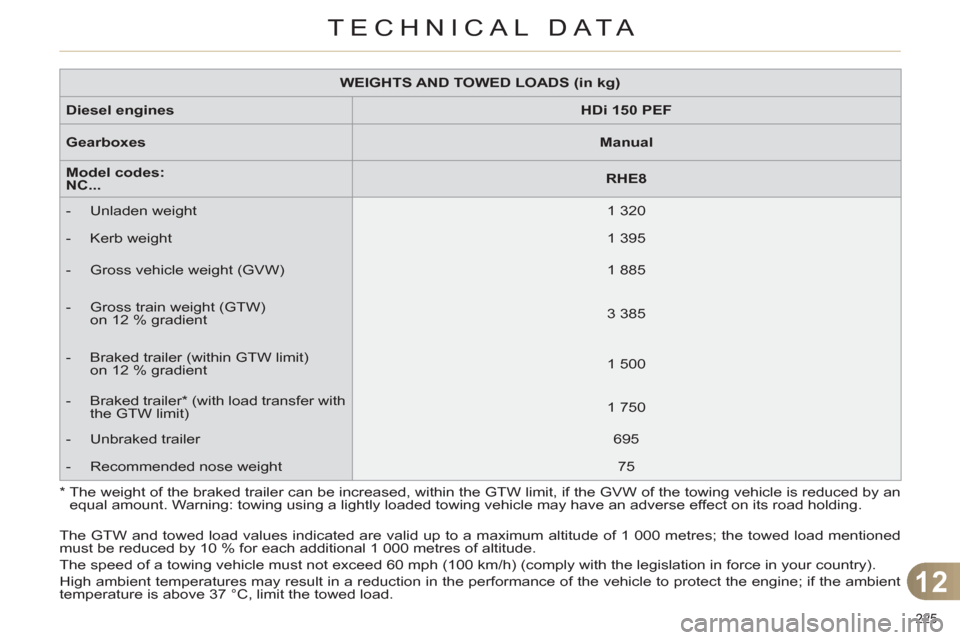
*
The weight of the braked trailer can be increased, within the GTW limit, if the GVW of the towing vehicle is reduced by an
equal amount. Warning: towing using a lightly loaded towing vehicle may have an adverse effect on its road holding.
The GTW and towed load values indicated are valid up to a maximum altitude of 1 000 metres; the towed load mentioned
must be reduced by 10 % for each additional 1 000 metres of altitude.
The speed of a towing vehicle must not exceed 60 mph (100 km/h) (comply with the legislation in force in your country).
High ambient temperatures may result in a reduction in the performance of the vehicle to protect the engine; if the ambient
temperature is above 37 °C, limit the towed load.
Page 228 of 332
12
TECHNICAL DATA
226
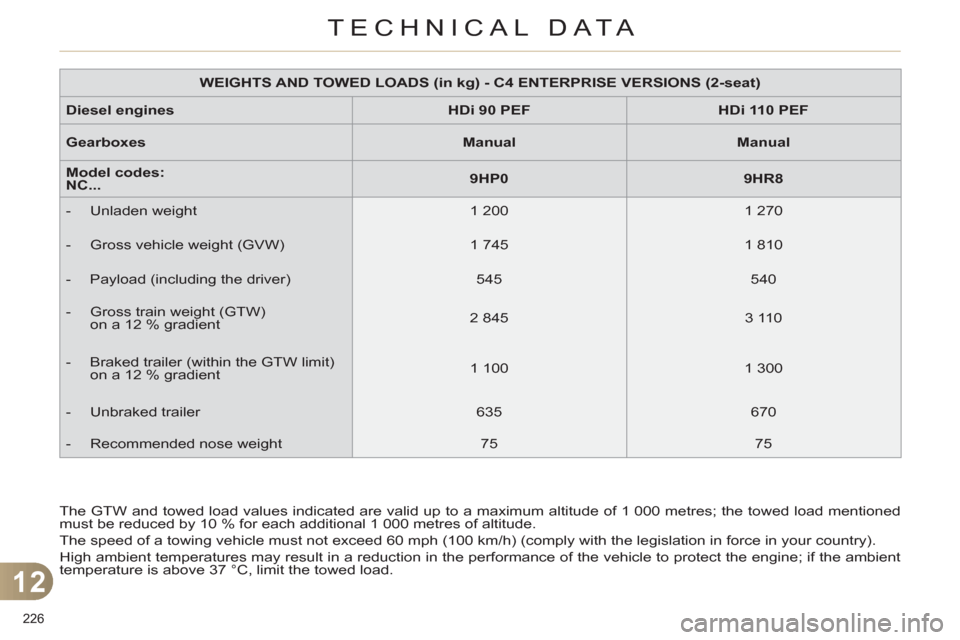
The GTW and towed load values indicated are valid up to a maximum altitude of 1 000 metres; the towed load mentioned
must be reduced by 10 % for each additional 1 000 metres of altitude.
The speed of a towing vehicle must not exceed 60 mph (100 km/h) (comply with the legislation in force in your country).
High ambient temperatures may result in a reduction in the performance of the vehicle to protect the engine; if the ambient
temperature is above 37 °C, limit the towed load.
WEIGHTS AND TOWED LOADS (in kg) - C4 ENTERPRISE VERSIONS (2-seat)
Diesel
engines
HDi 90 P
EF
HDi 110 PEF
Gearboxes
Manual
Manual
Model codes:
NC...
9HP0
9HR8
- Unladen weight
1 200
1 270
- Gross vehicle weight (GVW)
1 745
1 810
- Payload (including the driver)
545
540
- Gross train weight (GTW)
on a 12 % gradient
2 845
3 110
- Braked trailer (within the GTW limit)
on a 12 % gradient
1 100
1 300
- Unbraked trailer
635
670
- Recommended nose weight
75
75
Page 230 of 332
12
TECHNICAL DATA
228
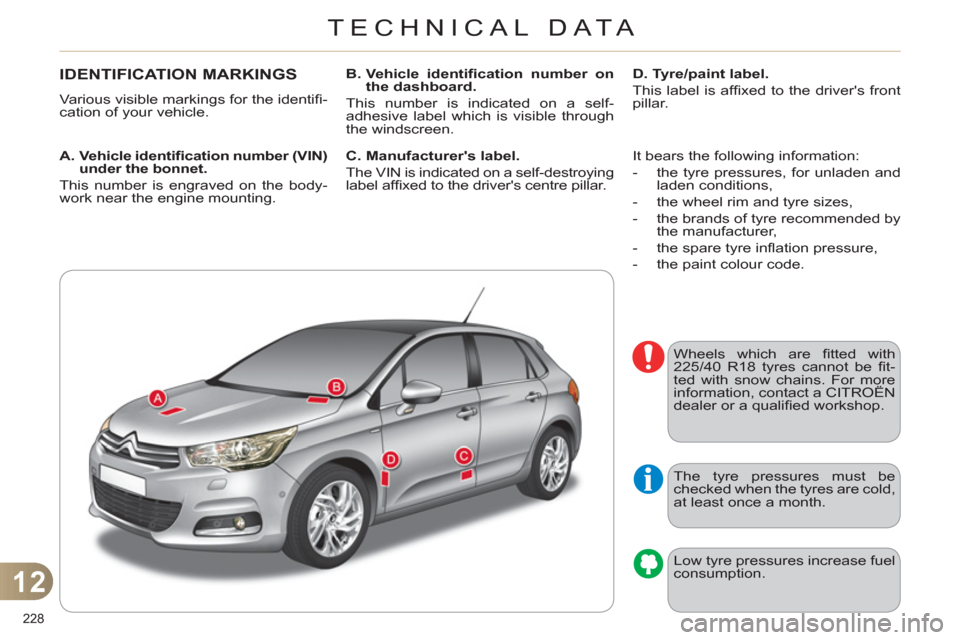
IDENTIFICATION MARKINGS
Various visible markings for the identifi -
cation of your vehicle.
A. Vehicle identifi cation number (VIN)
under the bonnet.
This number is engraved on the body-
work near the engine mounting.
B. Vehicle identifi cation number on
the dashboard.
This number is indicated on a self-
adhesive label which is visible through
the windscreen.
D. Tyre/paint label.
This label is affi xed to the driver's front
pillar.
The tyre pressures must be
checked when the tyres are cold,
at least once a month.
Low tyre pressures increase fuel
consumption.
C. Manufacturer's label.
The VIN is indicated on a self-destroying
label affi xed to the driver's centre pillar. It bears the following information:
- the tyre pressures, for unladen and
laden conditions,
- the wheel rim and tyre sizes,
- the brands of tyre recommended by
the manufacturer,
- the spare tyre infl ation pressure,
- the paint colour code.
Wheels which are fi tted with
225/40 R18 tyres cannot be fi t-
ted with snow chains. For more
information, contact a CITROËN
dealer or a qualifi ed workshop.
Page 233 of 332
231
The system is protected in such a way that it will only
operate in your vehicle. If it is to be installed in another
vehicle, contact a CITROËN dealer for confi guration of
the system.
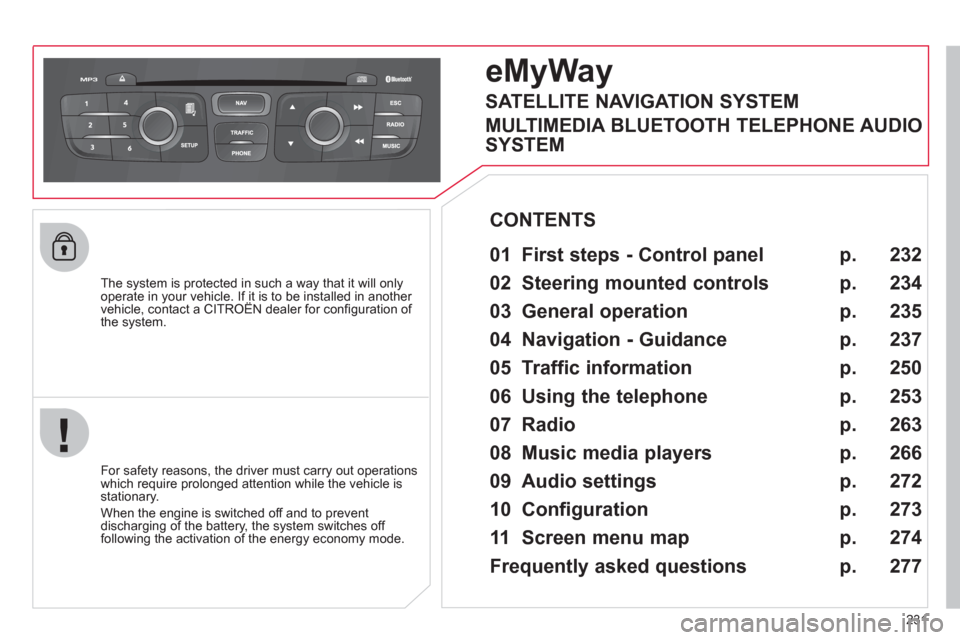
eMyWay
01 First steps - Control panel
For safety reasons, the driver must carry out operations
which require prolonged attention while the vehicle is
stationary.
When the engine is switched off and to prevent
discharging of the battery, the system switches off
following the activation of the energy economy mode.
CONTENTS
02 Steering mounted controls
03 General operation
04 Navigation - Guidance
05 Traffic information
06 Using the telephone
07 Radio
08 Music media players
09 Audio settings
10 Configuration
11 Screen menu map
Frequently asked questions p.
p.
p.
p.
p.
p.
p.
p.
p.
p.
p.
p.
232
234
235
237
250
253
263
266
272
273
274
277
SATELLITE NAVIGATION SYSTEM
MULTIMEDIA BLUETOOTH TELEPHONE AUDIO
SYSTEM
Page 235 of 332
233
01
1. Rotary control:
- Short press engine not running: on/off.
- Short press engine running:
mute on/off.
- Rotation: volume adjustment (each source
is independent, including TA messages
and navigation information).
2. Radio source, access to the FM/AM band
menu and display the list of stations.
3. Access to the MEDIA
menu and display
the list of tracks.
4. Access to the Navigation - guidance
menu
and display the last destinations.
5. Access to the Traffi c information
menu and
display the current traffi c alerts.
6. Access to the " Telephone
" menu and display
the recent calls list or accept an incoming
call.
2 - 3. Long press: access to the Audio settings
:
music ambiance, bass, treble, loudness,
left/right balance, front/rear fader,
automatic volume adjustment.
7. Access to the " Confi guration
" menu.
Long press: access to the GPS coverage and
the navigation demonstration mode.
8. MODE button:
Selection of the type of permanent display.
Long press: black screen (DARK).
9. ESC: abandon the operation in progress, up
one level in the menu.
Long press: return to permanent display.
10. CD eject.
Continuous press: reinitialisation of the
system.
11. According to context:
Selection of the previous/next line in a list or
menu
Selection of the previous/next media folder.
Step by step selection of the previous/next
radio frequency.
Move up/down in Move the map
mode.
12. According to context:
Automatic selection of the next lower/higher
radio frequency
Selection of the previous/next CD or media
track
Selection of left/right on the screen when a
menu is displayed.
Move left/right in Move the map
mode.
13. Buttons 1 to 6:
Short press: selection of the stored radio
station.
Long press: store the current radio station.
14. Dial for selection and OK confi rmation:
Selection of an item on the screen or in a
list in a menu, then confi rmation with a short
press.
Other than for menus and lists, a short press
displays a contextual menu depending on the
current screen.
Rotation with map displayed: zoom the map
scale in and out.
FIRST STEPS
Page 284 of 332
282
QUESTION
ANSWER
SOLUTION
With the engine off, the
system switches off after a
few minutes of use. When the engine is switched off, the system's operating time depends on
the battery charge.
The switch-off is normal: the system switches to economy mode and
switches off to prevent discharging of the vehicle's battery. Start the vehicle's engine to increase the battery
charge.
Playback of my USB
memory stick starts only
after a very long wait
(around 2 to 3 minutes). Some fi les supplied with the memory stick may greatly slow down access
to reading the memory stick (multiplication by 10 of the catalogue time). Delete the fi les supplied with the memory stick
and limit the number of sub-folders in the fi le
structure on the memory stick.
When I connect my iPhone
as telephone and to the
USB port at the same time,
I am unable to play the
music fi les. When the iPhone connects automatically as a telephone, it forces the
streaming function. The streaming function takes the place of the USB
function which is then not useable. Disconnect and reconnect to the USB port
(the USB function takes priority over streaming).
FREQUENTLY ASKED QUESTIONS
Page 285 of 332
283
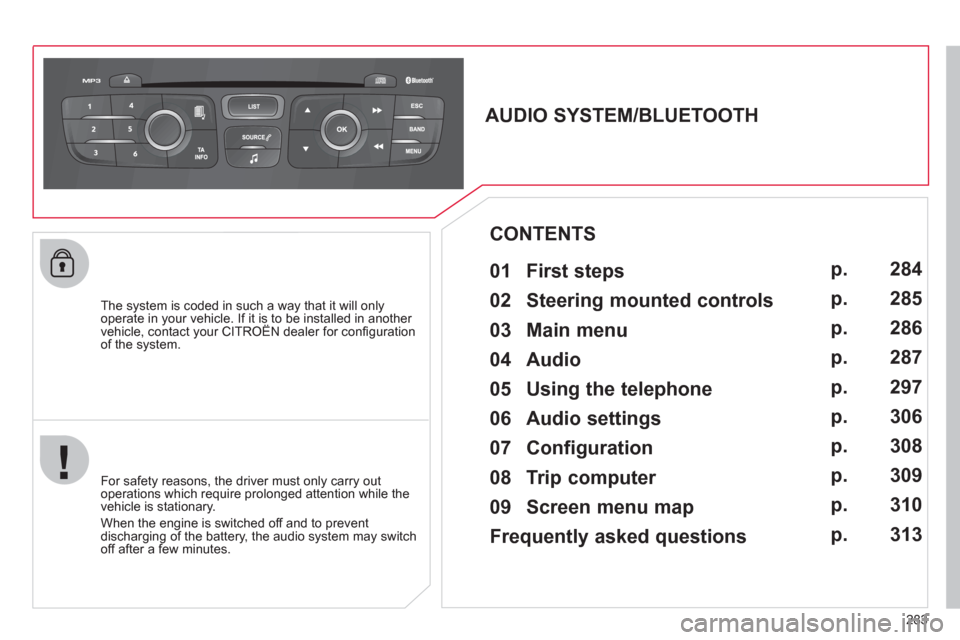
The system is coded in such a way that it will only
operate in your vehicle. If it is to be installed in another
vehicle, contact your CITROËN dealer for confi guration
of the system.
AUDIO SYSTEM/BLUETOOTH
01 First steps
For safety reasons, the driver must only carry out
operations which require prolonged attention while the
vehicle is stationary.
When the engine is switched off and to prevent
discharging of the battery, the audio system may switch
off after a few minutes.
CONTENTS
02 Steering mounted controls
03 Main menu
04 Audio
05 Using the telephone
06 Audio settings
07 Configuration
08 Trip computer
09 Screen menu map
Frequently asked questions p.
p.
p.
p.
p.
p.
p.
p.
p.
p.
284
285
286
287
297
306
308
309
310
313
Page 318 of 332
316
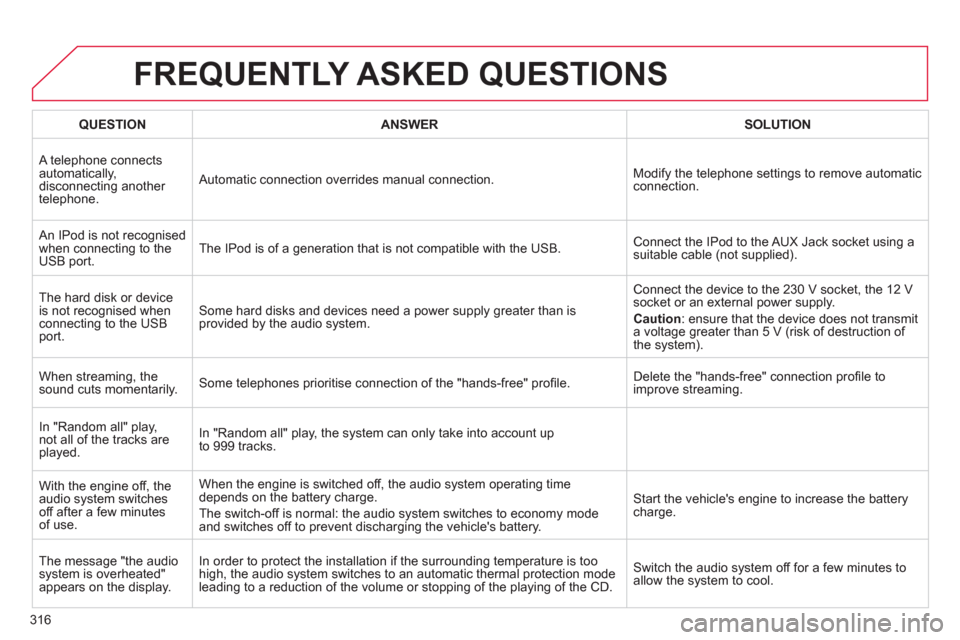
FREQUENTLY ASKED QUESTIONS
QUESTION
ANSWER
SOLUTION
A telephone connects
automatically,
disconnecting another
telephone. Automatic connection overrides manual connection. Modify the telephone settings to remove automatic
connection.
An IPod is not recognised
when connecting to the
USB port. The IPod is of a generation that is not compatible with the USB. Connect the IPod to the AUX Jack socket using a
suitable cable (not supplied).
The hard disk or device
is not recognised when
connecting to the USB
port. Some hard disks and devices need a power supply greater than is
provided by the audio system. Connect the device to the 230 V socket, the 12 V
socket or an external power supply.
Caution
: ensure that the device does not transmit
a voltage greater than 5 V (risk of destruction of
the system).
When streaming, the
sound cuts momentarily. Some telephones prioritise connection of the "hands-free" profi le. Delete the "hands-free" connection profi le to
improve streaming.
In "Random all" play,
not all of the tracks are
played. In "Random all" play, the system can only take into account up
to 999 tracks.
With the engine off, the
audio system switches
off after a few minutes
of use. When the engine is switched off, the audio system operating time
depends on the battery charge.
The switch-off is normal: the audio system switches to economy mode
and switches off to prevent discharging the vehicle's battery. Start the vehicle's engine to increase the battery
charge.
The message "the audio
system is overheated"
appears on the display. In order to protect the installation if the surrounding temperature is too
high, the audio system switches to an automatic thermal protection mode
leading to a reduction of the volume or stopping of the playing of the CD. Switch the audio system off for a few minutes to
allow the system to cool.