adjust time Citroen C4 2012 2.G User Guide
[x] Cancel search | Manufacturer: CITROEN, Model Year: 2012, Model line: C4, Model: Citroen C4 2012 2.GPages: 332, PDF Size: 28.33 MB
Page 148 of 332
8
SAFETY
146
For the airbags to be fully
effective, observe the
following safety rules:
Sit in a normal upright position.
Wear a correctly adjusted seat
belt.
Do not leave anything between
the occupants and the airbags
(a child, pet, object...). This could
hamper the operation of the air-
bags or injure the occupants.
After an accident or if the ve-
hicle has been stolen or broken
into, have the airbag systems
checked.
All work on the airbag system must
be carried out by a CITROËN
dealer or a qualifi ed workshop.
Even if all of the precautions men-
tioned are observed, a risk of in-
jury or of minor burns to the head,
chest or arms when an airbag is
deployed cannot be ruled out.
The bag infl ates almost instantly
(within a few milliseconds) then
defl ates within the same time dis-
charging the hot gas via openings
provided for this purpose.
Front airbags
Do not drive holding the steering wheel by its spokes or resting your hands on
the centre part of the wheel.
Passengers must not place their feet on the dashboard.
If possible, do not smoke as deployment of the airbags can cause burns or the
risk of injury from a cigarette or pipe.
Never remove or pierce the steering wheel or hit it violently.
Lateral airbags
Use only approved covers on the seats, compatible with the deployment the lateral
airbags. For information on the range of seat covers suitable for your vehicle, you
can contact a CITROËN dealer (see "Practical information - § Accessories").
Do not fi x or attach anything to the seat backs (clothing...). This could cause in-
jury to the chest or arms if the lateral airbag is deployed.
Do not sit with the upper part of the body any nearer to the door than necessary.
Curtain airbags
Do not fi x or attach anything to the roof. This could cause injury to the head if the
curtain airbag is deployed.
If fi tted on your vehicle, do not remove the grab handles installed on the roof, they
play a part in securing the curtain airbags.
Page 275 of 332
273
10
1
2
3a
3b
1
2
3
4
CONFIGURATION
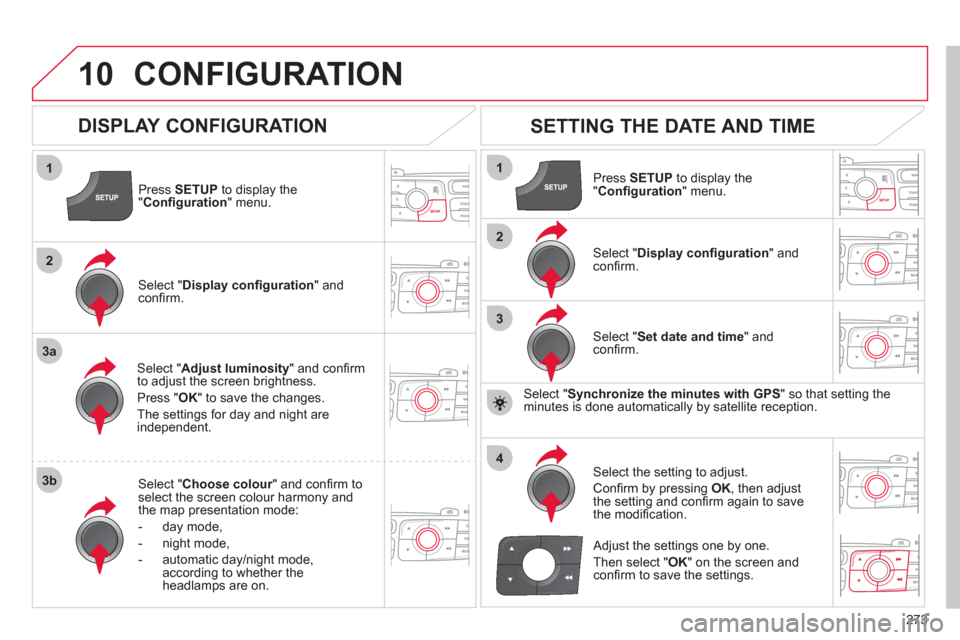
Press SETUP
to display the
" Confi guration
" menu.
Select " Adjust luminosity
" and confi rm
to adjust the screen brightness.
Press " OK
" to save the changes.
The settings for day and night are
independent.
Select " Choose colour
" and confi rm to
select the screen colour harmony and
the map presentation mode:
- day mode,
- night mode,
- automatic day/night mode,
according to whether the
headlamps are on.
SETTING THE DATE AND TIME
Select " Set date and time
" and
confi rm.
Select the setting to adjust.
Confi rm by pressing OK
, then adjust
the setting and confi rm again to save
the modifi cation.
Select " Display confi guration
" and
confi rm.
Press SETUP
to display the
" Confi guration
" menu.
Select " Display confi guration
" and
confi rm.
Adjust the settings one by one.
Then select " OK
" on the screen and
confi rm to save the settings.
DISPLAY CONFIGURATION
Select " Synchronize the minutes with GPS
" so that setting the
minutes is done automatically by satellite reception.
Page 278 of 332

276
11 SCREEN MENU MAP
"SETUP" MENU
Audio settings
Equalizer
Following media source
Eject USB support
Read mode
Normal
Random
Random on all media
Repetition
Audio settings (same
as RADIO)
Activate/Deactivate AUX
input
None
Classical
Jazz
Rock
Techno
Vocal
Bass
Treble
Loudness
Distribution
Driver
All passengers
Le-Ri balance
Fr-Re balance
Auto. Volume
Update radio list
"MEDIA" MENU
Display configuration
Choose colour
Harmony
Cartography
Day mode
Night mode
Auto Day/Night
Adjust luminosity
Set date and time
Voice synthesis
Guidance instructions volume
Select male voice/Select female voice
1
1
12
1
2
3
3
1
1
1
3
2
2
2
4
3
3
3
3
3
2
2
2
2
2
3
3
2
2
2
1
2
2
1
4
4
2
2
Page 286 of 332
284
01
1
2
7
45
6
3
8
9
10
13
1112
14
FIRST STEPS
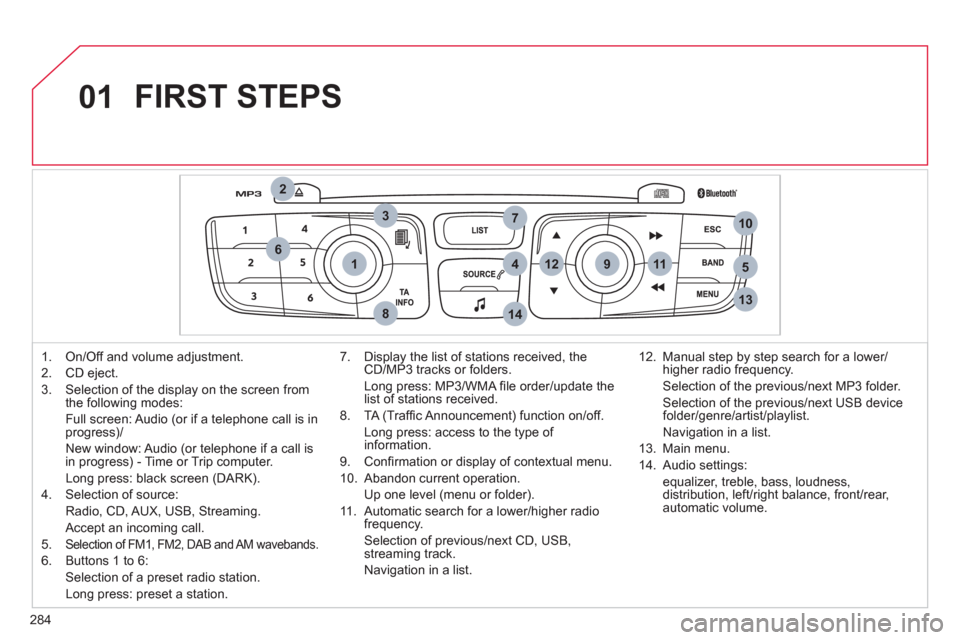
1. On/Off and volume adjustment.
2. CD eject.
3. Selection of the display on the screen from
the following modes:
Full screen: Audio (or if a telephone call is in
progress)/
New window: Audio (or telephone if a call is
in progress) - Time or Trip computer.
Long press: black screen (DARK).
4. Selection of source:
Radio, CD, AUX, USB, Streaming.
Accept an incoming call.
5.
Selection of FM1, FM2, DAB and AM wavebands.
6. Buttons 1 to 6:
Selection of a preset radio station.
Long press: preset a station.
7. Display the list of stations received, the
CD/MP3 tracks or folders.
Long press: MP3/WMA fi le order/update the
list of stations received.
8. TA (Traffi c Announcement) function on/off.
Long press: access to the type of
information.
9. Confi rmation or display of contextual menu.
10. Abandon current operation.
Up one level (menu or folder).
11 . Automatic search for a lower/higher radio
frequency.
Selection of previous/next CD, USB,
streaming track.
Navigation in a list.
12. Manual step by step search for a lower/
higher radio frequency.
Selection of the previous/next MP3 folder.
Selection of the previous/next USB device
folder/genre/artist/playlist.
Navigation in a list.
13. Main menu.
14. Audio settings:
equalizer, treble, bass, loudness,
distribution, left/right balance, front/rear,
automatic volume.
Page 288 of 332
286
03
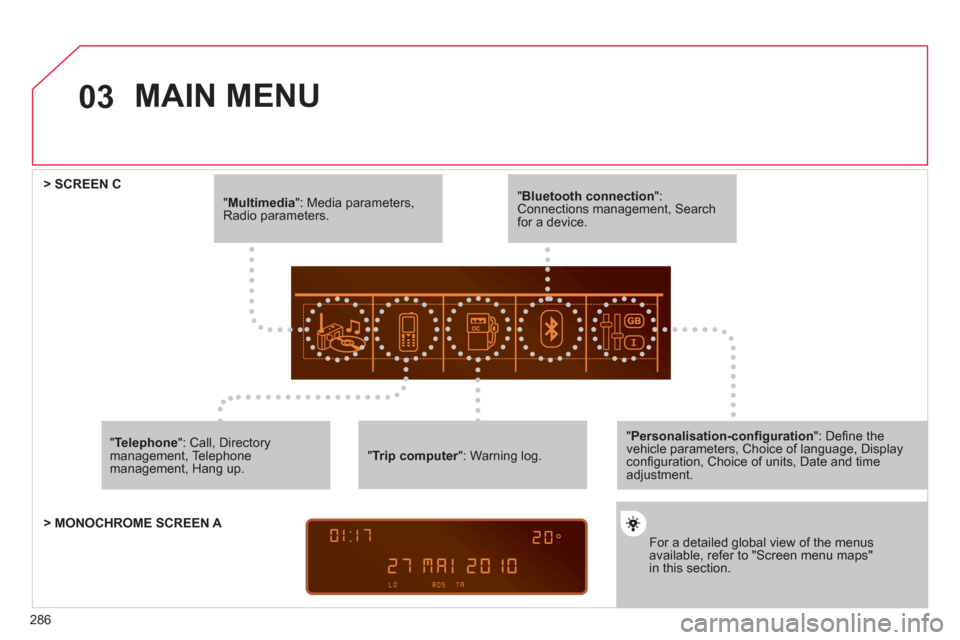
" Multimedia
": Media parameters,
Radio parameters.
" Trip computer
": Warning log.
For a detailed global view of the menus
available, refer to "Screen menu maps"
in this section.
> SCREEN C
" Bluetooth connection
":
Connections management, Search
for a device.
" Telephone
": Call, Directory
management, Telephone
management, Hang up.
MAIN MENU
> MONOCHROME SCREEN A
" Personalisation-confi guration
": Defi ne the
vehicle parameters, Choice of language, Display
confi guration, Choice of units, Date and time
adjustment.
Page 297 of 332
295
3
2
4
04
1
AUDIO
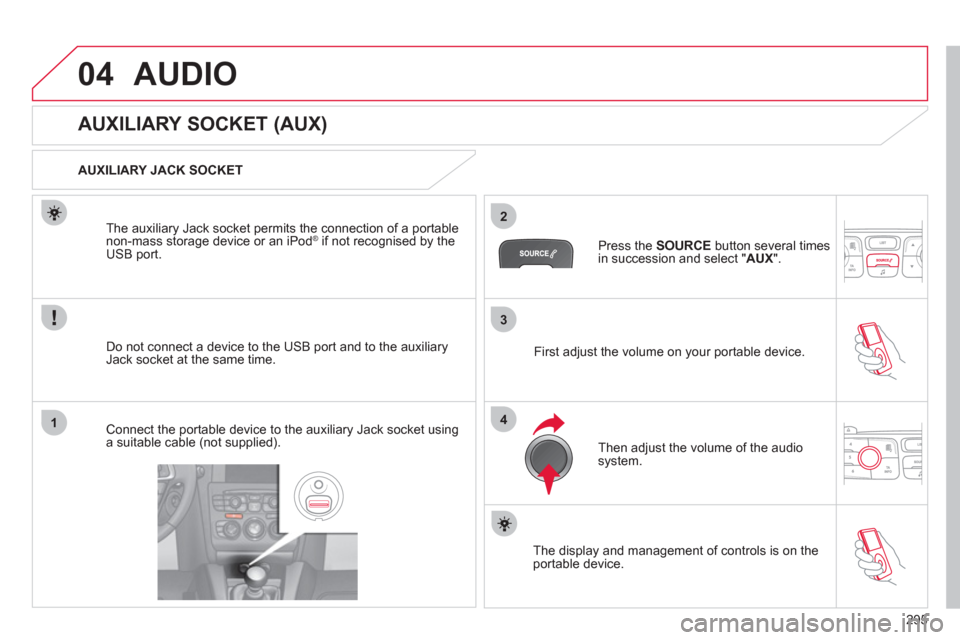
AUXILIARY SOCKET (AUX)
AUXILIARY JACK SOCKET
Do not connect a device to the USB port and to the auxiliary
Jack socket at the same time.
The auxiliary Jack socket permits the connection of a portable
non-mass storage device or an iPod
® if not recognised by the
USB port.
Connect the portable device to the auxiliary Jack socket using
a suitable cable (not supplied).
Press the SOURCE
button several times
in succession and select " AUX
".
First adjust the volume on your portable device.
Then adjust the volume of the audio
system.
The display and management of controls is on the
portable device.
Page 310 of 332
308
5
63
4
07
2
1
CONFIGURATION
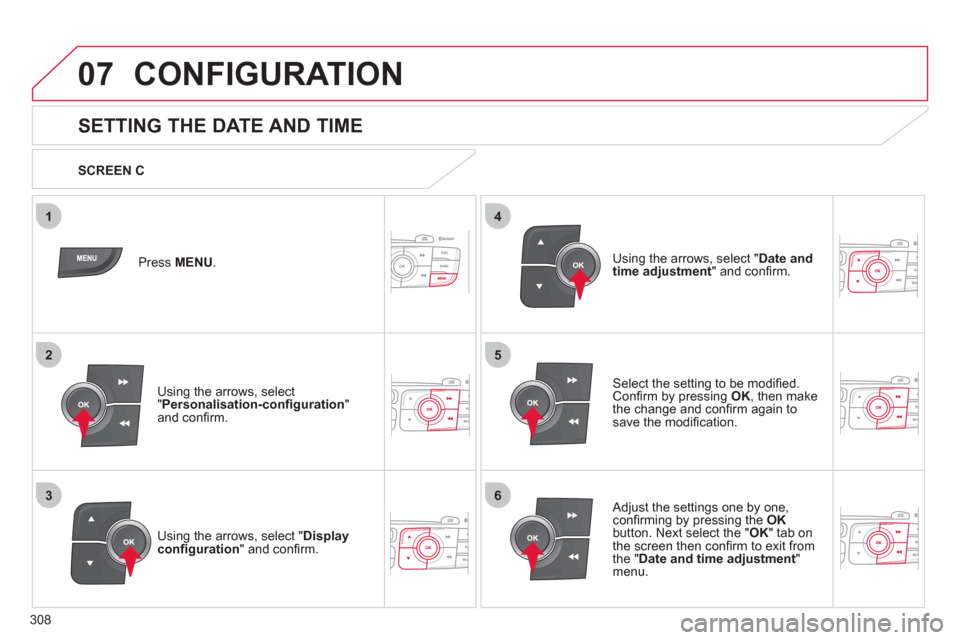
SETTING THE DATE AND TIME
Select the setting to be modifi ed.
Confi rm by pressing OK
, then make
the change and confi rm again to
save the modifi cation.
Using the arrows, select " Display
confi guration
" and confi rm. Press MENU
.
Using the arrows, select
" Personalisation-confi guration
"
and confi rm.
SCREEN C
Using the arrows, select " Date and
time adjustment
" and confi rm.
Adjust the settings one by one,
confi rming by pressing the OK
button. Next select the " OK
" tab on
the screen then confi rm to exit from
the " Date and time adjustment
"
menu.
Page 314 of 332
312
09 SCREEN MENU MAP
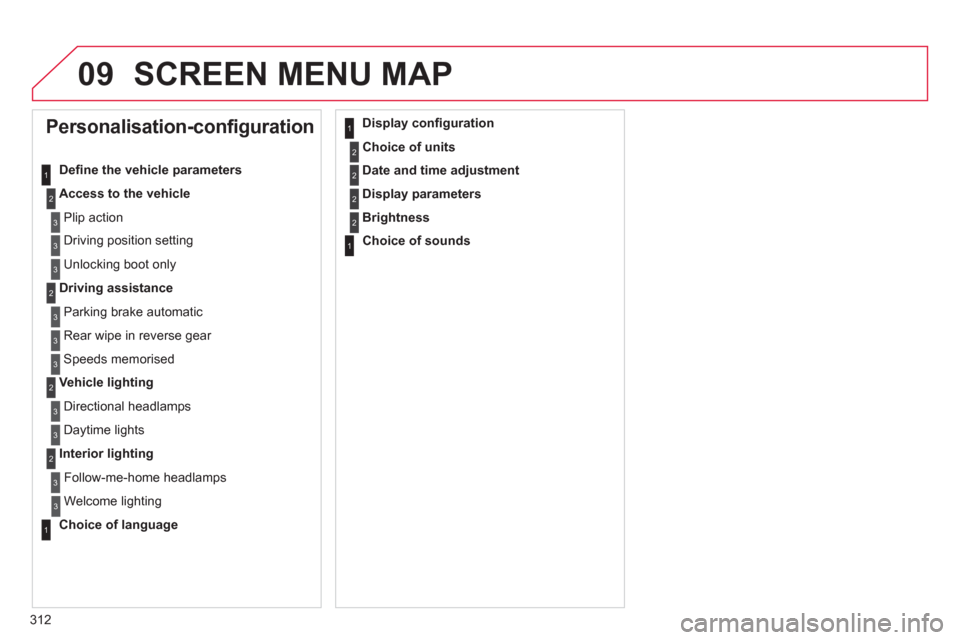
Personalisation-configuration
Defi ne the vehicle parameters
Access to the vehicle
Plip action
Driving position setting
Unlocking boot only
Driving assistance
Parking brake automatic
Rear wipe in reverse gear
Speeds memorised
Vehicle lighting
Directional headlamps
Daytime lights
Interior lighting
Follow-me-home headlamps
Welcome lighting
Choice of language
Display confi guration
Choice of units
Date and time adjustment
Display parameters
Brightness
Choice of sounds
1
2
3
3
3
2
3
3
3
2
3
3
2
3
3
1
1
2
2
2
2
1
Page 321 of 332
319
VISUAL SEARCH
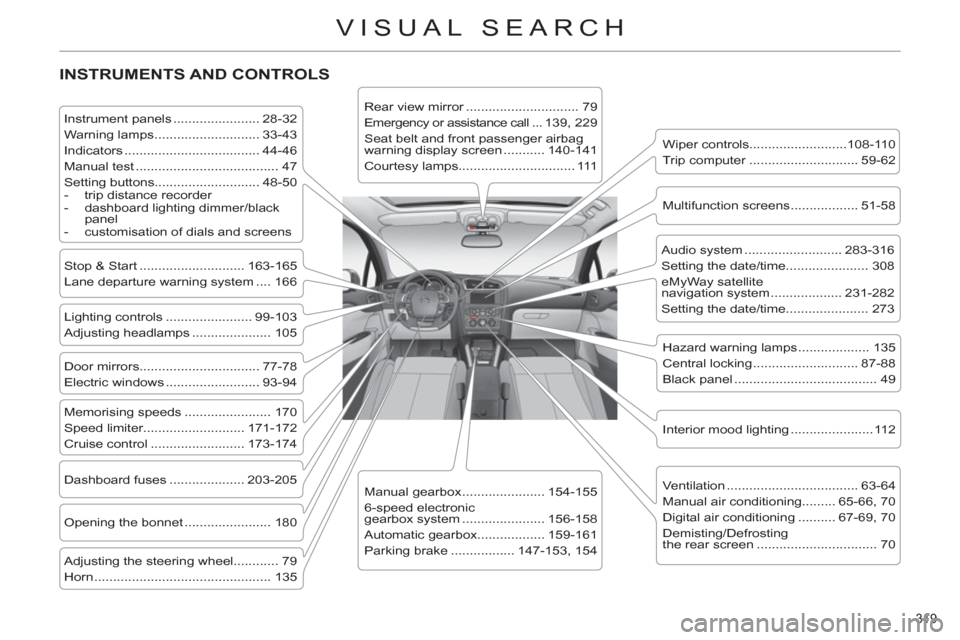
INSTRUMENTS AND CONTROLS
Instrument panels ....................... 28-32
Warning lamps ............................ 33-43
Indicators .................................... 44-46
Manual test ...................................... 47
Setting buttons............................ 48-50
- trip distance recorder
- dashboard lighting dimmer/black
panel
- customisation of dials and screens
Lighting controls ....................... 99-103
Adjusting headlamps ..................... 105
Stop & Start ............................ 163-165
Lane departure warning system .... 166
Door mirrors ................................ 77-78
Electric windows ......................... 93-94
Dashboard fuses .................... 203-205
Opening the bonnet ....................... 180
Adjusting the steering wheel............ 79
Horn ............................................... 135
Audio system .......................... 283-316
Setting the date/time...................... 308
eMyWay satellite
navigation system ................... 231-282
Setting the date/time...................... 273
Manual gearbox ...................... 154-155
6-speed electronic
gearbox system ...................... 156-158
Automatic gearbox.................. 159-161
Parking brake ................. 147-153, 154
Wiper controls..........................108-110
Trip computer ............................. 59-62
Rear view mirror .............................. 79
Emergency or assistance call ...139, 229
Seat belt and front passenger airbag
warning display screen ........... 140-141
Courtesy lamps............................... 111
Interior mood lighting ...................... 112
Hazard warning lamps ................... 135
Central locking ............................ 87-88
Black panel ...................................... 49
Multifunction screens .................. 51-58
Ventilation ................................... 63-64
Manual air conditioning......... 65-66, 70
Digital air conditioning .......... 67-69, 70
Demisting/Defrosting
the rear screen ................................ 70
Memorising speeds ....................... 170
Speed limiter........................... 171-172
Cruise control ......................... 173-174
Page 323 of 332
321
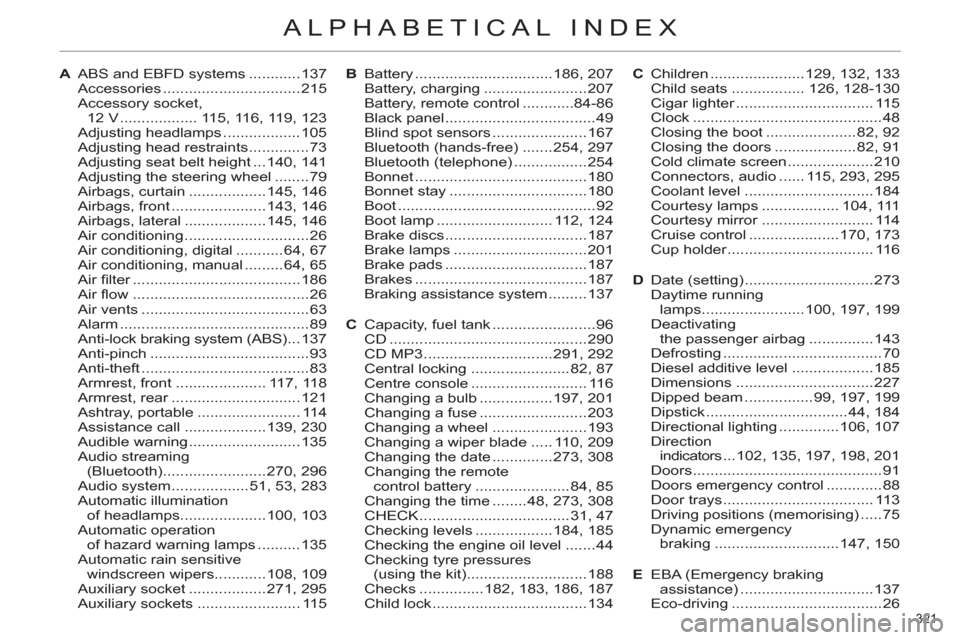
ALPHABETICAL INDEX
A ABS and EBFD systems ............137
Accessories ................................215
Accessory socket,
12 V .................. 115, 116, 119, 123
Adjusting headlamps ..................105
Adjusting head restraints ..............73
Adjusting seat belt height ...140, 141
Adjusting the steering wheel ........79
Airbags, curtain ..................145, 146
Airbags, front ......................143, 146
Airbags, lateral ...................145, 146
Air conditioning .............................26
Air conditioning, digital ...........64, 67
Air conditioning, manual .........64, 65
Air fi lter .......................................186
Air fl ow .........................................26
Air vents .......................................63
Alarm ............................................89
Anti-lock braking system (ABS) ...137
Anti-pinch .....................................93
Anti-theft .......................................83
Armrest, front ..................... 117, 118
Armrest, rear ..............................121
Ashtray, portable ........................ 114
Assistance call ...................139, 230
Audible warning ..........................135
Audio streaming
(Bluetooth) ........................270, 296
Audio system ..................51, 53, 283
Automatic illumination
of headlamps ....................100, 103
Automatic operation
of hazard warning lamps ..........135
Automatic rain sensitive
windscreen wipers ............108, 109
Auxiliary socket ..................271, 295
Auxiliary sockets ........................ 115B Battery ................................186, 207
Battery, charging ........................207
Battery, remote control ............84-86
Black panel ...................................49
Blind spot sensors ......................167
Bluetooth (hands-free) .......254, 297
Bluetooth (telephone) .................254
Bonnet ........................................180
Bonnet stay ................................180
Boot ..............................................92
Boot lamp ........................... 112, 124
Brake discs .................................187
Brake lamps ...............................201
Brake pads .................................187
Brakes ........................................187
Braking assistance system .........137
C Capacity, fuel tank ........................96
CD ..............................................290
CD MP3 ..............................291, 292
Central locking .......................82, 87
Centre console ........................... 116
Changing a bulb .................197, 201
Changing a fuse .........................203
Changing a wheel ......................193
Changing a wiper blade ..... 110, 209
Changing the date ..............273, 308
Changing the remote
control battery ......................84, 85
Changing the time ........48, 273, 308
CHECK ...................................31, 47
Checking levels ..................184, 185
Checking the engine oil level .......44
Checking tyre pressures
(using the kit) ............................188
Checks ...............182, 183, 186, 187
Child lock ....................................134C Children ......................129, 132, 133
Child seats ................. 126, 128-130
Cigar lighter ................................ 115
Clock ............................................48
Closing the boot .....................82, 92
Closing the doors ...................82, 91
Cold climate screen ....................210
Connectors, audio ...... 115, 293, 295
Coolant level ..............................184
Courtesy lamps .................. 104, 111
Courtesy mirror .......................... 114
Cruise control .....................170, 173
Cup holder .................................. 116
D Date (setting) ..............................273
Daytime running
lamps ........................100, 197, 199
Deactivating
the passenger airbag ...............143
Defrosting .....................................70
Diesel additive level ...................185
Dimensions ................................227
Dipped beam ................99, 197, 199
Dipstick .................................44, 184
Directional lighting ..............106, 107
Direction
indicators ...102, 135, 197, 198, 201
Doors ............................................91
Doors emergency control .............88
Door trays ................................... 113
Driving positions (memorising) .....75
Dynamic emergency
braking .............................147, 150
E EBA (Emergency braking
assistance) ...............................137
Eco-driving ...................................26