fuel Citroen C4 2012 2.G User Guide
[x] Cancel search | Manufacturer: CITROEN, Model Year: 2012, Model line: C4, Model: Citroen C4 2012 2.GPages: 332, PDF Size: 28.33 MB
Page 30 of 332
1
MONITORING
28
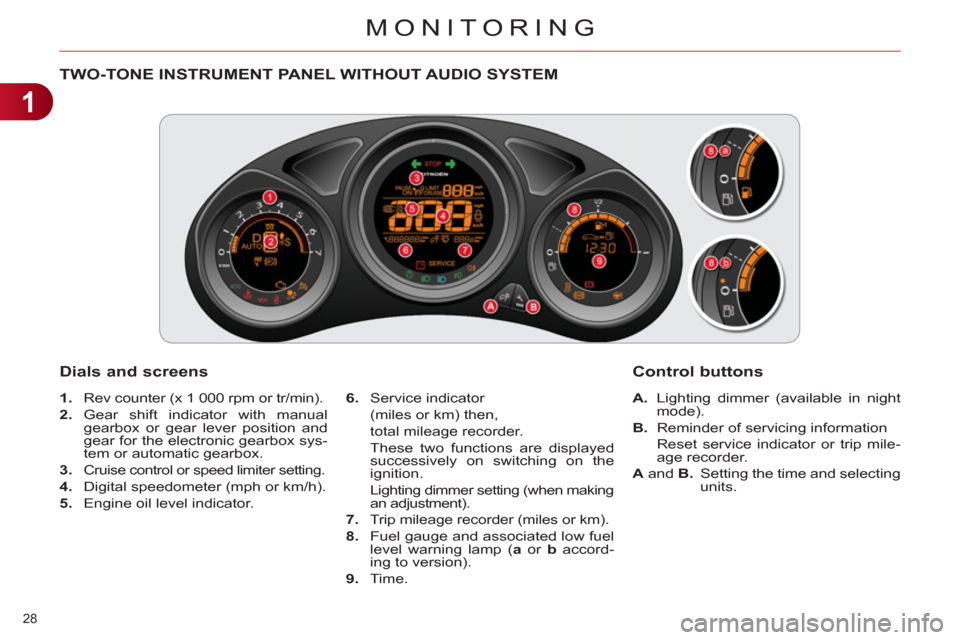
TWO-TONE INSTRUMENT PANEL WITHOUT AUDIO SYSTEM
Dials and screens
1.
Rev counter (x 1 000 rpm or tr/min).
2.
Gear shift indicator with manual
gearbox or gear lever position and
gear for the electronic gearbox sys-
tem or automatic gearbox.
3.
Cruise control or speed limiter setting.
4.
Digital speedometer (mph or km/h).
5.
Engine oil level indicator.
6.
Service indicator
(miles or km) then,
total mileage recorder.
These two functions are displayed
successively on switching on the
ignition.
Lighting dimmer setting (when making
an adjustment).
7.
Trip mileage recorder (miles or km).
8.
Fuel gauge and associated low fuel
level warning lamp ( a
or b
accord-
ing to version).
9.
Time.
Control buttons
A.
Lighting dimmer (available in night
mode).
B.
Reminder of servicing information
Reset service indicator or trip mile-
age recorder.
A
and B.
Setting the time and selecting
units.
Page 31 of 332
1
MONITORING
29
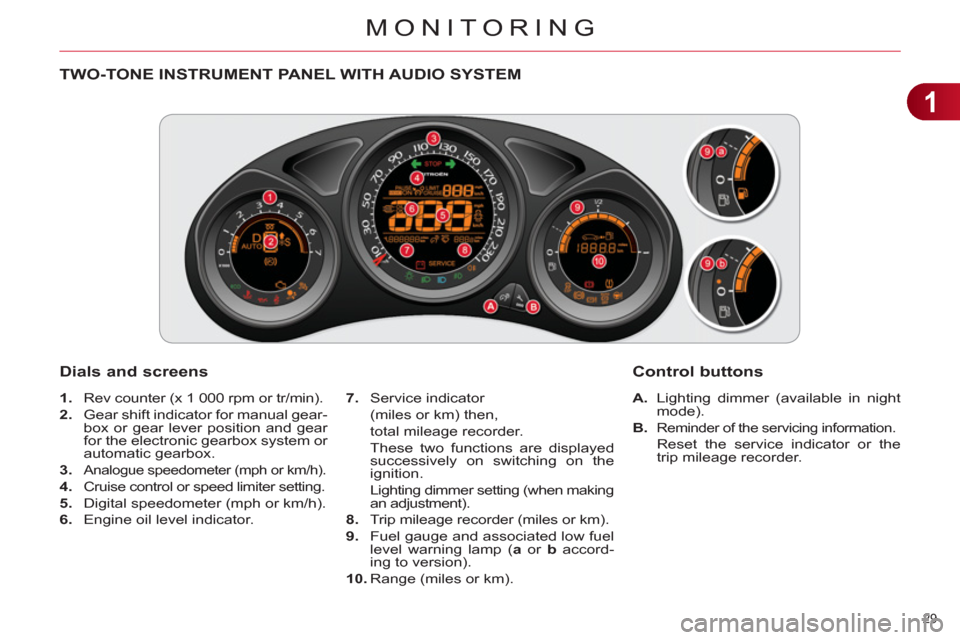
TWO-TONE INSTRUMENT PANEL WITH AUDIO SYSTEM
Dials and screens
A.
Lighting dimmer (available in night
mode).
B.
Reminder of the servicing information.
Reset the service indicator or the
trip mileage recorder.
7.
Service indicator
(miles or km) then,
total mileage recorder.
These two functions are displayed
successively on switching on the
ignition.
Lighting dimmer setting (when making
an adjustment).
8.
Trip mileage recorder (miles or km).
9.
Fuel gauge and associated low fuel
level warning lamp ( a
or b
accord-
ing to version).
10.
Range (miles or km).
Control buttons
1.
Rev counter (x 1 000 rpm or tr/min).
2.
Gear shift indicator for manual gear-
box or gear lever position and gear
for the electronic gearbox system or
automatic gearbox.
3.
Analogue speedometer (mph or km/h).
4.
Cruise control or speed limiter setting.
5.
Digital speedometer (mph or km/h).
6.
Engine oil level indicator.
Page 32 of 332
1
MONITORING
30
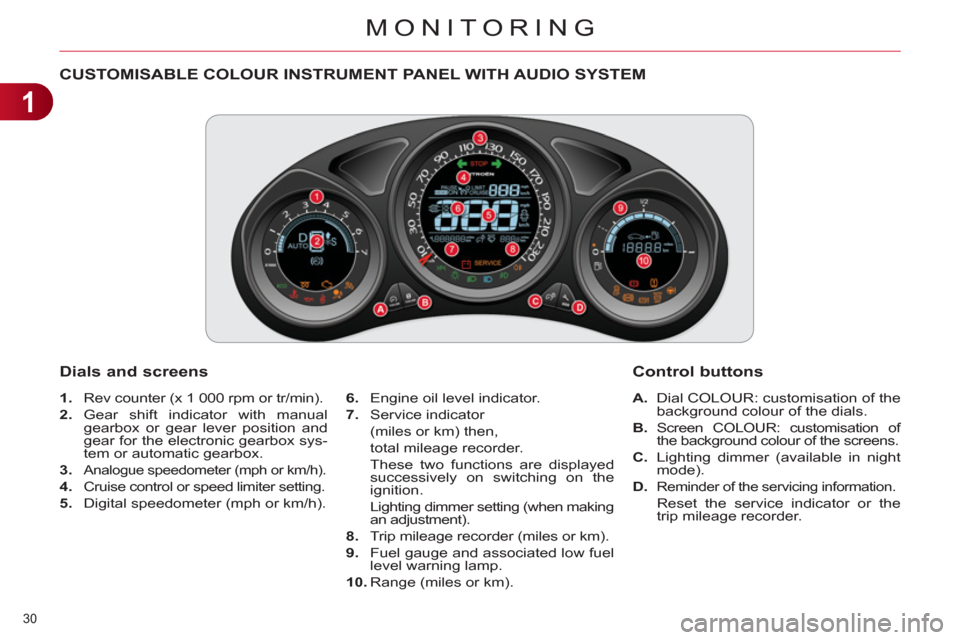
CUSTOMISABLE COLOUR INSTRUMENT PANEL WITH AUDIO SYSTEM
1.
Rev counter (x 1 000 rpm or tr/min).
2.
Gear shift indicator with manual
gearbox or gear lever position and
gear for the electronic gearbox sys-
tem or automatic gearbox.
3.
Analogue speedometer (mph or km/h).
4.
Cruise control or speed limiter setting.
5.
Digital speedometer (mph or km/h).
A.
Dial COLOUR: customisation of the
background colour of the dials.
B.
Screen COLOUR: customisation of
the background colour of the screens.
C.
Lighting dimmer (available in night
mode).
D.
Reminder of the servicing information.
Reset the service indicator or the
trip mileage recorder.
Dials and screens
6.
Engine oil level indicator.
7.
Service indicator
(miles or km) then,
total mileage recorder.
These two functions are displayed
successively on switching on the
ignition.
Lighting dimmer setting (when making
an adjustment).
8.
Trip mileage recorder (miles or km).
9.
Fuel gauge and associated low fuel
level warning lamp.
10.
Range (miles or km).
Control buttons
Page 33 of 332
1
MONITORING
31
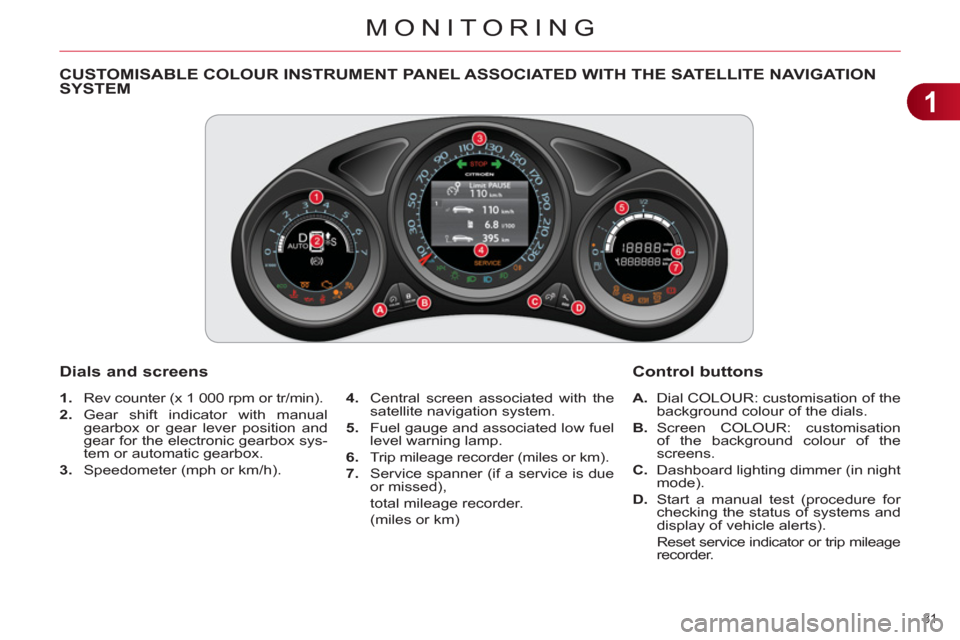
CUSTOMISABLE COLOUR INSTRUMENT PANEL ASSOCIATED WITH THE SATELLITE NAVIGATION
SYSTEM
1.
Rev counter (x 1 000 rpm or tr/min).
2.
Gear shift indicator with manual
gearbox or gear lever position and
gear for the electronic gearbox sys-
tem or automatic gearbox.
3.
Speedometer (mph or km/h).
Dials and screens
4.
Central screen associated with the
satellite navigation system.
5.
Fuel gauge and associated low fuel
level warning lamp.
6.
Trip mileage recorder (miles or km).
7.
Service spanner (if a service is due
or missed),
total mileage recorder.
(miles or km)
A.
Dial COLOUR: customisation of the
background colour of the dials.
B.
Screen COLOUR: customisation
of the background colour of the
screens.
C.
Dashboard lighting dimmer (in night
mode).
D.
Start a manual test (procedure for
checking the status of systems and
display of vehicle alerts).
Reset service indicator or trip mileage
recorder.
Control buttons
Page 39 of 332
1
MONITORING
37
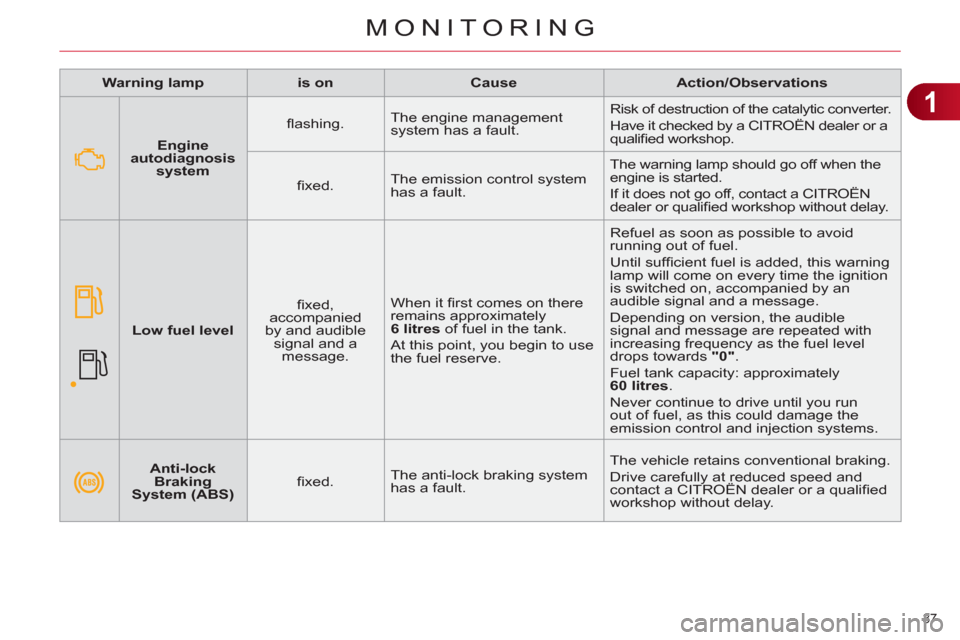
Warning lamp
is on
Cause
Action/Observations
Anti-lock
Braking
System (ABS)
fi xed. The anti-lock braking system
has a fault. The vehicle retains conventional braking.
Drive carefully at reduced speed and
contact a CITROËN dealer or a qualifi ed
workshop without delay.
Engine
autodiagnosis
system
fl ashing. The engine management
system has a fault. Risk of destruction of the catalytic converter.
Have it checked by a CITROËN dealer or a
qualifi ed workshop.
fi xed. The emission control system
has a fault. The warning lamp should go off when the
engine is started.
If it does not go off, contact a CITROËN
dealer or qualifi ed workshop without delay.
Low fuel level
fi xed,
accompanied
by and audible
signal and a
message. When it fi rst comes on there
remains approximately
6 litres
of fuel in the tank.
At this point, you begin to use
the fuel reserve. Refuel as soon as possible to avoid
running out of fuel.
Until suffi cient fuel is added, this warning
lamp will come on every time the ignition
is switched on, accompanied by an
audible signal and a message.
Depending on version, the audible
signal and message are repeated with
increasing frequency as the fuel level
drops towards "0"
.
Fuel tank capacity: approximately
60 litres
.
Never continue to drive until you run
out of fuel, as this could damage the
emission control and injection systems.
Page 41 of 332
1
MONITORING
39
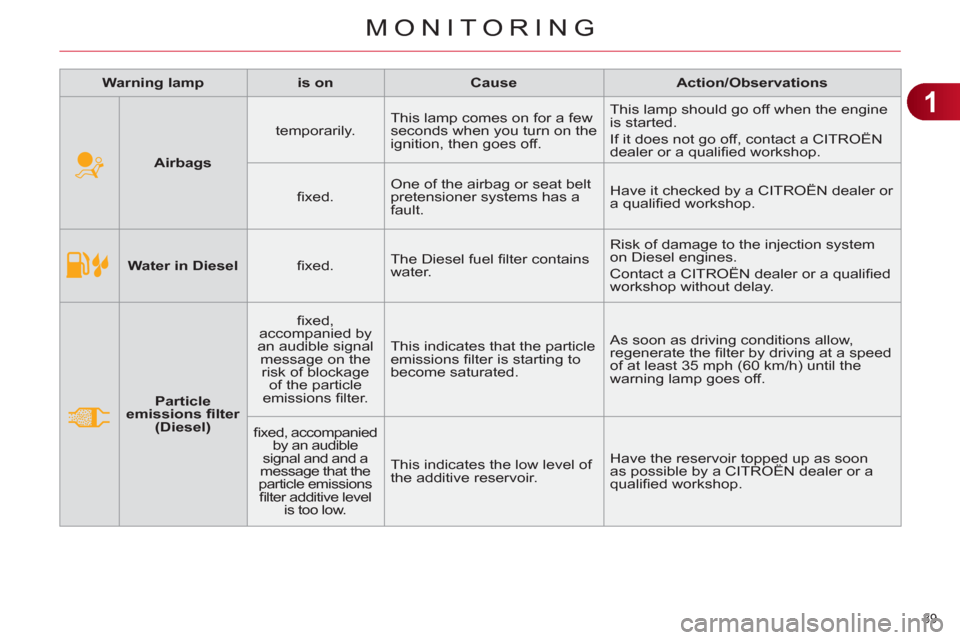
Water in Diesel
fi xed. The Diesel fuel fi lter contains
water. Risk of damage to the injection system
on Diesel engines.
Contact a CITROËN dealer or a qualifi ed
workshop without delay.
Particle
emissions fi lter
(Diesel)
fi xed,
accompanied by
an audible signal
message on the
risk of blockage
of the particle
emissions fi lter. This indicates that the particle
emissions fi lter is starting to
become saturated. As soon as driving conditions allow,
regenerate the fi lter by driving at a speed
of at least 35 mph (60 km/h) until the
warning lamp goes off.
fi xed, accompanied
by an audible
signal and and a
message that the
particle emissions
fi lter additive level
is too low. This indicates the low level of
the additive reservoir. Have the reservoir topped up as soon
as possible by a CITROËN dealer or a
qualifi ed workshop.
Warning lamp
is on
Cause
Action/Observations
Airbags
temporarily. This lamp comes on for a few
seconds when you turn on the
ignition, then goes off. This lamp should go off when the engine
is started.
If it does not go off, contact a CITROËN
dealer or a qualifi ed workshop.
fi xed. One of the airbag or seat belt
pretensioner systems has a
fault. Have it checked by a CITROËN dealer or
a qualifi ed workshop.
Page 51 of 332
1
MONITORING
49
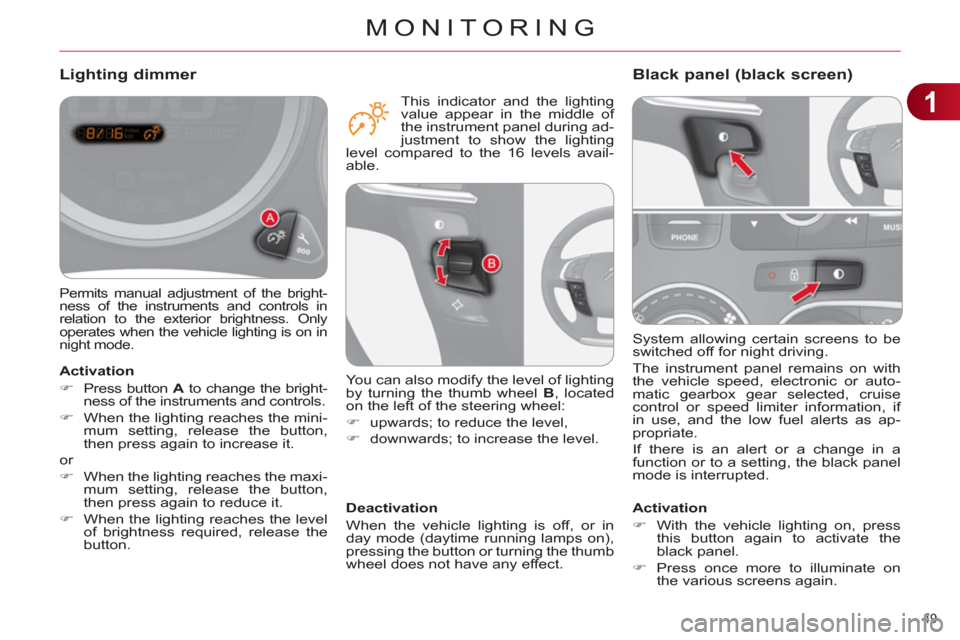
System allowing certain screens to be
switched off for night driving.
The instrument panel remains on with
the vehicle speed, electronic or auto-
matic gearbox gear selected, cruise
control or speed limiter information, if
in use, and the low fuel alerts as ap-
propriate.
If there is an alert or a change in a
function or to a setting, the black panel
mode is interrupted.
Black panel (black screen)
Activation
)
With the vehicle lighting on, press
this button again to activate the
black panel.
)
Press once more to illuminate on
the various screens again.
Permits manual adjustment of the bright-
ness of the instruments and controls in
relation to the exterior brightness. Only
operates when the vehicle lighting is on in
night mode.
Lighting dimmer
Activation
)
Press button A
to change the bright-
ness of the instruments and controls.
)
When the lighting reaches the mini-
mum setting, release the button,
then press again to increase it.
or
)
When the lighting reaches the maxi-
mum setting, release the button,
then press again to reduce it.
)
When the lighting reaches the level
of brightness required, release the
button.
Deactivation
When the vehicle lighting is off, or in
day mode (daytime running lamps on),
pressing the button or turning the thumb
wheel does not have any effect.
You can also modify the level of lighting
by turning the thumb wheel B
, located
on the left of the steering wheel:
)
upwards; to reduce the level,
)
downwards; to increase the level.
This indicator and the lighting
value appear in the middle of
the instrument panel during ad-
justment to show the lighting
level compared to the 16 levels avail-
able.
Page 60 of 332
2
MULTIFUNCTION SCREENS
58
Vehicle parameters
This menu is used to activate or deac-
tivate certain driving and comfort sys-
tems, classifi ed in different categories:
- "Access to the vehicle" (see
"Access" section):
●
"Plip action" (Selective unlocking
of the driver's door),
●
"Unlocking only boot" (Selective
unlocking of the boot).
- "Driving assistance":
●
"Parking brake automatic" (Auto-
matic electric parking brake; see
"Driving" section),
●
"Rear wipe in reverse gear" (Rear
wiper coupled to reverse gear;
see "Visibility" section),
●
"Speeds memorised" (Memoris-
ing speeds; see "Driving" sec-
tion).
- "Vehicle lighting" (see "Visibility"
section):
●
"Directional headlamps" (Main/
additional directional lighting),
●
"Daytime lights" (Daytime running
lamps).
- "Interior lighting" (see "Visibility"
section):
●
"Follow-me-home " (Automatic
timed operation of headlamps),
●
"Welcome lighting" (Interior/exte-
rior welcome lighting).
Display confi guration
This menu is used to confi gure:
- the display language of the central
screen, from a pre-defi ned list,
- the units: temperature (°Celsius or
°Fahrenheit) and fuel consumption
(l/100 km, mpg or km/l),
- the graphical presentation of the
central screen, from a pre-defi ned
list.
Choice of sounds
This menu allows you to choose a fam-
ily of polyphonic sounds from the four
available. These sounds are grouped
together in a family and are adapted
to suit the situation and context (alert,
confi rmation, rejection, direction indica-
tors, lighting left on, key in ignition...).
Page 61 of 332
2
MULTIFUNCTION SCREENS
59
TRIP COMPUTER
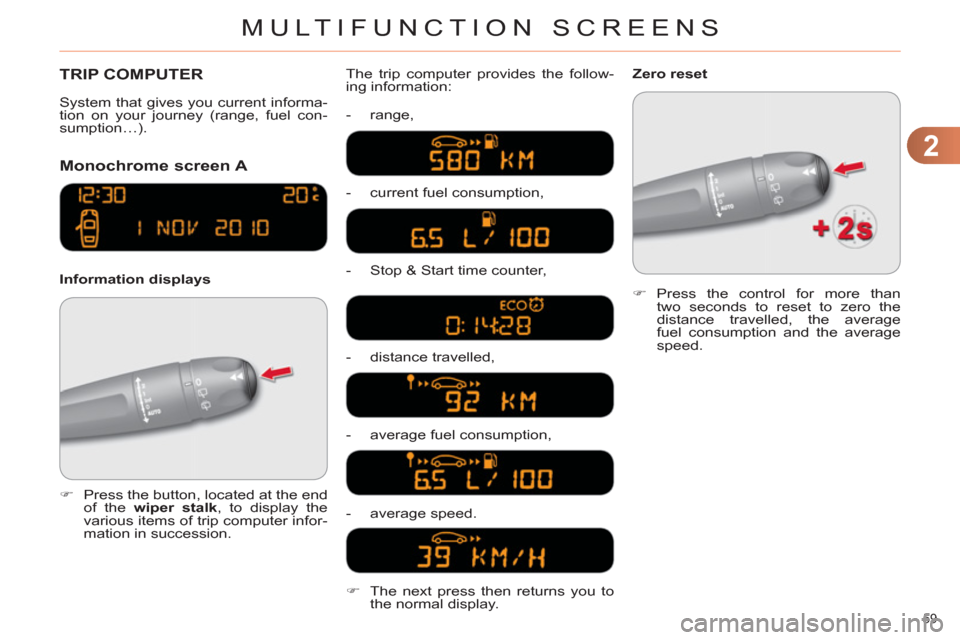
Monochrome screen A
Information displays The trip computer provides the follow-
ing information:
- range,
- current fuel consumption,
- Stop & Start time counter,
- distance travelled,
- average fuel consumption,
- average speed.
)
Press the button, located at the end
of the wiper stalk
, to display the
various items of trip computer infor-
mation in succession.
System that gives you current informa-
tion on your journey (range, fuel con-
sumption…).
)
Press the control for more than
two seconds to reset to zero the
distance travelled, the average
fuel consumption and the average
speed.
Zero reset
)
The next press then returns you to
the normal display.
Page 62 of 332
2
MULTIFUNCTION SCREENS
60
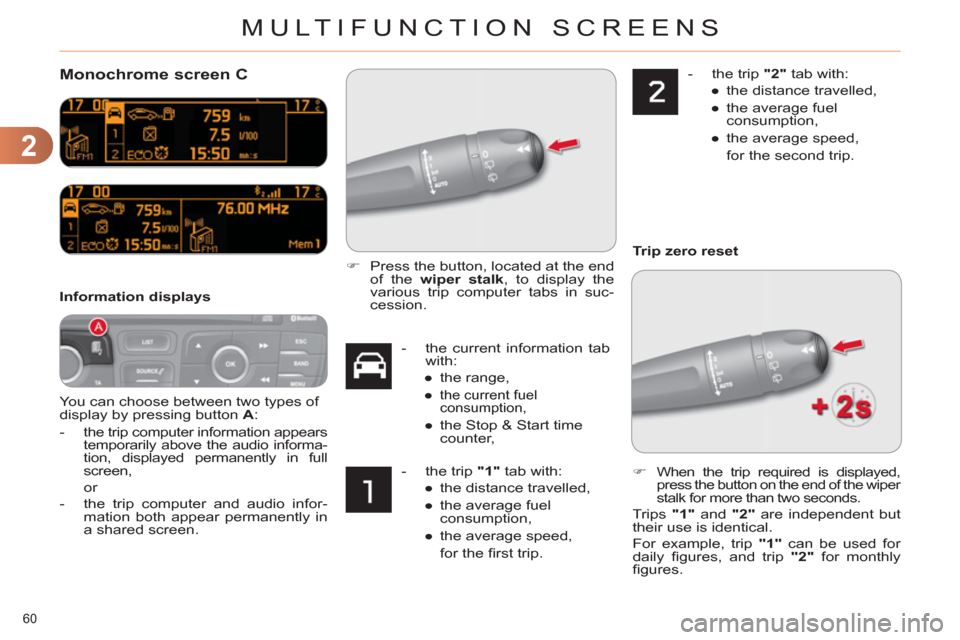
Monochrome screen C
You can choose between two types of
display by pressing button A
:
-
the trip computer information appears
temporarily above the audio informa-
tion, displayed permanently in full
screen,
or
- the trip computer and audio infor-
mation both appear permanently in
a shared screen.
Information displays
- the current information tab
with:
●
the range,
●
the current fuel
consumption,
●
the Stop & Start time
counter,
- the trip "1"
tab with:
●
the distance travelled,
●
the average fuel
consumption,
●
the average speed,
for the fi rst trip.
- the trip "2"
tab with:
●
the distance travelled,
●
the average fuel
consumption,
●
the average speed,
for the second trip.
)
Press the button, located at the end
of the wiper stalk
, to display the
various trip computer tabs in suc-
cession.
)
When the trip required is displayed,
press the button on the end of the wiper
stalk for more than two seconds.
Trips "1"
and "2"
are independent but
their use is identical.
For example, trip "1"
can be used for
daily fi gures, and trip "2"
for monthly
fi gures.
Trip zero reset