ignition Citroen C4 2012 2.G User Guide
[x] Cancel search | Manufacturer: CITROEN, Model Year: 2012, Model line: C4, Model: Citroen C4 2012 2.GPages: 332, PDF Size: 28.33 MB
Page 37 of 332
1
MONITORING
35
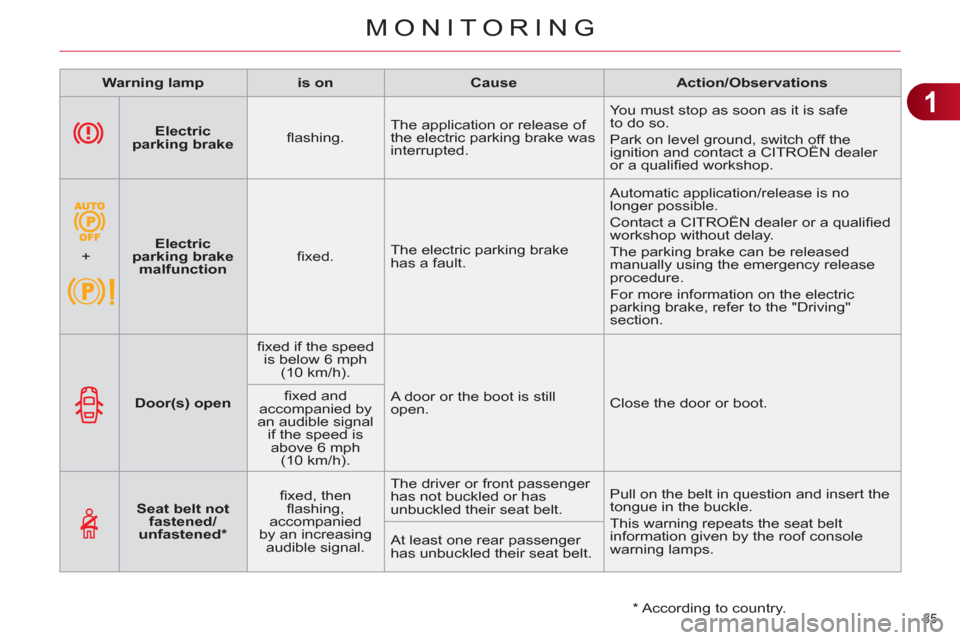
Electric
parking brake
fl ashing. The application or release of
the electric parking brake was
interrupted. You must stop as soon as it is safe
to do so.
Park on level ground, switch off the
ignition and contact a CITROËN dealer
or a qualifi ed workshop.
+
Electric
parking brake
malfunction
fi xed. The electric parking brake
has a fault. Automatic application/release is no
longer possible.
Contact a CITROËN dealer or a qualifi ed
workshop without delay.
The parking brake can be released
manually using the emergency release
procedure.
For more information on the electric
parking brake, refer to the "Driving"
section.
Warning lamp
is on
Cause
Action/Observations
Door(s) open
fi xed if the speed
is below 6 mph
(10 km/h).
A door or the boot is still
open. Close the door or boot.
fi xed and
accompanied by
an audible signal
if the speed is
above 6 mph
(10 km/h).
Seat belt not
fastened/
unfastened *
fi xed, then
fl ashing,
accompanied
by an increasing
audible signal. The driver or front passenger
has not buckled or has
unbuckled their seat belt. Pull on the belt in question and insert the
tongue in the buckle.
This warning repeats the seat belt
information given by the roof console
warning lamps. At least one rear passenger
has unbuckled their seat belt.
* According to country.
Page 39 of 332
1
MONITORING
37
Warning lamp
is on
Cause
Action/Observations
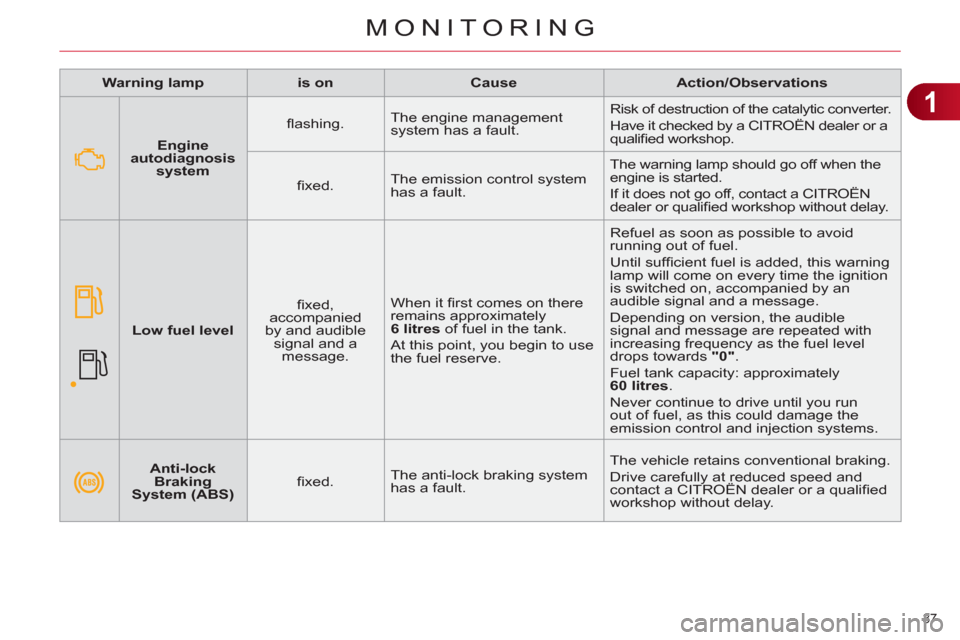
Anti-lock
Braking
System (ABS)
fi xed. The anti-lock braking system
has a fault. The vehicle retains conventional braking.
Drive carefully at reduced speed and
contact a CITROËN dealer or a qualifi ed
workshop without delay.
Engine
autodiagnosis
system
fl ashing. The engine management
system has a fault. Risk of destruction of the catalytic converter.
Have it checked by a CITROËN dealer or a
qualifi ed workshop.
fi xed. The emission control system
has a fault. The warning lamp should go off when the
engine is started.
If it does not go off, contact a CITROËN
dealer or qualifi ed workshop without delay.
Low fuel level
fi xed,
accompanied
by and audible
signal and a
message. When it fi rst comes on there
remains approximately
6 litres
of fuel in the tank.
At this point, you begin to use
the fuel reserve. Refuel as soon as possible to avoid
running out of fuel.
Until suffi cient fuel is added, this warning
lamp will come on every time the ignition
is switched on, accompanied by an
audible signal and a message.
Depending on version, the audible
signal and message are repeated with
increasing frequency as the fuel level
drops towards "0"
.
Fuel tank capacity: approximately
60 litres
.
Never continue to drive until you run
out of fuel, as this could damage the
emission control and injection systems.
Page 41 of 332
1
MONITORING
39
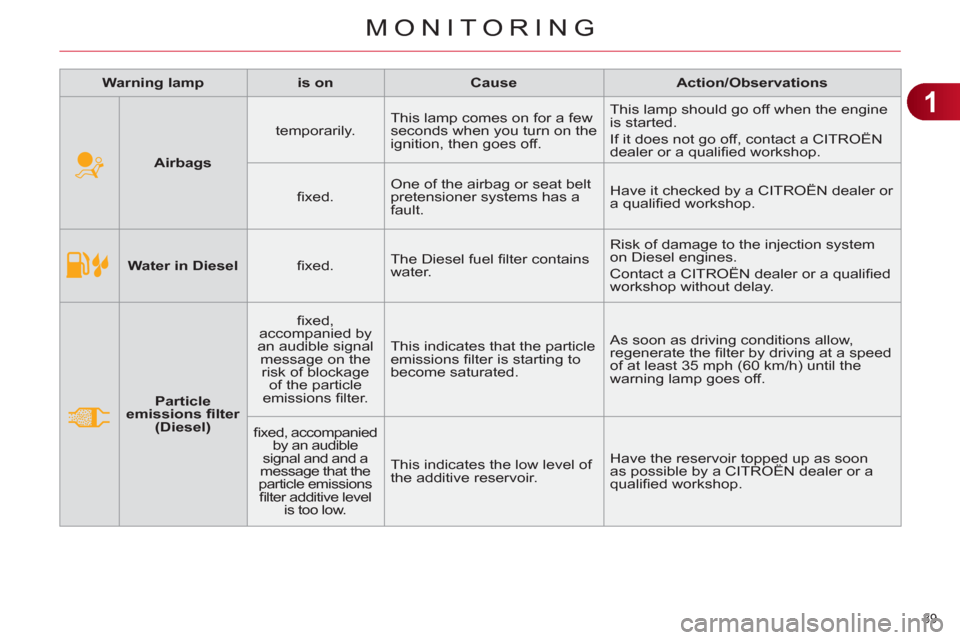
Water in Diesel
fi xed. The Diesel fuel fi lter contains
water. Risk of damage to the injection system
on Diesel engines.
Contact a CITROËN dealer or a qualifi ed
workshop without delay.
Particle
emissions fi lter
(Diesel)
fi xed,
accompanied by
an audible signal
message on the
risk of blockage
of the particle
emissions fi lter. This indicates that the particle
emissions fi lter is starting to
become saturated. As soon as driving conditions allow,
regenerate the fi lter by driving at a speed
of at least 35 mph (60 km/h) until the
warning lamp goes off.
fi xed, accompanied
by an audible
signal and and a
message that the
particle emissions
fi lter additive level
is too low. This indicates the low level of
the additive reservoir. Have the reservoir topped up as soon
as possible by a CITROËN dealer or a
qualifi ed workshop.
Warning lamp
is on
Cause
Action/Observations
Airbags
temporarily. This lamp comes on for a few
seconds when you turn on the
ignition, then goes off. This lamp should go off when the engine
is started.
If it does not go off, contact a CITROËN
dealer or a qualifi ed workshop.
fi xed. One of the airbag or seat belt
pretensioner systems has a
fault. Have it checked by a CITROËN dealer or
a qualifi ed workshop.
Page 43 of 332
1
MONITORING
41
Warning lamp
is on
Cause
Action/Observations
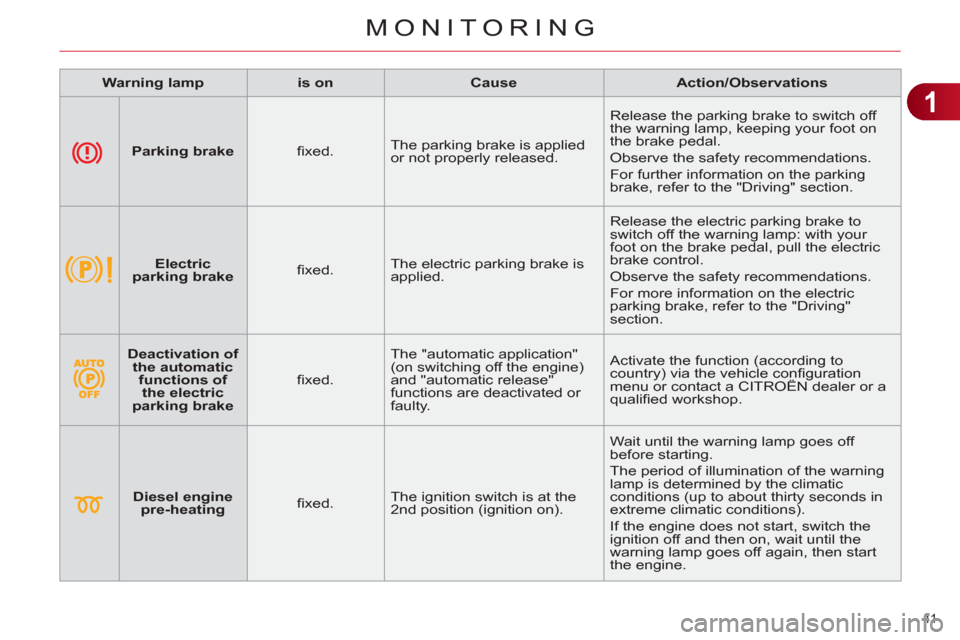
Parking brake
fi xed. The parking brake is applied
or not properly released. Release the parking brake to switch off
the warning lamp, keeping your foot on
the brake pedal.
Observe the safety recommendations.
For further information on the parking
brake, refer to the "Driving" section.
Electric
parking brake
fi xed. The electric parking brake is
applied. Release the electric parking brake to
switch off the warning lamp: with your
foot on the brake pedal, pull the electric
brake control.
Observe the safety recommendations.
For more information on the electric
parking brake, refer to the "Driving"
section.
Deactivation of
the automatic
functions of
the electric
parking brake
fi xed. The "automatic application"
(on switching off the engine)
and "automatic release"
functions are deactivated or
faulty. Activate the function (according to
country) via the vehicle confi guration
menu or contact a CITROËN dealer or a
qualifi ed workshop.
Diesel engine
pre-heating
fi xed. The ignition switch is at the
2nd position (ignition on). Wait until the warning lamp goes off
before starting.
The period of illumination of the warning
lamp is determined by the climatic
conditions (up to about thirty seconds in
extreme climatic conditions).
If the engine does not start, switch the
ignition off and then on, wait until the
warning lamp goes off again, then start
the engine.
Page 46 of 332
1
MONITORING
44
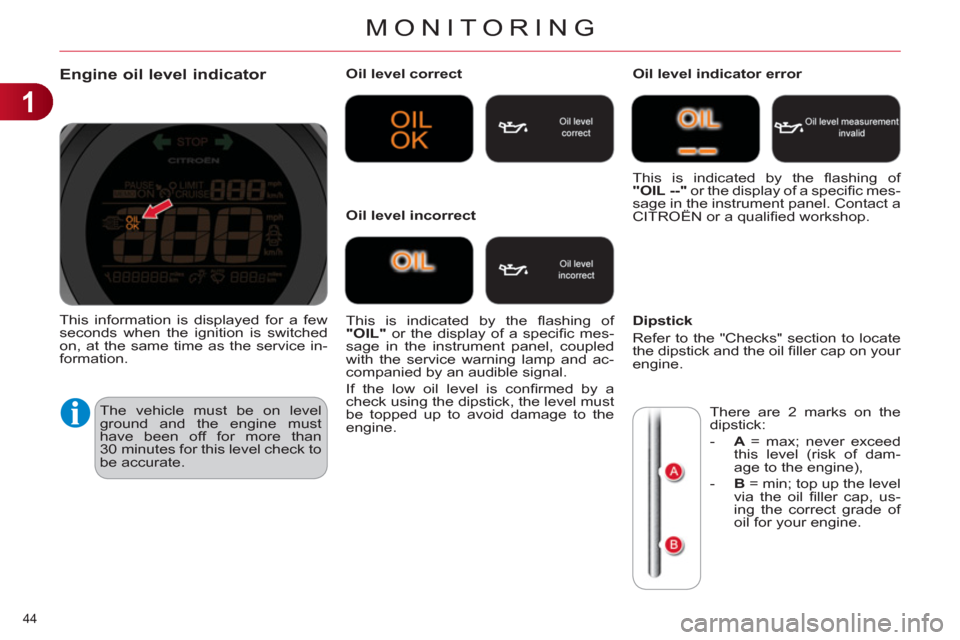
Engine oil level indicator
The vehicle must be on level
ground and the engine must
have been off for more than
30 minutes for this level check to
be accurate.
Oil level correct
This is indicated by the fl ashing of
"OIL"
or the display of a specifi c mes-
sage in the instrument panel, coupled
with the service warning lamp and ac-
companied by an audible signal.
If the low oil level is confi rmed by a
check using the dipstick, the level must
be topped up to avoid damage to the
engine.
Oil level indicator error
Dipstick
Refer to the "Checks" section to locate
the dipstick and the oil fi ller cap on your
engine.
Oil level incorrect This is indicated by the fl ashing of
"OIL --"
or the display of a specifi c mes-
sage in the instrument panel. Contact a
CITROËN or a qualifi ed workshop.
There are 2 marks on the
dipstick:
- A
= max; never exceed
this level (risk of dam-
age to the engine),
- B
= min; top up the level
via the oil fi ller cap, us-
ing the correct grade of
oil for your engine.
This information is displayed for a few
seconds when the ignition is switched
on, at the same time as the service in-
formation.
Page 47 of 332
1
MONITORING
45
Service indicator
This information is displayed for a few
seconds after switching on the igni-
tion. It informs the driver when the next
service is due, in accordance with the
manufacturer's servicing schedule.
The point at which the service is due is
calculated from the last service indica-
tor zero reset. It is determined by two
parameters:
- the distance travelled,
- the time elapsed since the last service.
More than 1 800 miles (3 000 km)
remain before the next service is due
When the ignition is switched on, no
service information appears in the in-
strument panel central screen.
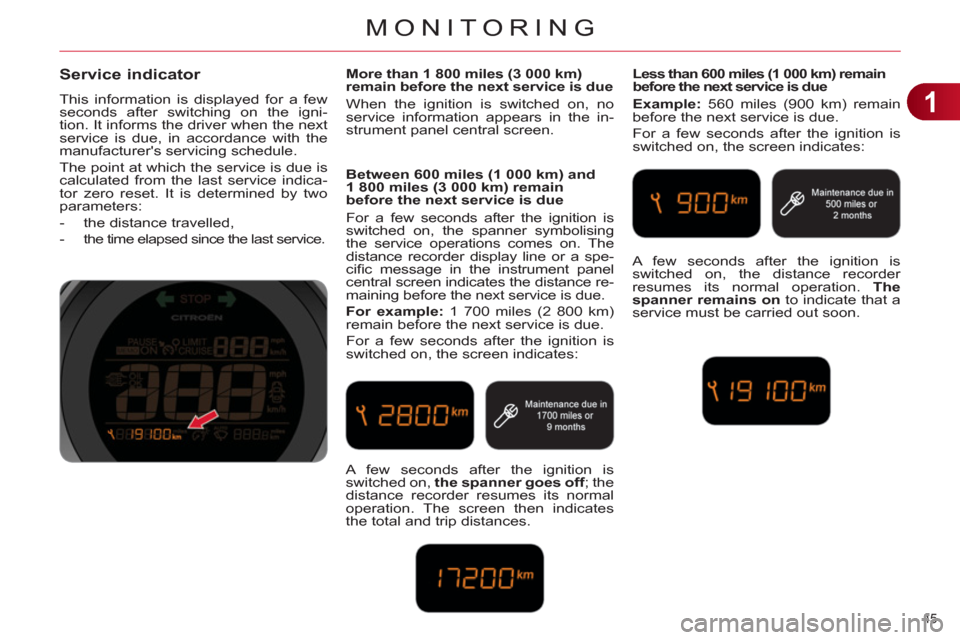
Between 600 miles (1 000 km) and
1 800 miles (3 000 km) remain
before the next service is due
For a few seconds after the ignition is
switched on, the spanner symbolising
the service operations comes on. The
distance recorder display line or a spe-
cifi c message in the instrument panel
central screen indicates the distance re-
maining before the next service is due.
For example:
1 700 miles (2 800 km)
remain before the next service is due.
For a few seconds after the ignition is
switched on, the screen indicates:
Less than 600 miles (1 000 km) remain
before the next service is due
Example:
560 miles (900 km) remain
before the next service is due.
For a few seconds after the ignition is
switched on, the screen indicates:
A few seconds after the ignition is
switched on, the spanner goes off
; the
distance recorder resumes its normal
operation. The screen then indicates
the total and trip distances. A few seconds after the ignition is
switched on, the distance recorder
resumes its normal operation. The
spanner remains on
to indicate that a
service must be carried out soon.
Page 48 of 332
1
MONITORING
46
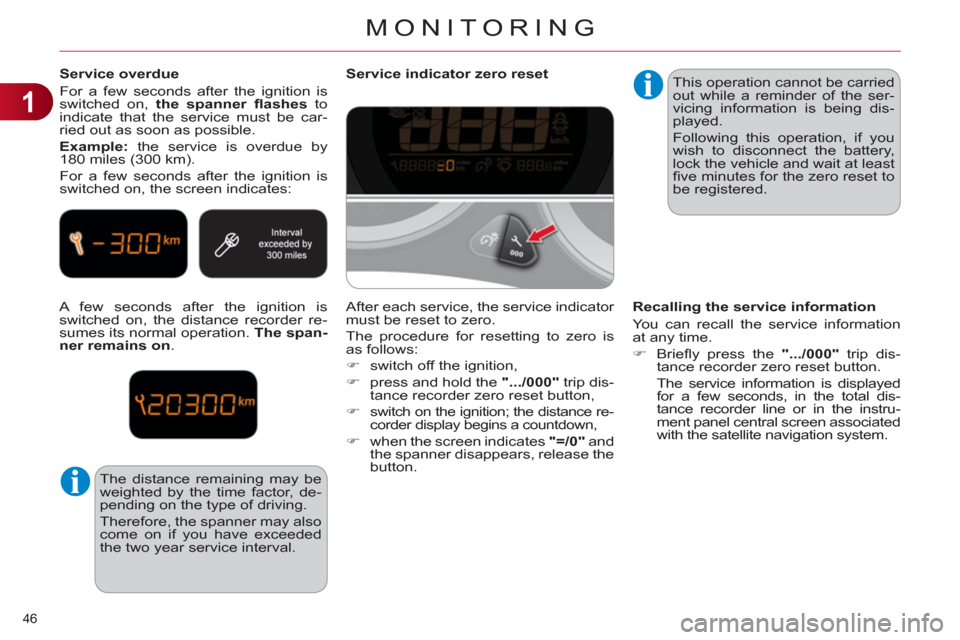
Service overdue
For a few seconds after the ignition is
switched on, the spanner fl ashes
to
indicate that the service must be car-
ried out as soon as possible.
Example:
the service is overdue by
180 miles (300 km).
For a few seconds after the ignition is
switched on, the screen indicates:
A few seconds after the ignition is
switched on, the distance recorder re-
sumes its normal operation. The span-
ner remains on
.
The distance remaining may be
weighted by the time factor, de-
pending on the type of driving.
Therefore, the spanner may also
come on if you have exceeded
the two year service interval.
Service indicator zero reset
This operation cannot be carried
out while a reminder of the ser-
vicing information is being dis-
played.
Following this operation, if you
wish to disconnect the battery,
lock the vehicle and wait at least
fi ve minutes for the zero reset to
be registered.
Recalling the service information
You can recall the service information
at any time.
)
Briefl y press the ".../000"
trip dis-
tance recorder zero reset button.
The service information is displayed
for a few seconds, in the total dis-
tance recorder line or in the instru-
ment panel central screen associated
with the satellite navigation system.
After each service, the service indicator
must be reset to zero.
The procedure for resetting to zero is
as follows:
)
switch off the ignition,
)
press and hold the ".../000"
trip dis-
tance recorder zero reset button,
)
switch on the ignition; the distance re-
corder display begins a countdown,
)
when the screen indicates "=/0"
and
the spanner disappears, release the
button.
Page 49 of 332
1
MONITORING
47
Manual test in the instrument panel
central screen associated with the
satellite navigation system
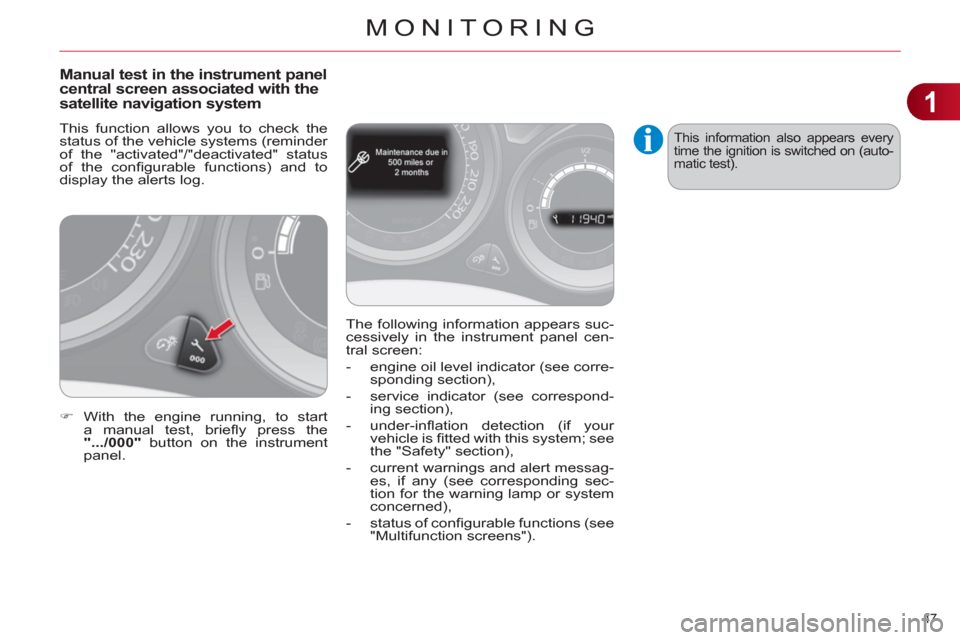
This function allows you to check the
status of the vehicle systems (reminder
of the "activated"/"deactivated" status
of the confi gurable functions) and to
display the alerts log.
)
With the engine running, to start
a manual test, briefl y press the
".../000"
button on the instrument
panel. The following information appears suc-
cessively in the instrument panel cen-
tral screen:
- engine oil level indicator (see corre-
sponding section),
- service indicator (see correspond-
ing section),
- under-infl ation detection (if your
vehicle is fi tted with this system; see
the "Safety" section),
- current warnings and alert messag-
es, if any (see corresponding sec-
tion for the warning lamp or system
concerned),
- status of confi gurable functions (see
"Multifunction screens").
This information also appears every
time the ignition is switched on (auto-
matic test).
Page 50 of 332
1
MONITORING
48
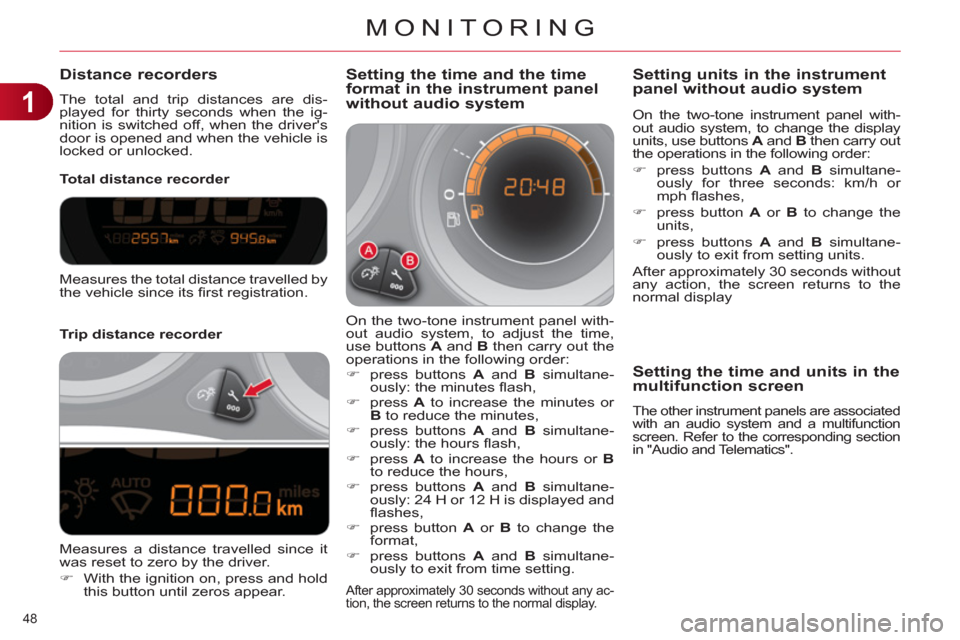
Distance recorders
The total and trip distances are dis-
played for thirty seconds when the ig-
nition is switched off, when the driver's
door is opened and when the vehicle is
locked or unlocked.
Trip distance recorder
Total distance recorder
Setting the time and the time
format in the instrument panel
without audio system
On the two-tone instrument panel with-
out audio system, to adjust the time,
use buttons A
and B
then carry out the
operations in the following order:
)
press buttons A
and B
simultane-
ously: the minutes fl ash,
)
press A
to increase the minutes or
B
to reduce the minutes,
)
press buttons A
and B
simultane-
ously: the hours fl ash,
)
press A
to increase the hours or B
to reduce the hours,
)
press buttons A
and B
simultane-
ously: 24 H or 12 H is displayed and
fl ashes,
)
press button A
or B
to change the
format,
)
press buttons A
and B
simultane-
ously to exit from time setting.
After approximately 30 seconds without any ac-
tion, the screen returns to the normal display.
Measures the total distance travelled by
the vehicle since its fi rst registration.
Measures a distance travelled since it
was reset to zero by the driver.
)
With the ignition on, press and hold
this button until zeros appear.
On the two-tone instrument panel with-
out audio system, to change the display
units, use buttons A
and B
then carry out
the operations in the following order:
)
press buttons A
and B
simultane-
ously for three seconds: km/h or
mph fl ashes,
)
press button A
or B
to change the
units,
)
press buttons A
and B
simultane-
ously to exit from setting units.
After approximately 30 seconds without
any action, the screen returns to the
normal display
Setting units in the instrument
panel without audio system
Setting the time and units in the
multifunction screen
The other instrument panels are associated
with an audio system and a multifunction
screen. Refer to the corresponding section
in "Audio and Telematics".
Page 52 of 332
1
MONITORING
50
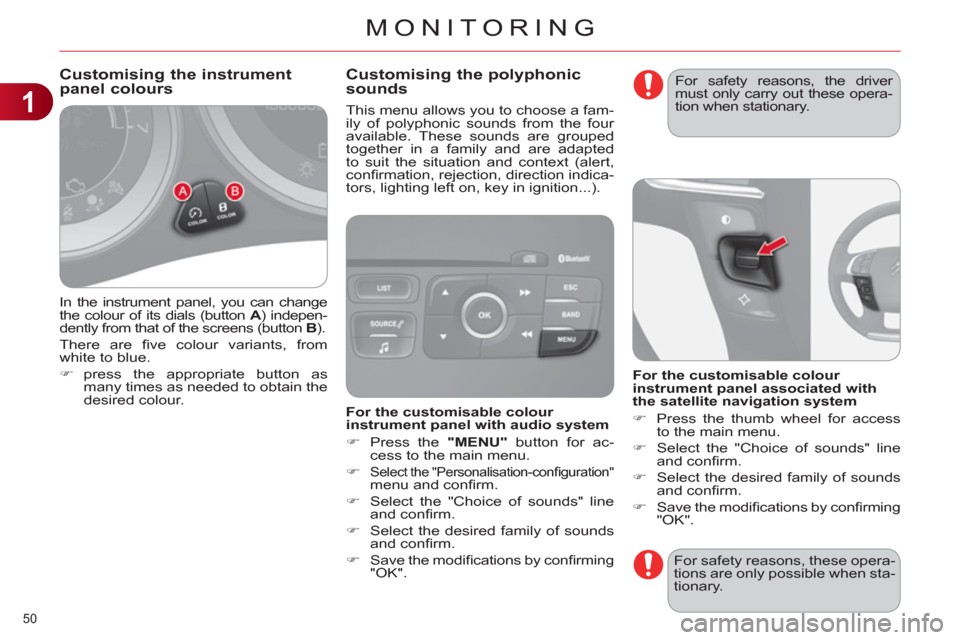
In the instrument panel, you can change
the colour of its dials (button A
) indepen-
dently from that of the screens (button B
).
There are fi ve colour variants, from
white to blue.
)
press the appropriate button as
many times as needed to obtain the
desired colour.
This menu allows you to choose a fam-
ily of polyphonic sounds from the four
available. These sounds are grouped
together in a family and are adapted
to suit the situation and context (alert,
confi rmation, rejection, direction indica-
tors, lighting left on, key in ignition...).
Customising the instrument
panel colours
Customising the polyphonic
sounds
For safety reasons, these opera-
tions are only possible when sta-
tionary.
For the customisable colour
instrument panel with audio system
)
Press the "MENU"
button for ac-
cess to the main menu.
)
Select the "Personalisation-confi guration" menu and confi rm.
)
Select the "Choice of sounds" line
and confi rm.
)
Select the desired family of sounds
and confi rm.
)
Save the modifi cations by confi rming
"OK".
For the customisable colour
instrument panel associated with
the satellite navigation system
)
Press the thumb wheel for access
to the main menu.
)
Select the "Choice of sounds" line
and confi rm.
)
Select the desired family of sounds
and confi rm.
)
Save the modifi cations by confi rming
"OK".
For safety reasons, the driver
must only carry out these opera-
tion when stationary.